 Digital Vikingz

Cannibalization is two or more of a site's own pages competing for one query with one intent, so Google alternates between them and neither one holds a stable position. The pattern shows as a shared query, a position that flips between the URLs by date, and clicks divided between them. Two pages ranking together on one query with stable positions is not cannibalization. Once found, each shared query is given one owner, and the other page is merged, re-anchored or removed.
Entity card
Field | Value |
Term | Keyword cannibalization |
Also called | Query cannibalization, content cannibalization, competing pages, shared queries |
Part of | Ranking signal dilution |
Depends on | Query and page pairs from the Search Console Performance report, read with the date dimension |
Produces | A list of shared queries with one owning URL per query and a fix per losing URL |
Measured by | Query count and clicks on the owning URL after the fix |
Not the same as | Two pages ranking together with stable positions, or sitelinks on a brand query |
What is keyword cannibalization?
Keyword cannibalization is two or more pages of one site competing for the same query and the same intent, so the site's signals for that query are split between the pages.
Google chooses one page per site to represent a query in most result sets. When two pages carry the same entity, the same attribute and the same predicate, the choice is unstable. One page ranks this week and the other ranks next week. Clicks, internal links and external links are divided, and neither page builds the historical data a single page builds.
The fault is a page decision that was never made. A keyword list produced two pages for two phrasings of one query. A topical map would have produced one page and one section.
Cannibalization is distinct from coverage. A guide and a service page can both appear for one query when the query carries two intents, learn and buy, and each page holds a stable position. The test is stability over time and sameness of intent, and both are read in Search Console.
How does keyword cannibalization show in Search Console?
Keyword cannibalization shows in Search Console as one query with two or more URLs earning impressions, positions that alternate between the URLs by date, and clicks divided between them.
The four signals of cannibalization in the Performance report are listed below:
Shared query. The Pages tab under one query lists two or more of the site's URLs with impressions in the same window.
Position flip. The date chart for the query shows the first URL's position rising while the second URL's position falls, then the reverse.
Click split. Neither URL holds most of the clicks for the query across the window.
Combined position worse than either alone. The query's average position across both URLs sits below the position either URL holds on the days that URL is shown.
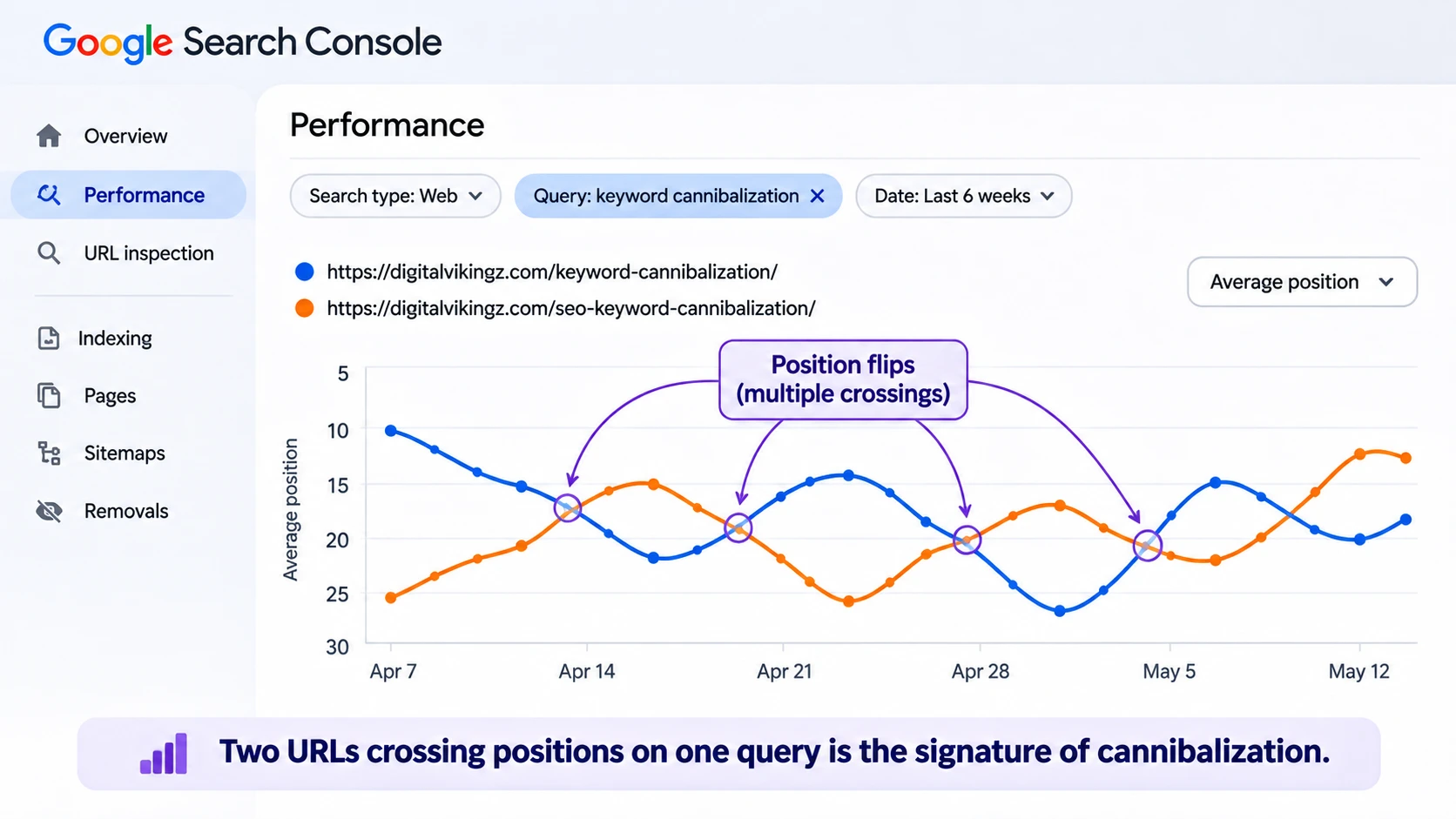
The image above shows the position flip for one query across six weeks. The two lines cross four times. A single owning page would hold one line.
A query with two URLs and no flip is read differently. One URL holds position 4 every day and the second holds position 40. The second URL is noise, not cannibalization, and is left alone.
How do you find keyword cannibalization in Search Console?
Keyword cannibalization is found by exporting query and page pairs for a three-month window, grouping by query, and flagging every query where a second URL holds a meaningful share of the impressions.
The steps to find keyword cannibalization in Search Console are listed below:
Open the Performance report. Set the search type to Web and the date range to the last three months. Shorter windows miss the flip.
Export query and page pairs. The interface export gives queries and pages as separate tables, so the pairs come from the Search Console API, the Looker Studio connector or the BigQuery bulk export.
Group the pairs by query. Count the distinct URLs with impressions per query.
Flag every query where two or more URLs each hold more than 10 percent of the query's impressions. We use 10 percent as the working threshold; a URL below that share is a stray impression, not a competitor.
Remove brand queries from the flagged list. A brand query shows many URLs by design through sitelinks.
Open the date chart for each flagged query with both URLs compared. Record a flip when the positions cross more than once in the window.
Read the intent of the two pages on each flipped query. Same entity, same attribute, same predicate means cannibalization. Different predicates, learn against buy, mean two intents and no fault.
Record the result in one table: query, URL one, URL two, impression share each, flip yes or no, same intent yes or no.
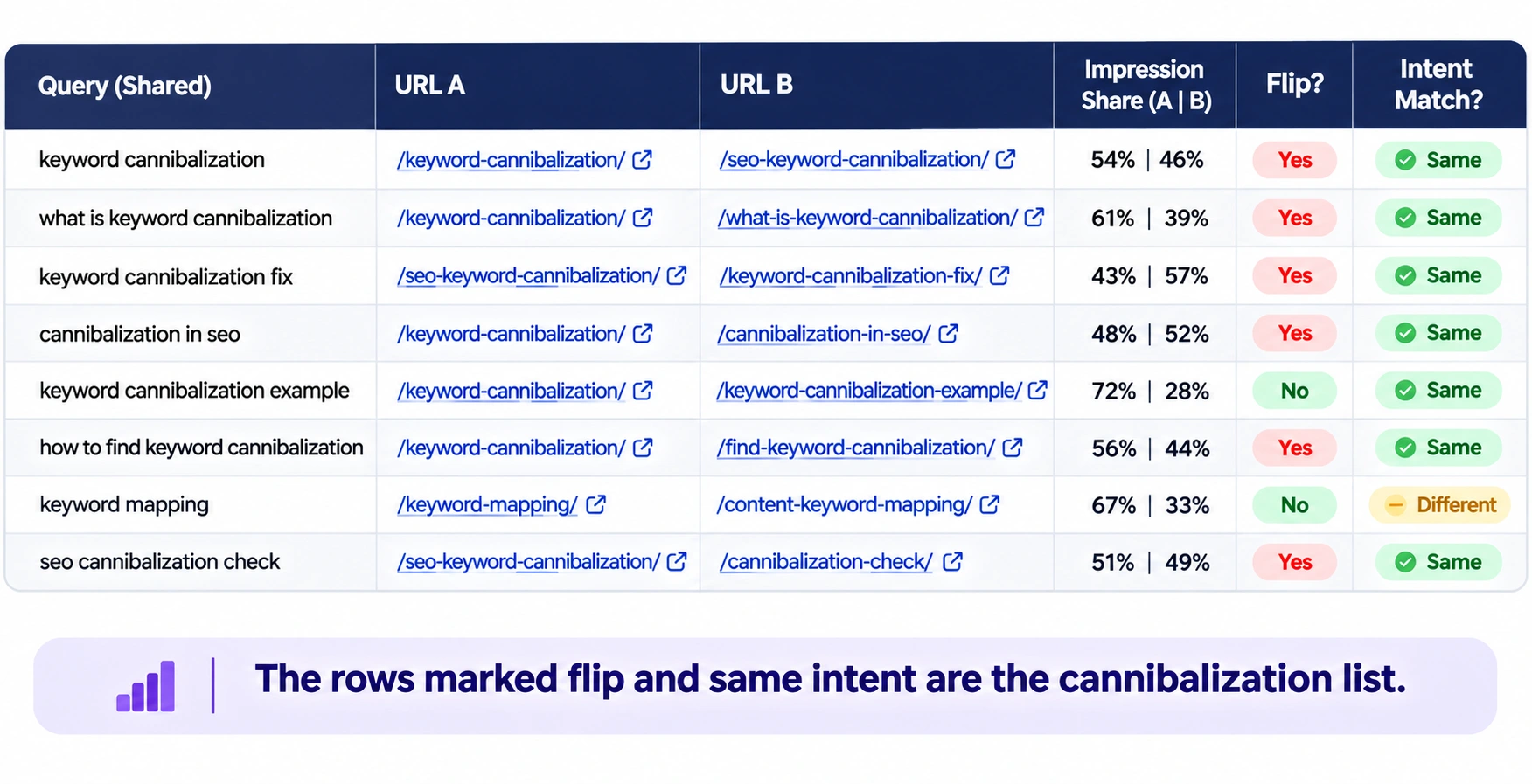
The image above shows the table step 8 produces. The rows marked flip and same intent are the cannibalization list. Every other row is left as found.
How do you find cannibalization for one query without an export?
Cannibalization for one query is found in the interface by filtering the Performance report to that query and opening the Pages tab.
The Pages tab lists every URL that earned impressions for the query, with clicks and position per URL. Two URLs with comparable impressions is the first signal. The compare dates control then shows whether the positions flipped between the two halves of the window.
The interface method works for a shortlist of queries the team already suspects. The export method works for the whole site.
How do you find cannibalization across a whole site?
Cannibalization across a whole site is found from the BigQuery bulk export or a Looker Studio report, where every query and page pair for every day is available in one table.
The bulk export stores the pairs from the day the export is switched on. A site that has not switched the export on starts with the API or the connector, which return up to 16 months of pairs within the row limits of each.
We switch the bulk export on at the start of every engagement, so the cannibalization read is one query on a table instead of a manual pass each quarter.
Is two pages ranking for one query always cannibalization?
Two pages ranking for one query is not always cannibalization, because a query with two intents is served by two pages with two stable positions.
The test is the flip and the intent match. Stable positions on different page types mean the query carries two intents and the site covers both. The pair is kept and both pages are linked to each other.
What causes keyword cannibalization?
Keyword cannibalization is caused by pages built from phrasings instead of from page decisions, and by templates that produce near-identical pages at scale.
The common causes of keyword cannibalization are listed below:
Synonym pages. One page per phrasing of one query: audit, review and assessment as three URLs for one service.
Blog post against service page. A post that explains the service in full, with the same entity and predicate as the service page.
Location pages with the same body. City pages that differ only in the city name, so Google reads one page in many copies.
Old and new versions. A rewritten page published at a new URL with the old one left live.
Tag and category archives. Archive pages that carry the same title words as the article they list.
Parameter and paginated URLs. Filter and page-two URLs indexed next to the canonical page.
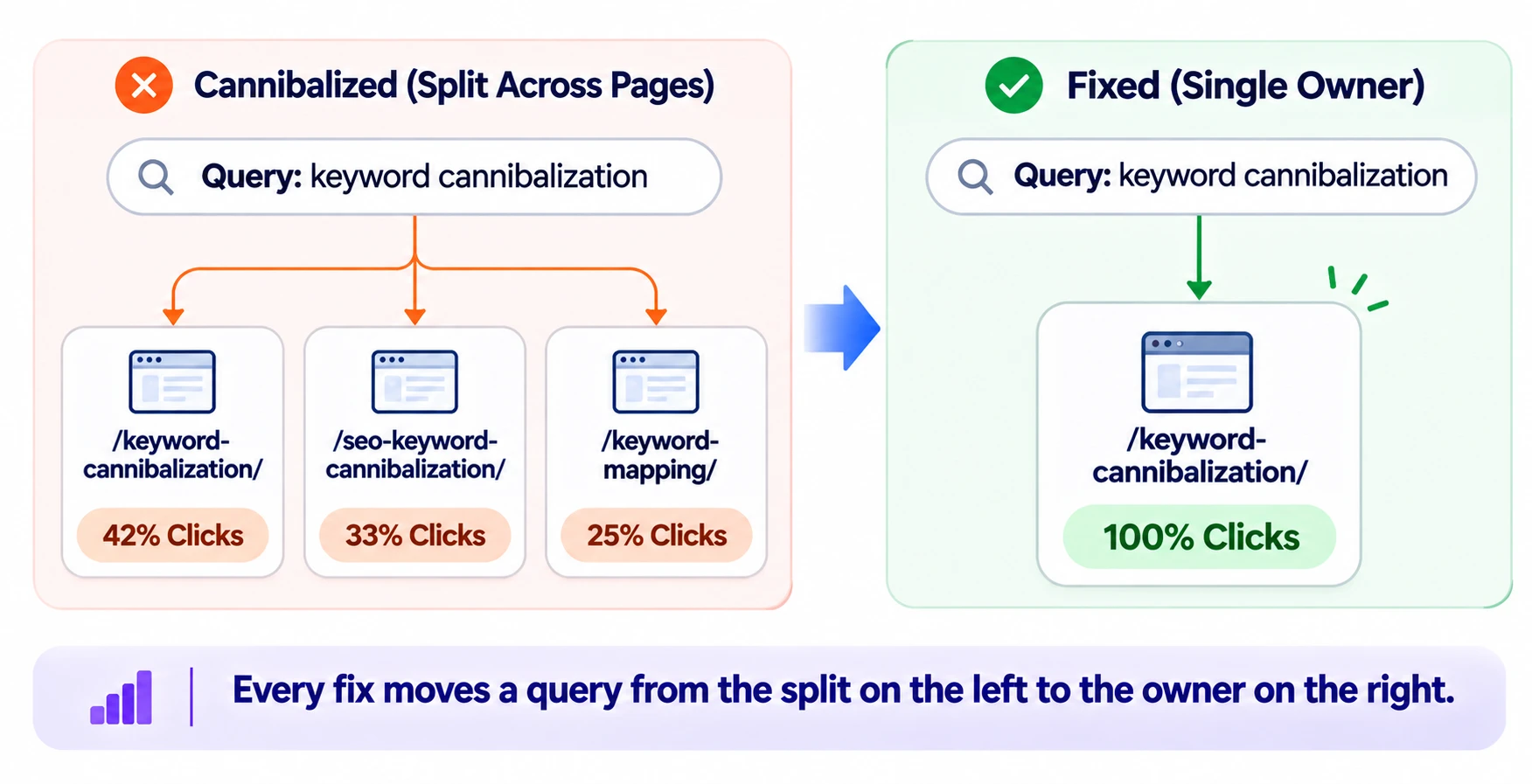
The image above shows the split on the left and the owned query on the right. The right side is the state every fix below produces.
The first two causes are content decisions and are fixed in the topical map. The last two are technical and are fixed in the crawl and index configuration. Location pages sit between the two.
How do you fix keyword cannibalization once found?
Keyword cannibalization is fixed by giving each shared query one owning URL and then merging, re-anchoring, canonicalising or removing the other URL according to the cause.
The fixes for keyword cannibalization by cause are listed below:
Cause | Fix | What happens to the losing URL |
Synonym pages | Consolidate | Merged into the owner and redirected with a 301 |
Blog post against service page | Re-anchor | The post is rewritten to a distinct question and links to the service page |
Location pages with the same body | Differentiate or consolidate | Pages with distinct local attributes are rewritten; the rest redirect to a regional page |
Old and new versions | Consolidate | The old URL redirects to the new one and internal links are updated |
Tag and category archives | De-index | Archives set to noindex or removed from the template |
Parameter and paginated URLs | Canonicalise | Canonical tag to the owning URL, and the parameter links removed from the template |
How do you choose the surviving URL?
The surviving URL is the one with the most historical data on the query: the longer ranking record, the higher query count, the more internal and external links, and the template that matches the query's intent.
Historical data outranks freshness. A page that held the query for two years keeps the query over a page published last month, even when the new page reads better. The new page's text moves into the old URL where needed.
The intent match decides ties. A buy query survives on the service page. A learn query survives on the guide.
How do you merge two pages without losing rankings?
Two pages are merged by moving the losing page's distinct content into the owner, redirecting the losing URL with a 301, and updating every internal link to point at the owner.
The steps to merge two cannibalising pages are listed below:
List the queries and sections the losing page holds that the owner lacks.
Add those sections to the owner under their own headings, in the owner's vocabulary.
Redirect the losing URL to the owner with a 301.
Update every internal link that pointed at the losing URL, including navigation, related posts and the sitemap.
Log the merge with the date and the query list, and read the owner's query count at the next configuration pass.
Google consolidates signals through the redirect over time. The query count on the owner is the reading that confirms the merge worked.
How do you prevent keyword cannibalization?
Keyword cannibalization is prevented by making one page decision per query network before writing, keeping one canonical anchor per URL, and running the shared-query check at every configuration pass.
The page decision is the test that decides whether a query variation earns a page, a section or a sentence. Query Deserves a Page sets out the five checks. A site that runs the test has no synonym pages to merge later.
One anchor phrase per URL tells Google which page owns which entity. Two pages linked with the same anchor from across the site are two candidates for the same query.
The shared-query check is step six of the content configuration pass. A site that runs the pass finds a new split within one quarter of the split appearing.
The Semantic Content Audit runs the whole-site read described above as one of its six checks, and returns the shared-query table with an owner decided per row.
How is keyword cannibalization different from ranking signal dilution?
Keyword cannibalization is one form of ranking signal dilution, the form where the split happens between URLs on one query; dilution also happens inside one page when the page covers too many entities.
Dilution inside a page shows as a page that ranks weakly for many queries and strongly for none. Cannibalization shows as two pages trading one query. The first is fixed by narrowing the page. The second is fixed by choosing an owner. What is a source term vector covers the page-level form and the vocabulary that prevents both.
Find your shared queries on a call
On a 30-minute call we open your Search Console, pull the shared queries for the last three months, and show you which ones flip. You leave with the owner decision for the top five, with or without an engagement.
Book a strategy call · Request the audit
Questions about keyword cannibalization
Does Google penalise keyword cannibalization?
No. Google states that there is no penalty for duplicate or similar content on one site. The cost is the split: neither page builds a stable position, so the site ranks lower than one owning page would.
How many shared queries are normal on a healthy site?
A healthy site shows shared queries on brand terms and on queries with two intents, and few elsewhere. The count that matters is the number of flipped, same-intent queries, and on a mapped site that number is close to zero.
Can a page cannibalise itself across two languages?
Yes, when hreflang is missing or wrong, so Google shows the wrong language version in a market. The fix is hreflang and a canonical per language, not a merge.
Should the losing page be deleted instead of redirected?
No, when the losing page has any historical data. A 301 passes the signals to the owner. A deletion returns a 404 or 410 and the signals are lost. Deletion is reserved for pages with no impressions and no links.
Does noindex fix cannibalization between two content pages?
No. Noindex removes the page from the index and passes nothing to the owner. Two content pages are merged with a redirect. Noindex fits archive and parameter pages that hold no content of their own.
How long after a merge does the owner's position settle?
The redirect is processed within weeks. The position settles over the following months and is read with confidence at the next core update.
Can internal links alone fix cannibalization?
Rarely. Pointing every internal link at the owner strengthens the owner, and the losing page still carries the same entity and predicate. The losing page is re-anchored or merged as well.
Does cannibalization happen between a page and its own FAQ?
Not between a page and its own sections. A FAQ answer that repeats a heading on another page of the site is a cross-page repeat, and that is cannibalization at the sentence level, fixed by removing the repeat.
Is a blog post that outranks the service page a problem?
Yes, when the query is a buy query. The post is re-anchored to the learn question and links to the service page with the service's canonical anchor, so the buy query moves to the page that converts.
Which tool finds cannibalization best?
Search Console holds the only first-party record of which URLs Google showed for which query. Third-party rank trackers sample the query set. The method above uses the first-party record.
How often should the shared-query check run?
The check runs at every configuration pass: after each core update and every 90 days otherwise. A site publishing weekly can also run the single-query check on each new page one month after publication.