 Digital Vikingz
What Are Macro Context and Micro Context?
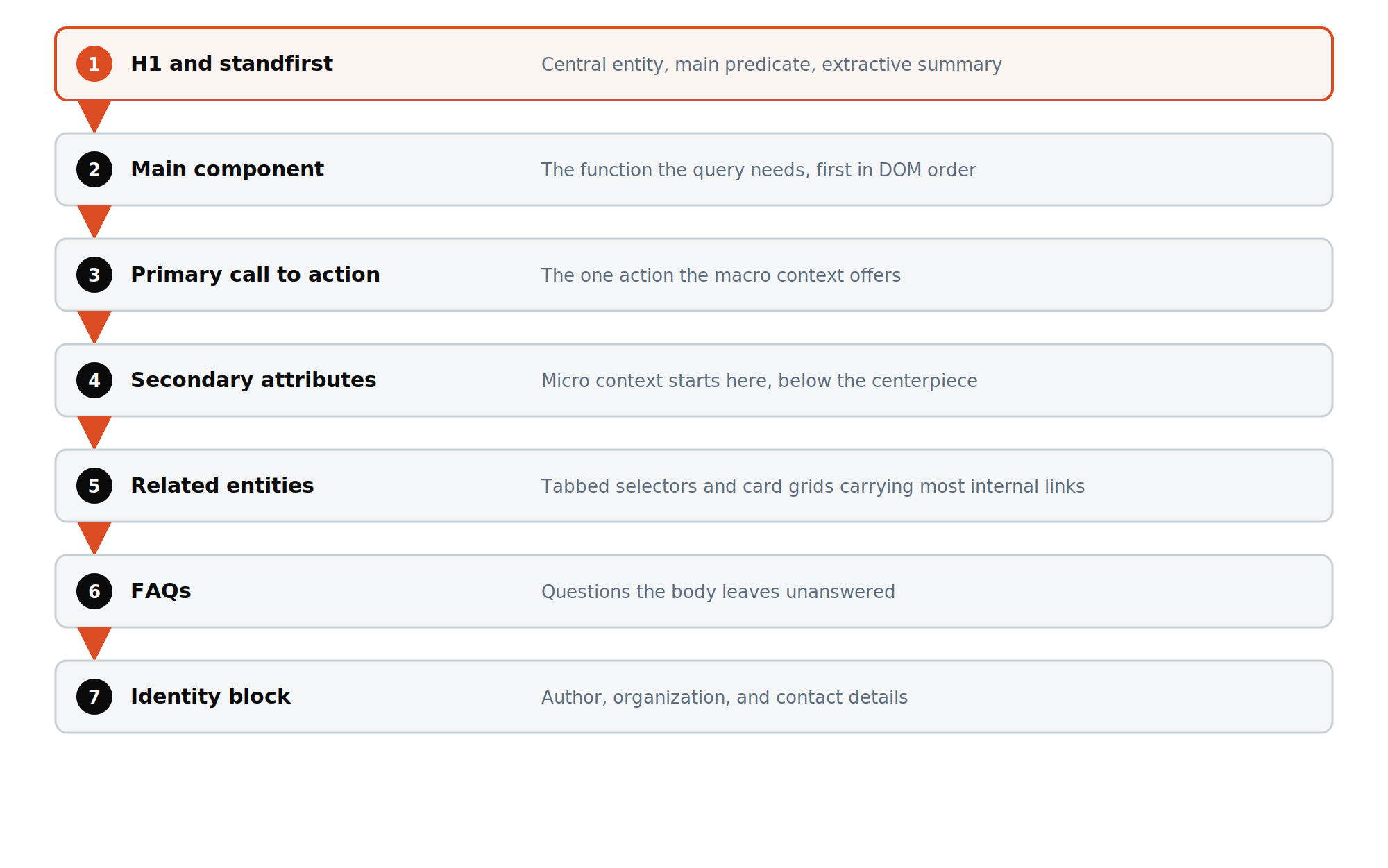
Macro context is the main content of a page, placed above the fold, and micro context is the supplementary content below it. Macro context carries the main predicate and the core answer or function. Micro context carries secondary attributes, related entities, and most internal links.

What are macro context and micro context on a web page?
Macro context is the page's main content and micro context is its supplementary content, the same split Google's rater guidelines draw.
Google's Search Quality Rater Guidelines separate Main Content from Supplementary Content. Main Content directly helps the page achieve its purpose. Supplementary Content supports the visit without being the purpose. Macro and micro context are the build terms for the same two regions.
Centerpiece annotation decides one block. The macro and micro split decides every block on the page. The centerpiece sits inside the macro context as its first block after the H1. Every other block is assigned to one side of the line.
The split is a meaning split, not a styling choice. One predicate runs through the macro context. Micro context introduces the neighbors: other attributes, related entities, and next steps. Mixing the two blurs what the page is about. A page that argues two predicates above the fold reads as two pages sharing one URL.
What belongs in the macro context above the fold?
The macro context holds four blocks: the H1, the standfirst, the centerpiece component, and the primary call to action.
Most of a page's semantic weight sits in the macro context. The query's answer and the main predicate live here in full. A reader who stops at the fold already has the answer.
Nothing interrupts those four blocks. Ads, newsletter signups, and popups stay out of the space between the H1 and the centerpiece. A secondary attribute that needs more than one paragraph moves below the fold. Micro topics that leak upward thin the main predicate. Chat widgets and promo strips stay outside the main element.
Take a project management SaaS feature page for task dependencies. The macro context names the feature, states what it does, shows the dependency view, and offers the trial. Integrations, pricing tiers, and customer stories wait below. Each one is useful, and none of them is the answer to the query. The trial button sits beside the view, not three screens down.
What belongs in the micro context below the fold?
The micro context holds secondary attributes, related entities, FAQs, experience blocks, and most of the page's internal links.
Micro context carries the rest of the page's meaning. The page widens here from the query to its neighbors. The drill-downs and next steps a generative model produces for the query find their blocks in this region. A next step with no block on the page and no page in the cluster sends the session elsewhere.
Tabbed selectors compress several sub-entities into one component. Each tab holds a short definitional snippet that mirrors the opening of the child page, plus a link to it. The tab content sits in the DOM on load, not behind a click. The same tab taxonomy repeats in the FAQ block, which keeps the context stable.
Conversion bands belong here too. A band follows each trust escalation: after the definition, after the service list, and before the FAQs. Objection handling sits inside the band as text. The primary call to action stays in the macro context, and the bands repeat it where a reader is ready. Each band carries one action, never a menu of options.
Where do internal links sit between macro and micro context?
Internal links sit in the micro context, from the middle to the bottom of the page, and never inside the centerpiece.
Link density is low above the fold and high below it. A wall of links near the top reads as navigation or an aggregator, not as main content. The centerpiece carries no internal links at all. Links earn their place after the answer, where a reader looks for the next step.
Each target page receives one canonical anchor phrase, used on every link across the site. Variation happens only inside the dual-entity form of that phrase. A link to the same target appears once per page, not in every section. Card grids that link to child pages use each child's H1 as the anchor. Anchors never read click here or read more.
A lapsed Google patent on query augmentation treats a click on another link on the landing page as a long click. The same patent stores anchor text repeated across many pages as a query the target answers. The patent has expired, so this is design logic, not a guarantee. Links placed where a satisfied reader looks next earn the click, and consistent anchors name the target.
How do Google's segmentation patents draw the line between blocks?
Google's segmentation patents split a page into blocks by white space and spatial boundaries, then read the blocks in order.
A granted Google patent on document segmentation based on visual gaps divides a document by its white space into a hierarchy of blocks. Large gaps separate major regions. Smaller gaps separate the blocks inside them. The line between macro and micro context is one of those gaps, placed on purpose. Designers set those gaps through spacing, borders, and background changes.
Google's patent on layout-aware multimodal pretraining defines a block as a part of the document with a clear spatial boundary to its neighbors. The encoder sorts blocks by their upper-left corner, vertical position first. The order becomes part of the stored document representation. Blocks without a clear boundary read as one block.
The Content Warehouse API leak shows Google labeling a main flow of text and separate flows for boxes and asides. Side boxes and callouts are therefore built as separate blocks, not as inline interruptions. One uninterrupted main flow keeps the macro context readable as one unit.
- Koray Tuğberk Gübür, Search Engine Land: Visual semantics, the missing piece of topical authority
- Google: Search Quality Rater Guidelines (PDF)
- US 7,676,745 B2: Document segmentation based on visual gaps (Google)
- US 12,393,768: Layout-aware multimodal pretraining for multimodal document understanding (Google)
Patents and filings describe systems Google has invented. None is a confirmed ranking factor.
What should you read after macro and micro context?
 What is centerpiece annotationCenterpiece annotation is Google's label for the primary content block of a page, extracted from its HTML structure.
 Visual semanticsVisual semantics is the meaning a search engine reads from a page's layout, blocks, and components alongside its text.
 What is a topical mapA topical map is the plan of every entity, attribute, and query a site covers.
 Query Deserves a PageQuery Deserves a Page is the test that decides if a query variation gets its own page, a section, or a sentence.
 Website DevelopmentFive platforms, chosen by what the architecture needs, not by preference.
 Semantic SEO ArchitectureSeven documents with a fixed structure. Every engagement produces all seven.
 Talk to usMessage the team on WhatsApp
Questions about macro and micro context
Is the fold a fixed line in pixels?
Can reviews and ratings sit in the macro context?
Does a sidebar beside the main content count as macro context?
Are the site header, menu, and footer part of the micro context?
Where does the buying guide go on an ecommerce category page?
When does a micro-context block become its own page?
Where do links to external sources sit?
Does the macro and micro split apply to blog posts?
Does the split change between mobile and desktop?
How does the split work on a homepage?
How is the macro and micro split checked on an existing page?

See it applied to your site
The Semantic Content Audit uses every term in the knowledge hub. Fixed scope, written deliverable.