 Digital Vikingz
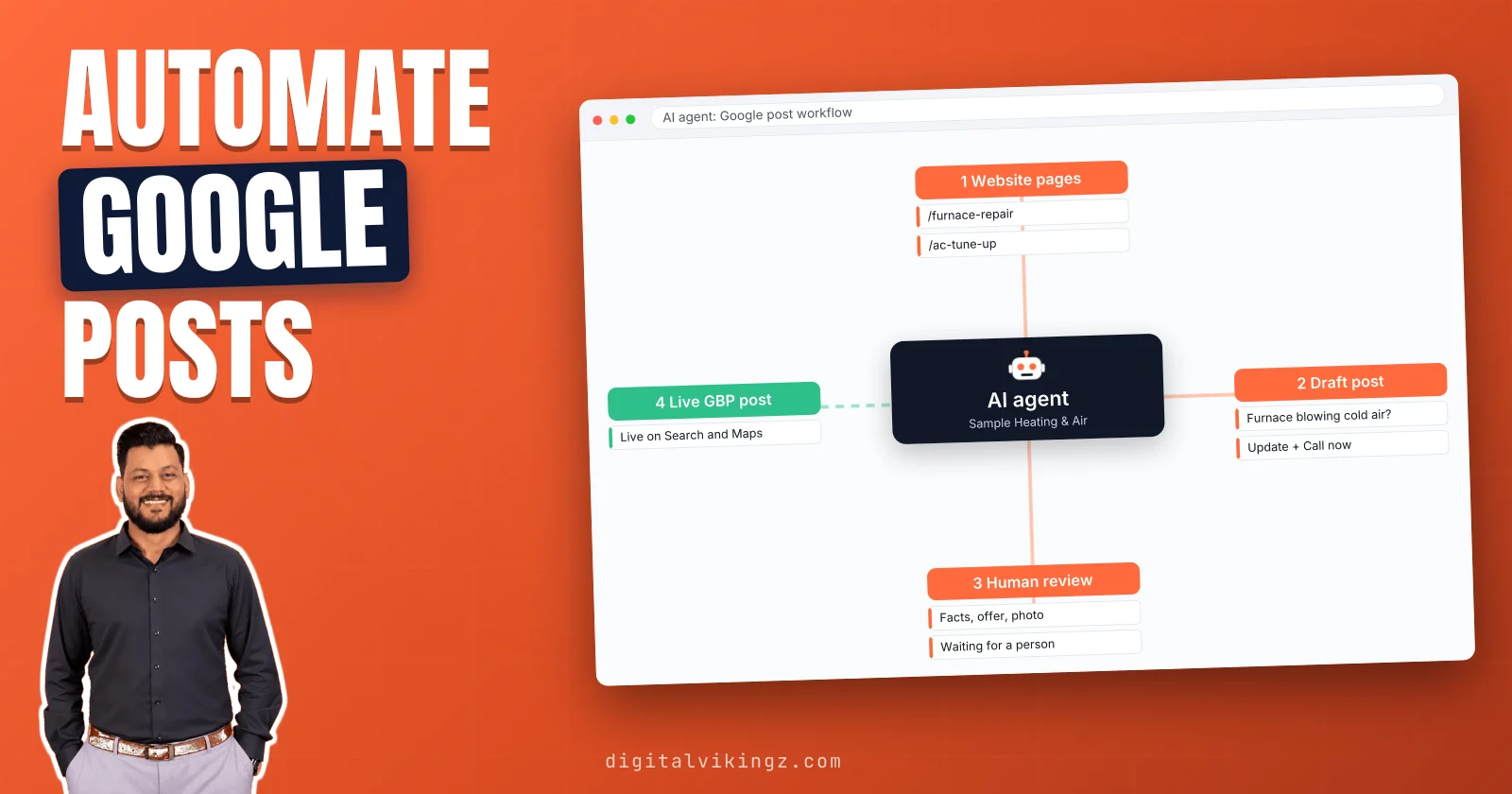
Google Business Profile posts are scheduled in Google's own post form, through a third-party Google Business Profile post scheduler or by an AI agent. A person still checks each automated post for facts, policy and the photo before the post goes live.
Google's Schedule this post switch, added in November 2025 according to Search Engine Land, publishes a post at a chosen date and time. The Repeats menu republishes a post weekly or monthly, and one post can go to several profiles at once. A schedule follows the cadence set out in how often Google Business Profile posts should go out.
A third-party scheduler adds bulk uploads, approval steps and one calendar, and publishes through Google's Business Profile API. An AI agent also drafts the text, picks the post type and image, and fills the calendar. Posting sits among the approval tasks in the split of which SEO tasks AI agents can do.
Google's posting tips warn against auto-generated content, so offers, phone numbers, regulated products and photos need a person's check. Safe rewrites for four trades appear in the Google Business Profile post examples by trade.
A scheduled post shows on Search and Maps only after Google marks the post Live. Google's scheduler fits an owner who writes, a tool fits teams approving in bulk, and an agent fits owners without writing time.
Teams can install the agent workflow through an SEO Automation service with human review. A Daily Google Posts preview shows the first post the agent writes for a business.
How do you schedule Google Business Profile posts?
Google Business Profile posts are scheduled in the Add post form by turning on Schedule this post and choosing a date and time.
Search Engine Land reported in November 2025 that Google added the scheduling option, so older guides still send owners to a separate tool.
The steps to schedule a post in Google's own post form are listed below:
- Open the Business Profile, select Posts, then select Add post.
- Choose the post type: Update, Offer or Event.
- Add the post text, a photo and a button with its link.
- Turn on Schedule this post and pick the publish date and time.
- Select Post, then choose extra profiles to share the post, or select Skip.
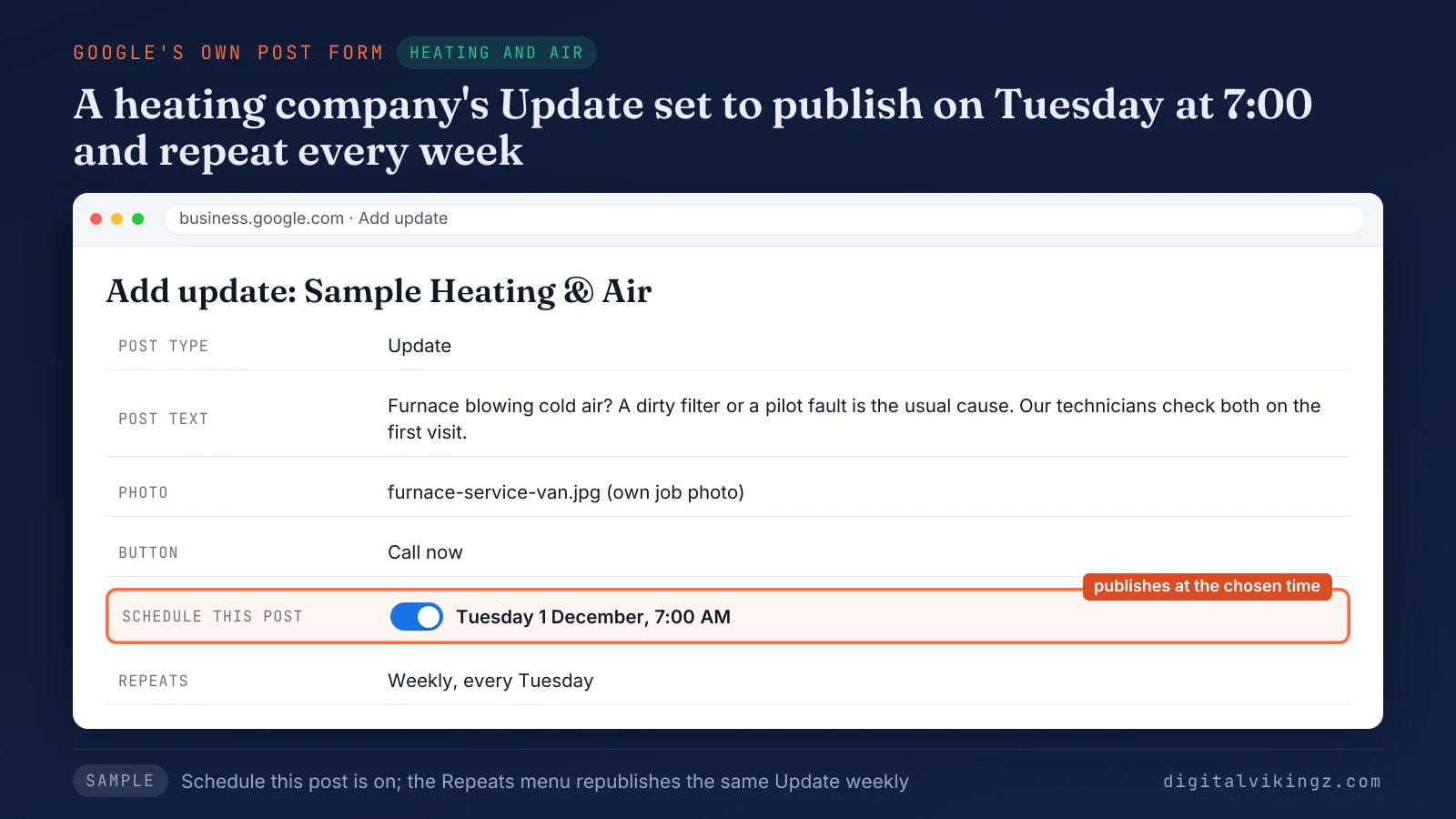
The sample Update for Sample Heating & Air, about a furnace blowing cold air, publishes on Tuesday 1 December at 7:00 and repeats weekly.
The Repeats menu turns one scheduled post into a recurring post.
Can a Business Profile post repeat on a schedule?
A Business Profile post can repeat on a schedule, because the Repeats menu republishes the post weekly, monthly or on a custom schedule.
Recurring posts suit facts that return on a cycle: a weekly service reminder, a monthly offer or a seasonal hours notice. Holiday hours from Thanksgiving to New Year fit one batch of posts scheduled before Thanksgiving week. A recurring post should still be read before each cycle, because a price or a date can change between repeats.
Buffer and most practitioner guides agree on how often posts should go out: at least once a week. The guide on how often Google Business Profile posts should go out explains the weekly band. One scheduled post can also reach several profiles in a single step.
How do you schedule one post for several locations?
One post reaches several locations when the manager selects the extra Business Profiles before the final Post button.
The shared post carries the same text on every profile, so each location's town, hours and offer need checking. Agencies on the Local Search Forum describe schedulers that fill per-location details, such as the town name, from a template field.
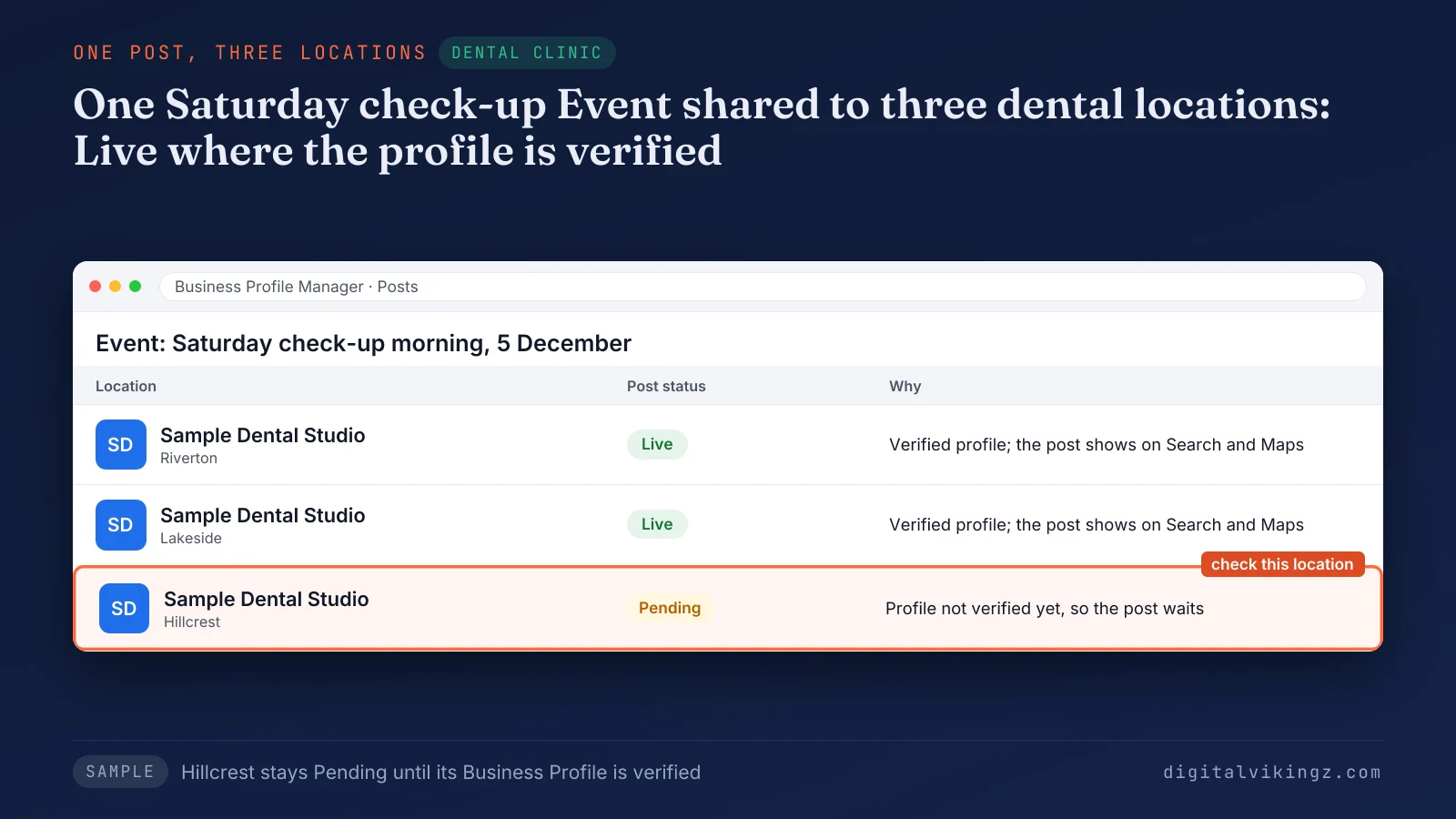
The sample Event post for Sample Dental Studio is Live in Riverton and Lakeside and Pending in Hillcrest, where the profile is unverified. An unverified profile also stays off Google Maps, as set out in why a business is not showing on Google Maps. A third-party scheduler adds more to multi-location posting than the shared post option.
What does a Google Business Profile post scheduler add?
A Google Business Profile post scheduler is a third-party tool that publishes posts at a set time and adds features Google's post form lacks.
Schedulers fall into three groups: social media schedulers, posting tools built for Business Profiles, and local SEO suites. Buffer and Publer are social media schedulers, MapPush and PostPeer post only to Business Profiles, and BrightLocal is a local SEO suite. The five names come from the top Bing US results for post schedulers on 18 November 2026.
The features a scheduler adds to Google's own post form are listed below:
- Bulk upload: many posts load at once from a spreadsheet file, instead of one form per post.
- Approval step: a draft post waits for a manager or a client to approve the wording before the publish time.
- Cross-network calendar: Business Profile posts sit beside Facebook, Instagram and LinkedIn posts in one calendar.
- Several Google accounts: one dashboard connects profiles held under different Google accounts, which agencies need for client posts.
- Post log: the tool records each post's publish time, status and link in one place.
- AI captions: some tools draft the post text with a language model for a person to edit.
Every scheduler, whatever the group, sends the post through the same Google interface.
How does a scheduler publish to a Business Profile?
A scheduler publishes to a Business Profile through Google's Business Profile API, which creates posts on Search and Maps without the post form.
Google's developer documentation names the posting interface localPosts and requires OAuth 2.0 credentials for each application. The scheduler connects through a Google account with owner or manager access to the profile.
The interface supports Update, Event and Offer posts, and Google's documentation states that Product posts are not available through the API. Google reviews a post sent through the API in the same way as a post from the form. An AI agent uses the same interface and adds the writing.
What does an AI agent automate in Google Business Profile posting?
An AI agent automates Business Profile posting by drafting each post, choosing the post type and image, scheduling the post and checking the published status.
A scheduler publishes posts a person has written, while an AI agent also writes the posts.
The posting tasks an AI agent takes over are listed below:
- Topic: the agent picks one customer question or service for each post from the business's own pages.
- Post text: the agent drafts the update, offer or event wording from facts on the business's website.
- Post type and button: the agent matches an Update, Offer or Event to the topic and adds the button link.
- Image: the agent selects a job photo or makes a picture sized for the post.
- Calendar: the agent fills the posting calendar at the chosen cadence and sets each scheduled publish time.
- Status check: the agent reads the post status after publishing and flags any post that is not Live.
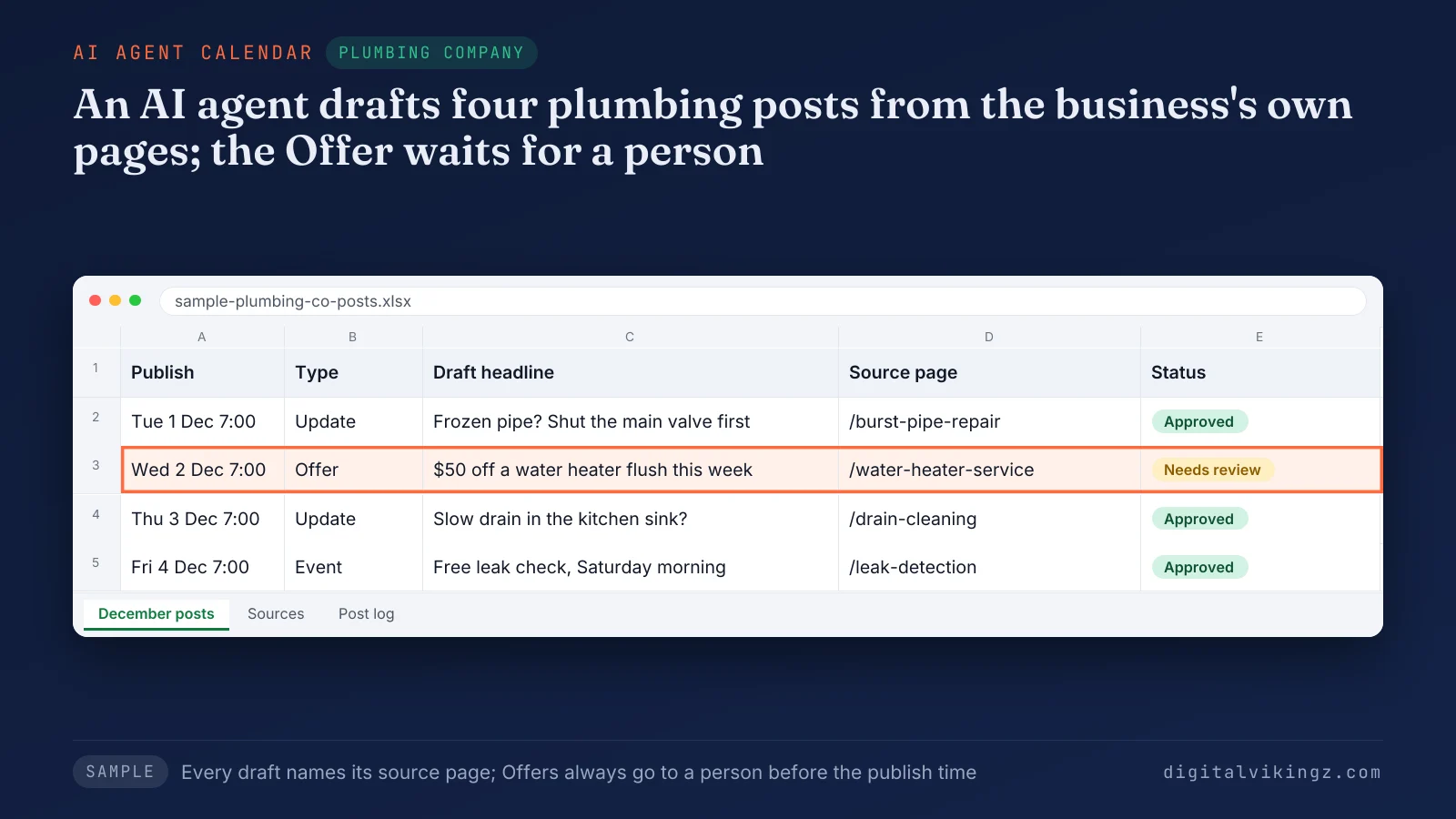
The sample calendar for Sample Plumbing Co. holds four agent-drafted posts from 1 to 4 December, and the 2 December Offer waits for review.
Business Profile posts sit among the approval tasks in the split of which SEO tasks AI agents can do. The guide to which SEO tasks AI agents can do separates drafting from the decisions a person keeps. Agents reach the profile through a connected tool, including agents inside chat assistants.
Can ChatGPT or Claude post to a Google Business Profile?
ChatGPT or Claude can draft a Business Profile post, and publishing the post needs a tool connected to Google's Business Profile API.
Some schedulers offer an MCP server, a connector that lets Claude or ChatGPT send a drafted post to the scheduler. The chat assistant then writes the post, and the scheduler publishes the post at the chosen time. A post typed into a chat window carries no check of prices, dates or policy, so a person should read the draft first.
A person's check before publishing covers seven points.
What should a person check before an automated post goes live?
A person should check facts, offer terms, contact details, regulated products, the photo, the link and the wording before an automated post goes live.
Google's posting tips tell owners to avoid "text that adds no value, and auto-generated or distracting content".
The seven checks a person makes before an automated post goes live are listed below:
- Facts: the hours, prices, towns and services in the post match the business's website today.
- Offer terms: an Offer post carries the right dates, coupon code and limits.
- Contact details: the post text leaves out phone numbers, because the Call now button carries the verified number.
- Regulated products: a dental or med spa post promotes the visit, never a prescription product or medical device.
- Photo: the post uses the business's own photo of a job or the premises, not a stock image.
- Link: the post button opens the service page the post is about.
- Wording: the post reads as written for the current week and repeats no earlier post word for word.
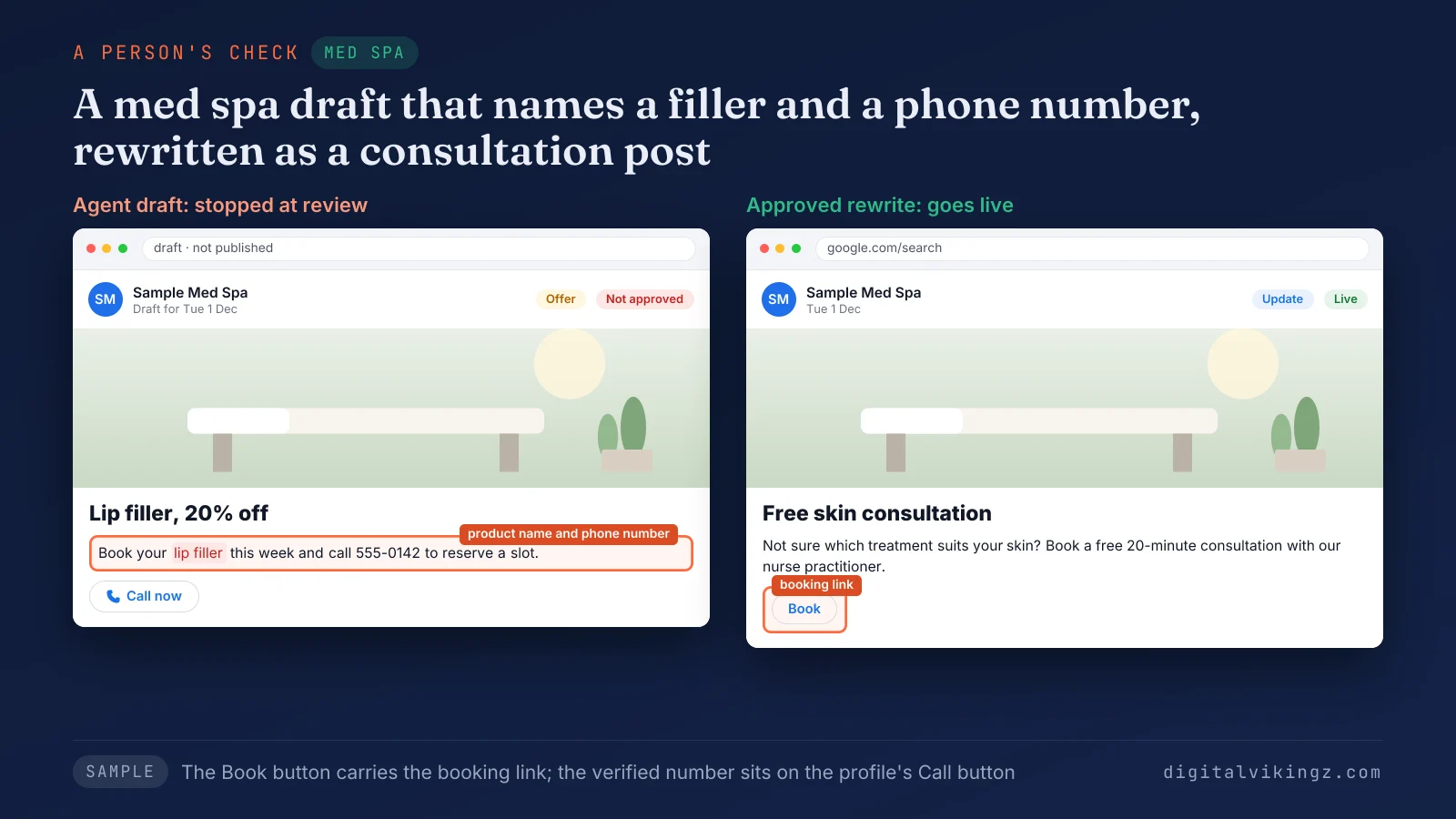
The sample med spa draft names a filler and a phone number, and the approved Update offers a skin consultation with a Book button.
Safe rewrites for four trades exist as Google Business Profile post examples by trade. Each of the Google Business Profile post examples by trade pairs a risky draft line with a rewrite. AI-written text raises one more question about Google's review.
Does Google reject AI-written Business Profile posts?
Google's posting rules name no rule that rejects AI-written posts, but Google's own tips tell owners to avoid auto-generated content.
An owner on the Local Search Forum reported in October 2023 that a ChatGPT-written offer post was removed seconds after publishing. The owner later traced the removal to a stock image and a phone number in the post, not to the AI wording. AI-written posts should therefore pass the same seven checks as any other post.
Each check ends when Google shows the post status.
How do you confirm a scheduled post went live?
A scheduled post is live when the Business Profile shows the status Live, meaning the post appears on Search and Maps.
Pending means the post is still uploading or processing, or the profile is unverified. Not approved means the post broke a content policy, and a question mark beside the status names the rule. The status should be read in the Business Profile itself, not only in the scheduler.
Google archives posts older than six months unless a date range is set, so an old post missing from view is not a rejection. A Live post shows customers the business is active, while the factors Google names for ranking sit in how to rank higher on Google Maps. The status check completes all three posting routes, which differ in who writes.
Should a business use Google's scheduler, a tool or an AI agent?
Google's scheduler fits an owner who writes, a tool fits teams approving posts in bulk, and an AI agent fits owners without time to write.
The table below compares the three posting routes by writer, cost, profiles, approval step and the person's check.
| Route | Who writes the post | Cost | Several profiles | Approval step | Person's check |
|---|---|---|---|---|---|
| Google's scheduler | The owner | Free | Yes, one shared post | None | The owner, while writing |
| Third-party scheduler | The owner or a team | Monthly fee per channel or location | Yes, plus bulk upload | Built into most tools | The approver inside the tool |
| AI agent with a person's check | The agent drafts | Monthly fee per profile or project | Yes | Before publishing, or on request | A person at the agency or business |
Google reviews every post after publishing, so the person's check stays in every route.
A single-location owner who already writes weekly posts gains little from a paid tool. An agency posting for many client profiles gains most from bulk upload and approvals. An owner without writing time gains most from an agent, provided a person reads each post before publishing.
Owners who automated posting report what goes wrong without the check.
What do owners report after automating Google Business Profile posts?
Owners and agencies report rejected batches, flagged images, invented details and status mix-ups after automating Business Profile posts without a person's check.
We read the ten top Bing results in the US for the scheduler query on 18 November 2026. All ten were tool vendors, none cited Google's posts content policy, and none named a person's check as a posting step.
The problems reported on the Local Search Forum between 2023 and 2025 are listed below:
- Rejected batch: an agency for beauty clients saw about one scheduled post in ten go through after switching scheduler in September 2023.
- Flagged image: the same agency discussed post photos flagged as too revealing by Google's image check.
- Status mix-up: posts marked rejected in the scheduler still showed in the owner's own view of the profile in 2023.
- Duplicate workarounds: agencies in a 2024 thread rotated template wording and edited photo dates to avoid duplicate posts.
- Missing posts: published posts went missing across many profiles in April 2025, a fault on Google's side.
- Invented details: an owner reported in late 2025 that an AI tool made up details about the business in a post.
Each reported problem matches one of the seven checks: the photo, the wording, the facts or the status read. Forum reports are single accounts, not measured rates, and none shows AI wording alone causing a rejection.
We run our AI agent on our own Business Profile before any client profile, so each check is tested on our posts first.
Teams that want the agent workflow inside their own accounts need an SEO Automation service with human review. Our SEO Automation service with human review installs agent workflows for GBP posts, and a person on the team approves every post.
Agencies face one more problem: client profiles sit under separate Google accounts.
How do agencies schedule posts across client Google accounts?
Agencies schedule posts across client Google accounts by asking each client to add the agency as a manager on the Business Profile.
Agencies on the Local Search Forum in 2024 named connecting several Google accounts at once as a scheduler requirement. Manager access keeps the client as the owner and lets the agency post without the client's password. Agencies in a March 2025 thread compared vendors by price per location, a cost that grows with every client.
Each client then gets a separate approver and calendar inside the agency's scheduler. A client should approve the first month of posts before the agency schedules the rest. The agency's post log should record the client, date, text and link of every post for the monthly report.
Clients with their own writer can keep Google's free scheduler and send drafts to the agency for the check. Multi-location brands follow the same pattern, with one regional manager approving posts for every location. Owners ask a few shorter questions about scheduling as well.
Questions about scheduling Business Profile posts
Is Google's post scheduler free?
Google's post scheduler is free, because scheduling sits inside the free Business Profile post form. Third-party schedulers and agent services charge a monthly fee, usually per channel or per location.
Can you schedule Business Profile posts from a phone?
Business Profile posts are scheduled most reliably on a computer, because guides from SocialRails and MapPush describe Google's scheduler as a desktop feature. The scheduler opens at business.google.com in a desktop browser.
Does Buffer schedule Google Business Profile posts?
Buffer schedules Update, Offer and Event posts to a Business Profile from the Buffer dashboard, according to Buffer's product page. Each scheduled post in Buffer can carry a button and a destination link.
Can a scheduler post videos to a Business Profile?
Buffer and PostEverywhere both state that their schedulers do not post videos, although Google's own post form accepts video. A video post can still be scheduled in Google's own post form.
Is a Google My Business post scheduler the same tool?
A Google My Business post scheduler is the same tool under the old product name, which Google changed to Google Business Profile in November 2021. Many scheduler pages still carry the old name in their titles.
How do you start automating Google Business Profile posts?
Automating Google Business Profile posts starts with choosing a route, connecting the profile with manager access and approving the first week of posts.
Each post in the first week should pass the checks for facts, offer terms, contact details, the photo and the link. The status check after each publish time closes the first week.
Our AI agent at Digital Vikingz writes and publishes posts for local service businesses, and a person steps in when a fact needs checking. A Daily Google Posts preview shows the post our AI agent writes for a business today. The free Daily Google Posts preview takes about 20 seconds and needs no Google password.
