 Digital Vikingz
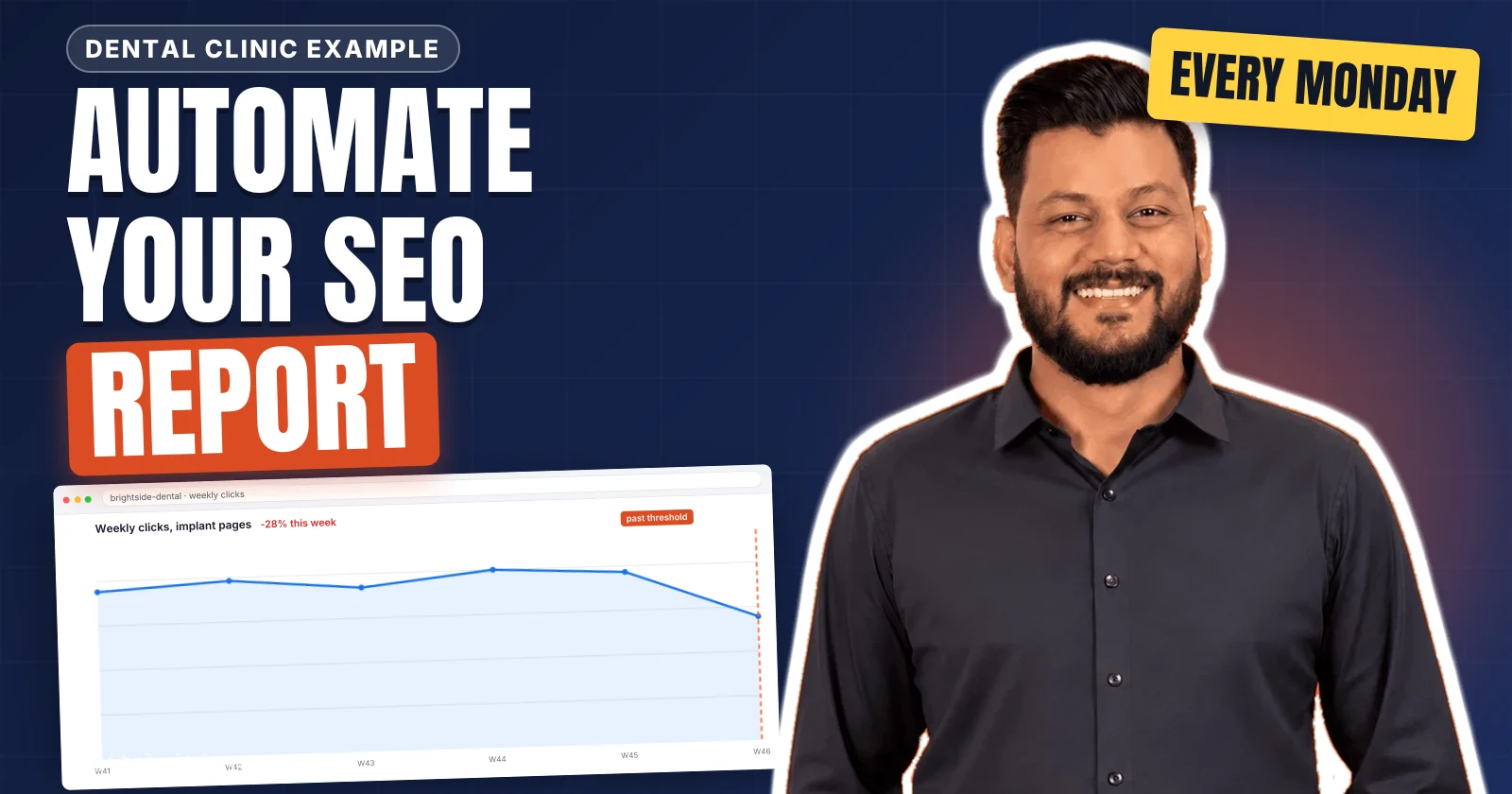
A weekly SEO and AEO report is a Monday report of the changes above a threshold, the likely cause and the week's fixes. AEO stands for answer engine optimization, and the AEO section tracks how AI assistants name and cite the business. Five steps automate the report: pull the data, compare each metric with a threshold, explain the cause, assign the fix and deliver.
Search rows come from Google Search Console and analytics, and AEO rows record mention rate and citation rate for each AI assistant. Each cause is read from the data, such as a held position with impressions and no clicks under an AI Overview. Digital Vikingz runs the report every Monday inside the SEO Reporting and Attribution service. Teams that run SEO themselves get the same workflow through SEO automation with AI agents and human review.
How do you automate a weekly SEO and AEO report?
A weekly SEO and AEO report is automated in five steps, from a scheduled data pull to a reviewed report delivered every Monday.
The five steps that automate a weekly SEO and AEO report are listed below:
- Pull Google Search Console, analytics and AI answer data on a schedule into one sheet.
- Compare each metric with the previous week and flag every change past its threshold.
- Explain the cause of every flagged change from the query, page and results page data.
- Assign a fix, an owner and a due date to each cause.
- Review the report and deliver the summary and the sheet every Monday.
We read eight pages in the top ten results for "automated SEO reporting" on 13 November 2026. None of the eight pages explains how a report states the cause of a change. Most guides to SEO report automation automate the data pull and the delivery, and stop before the cause and the fix. The automation pulls, compares and drafts each automated SEO report, and a person approves each cause and each fix. Every weekly SEO and AEO report starts from its data sources.
1. Pull Google Search Console, analytics and AI answer data on a schedule
Pulling the data on a schedule fills one sheet each week with Google Search Console rows, analytics sessions and AI answer checks.
The data pull is the scheduled export that copies every source of the weekly SEO and AEO report into one sheet. The four data sources of a weekly SEO and AEO report are listed below:
- Google Search Console: Google Search Console supplies clicks, impressions, click-through rate and average position for each query and page through its API.
- Analytics property: The analytics property supplies organic sessions, conversions and referral sessions from chatgpt.com, perplexity.ai and gemini.google.com.
- AI answer checks: AI answer checks record what ChatGPT, Gemini, Perplexity and Claude answer to a fixed prompt set, asked through each provider's API.
- Work log: The work log lists the pages published, edited, redirected or removed during the week, with the date of each change.
The newest Google Search Console data is preliminary and can still change, so the weekly pull reads finalized days only. Clicks and impressions from AI Overviews and AI Mode sit inside the Web search type of Google Search Console, with no separate filter. We ask the AI assistants through their APIs, because a logged-in chat window carries the account's memory and past chats. A scheduler such as cron, n8n or Make runs the pull before Monday and writes every source into the same sheet. Conversions reach the report only when each lead carries its landing page, the method used to attribute SEO to pipeline and revenue. Lead tagging with hidden form fields is set out in the guide on how to attribute SEO to pipeline and revenue. Each source then feeds a comparison with the previous week.
2. Compare each metric with the previous week against a threshold
Comparing each metric with the previous week flags only the changes that pass the metric's threshold.
Our weekly comparison reads the last seven finalized days against the seven days before them. The week-over-week change is the difference between the two windows, expressed as a percentage of the earlier week. A page group is a set of pages that share one template or one topic, such as demo and pricing pages. A threshold is set for each metric and each page group from the business value of those pages, never as one sitewide figure. Each metric carries its own threshold, because clicks, impressions and average position move at different speeds. A page group whose clicks move inside the group's usual weekly range produces no line in the weekly SEO report. Brand and non-brand queries sit on separate rows, split by a query filter that excludes the brand name in Google Search Console.
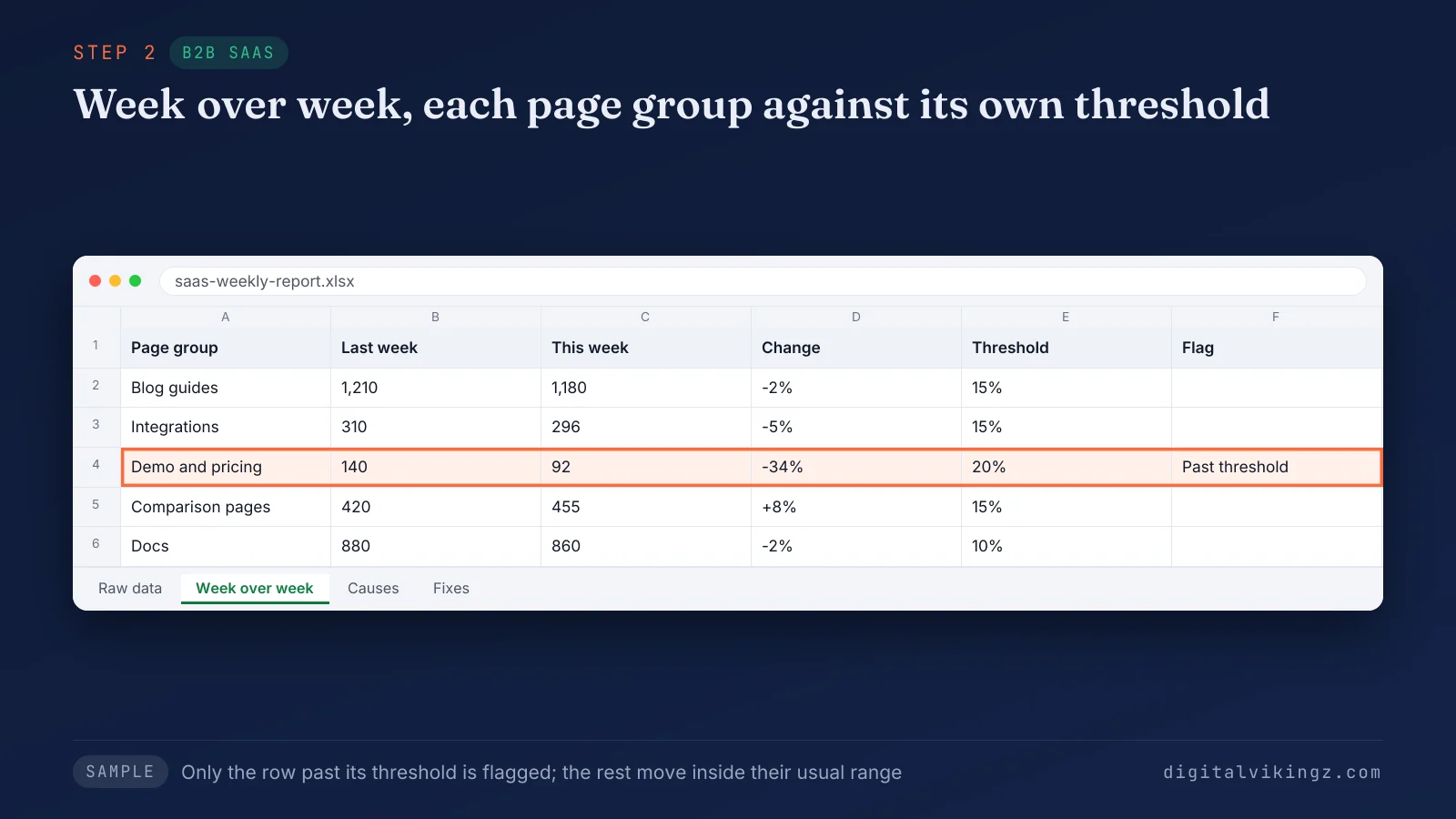
The sample sheet shows demo and pricing clicks falling from 140 to 92, a 34 percent drop against a 20 percent threshold. Only the demo and pricing row is flagged. A flagged change still needs its cause.
3. Explain the cause of every change past the threshold
Explaining the cause assigns each flagged change to one of six causes, each read from the query, page and results page data.
The six causes of a change in a weekly SEO report are listed below:
- Search demand: Search demand shows as impressions moving across every position, as with seasonal searches or brand searches.
- Position change: A position change shows as average position moving on the queries that carry the page's clicks.
- AI Overview or other results feature: An AI Overview or other feature shows as a held position with a falling click-through rate on question queries.
- Site change: A site change shows in the work log as a page published, edited, redirected or removed in the same week.
- Indexing or technical fault: An indexing or technical fault shows as pages leaving the index or returning errors in Google Search Console.
- Tracking change: A tracking change shows as analytics moving while Google Search Console stays flat for the same pages.
Each flagged line in the report states one cause in one sentence, with the evidence beside the cause.
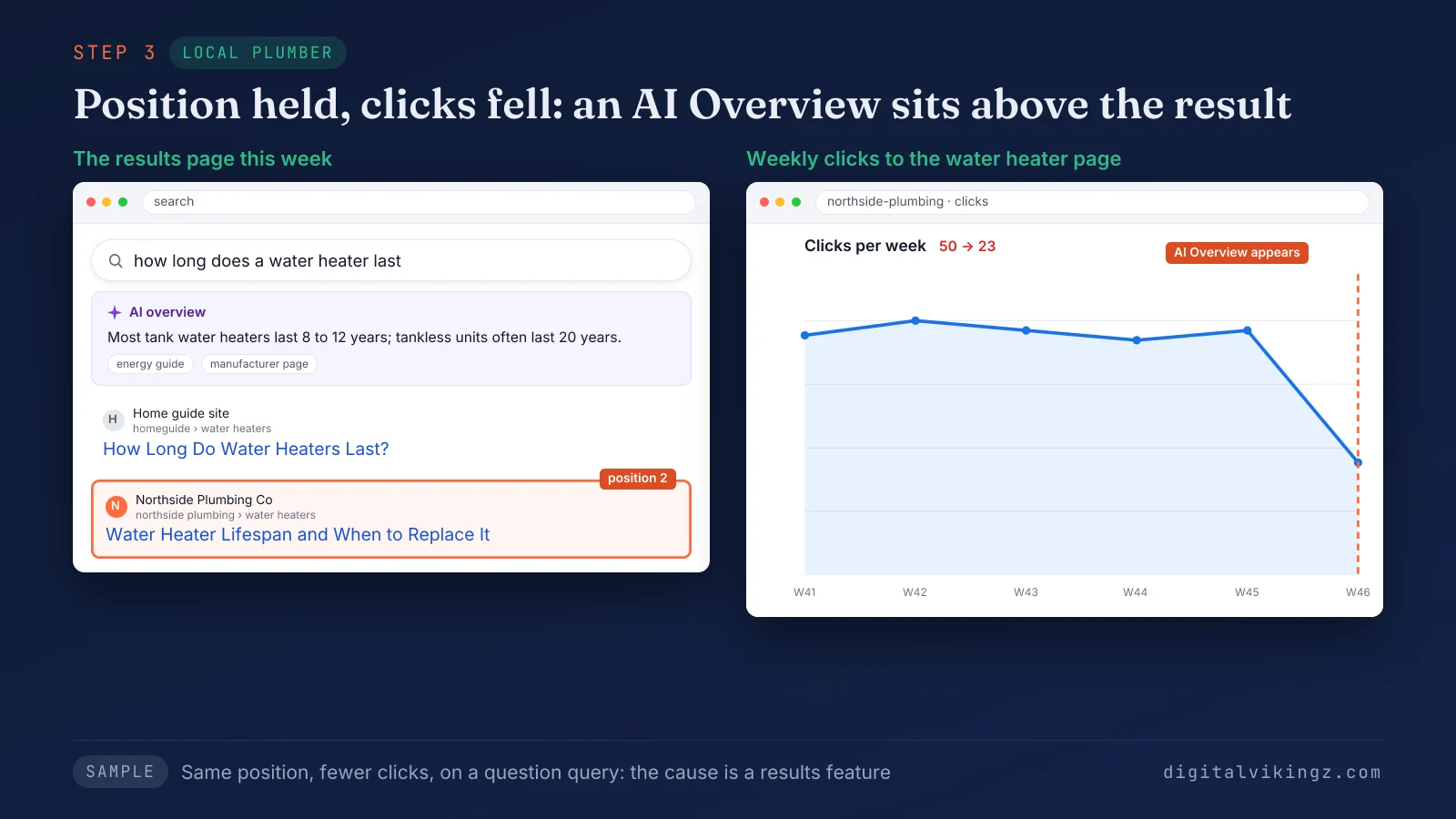
The sample plumber's water heater page held position 2 while weekly clicks fell from 50 to 23 in the week an AI Overview appeared. A page that holds its position and gets impressions and no clicks has five possible causes of its own. Each of those causes is diagnosed in the guide to why a page gets impressions and no clicks. Every named cause then points to one fix.
4. Assign a fix, an owner and a due date to each cause
Assigning a fix turns each cause into one task with a named owner and a due date before the next report.
A click lost under an AI Overview gets a passage that answers the query in one sentence, directly under a question heading. A page that dropped after an edit gets the edit checked against the content brief of the page. An indexing or technical fault goes to the developer with the list of affected URLs. Fixes should be ranked by the business value of the page group, so a demo or service page comes before an old blog post. The weekly SEO report lists last week's fixes as done or open. We log each decision with its date, so the next report shows whether the fix moved the number. The decision log records each fix, the owner and the result in one row. A person reviews the whole fix list before the report goes out.
5. Review the report and deliver it every Monday
Reviewing the report checks every number against its source and every cause against its evidence before the Monday delivery.
The reviewer opens the source row behind each flagged number and confirms the figure in Google Search Console or the analytics property. A cause without evidence beside the line goes back to step 3 before delivery. The reviewer also confirms that every fix carries an owner and a due date. An AI assistant drafts the three-line summary from the flagged rows, and the reviewer edits the summary before sending. The summary arrives first, in an email or a Slack message, with the full sheet linked below the summary. Agencies send the same weekly SEO report to clients under their own brand, as a white label report. We send the automated SEO and AEO report every Monday, for client sites and for our own site. The delivered report holds six sections.
What does a weekly SEO and AEO report contain?
A weekly SEO and AEO report contains six sections, from a three-line summary to the fixes for the week.
Each section answers one question a reader asks on Monday: what changed, why, what AI assistants say, and what happens next. The table below lists each section of a weekly SEO and AEO report, what the section shows and where its data comes from.
| Section | What it shows | Source |
|---|---|---|
| Summary | What changed, why, and what happens next, in three lines | The flagged rows, edited by the reviewer |
| Search performance | Clicks, impressions, click-through rate and average position against the previous week, brand and non-brand apart | Google Search Console |
| Changes past the threshold | Each flagged page group with its cause and evidence | Google Search Console, analytics property, work log |
| AEO section | Mention rate and citation rate for each AI assistant over four weeks | AI answer checks |
| Work completed | Last week's fixes, marked done or open | Work log, decision log |
| Fixes for the week | Each fix with its owner and due date | The reviewer |
The automation fills sections 2 to 5, and a person writes the summary and approves the fixes.
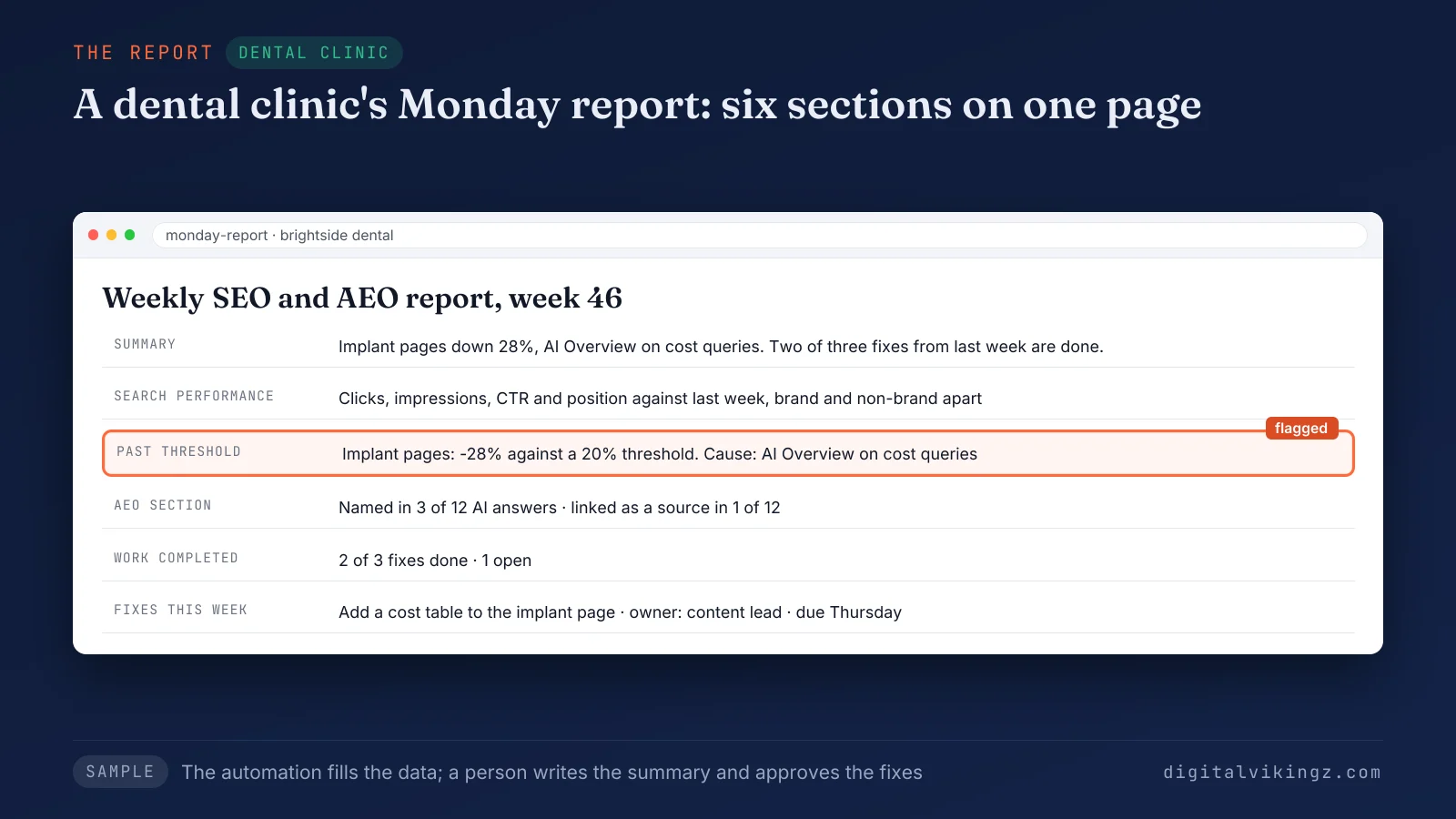
The sample report for a dental clinic flags the implant pages, down 28 percent against a 20 percent threshold, on one page. The same sample names the clinic in 3 of 12 AI answers and links the clinic in 1 of 12. Two of the three fixes from the previous week show as done. The AEO section is the part most weekly reports leave out.
What goes in the AEO section of the report?
The AEO section reports mention rate and citation rate for each AI assistant on a fixed prompt set, read over the last four weeks.
Mention rate is the share of generative answers that name a brand in the answer text. Citation rate is the share of generative answers that link to a page on the brand's domain as a source. Each logged answer records the assistant, the prompt, the date, the brand mention and any cited URL. Each answer is also checked for accuracy, meaning the services, locations and prices the assistant states about the business. The four-week window keeps the line steady, because one run of one prompt can change from one answer to the next. A first check of what ChatGPT and AI Overviews say about one business comes before the weekly SEO and AEO report rows begin.
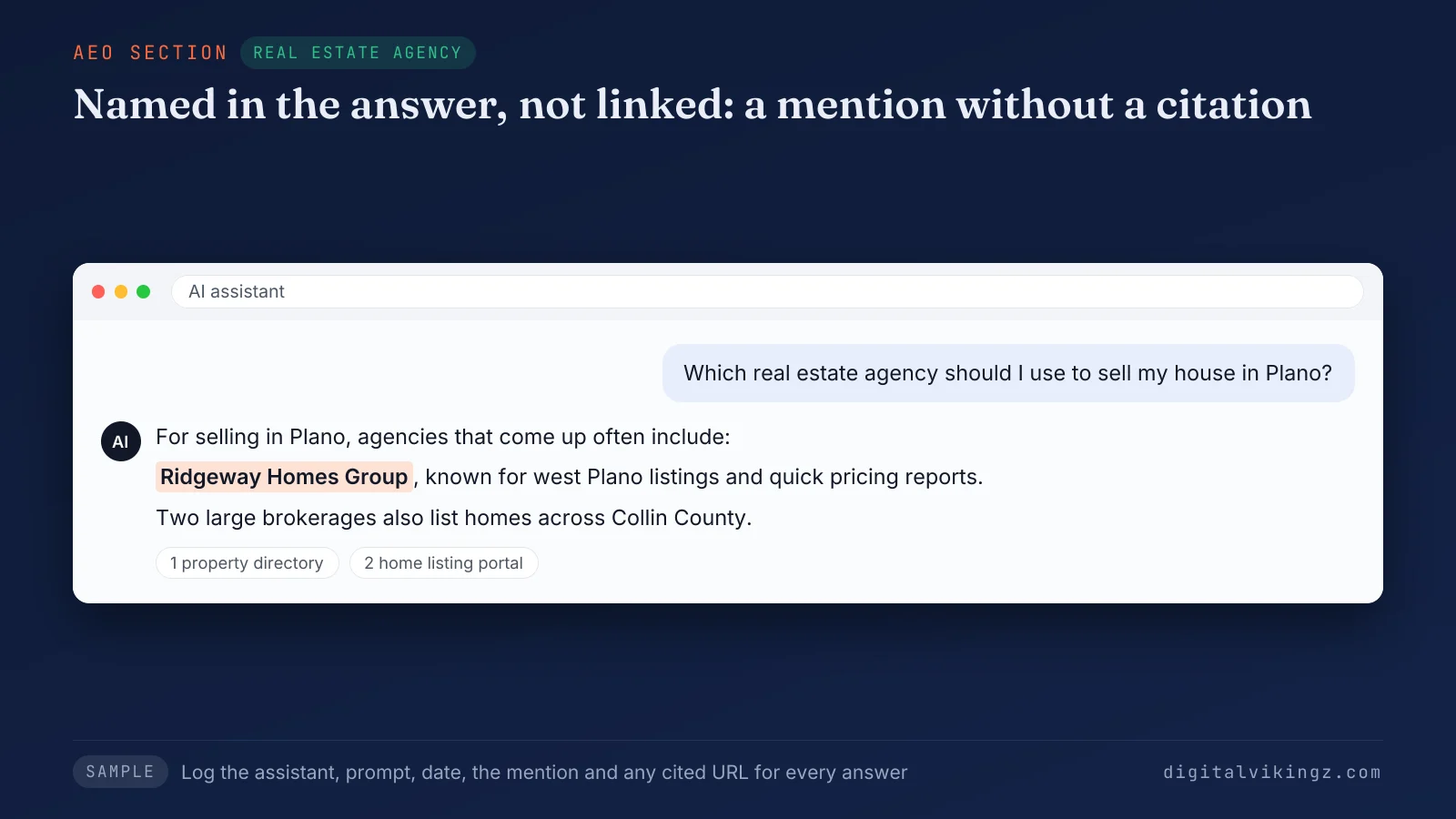
The sample answer names the real estate agency and cites two property directories, so the row counts a mention and no citation. Citation rate moves with page changes and mention rate moves with entity work, the core difference between mention rate and citation rate. The method for measuring both rates is on the page about the difference between mention rate and citation rate. Some SEO and AEO metrics read better monthly than weekly.
Which SEO metrics belong in a weekly report and which in a monthly one?
A weekly report holds the fast SEO metrics, and a monthly report holds the slow metrics that need four weeks of data.
The SEO and AEO metrics of each report are compared below:
- Indexing and errors: Indexing and errors belong in the weekly report, because a fault found within the week is fixed before more clicks are lost.
- Clicks past a threshold: Clicks past a threshold belong in the weekly report, because each flagged page group needs its cause and fix that week.
- Pages published and changed: Pages published and changed belong in the weekly report, because the work log explains most site changes.
- Traffic and conversions by cluster: Traffic and conversions by cluster belong in the monthly report, read over 28 days against the previous 28.
- Links and brand mentions: Links and brand mentions belong in the monthly report, because both build over months, not weeks.
- Full prompt-set read: The full prompt-set read belongs in the monthly report, while the weekly AEO section carries the four-week rolling rates.
The monthly prompt-set read applies the measurement framework for enterprise LLM visibility to a single business. Prompt sets, AI surfaces and the monthly cadence are set out in the measurement framework for enterprise LLM visibility. The fast metrics also answer whether a weekly report runs too often.
Is a weekly SEO report too frequent?
A weekly SEO report is not too frequent when the report flags only changes past a threshold and leaves slow metrics to the monthly read.
Rankings move a little every week, and a report that lists every movement teaches the reader to ignore the report. The threshold removes that noise, and a longer interval only delays the indexing faults and errors the weekly report exists to catch. A week with no flagged change produces a short report that says so. The choice of what counts as a change stays with a person.
Which parts of a weekly SEO report should stay with a person?
Four parts of a weekly SEO report stay with a person: setting the thresholds, approving each cause, ranking the fixes and approving the summary.
The automation collects, compares and drafts, and the person decides what the numbers mean for the business. A sales push, a new service line or a planned migration changes the priority of a fix, and only the team knows those plans. The data holds no record of those plans, so the four parts stay with a person. We run the automated SEO and AEO report every Monday as part of the SEO Reporting and Attribution service. The same service adds a monthly report of leads and revenue for each cluster. Teams that want the report run for them start with a strategy call about the SEO Reporting and Attribution service. Teams with their own SEO staff can run the same workflow themselves.
Can an in-house team run the same report workflow?
An in-house team can run the same weekly report workflow in its own accounts, with the review step kept.
The setup covers the scheduled pull, the threshold sheet, the cause rules and a review checklist. The weekly SEO report then runs in the team's own Google Search Console, analytics and API accounts. The team owns the workflow and can change the workflow without an agency. We install that workflow as SEO automation with AI agents and human review. The setup, the review checklists and the handover are described on the page for SEO automation with AI agents and human review. A workflow without the review step repeats the common report mistakes.
Which mistakes break an automated SEO report?
Five mistakes break an automated SEO report, and each mistake removes the comparison, the cause or the decision.
The five mistakes that break an automated SEO report are listed below:
- Dashboard instead of a decision page: A dashboard shows the report data and names no cause and no fix. The mistake removes the decision.
- Totals without a comparison window: A report total with no previous week beside the total shows no change. The mistake removes the comparison.
- Rankings as the only metric: A rankings report hides the clicks an AI Overview takes while position holds. The mistake removes the cause.
- One screenshot as the AI visibility record: A single chat screenshot in a report shows one answer from one session, not a rate. The mistake removes the comparison.
- Preliminary data read as final: Report rows built from preliminary Google Search Console days change after the report is sent. The mistake removes the comparison.
A decision page is a report page that states each change, the cause and the fix. The same test applies to an AI assistant asked to write the report.
Can an AI assistant write the whole weekly report?
An AI assistant writes the draft of a weekly SEO report, not the final report.
The assistant turns the flagged rows into a summary, and a person checks each cause and ranks each fix against the team's plans. The assistant has no record of a planned launch or a paused service. The same split holds for most SEO tasks: AI agents collect, compare and draft, and people decide. Every report we send waits for a person to approve, edit or reject the draft.
Questions about automating a weekly SEO report
Teams that automate a weekly SEO report ask six further questions, about Looker Studio, analytics, paid tools, local businesses, recipients and the delivery day.
Is Looker Studio enough for a weekly SEO report?
Looker Studio is enough for the data view of a weekly SEO report, not for the thresholds, the causes or the fixes. A person or an automated step still writes those three parts of the weekly SEO report every week.
Does a weekly SEO report need analytics as well as Google Search Console?
A weekly SEO report needs an analytics property as well as Google Search Console, because Google Search Console stops at the click. The analytics property adds sessions, conversions and referral visits from AI assistants to the weekly report.
Can AI visibility be reported without a paid tracking tool?
AI visibility can be reported without a paid tracking tool by asking a fixed prompt set through each assistant's API and logging every answer. The logged answers give the mention rate and citation rate for the AEO section of the report.
Can a local service business use the same weekly report?
A local service business uses the same weekly report and adds Google Business Profile calls, direction requests and website clicks as extra rows. The profile rows sit beside the Google Search Console rows for the service pages in the weekly report.
Who should receive the weekly SEO and AEO report?
The weekly SEO and AEO report goes to the person who approves the fixes, usually the founder or the marketing lead. Each owner named on a fix for the week receives a copy of the same report as well.
Which day should a weekly SEO report arrive?
A weekly SEO report should arrive on Monday, so the fixes fit inside the working week. Monday delivery leaves the whole working week to finish the fixes before the next weekly report arrives.
What does a weekly SEO and AEO report give a business?
A weekly SEO and AEO report gives a business one Monday page of changes, causes and fixes across Google and AI answers.
The weekly read shows how semantic SEO builds topical authority, one cluster at a time. Each cluster in the report is a section of the topical map, drawn in the steps to build a topical map. The clusters themselves are decided in the steps to build a topical map. Digital Vikingz runs the report for B2B SaaS companies and local service businesses, and a strategy call sets the thresholds for your site.