 Digital Vikingz
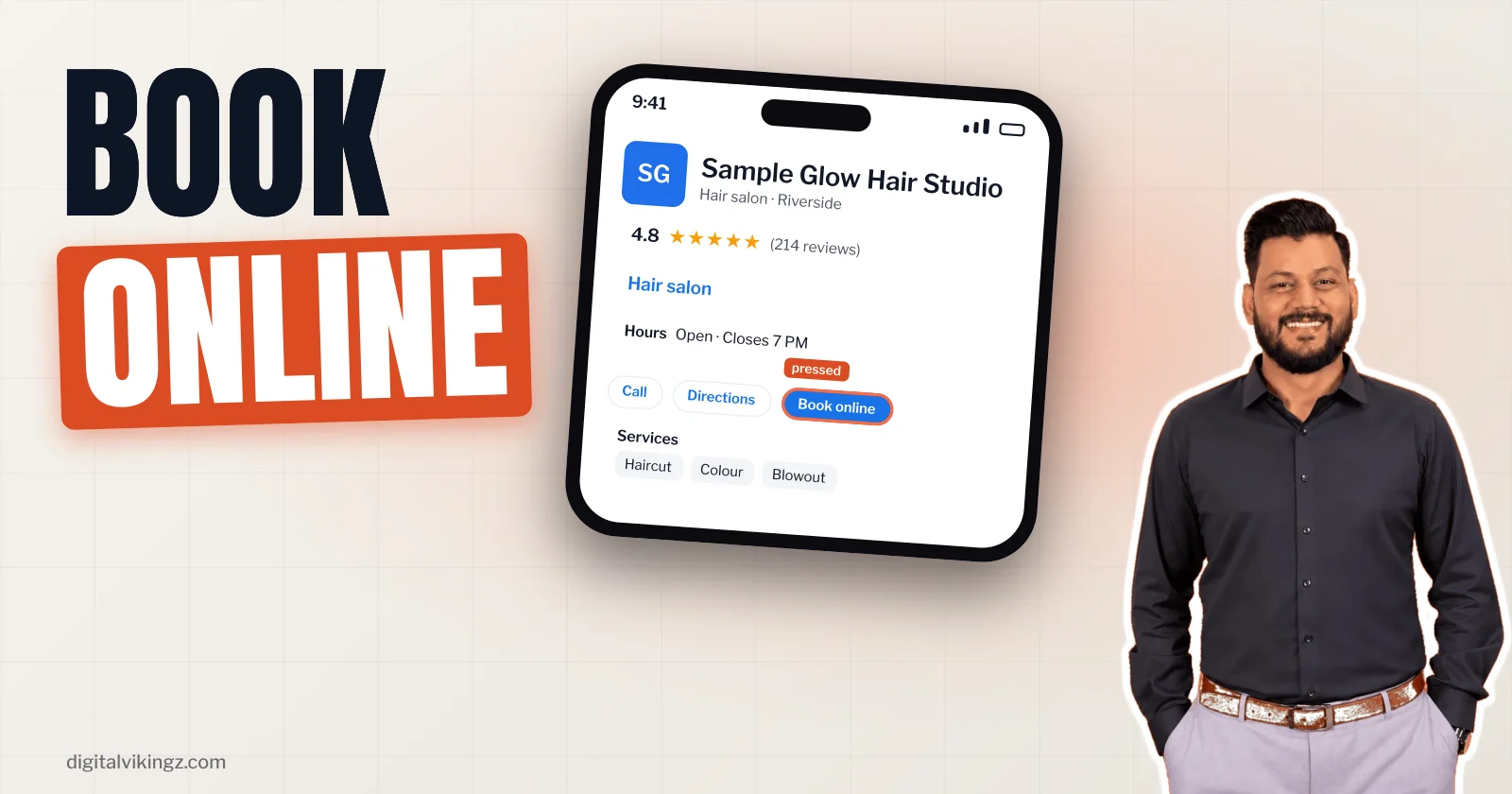
The Google Business Profile booking button is a Book action that opens a scheduling flow from a booking provider on Search or Maps. A Business Profile gets a booking action through a booking provider or through an appointment link to the owner's own page.
You add the Book button through a provider in five steps under Bookings. You add an appointment link under Booking in Google Search or under Edit profile in Google Maps. Seven checks find the cause of a missing, wrong or dead button.
What is the Google Business Profile booking button?
The Google Business Profile booking button is a Book action that opens a scheduling flow from a booking provider on Search or Maps. Owners call the label the Book button and the feature the booking button.
Ordering and menu links are separate Business Profile links, and the steps below leave them out.
Sample: picture a salon owner who already pays for a scheduling tool and expects the Book button to come with the tool. The owner still connects the provider on the profile, under Bookings. A second route, the appointment link, needs no provider.
Two routes put a booking action on a profile
A Business Profile gets a booking action through a booking provider or through an appointment link to the owner's own page. The two routes differ in who runs the booking, as listed below:
- Booking provider route: a scheduling provider on Google's list connects to the profile, and customers book inside Google.
- Appointment link route: the owner adds a URL under Booking, and customers land on that page.
Google calls its provider program Reserve with Google. Sample: a barber shop with its own scheduler page takes the link route.
The right route depends on the business. Eligibility comes next.
Which businesses get the Book button?
Businesses get the Book button through a booking provider that Google supports in their country. Google's Help page lists no eligible categories.
Whitespark's Business Profile guide, dated 19 January 2026, names seven verticals: Dining, Activities, Beauty, Fitness, Shopping, Financial Services and Local Services. Zocdoc reports that most healthcare categories sit outside the native Bookings list.
We found no full list outside Google. Each owner tests the profile.
A primary category shapes what a profile offers, and the 13 steps to optimize a Google Business Profile show how the fields fit together.
Test your profile for the Bookings entry
Your profile can use the provider route when Bookings appears in the profile menu and a provider is listed for your country. The test takes three steps, listed below:
- Open your Business Profile from Google Search or Google Maps.
- Look for Bookings in the profile menu.
- Select Get started and read the provider list for your country.
A profile with no Bookings entry takes the appointment link route instead. Sample: a dental practice, for example, finds no Bookings entry and adds its booking page as an appointment link.
Can you get the Book button without a booking provider?
No, Google's Help page sets up the Book button through a booking provider, and the appointment link is the route without one.
Search Engine Roundtable reported on 9 November 2026 that Google may add Book Online links to some profiles without owner setup. Some of those links open a 500 error, and the first reports came from SEO specialists checking client profiles, not from Google.
We found no Google statement on the trigger on 22 November 2026. Build on a provider or an appointment link.
Which route fits your type of business?
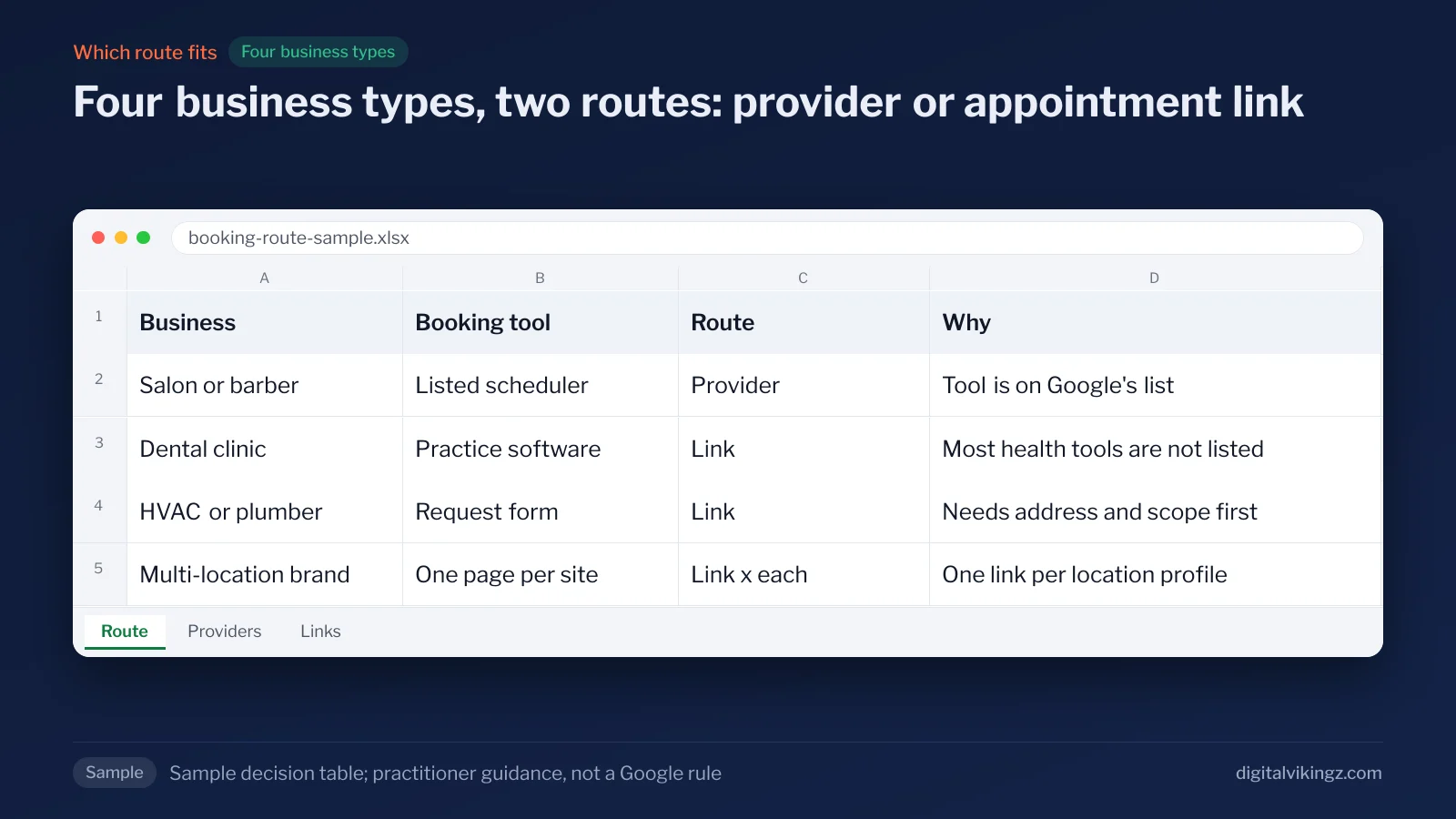
The route follows the scheduling tool: a tool on Google's list takes the provider route, and any other tool takes the appointment link. The route by type of business is listed below:
- Salon, barber or studio: the provider route when the booking tool is on Google's list, otherwise the appointment link.
- Clinic or dental practice: the appointment link, because Zocdoc reports that most healthcare categories sit outside the native list.
- Trades such as HVAC or plumbing: the appointment link to a request page, because a job needs an address and scope before a time slot.
- Multi-location brand: one appointment link per location profile, each pointing to that location's scheduler page.
Google publishes no route rules by business type. Each row above is practitioner guidance and our advice.
The profile setup for a dental practice, including its appointment link, sits in our dental SEO guide for practices.
How do you add the Book button through a provider?
You add the Book button through a provider in five steps under Bookings. Pick the provider your calendar already runs on. The booking data lives in that tool.
The steps to set up bookings through a provider are listed below:
- Open your Business Profile and select Bookings.
- Select Get started to sign up your preferred provider.
- Select your provider from the list.
- Select Done.
- Wait for the provider to show on the profile, which happens within a week.
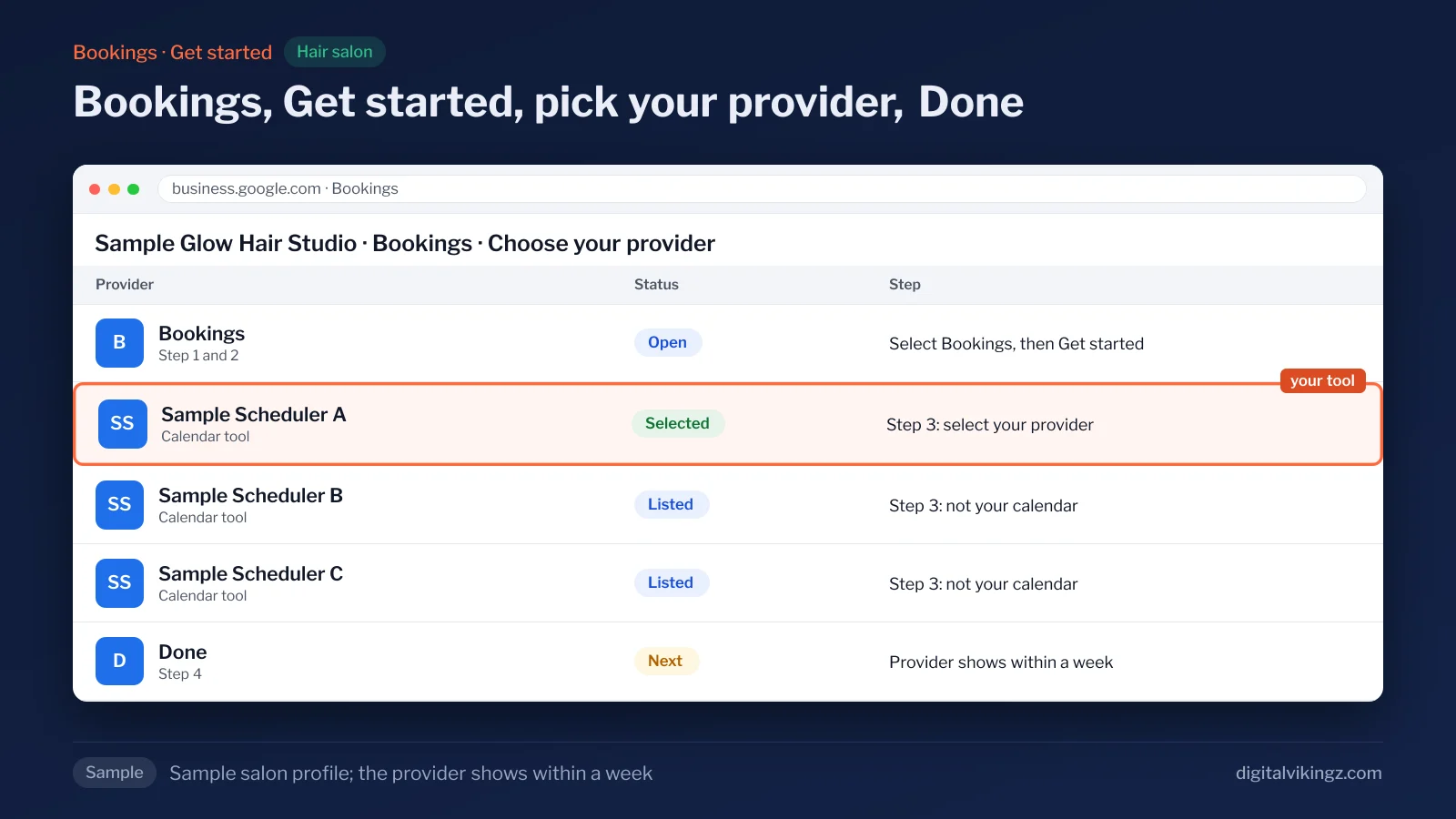
Sample: a salon on a listed scheduling tool selects its provider and waits for the Book button. Owners without a listed tool use the appointment link steps next.
How do you add or edit an appointment link?
You add an appointment link under Booking in Google Search or under Edit profile in Google Maps. Choose the page first: the link should open the page where a visitor books or requests a time, not the homepage.
A scheduling tool's own booking page counts, because the field accepts any URL. Sample: an HVAC contractor links a request page that asks for the address and the problem.
The steps to add an appointment link are listed below:
- Open your Business Profile in Google Search or Google Maps.
- Select Booking in Search, or select Edit profile and the booking option in Maps.
- Select Add link, or Add another link when links already exist.
- Enter the URL that the button should open.
- Select Save.
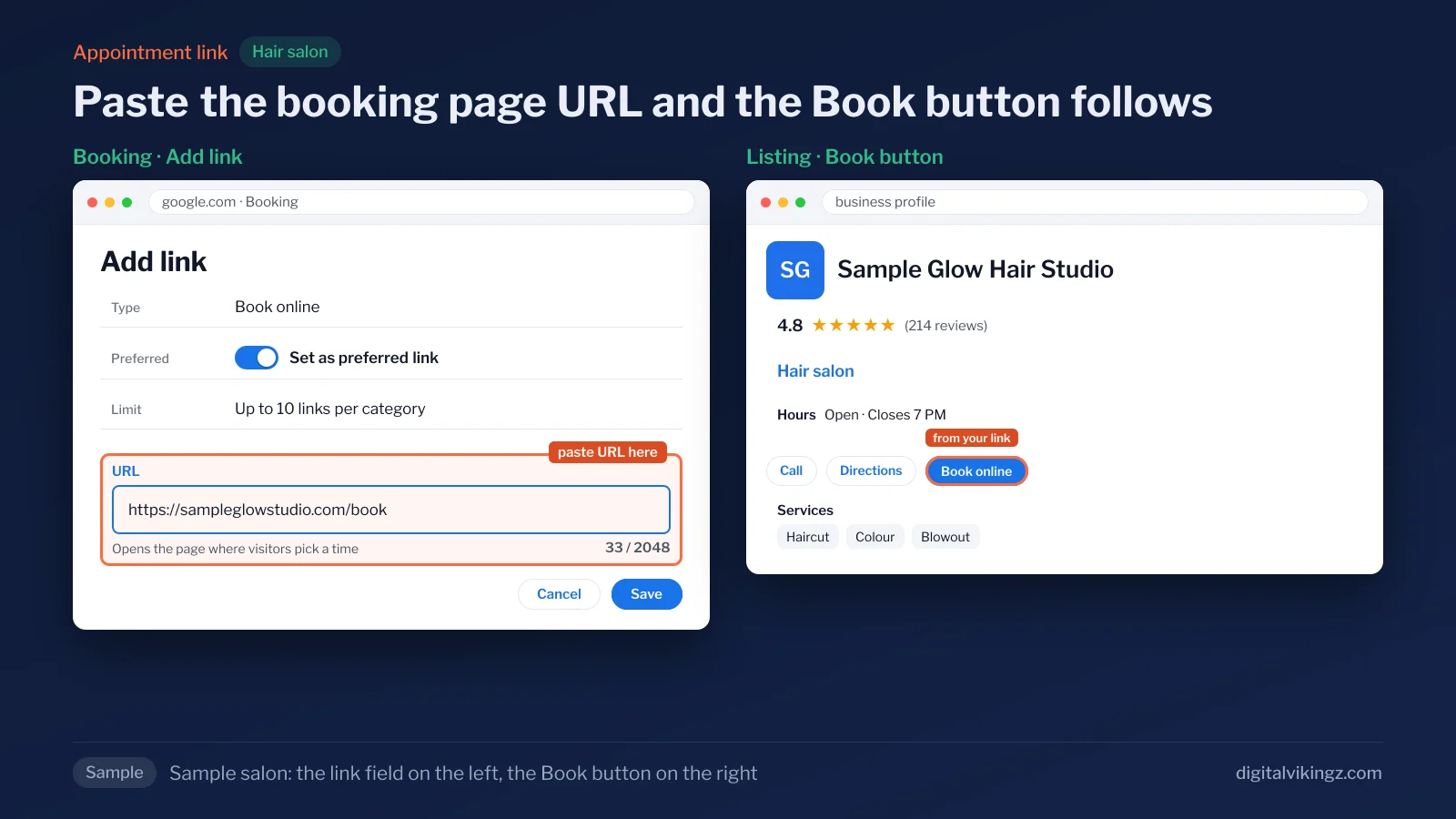
The Add link field in the figure holds the URL that the button opens. Google allows up to 10 links per category.
Google's Help page gives no wait time for a saved link. Uberall reports minutes to 24 hours.
Set a preferred link when you have more than one
A preferred link appears at the top of the links as Business preferred when a profile has more than one link. Select the transaction type, select Set preferred link, pick the link and select Save.
What a searcher sees on Search and Maps
A searcher sees the Book button on the profile in Search and Maps, and a tap starts the booking. Whitespark describes the provider flow in four screens: service types, open times, a booking form and a confirmation page.
The service types come from the scheduling tool, not from the services and products fields on the profile. An appointment link sends the searcher to the owner's page instead, so that page runs the booking.
Sample: take a customer who searches barber near me, taps Book on the profile and picks a Saturday slot. The screens above come from Whitespark's description, not from a test on our own profile.
Why is the booking button missing, wrong or dead?
The booking button goes missing, shows wrong or opens a dead page for seven checkable reasons, and the cheapest check comes first. Vendor help pages, including Zocdoc's, report most of these causes, so treat each as a report.
Work down the list in order.
Has the change had time to show?
A new provider or link needs time to show, so wait out the window given in the steps above before changing anything. Test the profile in an incognito window, because a cached page can hide a saved link.
Bookings is missing from the menu
Bookings is missing from the menu when the profile's category has no provider route, and the appointment link takes over. Zocdoc names the primary category as the cause of a missing Bookings entry.
A preferred link covers the button
A preferred link can replace the large Book button, according to a vendor troubleshooting guide. Remove or reorder the preferred link and recheck the profile after the change.
Profile details do not match the provider
A provider fails to match a profile when the name, address or phone differs between the two records. Copy the profile's name, address and phone into the provider account exactly, character for character.
A local SEO audit that checks name, address and phone covers every listing, not only the provider's.
An old provider is still connected
An old provider keeps controlling the button after a switch of booking software until that provider removes the link. Sample: suppose a day spa moves to new software, and the button still opens the old provider's page.
The last check in the list covers the removal route.
The link opens a dead or wrong page
A dead or wrong page behind the link sends paying customers to an error, so test the link on a phone after every edit. Use the direct URL of the scheduler or request page, not the homepage, as Uberall advises.
Run the page behind the link through the AI Visibility Checker for the booking page to see how Google and AI answers read the page. Sample: take a plumber whose link opens a page that returns a 404 after a website rebuild.
What if a booking link appears that you did not add?
A booking link that appears without the owner's action comes from a third-party partner, and the owner removes the link through that partner. Google's Help page says providers must process an opt-out request within 5 business days.
The owner can report a third-party violation to Google when 5 business days pass without removal.
Check the route and measure what it sends
The booking route needs a test booking from a phone and a look at the numbers that follow. Book a test slot or open the link on a phone, then cancel the test.
Google's Help page says performance data is not available for custom links. A provider's bookings show in Reserve with Google, so the provider route reports its own numbers.
The UTM tagging steps for Business Profile links cover the tags and the Google Analytics 4 report, so those steps stay in that guide. Sample: a salon compares tagged link visits with confirmed bookings in its scheduler each month.
What else should you know about Google booking?
Booking on Google also depends on cost, ranking myths and changes that Google has not announced in its Help pages. Our Local SEO and Google Business Profile Optimization for the booking route covers the provider choice, the link and the phone test.
Does the booking route cost anything?
A booking provider might charge when customers book through Google, so check the provider's terms before connecting. Whitespark reports that the appointment link field itself is free, and the scheduling tool behind the linked page keeps its own price.
Google publishes no price list for providers. Ask the provider what Google bookings cost. Sample: a studio compares two listed providers on the fee for Google bookings before choosing.
Does the booking button affect local ranking?
No, Whitespark's Business Profile guide, dated 19 January 2026, says the booking button and the appointment link do not influence rankings. Google's Help pages make no ranking claim for the button or the link.
Add the route for the bookings. Judge the route by bookings, not by map position. Sample: a dentist adds the link and watches booked appointments, not rank, in the following month.
Reserve with Google and the Actions Center
Google's developer FAQ says the Reserve with Google partner portal became the Actions Center, with no impact on merchants. Owners still select a provider under Bookings, as Google's Help page shows.
Provider names change fast. Read the provider list on your own profile, because a blog post ages faster than the list.
Waitlists belong to restaurants
Waitlists on Google are available to restaurant businesses only, and a third-party Reserve with Google provider sets them up. A restaurant removes the Join waitlist button by unregistering with that provider.
Everyone else uses the two routes above.
Booking in Local Services Ads and Google Ads
Google Ads and Local Services Ads carry their own booking features, separate from the Business Profile button. Search Engine Roundtable reported on 26 August 2026 that Local Services Ads booking expanded to many more Reserve with Google partners.
The same site reported on 28 August 2026 that the Book button reached Google Ads Search and Performance Max for eligible merchants, with healthcare excluded. Search Engine Roundtable's reports are second-hand, and Google Ads help pages decide what applies to an account.
How do you keep the booking route working?
The booking route keeps working when the owner tests the link after every change to the software, the address, the phone or the name. A monthly test on a phone catches a dead page before a customer finds the error.
A rebuilt website needs a link check on the same day, since old page addresses can return an error.
Each cause above has a first check, so start with the wait window and work down the list.
Booking button questions
Do you need a website to add an appointment link?
No, the link field accepts any URL, including a booking page hosted by a scheduling tool. The URL needs to open over HTTPS without a login, according to Zocdoc.
Can a service-area business get the Book button?
Yes, according to Zoho, a service-area business can use the provider route with Google Guaranteed or Screened status. Google's Help page states no such condition for the appointment link.
Can you add booking links through the Business Profile API?
No, Google's Help page says local business links are not available through the Business Profile API or spreadsheet upload. Each link is added by hand in Search or Maps.
Do customers get reminders for bookings made through Google?
Yes, Google's Help page says customers get reminders to come to their appointments when a provider manages the booking. Whitespark adds that Reserve with Google sends a 24 hour reminder email.
Can customers change or cancel a booking made through Google?
Yes, Whitespark reports that the confirmation page carries quick links to call the business or to modify or cancel the booking. Reserve with Google also sends emails for modified or cancelled bookings, according to the same guide.
Digital Vikingz tests the booking route inside Local SEO and Google Business Profile Optimization with route testing, after a strategy call. Start with the Bookings test on your own profile today, then work down the causes.