 Digital Vikingz
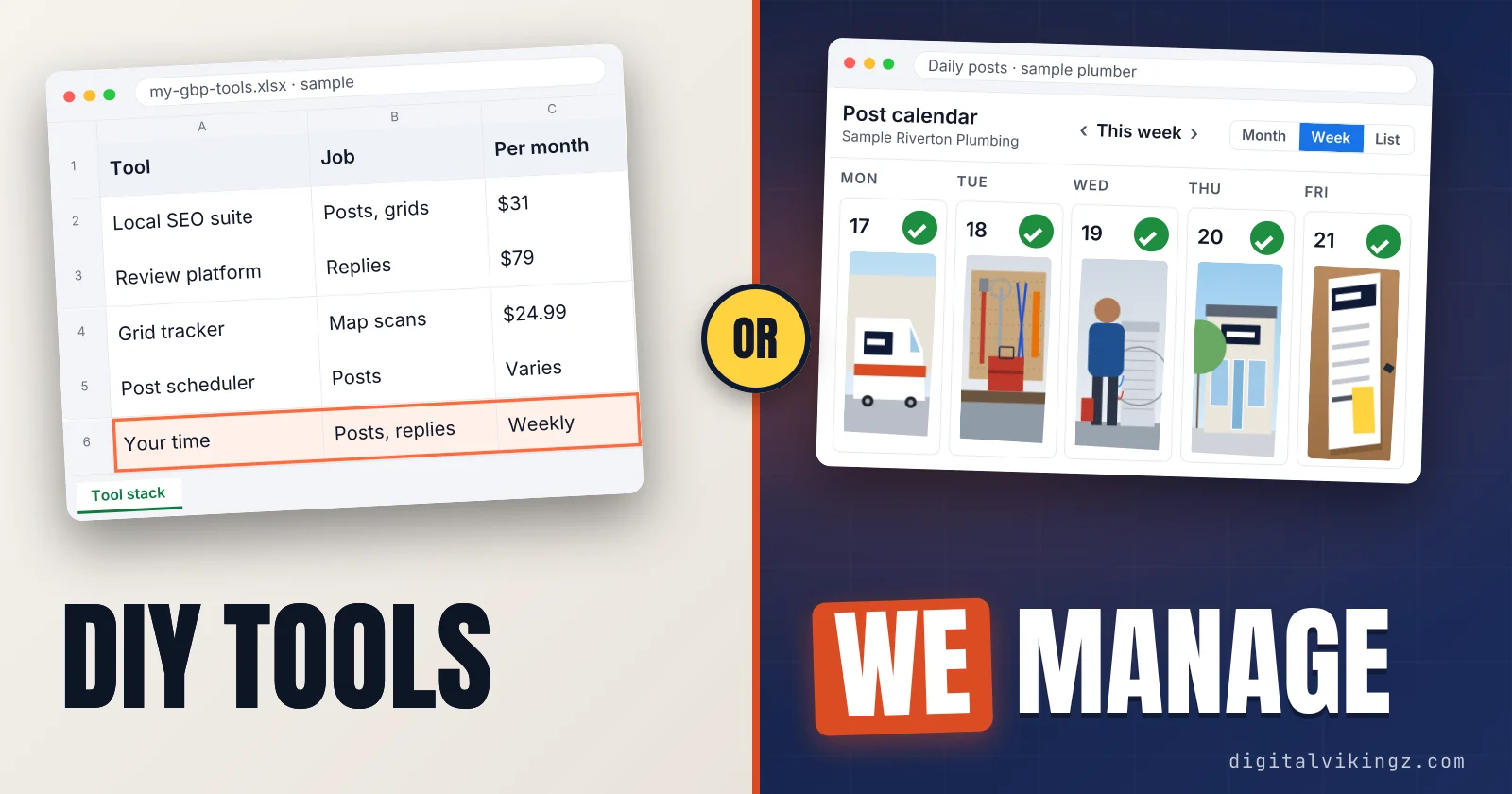
Google Business Profile management tools (GBP management tools) are software that edits profiles through the Business Profile APIs once an owner or manager grants access. The seven tool types are Google's own surfaces, local SEO suites, review platforms, listing sync tools, map grid trackers, audit extensions and post schedulers.
Google's own tools post, reply to reviews and group profiles for free, so paid tools differ on map grids, listing sync and price. Every feature and price below comes from the vendor's own page, read on 19 November 2026.
Business Profile software does not choose categories, write service descriptions or earn reviews, the work our Local SEO and Google Business Profile Optimization covers.
What is a Google Business Profile management tool?
A Google Business Profile management tool is software that edits one or many Business Profiles through Google's Business Profile APIs after an owner or manager grants access.
The software replaces signing in to each location's profile with one dashboard for posts, reviews, photos and business details. Google describes the Business Profile APIs as offering "much of the same functionality as the Business Profile user interface."
Google's developer overview adds that "User-created data, such as photos, posts, and reviews, can be managed through the APIs." Agencies and other representatives use the same APIs to act for a business without owning the profile.
Google's own Business Profile interface does the same core jobs at no cost, which makes Google the baseline for every comparison. Our Google Business Profile optimization guide walks through those free jobs in 13 steps. The access a tool needs decides who can connect the tool to a profile.
What access does a GBP management tool need?
A GBP management tool needs owner or manager access to each Business Profile, granted to a named Google Account instead of a shared password.
Google's help page says owners and managers "can edit info, respond to reviews, and manage posts." Managers are not able to add or remove users or remove the profile, so the owner keeps control of who connects a tool. Every profile has one primary owner, and Google requires a separate Google Account for each user.
Google grants the software vendor API access only with a valid Google Account, a business reason, a Google Cloud project and a business website URL.
Google Business Profile ownership decides who can invite a manager, transfer the primary owner role or remove a user. Google also decides whether third-party software may connect at all.
Is third-party Business Profile software allowed by Google?
Third-party Business Profile software is allowed by Google when the software connects through the Business Profile APIs and follows Google's API policies.
Google publishes the Business Profile APIs for "merchants or their representatives," and its API policies name the prohibited uses. Google's review policy states that incentives for reviews are fake and misleading content that "is strictly prohibited." A tool that pays for or incentivizes reviews puts the profile at risk, whatever interface sends the reviews.
Allowed tools split into types by the job each one does.
What are the types of Google Business Profile management tools?
Google Business Profile management tools fall into seven types, grouped by the job each type does on a profile.
The seven types of Business Profile software are listed below:
- Google's own Business Profile surfaces: Google Search, Google Maps and Business Profile Manager edit a profile at no cost for every owner or manager.
- Local SEO suites: all-in-one platforms post to the profile, check map positions, sync listings and report in one account. BrightLocal and Semrush Local are two documented examples.
- Review management platforms: one inbox monitors, requests and answers reviews on each profile across locations. Birdeye and Whitespark Reputation Builder sell review platforms.
- Listing and citation sync tools: citations and listings carry one set of profile details from Google to other directories, a job called listing sync. Yext says its distribution agent reaches "200+ publishers and LLMs."
- Map grid rank trackers: geogrid or heat map scans check where a profile appears for one keyword at many points across a service area. Local Falcon and Whitespark Local Ranking Grids sell map grid scans.
- Audit browser extensions: Chrome extensions read public profile data such as categories and competitors, without editing the user's own profile. GMB Everywhere describes its audit browser extension as "an independent third-party tool."
- Post schedulers with Business Profile support: social media schedulers publish Update, Offer and Event posts to the profile. Buffer is one post scheduler with a documented Business Profile integration.
Google's own surfaces set the free baseline the other six types build on.
What do Google's own Business Profile tools do for free?
Google's own Business Profile tools edit a profile, publish and schedule posts, reply to reviews and group several profiles at no cost.
The post form schedules a post with Schedule this post, repeats a post with Repeats and shares one post across selected profiles. Every action runs on the same owner or manager access a paid tool needs.
Google describes a business group as working "like a shared folder for your profiles." Any user with 2 or more profiles can create a business group in Business Profile Manager. Business groups suit several locations under one brand or one agency.
Google states that importing one spreadsheet across multiple business groups is "not possible." None of the Google help pages we read lists a map grid, sync to other directories or white-label client reports.
Optimizing the profile itself, from categories to services and photos, is free work done in the same Google interface. Paid tool types differ on the features Google leaves out.
How do Google Business Profile management tools compare?
Google Business Profile management tools differ most on map grid tracking, listing sync and price, because posting and review replies already exist in Google's own interface.
The table compares the seven tool types on six documented features, with one named example per type and the vendor page read on 19 November 2026:
| Tool type (example) | Posts | Review monitoring and replies | Several locations | Map grid | Listing sync | Public list price |
|---|---|---|---|---|---|---|
| Google's own (Business Profile Manager) | Schedule, repeat, several profiles | Owner or manager replies | Business groups | Not listed | Google only | Free |
| Local SEO suite (BrightLocal; Semrush Local) | BrightLocal Manage; Semrush Base | BrightLocal Grow; Semrush Base auto-replies | Priced by location | BrightLocal Track geo-grid; Semrush credits | BrightLocal Manage; Semrush Pro | $31 a month, 1 location; $30 per location; annual |
| Review platform (Birdeye; Whitespark Reputation Builder) | Not listed | Yes, both | Birdeye quote by location count; Whitespark priced per location | Not listed | Birdeye Listings | Birdeye quote; Whitespark $79 a month per location |
| Listing sync (Yext) | Not listed | Not listed | Yes, brand-wide | Not listed | "200+ publishers and LLMs" | Quote-based |
| Map grid tracker (Local Falcon; Whitespark Grids) | Not listed | Local Falcon "Automated Review Response" | Scans per location | 3x3 to 21x21; up to 225 points | Not listed | From $24.99 a month; from $10 a month |
| Audit extension (GMB Everywhere) | Post Audit; no publishing listed | Review Audit | Local Scan compares profiles | Not listed | No | Free or $30 a month |
| Post scheduler (Buffer) | Update, Offer and Event posts | Not listed | Several channels | No | No | In our posting guide |
We list only what each vendor's own page states, and a feature missing from a page may still exist inside the product. Posting tools have their own comparison, including how a Google Business Profile post scheduler differs from Google's post form.
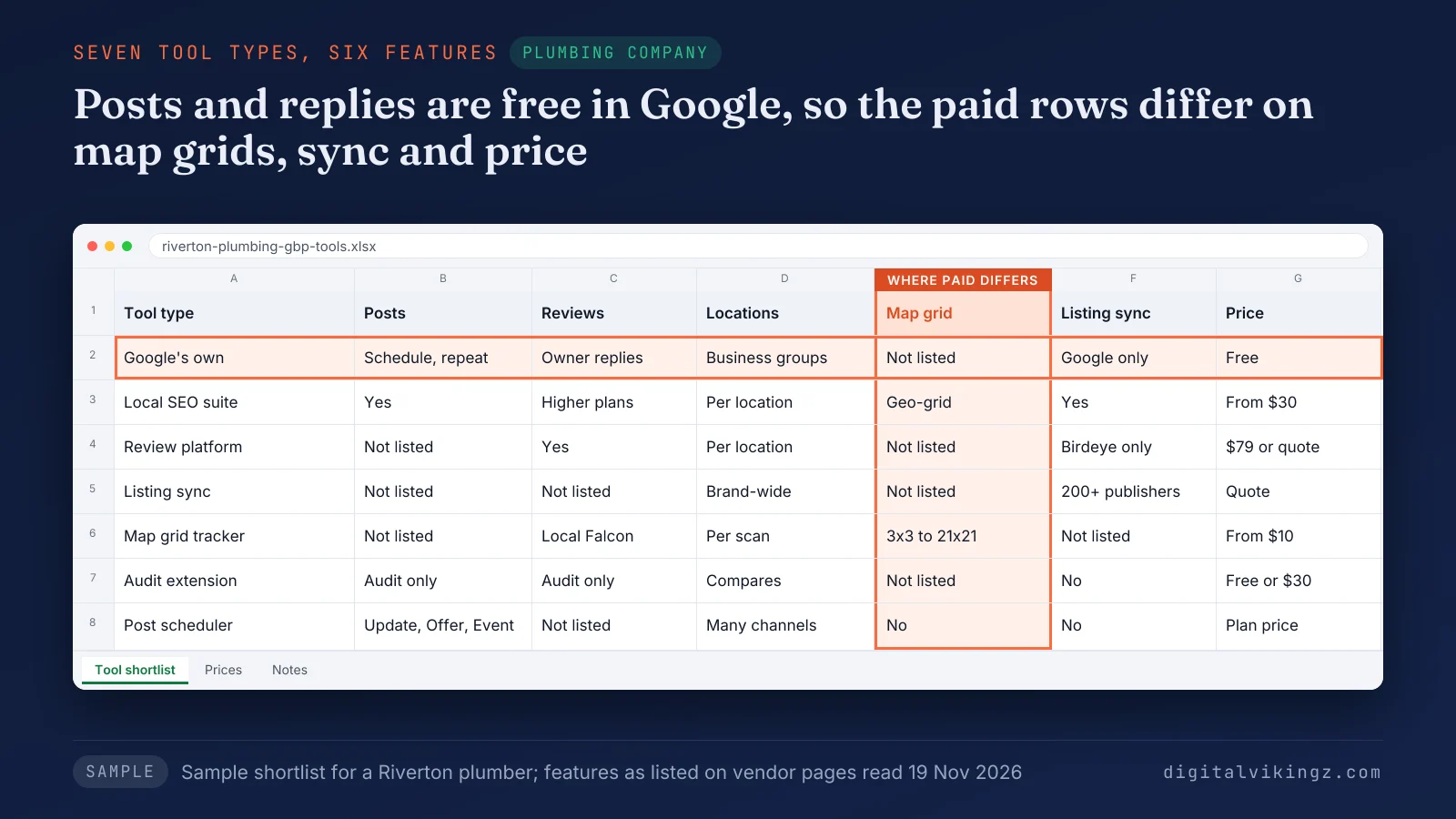
The plumbing sample judges paid rows only on grids, sync and price. Price models differ as much as features.
How much does GBP management software cost?
GBP management software costs nothing in Google's own interface and from $1 to $79 a month per location on vendor price pages we read on 19 November 2026.
Business Profile software uses four pricing models:
- Per location: a fixed monthly price for each profile, such as $30 or $60 at Semrush Local, billed annually, and $1 at Whitespark Local Platform.
- Plan tiers by location count: a set price per plan, such as $31 to $49 a month for 1 location at BrightLocal, billed annually. Monthly billing runs $41 to $65, and 100+ locations are priced on request.
- Credits: a balance spent on each map scan, such as Local Falcon plans from $24.99 a month, billed monthly. Local Falcon spends one credit per map pin.
- Quote-based: a price given after a sales conversation, as with Birdeye and Yext, which publish no list price.
BrightLocal's pricing page states that annual billing saves 25%. One Local Search Forum reply called per-location pricing "pretty pricey if you have more than 10 locations." Prices change often, so each figure carries the date we read the vendor page.
Review features often sit on the higher plans.
Which GBP management tools handle Google reviews?
Review management platforms and the higher plans of local SEO suites monitor Google reviews and send or draft replies from one inbox.
BrightLocal adds review replies across several sites on its Grow plan, and Semrush Local lists review auto-replies on its Base plan. Local Falcon, a map grid tracker, also lists "Automated Review Response" on its pricing page. Google's own Business Profile interface lets any owner or manager reply to reviews at no cost for each location.
Vendors market AI review replies, and a person should approve each reply draft before posting.
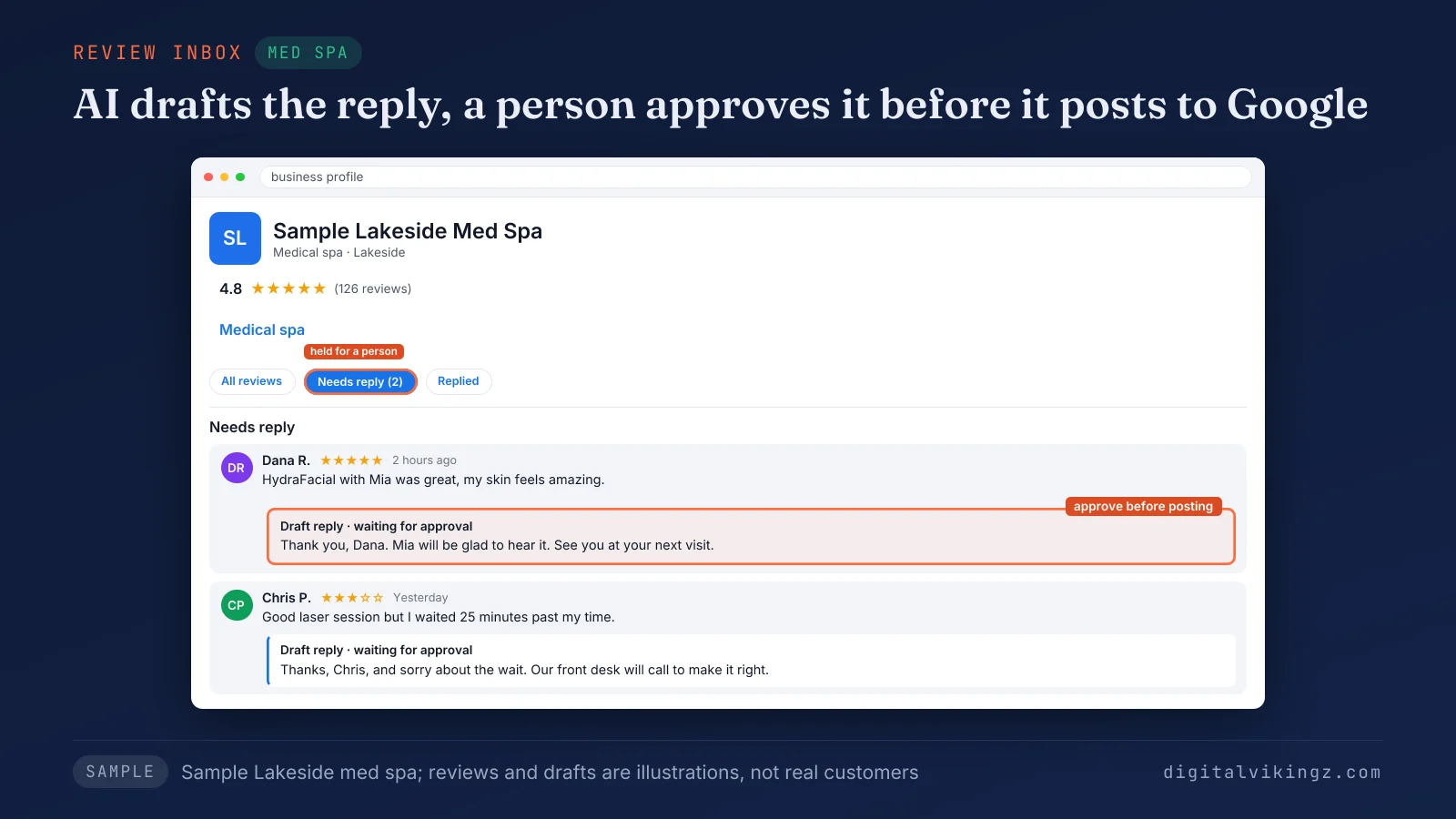
Each reply in the med spa sample waits for approval, because a published reply speaks for the business. Review software answers reviews, yet the job to get more Google reviews starts with customers. Our review guide lists the steps to get more Google reviews without breaking Google's rules.
Ranking reports are the other paid feature.
Which GBP management tools track rankings on a map grid?
Map grid rank trackers check where a Business Profile ranks for one keyword at many points across a service area.
Local Falcon scans grids from 3x3 to 21x21, and Whitespark Local Ranking Grids reach up to 225 points. BrightLocal's pricing page lists a Track plan geo-grid for up to five keywords, and Semrush Local spends Map Rank Tracker credits. A 5x5 grid checks 25 points, so one Local Falcon scan of that size uses 25 credits.
Rankings change with the searcher's location, so a grid reports a pattern, not a fixed position. A grid measures position, while the work to rank higher on Google Maps changes position. Our Maps guide explains how to rank higher on Google Maps for each location.
The right mix of tools depends on locations and team time.
Which GBP management tool fits a single location, a multi-location brand or an agency?
The right GBP management tool depends on the number of locations, the tasks that repeat each week and the cost per location.
No single tool type fits every business, because each situation repeats different tasks at a different scale.
Three situations decide which tool type fits:
- A single location: Google's own tools cover posts, replies and edits at no cost. A map grid tracker or an audit extension earns a place only for a job Google leaves out.
- A multi-location brand: a business group in Business Profile Manager covers shared access across locations. A local SEO suite or a listing sync tool, priced per location, adds bulk work.
- An agency: a local SEO suite covers client reports, grid credits and several Google Accounts. Cost per client location, read on each vendor page, decides between suites.
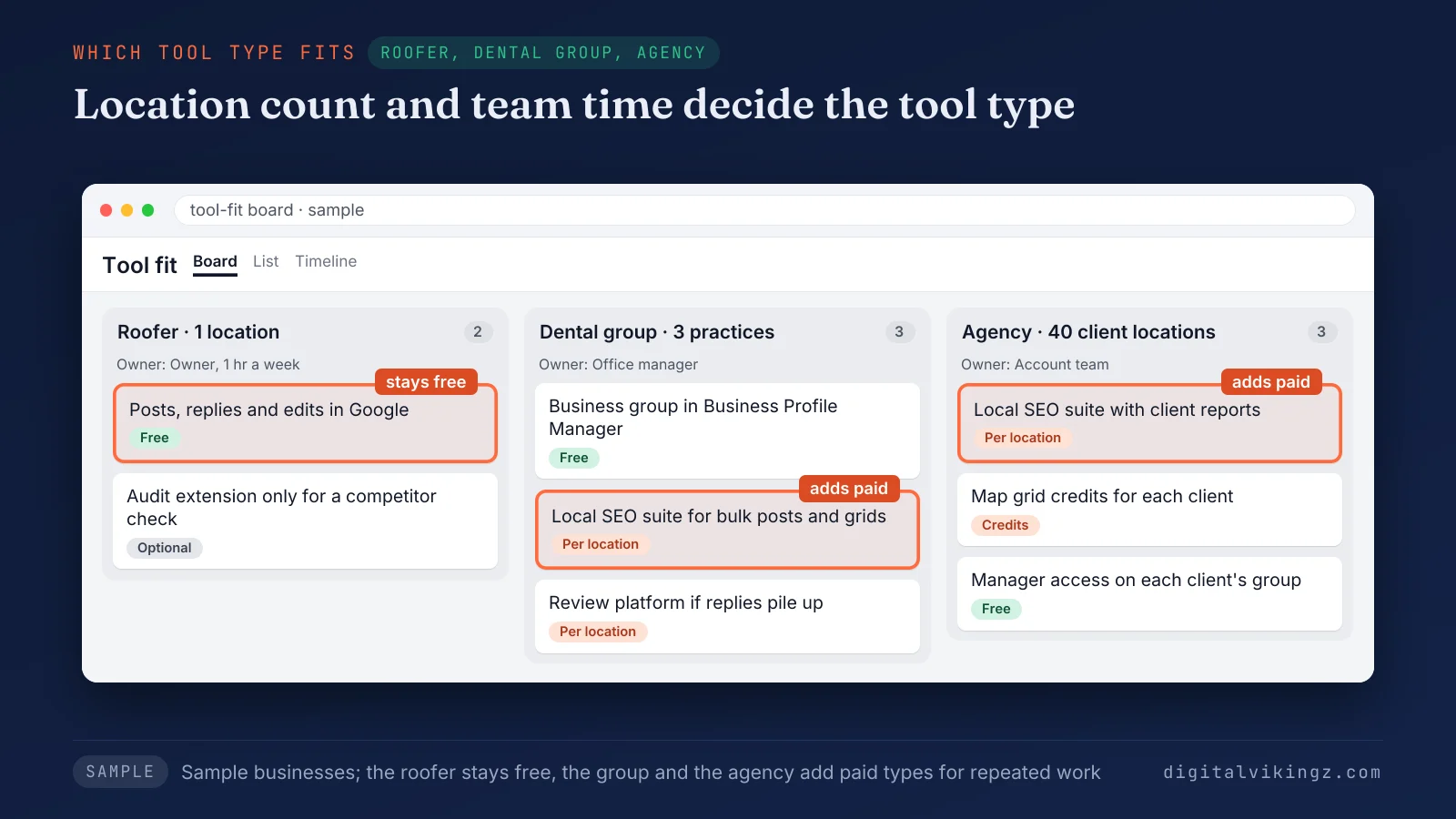
The roofer in the sample stays on Google's free tools, while the dental group and the agency add paid types for repeated work. One reply in a Local Search Forum thread that ran from 2022 to 2024 called an enterprise listing platform "Probably overkill for a small chain or SMB."
A tool earns its price when the same task repeats across many profiles every week. Managing several profiles starts in Google's own business groups.
How do you manage multiple Google Business Profiles from one dashboard?
Multiple Google Business Profiles are managed from one dashboard by placing the profiles in a business group in Business Profile Manager.
The steps to group and share several profiles are listed below:
- Sign in to Business Profile Manager with an account that holds 2 or more profiles.
- Select Create group, then name the business group.
- Select the profiles, then Actions and Transfer businesses.
- Add the co-worker or agency as a manager of the group, then connect any tool through that manager account.
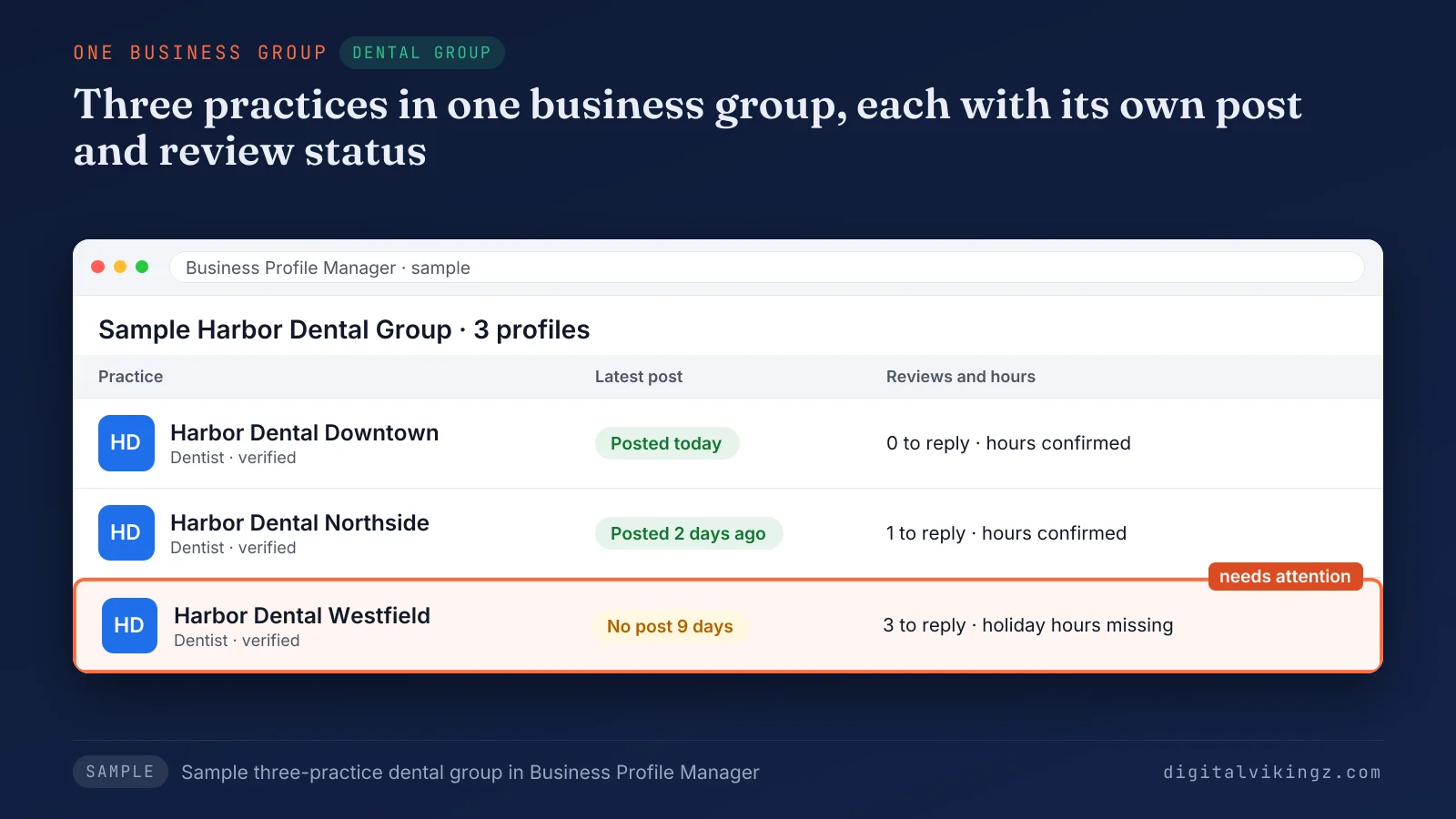
The dental group sample shows three practices in one business group, each with its own post and review status. Google says a manager or owner added to a group can "access all current and future profiles placed in the group."
A tool becomes worth adding when bulk edits, grids or client reports go beyond the group view for many locations. No tool controls where the profiles appear on Google Maps.
Can a GBP management tool guarantee a top 3 Google Maps position?
No GBP management tool can guarantee a top 3 Google Maps position, because Google states there is no way to request or pay for a better local ranking.
Google says local results are based primarily on relevance, distance and prominence. A Local Search Forum thread in July 2026 discussed software promising a top 3 position for "100USD per month." A guarantee in a sales pitch should prompt a request for the vendor's evidence.
Business Profile tool feature lists also age when Google changes the platform.
What has Google changed that GBP management tools depend on?
Google discontinued the My Business Q&A API on 3 November 2025 and added native post scheduling in November 2025, so older feature lists can be out of date.
Three Google changes affect what Business Profile software can do:
- Q&A API: discontinued on 3 November 2025, after support ended on 15 September 2025.
- Native post scheduling: added to Google's own post form in November 2025, with posting across several profiles.
- Business Calls API: deprecated on 30 May 2023.
Google's deprecation schedule for the Business Profile APIs records each API date. Google's role table still lists Respond to Q&A inside Google's own interface, so Q&A work happens there, not through the API.
A vendor feature list should be checked against the vendor page date before a purchase. Software changes data, but deciding what the data says is still people's work.
What does Google Business Profile software not do?
Google Business Profile software applies changes across profiles, but the software does not choose categories, write service descriptions, verify facts or earn reviews.
Each change a tool makes still runs through a named owner or manager account, so a person answers for every edit.
Four jobs stay with people even when a tool is connected:
- Category choice: a tool edits the category field, while choosing the primary category needs a person who knows the services and the market.
- Service and post writing: a tool publishes text, while the facts, the town names and the offer come from the business.
- Fact checks: a tool copies data to every directory, mistakes included.
- Reviews: a tool sends requests and drafts replies, while customers decide whether to leave a review.
Each job sits behind a feature in the comparison table. Category choice sits behind edits, writing behind posts, fact checks behind listing sync and reviews behind replies.
Teams without time for those jobs hire the work, not only the software. Our Local SEO and Google Business Profile Optimization for local service businesses covers categories, services, posts and review replies. Our AI agent does the repetitive steps, and a person checks each change.
The service starts with a strategy call, which sets the jobs our team takes on for each location and ends in a written quote.
Daily work in Google's own dashboard shows the same split.
What does daily work in Google's own dashboard show?
Daily posting on our own Business Profile in Google's dashboard shows that Google's form covers publishing, while writing and checking each post remains the work.
We have run a daily posting routine on the Digital Vikingz Business Profile since 7 November 2026, with 12 posts published or submitted by 19 November. Each new post showed Pending first, and our posts appeared on the public Maps listing within a day.
The post dialog offered to copy a post to other profiles, so sharing a post needed no extra tool. We held one post back because nobody was able to re-check its figures that day.
Our access check on 7 November 2026 found no Google-built connector that links a Business Profile to our AI tools. The third-party connectors we found each needed a separate account, and the Local Falcon connector covered rank scans only.
Writing and re-checking each post was the daily work, and that is the step our AI agent takes over for owners short on time. Owners can try done-for-you Daily Google Posts from our AI agent, written from the business's own website, with a free sample post first. Packages start from $99 a month per listing.
The same split frames the choice between buying software and hiring help.
Should you buy GBP software or pay someone to manage the profile?
Software suits a team with time to write posts and replies, while a management service suits an owner who wants the work done.
The difference lies in who writes posts, checks facts and replies to reviews each week. The software route keeps every decision inside the business, and the service route moves the routine work outside. Both routes use the same manager access, so the owner can switch later.
The deciding figure is the hours each location needs per week against the monthly price. Our own management service is priced by written quote after a strategy call. The service route still needs the owner to approve facts and offers.
A Google Business Profile management service is a team that runs the profile for the owner, from edits and posts to review replies and reports. Done-for-you Google posts differ from scheduling tools because someone else writes each post, not only publishes the post.
Switching between software and a service raises questions about trials, access and exports.
Questions about Google Business Profile management tools
Is Google My Business the same as Google Business Profile?
Google My Business is the former name of Google Business Profile, which Google renamed in November 2021. Tools sold as Google My Business software manage the same profiles.
Do GBP tools work for service-area businesses?
Map grid trackers can scan a service-area business, because Local Falcon lists service area business scans on its pricing page. A service-area business without a public address still has a profile that grants manager access.
Do posts and replies stay after a tool loses access?
Posts and review replies stay on the Business Profile after a user loses access, according to Google's help page on owners and managers. Google states that a removed user's "replies to reviews, posts, comments, and other actions stay on the Business Profile."
Do Business Profile tools offer free trials?
Some Business Profile tools offer free trials, including BrightLocal's 14 days of full access without a credit card and Local Falcon's 100 free credits on sign-up. Semrush offers a general seven-day trial across its products, not one stated for Semrush Local.
Can you export Business Profile data before switching tools?
Owners and managers can download insights from Google's own interface before switching tools. Google does not combine profile data from several business groups into one spreadsheet, so each group exports on its own.
What should you check before you pay for GBP management software?
Five checks before you pay for GBP management software keep the choice tied to your locations, your weekly tasks and your access.
The five checks before buying Business Profile software are listed below:
- Count the locations and the tasks that repeat every week.
- Confirm the tool connects through a manager role, never a shared password.
- Match each needed feature to the vendor's own page and its date.
- Price the plan per location, monthly and annual.
- Start a free trial on one profile before connecting the rest.
The checks turn a feature comparison into a decision to run the tool in-house or hand over the work. Handing over the work suits a profile when nobody has weekly hours for categories, services and review replies. Digital Vikingz scopes that weekly work in a strategy call and delivers it as Local SEO and Google Business Profile Optimization.
