 Digital Vikingz
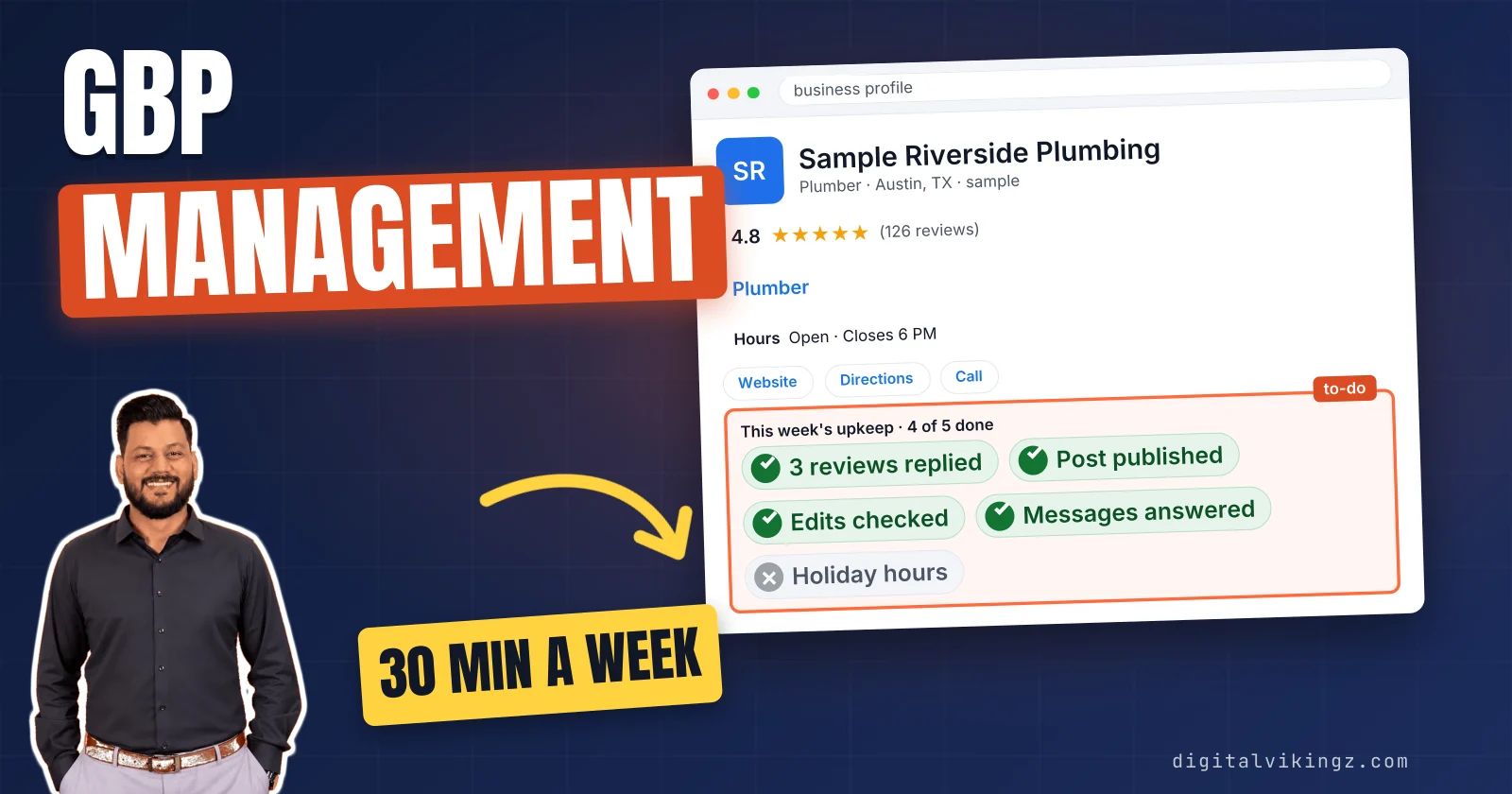
Google Business Profile management is the recurring upkeep of a listing after setup: hours, categories, posts, photos, review replies, messages, edit checks and performance reading. Google charges nothing for the profile, so the cost of management is the owner's time or a provider's fee. We advise budgeting about 30 minutes a week for one location when doing it yourself.
Our Daily Google Posts packages cost $99, $179 or $299 per listing per month. The full Local SEO and Google Business Profile service is a written quote after the strategy call.
Doing it yourself is enough for one location with a steady routine; a manager earns the fee when the tasks go undone. The right provider works as a manager on the profile, reports its numbers every month and never promises a ranking.
What is Google Business Profile management?
Google Business Profile management is the recurring upkeep of a listing after setup: hours, categories, posts, photos, review replies, messages, edit checks and performance reading. Google says Business Profile "is a tool that can be used at no charge," but "third parties often charge a fee to manage your profile."
Setup and optimization fix every field once, while management repeats the same tasks on a weekly, monthly and seasonal cadence. The owner can do the work in Google's free tool, or invite a hired manager to handle the profile. Agencies also call the work GBP management or profile upkeep.
The work splits into eight recurring tasks.
What does Google Business Profile management include?
Google Business Profile management includes eight recurring tasks that keep the listing accurate, active and answered. Google says third parties "might offer services to keep your profile up-to-date, provide you with customer insights, answer your questions, and respond to reviews."
The eight recurring tasks on a Google Business Profile are listed below:
- Business details and hours: name, phone, website, regular hours and holiday hours kept current on the profile.
- Categories and services: the primary category, up to 9 more categories Google allows, and the services list, checked against the work the business does.
- Posts: updates, offers and events published on the profile on a set cadence.
- Photos: new job, team and premises photos added to the listing each month.
- Review replies: a reply to every new Google review on the profile, positive or negative.
- Messages and questions: customer messages by text message or WhatsApp and questions in the Q&A section, answered on the profile where Google offers each channel.
- Edit monitoring: suggested edits, Google updates and collected info checked under "Edit profile > Collected info", because Google reviews changes before publication on the listing.
- Performance reading: calls, direction requests, website clicks and views read from the profile each month.
Each task repeats on its own schedule.
How often does each Google Business Profile task repeat?
Each Google Business Profile task repeats on a cadence: replies and messages weekly, posts weekly or daily, photos and performance monthly, hours and categories seasonally. The cadence below follows our Local SEO and Google Business Profile service, which posts weekly, answers every review and reports monthly.
The cadence of each Google Business Profile task for one location is shown below:
| Task | Cadence | What triggers an extra check |
|---|---|---|
| Business details and hours | When anything changes; holiday hours each season | Thanksgiving to New Year, a new phone number |
| Categories and services | Every quarter | A new service or a lost one |
| Posts | Weekly (daily on a posting plan) | A seasonal offer or event |
| Photos | Monthly | A finished job worth showing |
| Review replies | Weekly, within the week of the review | A negative review |
| Messages and questions | Weekly | A new message or question |
| Edit monitoring | Weekly | A Google update notice |
| Performance reading | Monthly | A drop in calls |
Business names, towns and numbers in the figures are samples, not client data.
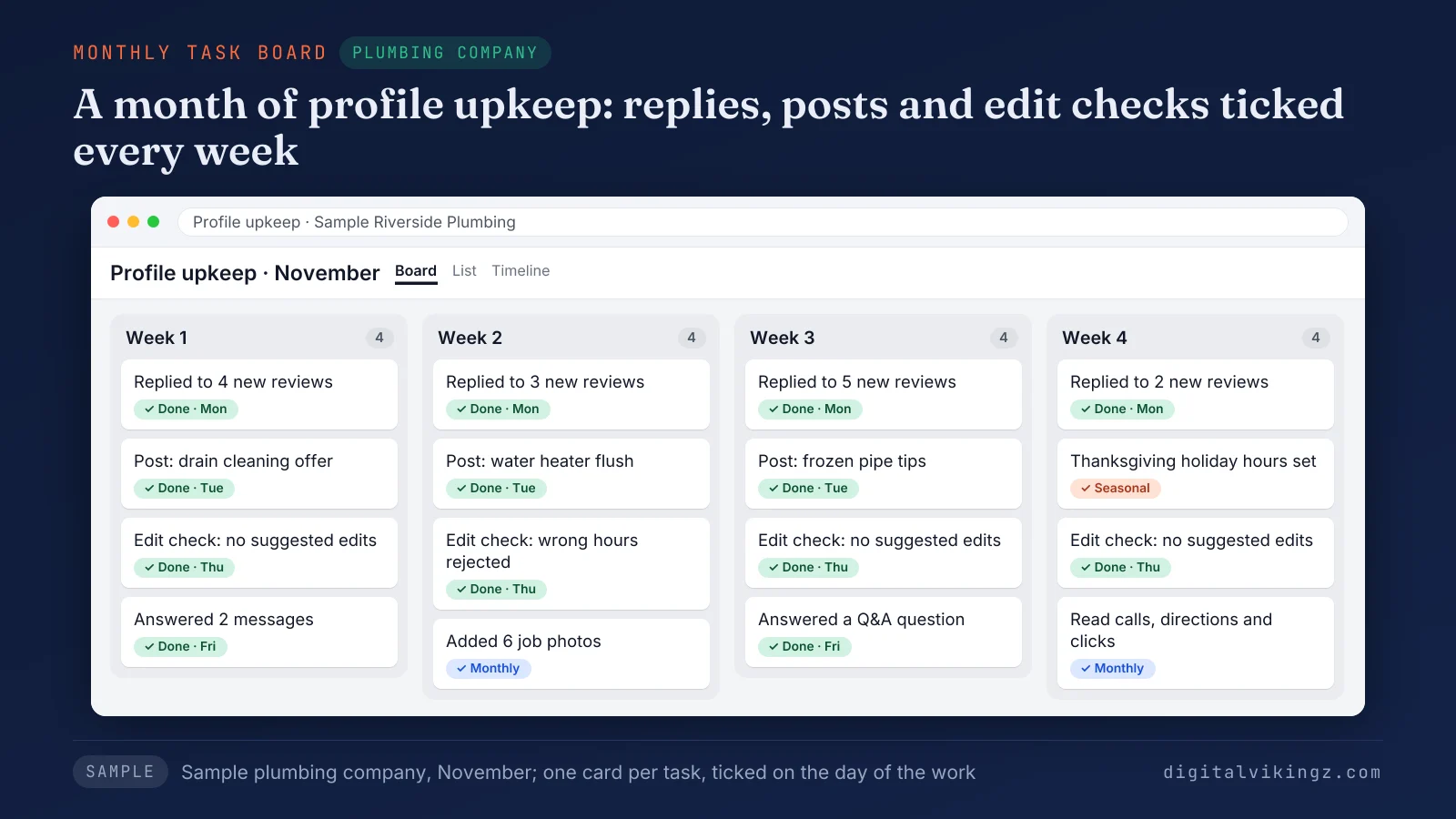
Figure 1 shows a month of tasks for a sample plumbing company, with each recurring task ticked on the day of the work. Our posts guide covers what to post on a Google Business Profile and how often.
What is not part of Google Business Profile management?
Google Business Profile management does not include the one-time setup, the website, paid ads or a promised Maps position.
The jobs that sit outside profile management are listed below:
- Setup and optimization: Google Business Profile optimization sets every field correctly once, and management keeps those fields current afterwards.
- Website and location pages: service pages, location pages and directory listings belong to wider local SEO work.
- Paid ads: Google Ads and Local Services Ads are paid placements with their own budget.
- Rankings: no provider controls the order of businesses on Google Maps.
Google Business Profile optimization is the one-time work of choosing categories, writing the description and filling every field. The field-by-field method belongs to a Google Business Profile optimization guide, separate from recurring upkeep.
A fixed scope makes the cost of management the next question.
How much does Google Business Profile management cost?
Google Business Profile management costs no money when owners do the work; our Daily Google Posts packages cost $99, $179 or $299 per listing monthly. The fee pays for time on the task list, since the profile stays free.
The three Daily Google Posts packages, priced per Google listing per month, are listed below:
- Starter, $99 a month: 3 posts a week, about 12 a month, each with a picture.
- Daily, $179 a month: 1 post every day, about 30 a month, with approval on request.
- Daily + Profile Care, $299 a month: everything in Daily, plus review replies written for your approval. Views, calls, direction requests and website clicks are tracked monthly to guide profile updates.
The packages carry no setup fee, and the first post goes live on the listing free before any payment. The Local SEO and Google Business Profile service adds location pages, directory details and a monthly report. The price is a written quote after the strategy call.
Daily Google Posts serves US plumbers, HVAC companies, roofers, electricians and cleaners. Our AI agent writes each post from the business's website.
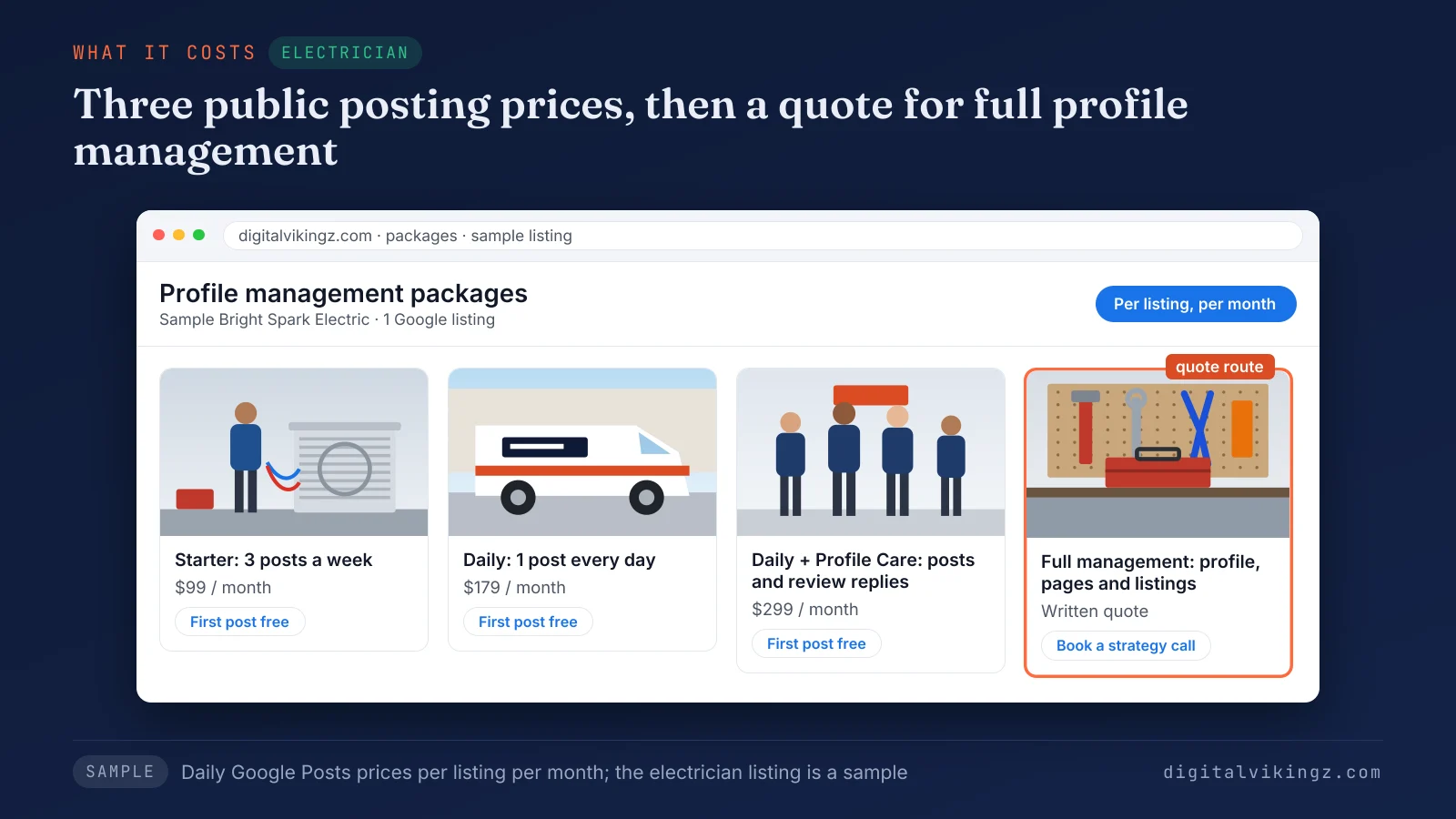
Figure 2 sets the three public package prices next to the quote route, so the price difference reads as a difference in tasks. Scope, listing count and profile condition change the price.
What changes the price of Google Business Profile management?
The price of Google Business Profile management changes with the scope of tasks, the number of listings and the condition of each profile.
The five factors that change the price of profile upkeep are listed below:
- Scope of tasks: posting alone costs less than posting plus replies and profile updates, and both cost less than full local SEO work.
- Number of listings: each listing is priced on its own, and Daily Google Posts prices 10 or more listings on a call.
- Profile condition: a suspended, duplicated or agency-held listing needs hours of Google support work before routine upkeep starts.
- Posting frequency: 3 posts a week and 1 post a day sit at different Daily Google Posts prices.
- Reporting depth: a monthly report with Search Console data takes more work than a post log.
Full local SEO budgets cover pages, directories and links on top of the profile, the subject of local SEO pricing.
Money is one cost; the owner's time is the other.
How long does managing a Google Business Profile yourself take?
We advise budgeting about 30 minutes a week, or around two hours a month, to manage one Google Business Profile yourself. Seasons add time: holiday hours from Thanksgiving to New Year, storm season for roofers and heating season for HVAC companies.
A sample week of Google Business Profile tasks for one roofing company is shown below:
| Task | Owner time doing it yourself | Owner time with a done-for-you service |
|---|---|---|
| Review replies | 8 minutes | 2 minutes to approve |
| One post with a photo | 10 minutes | 0 minutes |
| New photos | 4 minutes | 0 minutes |
| Messages and questions | 4 minutes | 4 minutes |
| Edit check | 2 minutes | 0 minutes |
| Performance glance | 2 minutes | 0 minutes (monthly report) |
| Total | 30 minutes | 6 minutes |
The minutes are a sample built from our 30-minute planning figure, not a measured client week.
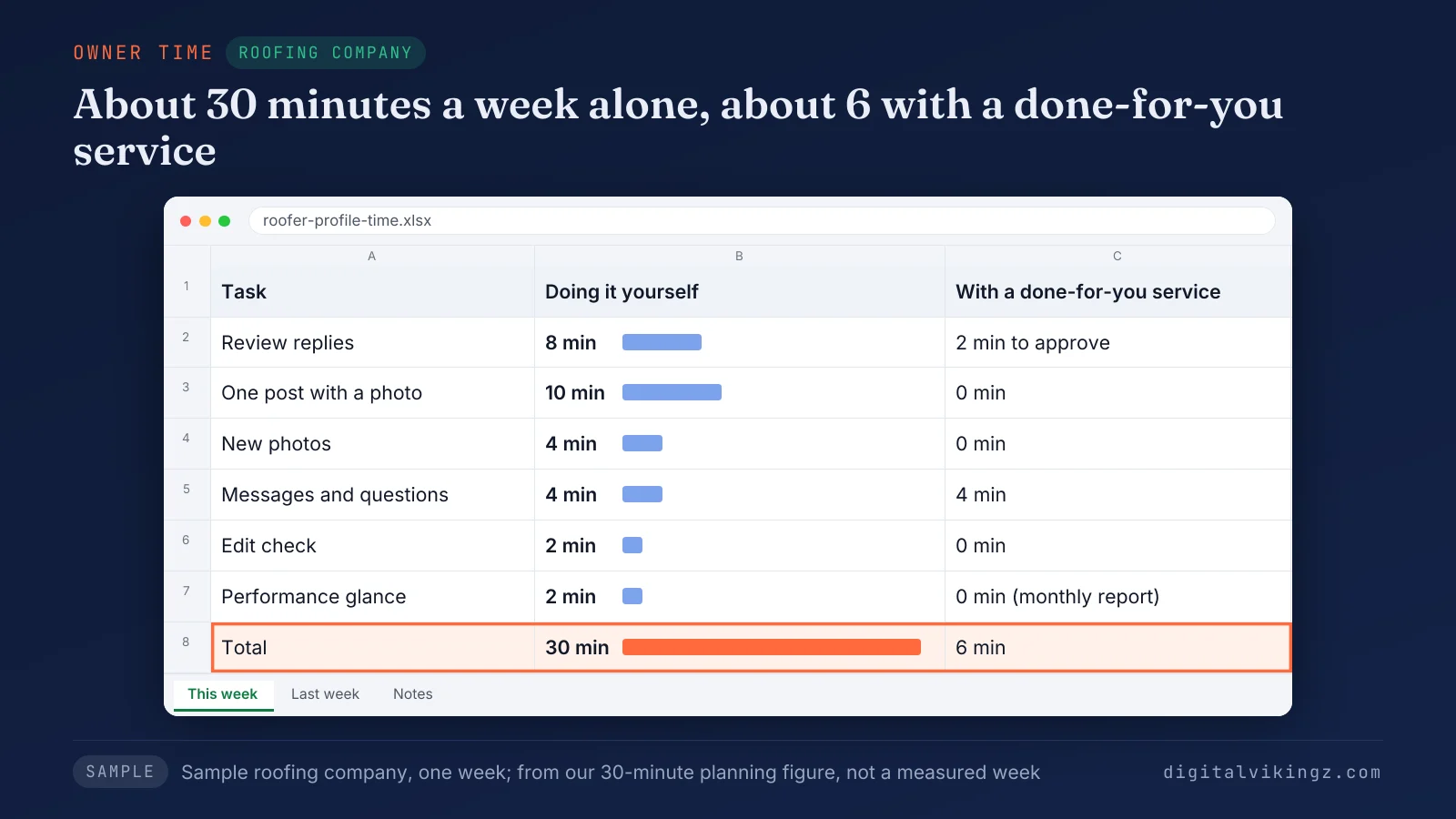
Figure 3 puts the same week side by side, so the owner's remaining minutes show which tasks a service removes. Thirty minutes a week decides the hiring question for most owners.
Should you hire someone to manage your Google Business Profile?
Hiring someone to manage your Google Business Profile makes sense when weekly tasks go undone; an owner who keeps the routine can manage alone. Google itself notes that "running a business often limits the time to establish and maintain your online presence."
The profile stays free in both cases, so the choice is between the owner's minutes and a provider's fee. Unanswered reviews, months-old posts and wrong holiday hours are the signs of a stopped routine.
Four ways to manage the profile sit between doing everything yourself and handing everything over.
How do the four ways to manage a Google Business Profile compare?
A Google Business Profile can be managed four ways: doing it yourself, a software tool, a done-for-you posting service or a full management service.
The four ways to manage a Google Business Profile compare on cost, owner time and fit as shown below:
| Route | Money cost | Owner time each week | Best fit | Weak point |
|---|---|---|---|---|
| Yourself in Google's free tool | None | About 30 minutes | One location, steady routine | Tasks slip in busy weeks |
| Software tool | A monthly subscription | Less posting time; replies and checks remain | Several locations with an in-house person | Someone still has to write and check |
| Done-for-you posting (our Daily Google Posts) | $99, $179 or $299 per listing a month | Approvals only, if wanted | US home-service trades with an active website | Covers posts, plus replies and profile updates on Daily + Profile Care; no location pages or directories |
| Full management service (our Local SEO and Google Business Profile service) | A written quote after the strategy call | Approvals and a monthly report | Owners who want the profile, pages and listings handled | Costs more and starts with a strategy call |
Dental clinics and med spas fit the full service route, because Daily Google Posts serves home-service trades. A software tool schedules posts and collects reviews in one dashboard, while a person still writes and checks each item. The choice between Google Business Profile management tools is a separate decision from hiring a person.
When is doing it yourself enough?
Doing Google Business Profile management yourself is enough when one location, a steady routine and a weekly half hour come together.
The signs that doing the profile work yourself is enough are listed below:
- One location: a single listing, with hours that rarely change.
- A weekly half hour: about 30 minutes the owner keeps free every week.
- A review flow the owner can answer: a handful of new reviews a week, each one replied to.
- A clean profile: no open suspension, duplicate listing or ownership dispute on the Google Business Profile.
- Comfort with edits: the owner checks suggested edits before Google applies the changes.
An owner who does the work also asks every customer for a review. Our guide shows how to get more Google reviews without breaking Google's rules by asking every customer the same way.
When does a Google Business Profile manager earn the fee?
A Google Business Profile manager earns the fee when the owner's time runs out or an event breaks the routine.
The situations in which a Google Business Profile manager earns the fee are listed below:
- Weeks of backlog: reviews unanswered and posts months old.
- Several locations: each listing needs its own hours, posts and replies.
- Seasonal rush: holiday hours from Thanksgiving to New Year, storm season and heating season.
- Unwanted edits: Google updates or suggested edits that change hours or categories on the profile.
- A verification request: Google asks the owner to verify the profile again before changes go through.
- A suspension: the profile disappears from Google, and recovery runs through Google's reinstatement request.
Careful edits to name, address, phone and hours lower the risk of a suspension. The causes and the reinstatement steps are covered in our guide on why a Google Business Profile gets suspended.
How do you choose a Google Business Profile management provider?
The right Google Business Profile management provider publishes its task list, reports your profile's numbers each month, works as a manager and promises no ranking. Google publishes its own checklist for owners who work with third parties.
The six checks Google suggests before hiring a provider are listed below:
- Ask about experience: Google suggests the question "Have they managed Business Profiles before?"
- Ask for performance numbers: Google tells owners, "You have the right to know your profile's performance."
- Reject ranking promises: a provider that "Guarantees placement on Google" is a warning sign on Google's list.
- Check the employer: a representative who "Claims to work for Google" should email from an "@google.com" address.
- Get the agreement in writing: Google advises owners to "get an official copy of your agreement that clearly details the services and their costs."
- Use one provider at a time: Google's advice reads "Work with one third party at a time."
A provider whose monthly list still sells Business Profile chat as a standard task works from an outdated checklist. Google's help page now describes messaging by text message or WhatsApp, with chat options in select regions only.
Two questions decide most provider choices: access and rankings.
Should a Google Business Profile provider get your login?
A Google Business Profile provider should not get your login; the owner invites the provider as a manager instead. Google's help page says that "each user needs their own Google Account" so no password is shared.
Managers have "mostly the same access to the profile as owners," except that "they can't add or remove users or remove the profile." The owner keeps control of access and can remove the manager at any time.
The full rules for Google Business Profile owners and managers also cover primary ownership and access requests.
Can a provider guarantee a Google Maps ranking?
No provider is able to guarantee a Google Maps ranking, and Google warns owners about any third party that promises one. Google's help page states that "Third parties can't promise nor directly influence your business's ranking on Google Search or Maps through any special means."
Management keeps the Google Business Profile accurate, complete and active, which Google's local ranking guidance rewards over time. The factors that profile upkeep supports are explained in our guide on how to rank higher on Google Maps.
How does Digital Vikingz manage Google Business Profiles?
Digital Vikingz manages profiles two ways: our AI agent posts through Daily Google Posts; the Local SEO and Google Business Profile service covers every task. Both routes work with manager access, so the owner keeps ownership of the profile.
Our AI agent runs on our own Google listing before the agent runs on a client's. The agent writes only from facts on the business's own website. A person steps in when the agent is unable to post or a fact needs checking with the owner.
The limits of our two profile management routes are listed below:
- Trades served: Daily Google Posts covers US plumbers, HVAC companies, roofers, electricians and cleaners only.
- Posting rate: Starter posts 3 times a week, not daily.
- Results: we promise neither rankings nor a number of calls.
- Review requests: the client's team sends each request after a finished job, using the message and timing we write.
- Website facts: a website with few service details gives the agent less to write from.
Owners who want every task handled can book a strategy call for a written quote on our Local SEO and Google Business Profile service.
What should a monthly Google Business Profile report show?
A monthly Google Business Profile report shows calls, direction requests, website clicks and views, next to the tasks done that month. Google tells owners to "Spend time each month to review your profile's performance" when a third party manages the profile.
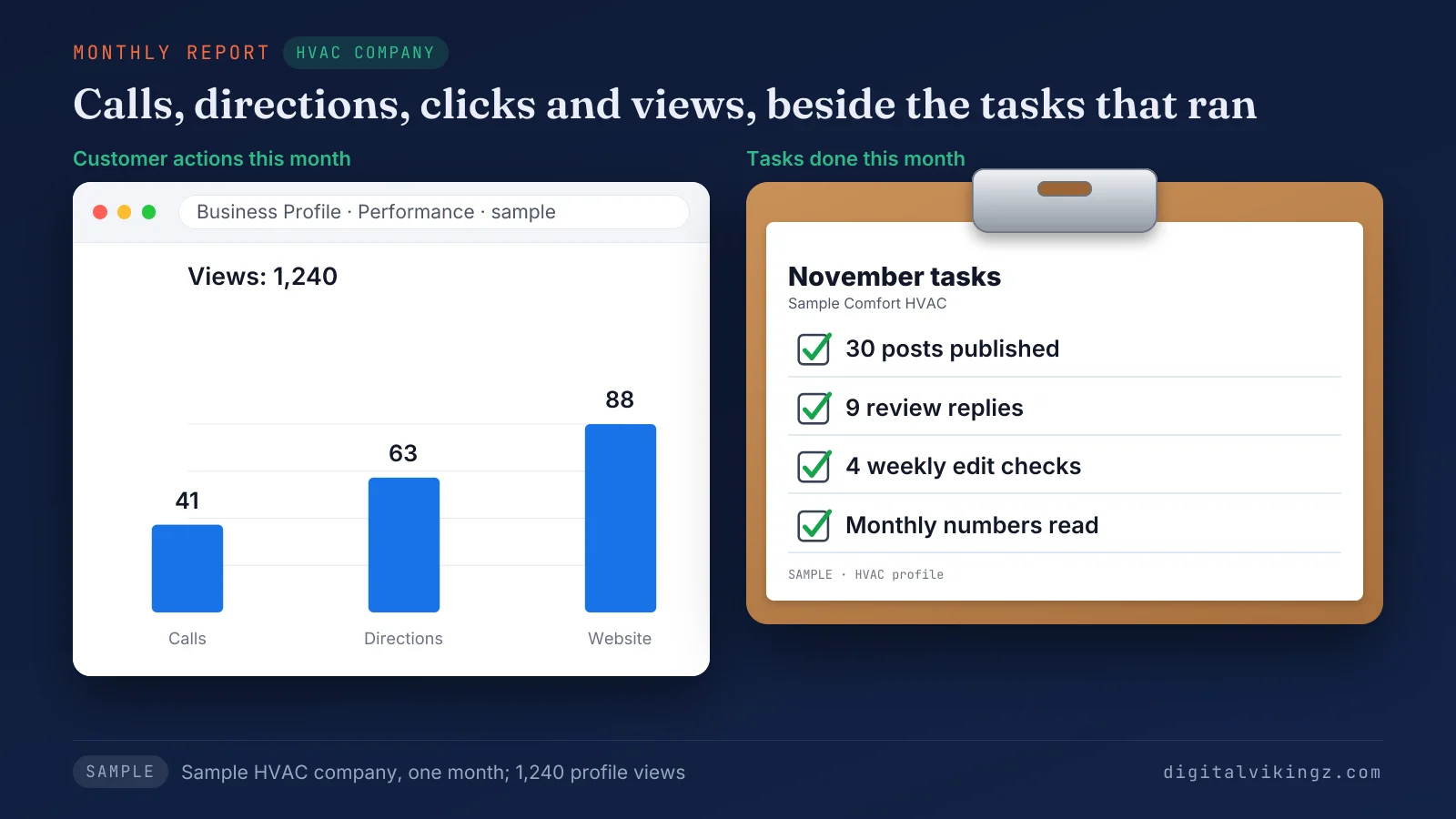
Figure 4 shows the four numbers for a sample HVAC company in one month, with the tasks that ran beside them. The sample month reads 41 calls, 63 direction requests, 88 website clicks and 1,240 views, beside 30 posts and 9 review replies.
A report that lists only rankings, with no calls or clicks, leaves the owner unable to judge the work. A fall in calls while views hold is the first alarm. A separate checklist covers what to check when Google Business Profile calls drop.
What each metric counts is set out in the guide to the Google Business Profile Performance report.
Does Google Business Profile management help with AI assistant answers?
Google Business Profile management can support AI assistant answers, because assistants read business profiles alongside websites and review sites. A current profile with matching hours, services and replies gives an assistant consistent facts to repeat.
No provider controls which business an assistant names. The sources assistants read are set out in our guide on how AI assistants choose which local business to recommend.
What do you need before handing over Google Business Profile management?
Handing over Google Business Profile management needs owner access, a manager invite, current business facts and an approval preference.
The steps to prepare a Google Business Profile for a new manager are listed below:
- Confirm the owner: check that you are an owner of the profile and who the primary owner is.
- Invite the manager: add the provider's Google Account as a manager under People and access, about two minutes, says our Daily Google Posts page.
- Update the website facts: correct hours, holiday hours, services and towns on the website, because posts and profile updates draw on those facts.
- Check the primary category: confirm the primary category matches the main service before upkeep starts.
- Choose an approval rule: decide whether posts and review replies come to you for approval first.
The primary category is the one field worth verifying before handover, so match the category to the main service the business sells.
Google Business Profile management questions
Is posting the same as Google Business Profile management?
Posting is one of the eight management tasks on a Google Business Profile, not the whole job. Replies, hours, edit checks and performance reading still need doing on the profile.
Can a management service reply to my Google reviews?
A management service can reply to your Google reviews once you add the service as a manager on your Google Business Profile. Managers handle daily work such as replies, and on our Daily + Profile Care package the replies come to you for approval first.
Can I remove a manager from my Google Business Profile?
An owner can remove a manager from a Google Business Profile at any time. Google states that "Only profile owners can control who has access and can update permissions at any time."
Does Google Business Profile still have Q&A and chat?
Google's help pages still describe a Google Business Profile Q&A section and messaging by text message or WhatsApp, with chat options in select regions only. Attribute questions on the profile are answered with Yes, No or Skip, according to the same help pages.
Can one provider manage several Google Business Profiles?
One provider can manage several Google Business Profiles, with each listing priced and reported on its own. Our Daily Google Posts page prices 10 or more listings per listing on a call.
Is Google My Business management the same thing?
Google My Business management is the old name for Google Business Profile management; Google renamed the product in November 2021.
Does a managed Google Business Profile still get suspended?
A managed Google Business Profile can still be suspended, because Google applies its guidelines to every profile. Careful edits lower the risk, and recovery runs through Google's reinstatement request.
Where should you start with Google Business Profile management?
Start Google Business Profile management from the task list: keep the weekly half hour yourself, hand posts to an AI agent, or hand over everything. Digital Vikingz runs the second and third routes with manager access, so the profile stays yours. The first post goes live free, and the preview takes about 20 seconds, according to the Daily Google Posts page.
See today's post for your business with the free preview of Daily Google Posts.
