 Digital Vikingz
Google Business Profile ownership is the set of user roles that decides which Google Accounts control a Business Profile and which only edit the profile. Owners can add and remove users and remove the profile, while managers do the other tasks, including edits, posts, photos and review replies. One primary owner holds the right to transfer primary ownership.
An owner adds a user from People and access with Add, an email address, a choice of Owner or Manager, and Invite. A business locked out by someone else can request access at business.google.com/add, and the current owner has 3 days to respond.
Ownership stays safe when two people from the business hold owner roles and every outside party works as a manager.
What is Google Business Profile ownership?
Google Business Profile ownership is the set of user roles that decides which Google Accounts control a Business Profile and which only edit the profile. Google names two roles, owners and managers, and gives every profile one primary owner. Older guides call the product Google My Business, but the roles work the same way under the current name.
Owners often say an agency "has the login". Google ties each role to a person's own Google Account instead of a shared login.
The owner role decides who can invite, remove or replace everyone else. The business itself should therefore hold the owner role. Ownership comes before every other field, which the guide on how to optimize a Google Business Profile step by step covers in order.
What can an owner do that a manager cannot?
Owners can add and remove users and remove the Business Profile, while managers can do the other tasks, including edits, posts, photos and review replies. Google says managers "have mostly the same access to the profile as owners. The only exception is they can’t add or remove users or remove the profile."
The table compares what a primary owner, an owner and a manager can do on one Business Profile.
| Task | Primary owner | Owner | Manager |
|---|---|---|---|
| Add and remove users | Yes | Yes | No |
| Remove the Business Profile | Yes | Yes | No |
| Transfer primary ownership | Yes | No | No |
| Edit name, category, hours, address and phone | Yes | Yes | Yes |
| Edit services and attributes | Yes | Yes | Yes |
| Create and publish posts | Yes | Yes | Yes |
| Add photos, logos and products | Yes | Yes | Yes |
| Respond to reviews and use Messaging | Yes | Yes | Yes |
| Remove themselves from the profile | After a transfer | Yes | Yes |
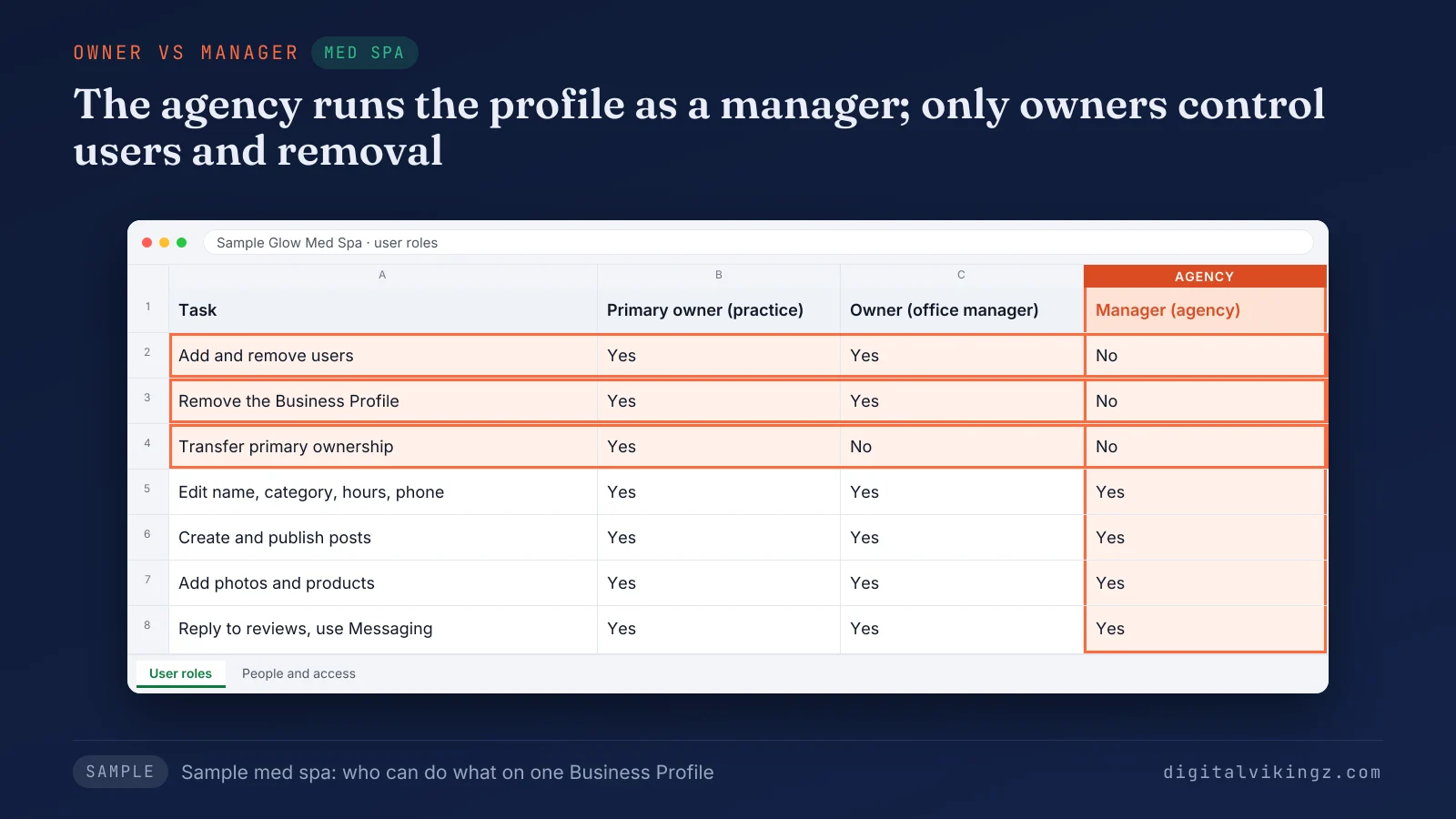
The sample med spa keeps the marketing agency as a manager. The agency lacks only user control, profile removal and the transfer right. Managers handle the Google Business Profile posts that keep a listing active, so a posting team never needs the owner role.
What is a primary owner?
A primary owner is the one owner on a Business Profile who can transfer primary ownership, the top role among several possible owners. Google states: "A Business Profile can have multiple owners but only one primary owner." Google adds: "Only the primary owner can transfer primary ownership."
Google uses the word co-owner once, in the note "Co Owners upgrade themselves to Primary Owners." Google lists no separate co-owner role, so a co-owner is an owner. The first job for any owner is to find out who holds each role today.
How do you see who owns a Google Business Profile?
Owners and managers see every user on the Business Profile under More, then Business Profile settings, then People and access, with each person's role. Google states: "Users in the account can find names and email addresses of the owners and managers." The People and access list is the working record of Google Business Profile ownership.
Google notes that a business owner who finds no "Claim this business" or "Own this business" button might already be the owner. The owner role may sit on another Google Account the business has forgotten.
Sterling Sky reports that the request screen can show an email address for the account holding the profile. A recognized address means the business should recover that account first.
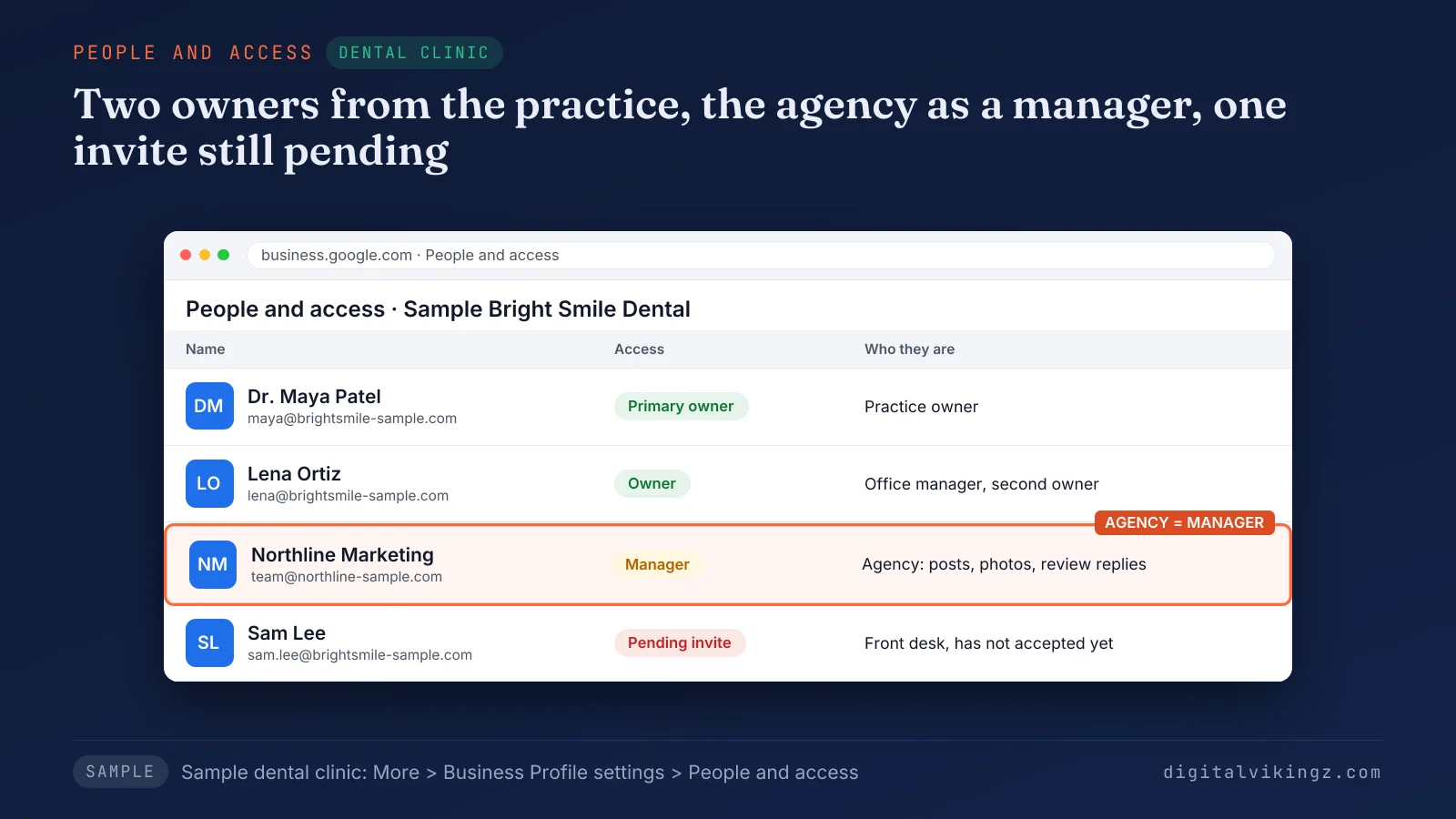
The sample dental clinic shows the setup we recommend: two owners from the practice and the agency as a manager. A business that sees a gap in the list adds the missing person.
How do you add an owner or manager to a Google Business Profile?
An owner adds a user from People and access by selecting Add, entering the person's email address, choosing Owner or Manager, and selecting Invite.
Google lists six steps to add an owner or manager:
- Go to the Business Profile.
- Select More, then Business Profile settings, then People and access.
- Select Add at the top left.
- Enter the person's email address.
- Select Owner or Manager under Access.
- Select Invite.
Google says: "To access and manage Business Profiles without the need to share your password, each user needs their own Google Account." Only an owner can send the invitation, so a manager who needs a colleague added asks an owner. The role chosen at step 5 matters most for people outside the business.
Which role should an agency, employee or tool get?
Agencies, employees and posting or booking tools should get the manager role, because managers do the profile work while owners control who has access. Google says: "Any individual or company that manages business information for a Business Profile that they don’t own is considered an authorized representative."
Google names a third-party SEO company and a scheduling or booking provider as examples. Google also asks representatives to encourage the business owner to "own the Business Profile, and add authorized representatives as managers."
An office manager who runs the profile day to day can hold the owner role when the business owner wants a second owner on staff. Who should run the profile and what that costs is set out in the guide to Google Business Profile management.
Why has a manager invitation not arrived?
A manager invitation stays under Pending in People and access until the invitee accepts the invitation from the email sent to that address. Google says: "Invited users can accept the invite and become users right away."
Google lets the owner select Cancel invitation under the PENDING section of the Business Profile. The owner then checks that the address matches the Google Account the person signs in with, and sends a fresh invitation. A manager can post from the first day, because the 7-day limit covers only removal, deletion and transfer tasks.
How do you transfer primary ownership of a Google Business Profile?
The primary owner transfers primary ownership in People and access by selecting another user, selecting Edit next to Access, choosing Primary owner and saving. Google states: "A profile must have at least one other owner or manager to transfer primary owner access to."
Google lists five steps to transfer primary ownership:
- Go to the Business Profile.
- Select More, then Business Profile settings, then People and access.
- Select the person who will become primary owner.
- Select Edit next to Access.
- Select Primary owner, then Save.
The new primary owner must already be on the profile. A buyer or a new owner therefore joins first through Add and Invite.
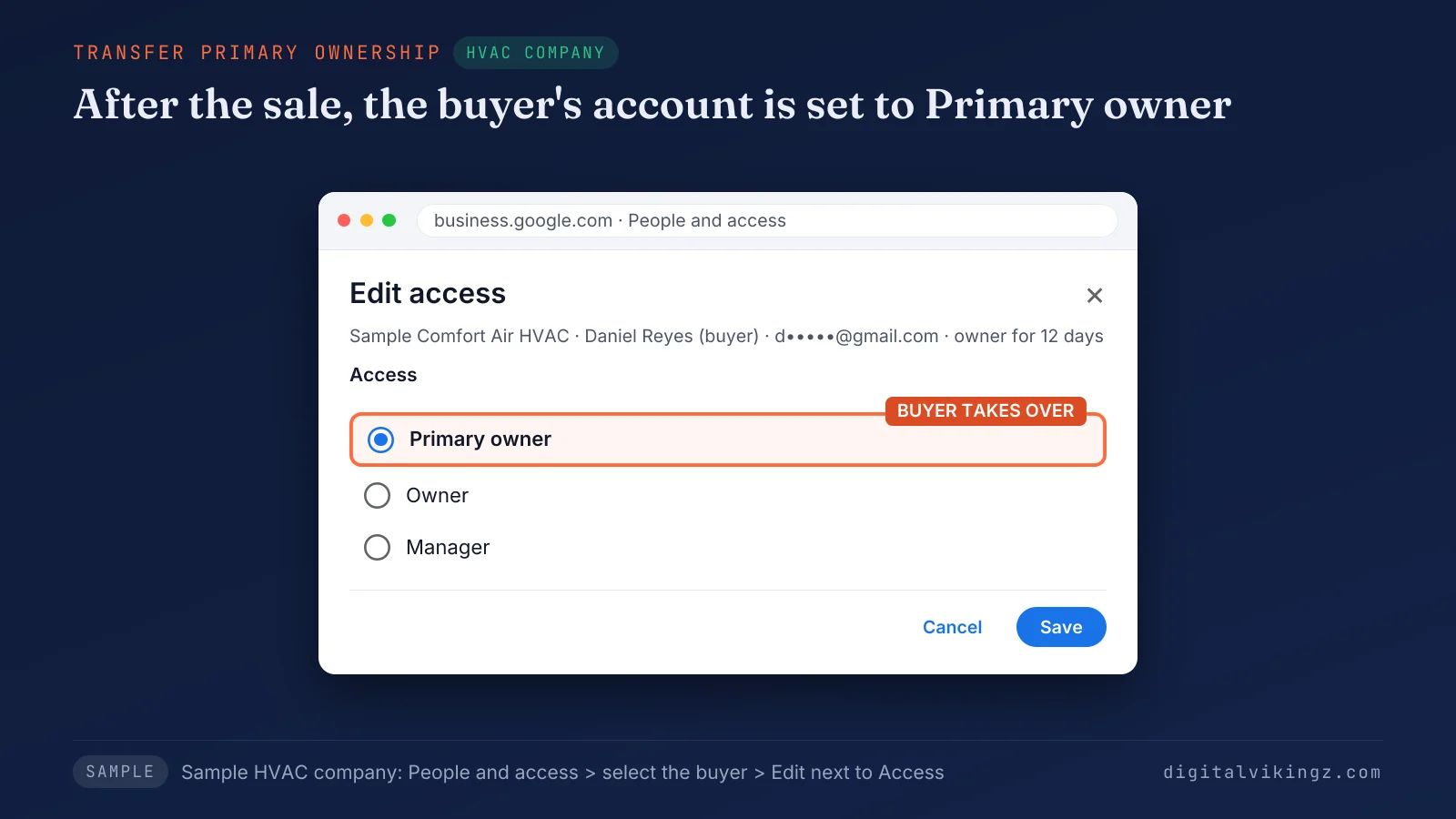
The sample HVAC company selects the buyer's account, already an owner, and sets the role to Primary owner. A business sale needs the transfer in a set order.
How should ownership move when a business is sold?
A seller should transfer primary ownership of the Business Profile to the buyer as part of the sale, so the reviews stay with the business.
Google says: "If you want to transfer ownership of your business, make sure you’re transferring primary ownership of your Business Profile to the new owner." Google adds that the transfer keeps the business info, including reviews.
The order that protects a sale has four steps:
- Add the buyer's Google Account as an owner.
- Transfer primary ownership to the buyer.
- Remove the seller's staff and old agencies the buyer does not keep.
- Confirm the buyer sees the profile under People and access.
Steady Demand advises transferring access before the transaction closes. A retiring owner selling an HVAC company, the sample in the transfer figure, completes the transfer at closing. The new owner keeps the reviews that support the seasonal searches covered in HVAC SEO.
What does the 7-day limit block for new owners and managers?
A new owner or manager waits 7 days before deleting the profile, removing other users or becoming primary owner.
Google blocks three tasks on a Business Profile in a new user's first 7 days:
- Deletion: deleting or undeleting the profile.
- Removal: removing other owners or managers.
- Transfer: making themselves or someone else the primary owner.
Google adds: "If an existing owner tries to make someone else the primary owner in their first 7 days, they’ll get an error." Some guides tell readers to wait 7 days before every transfer, while others call the transfer immediate. Google's wording ties the error to the person within their own first 7 days.
A transfer error is the signal to check whether either person joined the profile less than 7 days earlier.
How do you remove an owner or manager from a Google Business Profile?
An owner removes a user from People and access by selecting the person and choosing Remove person.
Google lists four steps to remove another user:
- Go to the Business Profile.
- Select More, then Business Profile settings, then People and access.
- Select the person to remove.
- Select Remove person.
A user who leaves on their own selects their own name, then Stop managing, then Confirm. Google states: "Managers can remove themselves from a profile." Google also states: "If you're the primary owner, you can't remove yourself until after you transfer primary ownership to someone else."
Google emails the removed user. The removed user's review replies, posts and comments stay on the profile. A sample dental clinic whose office manager has left removes the old account the same week and adds the replacement.
How do you request access when someone else owns the profile?
A business owner requests access at business.google.com/add by choosing the business, selecting Request Access, completing the form and submitting the request to the current owner. Google Business Profile Help names the flow request ownership, and the button says Request Access.
Google lists six steps to request access to a storefront or hybrid business:
- Go to business.google.com/add.
- Enter the name and address of the business.
- Choose the business from the list.
- Read the message "Someone else may manage this Business Profile."
- Select Request Access and fill out the form.
- Select Submit.
Google states: "The current profile owner is then notified by email and has 3 days to respond." An approved request brings an approval email, and the requester can then manage the profile.
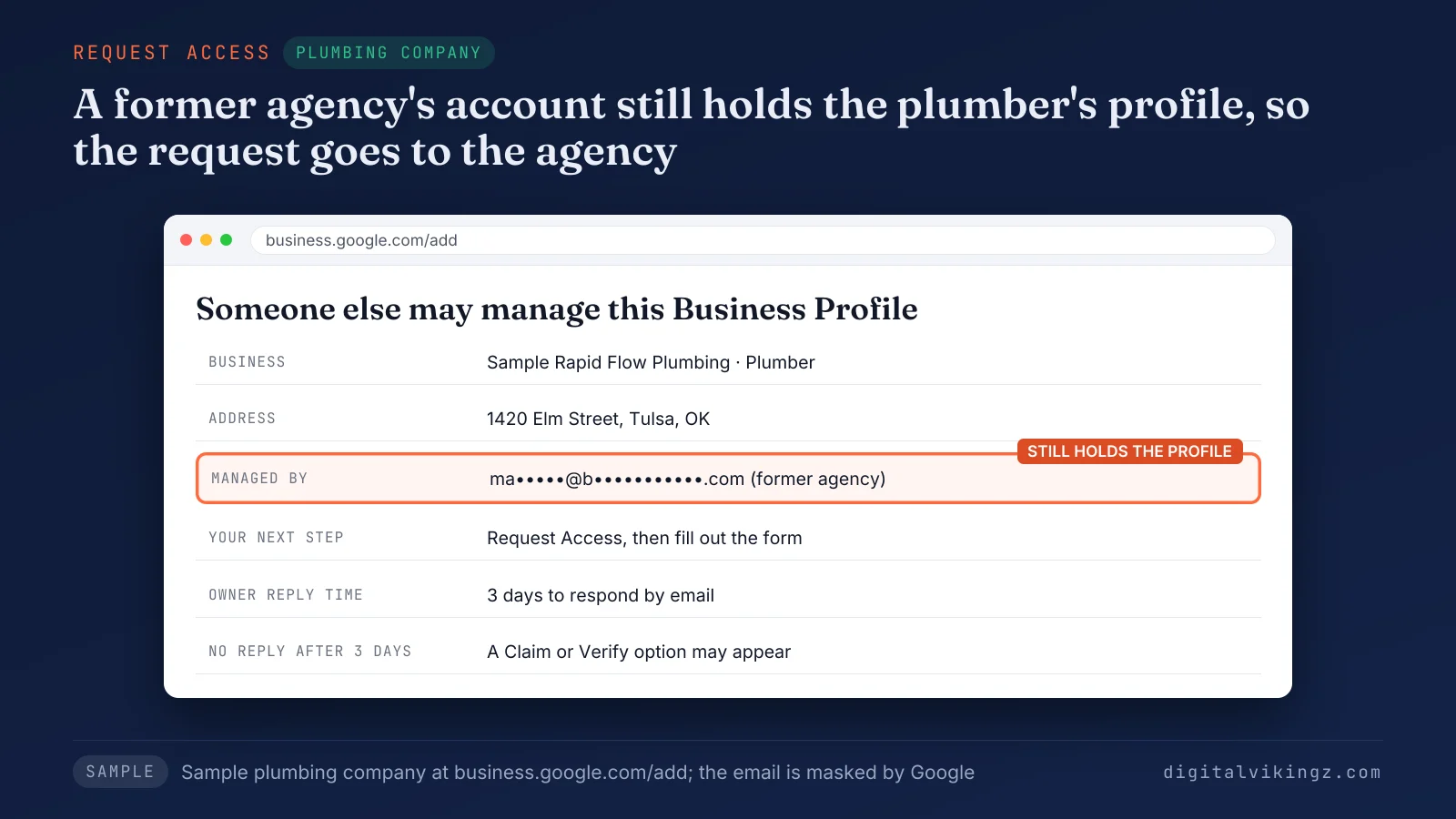
The masked email in the sample belongs to the plumbing company's former marketing agency, so the agency receives the request. A profile that nobody has claimed shows a Claim this business option instead, which is a separate process. An unclaimed profile follows the claim route, which ends with the steps to verify a Google Business Profile.
What happens if the owner does not respond within 3 days?
Google may offer a Claim or Verify option after 3 days without a response, though the claim option is not always available. Google states: "If you don’t get a response after 3 days, you may have the option to claim the profile."
The option appears through View request in the confirmation email. It can also appear as a Claim or Verify button after the requester signs in to the Business Profile.
Ownership never passes automatically, so the requester follows the verification steps Google shows. We advise keeping the confirmation email, because the View request link sits there.
What can you do when an access request is denied?
A denied requester can still suggest edits to the profile and can appeal the decision, as Google states in the denial process. Google says the requester "can still suggest an edit to the profile. You can also try to appeal the decision."
Google states: "You can have only one Business Profile for each business." A second profile for the same business is a duplicate, and a duplicate does not show on Google Search or Maps. Fixing a second listing is a separate job, set out in the guide to duplicate Google Business Profile listings.
How does a service-area business request access?
A service-area business without a shop or office requests access by contacting Google Business Profile support and entering Transfer ownership of listing. Google says to enter "Transfer ownership of listing" in the "Tell us what we can help with" field.
Forum threads report that service-area profiles, which hide the address, often do not appear in the business.google.com/add search. Thryv reports an "Owner Conflict" dialog with Request Access during verification, though Google's support route remains the official one. Google adds that accounts verified in bulk can request ownership through the bulk upload spreadsheet.
How do you recover a profile held by a former employee or agency?
A business recovers Google Business Profile ownership from a former employee or agency by asking in writing, then requesting access, then contacting support. Owners often describe the problem as "my agency owns it". Google's terms describe the same problem as an owner role on another Google Account.
The table matches each recovery situation with the first step and the next step if the first fails.
| Who holds the profile | First step | Next step if that fails |
|---|---|---|
| Former employee, reachable | Ask in writing to add the business owner's account and transfer primary ownership | Request access through Google |
| Former employee, unreachable | Request access through Google | Claim or Verify after 3 days, where Google offers the option |
| Old agency or web designer | Ask in writing, quoting Google's duty for authorized representatives | Request access, then contact Google support |
| Previous owner of a bought business | Ask the seller to transfer primary ownership | Request access, then contact Google support |
| The business's own old Google Account | Use Google's Accounts troubleshooter | Request access from a new account |
Every route keeps the existing profile, because the reviews and history live on that profile. Forum tips such as a Place ID request link or a second profile are not Google routes. A second profile also breaks Google's one-profile rule.
What if your agency owns your Google Business Profile?
An agency that holds the owner role on your Business Profile must hand ownership back, because Google requires authorized representatives to transfer ownership on request. Google says representatives must "always transfer Business Profile ownership to the business owner immediately upon request".
Four steps move ownership back from an agency:
- Check People and access for the agency's accounts and roles.
- Ask the agency in writing to transfer primary ownership to the business owner's account.
- Request access through Google when the agency does not reply.
- Report the agency to Google through the third-party policy form when the agency refuses.
Google states: "Failure to adhere to these policies may result in a suspension for the Business Profile and/or Google Account." The business then sets roles so the same lockout does not happen again.
How do you keep Google Business Profile ownership safe?
Google Business Profile ownership stays safe when two people from the business hold owner roles and every outside party works from the manager role. Digital Vikingz recommends five checks as agency advice, built on Google's role rules.
Five checks keep ownership with the business:
- Two owners: the business owner as primary owner and one trusted person from the business as a second owner.
- Business accounts: owner roles on Google Accounts the business controls, never on an agency or freelancer account.
- Managers for outsiders: the manager role for every agency, freelancer and tool.
- 2-Step Verification: turned on for every owner account.
- Access review: People and access checked after every staff change or agency switch.
The primary owner should be the person who owns the company, because only the primary owner can hand that role on. An owner role on an agency account leaves every user change dependent on that agency. A departed employee keeps owner rights until another owner removes the account.
Steady Demand also advises at least two trusted owners and 2-Step Verification for every owner. We also suggest a full access review once a year.
Outside teams work the same way, including ours on Local SEO and Google Business Profile Optimization run from the manager role.
How should an owner answer an access request?
An owner who receives an access request should approve a person the business has authorized and deny anyone else within the 3-day window.
Three kinds of request need three answers:
- Known staff member or new agency: approve, then set the manager role unless the person needs owner rights.
- Unknown person or company: deny the request to the Business Profile.
- Unsure: deny, then invite the person later from People and access once the business confirms who the person is.
An unanswered request can leave the requester with a claim option after 3 days, so silence is a decision too. We advise owners to answer an unfamiliar request on the day the email arrives.
Owners can change a role later from People and access, so the manager role is the safer starting point for an approved person. The approved person still faces the 7-day limit as a new user.
Why can Google remove an owner's access?
Google can revoke ownership for five reasons, including no recent sign-in, a business withdrawing authorization and an owner who is unreachable by email.
Google lists five reasons for revoking ownership:
- Inactivity: no recent sign-in to the account.
- Authorization: the business confirms the user or agency is no longer authorized.
- Email: Google fails to reach the owner by email after several attempts.
- Deletion: an owner deleted the Business Profile.
- Suspended product: the profile came from another Google product that was suspended.
Google says the user can then reverify or request ownership from the new business owner. Regular sign-ins by every owner guard against the inactivity reason.
A profile that Google takes off Maps for guideline breaches is a suspended Google Business Profile, with a separate reinstatement route.
What access does Digital Vikingz ask for?
Digital Vikingz asks for manager access only, so the business owner keeps ownership of the Business Profile and can remove the agency at any time.
The service page answers the owner-access question in one line: "No, manager access is enough, and you keep ownership of the profile." Daily Google Posts uses the same terms: "You add us as a manager on your Google Business Profile."
The arrangement matches the role Google asks authorized representatives to take, and no password changes hands. The manager role covers the posting work, because Google lets managers create and publish posts.
Owners who want daily Google posts from our AI agent can add Digital Vikingz as a manager and remove us at any time.
Questions about Google Business Profile ownership
Can a Google Group be an owner or manager?
No, Google does not allow a Google Group as an owner or manager, so each person needs an individual Google Account. Google states: "You can’t add Google Groups as managers or owners."
Can you transfer a Business Profile to another Google Account you own?
Yes, an owner can move the profile to a second account by adding that account as an owner and transferring primary ownership to the account. The second account counts as a new user, so the 7-day limit applies to the second account first.
Do you lose reviews by starting a new Business Profile?
Yes, a new Business Profile starts without the old reviews, and Google allows only one profile for each business. Recovering the existing profile is the route that keeps the reviews.
What is a site manager on Google Business Profile?
A site manager is the former name of the manager role, so older guides that say site manager mean manager. Google states that managers were "formerly known as “site managers.”"
Is Google Business Profile ownership the same as owning the business?
No, Google Business Profile ownership is a role on Google, separate from legal ownership of the company. An employee or agency can hold the owner role without owning the business, which is why the business should hold the role itself.
Does a granted access request need verification?
A granted access request may still need verification, because some practitioners report Google asks again while others say a second check may not be needed. Thryv reports a second verification and CommonMind says verification may not be needed; the Business Profile verification guide lists the methods.
Who should own your Google Business Profile?
The business should own the Google Business Profile, with the owner as primary owner, a second owner on staff and every outside party as manager. The role table, the add and transfer steps and the recovery routes all lead back to that setup.
Google Business Profile ownership set up in that way stays with the business through staff changes, agency switches and a sale. Digital Vikingz works on that basis for every local service business. Ownership is the first step in semantic SEO for a local service business.
