 Digital Vikingz
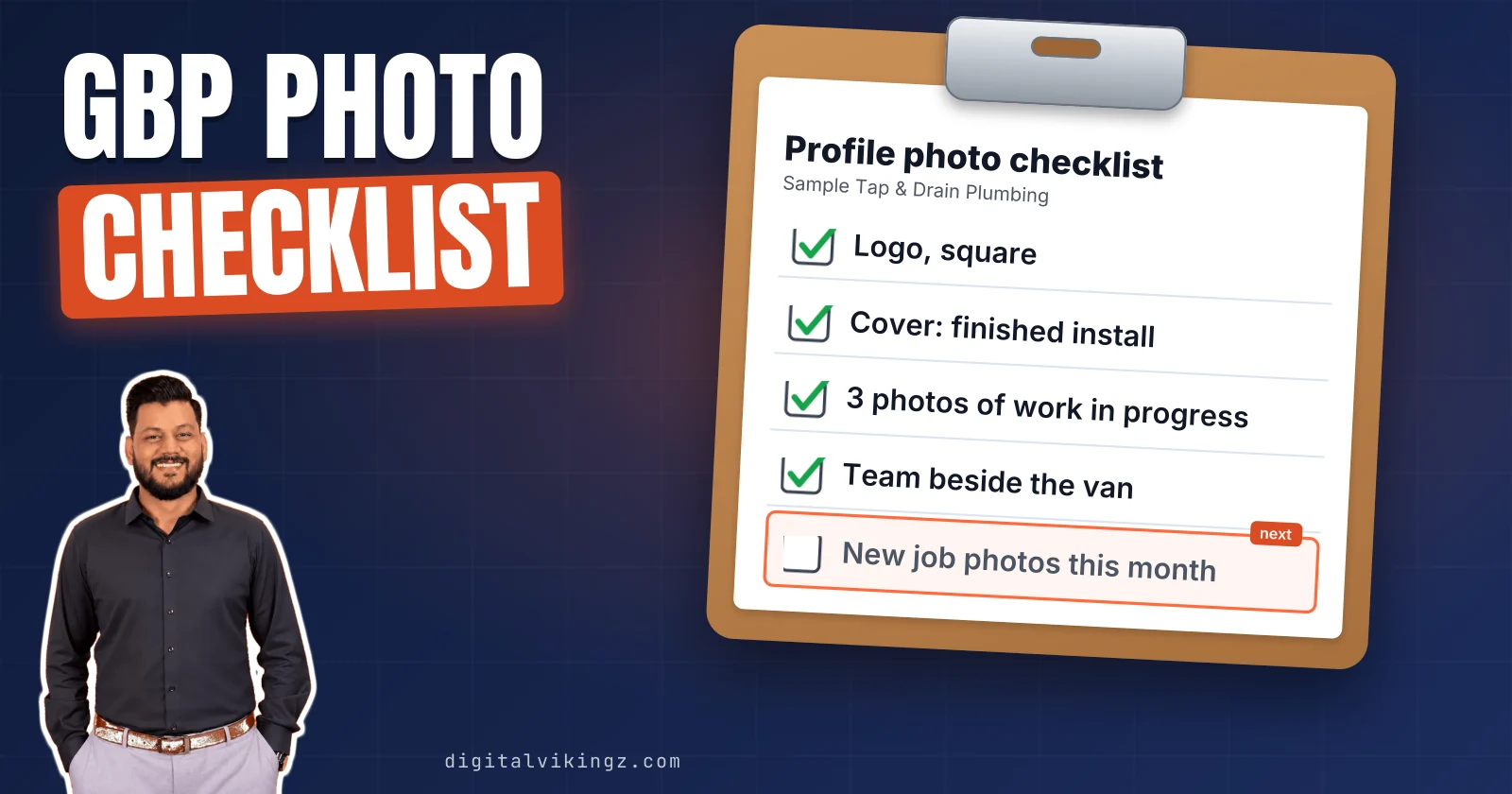
Google Business Profile photos are images and videos on a verified Business Profile, added by owners or customers and reviewed by Google before showing on Search and Maps. A complete profile carries a logo, a cover photo and business photos of each type that fits the business.
Google asks for JPG or PNG files between 10 KB and 5 MB, at 720 x 720 pixels recommended and 250 x 250 pixels minimum. New photos stay Pending for up to 24 to 48 hours, and photos that break Google's policies are marked Not approved.
Google sets no total, but its photo tips ask for at least three photos of each type that applies. A monthly upload tied to finished jobs and seasons keeps the gallery current.
What are Google Business Profile photos?
Google Business Profile photos are images and videos on a verified Business Profile, added by owners or customers and reviewed by Google before showing on Search and Maps. Google's help page states: "Your photos and videos show up on Google only after you verify your Business Profile."
Owner photos sit beside the photos and photo updates that customers add from Google Maps. Many owners call them pics or pictures, and Google calls them photos and videos.
Owners who still say Google My Business photos mean the same gallery, which Google renamed in November 2021. Each profile needs three kinds of photo.
Which photos should a Google Business Profile have?
A Google Business Profile should have a logo, a cover photo and business photos of each type that fits: exterior, interior, products, work in progress and team. Google explains that "When you add an exterior photo, it helps customers recognize your business when they visit."
The photo types Google lists for a Business Profile, with the minimum Google suggests for each, are shown below:
| Photo type | What the photo shows customers | Google's suggested minimum | Fits a service-area business? |
|---|---|---|---|
| Logo | The brand mark beside the business name | 1 | Yes |
| Cover photo | The image set at the top of the profile | 1 | Yes |
| Exterior | The building from each direction customers approach | At least 3 | Only with a premises customers visit |
| Interior | What the inside feels like to a customer | At least 3 | Only with a premises customers visit |
| Products | Popular items the business sells | At least 3 | When products are sold |
| At work | The team delivering the service | At least 3 | Yes |
| Team | Management and employees | At least 3 | Yes |
| Food and drink, rooms, common areas | Menus, guest rooms, shared spaces | At least 3; at least 1 per common area | Not for trades |
The photo types that fit the business decide the gallery, not a total count. Our setup method counts photos as one of the 13 steps to optimize a Google Business Profile, from setup to upkeep.
A business without a storefront swaps two of the listed photo types for others.
Which photos should a service-area business add?
A service-area business should replace storefront photos on its Google Business Profile with photos of its team at work, finished jobs, branded vehicles and equipment. Google's at-work and team types apply to every business. Exterior and interior photos apply only where customers visit a premises.
A service-area business is a business that serves customers at their address and hides its own street address on Google. The address and area settings belong to the setup of service area businesses on Google, a separate task from photos.
Business names, towns and shot lists in the figures are samples, not client data.
A starting shot list for five local service trades is shown below:
| Trade | At work | Finished jobs | Vehicles and equipment | Team |
|---|---|---|---|---|
| Plumber | A technician fitting a water heater | A finished drain or fixture install | The branded van | The crew beside the van |
| HVAC | A technician servicing a condenser | A new furnace or heat pump install | The van and diagnostic tools | Technicians in uniform |
| Roofer | A crew laying shingles | A finished roof from the street | The truck and ladder rig | The crew on site |
| Dental clinic | A hygienist at the chair, patient not identifiable | The treatment room ready for a patient | The imaging equipment | Dentists and front desk |
| Med spa | A provider preparing a treatment room | The treatment room and product shelf | The device used for treatments | Providers and front desk |
Clinics and med spas also have a premises, so their exterior and interior photos apply as well.
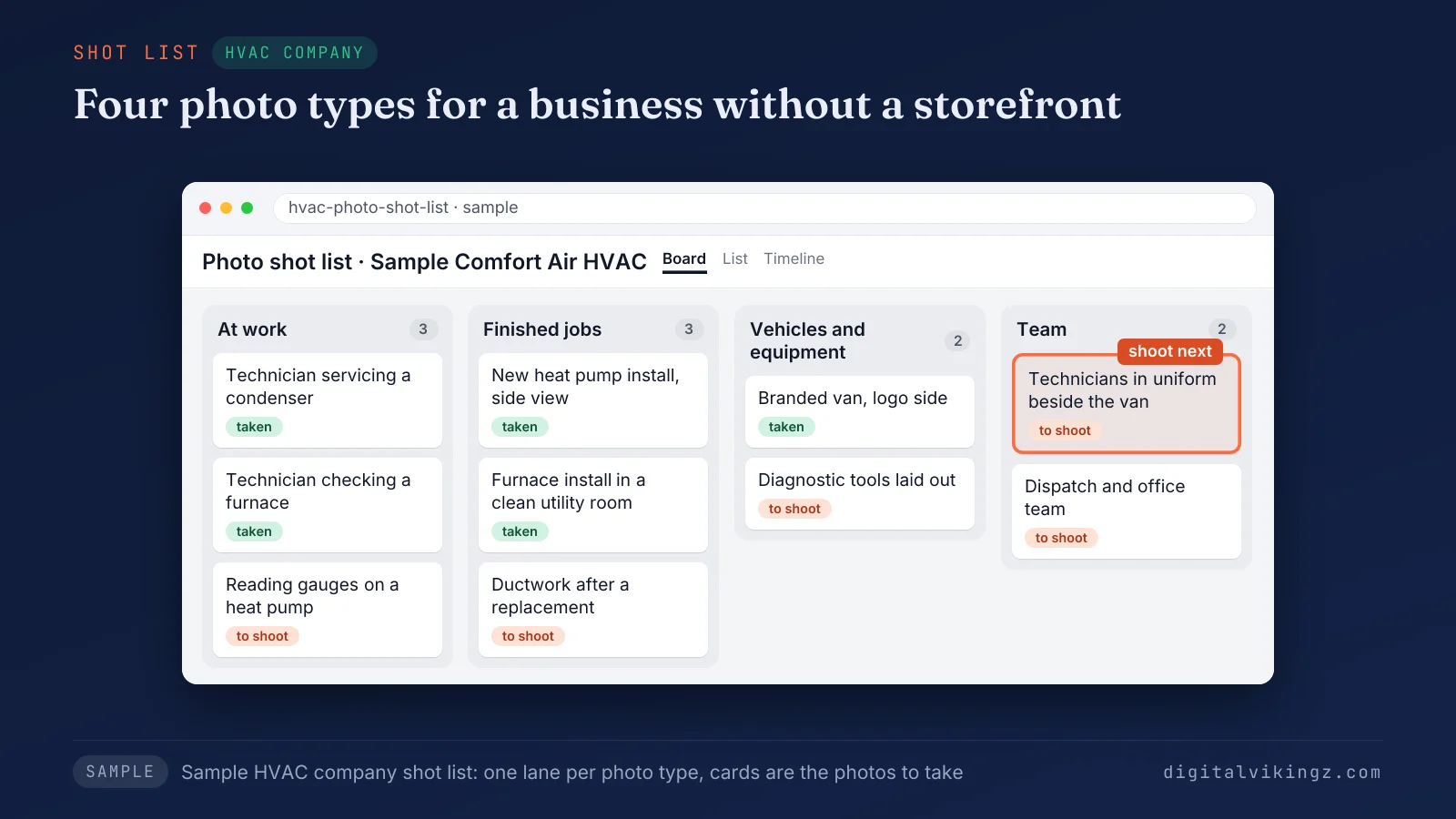
Figure 1 shows a shot-list grid for a sample HVAC company, with one photo slot for each type that fits a business without a storefront. Two photos sit apart from the gallery: the logo and the cover photo.
How do you choose the cover photo and logo?
The cover photo and logo of a Google Business Profile are set from the Photos option, and Google can still show a different image first. Select Photos on Google Search or Maps, then Add a cover photo or Add a logo. Change cover and Change logo replace an existing one.
Google notes that a chosen cover photo may still not show up as the first image for the business. A low-quality cover can give way to a photo a customer submitted, according to the same help page.
Google's help page ties a missing logo to a missing profile field: name, a valid location with a street address, categories, phone number or opening hours. Choose a cover that shows the work or the premises at its best, and a logo that reads at small size.
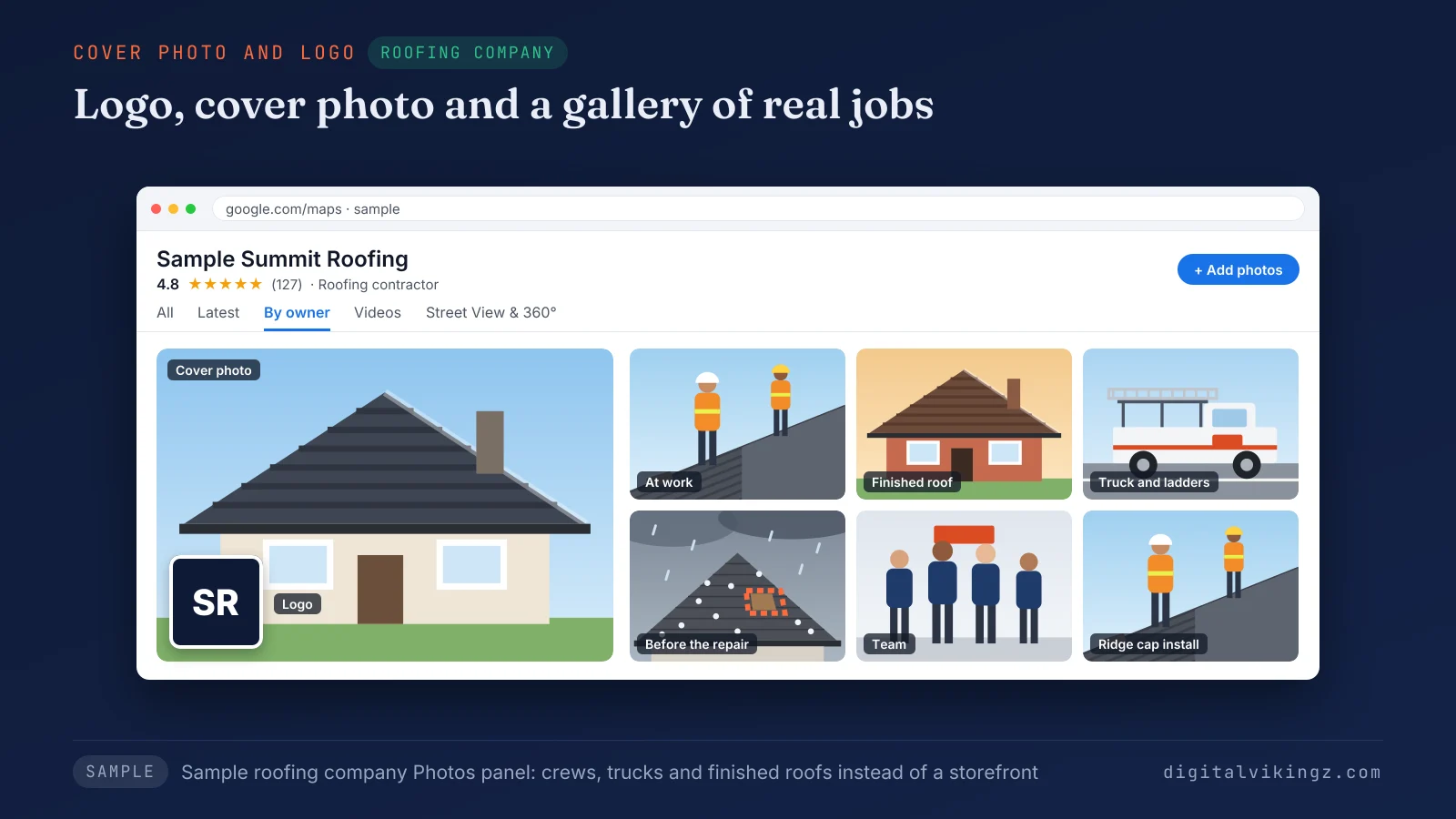
Figure 2 shows the photos panel of a sample roofing company, with the logo, the cover photo and a gallery of finished roofs instead of storefront shots. Every photo type follows the same file rules.
What size and format do Google Business Profile photos need?
Google Business Profile photos need JPG or PNG files between 10 KB and 5 MB, at 720 x 720 pixels recommended and 250 x 250 minimum.
Google's published photo and video rules, next to the crop sizes practitioners use, are shown below:
| Item | Value | Source |
|---|---|---|
| Photo format | JPG or PNG | |
| Photo file size | 10 KB to 5 MB | |
| Recommended resolution | 720 x 720 pixels | |
| Minimum resolution | 250 x 250 pixels | |
| Video length | Up to 30 seconds | |
| Video file size | Up to 75 MB | |
| Video resolution | 720p or higher | |
| Cover and logo crops | Cover 1024 x 576 pixels (16:9); logo 720 x 720 pixels (1:1) | Practitioner convention (Semrush, BizIQ), not Google |
Google publishes one photo rule for every photo type. Separate cover and logo sizes come from practitioner guides such as Semrush and BizIQ, not from Google.
A phone photo exported as a JPG passes the size rule. Keep the subject centered, because Google crops images to fit each slot on the profile. Videos follow their own three limits in the same table.
Post photos follow the same file rule as gallery photos. Our Google Business Profile post examples with post photo sizes show those post photos in use.
Can you use stock photos or edited images on a Google Business Profile?
No, a Google Business Profile should not use stock photos or heavily edited images, because Google asks for photos that match the business today. Google's photo guideline reads: "The photo should be in focus, well lit, and have no significant alterations or excessive use of filters or AI. In other words, the image should represent reality."
A stock image shows another business, so customers learn nothing about the owner's own work. Designed graphics with text belong in posts, not in the photo gallery.
Light cropping and brightness fixes stay within the rule. Photos that pass the rules go on through the Photos option.
How do you add photos to a Google Business Profile?
Photos are added to a Google Business Profile by searching the business name and city on Google Search or Maps, then selecting Photos and Add photos.
The steps to add photos to a Google Business Profile from a computer are listed below:
- Sign in to the Google Account with access to the profile.
- Open Google Search or Google Maps.
- Search for the business name and city.
- Select Photos, then Add photos.
- Choose the photos or videos and upload the files.
The Google Maps app reaches the same profile through the Business tab at the bottom right. Google shows the newest photo first, and a duplicate upload may not appear.
Uploads on an unverified profile stay Pending until you verify the Google Business Profile. The same Photos option removes a photo.
How do you remove a photo from a Google Business Profile?
An owner removes a photo from a Google Business Profile by opening Photos, selecting the photo and clicking Delete twice, once to delete and once to confirm.
Remove photos that show an old sign, a former location, staff who have left or work the business no longer offers. Outdated photos send customers looking for a sign or a van the business no longer has. Customer photos need a different route.
Can you delete customer photos on a Google Business Profile?
No, an owner can only report customer photos on a Google Business Profile, and Google reviews each report before removing a photo.
The steps to report a customer photo on a Google Business Profile are listed below:
- Open the Business Profile and select Photos, then View all photos.
- Select the customer photo.
- Select Report a problem.
- Choose a reason, such as "Privacy concern" or "Not a photo or video of the place."
- Select Submit.
Google states that "The review process can take several business days." Send one report per photo, because Google warns that repeat requests can delay the review.
Google lets each customer write one review but post many photo updates, and owners reply to photo updates only in the Google Maps app. The review request after each finished job is the other customer channel to manage.
Why are Google Business Profile photos not showing?
Google Business Profile photos do not show while they are Pending, after Google marks them Not approved, or when the profile is not verified.
Each photo status, its meaning and the next step are shown below:
| Status or symptom | What the status means | What to do |
|---|---|---|
| Pending | Uploading, processing, or the profile is not verified | Wait up to 24 to 48 hours; verify the profile |
| Not approved | Google flagged the photo under its policies | Check the photo against the rejection checks below, then upload a different photo |
| Live | The photo shows on Search and Maps | No action |
| Photo missing after upload | A duplicate of an existing photo | Upload a different photo |
| Cover not shown first | Google chose another image, sometimes a customer photo | Upload a sharper cover that shows the business |
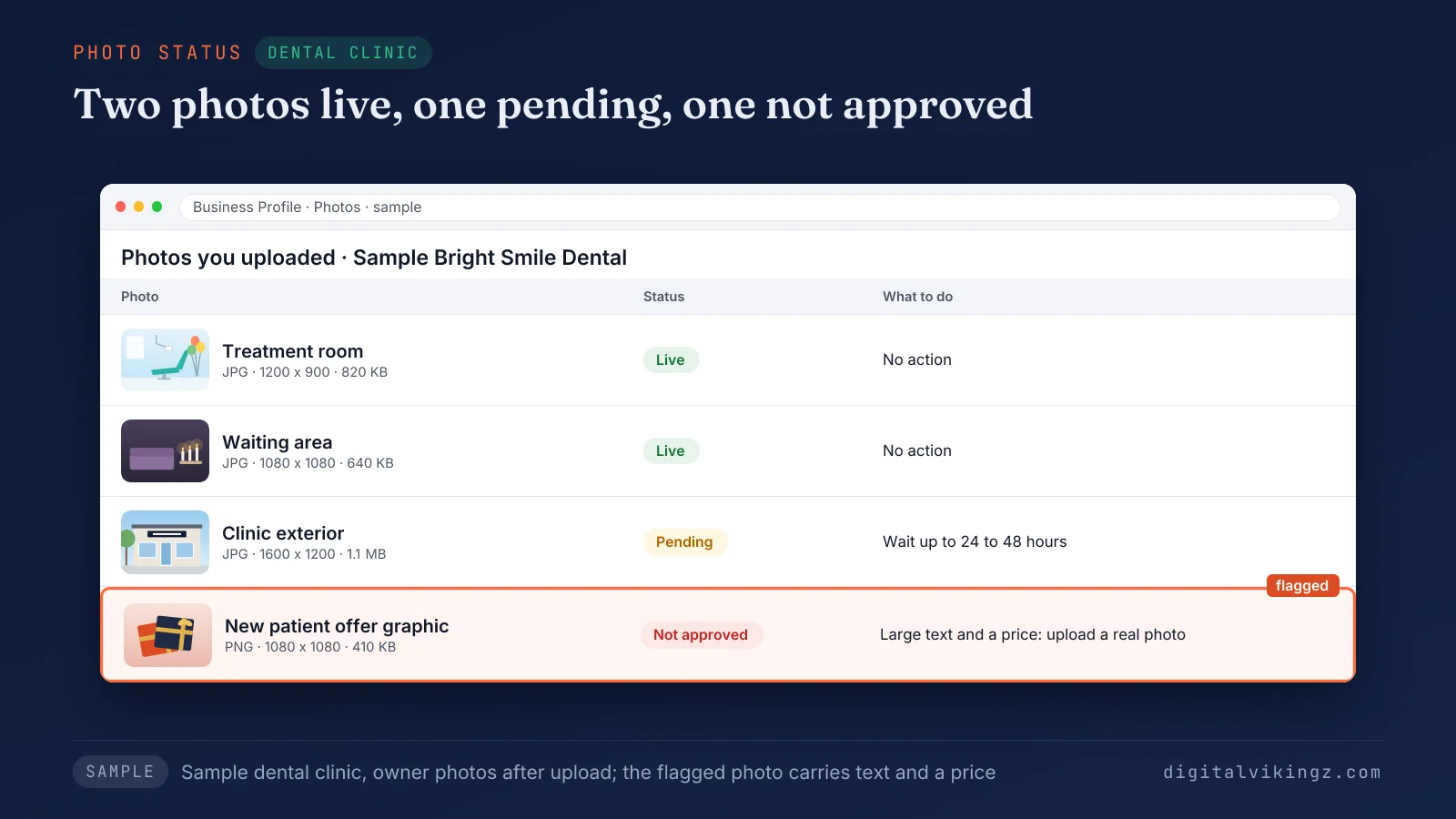
Figure 3 shows the photo statuses of a sample dental clinic, with two photos live, one pending and one not approved. Google says new photos and videos can take up to 24 to 48 hours to show on a Business Profile.
Pending photos past that window on a verified profile are worth one re-upload. A profile missing from Google Maps altogether is a different problem from a missing photo. The checklist for a business not showing on Google Maps at all covers the whole profile.
Why does Google reject a photo that meets the size rules?
Google rejects a Google Business Profile photo that meets the size rules for breaking the content policy, failing the quality rule or not showing the business.
The checks to run before re-uploading a rejected Google Business Profile photo are listed below:
- Quality: the photo is sharp, well lit and free of heavy filters, AI changes and borders.
- Subject: the photo shows the business, its premises, its team or its work.
- Text and marks: the photo carries no large text, stamped logos or watermarks.
- Sensitive content: the photo avoids clinical close-ups, exposed skin and anything an image safety check could flag.
- Duplicates: the photo is not a copy of one already on the profile.
Agencies on the Local Search Forum report clinic and med spa photos flagged by an image safety check, even when the photos were appropriate. A Not approved status hides that photo only. Google's photo help describes no profile penalty for a rejected photo.
A suspension of the whole Google Business Profile is a separate event with its own reinstatement steps.
How many photos should a Google Business Profile have?
A Google Business Profile should have at least three photos of each type that applies, according to Google's photo tips, which set no total.
The floor for a trade with no storefront is a logo, a cover and at least three photos each of work in progress and the team. The starting count by business type, from Google's minimums, is shown below:
| Business type | Types that apply | Starting count |
|---|---|---|
| Service-area trade (plumber, HVAC, roofer) | Logo, cover, at work, team | 8 |
| Clinic or med spa with a premises | Logo, cover, exterior, interior, at work, team | 14 |
| Shop that sells products | Logo, cover, exterior, interior, products, team | 14 |
Counts above the floor come from new jobs, not from a target number. Google does not publish a photo cap or an ideal total on its photo help pages. The photo count grows with each month's uploads.
How often should you add photos to a Google Business Profile?
Google Business Profile photos should be added at least once a month, after notable jobs and at each change of season, although Google sets no schedule. Our monthly photo task follows the upkeep cadence we use for Google Business Profile management.
One month of finished jobs gives a trade business more new photos than any quota asks for.
The moments that call for new profile photos are listed below:
- A finished job: the install, repair or treatment room worth showing that week.
- A new hire or vehicle: a team photo or a van photo the week either arrives.
- A season change: winter heating work, spring roof checks or holiday hours, from Thanksgiving on November 26, 2026 through New Year.
- A change at the premises: a new sign, a renovated room or a new address.
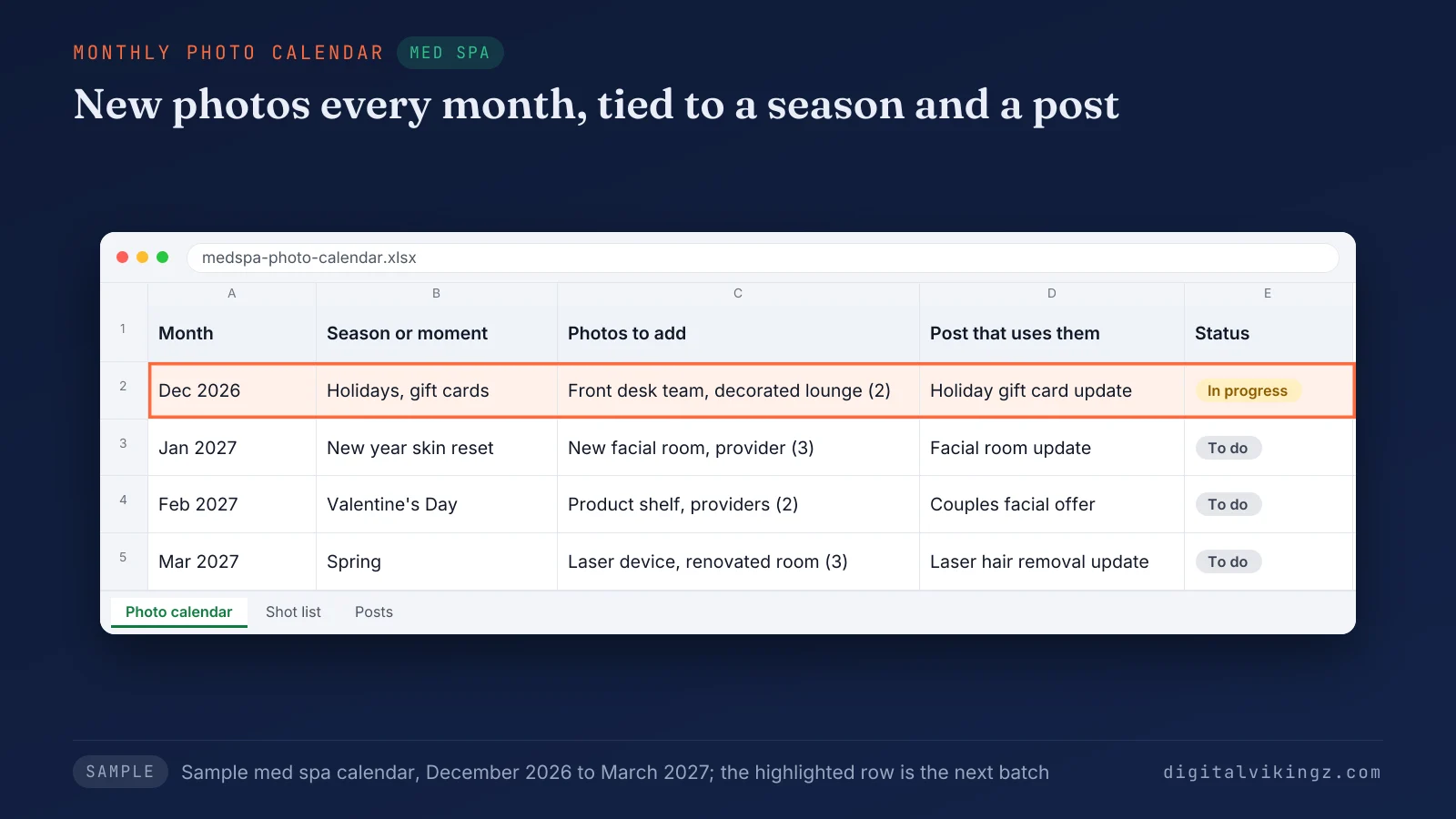
Figure 4 shows a sample med spa's photo calendar from December to March, with each month's photos tied to a season and a post. Posts run on a weekly cadence of their own and carry a picture of their own. Our guide sets out Google Business Profile posts and how often to publish them.
Do photos help Google Maps ranking?
Photos have no documented effect on Google Maps ranking. Google lists photos and videos among the tips on the Google local ranking help page, without naming them as a ranking factor. Geotagged photos have no documented effect on a Google Maps position.
Photos on a Google Business Profile still matter to customers, who judge the work and decide to call. File names and photo metadata carry no published ranking weight either. The factors Google does name are covered in how to rank higher on Google Maps.
Who can keep Google Business Profile photos current for you?
Google Business Profile photos can be kept current by the owner, a profile manager or a provider such as our Local SEO and Google Business Profile service.
The three ways to keep the gallery current are listed below:
- The owner: takes and uploads the month's job photos from a phone, about one session a month.
- A manager: a staff member or provider with manager access, which Google describes as "mostly the same access to the profile as owners."
- A provider: our Local SEO and Google Business Profile service sets up categories, services, service areas, hours, attributes and photos, then posts weekly and reports monthly.
Manager access leaves ownership with the business, so the profile and its photos stay the owner's.
Daily Google Posts keeps the posting side running: our AI agent writes each post from the business website and makes a picture for each post, sized for Google. The agent does not photograph jobs or upload gallery photos. The owner's own job photos still have to come from the business.
Our agent runs on our own Google listing before a client's, and a person steps in when a fact needs checking. Owners who want photos handled alongside the whole profile can book a strategy call for a written scope of our Local SEO and Google Business Profile service.
Do AI assistants read Google Business Profile photos?
AI assistants can read a Google Business Profile, and no published documentation states how much weight they give its photos. AI assistants read business profiles, directory and review sites, business websites and third-party mentions when they recommend a local business.
Consistent facts across the profile, the photos and the website give an assistant one clear picture of the business. Profile photos that show the trade, the vehicles and the service area match what the website says.
Our guide on how AI assistants decide which local business to recommend lists every source in full.
How do you measure what Google Business Profile photos do?
Each Google Business Profile photo shows its view count on Google Search, while the Performance report measures the calls, direction requests and website clicks the profile earns. Google's help page states: "Photo source and total views show on the bottom left corner of your Business Profile photos on Search."
The Performance report lists views, searches, directions, calls, website clicks, messages and bookings, with no photo views metric. Photo views show attention, while calls and direction requests show action. Per-photo view counts show which shots customers open most, such as finished jobs or the team.
Compare one month's calls and direction requests before and after a batch of new photos. Read the result as a signal, not proof. The Google Business Profile performance report is the monthly view of how customers found and contacted the profile.
The photos that earn views start as phone shots.
How do you take Google Business Profile photos with a phone?
A phone takes Google Business Profile photos that pass Google's rules when each shot is in focus, evenly lit, unfiltered and taken at the job or the premises.
The habits for taking profile photos with a phone are listed below:
- Shoot in daylight or with the room lights on, and wipe the lens first.
- Photograph the premises from each direction customers approach, at different times of day.
- Capture the finished job before packing up.
- Take team photos that feel less formal, as Google's own tips suggest.
- Ask permission before any customer or patient appears, and keep faces and clinical detail out of clinic photos.
Google lists "Privacy concern" as a reason to report a photo, so consent protects the business as well as the customer.
Frequently asked questions about Google Business Profile photos
Can you rearrange photos on a Google Business Profile?
No, Google's photo help describes no control for reordering Business Profile photos, and the newest photo appears first. The cover photo setting chooses the image at the top, although Google can show another.
Should you delete old Google Business Profile photos?
Yes, old photos on a Google Business Profile should be deleted once they show a sign, a team, a vehicle or a location the business no longer has. Photos that still show the business accurately can stay.
Can a manager add photos to a Google Business Profile?
Yes, a manager can add photos to a Google Business Profile, because Google gives managers mostly the same access as owners. Each manager signs in with a personal Google Account.
Are post images the same as Google Business Profile photos?
No, a post image publishes with a post in the Updates tab of a Google Business Profile, while profile photos sit in the Photos tab. Customer photo updates appear in both places.
Can you upload photos for 10 or more locations at once?
Yes, a business with 10 or more locations can bulk upload photos to each Google Business Profile through a spreadsheet. Google's help page links to the bulk upload spreadsheet guide.
Can you upload a Google Business Profile logo as an SVG file?
No, a Google Business Profile logo has to be a JPG or PNG file, like every other profile photo. Export the logo at 720 x 720 pixels to meet Google's recommended resolution.
Where should you start with Google Business Profile photos?
Start Google Business Profile photos with the logo, the cover photo and three photos of each type that fits the business, then add new job photos every month. Digital Vikingz keeps the profile posting between uploads with Daily Google Posts, from $99 per listing per month.
The first post goes live free, and a free preview shows today's post for the business in about 20 seconds. See today's post with a free Daily Google Posts preview for your business.
