 Digital Vikingz
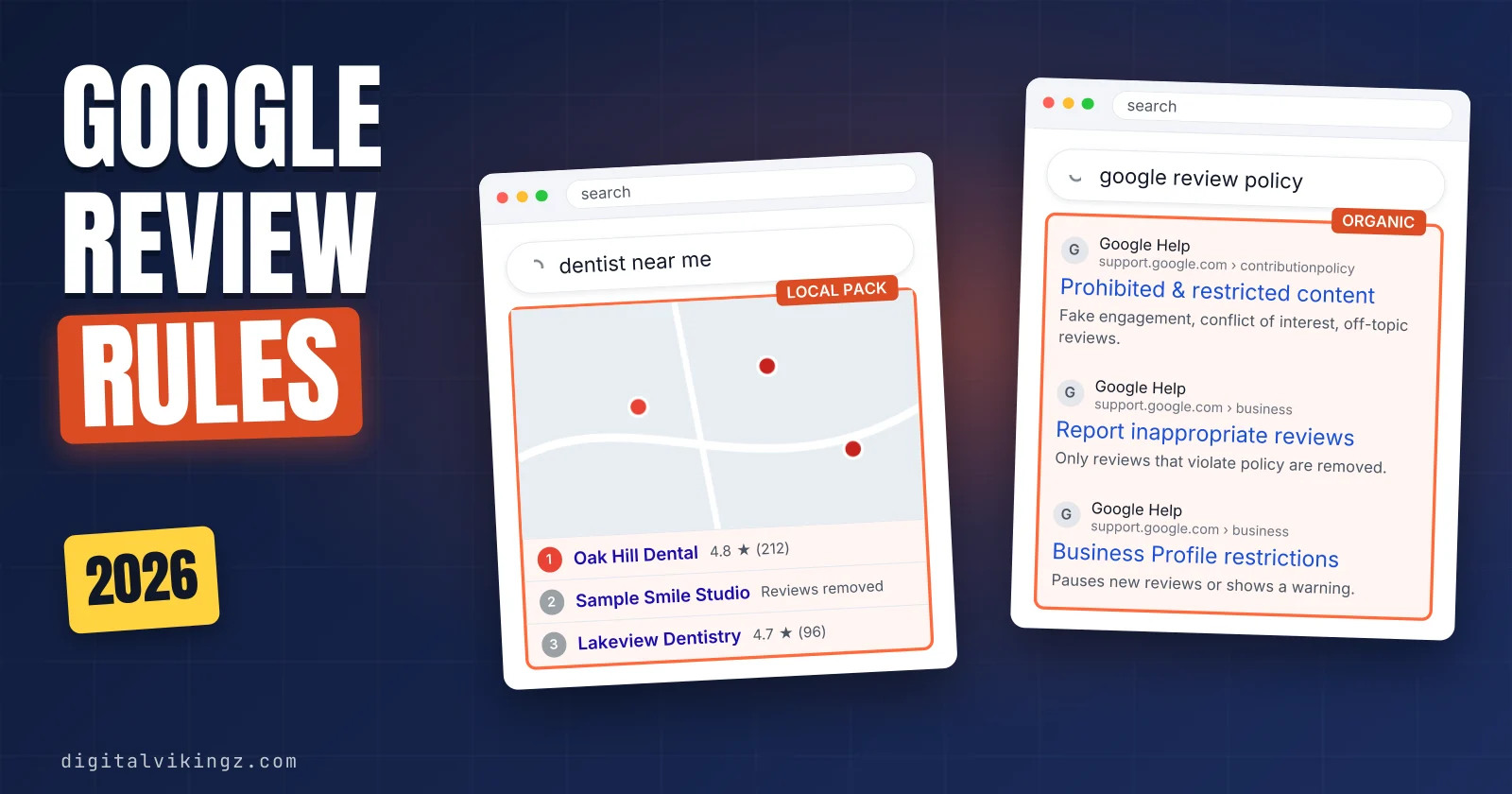
Google review policy requires every Google review to reflect a genuine experience and removes reviews that are fake, conflicted, offensive, off-topic or bought. The rules sit on Google's "Prohibited & restricted content" page and bind reviewers, business owners and staff, agencies and competitors.
A business may ask every customer for a Google review. The business may not offer a reward, filter out unhappy customers, press for a review on the premises or request specific content.
A negative review that describes a genuine experience in a respectful manner stays on the Google Business Profile. Review rules are one part of Google Business Profile optimization.
Google removes violating reviews through automated systems and human review, and fake engagement can bring Business Profile restrictions or account action. Owners report a violating review, appeal a rejected report once and reply in public, because only Google removes a review.
What is Google's review policy?
Google's review policy is the Google Maps content policy that keeps only Google reviews based on a genuine experience and free of prohibited content. Google's policy states that a review "should reflect an actual experience with a business, and be genuine and unbiased."
Google publishes the rules on its Prohibited & restricted content page, which sits inside the Maps user-generated content policy. Owners who search for Google review guidelines or Google review rules reach the same page, because Google uses one policy for all Maps content.
The policy covers star ratings, review text and photos posted with a review. Owner replies on a Google Business Profile count too, since Google states that replies "must follow our policies." The policy reaches everyone who writes, requests or answers a Google review, not only customers.
Who has to follow Google's review policy?
Google's review policy binds reviewers, business owners and their staff, agencies acting for a business, and competitors, each through different rules.
The table below matches each group to the Google review rules written for that group:
| Group | Main rules that apply | Google's wording |
|---|---|---|
| Reviewer (customer) | Genuine experience; no ads, links or phone numbers; no abuse or personal details | "links to other websites in your reviews" |
| Business owner and staff | No incentives, gating, on-premises pressure, requested content or staff quotas; no conflicted reviews | "We do not allow merchants or users to" |
| Agency or review vendor | Merchant rules for every request; no posting from several accounts | "by or at the request of one person" |
| Competitor | No reviews that attack a rival; competitors count as a conflict of interest | "industry competitors" |
An agency that sends review requests acts for the merchant, so the merchant rules apply to every message it sends.
Every group faces the same list of content that Google prohibits in a Google review.
What does Google's review policy prohibit?
Google's review policy prohibits 21 named types of content, listed under fake or misleading content and inappropriate content.
The table below sorts Google's 21 review policy categories into six groups a local business meets:
| Group | Google's category names | What it removes on a local profile |
|---|---|---|
| Fake and misleading | Fake Engagement, Rating Manipulation, Impersonation, Misinformation, Misrepresentation | Paid, swapped, conflicted or invented reviews |
| Abusive | Harassment, Hate speech, Offensive content, Obscenity & profanity | Threats, slurs, insults, unsupported accusations |
| Privacy | Personal information | Private names, faces, contact details |
| Explicit and harmful | Sexually explicit content, Adult-themed content, Violence & gore, Dangerous content, Child safety, Terrorist content | Graphic or dangerous material |
| Commercial and regulated | Restricted content, Advertising & solicitation | Sales pitches, links, regulated offers |
| Low-value | Off-topic, Unclear and Repetitive Content, Defacement & Mischief | Rants, gibberish, copy-paste reviews |
The group names are a reading aid, and Google's page uses only the two parent headings. Google's policy page gives eight of the 21 categories a "We do allow" line, such as respectful negative Google reviews under offensive content. Three more carry a "We may allow" line for educational, documentary, scientific or artistic purposes.
Within the fake and misleading group, fake engagement covers paid reviews and reviews posted from multiple accounts.
What counts as fake engagement in a Google review?
Fake engagement is any Google review not based on a genuine experience, including paid reviews and reviews posted from several accounts by one person. Google lists "Reviews or ratings that have been paid for, directly or in kind."
Google also lists "Content that has been posted from multiple accounts by or at the request of one person." Reviews posted through an emulator or a tampered device count as fake engagement too.
Google bars merchants and users from content that aims "to undermine that business' or product's reputation" on a competitor's profile. Google states that fake engagement "is not allowed and will be removed," so a bought fake review vanishes however natural the wording reads.
A review can describe a genuine visit and still break Google's review policy when the writer has a stake in the business.
What is a conflict of interest in a Google review?
A conflict of interest in a Google review is a relationship with the business that biases the review, such as employment, family or competition.
Google states: "A conflict of interest may include current or former employment, a contractual or consultory relationship, or other professional or personal affiliations." Google's examples include "industry competitors, familial relationships."
The people a conflict of interest covers on a local service profile are listed below:
- Owners and staff: an employee review from current staff, managers or the owner.
- Former employees: people who left the business.
- Contractors and vendors: suppliers, subcontractors and consultants paid by the business.
- Family and close relations: relatives of the owner or staff.
- Competitors and peers: rival businesses and referral partners in the same trade.
Therapists and law firms on the Local Search Forum report peer reviews removed as conflicts of interest in 2026.
Conflicted reviews are removed as rating manipulation, while abusive wording falls under separate categories.
Which offensive or personal content breaks Google's review policy?
A Google review breaks the policy when it harasses, threatens, uses hate speech or profanity to attack, or posts personal information without consent.
The offensive and personal content categories Google removes from reviews are listed below:
- Harassment: threats of harm, doxxing and unwanted sexualization of a person.
- Hate speech: content that attacks people for a protected characteristic.
- Offensive content: attacks, deliberate provocation and "Unsubstantiated allegations of unethical behavior or criminal wrongdoing."
- Obscenity & profanity: profanity used to offend or to emphasize criticism.
- Personal information: a private person's full name, last name, face or contact details posted without consent.
Google allows the name of "a public-facing professional conducting business under their name." Google's examples are "Doctors, lawyers, realtors, financial planners, contractors."
A Google review naming the dentist who did the work stays, while a front-desk employee's full name posted without consent can be reported.
Reviews can also break the policy by leaving the experience behind.
What makes a Google review off-topic, spam or misleading?
A Google review is off-topic or spam when it is not about an experience at that place, promotes something, or repeats or garbles content.
The off-topic, spam and misleading categories in Google's review policy are listed below:
- Off-topic: "general, political, or social commentary or personal rants" unrelated to the visit.
- Advertising & solicitation: reviews with "email addresses, phone numbers, social media links, or links to other websites".
- Unclear and Repetitive Content: random characters or the same text posted again.
- Impersonation: a review pretending to come from another person, group or verified source.
- Misrepresentation: "False or misleading accounts of the description or quality of a good or service."
Owners call these "spam reviews" or "gibberish." The same policy also sets rules for how a business asks for reviews.
What does Google's review policy allow businesses to do?
Google's review policy allows a business to ask every customer for a review, share a review link or QR code, and reply to reviews. Google permits requests "without offering incentives to do so or attempting to influence the rating or the contents of the review."
The review link and QR code come from the Google Business Profile itself.
The table below shows eight review practices and where Google's review policy places each one:
| Practice | Allowed? | Google's wording |
|---|---|---|
| Ask every customer for a review | Yes | "Solicit or encourage the posting of content that does represent a genuine experience" |
| Send a Google link or QR code | Yes | "visit a Google link or scan a QR code" |
| Reply to every review | Yes | Replies "must follow our policies" |
| Offer a discount, gift or free service | No | "payment, discounts, free goods and/or services" |
| Ask only happy customers (review gating) | No | "selectively solicit positive reviews" |
| Discourage negative reviews | No | "Discourage or prohibit negative reviews" |
| Require or press for a review on the premises | No | "require or pressure users" |
| Request specific content, staff names or a review quota | No | "specific content be included" |
Asking for Google reviews stays inside the policy when every request follows the first three rows. Request wording, timing and channels that keep inside these lines are set out in the steps to get more Google reviews.
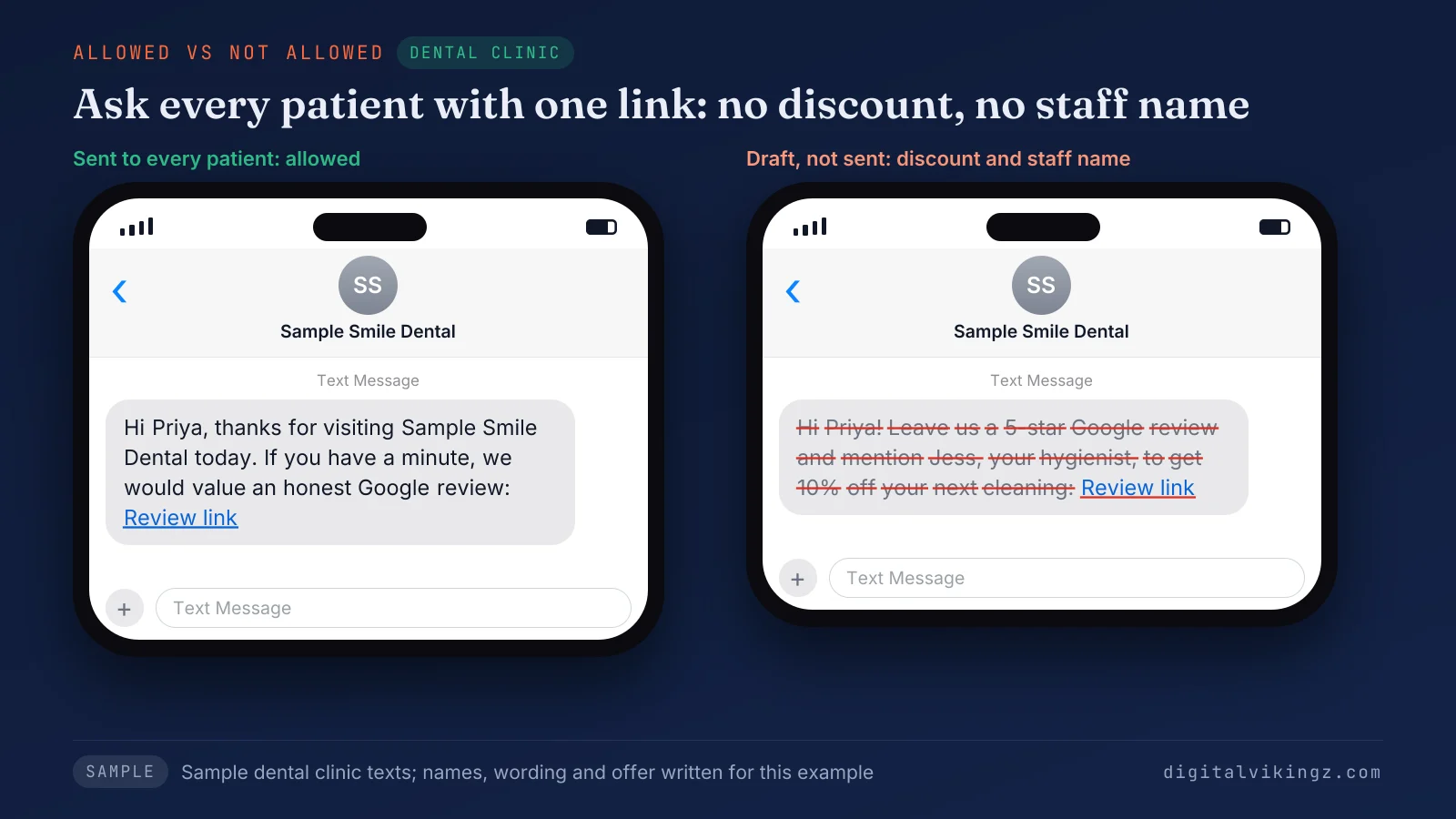
The sample dental clinic request goes to every patient with one link, while the struck-out draft offers a discount and names a hygienist. The last two rows come from clauses that agency explainers first reported in 2026.
What changed in Google's review policy in 2026?
Google's review policy now bars merchants from requiring or pressuring reviews on the premises, requesting specific content, and setting staff review quotas.
Google states that "merchants should not require or pressure users to leave ratings or write reviews while on the premises." Google's examples include "Merchants requesting that staff solicit a certain number of reviews." Requests for "content that identifies a staff member" also break the rule, according to Google.
Agency explainers dated from April 2026 report these Google review clauses as new, while Google's policy page shows no change date. Google's page never uses the word "kiosk," but a counter tablet a customer must use before leaving fits "while on the premises."
The staff clause limits what a business asks for, which leaves the customer's own words untouched.
Can a customer name a staff member in a Google review?
A customer can name a staff member in a Google review, because Google's rule bars the business from requesting staff names, not the customer.
A thank-you naming the technician who fixed the furnace stays, if nobody at the business asked for the name. A private employee's full name in a complaint stays reportable as personal information.
Complaints about named staff raise the line between negative and violating reviews.
What is the difference between a negative Google review and a violating one?
A negative Google review describes a genuine bad experience and stays, while a violating review breaks a named policy category and can be removed. Google states: "We do allow content that describes negative experiences in a respectful manner."
Google's reporting page warns: "Do not report a review just because you disagree with it or dislike it." Google adds that it "doesn't get involved in conflict between businesses and customers."
The three tests that separate a negative review from a violating one are listed below:
- Check the experience: ask whether the writer had a genuine experience at the business.
- Check the relationship: ask whether the writer is staff, family, a former employee or a competitor.
- Check the content: ask whether the text matches a named category, such as harassment.
A review that passes all three tests stays, however low the rating.
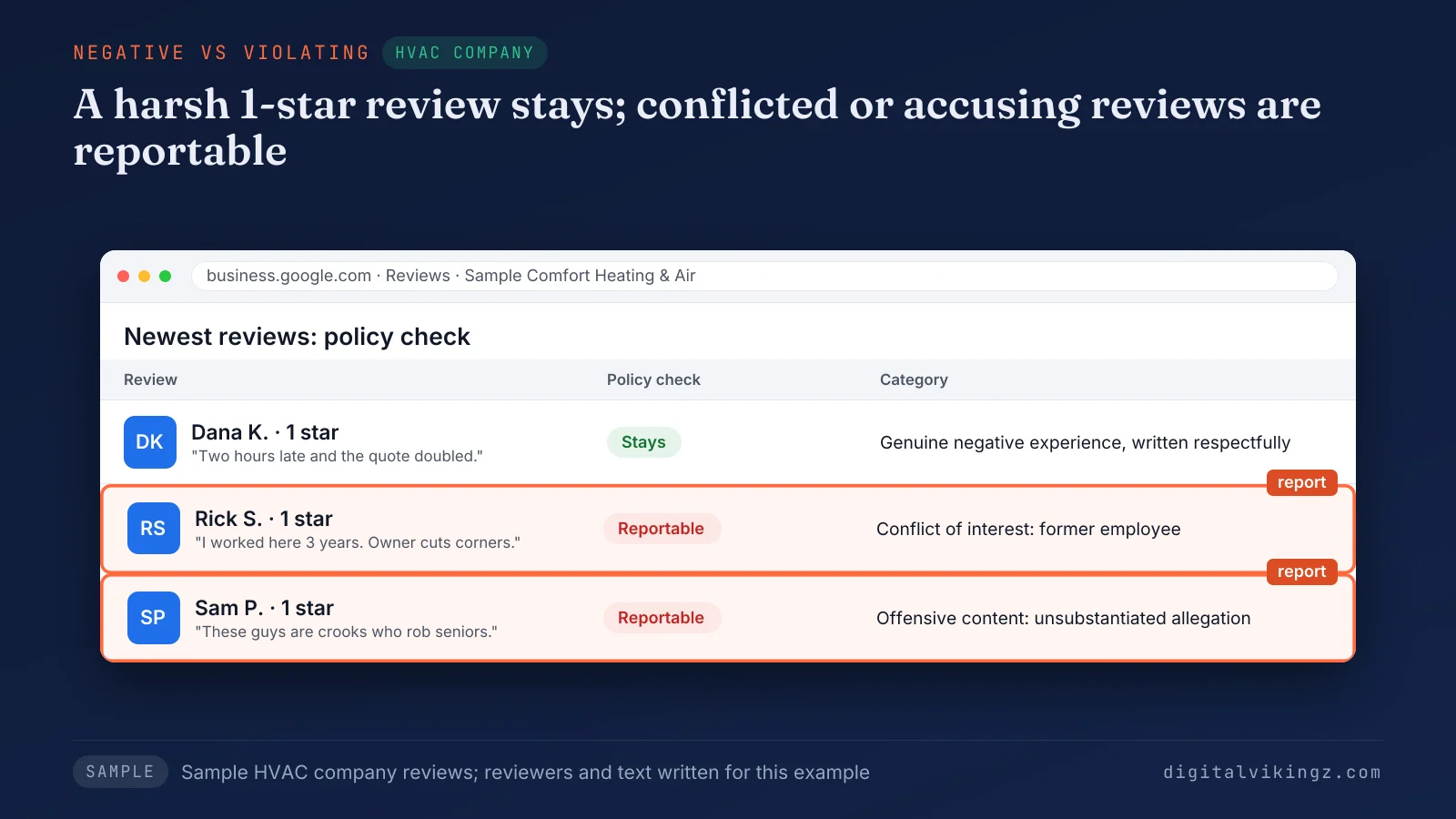
The sample HVAC panel keeps a harsh but respectful one-star review and marks two others as reportable under named categories. False claims and former employee reviews sit on this line.
Does a false or unfair Google review break the policy?
A false Google review can break the policy as misrepresentation or an unsubstantiated allegation, but Google does not settle factual disputes with customers.
Misrepresentation covers false or misleading accounts of a good or service. An accusation of fraud or a crime without support falls under offensive content as an "unsubstantiated allegation."
A customer's version of a late arrival or a price dispute is a disagreement, so the review stays. Google's pages set no age limit, so an old genuine review stays. A public reply gives the business's side.
The writer's relationship can matter more than accuracy, as with a former employee.
Can a former employee leave a Google review?
A former employee can post a Google review, but Google lists current or former employment as a conflict of interest, so the review is reportable.
One owner on the Google Business Profile Community reports a dismissed employee's one-star review that stayed after Google's evaluation. Owners on the Local Search Forum describe bursts of text-free one-star reviews from an ex-employee as hard to remove.
The report should name conflict of interest, and the business should keep employment dates on file for a later appeal. Google decides each report, and enforcement of Google's review policy reaches beyond single reviews.
How does Google enforce its review policy?
Google enforces its review policy with automated detection and human review, then removes violating reviews and can restrict the profile or account involved. Google states that violating content "is either removed by our automated models or flagged for further review by trained operators and analysts."
Google "blocked or removed over 292 million policy-violating reviews" in 2025, per its April 2026 blog post.
The table below lists the five enforcement steps Google describes for reviews, with the page that states each one:
| Step | What Google does | Where Google states it |
|---|---|---|
| Detection | Scans contributions with machine learning and trained operators | Maps user-generated content policy |
| Review removal | Removes the violating review, and usually the full post | Maps user-generated content policy |
| Removal after a report | Evaluates owner reports and removes only violations | Report inappropriate reviews |
| Business Profile restrictions | Pauses new reviews, unpublishes reviews or shows a warning | Business Profile restrictions |
| Account action | Suspends account privileges or terminates the account | Prohibited & restricted content |
The first two steps run without any report, which is why some genuine-looking reviews disappear.
Why does Google remove Google reviews that look genuine?
Google removes genuine-looking Google reviews when its systems read a pattern as manipulation or when one part of a review post breaks the policy.
Google's rating manipulation category covers "unusual volumes or patterns of review contributions" aimed at a place's rating. Google's Maps user-generated content policy states that "we generally remove full posts" even when only one part breaks the policy.
Google admits that automated spam detection "may also mistakenly remove legitimate reviews." Google states: "Reviews removed for policy violations won't be restored."
Google can also disable reviews for whole categories, as Google did for schools serving students aged 6 to 18. Owners report waves of long-standing reviews removed at once, which fits automated sweeps rather than single reports.
Patterns of fake engagement move enforcement from single reviews to the Business Profile itself.
What restrictions can Google place on a Business Profile for fake reviews?
Google can stop a Business Profile from receiving new reviews, unpublish its existing reviews, or show consumers a warning that fake reviews were removed.
The Business Profile restrictions Google lists for fake engagement are given below:
- No new reviews: the profile receives no new reviews or ratings for a set period of time.
- Unpublished reviews: existing reviews and ratings are hidden for a set period of time.
- Consumer warning: the profile shows a warning that fake reviews were removed.
Google's Business Profile restrictions page states: "We will notify business owners via email if we plan to apply a restriction to their profile." The owner can appeal.
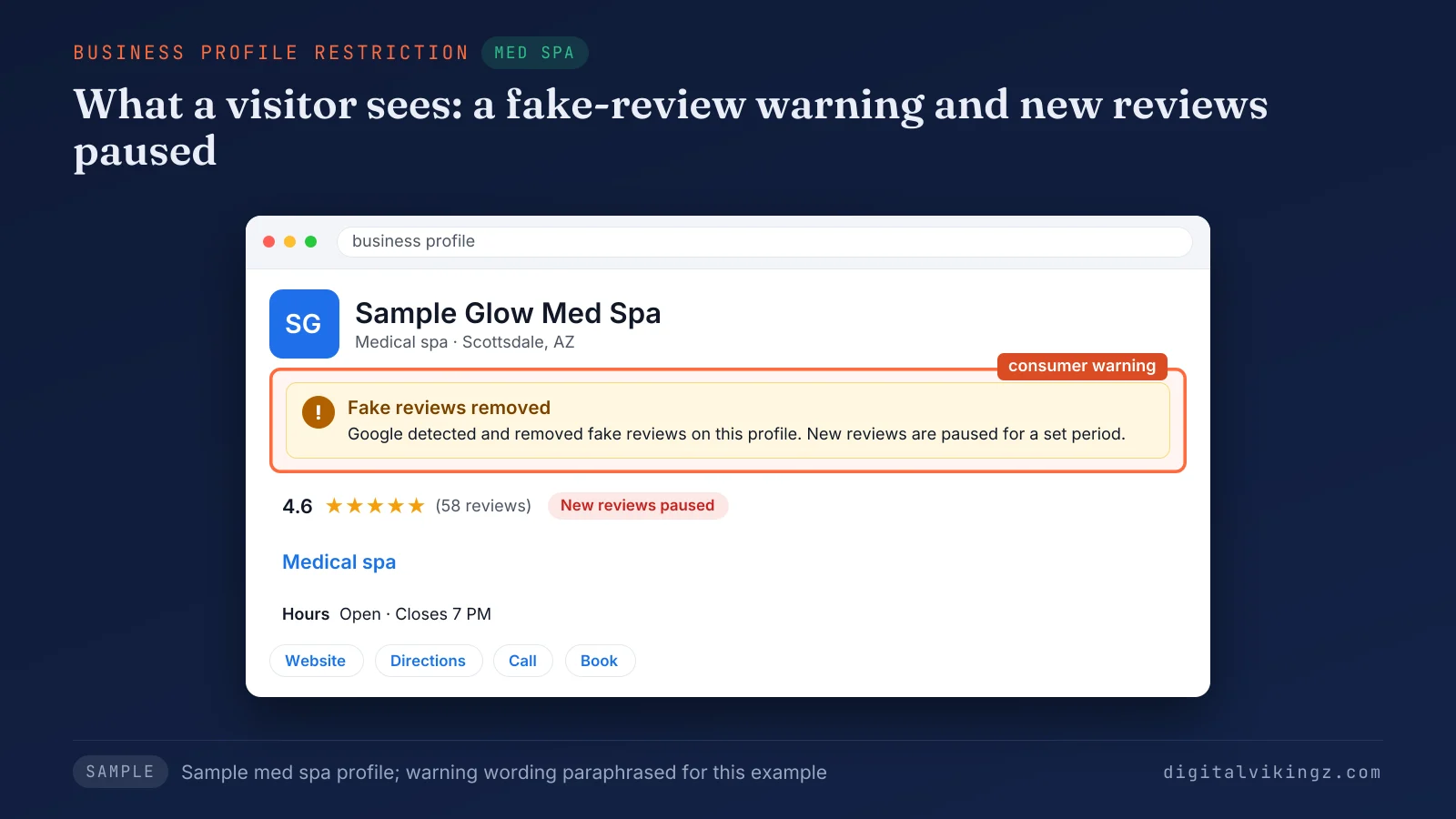
The sample med spa profile shows a consumer warning and a pause on new reviews, the two restrictions a visitor can see. Google calls these restrictions examples, so repeated abuse can go further.
Can review policy violations lead to a suspension?
Repeated review policy violations can cost a business more than reviews, because Google states its actions range from suspending account privileges to account termination.
Google's restriction page says its examples "include, but are not limited to" the three listed restrictions.
A suspended profile follows its own appeal route. Reinstatement then follows the appeal steps for a Google Business Profile suspended for guideline breaches.
A business facing a violating Google review has its own options long before enforcement reaches that point.
What can a business owner do about a Google review that breaks the policy?
A business owner has no delete option for a Google review, but can report a violating review, appeal a rejected report once, and reply publicly. Google's report inappropriate reviews page states: "You can report any review, but only those that violate Google policies are eligible for removal."
The four options an owner has for a review that breaks Google's review policy are listed below:
- Report the review: flag the review from the Business Profile and pick the policy category the review breaks.
- Track the status: follow the report in the Reviews Management Tool until Google decides.
- Appeal once: send a one-time appeal for a rejected report, selecting up to 10 reviews.
- Reply in public: answer calmly with the business's side, because replies follow the same policy.
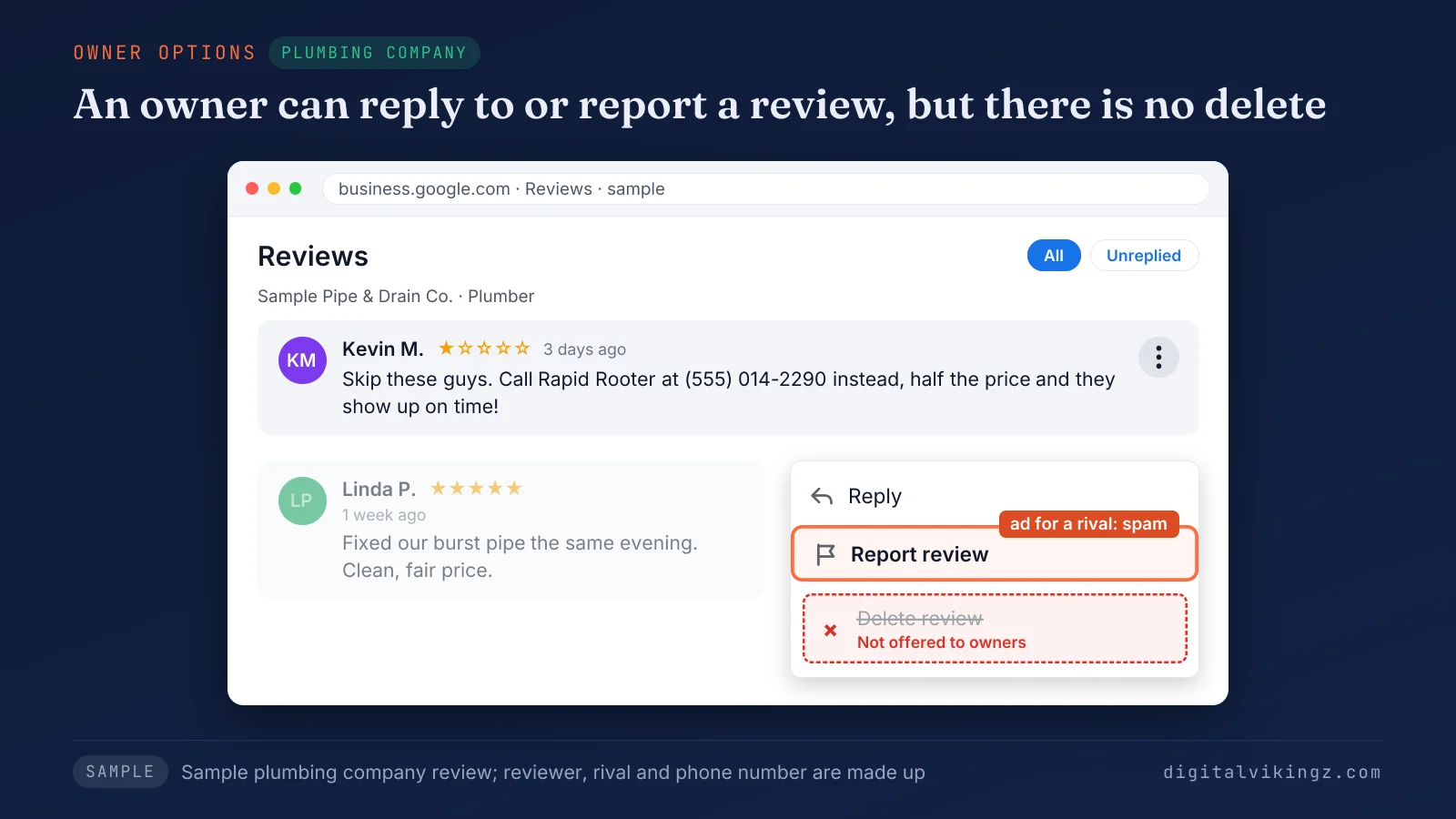
The sample plumbing review, an ad with a phone number, gives the owner two actions, Reply and Report review, and no delete option.
The Reviews Management Tool shows "Decision pending," "Report reviewed - no policy violation" or "Escalated - check your email for updates." An extortion demand tied to negative reviews goes to Google through the separate extortion report path.
Each click and the evidence that helps are covered in the guide to report and remove fake Google reviews. Reply wording for angry or false reviews is the separate task of how to respond to Google reviews.
Businesses that hand reviews to an agency pass the same rules to every request the agency sends.
How does an agency keep a Business Profile's reviews inside Google's policy?
An agency keeps a Business Profile's reviews inside Google's policy by asking every customer the same way and reporting violations under the named category.
The four review practices an agency runs for each Google Business Profile are listed below:
- Audit the request: check every review message for rewards, filters, scripted wording and staff names before sending.
- Brief the staff: tell front-desk and field staff to ask every customer and never set review targets.
- Watch new reviews: read new Google reviews each week and match any suspect review to a policy category.
- Log every report: record the category, date and status of each report so a one-time appeal has its facts.
Our Local SEO and Google Business Profile optimization with review replies also writes a review request message for every finished job. Your team sends each request.
Review work is one part of the full steps on how to optimize a Google Business Profile. US businesses also face a federal rule on reviews that differs from Google's review policy.
How does Google's review policy differ from the FTC rule on reviews?
Google's review policy removes conflicted and incentivized reviews, while the US FTC rule makes certain fake reviews and review practices unlawful.
The US FTC rule on consumer reviews has been in force since October 2024. Google's policy page bans incentives "in exchange for posting any review." The FTC rule targets incentives tied to a positive or negative sentiment.
An officer or manager review needs a clear disclosure under the FTC rule, yet Google removes conflicted Google reviews whatever the review discloses. Google's conflict rule also reaches relatives, former employees and competitors, according to its list of conflict of interest examples.
A lawyer gives the binding answer on a specific practice under the FTC rule. Google's own review rules also differ by product.
Does Google's review policy cover Google Store product reviews?
Google's review policy for Maps and Business Profiles does not cover Google Store product reviews, which follow the separate Google Store review guidelines.
The Google Store review guidelines govern reviews of Google's own hardware, such as phones and speakers. The Google Store page ranks beside the Maps policy in search results for the policy.
A local business checks only the Maps policy for Google reviews on its Google Business Profile. The Maps policy leaves a business with a short list of checks.
Which review practices should a business check against Google's policy first?
A business should check its review requests, incentives, reviewer relationships and open reports first, because each one maps to a named policy category.
The five checks that keep a business inside Google's review policy are listed below:
- Read the request: remove any discount, prize or filter from every Google review message.
- Check the staff rules: drop review quotas and requests for staff names or set wording.
- List the relationships: stop reviews from staff, family, former employees, vendors and competitors.
- Scan new reviews: match each suspect review on the Google Business Profile to fake engagement, conflict of interest or offensive content.
- Close open reports: check every pending report and use the one-time appeal where the facts support an appeal.
Every check returns to one test: each Google review has to reflect a genuine experience. A few narrower questions about Google reviews and the policy remain.
Google review policy questions
Is it illegal to leave a bad review on Google?
Google's review policy allows a negative Google review that describes a genuine experience in a respectful manner. A lawyer answers whether a specific review is unlawful, because Google's policy decides only removal.
Can a business turn off Google reviews?
A business has no setting to turn off Google reviews, although Google might temporarily disable reviews for certain profiles or business categories. Google disabled reviews for schools serving students aged 6 to 18.
Can you pay to have Google reviews removed?
Google removes reviews only for policy violations, and paying a reviewer to remove a negative review breaks Google's incentive rule. Demands for money to stop negative reviews are extortion, which Google handles through a separate report path.
Does Google restore reviews removed for policy violations?
Google does not restore reviews removed for policy violations, according to its help page on missing reviews. Reviews lost after a profile reinstatement are a case for Google support.
Do Local Guides follow the same Google review policy?
Local Guides follow the same Google review policy as every other reviewer, since Google's Maps content policy covers every contribution. Google's Maps content policy gives Local Guides a badge, points and a level by how much they contribute, with one rule set at every level.
Does replying to a review stop Google from removing it?
Google's reporting and review help pages state no link between an owner reply and a removal decision. Replies must follow the same policy, so a reply stays factual and calm.
Google's review policy keeps a Google review only when the review reflects a genuine experience, and every business request has to respect that test.
Reviews earned that way sit beside an active Google Business Profile. Digital Vikingz keeps the profile itself active with Daily Google Posts that keep a Business Profile current between reviews. An AI agent posts on the profile every day.
