 Digital Vikingz

You open your Google Business Profile and a field reads differently from what you typed. Google updated your business information because sources reported details on your Business Profile as incorrect or outdated. Updates appear on Maps and Search, and Google's help page says a notification sits at the top of the profile editor.
Open Edit profile, check the fields Google marked as changed, then accept, reject or correct each one. A change can start with a public suggested edit, your website, a connected tool, another manager or Google's own systems. Google's help pages list no setting that switches updates off, but matching your sources may lower repeats.
A suspended profile is a different problem. Reinstatement stays on its own page.
What does "Google updated your business information" mean?
Google updated your business information is a notice that a field on your Business Profile changed without an edit from you. Google says, “If sources report that your profile info is incorrect or outdated, Google may update your profile.” Google's help page adds that updates show on Maps, Search and other Google services.
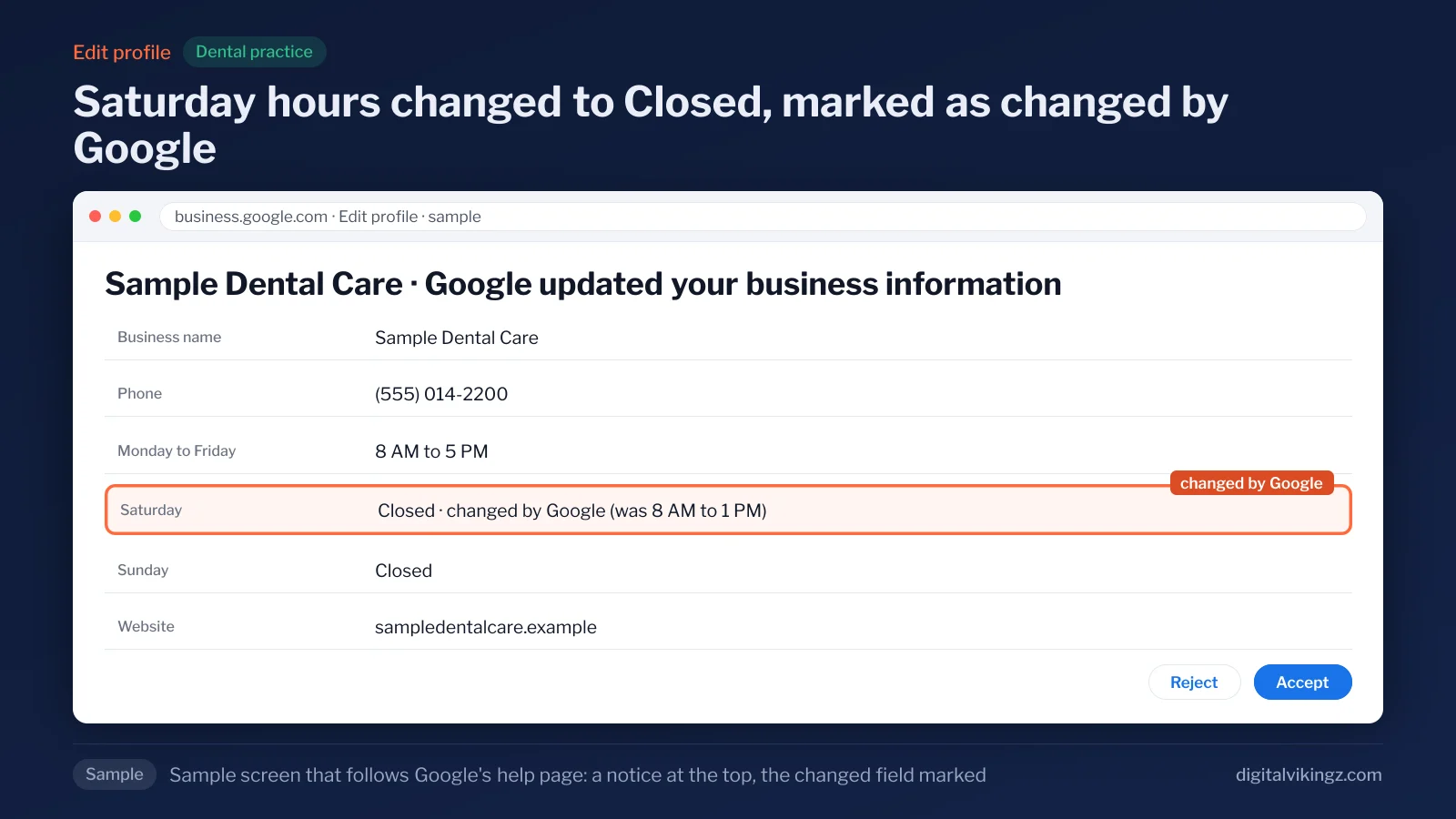
Sample Dental Care in Riverton is a made-up practice. Its owner opens Edit profile and finds Saturday hours changed from 8 AM to 1 PM to Closed. A patient searching for a Saturday dentist sees Closed and calls the next practice.
We could not find Google's exact notice wording on any saved page, so we quote no wording. The next question is where the notice shows.
Where the notice and the changed fields show up
The alert sits at the top of the profile and in the Edit profile section, and Google may also send an email. Google's help page says a notification and an alert appear in Edit profile when Google updates a profile.
Inside the editor, text color marks the type of update. Google's help page says blue shows info changed by Google, and we read that page on 22 November 2026. Other sources name other colors, so trust the marks on your own screen.
Figure 1 is a sample Edit profile screen that follows Google's help page: the changed field is marked and a notification sits at the top. Sample Dental Care shows Saturday as Closed and marked as changed by Google. Sunday is Closed, and Monday to Friday runs 8 AM to 5 PM.
Is a Google update the same as a suggested edit?
A suggested edit is a change someone else proposes for your profile, such as new hours or a new phone number. Google's help page says people who do not manage a profile can suggest an edit to it.
No. A Google update is a change already made. A suggested edit is a user's proposal that may still wait for your review. A suggested edit that needs review reaches you by email or in-product notification first, according to Google's help page.
Five places can start a change, and they come next.
Where Google's changes come from
You and the people you add as managers can edit a verified profile. Everyone and everything else reaches the profile through a suggestion, a source or a system.
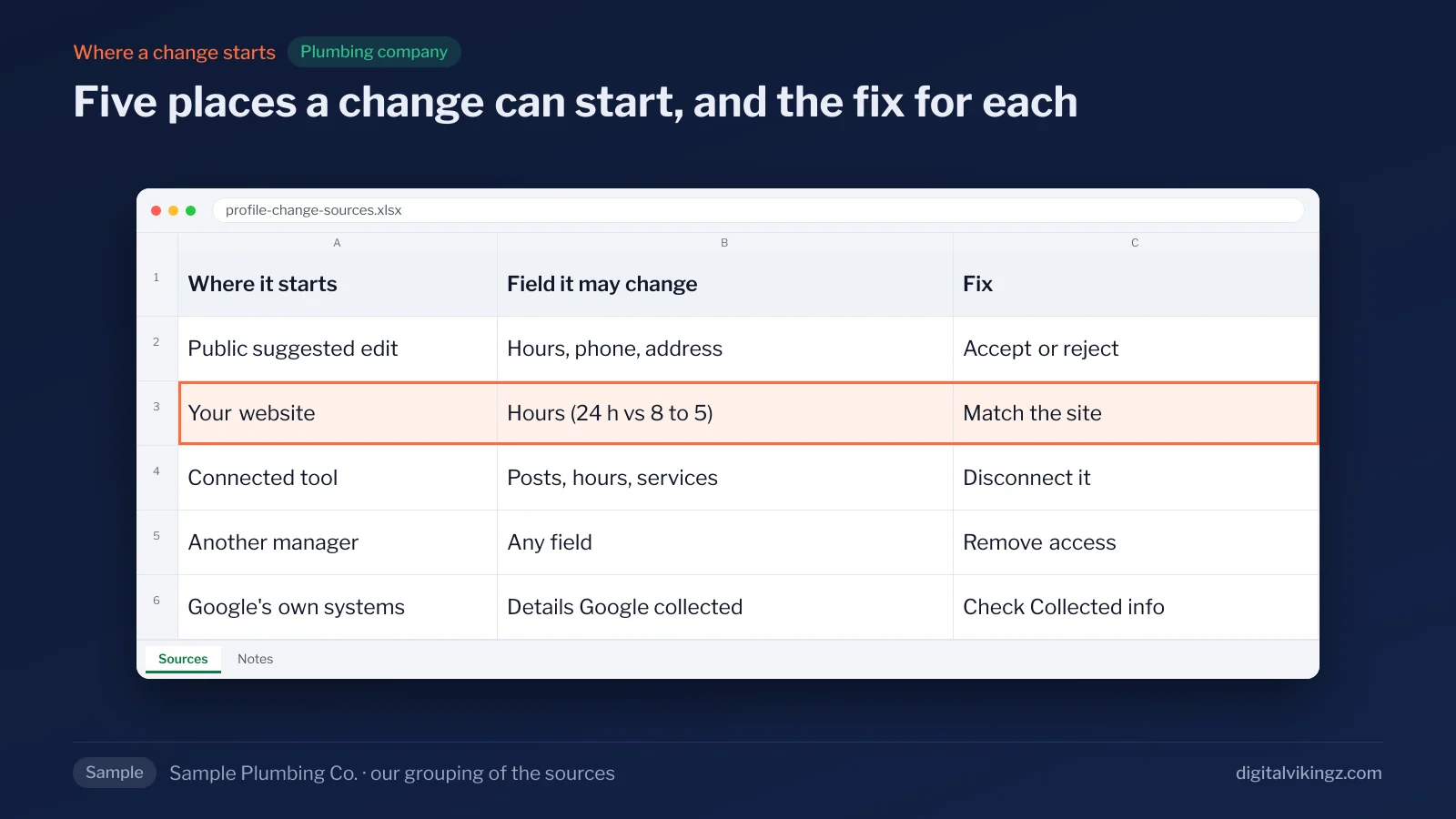
Google's changes come from five places: public suggested edits, your website and other public pages, connected tools, other managers and Google's own systems. The split is our grouping. Google's page names user reports and licensed content, and we join that with practitioner advice from Search Engine Journal (27 April 2022).
Take Sample Plumbing Co. in Riverton, a made-up business. Its profile lists 24 hours, while its website says 8 AM to 5 PM. A suggested edit to 8 AM to 5 PM would find support on the website, which is the case Google's help page describes.
Figure 2 shows the five places and the field each one may change. The fixes sit in the third column: accept or reject, match the site, disconnect, remove access and check Collected info.
The five places a change can start are listed below.
Suggested edits from the public
People who do not manage a profile can suggest an edit to its hours, phone number, address, website or open status. Google may notify the owner about certain suggested edits before publishing them, says Google's help page.
A suggested edit can also help you. Search Engine Journal's 27 April 2022 column says a user who corrects wrong hours may save customers a wasted trip.
Your website and other public pages
Your website can back a change: Google may publish a suggested edit that other public information, such as your site, supports. Google's help page says, “Google may automatically publish the update if it is supported by other publicly available information, such as your business website.”
In our reading, a footer or contact page with old hours is the page most likely to support a wrong edit.
Connected tools and old managers
Connected tools and former managers can push values into your profile, so a change can come from inside your own account. Search Engine Journal's 2022 column says a tool can sit on a profile unnoticed, and the writer advises against connecting tools unless needed.
Scheduling tools are the usual example. Our guide on how scheduling tools connect to a profile shows which tools post and edit for you. Who holds which role has its own page.
Google's own systems and automated calls
Google's own systems may update a profile from licensed content, user reports and, in some regions, answers to automated calls or texts. Google says the company “may occasionally reach out using automated messages via call, text, or WhatsApp to the verified phone number on your profile.”
Google's page limits the feature to select regions, languages and business categories. Search Engine Journal and LocalIQ wrote in 2022 that Google had started to use AI to update profile details. We state no 2026 scale for that.
Collected info shows the source of a change
Collected info shows the source and collection date of details Google gathered, where the feature is available for your region, language and category. Go to your Business Profile, select Edit profile, then Collected info.
Google adds, “Deleting collected information removes it from Google's records but does not change other details already on your Business Profile.”
Collected info covers details gathered through Google's automated messages. In our reading, an empty tab does not prove that nothing changed.
Which fields Google changes and how to correct each one
Google may change any of six fields: hours, phone number, address, name, category and website, and each one has a different likely source. The table lists each field, the likely source of a wrong value, the fix and what Google's pages say about verifying again.
| Field | Where a wrong value may come from (our reading) | How to correct it | Verifying again (Google's pages) |
|---|---|---|---|
| Hours | Website footer, other listings, public suggested edit | Set main hours in Edit profile and match the website | No rule stated |
| Phone number | Old website page, directories, answers to automated messages | Enter the number in Edit profile and on the site | No rule stated |
| Address | User edit, old directory entries | Enter the full address and check the pin location | “If you move your business to a new address after it’s verified, you must verify your business again.” |
| Name | User edit, old signage text on a page | Enter the name as it appears on your signage | Google says you “might need to verify your business again” |
| Category | User edit, connected tool | Choose the primary category that best matches what you do | No rule stated |
| Website | User edit, connected tool | Re-enter the URL and check that any UTM tags survived | No rule stated |
The second column is our reading, because no Google page maps a field to a source. Pending, accepted and not approved describe your own edits, not Google's updates, according to Google's help page on edits.
The website field often carries tracking tags. Our guide to UTM tracking on the website link explains how a tagged link reads in GA4. The hours field is the one owners ask about first, so the next question takes it.
Why does Google keep changing my business hours?
You set main hours in Edit profile. You set special hours for holidays or other temporary periods, as Google's edit page describes.
Google may change your hours when sources disagree: your website, your profile, other listings or a user's edit. In an October 2025 Local Search Forum thread, one practitioner told a poster to check that hours match across the board. A reply named a website and profile mismatch as the reason Google applies a wrong update.
Picture Sample HVAC Co., a made-up contractor. The company changes its Christmas Eve hours on its website but not on its profile. For a week, the two sources disagree.
Practitioners disagree on whether automatic edits rose in 2025. In an October 2025 Local Search Forum thread, one reply cited a tracker of about 12,000 profiles with no rise, and another saw a wave. We state no trend, so the fix steps come next.
How do you review and accept or reject a change?
You review a change in Edit profile, then accept, reject or correct the field yourself. Google's help page says you can always update your Business Profile directly.
Take Sample Roofing Co., a made-up business. Its owner gets a Friday evening email about a suggested phone number. On Saturday the owner opens Edit profile and compares the number with the website.
The parts of a review are covered below, in order.
Find what changed in Edit profile
Open your Business Profile on Google Search, select Edit profile, and look for the notification and the fields Google marked as changed. Sign in to the Google Account linked to the profile first.
In the Google Maps app, tap Business, then Edit profile, as Google's help page lists.
How many days do you have to reject a suggested edit?
Google may email you or show an in-product notification when a suggested edit needs your review.
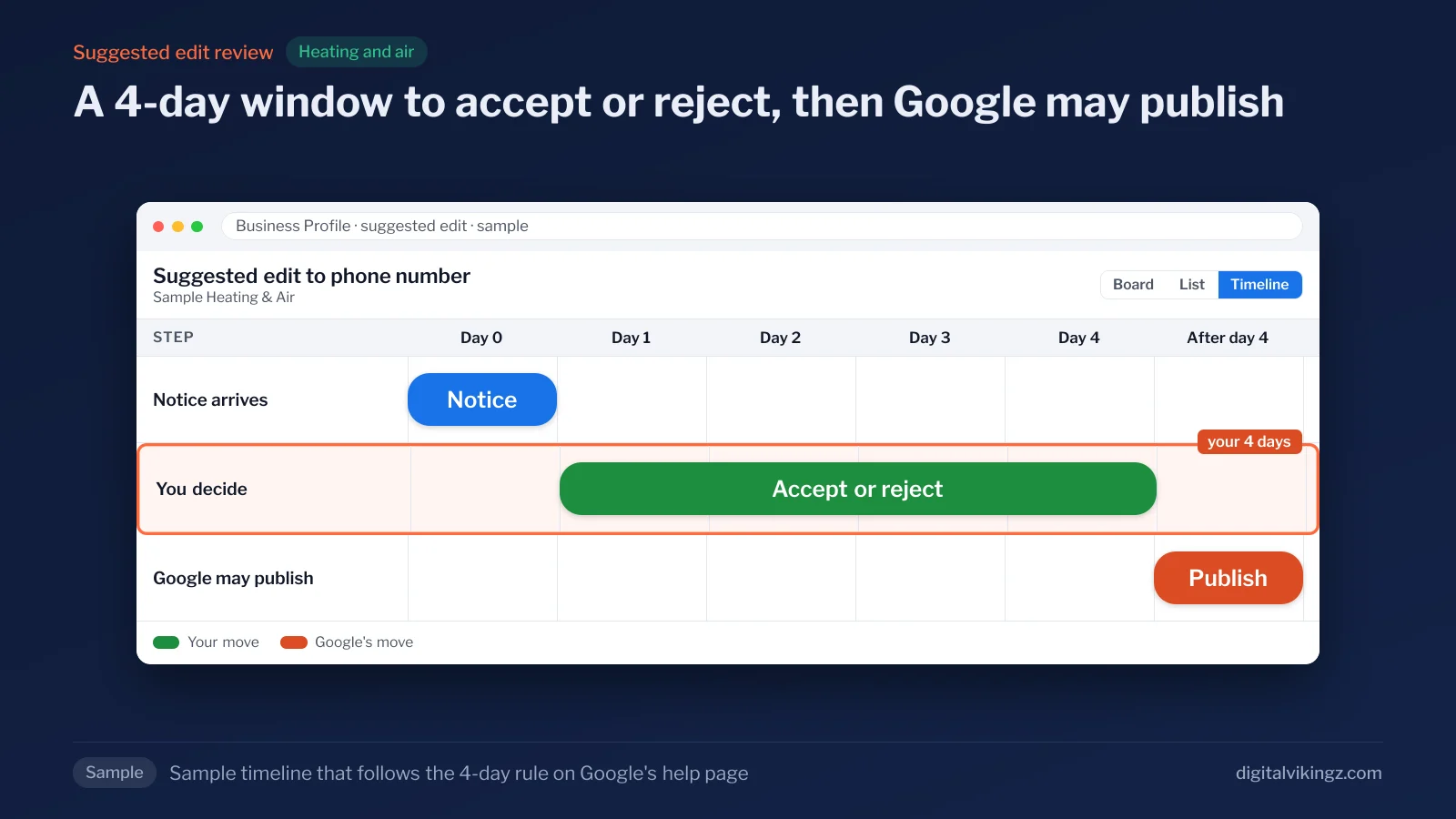
You have 4 days to accept or reject a suggested edit once Google notifies you that the edit needs review. Google's help page says Google may publish the edit after 4 days when other public information, such as your website, supports it. Google may also apply some edits without prior review to meet policy guidelines.
Google lists no cases, and nobody outside Google knows which edits skip review.
Figure 3 follows the 4-day rule on Google's help page: notice, 4 days to decide, then Google may publish. Sample Heating & Air shows the notice on day 0 and accept or reject on days 1 to 4. After day 4, Google may publish if the website supports the edit.
Accept, reject or correct the field yourself
Accept a change that is correct and reject one that is wrong. Then enter the right value yourself and fix its source. We suggest that order because rejecting alone leaves the source unchanged, so the old value may return.
Rejecting a Google update that is correct leaves a wrong value on the profile for customers to find. Check your website first. We have not tested whether a rejected change returns.
What if the notice goes to the wrong person?
A profile can have an owner and several managers, and Google may notify any of them.
The notice may go to a former manager or a shared inbox nobody checks, so the 4-day clock runs unseen. We suggest listing the users on the profile, removing anyone who has left, and putting one monitored address on the owner role.
Our guide on who holds each manager role on a Google Business Profile covers roles and transfers.
When your own edit shows as not approved
Not approved means Google could not confirm your own edit, and you may be able to appeal the decision. Google's help page says an owner edit shows as accepted, pending or not approved. Owner edits usually take up to 10 minutes to review, but some take up to 30 days. Google gives no range for its own updates.
A not approved edit is a different state from a Google update, which Google already made. Google's page on edits links the appeal steps.
How do you stop the same change coming back?
A change comes back when the source behind it still holds the old value. The usual sources are the website, other listings and connected tools, according to Search Engine Journal's 2022 column.
Google's help pages list no setting that stops updates, but matching your sources to your profile may lower the chance of a repeat. Four steps reduce repeat changes, and they are listed below.
Sample Med Spa in Westbrook is a made-up business that changed its phone number last spring. A booking tool still held the old number and sent the old number to the profile again.
Match your website, social profiles and directories
Your website, social profiles and directory listings should all show the same hours, phone number, address and name as your profile. The places to align are listed below.
- Website header and footer
- Contact page
- Schema markup on the site
- Social profile bios
- Directory listings
Mismatches hide on pages nobody opens anymore, such as an old contact page. A local SEO audit lists every source that carries your name, address and phone number.
Remove old managers and connected tools
Remove managers you no longer work with, and disconnect tools you no longer use, so an old account cannot send values. Check Google Account permissions and each connected app once, and keep a written list of who has access.
The role check from the section on wrong notices applies here too.
Use special hours for holidays and temporary changes
Set special hours in Edit profile for holidays and other temporary periods, as Google's edit page describes. Google says, “To change your hours for holidays or other temporary periods, set special hours.”
No source we read says special hours stop Google or the public from editing your hours. They only show the right dates. Our guide on how to set special hours for holidays walks through the Special hours editor.
Many locations: bulk uploads and shared rules
A bulk upload ignores an unchanged field, replaces a changed one, and may let an automatic update fill a blank one. When you use a spreadsheet to update multiple locations, Google says to import them “before you manage Google updates.”
We suggest one owner for the master hours sheet and a weekly check of all locations. Agencies that manage profiles for clients can read how white-label SEO for agencies is delivered.
Does a change trigger re-verification?
To edit your business info on Google, you need to verify your business, and verifying gives you ownership of the profile.
Yes for an address move, maybe for a name change, and Google's pages state no rule for category, hours, phone number or website. Google's help page says a move to a new address means you “must verify your business again.” A name change “might” need it too.
Google's pages do not say whether accepting a Google update triggers verification, and we have not tested the case. Sample Roofing Co. moves its office across Riverton and enters the new address. That is the case Google says needs verifying again.
Our guide on how to verify a Google Business Profile again lists the verification methods.
What if someone else made the change?
A change someone else made may come from a former manager, a connected tool or a stranger's suggested edit. The steps to check a change you did not make are listed below.
- Check Collected info for the source and date.
- Check the list of users and connected apps.
- Correct the field, then report a policy violation through Google's third-party policy form.
Search Engine Journal's 27 April 2022 column tells of a school. Its website link changed on the profile, and the fix took at least 24 hours. Google's pages do not promise that a report removes a change, so keep the correction in your own hands.
A second listing for the same business is a duplicate problem and has its own page.
Is a suspended profile an edit problem?
No. A suspended profile is a status problem, so reinstatement and appeals follow a different path from edits. A Google update or suggested edit changes a field on a live profile, while a suspension removes the profile from view.
Our guide on what to do when a profile is suspended covers the causes and the reinstatement steps.
What changed in 2026 for suggested edits?
Google's help page now carries the 4-day rule, and Search Engine Roundtable reported it on 23 September 2026. That rule explains why the notice you received may carry a deadline.
What Search Engine Roundtable reported in September 2026
Search Engine Roundtable reported on 23 September 2026 that Google added a section on notifications about suggested edits to its help page. Google's help page says some edits apply without prior review.
A notice in your inbox is therefore not the only way a change arrives. That is one more reason to open Edit profile on a schedule.
Do suggested edits affect rankings?
No Google help page we read says that a suggested edit changes rankings. Nobody outside Google knows whether edits move rankings.
Treat a wrong field as a customer problem first. A closed label or a wrong phone number sends the customer to another business. The owner's routine below comes next.
How do you contact Business Profile support?
Contact Business Profile support through the Contact us option on Google's help pages, or post to the help community. The help community is public, so leave out customer details.
A weekly check for Google changes
We suggest checking Edit profile once a week and after every hours or phone change. The weekly check has four steps, and they are listed below.
- Open Edit profile and read the notification.
- Compare hours, phone number, address, name, category and website with your site, using the table above.
- Check the list of users and connected apps.
- Write down the date, the field and the source of any change from Collected info.
Sample log: 14 December, hours, Collected info shows a directory, site footer fixed. One line per change is enough.
Our guide to Google Business Profile upkeep steps covers every other field in order. A weekly check may not be realistic for your team. Our Local SEO and Google Business Profile Optimization service keeps the profile matched to your site, and a written quote follows a strategy call.
Our AI agent writes Daily Google Posts, which gives you a reason to open the profile every day and see what changed.
The free preview of today's Google post shows one post written for your business before you choose a plan.