 Digital Vikingz
Getting more Google reviews means asking every customer for a review of the visit, through the Business Profile review link, within Google's rules. Seven steps cover the link, the customers to ask, the timing, the channel, the wording, the replies and the target. The Get more reviews option gives each Business Profile a review link and a QR code.
Every customer gets the request on the day the job is done. Text messages, emails and printed QR cards carry a short request for a review of the visit.
Replies to every review show future customers that the business reads feedback. The right review count is the count and recency of the businesses beside yours in the map pack.
Google bans incentives for any review, review gating, conflict-of-interest reviews and bought reviews. The US FTC rule makes fake reviews and incentives tied to positive or negative sentiment unlawful. Google can remove those reviews, block new ones and show a warning on a profile that breaks the rules.
How do you get more Google reviews?
More Google reviews come from asking every customer on the day of the job, with no reward attached. Google gives each Business Profile a review link and a QR code for the request.
The seven steps to get more Google reviews within Google's rules are listed below:
- Copy the review link and QR code from your Business Profile.
- Ask every customer, not only the customers you expect to be happy.
- Ask on the day the job is done, while the visit is fresh.
- Send the request by text message, email or a printed QR card.
- Ask for a review of the visit without offering a reward or naming a star rating.
- Reply to every review, including the negative ones.
- Track your review count and newest review date against the businesses in the map pack.
Business names, towns and customer names in the examples below are samples to replace with your own. Step one starts inside the Business Profile.
How do you get your Google review link and QR code?
The Google review link and QR code come from the Get more reviews option in the Business Profile, under Read Reviews. Google Business Profile is the name Google gave Google My Business in November 2021, as Google announced on The Keyword.
The steps to copy the review link and save the QR code are listed below:
- Sign in on a computer and open your Business Profile.
- Select Read Reviews, then select Get more reviews.
- Select Copy to copy the review link.
- Right-click the QR code and choose Save image as to download the code.
Google's Business Profile Help, read in November 2026, states that review QR codes are generated only in a computer browser, not on mobile devices. Google suggests the link for receipts, thank-you emails and the end of a chat, and a printed QR code in the store.
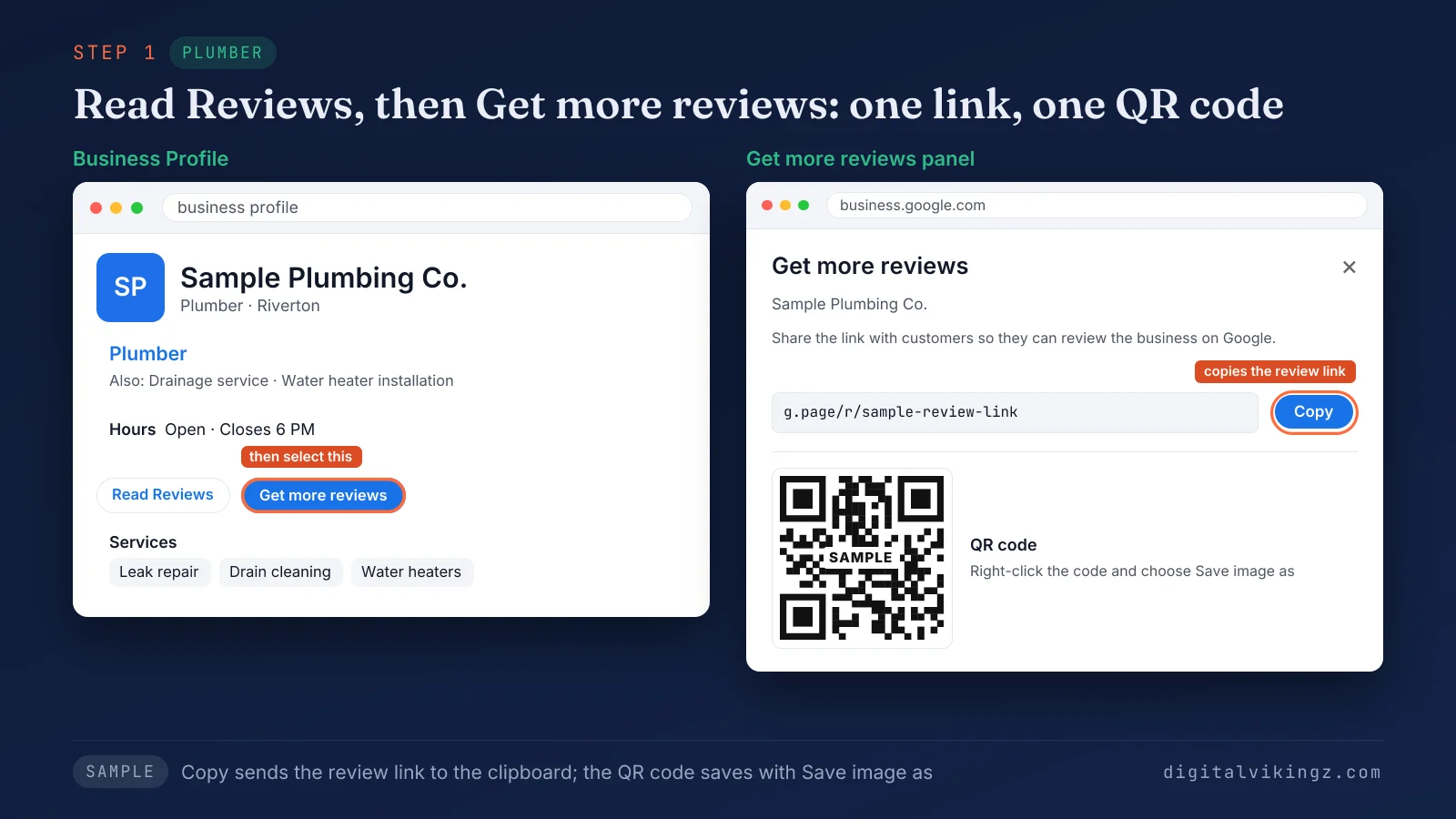
Figure 1 shows the Get more reviews panel for Sample Plumbing Co., with the Copy button beside the review link and the QR code below. Review link generators from other companies are optional, because the Business Profile already generates the link.
The same link also works in a WhatsApp message or a Facebook post. Customers then need one thing to post a review: a Google Account.
Do customers need a Gmail address to leave a Google review?
Customers do not need a Gmail address to leave a Google review, but they do need to sign in to a Google Account. Google lets anyone create a Google Account with a non-Gmail email address.
Send the review request to every customer, whatever email address the customer uses. The next decision is which customers to ask, and when.
Who should you ask for a Google review, and when?
Every customer should get a Google review request, on the day the job or visit ends. Google's policy allows businesses to ask for reviews that "represent a genuine experience", without "attempting to influence the rating or the contents of the review."
Asking only the customers expected to be happy is review gating, which Google's policy does not allow. Owners on the Local Search Forum and Quora report happy repeat customers who leave few reviews until someone sends the link.
The request should go out on the same day, while the visit is fresh. Review guides from Backlinko and AP Web commonly advise asking within 24 to 48 hours at the latest. The right moment differs by type of business.
When should each type of local business ask for a review?
Each local business should ask for a Google review at the moment its job is visibly finished, which differs by trade.
The table below matches four types of local business to the moment and channel for the review request:
| Business | Moment the job is done | Channel | When the request goes out |
|---|---|---|---|
| Plumber | Leak fixed and invoice paid | Text message | With the paid invoice |
| HVAC company | Repair or tune-up finished | Text message | Same day, after the technician leaves |
| Dental practice | Patient checks out | QR card at the front desk, then email | Card at checkout, email the same evening |
| Med spa | Treatment finished and paid | Email or text message | Same day, after the client leaves |
Service-area businesses without a counter can print the QR code on the invoice or a leave-behind card. Businesses that book by chat can add the review link at the end of the chat, as Google suggests.
The request itself then needs the right words.
What should a Google review request say?
A Google review request should name the business and the job, ask for a review of the visit and carry the review link. Google's policy bars requests that try to influence the rating or ask for specific content.
The four parts of a review request that stays within Google's rules are listed below:
- Business and job: the name of the business and the service done that day.
- Request: one sentence asking for a review of the visit on Google.
- Review link or QR code: the Business Profile link, so the customer skips the search.
- Sign-off: the business name, with no staff member the customer is asked to mention.
The request leaves out "5-star", "positive" and any reward, because each one steers the rating Google asks businesses to leave alone. Vague openers such as "if you get a moment" can make the request sound optional.
Each channel carries the same four parts in its own format. The job facts in a review request also make a finished-job Update post on the Google Business Profile. Our Google Business Profile post examples by industry include a finished water heater install written as a post.
What should a review request text message say?
A review request text message should fit on one phone screen, name the job and end with the review link. The sample below comes from Sample Heating & Air, an HVAC company in Northfield, after a furnace repair.
The sample text message has two fields:
- Sent: "Same day, after the technician leaves"
- Text: "Hi Dana, thanks for choosing Sample Heating & Air for today's furnace repair in Northfield. Would you review the visit on Google? Here is the link: [review link]"
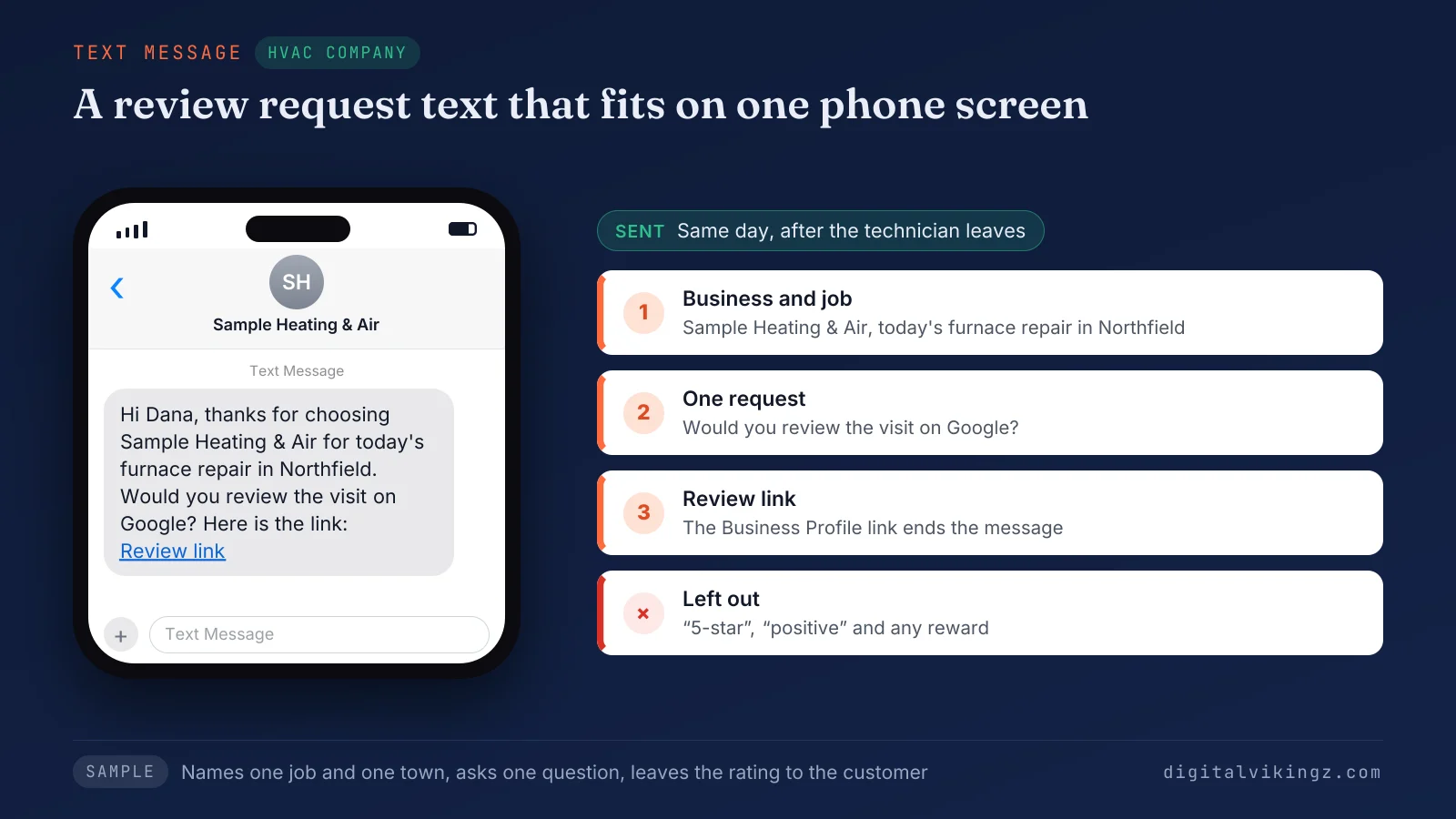
Figure 2 shows the Sample Heating & Air text on a phone, naming the furnace repair in Northfield before the review link. The message names one job and one town, asks one question and leaves the rating to the customer.
One reminder a few days later should be the last message for that job. Email carries the same Google review request with room for a subject line and a button.
What should a review request email say?
A review request email should carry a clear subject line, two or three short sentences and one button that opens the review link. The sample below comes from Sample Med Spa in Westbrook, after a facial.
The sample email has four parts:
- Subject: "Your visit to Sample Med Spa today"
- Opening: "Hi Maria, thank you for visiting Sample Med Spa in Westbrook for your facial today."
- Request: "We read every review. Would you review your visit on Google?"
- Button: "Review us on Google", linked to the Business Profile review link
The button hides the long link, and the subject line names the visit instead of the review. The email names the facial and makes no claim about the treatment result.
Customers at a front desk can open the same Google review link from a printed card.
How do you ask for Google reviews in person?
A business asks for Google reviews in person by handing every customer a printed QR card, without asking the customer to post on the spot. Google's policy states that merchants "should not require or pressure users to leave ratings or write reviews while on the premises."
Google still suggests displaying the review QR code in the store, so a card and a counter sign are both allowed.
The sample QR card for Sample Family Dental in Lakeside has three parts:
- Heading: "Thank you for visiting Sample Family Dental"
- Request: "Scan to review your visit on Google."
- Code: the Business Profile review QR code, saved from the Get more reviews panel
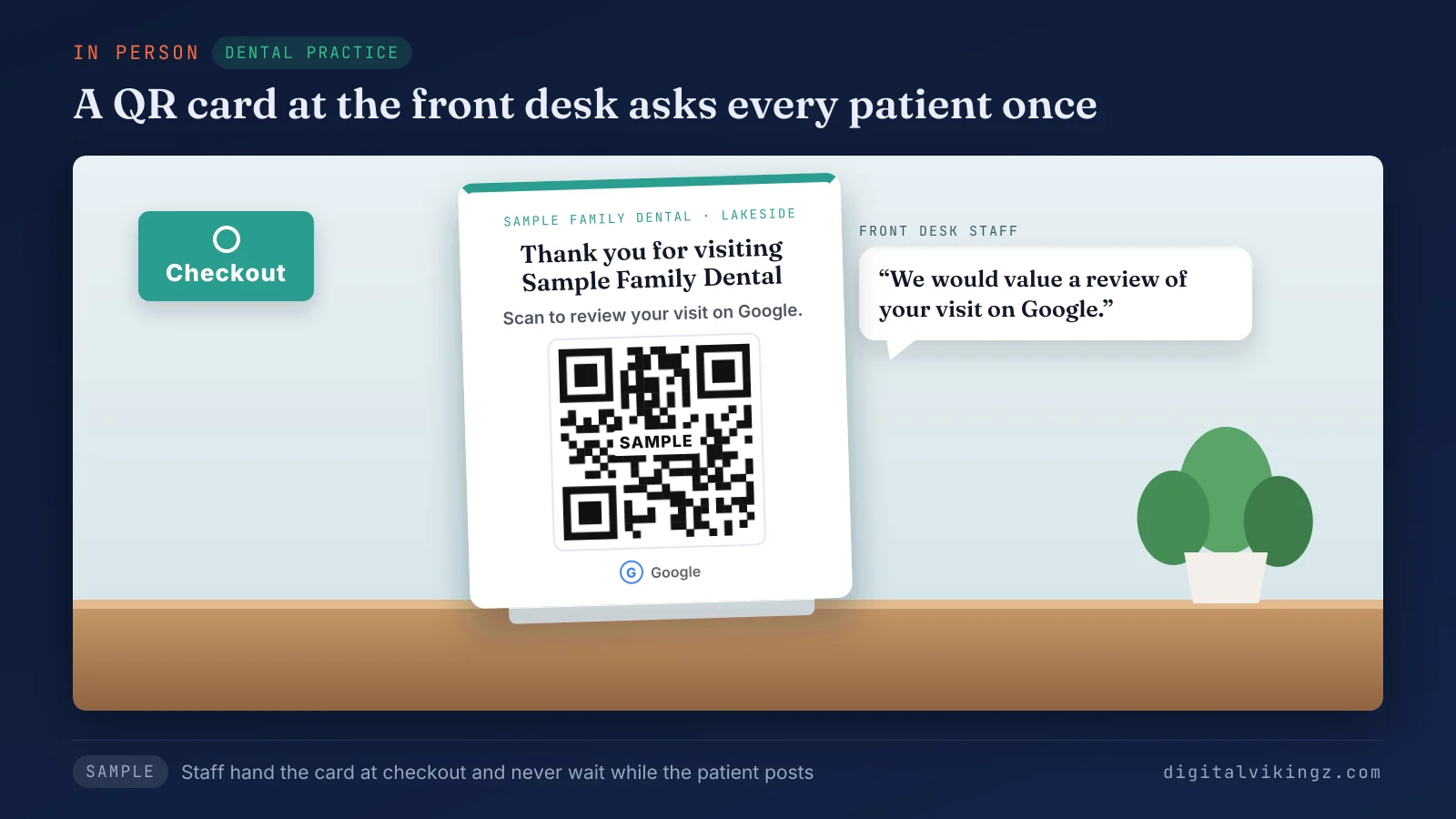
Figure 3 shows the Sample Family Dental card at a front desk, with the request line above the QR code. Front-desk staff hand the card to every patient at checkout with one line: "We would value a review of your visit on Google."
Staff never wait while the patient posts, and never ask for a staff name in the review. Every review that arrives then deserves a reply.
How should you reply to Google reviews?
A business should reply to every Google review with a short, personal answer to the point the reviewer made. Google's review tips ask owners to reply so customers see "that their feedback matters."
Google's tips for replies to Google reviews are listed below:
- Keep the reply short, clear and polite.
- Answer the point the reviewer made instead of sending the same thank-you to everyone.
- Leave deals and promotions out of the reply.
- Protect the reviewer's privacy and move complex issues to phone or email.
- Apologize where a mistake happened and explain the limits of what the business can do.
Google's tips add that "A mix of positive and negative feedback often feels more trustworthy." Replies to negative reviews matter most, because later customers read the owner's answer beside the complaint.
Replies keep the profile active while the review count grows toward its target.
How many Google reviews does a business need?
A business needs a Google review count and a newest-review date close to those of the other businesses in its map pack. A fixed review target ignores how many reviews local competitors hold.
Search the main service and town, then note the review count, star rating and newest review date of the top three businesses.
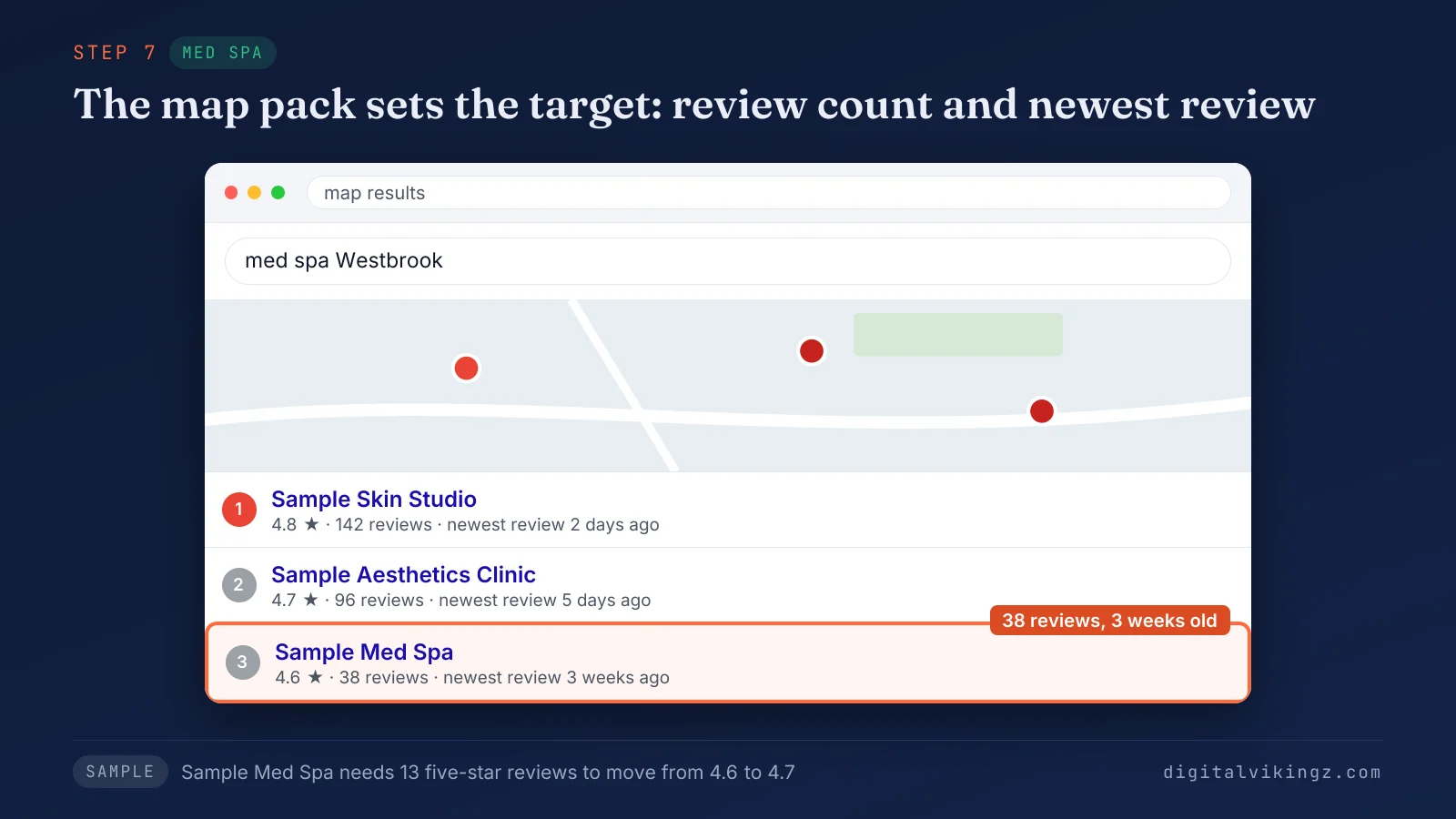
Figure 4 shows a sample map pack for med spas in Westbrook, with Sample Med Spa third at 38 reviews and 4.6 stars. Sample Skin Studio holds 142 reviews at 4.8 stars, and Sample Aesthetics Clinic holds 96 at 4.7. The newest reviews of the two leaders are 2 and 5 days old, against 3 weeks for Sample Med Spa.
The newest review date deserves the same attention as the count, because searchers see the date on every review.
The five-star reviews needed to lift an average equal the current count, times the target minus the current rating, divided by 5 minus the target. Sample Med Spa needs 13 new five-star reviews to move from 4.6 to 4.7: 38 times 0.1, divided by 0.3, is 12.7, rounded up.
The formula assumes a simple average, and the rating Google displays can differ from a simple average.
A steady request after every job keeps new reviews arriving each week instead of in one burst. Review count and recency are two of the signals behind how a business ranks higher on Google Maps. Our guide on how to rank higher on Google Maps covers the other signals, from categories to distance.
What do Google and the FTC ban when businesses ask for reviews?
Google bans incentives for any review, review gating, conflict-of-interest reviews and bought or fake reviews on Business Profiles. The US FTC rule on consumer reviews, in force since October 2024, makes fake reviews and incentives tied to a sentiment unlawful.
Google's policy is wider, because a reward for any review breaks Google's policy even when the reward ignores the star rating.
The table below compares what Google's policy and the FTC say about five review practices:
| Practice | Google Business Profile policy | US FTC rule or guidance |
|---|---|---|
| A discount, gift or prize for posting any review | Not allowed: incentives "in exchange for posting any review" | Unlawful when the reward is tied to positive or negative sentiment (16 CFR 465.4) |
| Asking only happy customers (review gating) | Not allowed: no business may "selectively solicit positive reviews" | Guidance: may be unfair or deceptive when posted reviews end up "substantially more positive" (16 CFR 255.2) |
| Reviews from staff, relatives or competitors | Not allowed: a conflict of interest | An officer or manager review needs a clear disclosure (16 CFR 465.5) |
| Buying reviews | Not allowed: reviews "paid for, directly or in kind" | Unlawful when the business knew or should have known the review was fake (16 CFR 465.2) |
| Pressing customers on the premises or asking for specific content | Not allowed | Google rule only |
The FTC can seek civil penalties against knowing violators of the rule. A lawyer gives the binding answer on a specific practice, and the quotations above come from the published texts.
Asking every customer for a Google review breaks none of these rules. Google acts first on the profile that breaks them.
What happens when a business breaks Google's review rules?
Google removes the reviews that break its rules and can restrict the Business Profile that collected them.
The restrictions Google lists in its help pages are given below:
- No new reviews: the profile receives no new reviews or ratings for a set period of time.
- Unpublished reviews: existing reviews and ratings are hidden for a set period of time.
- Consumer warning: the profile shows a warning that fake reviews were removed.
Google notifies the owner by email before a restriction applies, and the owner can appeal the decision. Google reviews removed for policy violations are not restored.
Serious or repeated fake engagement can also lead to a suspended Google Business Profile. Our guide on why a Google Business Profile gets suspended covers reinstatement.
Can you offer a discount for a Google review?
Offering a discount for a Google review breaks Google's policy, whatever rating the customer gives. Google calls incentives for posting, changing or removing reviews "fake & misleading content" that is "strictly prohibited."
The FTC rule also makes a reward tied to a positive review unlawful in the US. Google's list of incentives begins with "such as", so prize draws and gift cards fall under the same ban.
Can you ask only happy customers for Google reviews?
Asking only happy customers for Google reviews is review gating, and Google's policy does not allow review gating. The policy bars any business that would "selectively solicit positive reviews from customers."
FTC guidance describes the same practice and says a business that "simply invited all recent purchasers" would not have acted unfairly. Survey tools that send only high scorers to Google after a star rating work the same way.
Every survey respondent should get the same Google review link.
Can employees or relatives leave Google reviews for a business?
Google's policy does not allow Google reviews from employees or relatives, because those reviews carry a conflict of interest. Google's list includes "current or former employment" and "familial relationships", and covers industry competitors too.
The FTC rule also requires an officer or manager who reviews the business to disclose the relationship clearly. Owners should never post a review for a customer, or from an account or device set up for the customer.
Can you ask customers to name a staff member in a review?
A business should not ask customers to name a staff member in a review, because Google bars requests for specific content. Google's policy names "content that identifies a staff member" among the specific content merchants may not request.
The same policy bars staff review quotas, so a contest over who collects the most reviews breaks Google's rules. Asking customers to mention a service or a keyword in a Google review counts as specific content too.
Is buying Google reviews illegal?
Buying fake Google reviews is illegal under the US FTC rule, and Google bans every paid review. The rule makes buying a review unlawful when the business knew or should have known the review misrepresented the reviewer or the experience.
Google's policy bans reviews "paid for, directly or in kind", which covers every review seller. Bought reviews also expose the profile to the restrictions listed above.
Reviews earned within these rules also feed how a profile ranks on Google Maps.
How do Google reviews affect ranking on Google Maps?
Google reviews affect ranking on Google Maps through prominence, which Google describes as how well-known a business is. Google's ranking help page states: "More reviews and positive ratings can help your business's local ranking."
The same page lists the main local factors as "relevance, distance, and popularity", so reviews are one factor among several. Reviews also show next to the Business Profile in Maps and Search, where searchers compare businesses before calling.
Google's review tips add that reviews "give potential customers helpful info." Our Local SEO service page states that map pack gains usually build over two to four months as reviews, posts and pages add up.
Our service sends every client the review request, because Google does not allow paid or filtered reviews. Review growth is monthly work in our Local SEO and Google Business Profile Optimization service. The service covers Google Business Profile optimization with review requests and replies, so we write the request message and timing, and your team sends each request.
Do replies to Google reviews help ranking on Google Maps?
Google has not said that replies to Google reviews raise ranking on Google Maps, though Google lists replies on its local ranking tips page. The page says that "Positive reviews and helpful replies can help your business stand out."
A Google Product Expert in the Business Profile Help Community has written that replying does not help rank, which is one expert's view. Replies still serve the people reading the profile before calling.
Do Google reviews affect which business AI assistants recommend?
Google reviews are one of the sources AI assistants read before recommending a local business, beside profiles, directories and websites. Reviews that describe a specific service give an assistant more to match against the question.
Which local business an AI assistant recommends depends on the facts agreeing across those sources. Our guide on which local business an AI assistant recommends shows what each assistant reads.
Why do Google reviews disappear after customers post them?
Google reviews disappear or arrive late when Google's checks hold them, when profiles merge or when Google removes them for a policy violation. Google's help page on missing reviews says the check process "might take a few days".
The common reasons a Google review goes missing are listed below:
- Review checks: Google checks new reviews before showing them, which can delay a review by a few days.
- Merged profiles: reviews from two merged Business Profiles can take a few days to display together.
- Policy removals: Google removes reviews that break its content policies, and those reviews are not restored.
- Old app versions: customers on older phones or software might have trouble posting, and Google recommends updating the Maps app.
- Spam-like patterns: owners on the Local Search Forum report that bursts of reviews and reviews posted from the business's own device go missing more often.
Google might also disable reviews for a time on certain Business Profiles or business categories. Reviews that vanish after a profile is reinstated are a case for Google support, as the same help page advises.
Owners who see legitimate reviews vanish should keep asking every customer at a steady pace instead of pushing harder. Customers should post from their own phone and their own Google Account, never from a tablet at the counter.
Bad reviews raise a different question, because a bad review stays unless the review breaks a rule.
Can a business remove a bad Google review?
A business can flag a bad Google review that breaks Google's content policies, and Google decides whether to remove the review. Google's review tips point owners to the flag option for reviews that break content policies.
Google states that reviews are usually removed for policy violations "like spam or inappropriate content." Negative reviews that follow the rules stay on the profile, and the owner's reply sits beside them.
Paying or rewarding a customer to remove a negative review breaks the same incentive rule as paying for a good one. A few questions about review requests remain.
Questions about getting more Google reviews
Can you ask customers for a 5-star review?
A business should not ask for a 5-star Google review, because Google's policy bars attempts to influence the rating. Ask for a review of the visit and let the customer choose the stars.
Can you get more Google reviews for free?
A business can get more Google reviews for free, because the review link and QR code come with every Business Profile. Paid review tools automate the sending, and the rules stay the same.
Can you send the same review link to every customer?
The same Google review link can go to every customer, because the link belongs to the Business Profile. Sending the link to every customer is also the opposite of review gating.
Can you ask a customer to change a negative review?
A business can fix the problem behind a negative Google review, and Google bans any reward for changing or removing the review. Google notes that a constructive reply may even encourage the customer to update the review.
Can review software send Google review requests?
Review software can send Google review requests by text and email, as long as every customer gets the same request. The software changes the speed of sending, never the rules on incentives and gating.
Which step should you start with to get more Google reviews?
The first step to more Google reviews is copying the review link and sending the link to every customer on the day of the job. Add the text, email or counter card that fits your business, then reply to each review as the review arrives.
Check your review count and newest review date against the map pack once a month. Digital Vikingz runs review requests and replies inside one plan with posts and pages, so Google and AI answer engines recognize the business.
Home-service owners short on time can hand the posting to Daily Google Posts, where our AI agent posts on the profile every day. Our page on daily Google posts and review replies shows the plan that adds review replies written for the owner to approve.
