 Digital Vikingz
A business responds to a Google review by selecting Reply under the review in its verified Business Profile and posting a short answer to the reviewer's point. Every review gets one reply that changes with the situation: thanks with one detail, a fix for a fair complaint or a calm correction of a wrong fact.
Yes, a business should respond to every Google review, since Google's review tips advise owners to "reply to reviews and share your perspective." Every reply to a Google review includes five parts: the reviewer's name, the point the reviewer made, the service delivered, one next step and a sign-off.
The reply to each Google review type starts differently: thanks for praise, a fix for a complaint, a correction for wrong facts and a no-record line for strangers. A reply to a negative Google review thanks the reviewer, names the problem, apologizes for any fault, states the fix and gives a business phone or email.
The owner or one named manager should write Google review replies, because one writer keeps the voice, the facts and the timing the same across every review. Dental clinics and med spas respond to Google reviews without the reviewer's name or the service, so the reply never confirms that the reviewer is a patient.
How do you respond to Google reviews?
A business responds to a Google review by selecting Reply under the review in its verified Business Profile and posting a short answer to the reviewer's point. Every review gets one reply that changes with the situation: thanks with one detail, a fix for a fair complaint or a calm correction of a wrong fact.
The reply appears under the review on Google Search and Google Maps, where the next customer reads both. Replying to each review is step 12 in our guide on how to optimize a Google Business Profile.
The steps to reply to a Google review, in Google's order, are listed below:
- Go to the Business Profile.
- Select Read reviews.
- Select Reply next to the review.
- Enter the reply in the dialog box.
- Select Reply to post the answer.
Google states that "Before you can reply to reviews, you must verify your business." The same Reply option opens from a phone, through a different path to the reviews.
How do you reply to a Google review on a phone?
A business replies to a Google review on a phone through the Google Maps app, where the Business tab lists the reviews. Google's help path opens the Google Maps app, then Business, then Reviews, where each review on the Business Profile carries the same Reply option.
Some owners find the Reply option missing on both phone and computer, for one of three reasons.
Why can't you reply to a Google review?
A business is unable to reply to a Google review on an unverified Business Profile, without an owner or manager role, or in a category without reviews. Google states that "Reviews are available only in certain countries or regions and for certain business categories."
Owners and managers can both reply, because Google gives managers "mostly the same access to the profile as owners". A personal Google account that was never added to the profile sees the review the way any customer does, with no Reply option.
A reply that posts and then vanishes is usually waiting for Google's check, covered next.
What happens after you reply to a Google review?
Google checks every reply to a Google review against its content policies before the reply appears, and the reviewer gets a notification once the reply is live.
Google states that "Replies usually take up to 10 minutes to review, but sometimes a review can take up to 30 days." A reply that fails the check is not posted, and Google asks the owner to edit the reply.
The owner reply shows as the business, and Google says "your personal name won't be shown." Customers can change their review after reading the reply, and the review date then moves to the latest edit.
An owner edits or deletes a reply from Read reviews on the Business Profile, with Edit under the reply, then Update or Delete. Only Google's help page and one troubleshooting guide, among the nine pages we read on 19 November 2026, mention the check Google runs before a reply shows.
Every eligible review can take a reply, which raises the question of whether every review needs one.
Should you respond to every Google review?
Yes, a business should respond to every Google review, since Google's review tips advise owners to "reply to reviews and share your perspective." Google recommends replies without making replies mandatory, so the choice to answer every reviewer sits with the owner.
Which reviews should a business answer first? Negative reviews come first, then reviews that ask a question, then detailed positive reviews, then ratings with no text.
Google's local ranking page says that "Positive reviews and helpful replies can help your business stand out."
Google has not said that replies help a business rank higher on Google Maps. Relevance, distance and prominence, the factors Google does name, are covered in our guide on what helps a business rank higher on Google Maps.
Answering every review works only when each reply carries the same five parts.
What should every reply to a Google review include?
Every reply to a Google review includes five parts: the reviewer's name, the point the reviewer made, the service delivered, one next step and a sign-off. Google's reply tips say "Address the reviewer by name and acknowledge their specific feedback."
The five parts of a reply to a Google review are listed below:
- Name: the reviewer's display name, except on a clinic or med spa profile.
- Point: one specific thing the reviewer wrote, repeated in the reply.
- Service: the job the business did, in the words its website uses.
- Next step: a return visit for a happy customer, or a phone number or email for a problem.
- Sign-off: the first name or initials of the person replying.
Google may ask reviewers of a service business to "choose the specific service provided," and the choice shows on written reviews. Google's tips add "Keep it short and simple," so a reply stays a few sentences long.
AI assistants read Business Profiles and review sites when choosing which local business to recommend. The sources each assistant reads are compared in our guide on which sources AI assistants read before recommending a local business.
Five parts belong in every reply, and a short list of things never does.
What should a reply to a Google review never include?
A reply to a Google review never includes the customer's private details, an offer, an argument, a reward for changing the review or text copied from another reply. Google's tips state that "Like reviews, replies must follow our policies."
The five things to leave out of a reply, with the Google rule behind each, are listed below:
- Private details: Google's tips say "Never share a reviewer's private information."
- Offers: Google's tips say "Be conversational, not promotional."
- Arguments: the same tips rule out "personal attacks" in any reply.
- Rewards: Google treats incentives to "change reviews, or remove negative reviews" as fake and misleading content.
- Copied text: Google's content policy bars "Posting the same content multiple times".
Business contact details are allowed, since Google's policy lets merchants post "contact information related to their business including phone, email". Google's review policy, the Maps content rules that decide which reviews and replies stay up, covers more cases than these five.
The parts and the limits stay fixed, and the opening line is what changes with each review.
What should you reply to each type of Google review?
The reply to each Google review type starts differently: thanks for praise, a fix for a complaint, a correction for wrong facts and a no-record line for strangers.
The table below gives the first line and the next move for eight types of Google review:
| Review type | First line of the reply | What follows |
|---|---|---|
| Five stars with text | Thanks, [name], for the note about [detail]. | Name the service and invite the customer back. |
| Rating only, no text | Thank you for the [n]-star rating. | One line; a low rating also gets a phone number. |
| Mixed, three stars | Thanks for the fair feedback on [detail]. | Thank the praise, own the problem and say what changed. |
| Negative, fair complaint | [Name], you are right that [problem], and we are sorry. | State the fix and give a business phone number or email. |
| Negative, wrong on facts | Thank you for raising [topic], [name]. | State the correct fact once and offer a call. |
| No record of the customer | We have no record of a visit under the name on the review. | Invite contact, then report the review if the review breaks policy. |
| Former employee or competitor | Thank you for the feedback. | Keep the reply to one line and report the review as a conflict of interest. |
| Another language | [A thank-you in the reviewer's language] | Reply in that language when someone on the team writes the language well; otherwise reply briefly in English. |
Each first line is a starting point, and the rest of the reply follows the five parts above.
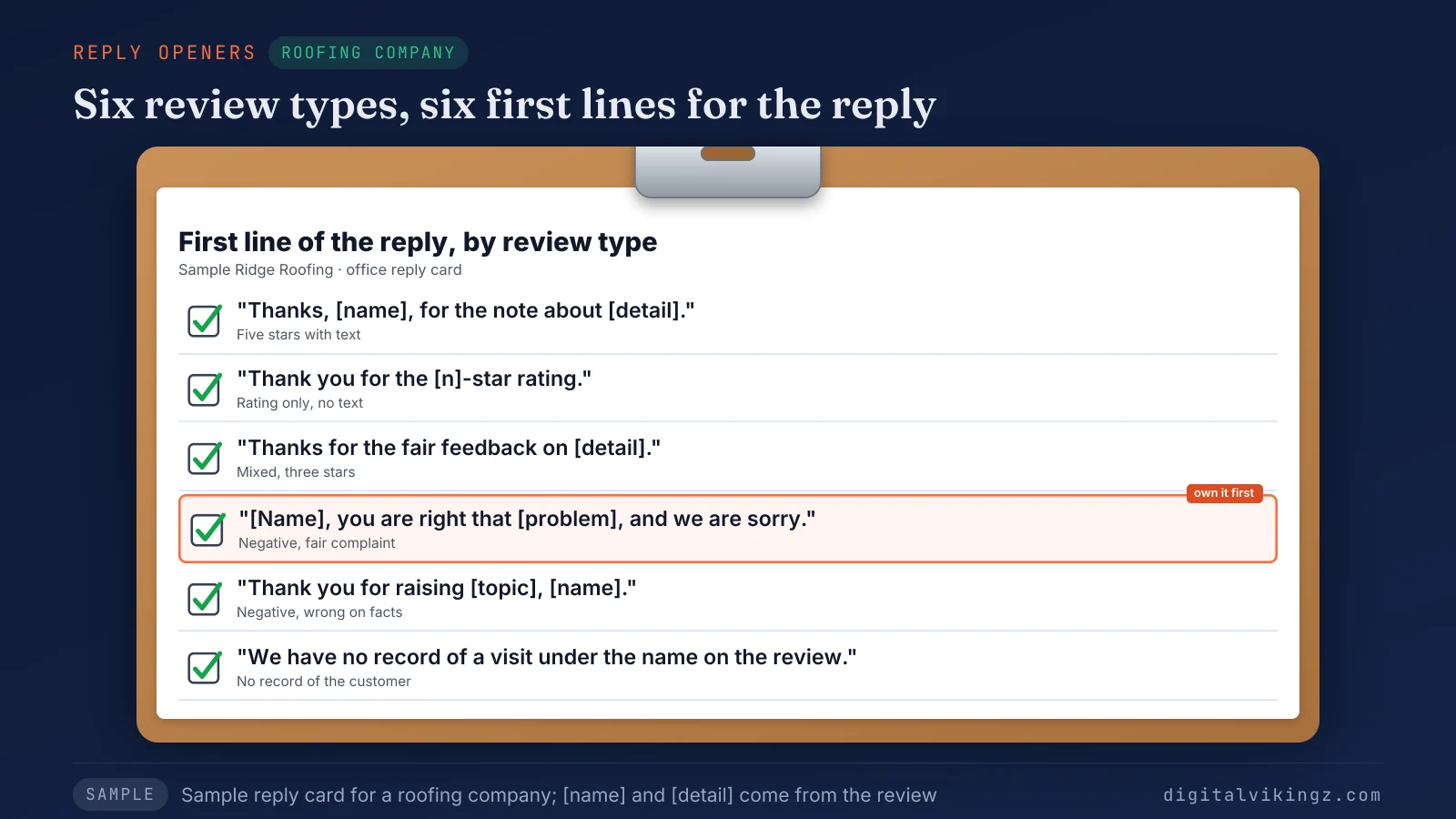
The sample card for Sample Ridge Roofing pairs six review types, from five stars to no record of the customer, with one opening line each. Each type gets its own section below, starting with positive reviews.
How do you respond to a positive Google review?
A reply to a positive Google review thanks the reviewer by name, repeats one detail from the review and names the service the business delivered. Google's tips favor a reply that shares "a detail that reinforces their experience and encourages a return visit."
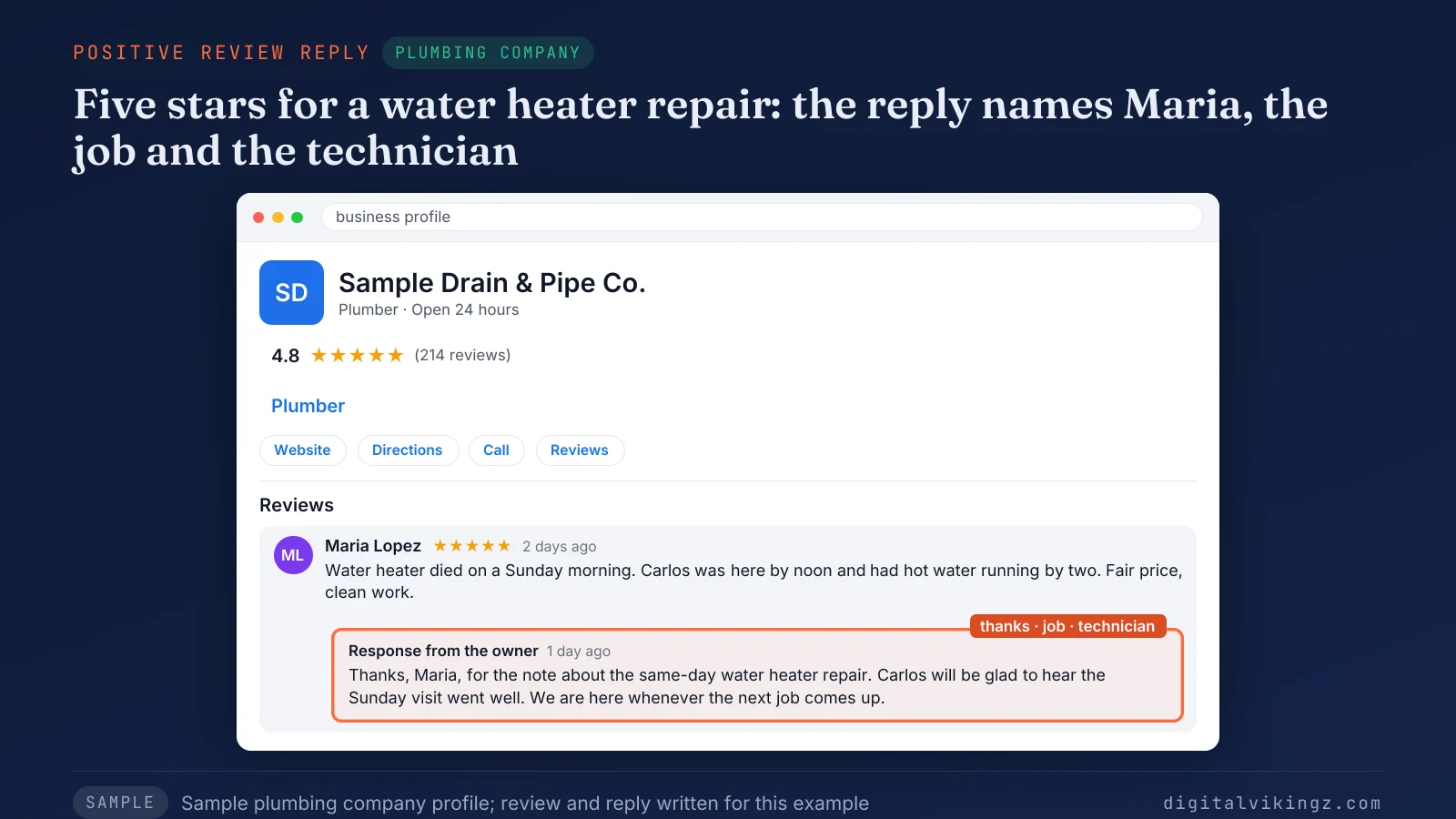
The sample reply from Sample Drain & Pipe Co. names Maria, the same-day water heater repair and the technician. Three sentences carry the thanks, the technician and the next visit.
A short review gets a short reply, and a detailed review earns one more sentence about the work. Some positive and negative reviews arrive as stars alone, with no words to quote back.
How do you respond to a Google rating with no text?
A Google rating with no text gets a one-line reply: thanks for a high rating, or thanks plus a phone number for a low one. A one-star rating with no comment leaves nothing to fix in public, so the reply asks for the details by phone.
Sample reply: Thank you for the 1-star rating, Jamie. We would like to know what went wrong; please call our office on [business phone]. Dana, office manager
Google notifies the reviewer of the reply to a Google review, so the request reaches the person who left the rating. Reviews with three stars sit between praise and complaint and need both.
How do you respond to a 3-star Google review?
A reply to a 3-star Google review thanks the reviewer for what went well, owns the part that fell short and says what the business changed. Google's tips say "Acknowledge if any mistakes were made, but don't take responsibility for things outside your control."
Sample reply: Thanks, Leo, for the kind words about the roof repair crew and the fair point about the late quote. Quotes now go out within one business day, and we are glad to help with the next job. Ben, Sample Ridge Roofing
A mixed review often comes from a customer who might return, so the reply names the fix instead of defending the delay. A review with one or two stars needs the same ownership and a clearer fix.
How do you respond to a negative Google review?
A reply to a negative Google review thanks the reviewer, names the problem, apologizes for any fault, states the fix and gives a business phone or email.
The five steps of a reply to a negative Google review are listed below:
- Read the job record before writing a word.
- Thank the reviewer and name the problem in the reviewer's words.
- Apologize for the part the business got wrong.
- State what changed or what the business will do.
- Give a business phone number or email for the rest of the conversation.
Google's tips ask owners to "politely request that the reviewer contact you via phone or email to resolve the issue privately."
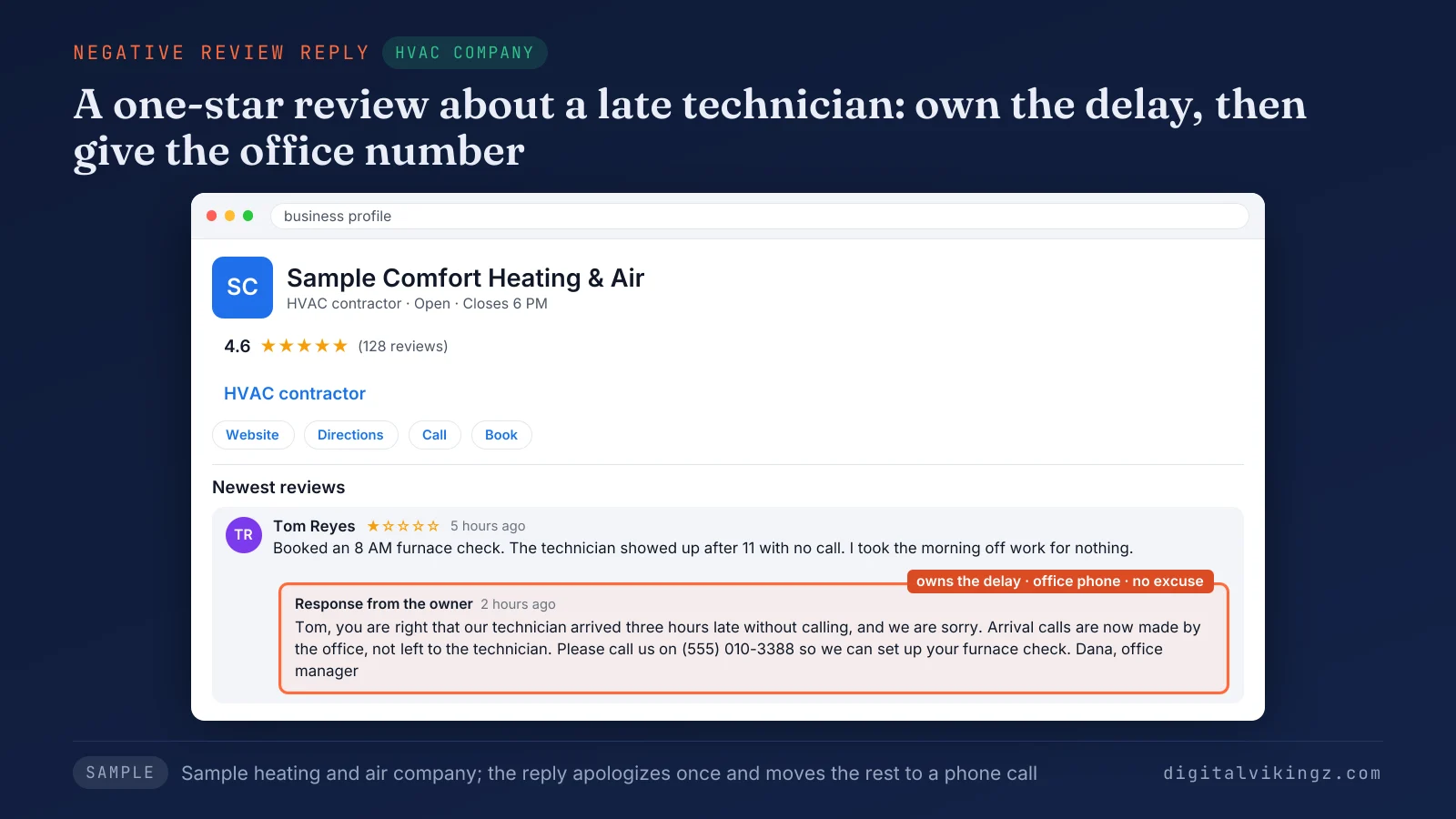
The sample reply from Sample Comfort Heating & Air owns the three-hour delay and apologizes once. The reply gives the office number, (555) 010-3388, with no excuse about traffic.
Google notes that constructive replies "may even encourage the customer to update their review." A request to update a bad review comes only after the fix, with no discount, refund or gift tied to the change.
Asking for a changed rating follows the same no-reward rule as asking customers for new Google reviews. The full request routine is in our guide to get more Google reviews without breaking Google's rules.
Some negative reviews describe events that did not happen the way the reviewer says.
How do you respond to a negative review when the customer is wrong?
A business responds to a negative review that is wrong on the facts by stating the correct fact once and offering a call for the rest. Google's report page says "Google doesn't get involved in conflict between businesses and customers."
A false claim is corrected without repeating the claim. The reply says what the job record shows and never calls the reviewer a liar.
Sample reply: Thank you for raising the drain repair invoice, Chris. Our records show the quote and the invoice both list $480; please call [business phone] and we will go through both with you. Sam, Sample Drain & Pipe Co.
Google's report page also tells owners not to report a Google review only because the owner disagrees with the review. A review from someone the business never served needs a different first line.
How do you respond to a fake Google review?
A business responds to a fake Google review with one calm no-record line, an invitation to get in touch and a report to Google. One Local Search Forum member warned in a 2019 thread that replies calling several reviews fake read badly to later customers.
Sample reply: Alex, we have no record of a visit under the name on the review. Please call [business phone] so we can look into what happened. Tom, owner
An owner reports the review from Read reviews, then Report, and Google states that "Review evaluation typically takes several days." Google adds that "only those that violate Google policies are eligible for removal."
A reviewer who is a former employee or a competitor has a conflict of interest under Google's policy. The policy names "current or former employment" and "industry competitors". Reporting a fake Google review also involves the report reasons, the Reviews Management Tool and a one-time appeal, steps longer than one reply.
Each situation above needs a person who owns the replies and answers on time.
Who should write your Google review replies?
The owner or one named manager should write Google review replies, because one writer keeps the voice, the facts and the timing the same across every review.
Google allows several owners and managers on one Business Profile, and a manager can reply to reviews the way an owner does. An agency that replies for a client works as a manager and writes in the owner's voice, signed with a name the owner approves.
A fixed routine keeps replies steady: the writer checks new reviews on set days and answers each reviewer in order. Google Business Profile management, the recurring upkeep of a profile after setup, includes review replies beside posts, photos and hours.
Our Local SEO and Google Business Profile Optimization service writes "a reply to every review that names the service". Owners who want replies handled can book a 30-minute call about Local SEO and Google Business Profile Optimization with review replies.
Speed matters as much as the writer.
How quickly should a Google review get a reply?
A Google review should get a reply within one or two business days, a working target rather than a Google rule, since Google sets no deadline. Google's tips say only "Respond in a timely manner."
One business owner on the Local Search Forum wrote of trying to reply "within 24 hrs" of each review. A negative review gets the fastest reply, after the job record is checked, so the first answer to the reviewer is accurate.
Google's own check can hold a reply for up to 30 days, so a late reply may appear later still. Speed at volume is where AI drafting comes in.
Can AI write replies to Google reviews?
Yes, AI can draft replies to Google reviews, and a person should approve each draft before posting because the reply speaks for the business. Google checks every reply against the same content policies, whoever wrote the draft.
Unedited auto-replies tend to give every reviewer the same lines, which Google's tips on identical thank-yous and its rule on repetitive content both discourage.
What should a person check in an AI draft? The person checks the facts against the job record, removes any customer detail and confirms the service named is the one delivered.
Daily + Profile Care, the fullest plan of our Daily Google Posts service, includes "Review replies written for you to approve". The Daily Google Posts page lists the plan at $299 a month per listing. A free preview of the first post our AI agent would write sits on the page for Daily Google Posts with Profile Care.
We checked our own Google review replies against Google's reply rules on 7 November 2026.
What did our own Google review replies miss?
Our own Google review replies answered every visible review but never named the service the client bought. An audit of our Business Profile on 7 November 2026 found five of five visible reviews answered by the owner.
Each reply thanked the client and restated the review, and none named a service such as "Website Development" in our website's words. The audit set a new reply rule: thank the reviewer, name the service in the website's words, name one thing done and point to the matching page.
The service delivered, part three of every reply, is the part a busy writer skips first. Clinics and med spas leave that part out on purpose, for a privacy reason.
How should dental clinics and med spas respond to Google reviews?
Dental clinics and med spas respond to Google reviews without the reviewer's name or the service, so the reply never confirms that the reviewer is a patient. Google's content policy lists "medical information" among the personal information that replies on a Business Profile must not share.
The Office for Civil Rights at the US Department of Health and Human Services settled with New Vision Dental, a California practice, for $23,000 in December 2022. The practice's replies to Yelp reviews had disclosed patient names, treatment and insurance information.
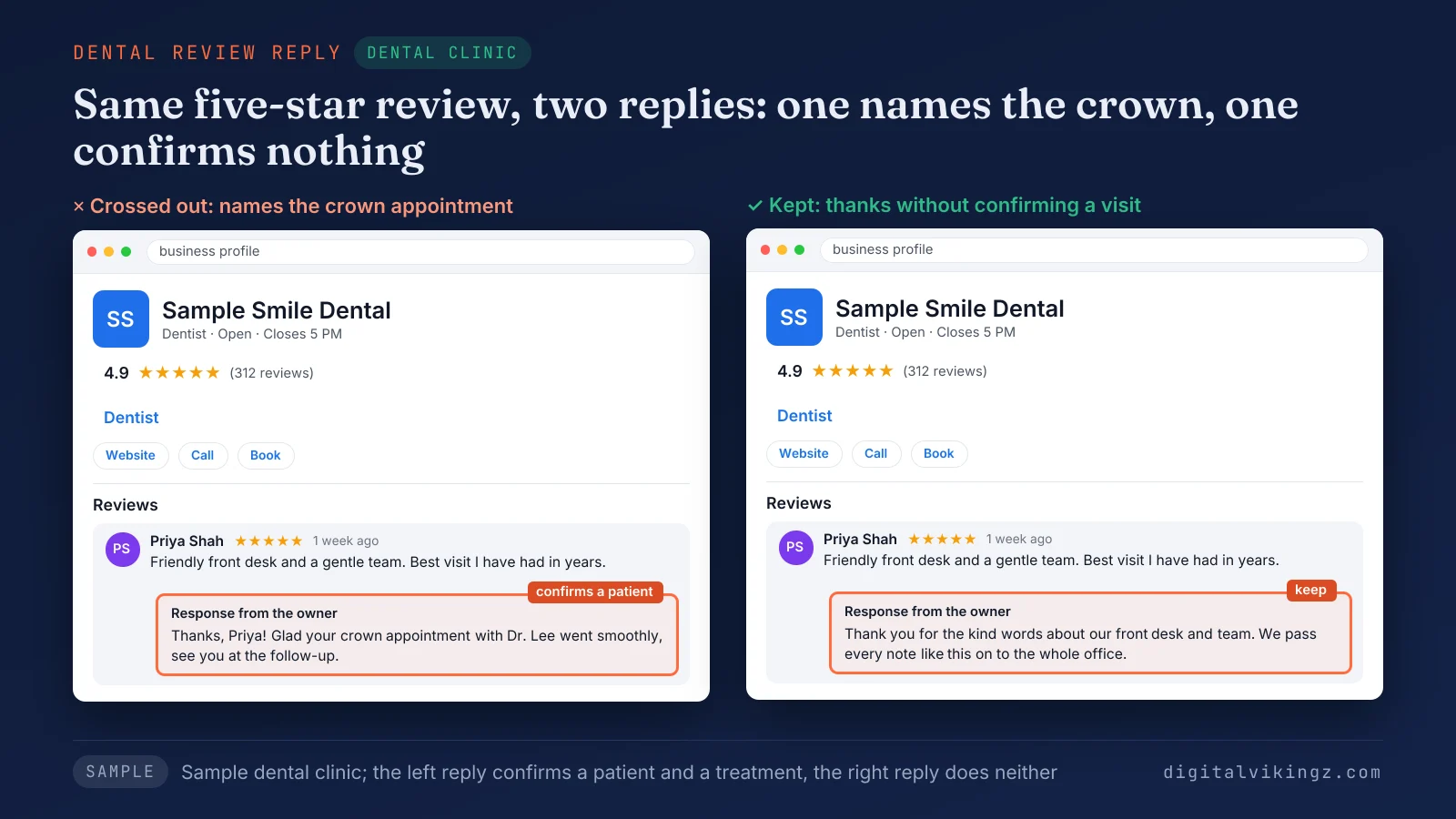
The sample shows two replies from Sample Smile Dental. The crossed-out one names the reviewer's crown appointment, and the kept one thanks the reviewer without confirming a visit.
Dental SEO, the work that gets a practice found on Maps and in AI answers, relies on reviews answered with the same care. Owners in health care also ask whether replying at all breaks the law.
Is it a HIPAA violation to respond to a Google review?
No, replying to a Google review is not by itself a HIPAA violation, though a reply that discloses a patient's health information can be a violation. HIPAA is the US federal law whose Privacy Rule protects patients' health information held by providers such as dental practices.
OCR Director Melanie Fontes Rainer said in the 2022 announcement: "Providers cannot disclose protected health information of their patients when responding to negative online reviews."
Does a public review from the patient change the rule? No, the 2022 case covered replies that added details the patients had not posted, and the safe reading is to confirm nothing about the reviewer.
Med spas should ask their own counsel whether HIPAA applies to the practice and follow the same reply rule either way. The paragraphs on HIPAA summarize the regulator's position and are not legal advice.
Outside health care, every reply keeps all five parts, the service named included.
Questions about responding to Google reviews
Can a reviewer reply to your reply on Google?
No, Google shows no reply thread under an owner's reply, and the reviewer answers by editing the original review instead.
Should you sign Google review replies with your name?
Yes, a first name or initials at the end of a reply works well, and Google's tips say a personal sign-off "shows that their experience matters to you." The reply still appears under the business name on the profile.
Should you reply to old Google reviews?
Yes, a late reply to an old Google review is still worth posting, because the review and the reply stay on the profile for every later reader. One short line that admits the delay keeps a late reply polite.
Can you share a link to a Google review?
Yes, a business can copy a direct link to any Google review from Google Maps through the Share review option next to the review. Google's help page calls positive reviews on a Business Profile "helpful testimonials for your business."
Can you reply to customer photo updates on Google?
Yes, Google lets a business reply to the photo updates customers post on the Business Profile. Google states that "Photo updates don't impact your review score," so the reply serves readers rather than the rating.
Do the same reply rules work on Yelp and Facebook?
Yes, the five parts of a reply carry over to Yelp and Facebook, though each site applies its own content rules.
Where should you start with your Google review replies?
Start with the newest negative Google review: check the job record, write a reply with the five parts and post the reply from the Business Profile today. Work back through older reviews next, negative reviews first, and set a weekly time to respond to each new reviewer.
Digital Vikingz writes replies with the same five parts for local service businesses that want more customers from Google Maps and AI assistants.
