 Digital Vikingz
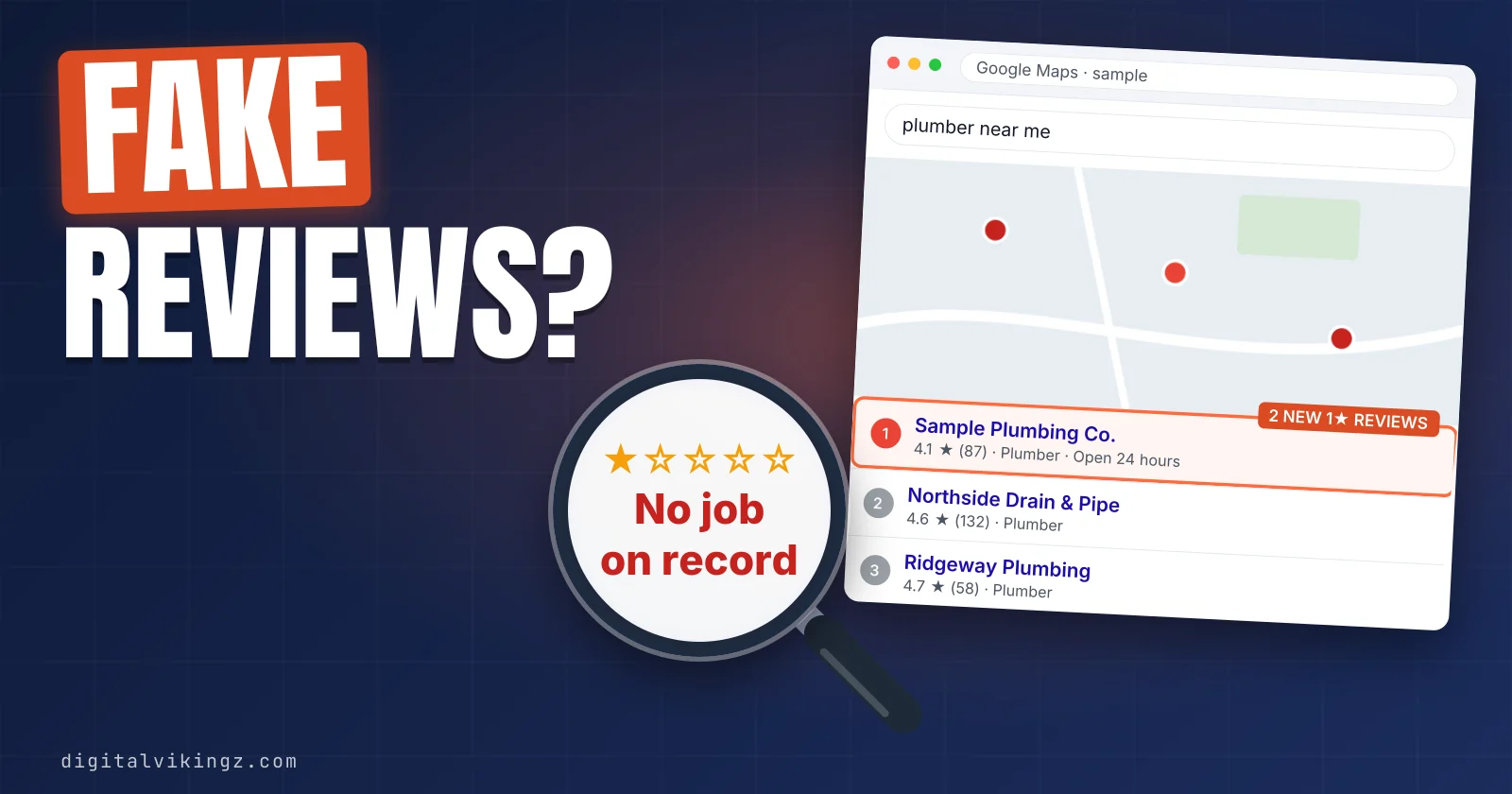
Fake Google reviews come down only when Google upholds a report that the review breaks its policy, because a business owner has no delete option. A fake review is one not based on a genuine experience, or one posted by a competitor, an employee or a group of linked accounts.
The owner checks the review against customer records, saves the evidence and reports the review from the Business Profile with the matching reason. The Reviews Management Tool shows each report's status, and a one-time appeal covers up to 10 reviews.
Google runs a separate form for review extortion and a legal request route for unlawful content. One calm reply and a steady flow of genuine reviews protect the profile while a report is open. Review care is one part of the wider work to optimize a Google Business Profile.
How do you remove a fake Google review?
Fake Google reviews come down only when Google upholds a report that the review breaks its policy, because a business owner has no delete option.
Google's help page states: "You can report any review, but only those that violate Google policies are eligible for removal."
The five steps to report and remove a fake Google review are listed below:
- Check the review against your customer and job records.
- Save screenshots, links and dates before you report.
- Report the review from your Business Profile with the reason that fits.
- Track the report in the Reviews Management Tool.
- Appeal once, for up to 10 reviews, when Google finds no policy violation.
Business names, reviewer names and review text in the figures below are samples, not client data or actual reviewers. Every step depends on one test first: what Google counts as a fake review.
What counts as a fake Google review?
A fake Google review is a review that breaks Google's Maps content policy, most often because the review is not based on a genuine experience.
Google's policy lists "Content that is not based on a real experience" under fake engagement. Owners call fake reviews false, bogus or fraudulent, and Google calls them policy-violating.
The policy groups that cover most fake reviews on a Business Profile are listed below:
- Fake engagement: reviews "not based on a real experience", paid reviews and reviews "posted from multiple accounts by or at the request of one person".
- Conflict of interest: reviews from current or former employees, industry competitors or relatives of the business.
- Competitor attacks: content posted "on a competitor's place or business to undermine" the business's reputation.
- Rating manipulation: "unusual volumes or patterns of review contributions", such as a sudden run of 1-star reviews.
- Offensive content: "Unsubstantiated allegations of unethical behavior or criminal wrongdoing", such as calling a business a scam without evidence.
Google's policy also covers harassment, personal information, profanity and off-topic content in reviews. The full Google review policy sits on Google's Prohibited and restricted content page and covers every group. Our guide to the Google review policy explains what is allowed and what gets removed.
A review outside the five groups stays up, even when the owner finds the review unfair.
Will Google remove a genuine negative review?
Google does not remove a genuine negative review that follows its policy, however unfair the owner finds the review.
Google's help page says: "Do not report a review just because you disagree with it or dislike it." Google adds that the company "doesn't get involved in conflict between businesses and customers."
Google's policy allows "content that describes negative experiences in a respectful manner." A late arrival, a high quote or a rude phone call described politely stays on the profile as a negative review.
Telling a fake review from a genuine negative review starts with the warning signs.
How can you tell if a Google review is fake?
A fake Google review usually shows two or more warning signs: no matching customer, a thin or distant reviewer history, or a burst of reviews.
The seven signs that a Google review may be fake are listed below:
- No customer match: no job, invoice, booking or call matches the reviewer's name or the review date.
- Empty account: the reviewer has no photo, no other reviews or an account created days earlier.
- Distant history: the reviewer's other reviews sit in cities far outside the service area.
- Burst timing: several reviews arrive within a day or two, often from new accounts.
- Rating only: a 1-star rating with no text, or text that fits any business.
- Wrong details: the review names a service, staff member or location the business does not have.
- Competitor pattern: the same accounts praise a nearby competitor that opened or started ranking recently.
Owners in the Google Business Profile Help Community report fake review attacks that began soon after a new competitor ranked nearby.
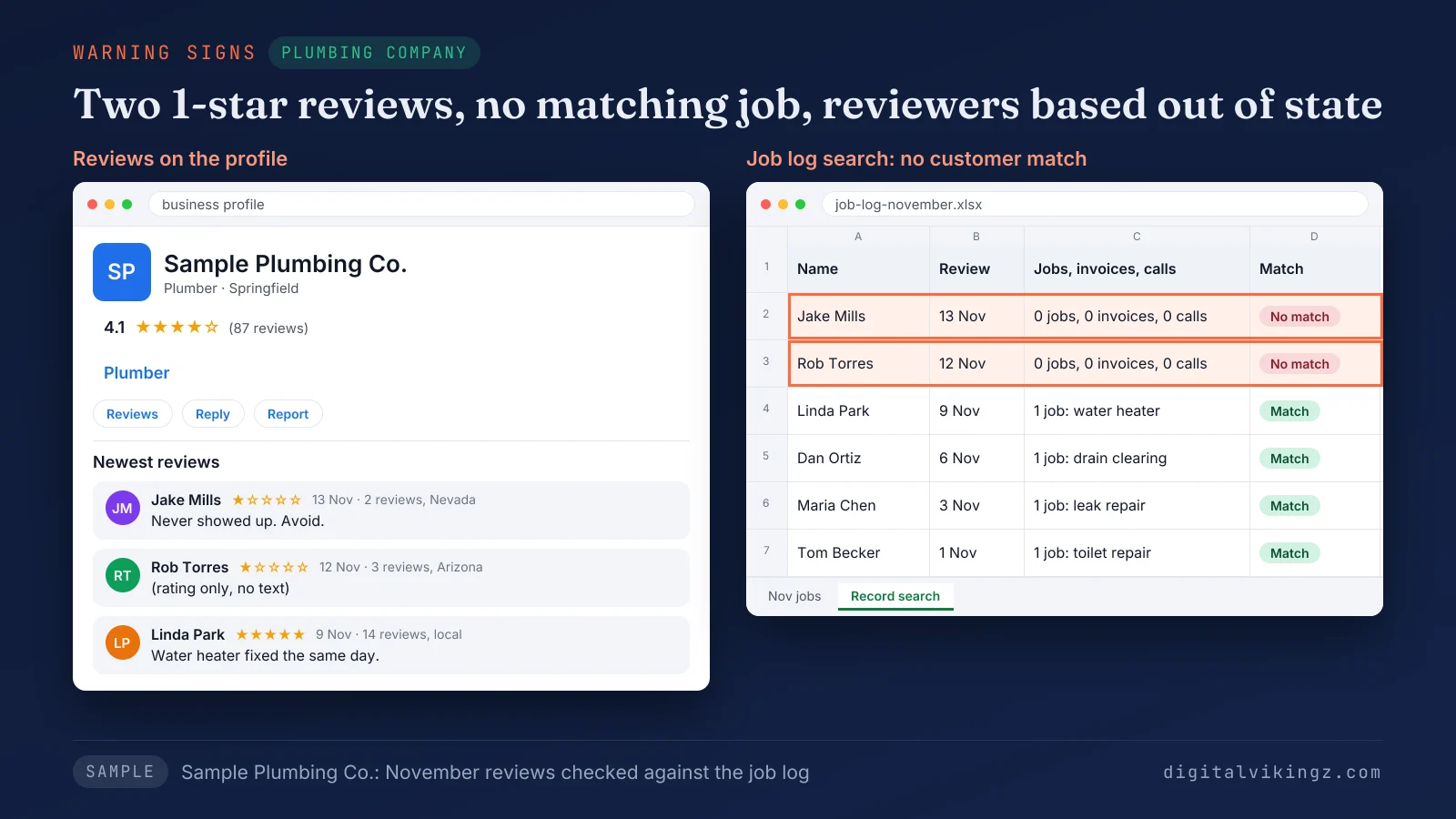
Figure 1 shows two 1-star reviews on Sample Plumbing Co. from 12 and 13 November, with no matching job in the job log. The reviewers' other reviews sit in Arizona and Nevada.
A single sign is a reason to look closer, and saved evidence carries the report.
What evidence should you save before reporting a fake review?
The evidence to save before reporting a fake Google review is a screenshot, a direct link, the dates and the customer record search result.
Screenshots matter because a reviewer can edit or delete a review after the report goes in.
The table below is an evidence log for one reported fake review, with sample entries:
| Field | What to record | Sample entry |
|---|---|---|
| Review | Screenshot with the date, rating and full text | Screenshot of a 1-star review with no text, 12 Nov 2026 |
| Link | Direct link to the review | Share link copied from Google Maps |
| Reviewer | Profile link, review count and other review locations | 3 reviews, all in Arizona |
| Record search | Job log, invoices, bookings and call log checked | No job under the reviewer's name in 2026 |
| Report | Date, reason chosen and status | Reported 12 Nov, Spam, Decision pending |
| Contact | Any message or demand linked to the review | None |
The same log fills the appeal form, which Google allows once per review. The report goes in from the Business Profile once the log is saved.
How do you report a fake Google review?
A fake Google review is reported from the Business Profile: open reviews, select Report next to the review, choose a reason and send the report.
The steps to report a fake review on your Business Profile are listed below:
- Open your Business Profile on Google Search or Google Maps.
- Select Read reviews.
- Select Report next to the review.
- Choose the reason that matches the review.
- Select Send report.
The Reviews Management Tool offers the same report through Report a new review for removal. Older guides call the step flag as inappropriate, a label from the Google My Business era.
The table below matches common fake review cases to the report reason and the policy group behind each reason:
| Fake review case | Reason to choose | Policy group |
|---|---|---|
| Reviewer was never a customer, or new accounts post at once | Spam | Fake engagement |
| Reviewer is a competitor or a current or former employee | Conflict of interest | Conflict of interest |
| Review is about another business or an unrelated topic | Off topic | Off-topic |
| Review insults, threatens or singles out a staff member | Bullying or harassment | Harassment |
| Review shares a phone number, address or health detail | Personal information | Personal information |
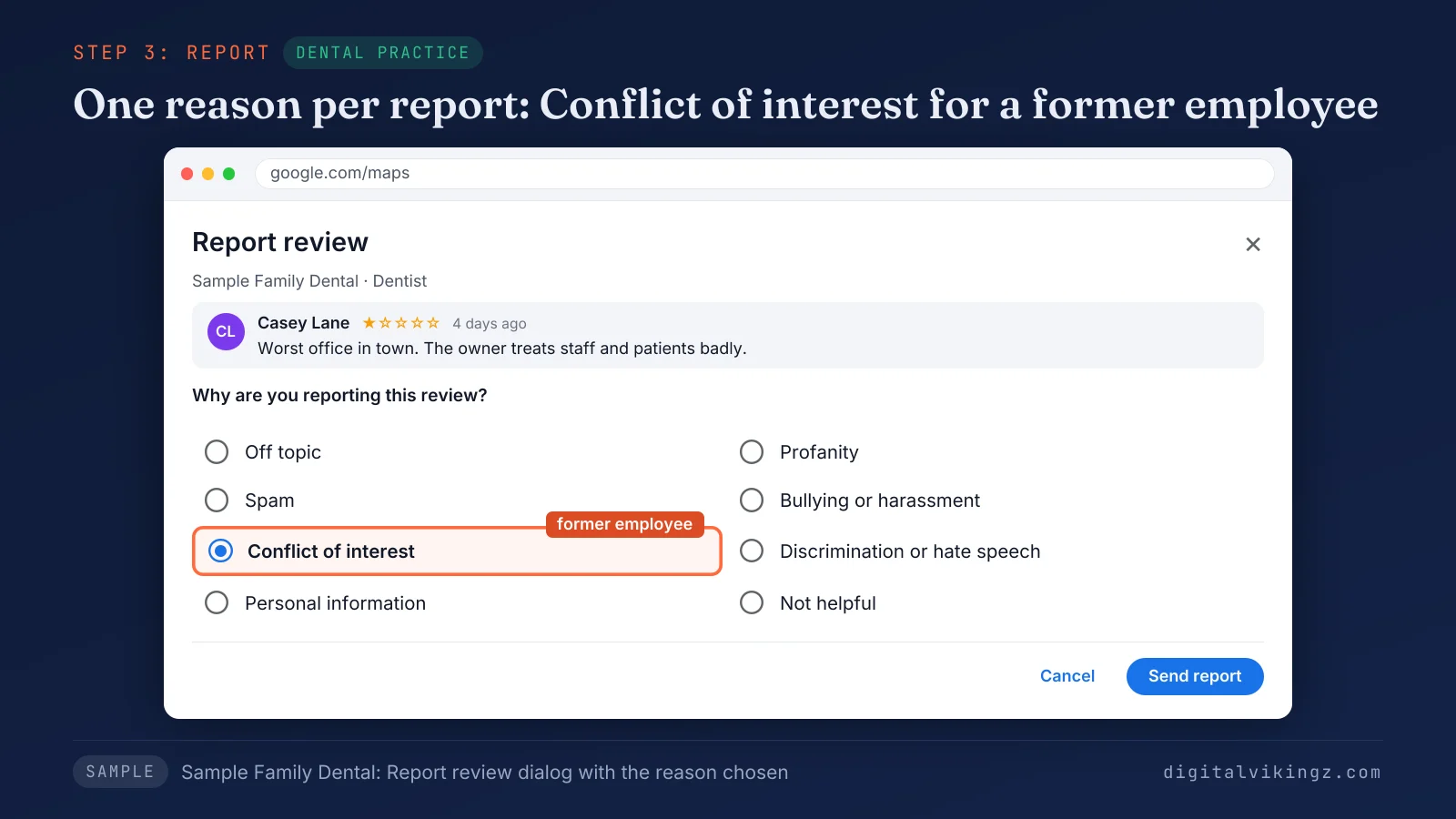
Figure 2 shows the report reasons for a review on Sample Family Dental, with Conflict of interest selected for a review from a former employee.
Each fake review should be reported once, with the one reason that fits best. The account behind a fake review can be reported as well, from the Google Maps app.
How do you report the reviewer's profile on Google Maps?
The reviewer's profile is reported from the Google Maps app, through the reviewer's name on the business's reviews.
The steps to report a reviewer's profile in the Google Maps app are listed below:
- Open the Google Maps app on your phone and find your business.
- Open the Reviews tab.
- Tap the reviewer's name.
- Tap More, then tap Report.
- Choose the reason, such as Legal issue or Privacy concerns.
Google says that after a profile report, "we'll review it for policy violations." A profile report suits an account that posted several fake reviews across businesses.
Each review report then shows its progress in the Reviews Management Tool.
How do you check a report in the Reviews Management Tool?
The Reviews Management Tool is Google's free tool that shows the status of every review you reported and opens the one-time appeal.
Paid review software with a similar name does a different job and has no say in removals.
The steps to check a report in the Reviews Management Tool are listed below:
- Open the Reviews Management Tool and confirm the email linked to your Business Profile.
- Select the business, then select Continue.
- Select Check the status of a review I reported previously and appeal options.
The table below lists the three report statuses Google shows and the next step for each one:
| Status | What the status means | Next step |
|---|---|---|
| Decision pending | Google has not finished the check | Wait and check again in a few days |
| Report reviewed - no policy violation | Google found no violation and kept the review | Submit the one-time appeal |
| Escalated - check your email for updates | The appeal went to a further check | Watch the email linked to the profile |
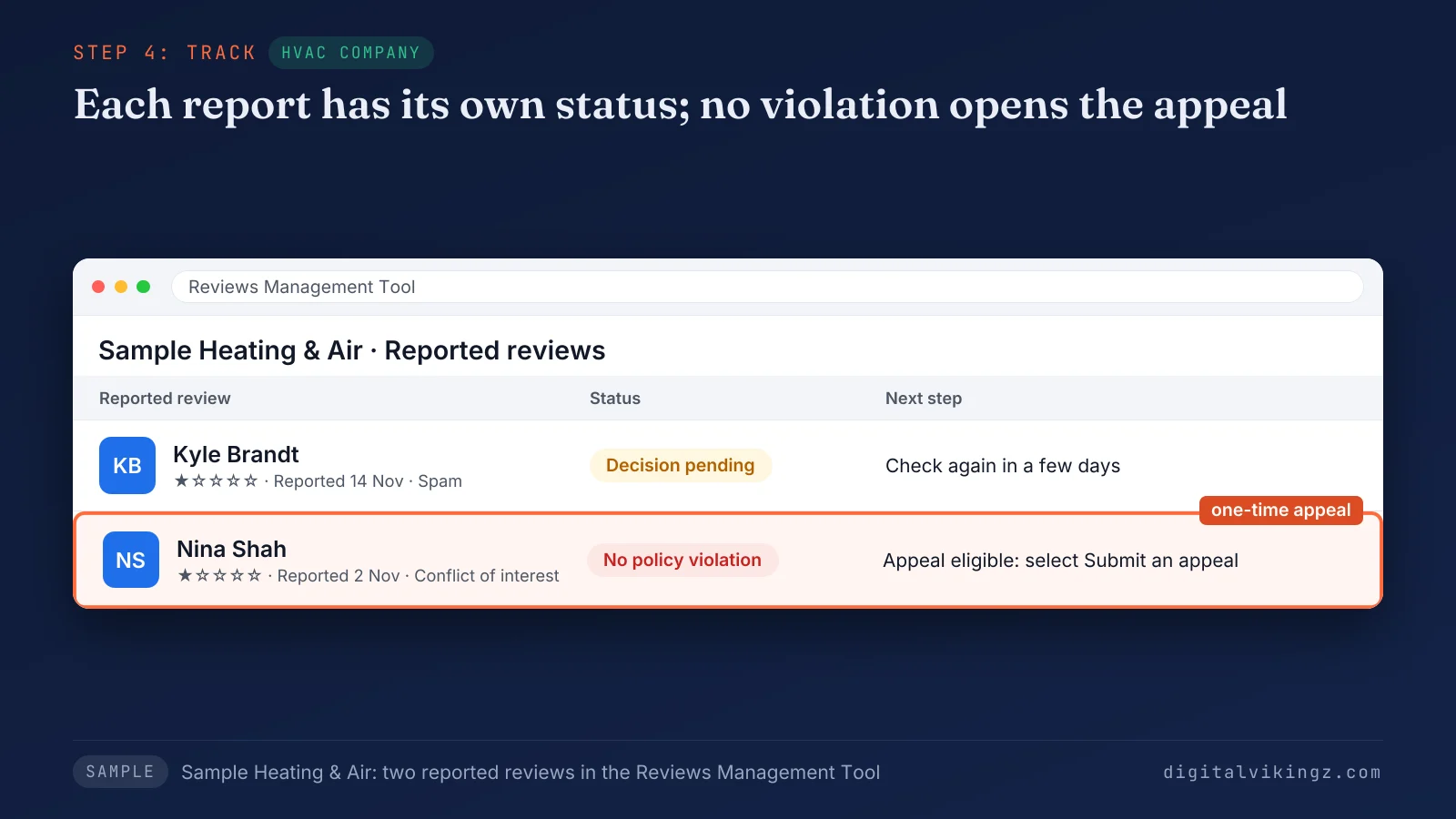
Figure 3 shows two reports for Sample Heating & Air. One report is marked Decision pending, and one is marked Report reviewed - no policy violation with the appeal option beside the review.
The first question most owners bring to the tool is how long Google takes to decide on a fake review.
How long does Google take to decide on a reported review?
Google says review evaluation "typically takes several days" and publishes no fixed deadline for a decision on a reported review.
Guides that promise 24 hours, 72 hours or two weeks cite no Google source. The status in the Reviews Management Tool shows where each report stands.
Checking the status every few days beats reporting the same fake review again. A status of no policy violation opens the appeal.
How do you appeal when Google finds no policy violation?
An appeal is the one-time second check Google allows after a Report reviewed - no policy violation result, for up to 10 reviews.
The steps to appeal a reported fake review are listed below:
- Open the Reviews Management Tool and select your business.
- Select Check the status of a review I reported previously and appeal options.
- Select Appeal eligible reviews and choose up to 10 reviews.
- Select Continue, then select Submit an appeal.
- Fill in the form with the evidence from your log and select Submit.
Google sends the appeal result by email. The form should carry the customer record search, the reviewer's history and the dates, because each review gets one appeal.
An appeal under review shows Escalated - check your email for updates in the tool. Some fake reviews stay up even after the appeal.
Why did Google not remove the fake review?
Google keeps a reported fake review up when the check finds no policy violation, even when the owner knows the reviewer was never a customer.
The common reasons a reported fake review stays up are listed below:
- Wrong reason: the reason chosen does not match the problem in the review.
- Missing proof: the review and the reviewer's history look like a genuine customer's.
- Disputed facts: the review describes a bad experience that the owner disputes.
- Unused appeal: the appeal was skipped or carried no evidence.
The four reasons come from practitioner guides and owner threads, not from a list Google publishes. Google allows one appeal per review, so a rejected appeal ends the standard route.
Two routes remain for special cases: the extortion report and the legal request.
How do you report Google review extortion?
Google review extortion pairs a spike of 1-star and 2-star reviews with a demand for money, and Google runs a separate extortion report form.
Google's help page tells owners: "Do not engage with or pay the malicious individuals." Google also warns that paying "doesn't guarantee the removal of reviews."
The report goes through Google's merchant extortion report form, linked from the extortion help page.
The evidence Google asks for in an extortion report is listed below:
- Messages: screenshots of each message, with the date, time and sender.
- Review links: a direct link to each review in the spike.
- People: names, usernames, email addresses and phone numbers of the people involved.
- Spike date: the date the run of negative reviews started.
- Demand date: the date of the first demand for money, goods or services.
Google reserves the form "exclusively for cases where you've been directly subjected to an extortion attempt". Fake reviews without a demand go through the standard report.
Commenters on Reddit warn that a caller offering to remove new 1-star reviews for a fee can be the person who posted them. Google has also added protections for the spike of reviews itself.
What does Google do when a profile gets a spike of fake reviews?
Google can remove spam reviews, pause new reviews, alert the owner and show a banner when a Business Profile gets a spike of fake reviews.
Google's 16 April 2026 post pledged to "quickly remove the fake content, pause new reviews on the profile, alert the Business Profile owner and display a notification banner". Google said the protection would roll out globally in the weeks after the announcement.
Google can apply a similar pause and consumer warning to profiles that collected fake reviews themselves, so the alert email deserves a full read. Owners often call a spike of fake reviews review bombing.
False statements that stay up after every report lead to the legal route.
When does a fake Google review need a legal removal request?
A legal removal request fits a fake Google review that a lawyer believes is unlawful, such as a false statement of fact harming the business.
Google's legal help page says: "If you see content on a Google product that you believe violates the law or your rights, let us know." Google then reviews the material and considers "blocking, limiting, or removing access to it."
The request goes through Google's Report Content for Legal Reasons page, with the specific URL of each review. Defamation depends on local law and the facts of each review, so a lawyer decides whether the route applies.
Owners on the Local Search Forum report that Google asked for court documents before acting on some legal requests. Our guide gives general information, not legal advice.
Whatever the route, customers read the fake review until Google acts, which raises the question of a reply.
Should you reply to a fake Google review?
An owner should report a fake Google review first and then post one short, calm reply that states the facts without accusing the reviewer.
Customers read the reply beside the fake review while Google checks the report. Some owners wait for Google's decision before replying, and others reply the same day.
We advise reporting first, so the evidence is on record before any public exchange with the reviewer.
The four parts of a reply to a suspected fake review are listed below:
- Thanks: one line that thanks the reviewer for the feedback.
- Record check: a statement that the business has no record of a visit under the name.
- Invitation: a request to call or email the business to look into the matter.
- Sign-off: the business name, with no customer details.
Google advises replies that stay professional and short and that protect customer privacy.
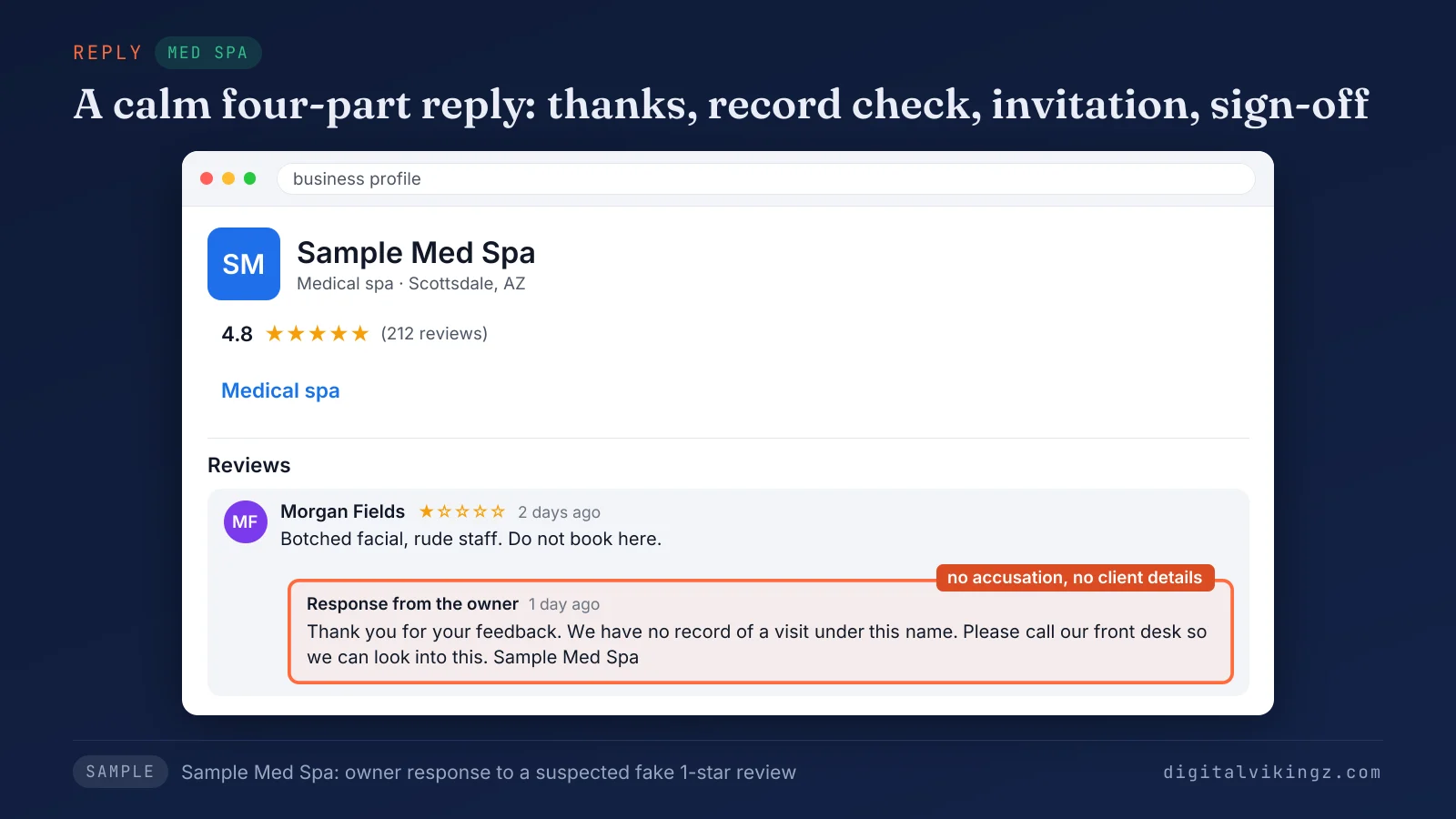
Figure 4 shows the reply from Sample Med Spa. The reply carries a thank-you line, a statement that no visit matches the name and an invitation to call the front desk.
A reply that names a suspected attacker or shares a client detail can break Google's policy and cost trust. Replies for other situations follow the same tips in our guide on how to respond to Google reviews.
Writing a calm reply to every review is part of the Business Profile work we run for service businesses. Our service for that work is Local SEO and Google Business Profile Optimization with a reply to every review, with a request message after every finished job.
Do fake reviews lower your Google Maps ranking?
Google publishes no statement on whether fake reviews lower Google Maps ranking, and Google names review count and ratings as part of prominence.
Google's help page says prominence draws on "how many reviews you have". The same page states: "More reviews and positive ratings can help your business's local ranking."
The star average on the profile drops while a fake 1-star review stays up.
Prominence is one of three local ranking inputs, beside relevance and distance. Our guide on how to rank higher on Google Maps covers all three inputs.
What should you avoid when dealing with fake Google reviews?
Owners should avoid any response to fake Google reviews that breaks Google's own rules, because a rule break can get the Business Profile restricted.
The responses to fake reviews that put a Business Profile at risk are listed below:
- Counter-reviews: asking staff, friends or relatives to post 5-star reviews, which Google treats as a conflict of interest.
- Bought reviews: paying for reviews to bury the fake ones, when Google bans reviews "paid for, directly or in kind".
- Organised flagging: asking several accounts to flag the same review instead of one accurate report from the owner.
- Payments to attackers: paying a person who demands money, which Google tells owners not to do.
- Competitor reviews: posting on a competitor's profile, which Google's policy bans.
Google can stop a profile from receiving new reviews for a set period and show a warning that fake reviews were removed.
Serious fake engagement can also lead to a suspended Business Profile. Our guide to a suspended Google Business Profile explains the causes and the reinstatement appeal.
Can a paid service remove fake Google reviews?
A paid service has no power to remove a fake Google review, because only Google removes reviews, after a report or through its own checks.
Removal services file the same reports and appeals that an owner can file for free.
A reputation firm worker on Reddit explained that guaranteed removal usually means the client pays only when Google removes the review. Another commenter described a firm that buried bad reviews under fake 5-star reviews, a practice Google's fake engagement policy bans.
A caller who links a fee to new 1-star reviews fits Google's description of review extortion. The steadier answer is what an owner does when a fake review stays.
What should you do if a fake Google review stays up?
A fake Google review that stays up should keep a calm owner reply and stay in the evidence log while genuine reviews keep arriving.
The steps for a fake review that Google keeps are listed below:
- Keep the reply short and leave the review alone after that.
- Keep the evidence log in case the reviewer posts again or a demand arrives.
- Report each new review that breaks the policy, once.
- Ask every customer for a review after each job, so one fake review carries less weight.
- Check new reviews every week for the warning signs.
Genuine reviews from every customer are the long-term answer to a fake review. Our seven steps to get more Google reviews from every customer cover the review link, the timing and the wording.
Fake Google review questions
Does Google remove fake 5-star reviews?
Google can remove a fake 5-star review, because the fake engagement policy covers content "not based on a real experience", whatever the rating. Owners in the Help Community report fake 4-star reviews that Google kept, so the decision stays with Google.
Can you report fake reviews on a competitor's Business Profile?
Any signed-in Google user can report a review on any Business Profile, including a fake review on a competitor's profile. Google judges the report against the same policy, and a conflict of interest covers reviews from the business's own employees.
Does reporting a fake review several times speed up removal?
Google's help page sets no number of reports for removal, and Google removes only the fake reviews that violate its policies. One accurate report per review starts the check, and the status shows when the check ends.
Can Google find fake reviews without a report?
Google finds many fake reviews without a report, and Google says the company blocked or removed over 292 million policy-violating reviews in 2025. Owners still report the fake reviews that Google's checks miss.
Can Google remove a genuine review by mistake?
Google says automated spam detection "may also mistakenly remove legitimate reviews", and tells owners to contact support when a genuine review disappears. The contact route sits on Google's help page for reported reviews, beside the report steps for a fake review.
Are fake Google reviews illegal in the US?
Fake Google reviews can be illegal in the US under the FTC rule on consumer reviews. The US FTC rule on consumer reviews, in force since October 2024, makes fake reviews and incentives tied to a sentiment unlawful. A lawyer decides whether a fake review about your business gives you a legal claim.
Where should you start with a fake Google review?
Start with the customer record search, because every later step, from the report to the appeal, rests on the evidence that search produces.
A fake Google review comes down through a report Google upholds, so a complete evidence log is the owner's strongest tool.
Digital Vikingz writes review replies for home-service businesses as part of a daily posting plan. Plumbers, HVAC companies, roofers, electricians and cleaners can choose Daily Google Posts with review replies to approve in the Daily + Profile Care plan. Our AI agent writes a free sample post for the business before any plan starts.
Google Business Profile optimization, from categories to photos, covers the wider profile work beyond reviews.
