 Digital Vikingz

A Black Friday SEO post-mortem starts when Cyber Monday ends and someone asks whether search did its job. Most stores answer with one revenue number and a guess.
A Black Friday SEO post-mortem replaces the guess with a short list of reports, read in fixed date windows. We wrote this on 25 November 2026, before the sale. Every 2026 season figure below is a forecast, and we will revise the page once with actual figures after 1 December.
Adobe forecast in September 2026 that US online spend in Cyber Week would reach $47.5 billion, up 7.4% year on year. A forecast says nothing about your store.
Stores that want the work done can look at our Shopify and WooCommerce SEO service. Owners still choosing help this week can compare our Black Friday SEO and web design deals.
What is a Black Friday SEO post-mortem?
A Black Friday SEO post-mortem is a review of search, AI referrals and product feeds in the Cyber 5 window, ending in a January fix list. Cyber 5 runs from Thanksgiving to Cyber Monday, which is 26 to 30 November 2026 in Adobe's definition.
A Black Friday SEO post-mortem answers three questions: which pages earned visits and orders, what broke, and what changes before the next sale.
Of the seven pages we opened in November 2026, only one has an after-sale section, and it lists "Analyze Performance" without naming a report. That gap is the job of this page, for ecommerce brands on Shopify or WooCommerce.
When should the review run?
The Black Friday SEO post-mortem runs in the first week of December, once Cyber Monday appears in every report. Thursday 3 December works well.
Waiting longer costs you. Out-of-stock pages, feed errors and sale-page links are easiest to fix while the team still remembers what changed. December fills up fast.
Date windows to compare
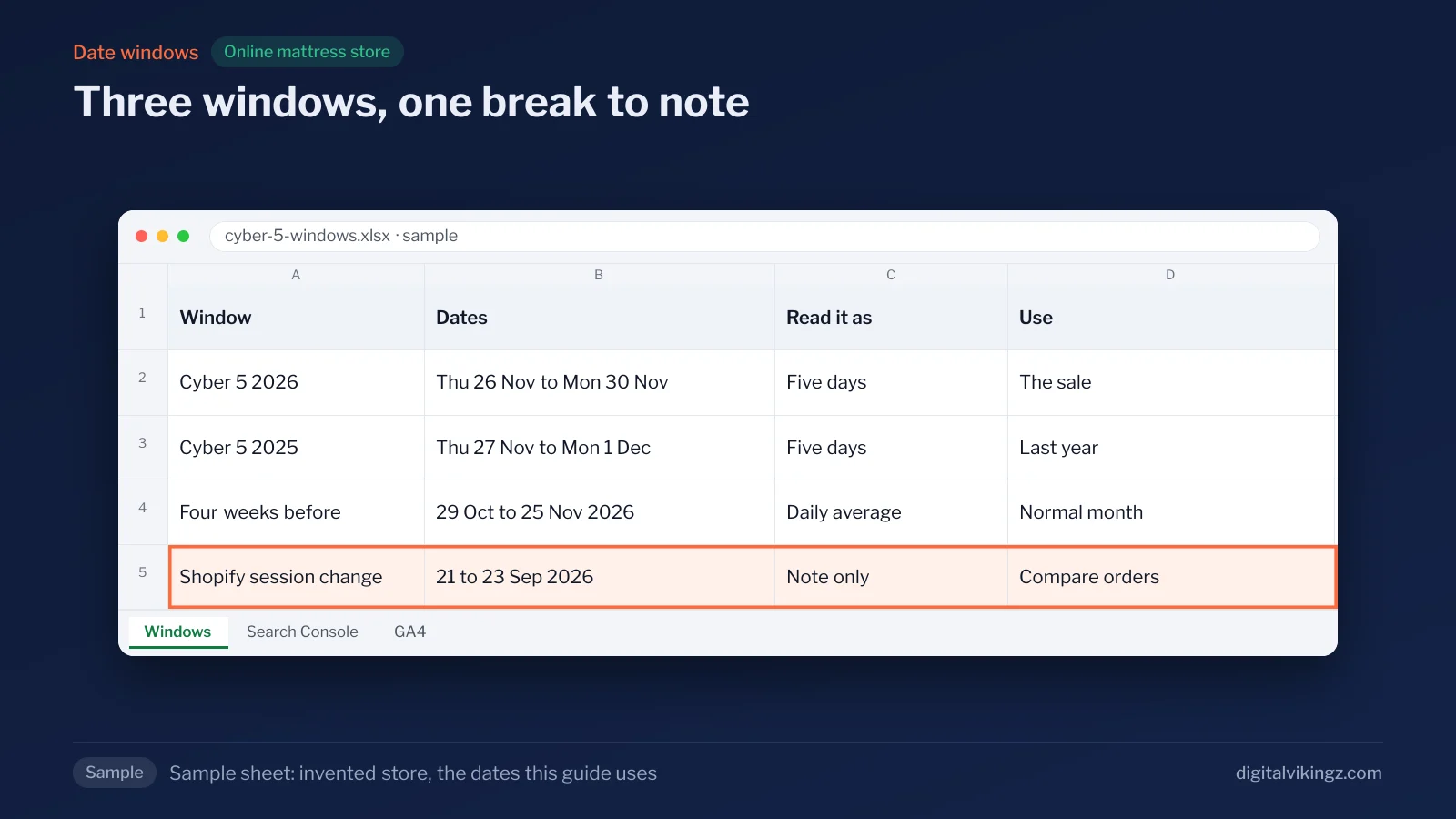
A Black Friday SEO post-mortem compares the Cyber 5 window with two others: the same five days last year, and the four weeks before the sale. Last year tells you about growth. The four weeks before tell you how much the sale lifted a normal month.
Match the weekdays. Cyber 5 2026 runs Thursday 26 November to Monday 30 November, so last year's window is Thursday 27 November to Monday 1 December 2025. Google wrote in December 2025 that misaligned weekends make daily comparison charts hard to read, and added weekly and monthly views for that reason.
For the four weeks before, we use 29 October to 25 November 2026 and read it as a daily average. A five-day sale against a 28-day total would look like a crash. Divide first.
What changed in measurement since last Black Friday?
Three measurement changes since last Black Friday can break a year-on-year comparison: Shopify's session change, the new Search Console AI report, and vendors' different Cyber 5 dates.
Shopify says its session measurement rollout ran from 21 to 23 September 2026. Session counts on either side of that date are measured differently, so part of any jump in sessions may come from the change itself. Compare orders.
Google's help page says the report was available to all sites as of 31 August 2026. Its data starts on 18 May 2026, according to our guide to the report, so it holds no Black Friday 2025 baseline. Use the four weeks before instead.
Vendor numbers disagree on the calendar too. Adobe's Cyber Week is 26 to 30 November, while Salesforce counts 24 to 30 November. Never mix their figures.
Search Console: pages, queries and AI features
Search Console shows the clicks and impressions your sale and product pages earned in Google Search, by page, query, country and device. Google's help page says you can change the metrics, dimensions and date ranges in the performance report.
How do you compare Cyber 5 with last year in Search Console?
You compare Cyber 5 with last year in Search Console through the Compare option in the date filter. The steps:
- Open the Performance report (Search results) for the store's property.
- Add a Date filter, choose Compare, and enter 26 to 30 November 2026 against 27 November to 1 December 2025, then apply.
- Read the table, which Google says will display a Difference column for each row.
- Group the table by Pages and sort by the click difference. Then filter to one page and group by Queries.
- Repeat with the four weeks before, using the weekly view so weekends line up.
Search Console also lets you filter by several dimensions at once, such as page plus device. Page plus device is a good first filter.
Picture an online mattress store whose sale page gained impressions against last year and still lost clicks on the busiest Friday of the year. The page ranked, and shoppers chose another result. Our guide to why a page gets impressions and no clicks walks through the usual causes.
What does the generative AI report add?
The Search Console generative AI performance report shows impressions your pages earned in Google's AI features, by page, country, device and date. Google notes the dates are in Pacific Time. The help page does not name clicks or queries as metrics.
An empty report has a known cause. Google's page says the data can be missing if you excluded your site from Search generative AI features. Check that setting before you read anything into a zero.
GA4: landing pages and the AI Assistant channel
GA4 shows where Cyber 5 visitors came from and which page they landed on first. Google describes the Traffic acquisition report as designed to show where visitors come from. Set the date picker to Compare, which GA4 supports for one range against another.
Which landing pages earned the sales?
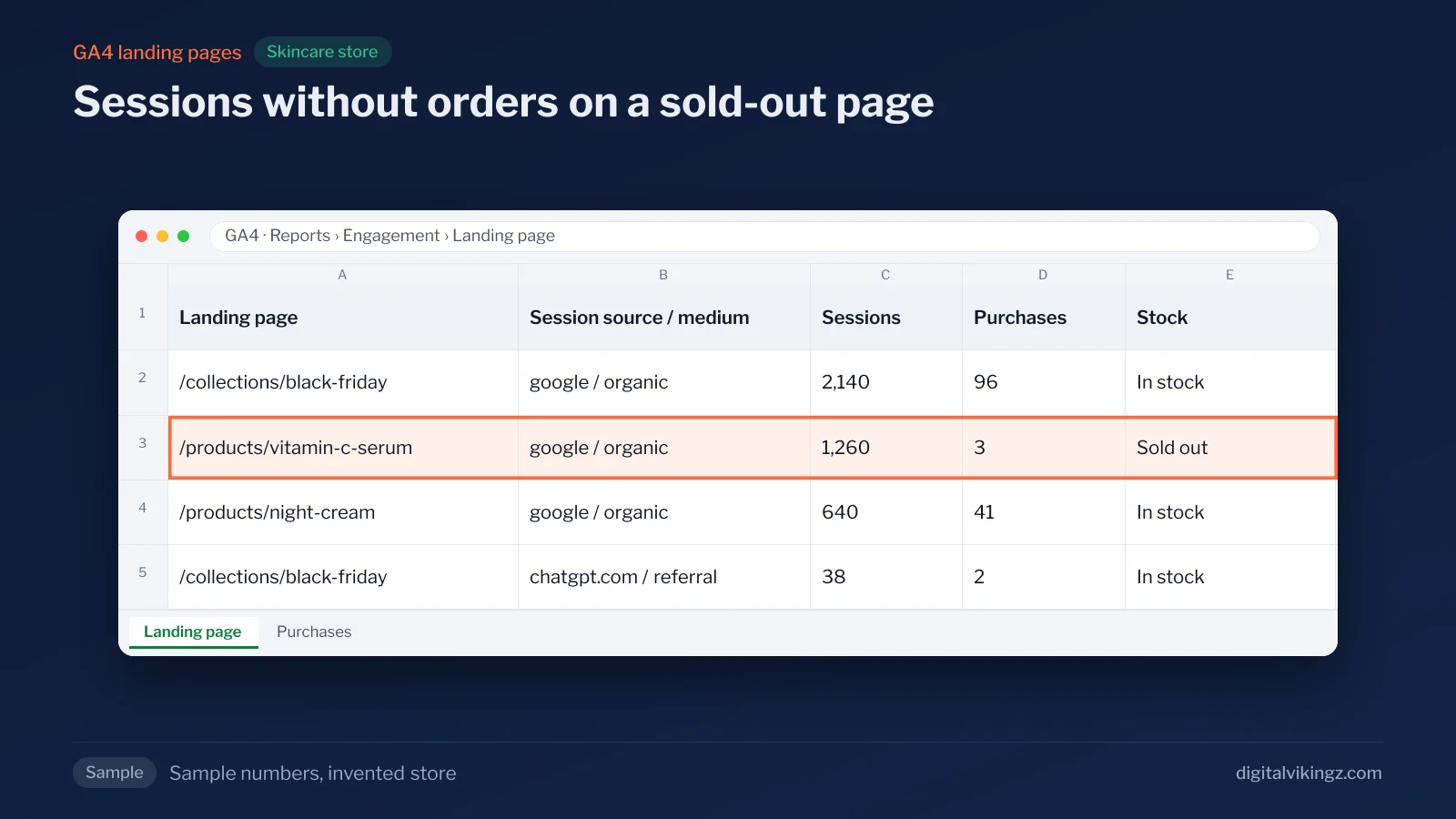
The landing pages that earned the sales show up in the GA4 Landing page report with Session source / medium added as a secondary dimension. Google defines the report as the first page a visitor lands on. The steps:
- Open Reports, then Engagement, then Landing page.
- Set the Cyber 5 dates and compare them with last year.
- Add the secondary dimension Session source / medium.
- Sort by purchases or key events, then by sessions.
- Open the Ecommerce purchases report to see which products sold. Google says Items purchased comes from the items array in the purchase event.
Look for pages with many sessions and few orders. Those are your first fixes. A skincare store, for example, might find its vitamin C serum page took a large share of organic sessions while the product was sold out.
How do you read AI referrals on a small base?
AI referrals on a small base read best as counts of sessions and orders, not as percentage growth. Percentages from a tiny starting number look dramatic and mean little.
The vendor data agrees on the size. Adobe reported that generative AI traffic to US retail sites rose 693.4% in the 2025 holiday season, and added that the base of users remains modest.
Semrush put AI referrals at about 0.15% of retail traffic across 19 retailers from 1 November 2025 to 9 January 2026, against about 18% from organic search.
Adobe's forecast for 2026 is AI traffic to retail sites up 130% year on year. That is a forecast, measured by shoppers clicking a link. Salesforce forecast that 20% of holiday traffic will come from AI chat agents, a mix that includes nonhuman bots.
GA4's AI Assistant channel covers assistants such as ChatGPT, Gemini and Copilot. Google states it excludes Google's AI Overviews and AI Mode, which sit in Organic Search. Keep the two apart.
Our rule: under 100 AI Assistant sessions in Cyber 5, report the count and the orders, and skip the percentage.
Some assistant visits also land in Direct, and our guide to track ChatGPT traffic in GA4 explains why. Product questions inside ChatGPT are covered in ChatGPT shopping for Shopify stores.
Merchant Center after the sale
Merchant Center shows which products Google disapproved or limited during the sale, and the Needs attention tab lists each issue per product. Google's help page adds a Prioritized fixes filter that shows medium and high impact issues. The steps:
- Open Products, then the Needs attention tab.
- Turn on the Prioritized fixes filter.
- Sort by issue, and note every mismatched price or availability error.
- Open Analytics, then Your reports, and the Google created dashboard, which Google says segments free from paid traffic using the traffic dimension. Read clicks for the Cyber 5 dates split by that dimension.
Sales make these errors more likely. Google warns that prices and availability might change multiple times per day during big sales, and recommends automatic item updates as a backup. Check them first.
Take a store selling cycling gear that cut helmet prices with a JavaScript badge. Google's mismatched price page says prices in the HTML need to match exactly the feed, so a price injected by script can trigger the error.
Shopify and WooCommerce reports
Shopify's Sessions by referrer report shows visits, and the Total sales by referrer report shows the orders. Shopify's help page says acquisition reports do not show converted sales, and they cover the Online Store channel only. Its session history goes back to 1 October 2022, so last year's sale is there.
Open Analytics, then Reports, and pull both reports for the two windows, with the 21 to 23 September session change marked on the sheet.
WooCommerce stores can run the same review from GA4 and Search Console, because neither report depends on the platform.
What does Bing AI Performance show?
Bing Webmaster Tools AI Performance shows how often Copilot and Bing's AI summaries cited your pages, with total citations, cited pages and grounding queries. Bing's February 2026 post lists those metrics and no click metric.
Bing also says the data represents a sample of citation activity. Read a citation as a mention, never as a visit or a sale. Clicks live elsewhere.
What should happen to the sale page URL?
The sale page URL stays the same every year, because Google's 2020 guidance says to use a recurring URL. Google's example is /sale/black-friday, with no year in the path. The 2020 Black Friday post also says to link the page from the home page and create it early.
Google repeated the point in its 2021 deals guidance. Reuse the same URL each year, and keep any text from a sale image in the page text too.
Google's posts do not say what to do between sales. Our advice is to keep the page live, swap the offer for a note about the next sale, and drop the home page link until November. Yoast gives similar advice: keep the pages up.
Seasonal collections get the same treatment in our Shopify SEO checklist for seasonal collections.
Out-of-stock and discontinued products
Out-of-stock products need the out of stock value in the feed and a page that shows it. Merchant Center help says to submit out of stock as the availability value rather than leave a sold-out product listed as in stock. A sold out label or a disabled buy button is accepted on the page.
Store owners in a May 2026 Shopify Community thread report a common catch: express payment buttons stay live on sold-out variants. Check one sold-out product page by hand after the sale, logged out of the store admin.
Discontinued products are a separate case. Our advice is one redirect from the product URL to the closest live product or collection. A product that lived in four collections can leave four 404s in Search Console, so check the canonical product URL first.
January fix list template
The January fix list ranks every issue the Black Friday SEO post-mortem found by its evidence, its fix, its owner and its due date. We order it by what blocked sales first, then by what lost search demand.
A useful order for most stores:
- Merchant Center prioritized fixes: price and availability errors.
- Landing pages with sessions and no orders, such as sold-out products.
- Pages that lost clicks against last year in Search Console.
- Sale page links, image text and the recurring URL.
- AI Assistant and Bing citation notes for the next review.
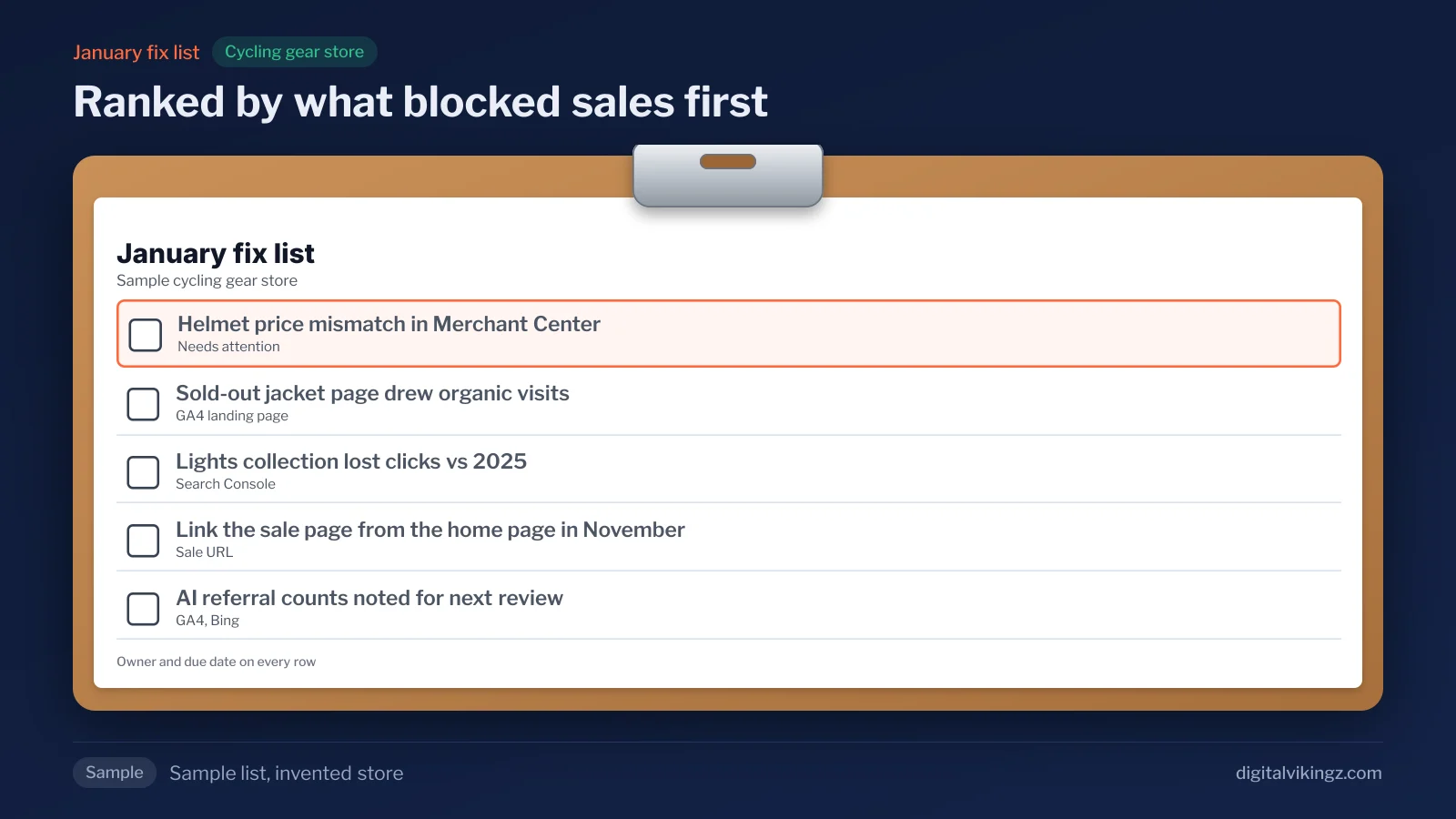
Keep each row to one sentence of evidence. A row that says "fix SEO" will still be on the list in March. Our Shopify and WooCommerce SEO work starts from a list like this one.
Mistakes that spoil the review
Five mistakes spoil a Black Friday SEO post-mortem more than any missing report. The five mistakes:
- Comparing windows that start on different weekdays.
- Comparing Shopify sessions across the 21 to 23 September 2026 change without a note.
- Reading AI referral growth as a percentage on a base of a few dozen sessions.
- Expecting AI Overviews clicks in GA4's AI Assistant row.
- Counting Bing citations as visits.
Each one can hide a real loss or invent a win.
Black Friday SEO post-mortem questions
Why does my own site show as the top referrer?
Shopify store owners report seeing their own domain as the top referrer. Shopify's help says referrer data is based on the session and that visits referred by your own store are classed as direct. To see where a buyer first arrived, use GA4's First user source dimension in the User acquisition report.
How long do disapproved products take to come back?
Disapproved products come back after Google re-crawls them, over the next few hours or days, according to Merchant Center help. Fix the page and the feed first, then wait.
Did AI shoppers convert better?
AI shoppers converting better is a vendor prediction. Salesforce wrote on 19 November 2026 that shoppers arriving via AI referrals are two times as likely to convert compared with typical ecommerce shoppers. Your GA4 AI Assistant row and its purchases are the only check that applies to your store.
Should discontinued products redirect?
Discontinued products redirect best to the closest live product or collection, in our advice. One redirect on the product URL is enough.
Where to start in the first week of December
Start the Black Friday SEO post-mortem with the windows sheet, then pull Search Console, GA4 and Merchant Center in that order. Shopify and Bing come last.
Write every finding as a row on the January fix list. Teams that want help can book ecommerce SEO for Shopify and WooCommerce stores with us.