 Digital Vikingz
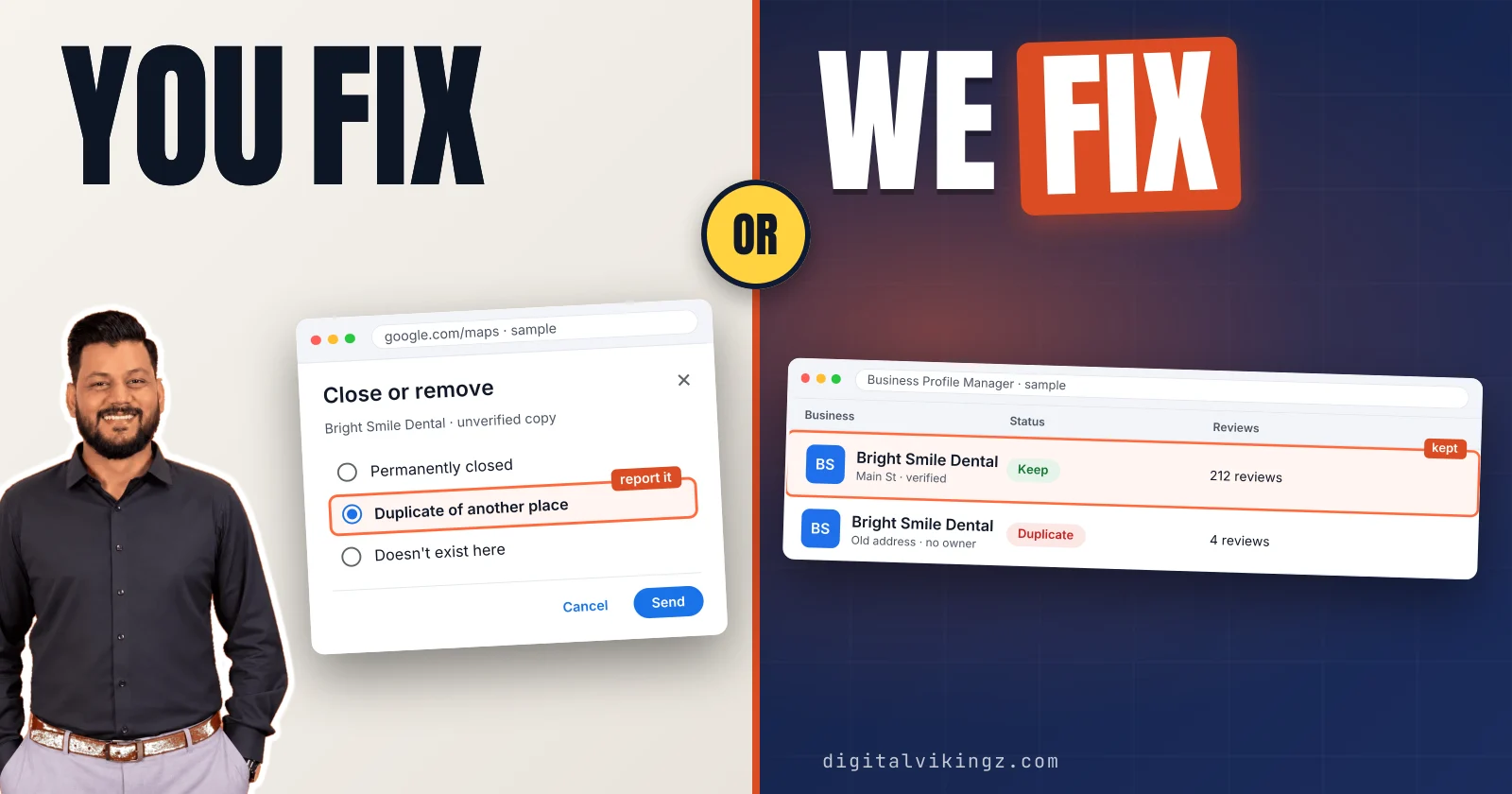
A duplicate Google Business Profile is a second Business Profile for the same business at the same location, and Google allows only one profile for each business. Google does not show a profile treated as a duplicate on Search or Maps. A signed-out Google Maps search for the business phone number and street address finds most duplicates.
The profile to keep is the verified one that holds the reviews and the correct details. A duplicate you manage is removed, a duplicate you do not manage is reported on Google Maps, and two profiles with reviews are merged. Google combines reviews in a merge but publishes no time for one.
What is a duplicate Google Business Profile?
A duplicate Google Business Profile is a second Business Profile for the same business at the same location, and Google allows only one profile for each business.
Google's help page states: "Multiple profiles for the same business may mislead your customers and are against our policies." Google adds: "If a profile is considered a duplicate, it won't show on Google Search or Maps."
Google's guidelines also say: "Do not create more than one page for each location of your business, either in a single account or multiple accounts." Owners searching for a duplicate Google My Business listing mean the same problem under the name Google retired in November 2021.
Most duplicates start with an ordinary change at the business.
Why does a business end up with two Google Business Profiles?
A business usually ends up with two Google Business Profiles after a lost login, a move, a second sign-up or a listing Google built from outside data. Google lists three reasons a profile counts as a duplicate: "Existing verified profile", "Same address" and "Different services".
The six events that most often create a second Google Business Profile are listed below:
- Lost login: an employee, past owner or former agency kept the old profile.
- Claim gone wrong: the "Claim this business" step produced a second listing.
- Move: the owner made a profile for the new address instead of editing the old one.
- Two Google Accounts: one profile sits on a personal account, one on a business account.
- One profile per service: a separate profile for each service, which Google's "Different services" reason covers.
- New profile during a suspension: a fresh profile made while the first was suspended.
Google can also build a listing from directory data or map edits, according to practitioners. Google flags many of these profiles with a Duplicate status.
What does the Duplicate status in Business Profile Manager mean?
The Duplicate status in Business Profile Manager means Google matched the profile to another profile for the same business and hides the flagged one from Search and Maps. Switching the Businesses view from All to Duplicate lists every flagged profile in the account.
Google's help page describes a red "Duplicate business" box on the overview of the flagged profile. The box links to "View original", or to "Request access" when another account holds the original. Owners report an email from Google that reads "Your profile has been marked as a duplicate."
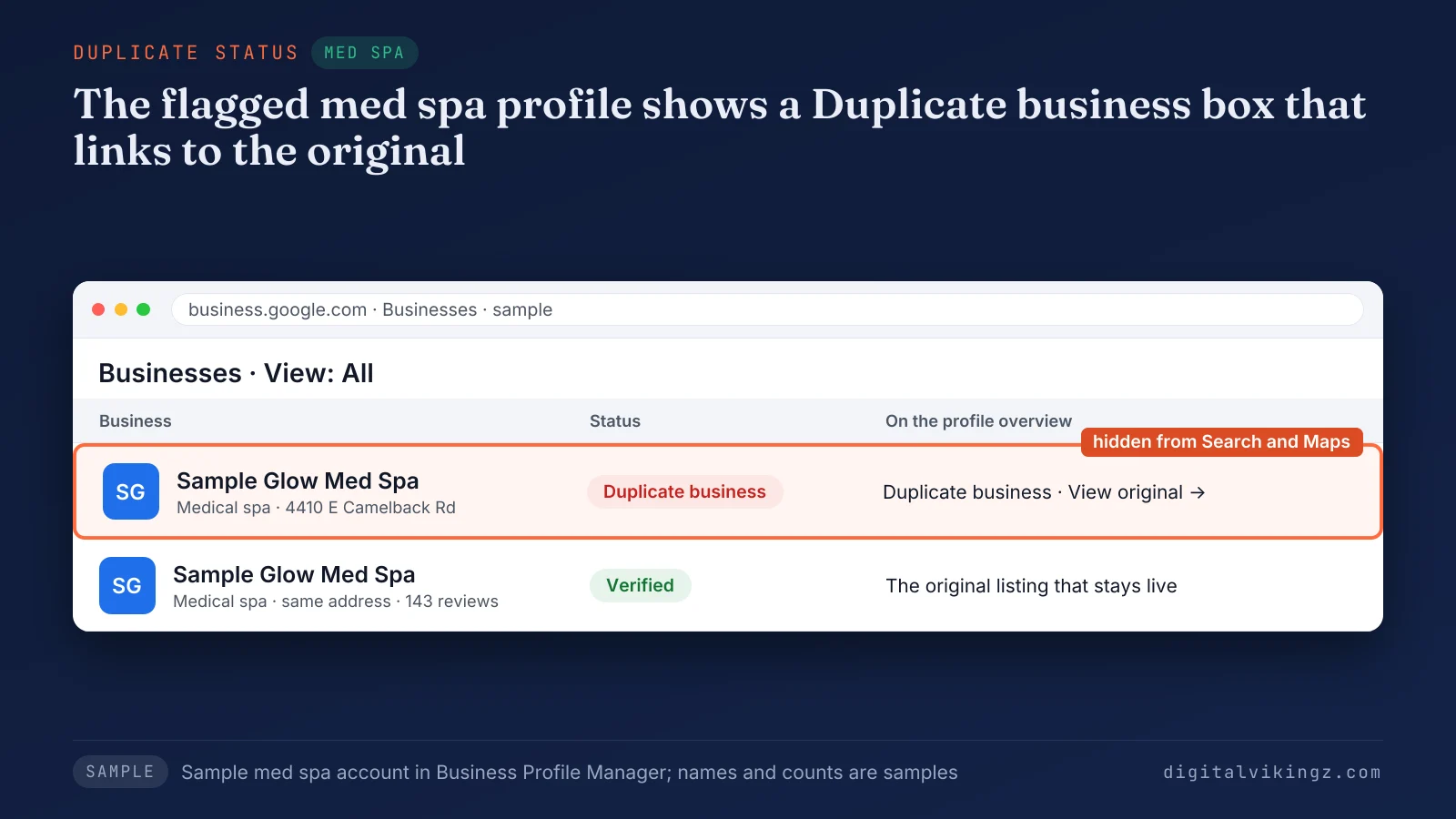
Figure 1 shows a sample med spa profile flagged as a duplicate, with the red box and the link to the original listing. A duplicate shown instead of the managed profile is one reason in the full checklist for a business not showing on Google Maps. An unflagged duplicate only shows up in a search.
How do you find a duplicate Google Business Profile?
A duplicate Google Business Profile is found by searching Google Maps, signed out, for the business phone number, the street address and the business name with its town.
The five checks that find a duplicate Google Business Profile are listed below:
- Sign out of Google or open a private browser window.
- Search Google Maps for the business phone number, then any older number.
- Search Google Maps for the street address, then any previous address.
- Search the business name with the town, and any former name.
- Open Business Profile Manager in each Google Account the business used, and switch the view to Duplicate.
A Google Maps search for the business phone number and the street address finds a second listing that the name search can miss. An unverified listing offers a "Claim this business" option, while a verified listing held by another account does not.
Business names, towns, addresses and review counts in the article's figures are samples, not client data.
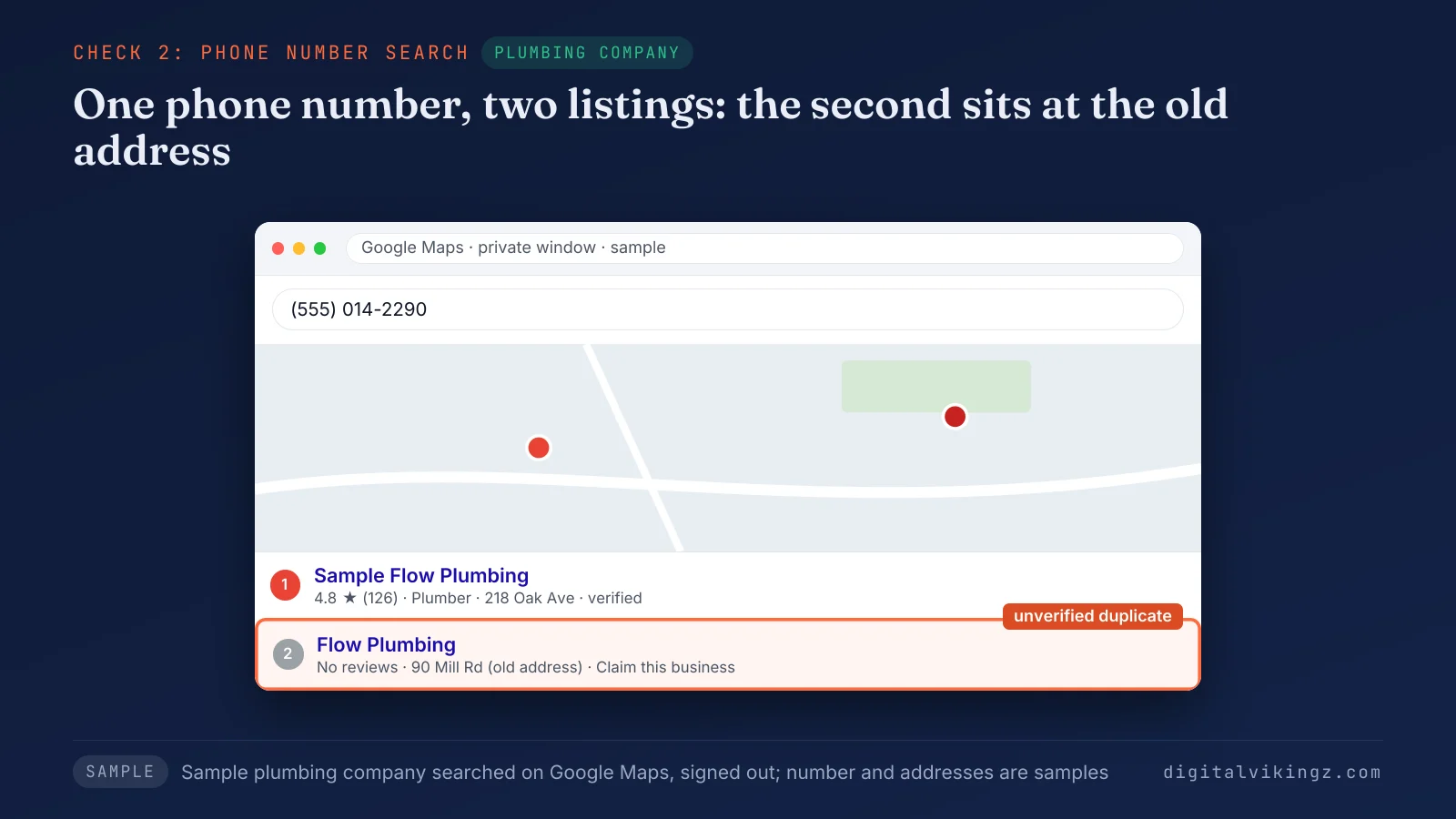
Figure 2 shows a phone number search for a sample plumbing company that returns two listings. One listing is verified with reviews, and the other is unverified at an old address. Some second listings are allowed and need no fix.
When are two Google Business Profiles not duplicates?
Two Google Business Profiles at one address are not duplicates when they represent distinct, eligible businesses, departments or individual practitioners. Google allows several profiles at one address for "Distinct businesses with different names and clearly visible differences in signage."
The second profiles that Google's guidelines allow are listed below:
- Co-located businesses: separate businesses with different names and visible signage at one address.
- Departments: departments within businesses, universities, hospitals and government buildings.
- Individual practitioners: public-facing professionals, such as dentists, reachable at the location during stated hours.
- Separate service-area locations: locations with separate service areas and staff, for a business that serves customers at their address.
- Independent brands: brands at one location that operate independently, each under its own name.
Google's guidelines say the practitioner's profile name "should include only the name of the practitioner, and shouldn't include the name of the organization." A solo practitioner at a branded practice shares one profile named "[brand/company]: [practitioner name]", and no practitioner holds one profile per specialty.
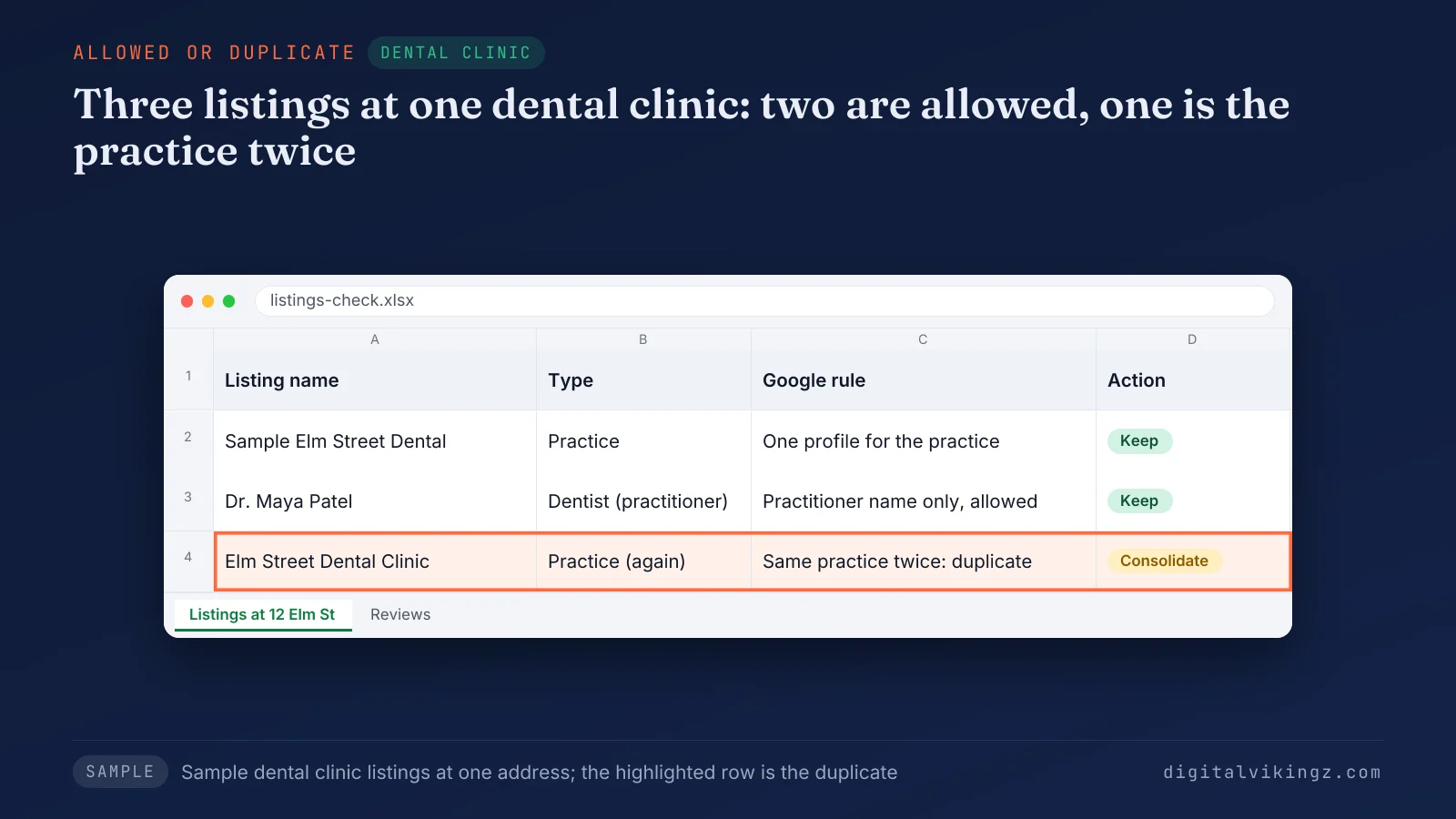
Figure 3 compares three listings at a sample dental clinic: the practice, one dentist and a second practice listing that duplicates the first. Each distinct business at a shared address keeps its own name, its own signage and its own Google Business Profile primary category. Google can still flag an allowed profile by mistake.
Can you appeal a profile wrongly marked as a duplicate?
Yes, a profile wrongly marked as a duplicate can be appealed through Google Business Profile support when both businesses are distinct and eligible. Google's help page adds: "If both businesses serve customers at the same location, you'll be asked to provide evidence of permanent signage that clearly shows both businesses."
Photos of each sign, each business's own phone number and website, and separate names on the door support the appeal. Agencies on the Local Search Forum blamed some flagged practitioner profiles on names that repeated the practice name, which Google's naming rule forbids.
Profiles that are true duplicates need one profile kept and the other dropped.
Which Google Business Profile should you keep?
The Google Business Profile to keep is the verified one that holds the reviews and the correct name, address and phone number. Google's own instruction on duplicates reads: "We recommend keeping the verified profile." The newest profile is not the one to keep by default.
Two verified profiles that both hold reviews call for a merge into the one at the current address with more reviews. A third profile never fixes a duplicate. Google asks owners not to create a new one after a move or a change of owner.
The kept profile next needs a complete setup, which follows the 13 setup-to-upkeep steps for a Google Business Profile. Two facts then decide what happens to the other profile: who manages the duplicate, and whether the duplicate holds reviews.
Should you merge, remove or report a duplicate Google Business Profile?
A duplicate Google Business Profile is removed when you manage the profile, reported on Google Maps when you do not, and merged when both profiles hold reviews.
The path for each situation, matched to the facts an owner can check, is shown below:
| Your situation | Path | Where the path starts | Section |
|---|---|---|---|
| You manage both; the extra holds no reviews worth keeping | Remove the extra profile | Business Profile settings | Remove a profile you manage |
| You manage both; both hold reviews for the same business | Request a merge | A suggestion on Google Maps | Merge two profiles |
| The duplicate is unverified and outside your account | Report the listing as a duplicate | Suggest an edit on Google Maps | Report a profile you do not manage |
| The duplicate is verified and owned by someone else | Request access, then remove or merge | The request access form | Report a profile you do not manage |
| The business moved and a second profile exists for the new address | Ask Google to transfer the reviews | Business Profile support | After a business moves |
| The old location closed for good | Mark the profile permanently closed | Business Profile settings | After a business moves |
| The two profiles are distinct businesses, departments or practitioners | Keep both; appeal a wrong Duplicate status | Business Profile support | When two profiles are not duplicates |
Every path starts from the profile chosen to keep. Only a merge combines the reviews of both profiles.
Removing a profile you manage is the shortest path.
How do you remove a duplicate profile you manage?
A duplicate profile you manage is removed from Business Profile settings with Remove Business Profile, which deletes its content and managers without affecting the verified listing. Google warns: "When you remove a duplicate profile, all content and linked managers will be removed, so make sure to remove the correct profile."
The steps to remove a duplicate Google Business Profile from your account are listed below:
- Sign in to the Google Account that manages the duplicate, not the profile to keep.
- Open the duplicate profile, select More, then Business Profile settings.
- Select Remove Business Profile, then Remove profile content and managers.
- Leave Mark your business as permanently closed off while the business is open.
- Select Continue, Remove, then Done.
Google's help page lets only primary owners remove a profile, and new owners and managers wait 7 days first. Google adds that a removed business can still show on Maps and Search, so a Maps report follows when the listing stays.
Removed owner content is gone for good, and managing that profile again means repeating the steps for how to verify a Google Business Profile. A listing outside your account needs a report instead.
How do you report a duplicate profile you do not manage?
A duplicate profile you do not manage is reported on Google Maps through Suggest an edit, then Close or remove, then Duplicate of another place. Some versions of the Maps app label the middle option Place is closed or not here.
The steps to report a duplicate listing on Google Maps are listed below:
- Open the duplicate listing on Google Maps.
- Select Suggest an edit, then Close or remove.
- Choose Duplicate of another place.
- Select the listing to keep, then send the suggestion.
A verified duplicate owned by someone else needs a request for access first, and Google gives the current owner 3 days to respond. Google notes: "The option to claim a profile isn't always available." The request access, transfer and manager steps are covered in Google Business Profile ownership and access requests.
The report is for a second listing of your own business, never for a competitor's listing. A report drops one listing, while a merge keeps the reviews of both.
How do you merge two Google Business Profiles?
Two Google Business Profiles for the same business are merged by reporting a suggestion on Google Maps, and Google reviews every merge request. Google sets one condition: "For the merge to be successful, the profiles must represent the same business and should have the same info."
The steps to prepare and send a merge request are listed below:
- Match the name, address, phone number and category on both profiles.
- Copy the Maps link and Business Profile ID of each profile, under Business Profile settings, then Advanced settings.
- Report the duplicate on Google Maps as a duplicate of the profile to keep.
- Save the date and a screenshot of each step.
Google's help page names no ownership condition for a merge request, so a merge does not wait for both profiles to sit in one account. Business Profile support handles cases the Maps report cannot, such as reviews on a profile created after a move.
A move is the one case where Google moves reviews without a request.
What happens to the old profile after a business moves?
A business that moves keeps its existing Google Business Profile and updates the address, because Google asks owners not to create a new profile for a new location.
Google states: "If you move to a new address and keep the same business name, Google will transfer your reviews automatically." Hotels, golf courses and scenic attractions are the categories Google names where reviews might not move.
A second profile already made for the new address calls for a request to Business Profile support to transfer the old reviews. A 2024 Local Search Forum thread reports support refusing a review transfer between profiles created with different business details.
Duplicate of another place is a report for the same business. Mark your business as permanently closed is a status for a location that ended. Google says a closed location does not leave Maps right away, and the reviews stay on the profile.
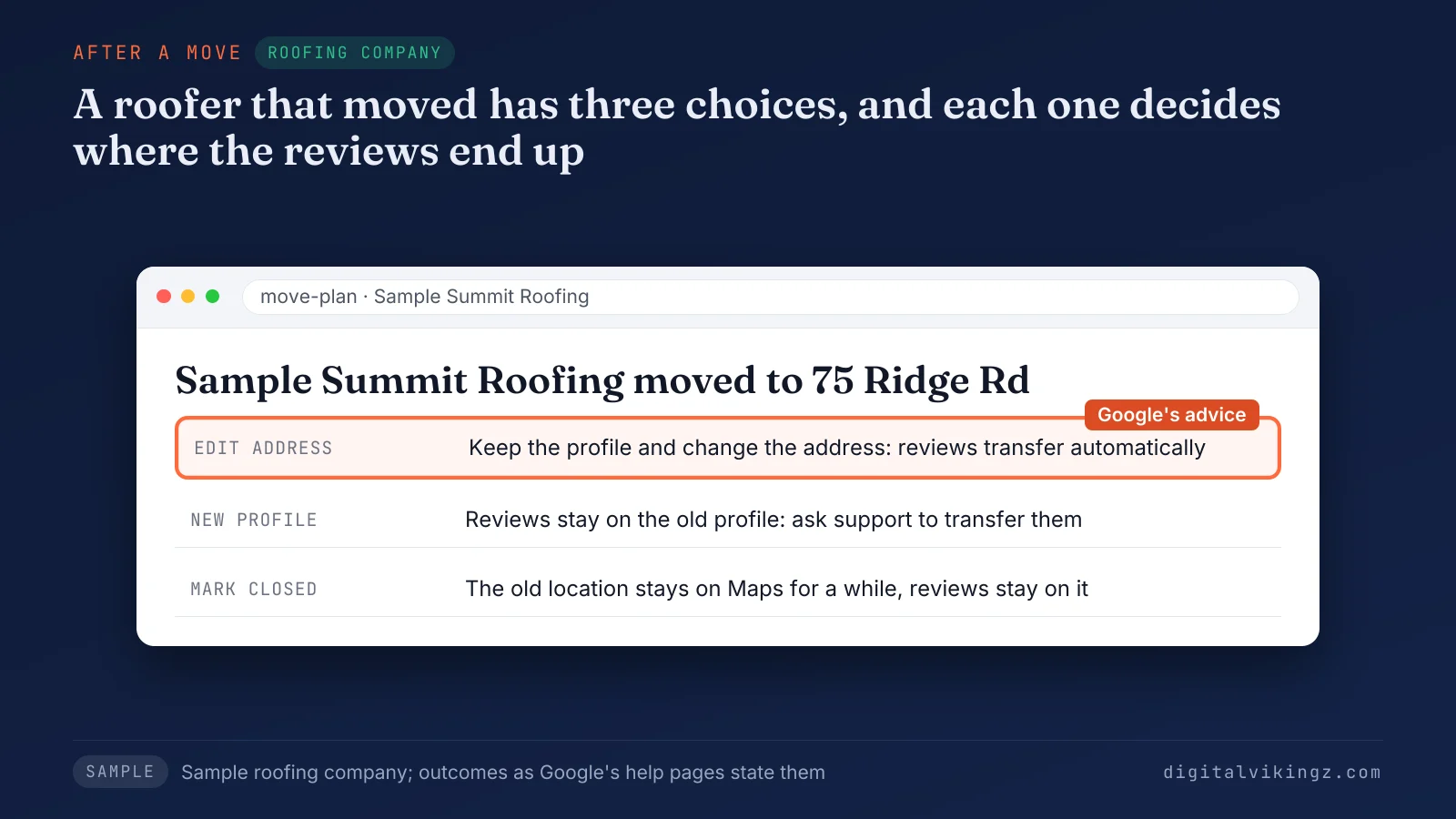
Figure 4 shows the three choices for a sample roofing company that moved, with the outcome Google states for each. Each path changes what stays on the kept profile.
What happens to reviews, photos and posts after a merge or removal?
A merge combines the reviews of both Google Business Profiles, while a removal deletes the owner's posts, photos, videos and review replies but leaves customer reviews in place.
What Google states about reviews and owner content for each change is shown below:
| Change | Customer reviews | Owner review replies | Owner posts, photos and videos | Google help page |
|---|---|---|---|---|
| Merge | Combined | "May be lost" | Not stated by Google | Resolve duplicate profiles |
| Remove from your account | Remain | Removed permanently | Removed permanently | Remove a Business Profile |
| Move with the same name | Moved automatically, except some categories | Stay on the same profile | Stay on the same profile | Move your reviews |
| Second profile made after a move or owner change | Transfer on request to Google support | Not stated by Google | Not stated by Google | Move your reviews |
| Marked permanently closed | Remain; no new reviews | Stay | Stay | Move your reviews |
Google states nothing about photos or posts after a merge, so a merge plan counts only on the reviews. Save copies of owner photos and review reply text before any merge or removal.
Google gives no time for any of these changes.
How long does Google take to act on a duplicate?
Google publishes no time for a merge or a duplicate report, and its help pages state only that every merge request is reviewed.
Google's stated times cover two other steps. Google gives an owner 3 days to answer an access request, and a new owner waits 7 days to remove a profile. Ranges such as 3 to 10 business days come from third-party guides, not from Google.
Owners on Google's community forum report waiting a week or more without a reply.
The checks that confirm a duplicate is gone are listed below:
- Repeat the signed-out Maps search for the phone number and the street address.
- Check that the Duplicate view in Business Profile Manager is empty.
- Confirm the reviews show on the kept profile.
A fixed duplicate can return when its cause stays in place.
How do you stop a duplicate Google Business Profile from coming back?
A duplicate Google Business Profile stays gone when the business owns the account, adds people as managers and edits the existing profile for every change.
The five habits that stop a duplicate Google Business Profile from coming back are listed below:
- Keep the profile in a Google Account the business owns, not in an employee's or an agency's account.
- Add staff and agencies as managers instead of letting anyone create a new profile.
- Edit the address on the existing profile after a move, as Google asks.
- List every service on the one profile rather than opening a profile per service.
- Search Google Maps for the business phone number each month to catch a new duplicate early.
Google's help page states: "If you offer different services at your business, do not create separate Business Profiles for each service." The same name, address and phone number on directories leaves fewer outside sources for a listing built from data, according to practitioners.
Our checks on any Google Business Profile start with the same signed-out phone and address search, before any edit. Our monthly profile work covers profile updates, weekly posts, review replies and a monthly report. The exact scope is quoted in writing after a strategy call.
Owners can book a strategy call about Local SEO and Google Business Profile Optimization after a duplicate fix. The call covers sorting the duplicate and keeping one profile current. A duplicate made during a suspension carries the highest risk.
Can a duplicate profile get the main profile suspended?
Yes, a duplicate profile can lead to a suspension, because a second Google Business Profile for the same business breaks Google's one-profile rule.
Google's guidelines warn that Google "reserves the right to suspend access to Business Profiles" of businesses that break them. A new profile made during a suspension counts as a duplicate, according to practitioners, and starts with no review history.
The owner reports or removes the duplicate before any appeal and creates no new profile. Removing the duplicate first leaves one Google Business Profile for Google to review.
The appeal itself follows the steps to get a suspended Google Business Profile reinstated. A duplicate that stays live also affects how the main listing shows on Google Maps.
Does a duplicate Google Business Profile hurt Google Maps ranking?
A duplicate Google Business Profile can hold the main listing back on Google Maps, because Google may show the duplicate instead and customers split reviews across two listings.
Google's guidelines say a second profile "can cause problems with how your information displays on Google Maps and Search." Google names no ranking penalty for duplicates, so a merge or removal promises no ranking gain.
Customers who find the duplicate can see an old phone number, old hours or an old address. A merge also brings the duplicate's reviews onto the main listing, as Google states for merged profiles.
The factors Google does name are explained in what helps a business rank higher on Google Maps. Two listings also give AI assistants two sets of facts.
Do AI assistants read both listings?
Yes, AI assistants can read both listings, so two Google Business Profiles with different phone numbers or hours give them conflicting facts about one business. Our guide sets out the sources AI assistants use to choose a local business. The guide lists business profiles, directory and review sites, business websites and third-party mentions.
A duplicate with an old phone number can carry that number into an AI answer. Customers can then call a line the business no longer uses. A removed or merged duplicate leaves one set of facts for search engines, AI assistants and customers.
The same phone number and hours on the business website and directories then back up the kept profile.
One verified, accurate profile gives every reader the same facts.
Frequently asked questions about duplicate Google Business Profiles
Can I create a second Google Business Profile?
A second Google Business Profile is allowed only for a distinct business, a department, an individual practitioner or a separately staffed location, never for the same business. Google asks for different names and visible signage when two businesses share an address.
Can one Google Account have multiple business profiles?
Yes, one Google Account can manage several Google Business Profiles, each for a different business or location. Business Profile Manager lists them and removes several at once through Actions.
Do both profiles need to be verified before a merge?
No, Google's help page names no verification condition for merging two Google Business Profiles; the profiles must represent the same business and carry the same information. Google reviews every merge request.
Can a merged Google Business Profile be separated again?
Google offers an appeal through Google Business Profile support only when two distinct, eligible businesses were merged by mistake. Businesses that share a location need evidence of permanent signage for both, according to Google's help page.
Can I delete my Google Business Profile and start over?
No, deleting and recreating a Google Business Profile removes the owner's posts, photos and replies, and the new profile can count as a duplicate of the old listing. Customer reviews stay with the place, and Google asks owners to edit the existing profile instead.
Can I contact Google about a duplicate profile?
Yes, Google's help pages send duplicate appeals and review transfers to the Google Business Profile support contact form. Owners report waits of a week or more, so a saved record of each request helps.
Where should you start with a duplicate Google Business Profile?
Start with a signed-out Google Maps search for the phone number and street address, keep the verified profile with the reviews, then remove, report or merge the other. Digital Vikingz keeps the remaining Google Business Profile active with Daily Google Posts, from $99 per listing per month.
Our AI agent writes each post from the business website, the first post is free, and a free preview takes about 20 seconds. See today's post with a free preview of Daily Google Posts for the profile you kept.
