 Digital Vikingz
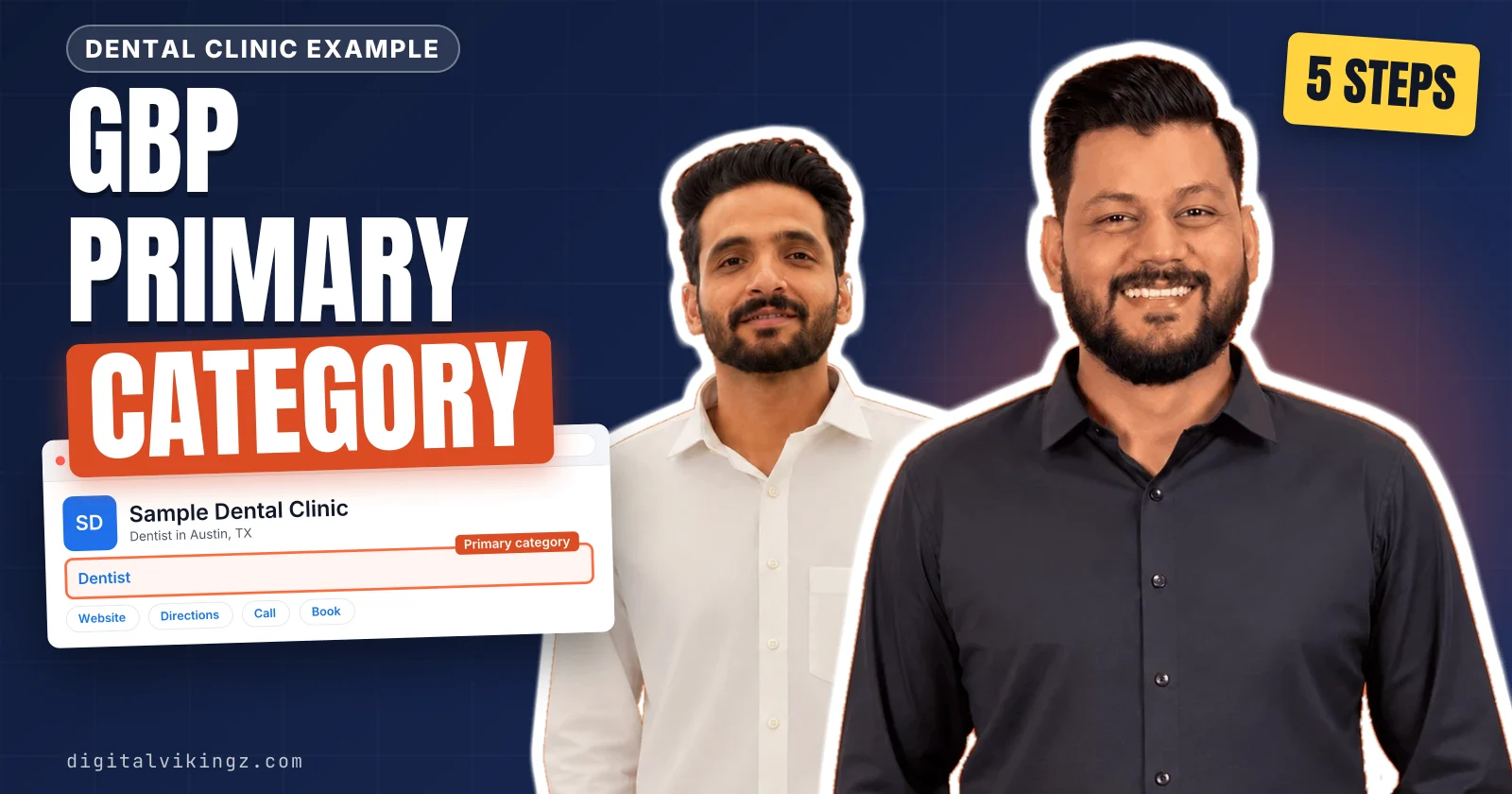
A Google Business Profile primary category is the one category from Google's list that states what a business is. Google uses the primary category to match the profile with local searches and to switch on features such as menus and booking buttons. Digital Vikingz chooses the primary category in five steps, and the first step names the central entity of a business in one sentence. Secondary categories add separate departments or major service lines, and a business with no exact match takes the closest general category.
A change of primary category can trigger re-verification, so Google Business Profile optimization records the profile and the rankings before the edit. Locations that offer the same service share one primary category, which semantic SEO for a multi-location business pairs with each location page. The right primary category then becomes the first decision in the site structure for local service businesses.
How do you choose a Google Business Profile primary category?
A Google Business Profile primary category is chosen in five steps, from naming what the business is to checking the features the category unlocks.
The five steps that choose a primary category are listed below:
- Name the one thing the business is, in a sentence that completes "This business IS a".
- Find the most specific category in Google's list that matches that sentence.
- Check the primary categories of the profiles in the map pack for the core service.
- Break a tie between two candidates with the service that earns the most revenue.
- Check which profile features the chosen category unlocks before saving the choice.
The five steps treat the primary category as a classification of the business, not as a keyword to rank for. Steps 1 and 2 follow Google's own category guidelines, and steps 3 to 5 follow how ranking profiles and profile features behave. Secondary categories are chosen only after the primary category is fixed, because each secondary category is judged against the primary category. Every GBP primary category decision therefore starts from one sentence about what the business is.
1. Name the one thing the business is
Naming the one thing the business is gives the primary category a test: the category must complete the sentence "This business IS a".
Google's guidelines ask for categories that complete the statement "This business IS a" rather than "this business HAS a." The core service an owner names is the noun after "IS a", and every other service the business offers is something the business HAS. A sample dental clinic that also places implants IS a dentist and HAS an implant service. A noun that names one service fails the test, because the primary category describes the whole business. Step 1 ends with one written sentence, such as "Sample dental clinic IS a dentist", before any category search starts. The same sentence names the central entity of a business, the one thing the website, profile and reviews describe. The method for naming that one thing is set out in the guide to the central entity of a business. The sentence then becomes the search term inside Google's category list.
2. Find the most specific matching category in Google's list
The most specific category that still describes the whole business is the right primary category, because Google adds the broader parent categories itself.
Google's help page gives the rule in one example: "instead of 'Salon,' choose 'Nail salon.'" Google's guidelines state that a specific category implicitly includes the more general parent categories, so a redundant parent category adds nothing. Google's list holds about 4,000 categories in November 2026, and Google accepts no custom category name. Type the noun from step 1 into the Primary category box, read every suggestion the list shows, then try one synonym of the noun. A category narrower than the business names one service, such as Orthodontist for a general dental clinic. One service belongs to a secondary category or to the services list, never to the primary category.
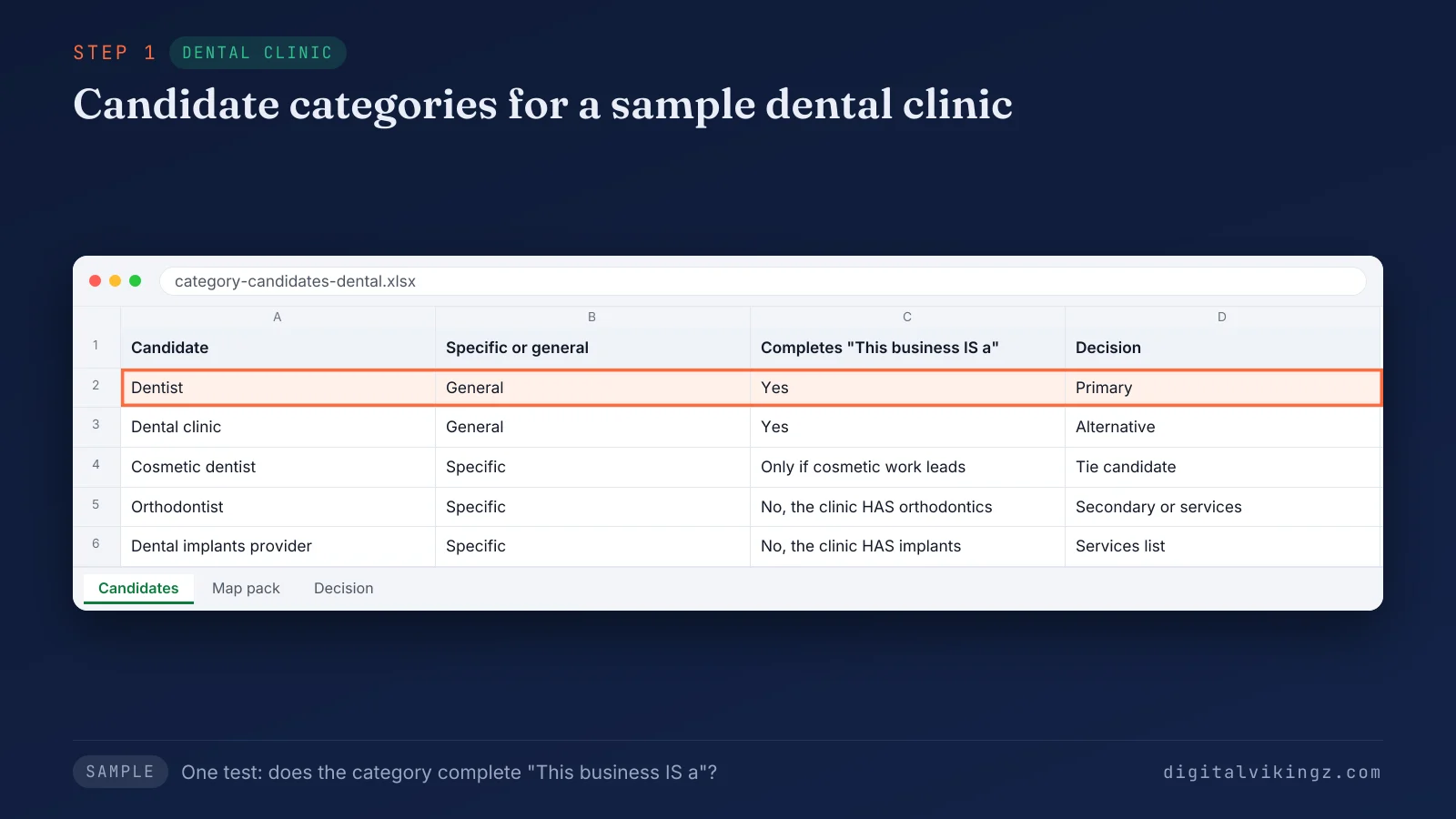
The sample clinic keeps Dentist as the primary category, because Orthodontist and Dental implants provider name services the clinic HAS. Dental clinic passes the same test as an alternative, and Cosmetic dentist stays a tie candidate for step 4. The candidates that survive go to the map pack for a second opinion.
3. Check the primary categories in the map pack
The primary categories of the profiles in the map pack show which category Google already pairs with the core service search.
Search the core service and the city in Google Maps, and read the grey category text under each business name. The grey category text is the primary category of each profile. Secondary categories stay hidden in the Maps interface, and only a browser extension or the page source reveals the full category set. The map pack majority should be read as evidence of how Google classifies the market, not as a category to copy. A competitor category that fails the "This business IS a" sentence from step 1 stays out of the shortlist. A candidate that passes step 1 and also leads the map pack moves to the top of the shortlist.
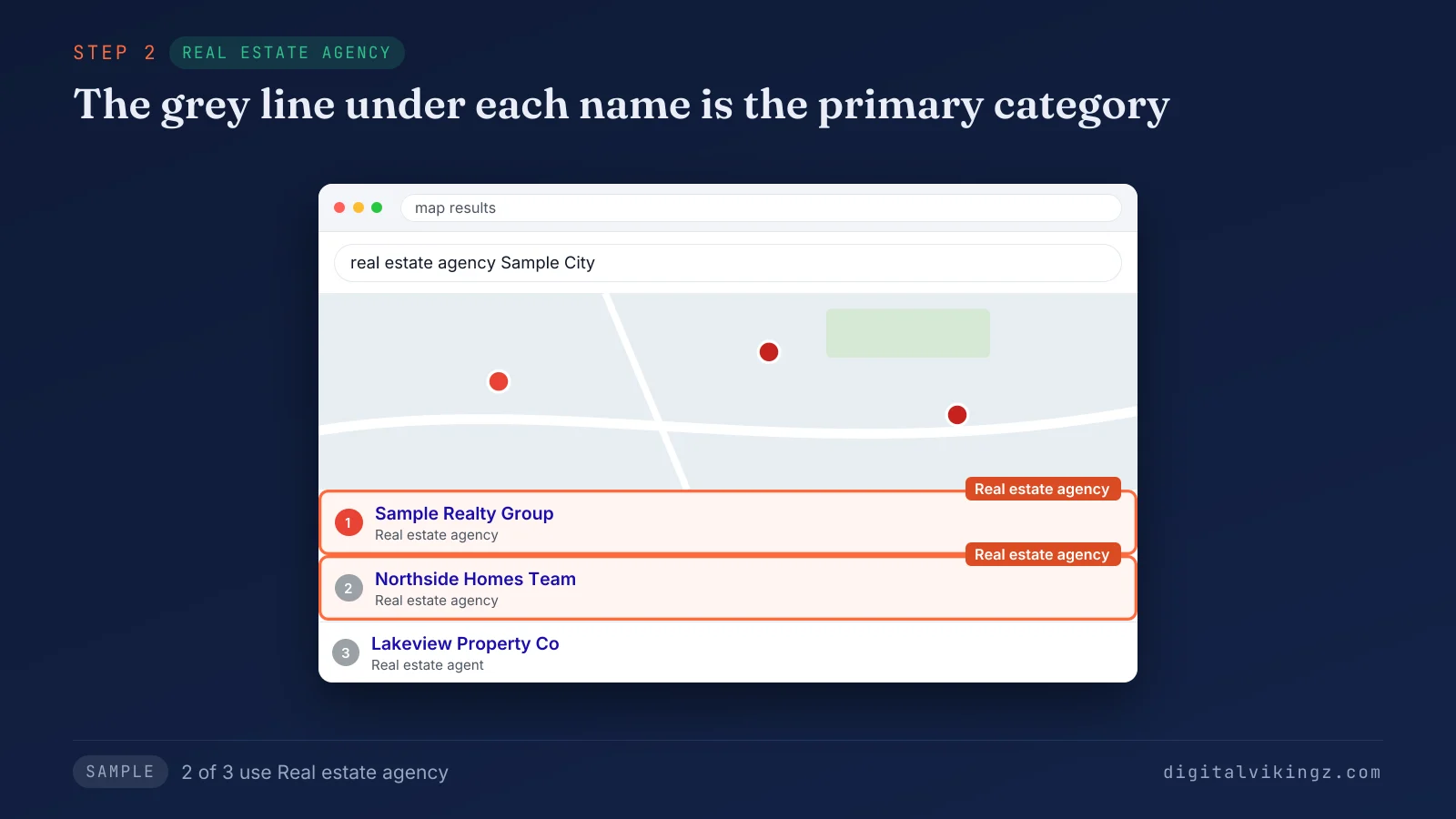
The sample map pack shows two of the three agencies under Real estate agency, so the agency keeps that candidate first. The third listing shows Real estate agent under the business name. Two candidates can survive the map pack check, and the next step breaks the tie.
4. Break a tie with the service that earns the most
A tie between two candidate categories goes to the category of the service that earned the most revenue over the last 12 months.
The tie-break decides the primary category between two candidates that both pass steps 1 to 3. Published guides split on the tie-break: revenue or profit, search volume, or the service the business wants more of. We use revenue first and growth priority second, because a category chosen for search volume can classify the business by a side service. Growth priority wins only when the business is moving the main service and the website already presents the new service as the main one. The sample clinic earns more from general dentistry than from cosmetic work, so Dentist wins over Cosmetic dentist. The candidate that loses the tie can still enter the profile as a secondary category. The winning candidate still needs one last check: the features the category unlocks.
5. Check which features the category unlocks
The primary category decides which profile features appear, so the last step confirms that the chosen category unlocks the features the business needs.
Google lists three examples of category-specific features. Hotels show class ratings and amenities. Restaurants add online orders, reservations and menus. Health and beauty businesses add a booking button and services. A service-area door installer reported a case on the Google Business Profile Community in February 2026. The primary category "Door supplier" limited the public Services section, while "Contractor" showed the section in full. Check a ranking profile that uses the candidate category, and note which buttons and sections the profile shows. A category that hides a feature the business needs sends the choice back to step 2 for the next candidate. Features are one of three things the primary category decides on a profile.
What does the primary category decide on a Google Business Profile?
The primary category decides which searches a Google Business Profile can match, the label under the business name, and the profile's features.
Google states the ranking link directly: "The categories you select affect your local ranking on Google." Google's help page says a "Pizza restaurant" primary category can show the business in searches for restaurants, Italian restaurants or pizza. Google's local ranking page says, in November 2026, "Local results are mainly based on relevance, distance, and popularity." The category feeds relevance. Distance and prominence, the term the same Google page uses for the third factor, decide the order among relevant profiles. Google describes prominence as how well-known a business is, based on links and reviews. Local SEO practitioners treat the primary category as carrying more ranking weight than any secondary category, and Google publishes no weights. Google's guidelines add that "Google can also detect category information from your website and from mentions about your business throughout the web." A website that states the same classification can therefore support the category choice. The extra weight is the reason the practitioner guides counted below call the primary category the most important local ranking factor.
Is the primary category the most important local ranking factor?
The primary category is called the most important local ranking factor by practitioners, not by Google, which publishes no factor weights.
We read the ten results on page one of Google for "Google Business Profile primary category" on 13 November 2026. Three of the ten call the primary category the most important or the heaviest-weighted local factor. Google's own documentation stops at relevance, distance and prominence and names no single top factor. A wrong primary category can keep a profile out of the searches the business should match. We therefore fix the primary category before work on reviews, posts or links. The secondary categories carry less weight and a different role.
How do secondary categories differ from the primary category?
Secondary categories describe departments or major service lines beside the main type, while the primary category states the main type alone.
Google's profile editor labels secondary categories "additional categories" and adds each one through the button "Add another category". The table below compares the primary category and secondary categories on five points of comparison.
| Point of comparison | Primary category | Secondary categories |
|---|---|---|
| Number per profile | One | Up to nine |
| Required | Yes, on every profile | No, optional |
| Role | States what the business is | Adds a department or a major service line |
| Shown under the business name | Yes | No, hidden in the Maps interface |
| Ranking weight | The most weight, by practitioner consensus | Less weight per category |
Google's own example is a grocery store with a bakery and a deli. Grocery store is the primary category. Bakery and Deli are the secondary categories.
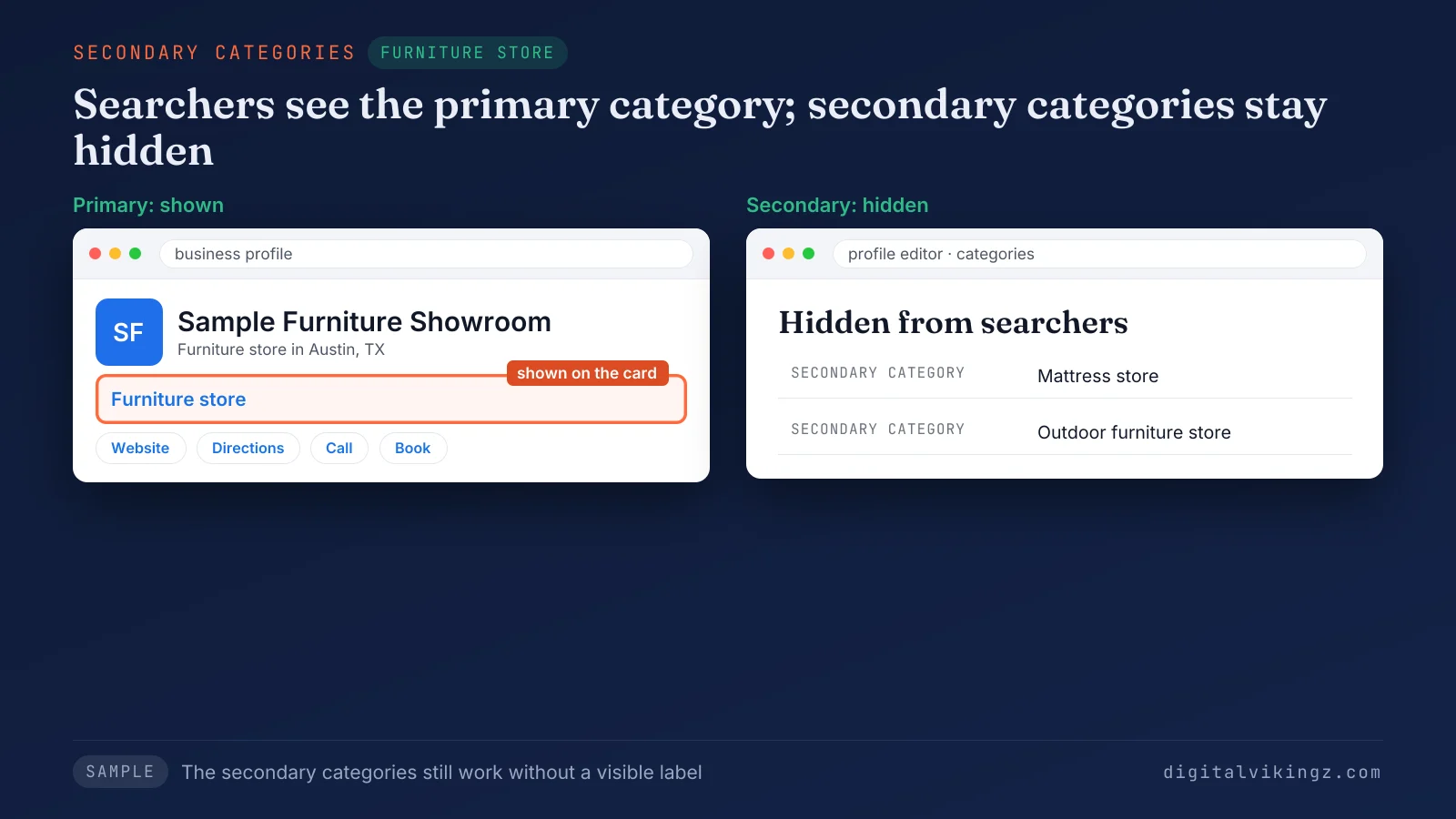
The sample store shows Furniture store under the business name, while Mattress store and Outdoor furniture store stay out of sight. Searchers see the primary category, and the secondary categories work without a visible label. The number of secondary categories raises the next question: how many a business should add.
How many secondary categories should a business add?
A business should add only secondary categories that name a separate department or major service line, and no agreed number exists.
Google's help page says: "Do not select a category for every product or service." The guides we read on 13 November 2026 recommend between one and six categories in total. Uberall and Wiremo, two listing vendors, and a 2025 agency guide from Olly Olly warn that extra categories dilute the focus of the profile. Sterling Sky, a local SEO agency, disputes dilution in a guide updated in January 2026. The guide reports that a law firm's employment-related rankings "improved significantly" after the firm added a relevant secondary category. A category that fails the "This business IS a" sentence for a department stays off the profile, whatever the count. Products and single services go in the services list, which holds products and services without changing the classification. A harder case arises when no category matches the business at all.
What should you choose when no category matches the business?
A business with no matching category should choose the closest general category and name the specialty in the profile description and services.
Google's guidelines tell an owner to choose a more general category when no specific category fits. A general category still has to pass the step 1 sentence, and "Store" with no qualifier passes for every business and classifies none. Our own profile uses Internet marketing service as the primary category, because Google's list holds no category named semantic SEO. The sample SaaS office uses Software company as the primary category and names employee onboarding software in the description and the services. The step 1 sentence for the sample office reads "Sample HR software office IS a software company".
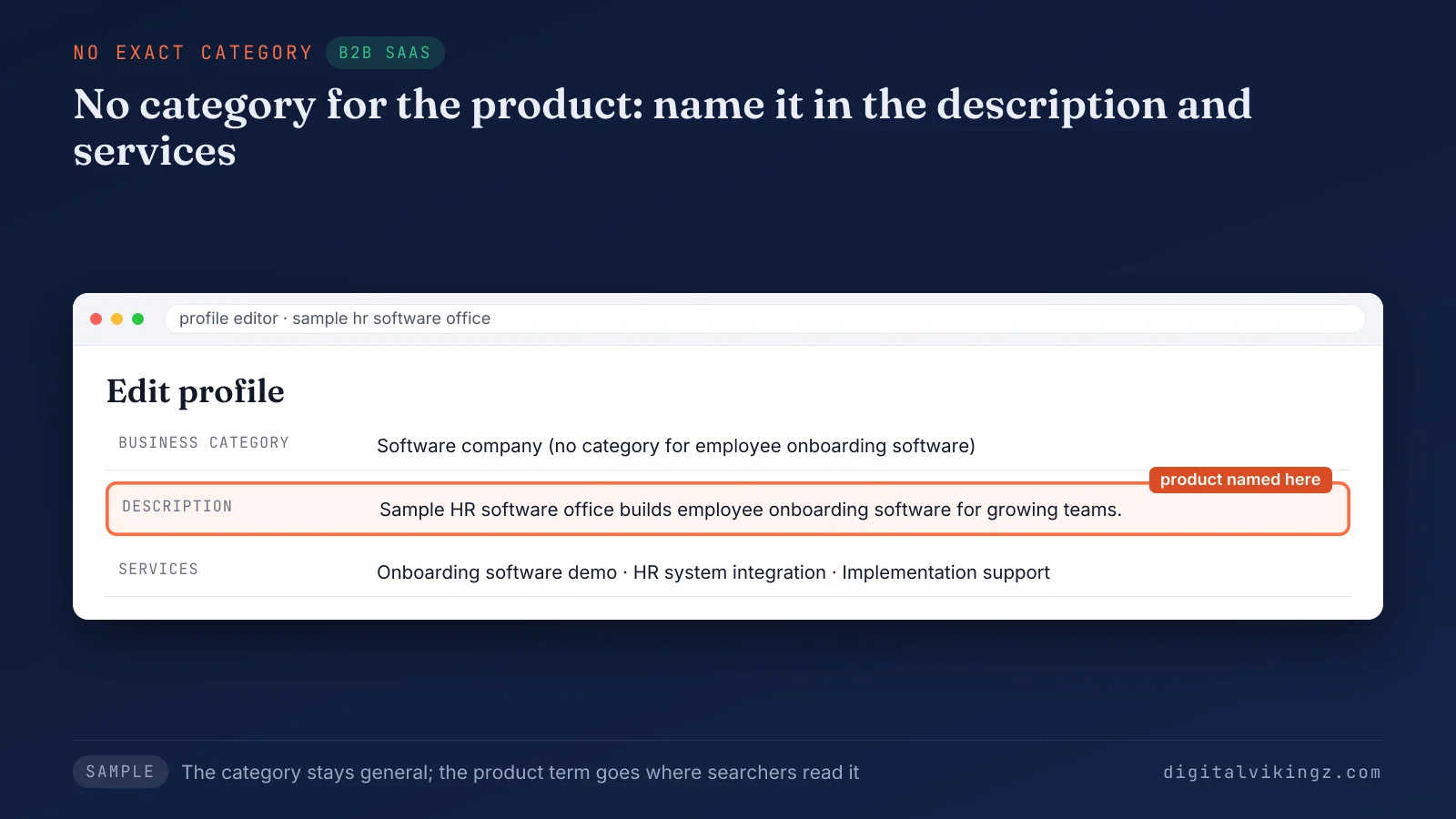
The sample profile keeps the product term out of the category and places the term in the description and three services. The three services read Onboarding software demo, HR system integration and Implementation support. A business with two equal lines of work faces the opposite question: two primary categories.
Can a business have two primary categories?
A Google Business Profile holds one primary category only, so a second line of business becomes a secondary category or a separate profile.
Google's help page gives a separately owned and operated department a separate Business Profile with a separate primary category. Google's example is an independently operated cafe inside a health club. Google's guidelines give co-located businesses that each need a distinct category two profiles with different names. A business that outgrows the current primary category changes the category instead of adding a second one.
How do you change the primary category on a Google Business Profile?
The primary category is changed in the Business category section of Edit profile, and Google can ask the owner to verify the business again.
The path is Edit profile, then Edit next to Business category, then a choice in the Primary category box, then Save. Google's help page warns that after a category edit "you might be asked to verify your business again." The checks that protect rankings during a primary category change are listed below:
- Record the current primary and secondary categories with a screenshot of the profile.
- Record the map pack positions for the core service searches before the edit.
- Change the primary category alone, with no edit to the name, address or website that day.
- Leave the profile untouched until any re-verification request is complete.
- Compare the same searches each week until the positions settle.
The checks above are the change step of Google Business Profile optimization. The owner approves the new category, and our service makes the change and tracks the searches as part of Google Business Profile optimization. The record also answers the first question owners ask about a change: the effect of the new primary category on rankings.
Does changing the primary category hurt rankings?
Changing the primary category can hurt rankings for the searches the old category matched, because Google pairs the profile with new searches.
The profile gains the new category's searches and loses the old category's searches. The net effect depends on which category describes the business better. No source we read gives an agreed time before positions settle. The BrightLocal guide read on 13 November 2026 advises switching the primary category with the season. The Wiremo guide read that day keeps one primary category all year and moves seasonal services into secondary categories. We keep one primary category all year, because each switch can bring a new verification request. A business with more than one location faces a related rule.
Can different locations use different primary categories?
Locations of one business that offer the same service share one primary category, and only a different type of location takes a different category.
Google's guidelines state: "All locations must also have the same category if they provide the same service." Google applies the rule within each type of location, such as retail, distribution center or office. Each location also needs its own page, and semantic SEO for a multi-location business ties every page to one profile. Profile and page pairing appears in the guide to semantic SEO for a multi-location business. Each profile holds the primary category, matched to the class of the business, beside services and attributes.
How do categories differ from services and attributes?
Categories state what the business is, services list what the business does, and attributes describe facts about the place or the offer.
The three profile fields compare as given below:
- Categories: Categories classify the business from Google's fixed list. The sample clinic is a Dentist.
- Services: Services name the work the business sells, in the owner's words. The sample clinic lists teeth whitening and dental implants.
- Attributes: Attributes record facts such as access, payment or booking options. The sample clinic shows online appointments.
Services and attributes hold the implants, the whitening and the online appointments, so the primary category stays Dentist. Google's guidelines say: "Do not use categories solely as keywords or to describe attributes of your business." Categories, services and attributes also form the profile data that AI assistants can read.
Do AI assistants read the primary category?
AI assistants can read the primary category, because the category is part of the structured business data that search-based assistants retrieve.
Uberall, a listings vendor, describes categories and attributes in 2026 as the structured facts AI search reads before recommending a business. The claim rests on one vendor's account, so we treat the claim as likely, not measured. The category that classifies the profile for Google Maps is the label an assistant can repeat. The label gives one more reason to choose the primary category by what the business is. The guide to how AI assistants choose a local business describes the other sources that AI assistants read. Owners also raise five shorter questions about categories.
Questions about Google Business Profile categories
Owners choosing a Google Business Profile primary category raise five further questions: error messages, country names, business names, the full list and practitioners.
Why does Google not understand a typed category?
Google reports a typed primary category as not understood when the text matches no name in the category list, so the owner picks a suggestion. The closest suggestion, or a more general category, replaces the typed text.
Do Google Business Profile category names differ by country?
Google Business Profile category names can differ by country and language, and Google adds and retires categories over time. A category seen on a profile abroad, or on an older profile, can be missing from the list in another market.
Should the business name include the category keyword?
The business name should match the name on the storefront, website and stationery, and an added category keyword breaks Google's name guidelines. The primary category, the services and the description carry the keyword instead of the business name.
Where is the full list of Google Business Profile categories?
The full list of Google Business Profile categories appears as suggestions in the Primary category box when a category name is typed. Third-party category lists copy the suggestions from Google and can lag behind changes to the list.
Do an agent and an agency need different primary categories?
An individual practitioner's profile should take a practitioner category such as Real estate agent, and the practice takes Real estate agency. Google's guidelines count doctors, dentists, lawyers and real estate agents among individual practitioners, who can hold a separate Google Business Profile.
What does the right primary category give a business?
The right primary category gives a business one classification that Google Maps, Google Search and AI assistants can state the same way.
A correctly classified profile aims to appear for the searches of the main service, once the services list and reviews describe the same service. The primary category opens the site structure for local service businesses, followed by service pages and location pages. The pages that complete the profile appear in the guide to site structure for local service businesses. Digital Vikingz checks the primary category first when a local service business books a strategy call.