 Digital Vikingz
A Google Business Profile description is the owner-written summary, up to 750 characters, that shows in the "From the business" section on Google Search and Maps. Google asks the description to cover what you offer, what makes you special and how long you have been in business.
A strong description names who you are and where, your main services, one fact customers can check, your area and how to book. Links, HTML and text that focuses on promotions, prices or sales are not allowed.
Business Profile edits go through review, which Google says usually takes about 10 minutes and sometimes up to 30 days. Google does not name the description as a ranking factor, so write the text for the customers who read the profile.
What is a Google Business Profile description?
A Google Business Profile description is the owner-written summary, up to 750 characters, that shows in the "From the business" section on Google Search and Maps. Owners often call the text a bio or an About blurb, while Google calls the box the description field.
Google sets the rules for the field in two help pages: the Edit your Business Profile page and the Guidelines for representing your business. A good Business Profile description tells customers what the business does, for whom, where, and why customers can trust the business.
The businesses in the examples and figures below are samples, not client data. The description sits in one fixed place on the profile, so placement shapes what customers read first.
Where does the description show on Google?
The description shows as the "From the business" section of a Business Profile, both on Google Search and on Google Maps. Customers usually see the opening lines first and open the rest with a More link. Google publishes no figure for the cut-off.
The first sentence of the description therefore has to carry the business type, the town and the main service. Customers comparing two or three businesses read the section before they call. AI assistants can draw on the same profile text.
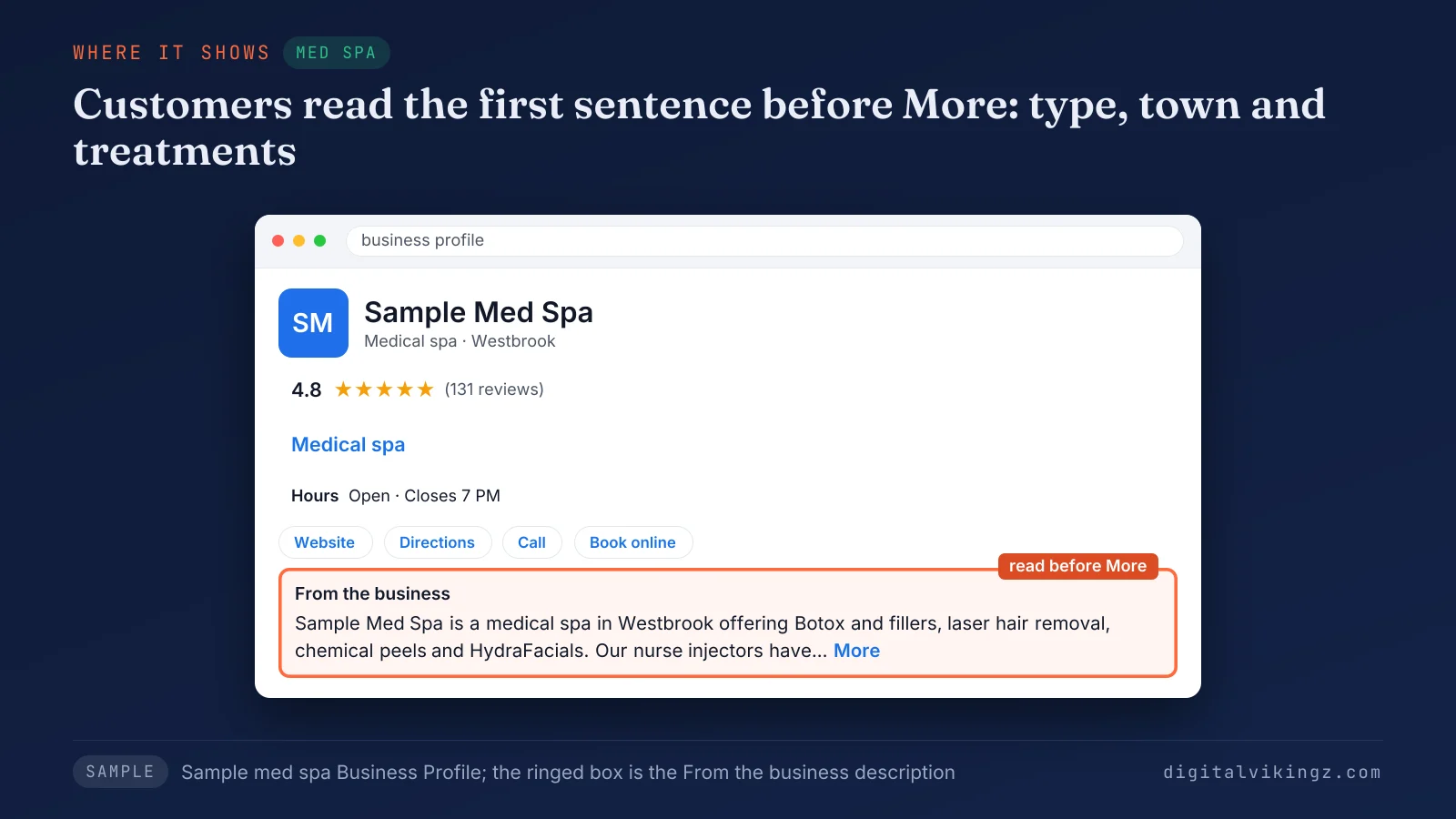
Figure 1 shows how a customer sees the description of Sample Med Spa in Westbrook. The business type, the town and the treatments sit in the first sentence, above the More link.
The space before the More link is short, and the whole field has a fixed limit.
How long can a Google Business Profile description be?
A Google Business Profile description can be up to 750 characters long, the limit Google sets for the description field. Google's help page says: "Do not exceed 750 characters in the description field."
Spaces and punctuation count as characters, so check the length with the counter in the edit panel or a character counter. Across our sample descriptions, 750 characters comes to about 110 to 125 words.
Google sets a maximum, not a target, and our five sample descriptions run from 440 to 473 characters. Google's brand profile, a separate product run by super admins, allows only 500 characters and also tags the text "from the business".
What should a Google Business Profile description include?
A Business Profile description should include what you offer, what makes you special, your years in business and other details customers find helpful.
Google Business Profile Help lists four things to include in the description:
- "What you offer": the main services or products, named as customers search for them.
- "What makes you special": one difference a customer can check, such as a license or a guarantee in writing.
- "How long you’ve been in business": the year the business opened or the years of service.
- "Anything else that’s helpful for customers to know": languages spoken, accessibility, emergency hours or booking options.
Google's guidelines add that the field is for "useful information on services and products offered, as well as the mission and history of your business." Each of those items becomes one sentence of the description in the five-part order below.
The description is one field of a complete Business Profile, next to categories, services, hours and photos. Our guide on how to optimize a Google Business Profile walks through every field in order.
How do you write a Google Business Profile description?
A Business Profile description is written in five parts: who and where, main services, one verifiable difference, the area served and how to contact you. Five short sentences fit well inside 750 characters and cover every item Google asks for.
The five parts of a strong description, in order:
- Who and where. Open with the business name, the business type and the main town, the facts customers need before the More link.
- Main services. Name three to five core services with the same names the services list and the website use.
- One verifiable difference. Add a fact customers can check, such as a license, a certification or the year the business opened.
- Area served. Name the main town and a radius or a few nearby towns, only where the business works.
- How to contact or book. Close with one short call to action, the way Google's own example ends with "Come visit us today!"
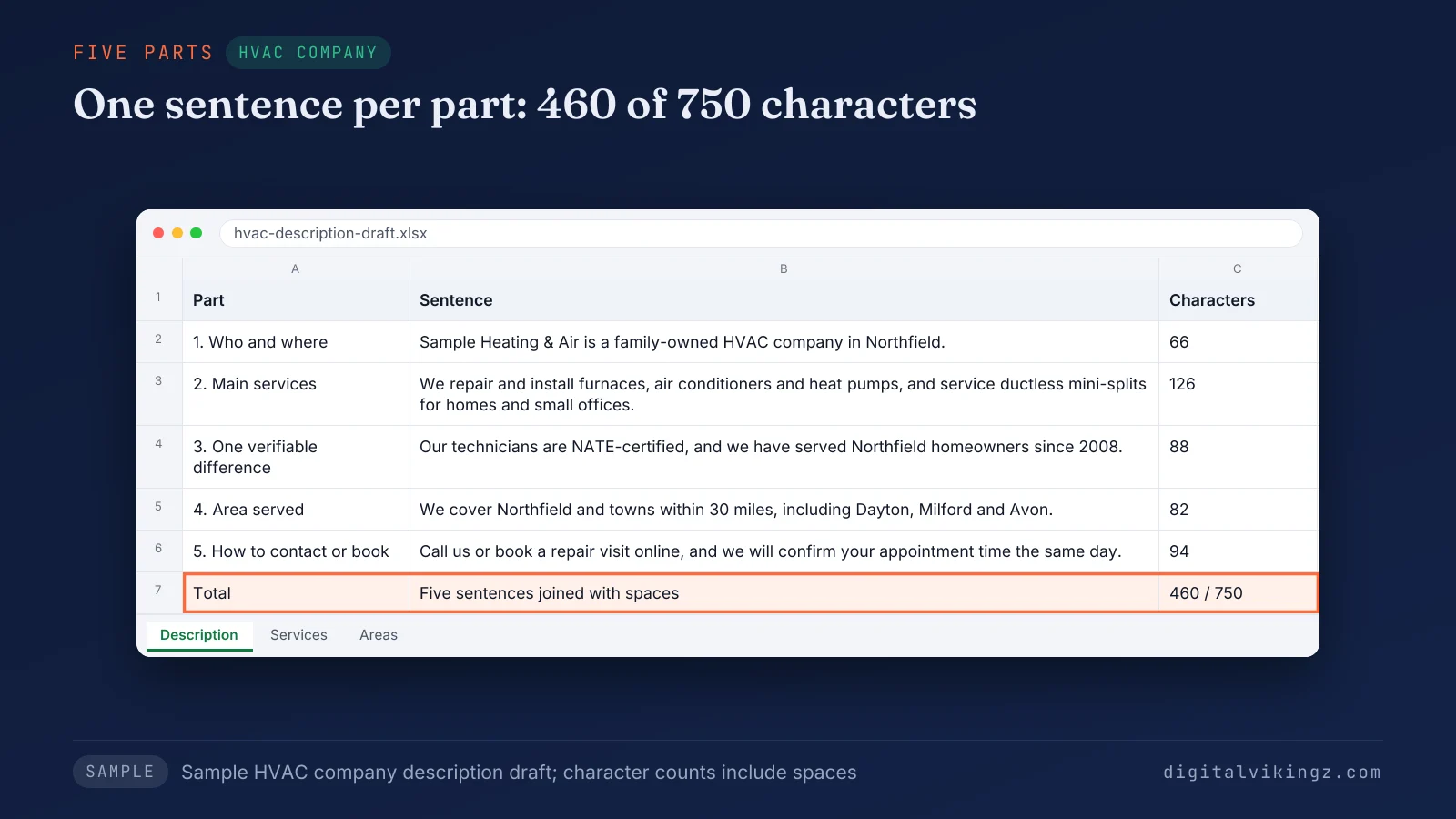
Figure 2 builds the 460-character description of Sample Heating & Air in Northfield from the five parts, one sentence per part.
Two choices shape the wording of each part: how to place keywords and whether to start from an AI draft.
Should you put keywords in a Google Business Profile description?
Yes, name your main services and town in the description, once each and in full sentences, and leave keyword lists out. Google says relevance improves when you "provide complete and detailed business info", which a clear service sentence does.
Google's description rules never use the phrase keyword stuffing, but repeated town and service names are the low-quality, distracting text those rules exclude. Keywords added to the business name break a separate Google rule, so the name stays the trading name.
A business with no matching category names the specialty in the description and in the services list. Our guide on the primary category rules for a Google Business Profile shows where the specialty goes when no category fits.
Can you use Google's AI suggestion or a description generator?
Yes, Google's Suggest description button and other AI generators can draft the description, as long as you check every claim before you save. Google's help page warns: "This AI feature writes creative text. You should review it for accuracy and update as needed."
Suggest description is available only in select regions and languages, and only to users aged 18 or older. Google's tool drafts from your Business Profile info and other sources, such as your website, so accurate facts give a better suggestion.
Check every year, license, service and town in the draft, because a generator guesses the facts missing from the profile.
What is not allowed in a Google Business Profile description?
A Business Profile description must not carry links, HTML, low-quality or irrelevant text, or a focus on promotions, prices and sales, under Google's rules.
Google's two help pages exclude five kinds of content from the description:
- Links and code. Google's guidelines state: "No links of any type are allowed." The edit page adds: "Do not include URLs or HTML code."
- Promotions, prices and sales as the focus. Google's guidelines exclude text that would "Focus on special promotions, prices, and offer sales." Google's examples are "Everything on sale, -50%" and "Best bagels in town for $5!"
- Low-quality or distracting text. Google names "misspellings, gimmicky character use, gibberish" as examples.
- Off-topic text. Google's guidelines state: "Content that's irrelevant to your business or has no clear association with it isn't allowed."
- Text over the limit. Anything past 750 characters does not fit the description field.
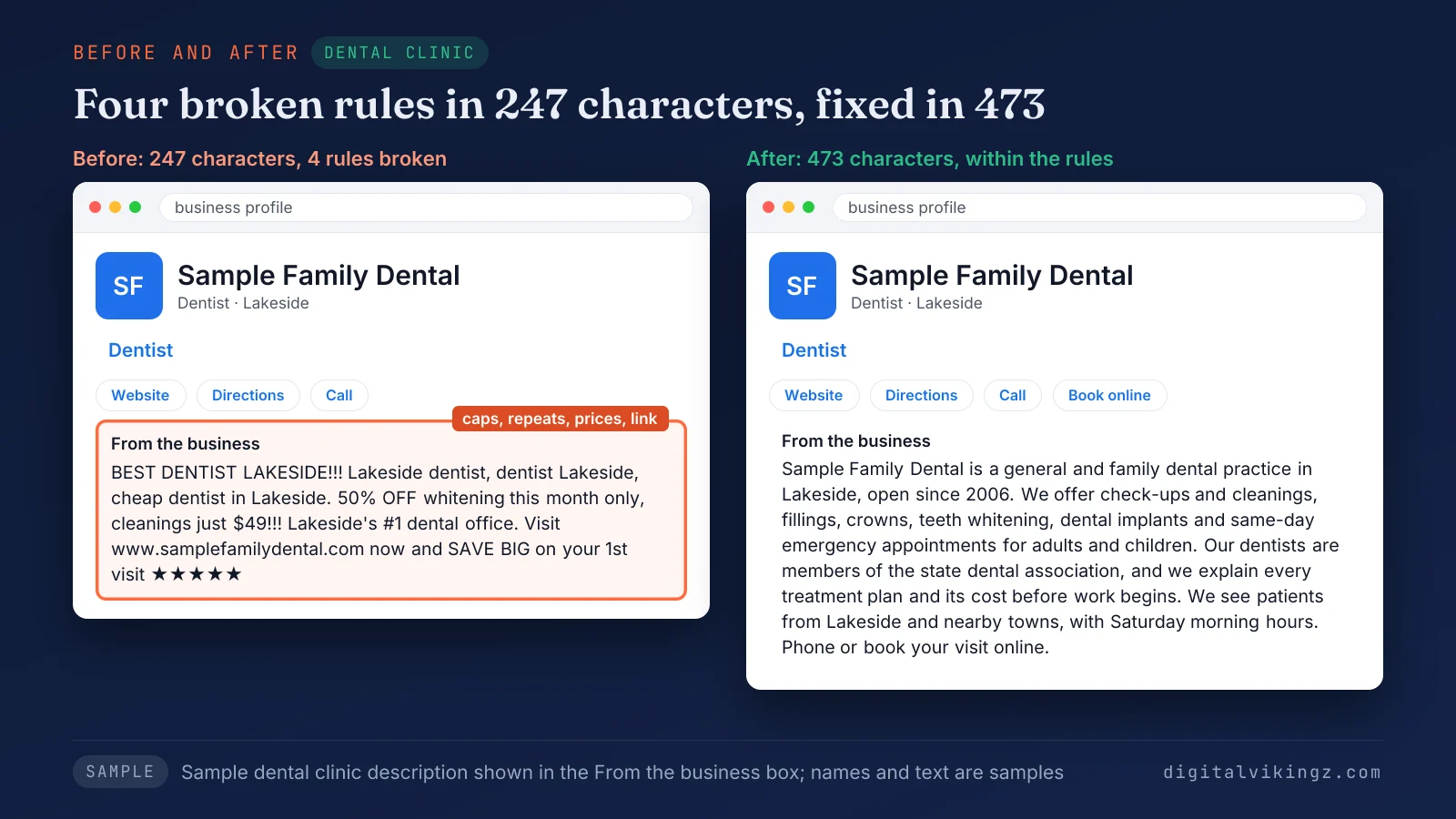
Figure 3 rewrites a 247-character description for Sample Family Dental in Lakeside that breaks four rules into a 473-character version that follows them. The rewrite drops the capitals, repeated town names, discount, price and web address, and adds services and a booking line.
Google "reserves the right to suspend access to Business Profiles" that break the guidelines, and a description is part of those guidelines. Our guide on why a Google Business Profile gets suspended explains the causes and the reinstatement steps.
Can you put a phone number or a price in the description?
Phone numbers and single price mentions are not banned by Google's description rules, but both usually belong in other fields of the profile. Google's guidelines say merchants may post "contact information (social media handles, email, phone number) for their own business on their own business profile".
The phone field of the Business Profile already shows the number, so repeating the number in the description spends characters for nothing. Google's rule targets a description that focuses on promotions, prices and sales. Service prices go in the Business Profile services list, and offers go in posts.
Capital letters for emphasis and rows of symbols count as the "gimmicky character use" Google excludes.
Google Business Profile description examples by industry
A good Business Profile description names the trade, the town, the main services, one fact customers can check and a way to book. The med spa, HVAC and dental examples sit in Figures 1, 2 and 3, and the plumber and roofer examples follow.
Plumber: Sample Plumbing Co., Riverton (461 characters)
Sample Plumbing Co. is a licensed plumbing company serving Riverton and nearby towns since 2009. We repair leaks, clear blocked drains, install and service water heaters, and replace sewer lines for homes and small businesses. Every plumber on our team is licensed and background-checked, and we give a written estimate before any work starts. Emergency calls are answered day and night, including weekends and holidays. Call or book online to schedule a visit.
The plumber example puts emergency hours in the description because emergency calls decide the trade.
Roofer: Sample Roofing Co., Hillcrest (465 characters)
Sample Roofing Co. is a roofing contractor in Hillcrest that has replaced and repaired residential roofs since 2011. We install asphalt shingle, metal and flat roofs, repair storm and hail damage, and replace gutters and skylights. Our crews are licensed, insured and certified by the shingle manufacturers we install, and each job ends with a roof inspection and photo report. We serve Hillcrest and towns within 25 miles. Call or request a roof inspection online.
The roofer example names storm and hail damage, the jobs roofing customers search for after bad weather.
Both samples stay under 750 characters, which leaves room for one more service or town. Service names in the description should match the service pages on the business website.
How do you add or edit a Google Business Profile description?
The Business Profile description is added or edited in Edit profile, where you click Edit next to "Description", enter the text and click Save.
The steps to add or edit the description:
- Go to your Business Profile on Google Search or in the Google Maps app.
- Click Edit profile.
- Click Edit next to "Description".
- Enter or paste the description and check the character count.
- Click Save.
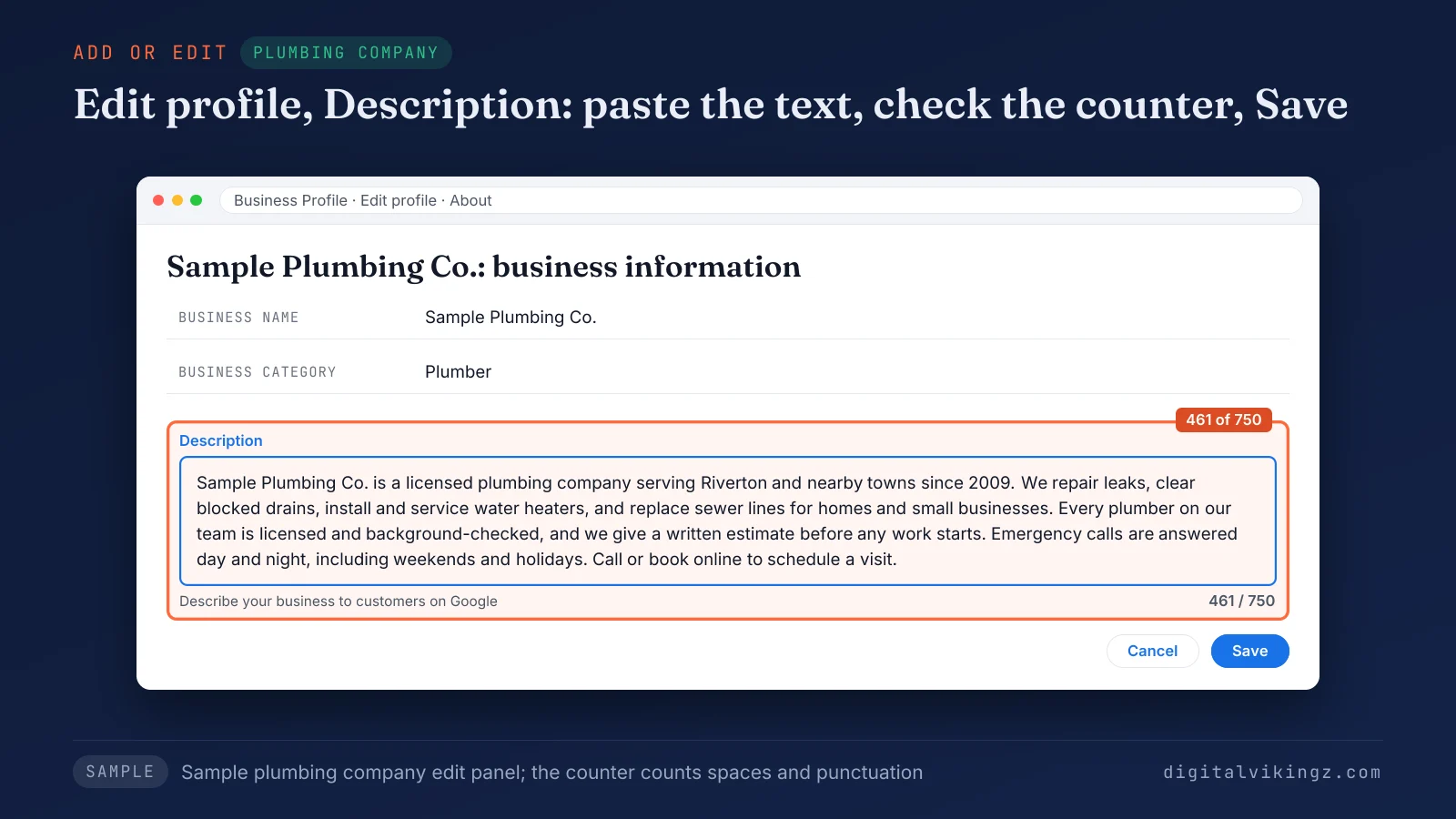
Figure 4 shows the edit panel for Sample Plumbing Co. with the description filled in and the counter at 461 of 750 characters.
Google says changes "usually take about 10 minutes to show up", and some edits wait in review much longer.
Why is a description edit pending or not approved?
A description edit shows as Pending while Google reviews the edit, which usually takes 10 minutes and sometimes up to 30 days. Google's edit status page says: "Not approved: Google might not approve changes if it can't confirm its accuracy." The same page names an appeal path for some rejected edits.
Agencies on the Local Search Forum report ordinary description rewrites held for the full 30 days and then published unchanged. Owners there also report the description field missing on some lodging profiles, and Google publishes no list of business types without the field.
Remove any web address, price-led offer, block capitals and unproven claim before you submit the description again.
A whole Business Profile missing from Maps is a different problem, rooted in the profile and not in the description edit. Our guide on why a business is not showing on Google Maps covers those checks.
Does the Google Business Profile description affect ranking?
The Business Profile description has no confirmed effect on ranking, and Google says local results are mainly based on relevance, distance and popularity. Google's help page defines relevance as "how well a Business Profile matches what someone is searching for". The same page asks for "complete and detailed business info".
Moz's list of 11 Business Profile fields known to affect rank leaves the description off and puts categories, reviews and services on the list. Claims of a ranking jump within days of a description edit rest on single tests that Google has never confirmed.
The description earns its place by helping customers choose to call, so write the text for the person reading the profile.
Categories, reviews, distance and links move Google Business Profile rankings far more than the wording of the description. Our guide on how to rank higher on Google Maps explains each factor and the steps that act on them.
How does the description work with categories, services and posts?
The description summarizes the business, while the primary category tells Google what the business is, services list each job and posts carry offers and news.
The table below shows what each Business Profile field carries for customers and what the description should leave to that field:
| Field | What the field carries | Keep out of the description |
|---|---|---|
| Description | Who you are, main services, one difference, area, how to book | Links, offers, price lists |
| Primary category | The one business type Google matches searches to | Category names repeated as a list |
| Services | Each service, with an optional description and price | A full service list with prices |
| Posts | Offers, events, seasonal news and updates with dates | Discounts, codes and end dates |
| Opening date | Month and year the business opened | Nothing: one year in the description is enough |
Google's help page says a future opening date shows only from 90 days before that date. A business opening later can name the opening month in the description until then.
We keep the description, categories, services and posts consistent for clients, with profile updates, weekly posts, review replies and a monthly report. Our Local SEO and Google Business Profile Optimization with profile updates and a monthly report covers every field in the table.
Where should offers and prices go instead?
Offers and dated news belong in Google Business Profile posts, and service prices belong in the services list. Posts carry an offer type with dates and terms, so a seasonal discount can run and expire without touching the description.
The description then stays accurate for months instead of changing with every sale. Weekly posts give the profile the fresh content the description is not built to hold. Our guide on what to post on a Google Business Profile and how often covers each post type.
Do AI assistants read the Business Profile description?
AI assistants can draw on Business Profile text among other sources, so a description with checkable facts gives them accurate lines to repeat. Google has not published which profile fields its AI features, such as Ask Maps in Google Maps, read.
Facts an assistant can repeat are the trade, the town, the services, the area served and a license or opening year. The same facts should match the website and the main directories, while the wording can differ.
Business Profile text is one of several sources AI assistants weigh, next to websites, reviews and directories.
Can the description say what the business does not offer?
Yes, the description can state a service the business does not offer, which saves customers a wasted call and staff a wasted answer. A volunteer Product Expert on the Business Profile Community gave that advice, not Google staff. The owner asking was fielding daily calls for a dropped service.
The does-not-offer line informs customers, but no Business Profile setting stops the profile from showing for that search. The med spa sample in Figure 1 carries the line "We do not offer surgical procedures."
Can the description mention a seasonal opening period?
Yes, Google allows the description to say the business opens only for a set season, such as a pool company working May to September. Google's hours guidelines say: "You can also indicate that your business is open only for a specific seasonal period in your business description."
Set the hours for the season as well, so the description and the hours tell customers the same thing.
Google Business Profile description FAQ
Is a Google My Business description the same as a Business Profile description?
Yes, a Google My Business description and a Google Business Profile description are the same field under the old and new product names. Google's product blog, The Keyword, announced the rename in November 2021, so older guides still use the old name.
Can you use emojis in a Google Business Profile description?
Emojis are not mentioned in Google's description rules, but a row of symbols counts as the "gimmicky character use" Google excludes. Words read better in the From the business section and leave room for facts.
How often should you update a Google Business Profile description?
A Business Profile description needs an update when one of its facts changes, such as a new service, a new town or a new license. Each edit goes through Google's review, so a stable, accurate description beats frequent rewording.
Should the description match your website About page?
The description should share the facts of your About page but be written for the field, in five short sentences under 750 characters. About pages run long and often open with history, while the description opens with the trade, the town and the services.
Can a description edit get a Business Profile suspended?
An ordinary description edit goes through review like any other edit, and text that breaks Google's guidelines is usually rejected rather than punished. Google keeps the right to suspend profiles that break the guidelines, so links, offers and stuffed keywords are never worth the risk.
What should you check before you save the description?
The description needs five checks before you save: length, the first sentence, service names, Google's not-allowed list and proof for every claim.
The five checks for a Business Profile description:
- The description is under 750 characters, counted with spaces.
- The first sentence names the business type, the town and the main service.
- Service names match the services list and the website.
- The text has no link, HTML, offer, price list or block capitals.
- Every year, license and town in the text can be proved.
Daily + Profile Care has our AI agent post every day. The description, services and categories are updated from the profile's own numbers. See Daily Google Posts with Profile Care for plumbers, HVAC and roofing companies and preview today's post for your business.
