 Digital Vikingz
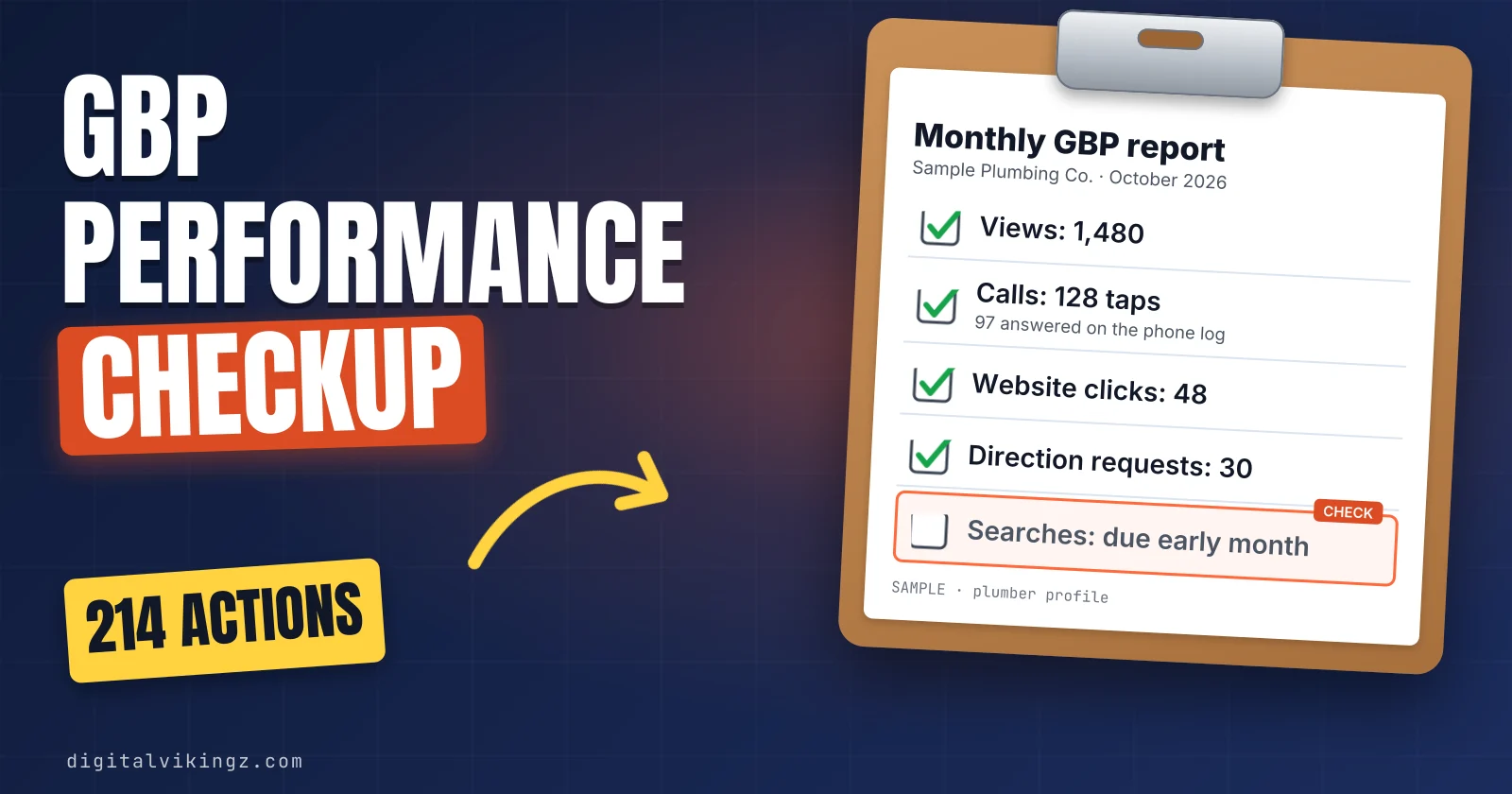
The Google Business Profile Performance report is a dashboard of how people find a profile on Google Search and Maps and what they do next.
Google Business Profile performance is checked by opening the Business Profile, clicking Performance, selecting a time period and clicking Apply. Interactions are the total of the actions people take on the profile: calls, messages, bookings, direction requests and website clicks.
The report reads best in four steps: views first, then interactions, then the mix of actions, then the same month last year. A one-page monthly sheet keeps views, calls, messages, direction requests and website clicks beside the same month last year, next to Google Analytics sessions.
What is the Google Business Profile Performance report?
The Google Business Profile Performance report is a dashboard of how people find a profile on Google Search and Maps and what they do next. The report groups the numbers into views, searches and interactions. Owners of older profiles know the report by its former name, Insights.
Google shows performance data only for verified Business Profiles. Owners and managers see the numbers when signed in to the Google Account that manages the profile. The Performance report sits inside the Business Profile dashboard that owners open directly in Google Search and Maps.
Categories, services, photos and reviews make up a full profile setup. The report is the measurement step of a full profile setup, covered in the step-by-step guide to optimizing a Google Business Profile.
Is Insights the same as the Performance report?
No, Insights is not the same as the Performance report today, because Google now uses Insights for a separate panel of recommendations. Google renamed the Insights report to Performance in 2022, according to a Sterling Sky guide dated 27 September 2026. The rename came when the New Merchant Experience moved profile management into Search and Maps.
Google describes the Insights panel as "data-driven recommendations" built from "customer reviews, photos, and local search trends". Google notes that the Insights feature may not be available for every Business Profile.
Calls, views and the other metrics sit under Performance, not under Insights. The bulk download in Business Profile Manager still uses the word Insights in the export menu.
How do you check Google Business Profile performance?
Google Business Profile performance is checked by opening the Business Profile, clicking Performance, selecting a time period and clicking Apply. The same steps work on a computer and, with small label changes, in the Google Maps app.
The steps to open the Performance report in Google Search are listed below:
- Search the business name on Google while signed in, and open the Business Profile.
- Click Performance.
- Select a time period at the top of the report.
- Click Apply.
The Google Maps app opens the same report on a phone. Tap Business at the bottom right, tap See more next to Performance, select a time period and tap Apply.
The link to the Google Business Profile Performance report appears only to an owner or manager signed in to the right Google Account. A visitor using another account sees the public profile without the link. The time period menu also decides how far back the report reaches.
How far back does the Performance report go?
The Performance report date picker reaches back up to six months, according to Sterling Sky and BrightLocal, and Google publishes no retention period. Google's help page asks owners to select a time period and states no maximum.
Interaction metrics arrive with daily detail, according to Sterling Sky. The searches figure updates once a month, according to Google.
A comparison with the same month last year therefore needs saved monthly files, because the dashboard window is shorter than a year. We compare completed months only, never a part month with a full one. A saved download each month closes that gap in the Business Profile history.
How do you download Google Business Profile performance data?
Google Business Profile performance data downloads as a spreadsheet from Business Profile Manager, one profile or many at once.
The steps to download Business Profile performance data on a computer are listed below:
- Open Business Profile Manager on a computer.
- Tick the box next to each profile.
- Click Actions, then Insights, at the top right.
- Select the timeframe.
- Click Download Report.
Three asterisks ("***") in the spreadsheet columns mean the profile is not enabled for downloads, according to Google. We save one download in the first week of each month, after the searches figure arrives, to one folder. The folder builds the history the dashboard does not keep, one metric per column.
Which metrics does the Performance report show?
The Performance report shows views, searches and interactions, and only the metrics that apply to the business appear. Google's help page puts the rule in one line: "Only metrics that apply to your business appear." A plumber with no booking provider therefore sees no bookings line on the Google Business Profile.
The table lists each Performance report metric, what Google counts and the most common misreading.
| Metric | What Google counts | Not counted or often misread |
|---|---|---|
| Views | Unique people who viewed the profile on Search and Maps, once a day | Not every visit, and not views of the business elsewhere on Google |
| Searches | Search terms that showed the profile, updated monthly | Not clicks, and not a list the owner manages |
| Interactions | The total of calls, messages, bookings, direction requests and website clicks | Not a lead count |
| Calls | Taps on the Call button | Not answered calls |
| Messages | Contacts through the Message button | Not the old chat feature |
| Bookings | Bookings completed through a booking provider | Not booking-link clicks outside hotels |
| Direction requests | Requests net of repeat taps, cancellations and spam | Not store visits |
| Website clicks | Clicks on the website link | Not Google Analytics sessions |
| Menus, products and offers | Category-specific counts, with menus counted per user per day | Shown only where they apply |
The first two rows measure visibility and the rest measure action, which is the order the monthly read follows.
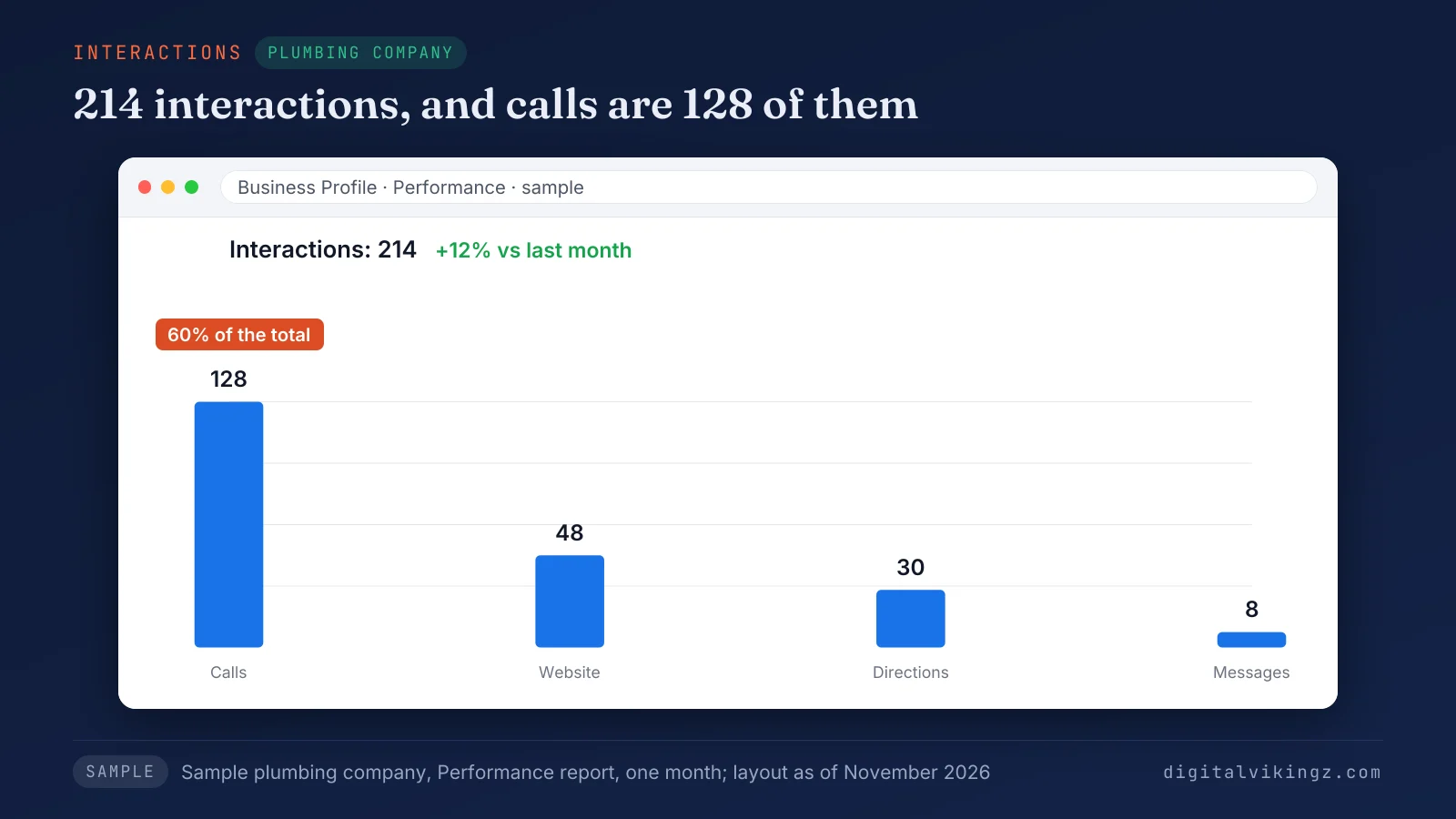
Calls make up 128 of the 214 interactions in a sample plumbing company's Google Business Profile Performance report, so the total hides where customers acted.
What do profile views count?
Profile views count the unique people who viewed the Business Profile on Google Search and Google Maps, once per person per day. Google says "A person can only be counted once a day." Owners often call these numbers impressions, which is also the word Google's Performance API uses.
One person can be counted a limited number of times across devices and platforms, according to Google. The views figure can therefore sit below the counts in Google's notification emails. The report splits views between Google Search and Google Maps, each on mobile and desktop.
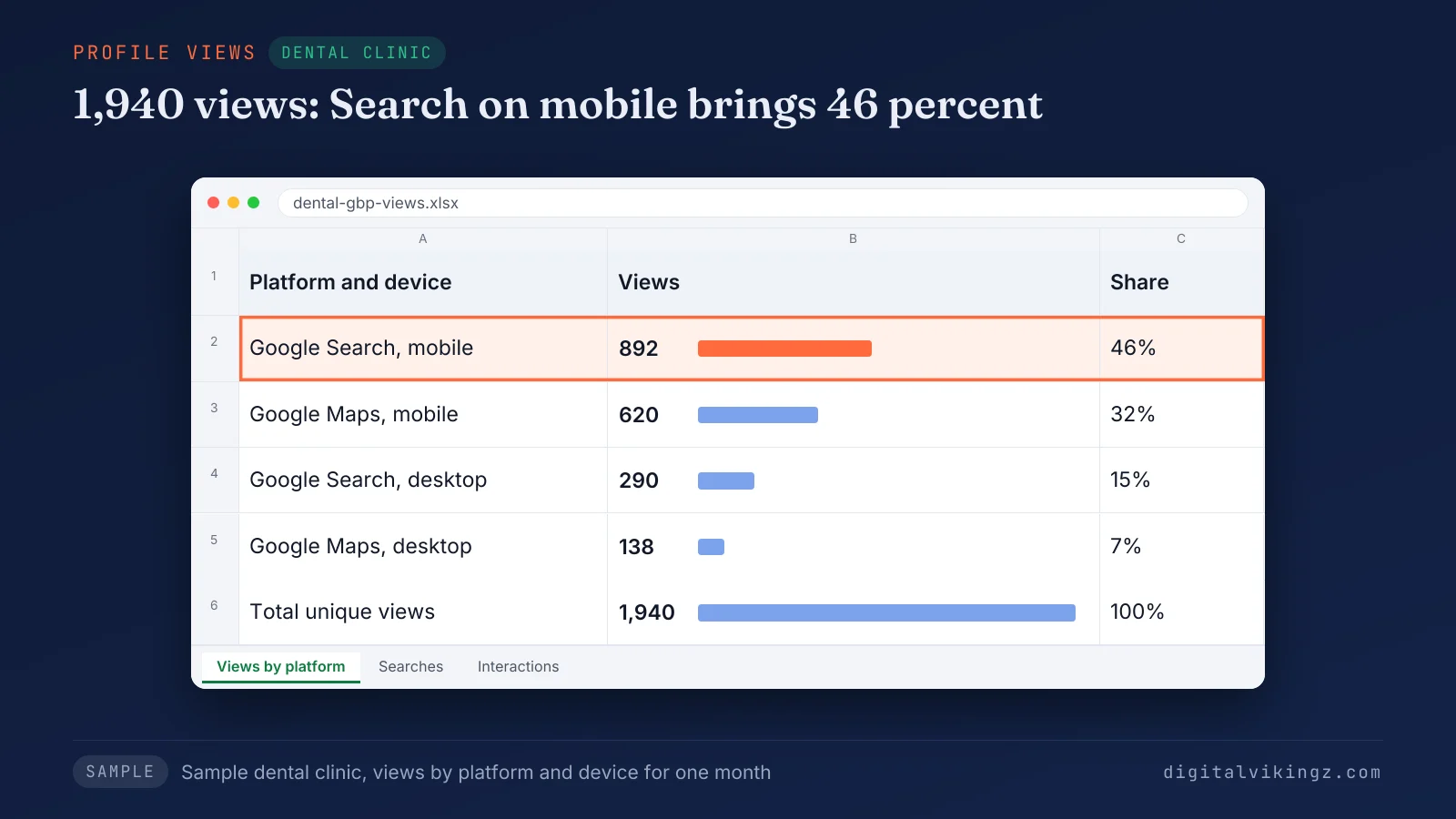
Mobile Search brings 46 percent of the sample clinic's 1,940 profile views, so the phone view of the Google Business Profile carries the first impression. Views count the profile only, not every place the business appears on Google.
What do searches show in the Performance report?
Searches list the search terms that showed the Business Profile on Google, updated at the start of each month. Google says the searches metric "might take up to 5 days to show up." A search term appears when the profile shows for that search, not when someone clicks.
Google Business Profile owners have no direct control over the list, according to Google. Branded searches use the business name, such as the company name. Discovery searches name the service, such as "emergency plumber", and their share shows reach beyond people who already know the business.
Google's Performance API reports each term as a count of unique users in the month or as a threshold. A threshold means the actual value sits below that number, so rare terms show no exact count. A searches figure that looks stuck early in the month is usually the monthly refresh, not a fault.
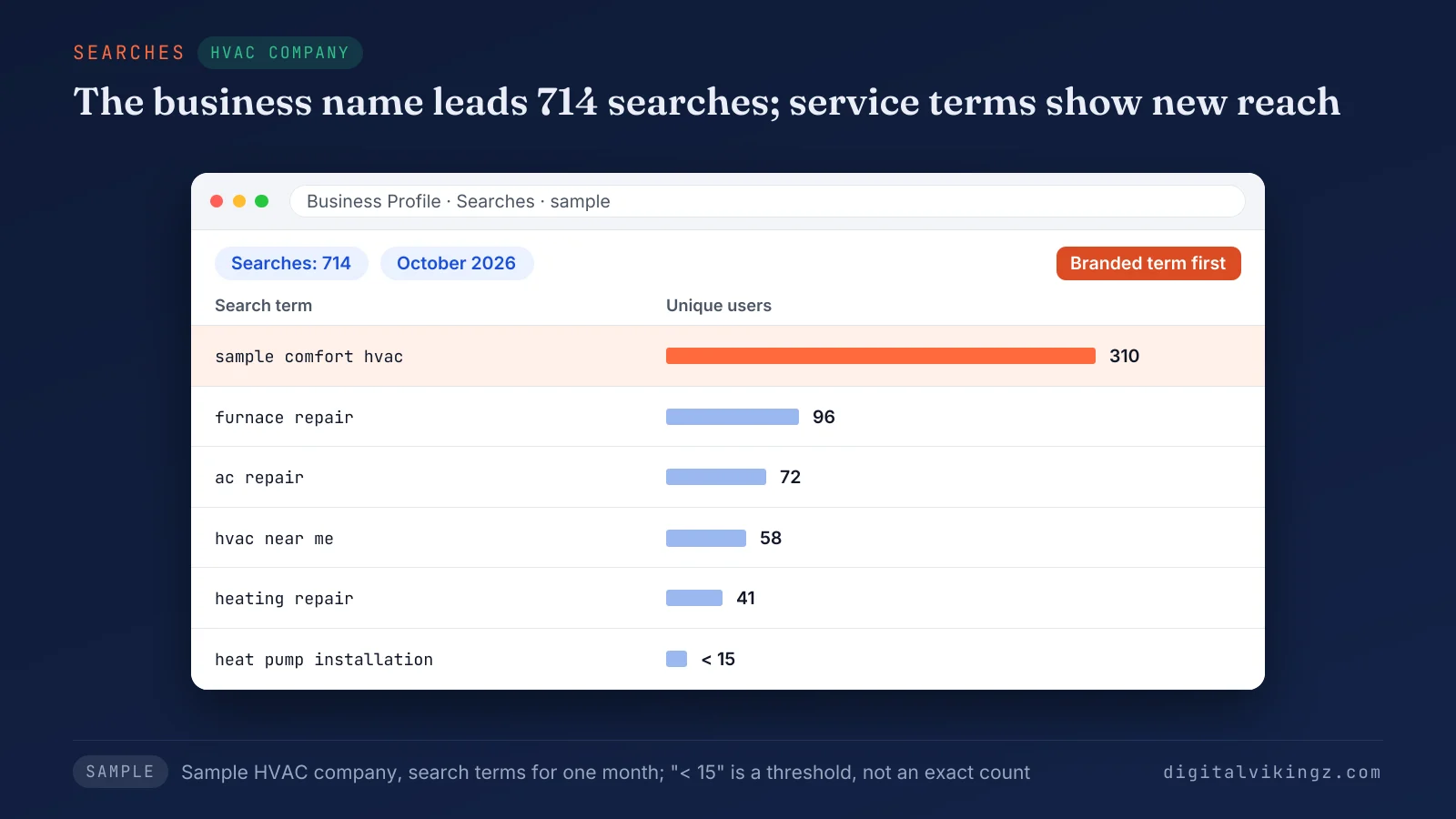
The company name leads the sample HVAC company's 714 searches with 310, while service terms such as "furnace repair" show reach beyond existing customers.
What counts as an interaction in the Performance report?
Interactions are the total of the actions people take on the Business Profile: calls, messages, bookings, direction requests and website clicks.
The interactions the Performance report counts are listed below:
- Calls: taps on the Call button, not phone calls answered.
- Messages: contacts started through the Message button, which opens WhatsApp or SMS.
- Bookings: bookings completed through a connected booking provider.
- Direction requests: requests for directions, counted without repeat taps, cancellations and spam.
- Website clicks: clicks on the website link in the profile.
A tap on Call that never connects still counts, and a customer who dials the number by hand adds nothing. Google tracks calls only when the Google Business Profile lists a phone number.
Google's help page still describes messages as conversations, while Google's API now counts clicks on the messaging button. The Message button has sat beside Call in Google Maps since 5 November 2026, according to Google's Small Business Bulletin.
A service-area business with a hidden address shows no Directions button, so the direction requests line stays empty by design. The bookings line appears only for businesses that take appointments online. Bookings need a connected booking partner, set up as shown in the guide to the Google Business Profile booking button.
Restaurants, shops and hotels may also see menus, products, offers or booking clicks.
Does the Performance report include Google Ads activity?
Yes, the Performance report includes views, searches and actions from both organic search results and Google Ads. The Google Business Profile Performance report shows no split between paid and organic actions.
A month with ads running and a month without ads are not a fair comparison. The monthly sheet therefore notes each month when ads ran, so the read stays fair.
How do you read the Performance report each month?
The Performance report reads best in four steps: views first, then interactions, then the mix of actions, then the same month last year.
The four steps to read the Performance report each month are listed below:
- Read views to see how many people the profile reached.
- Read total interactions and divide them by views to see how many viewers acted.
- Read each interaction type to see where customers acted: Call, Message, Directions, website or booking.
- Compare every figure with the same month last year, because local demand is seasonal.
We track interactions per 100 views in the Google Business Profile Performance report against the business's own past months, never against another business. A fall in calls with a rise in messages can be one customer group moving to the Message button. Calls and messages are therefore read together.
Year over year, the same month last year carries the same weather and holidays, so the comparison isolates the profile. New reviews, posts and profile edits in the month go into a notes line, so a later reader can explain a change. The mix of actions that matters most changes with the type of business.
Which interaction matters most for each type of business?
Calls matter most for plumbers, HVAC companies and roofers, while clinics and med spas read calls beside bookings, messages and direction requests.
The table pairs each type of local service business with the interactions to read first.
| Business type | Read first | Why |
|---|---|---|
| Plumbers, HVAC companies and roofers with a service area | Calls, then website clicks | Urgent jobs start with a call, and a hidden address removes direction requests |
| Dental clinics | Calls, then direction requests and bookings | Patients call to book and drive to the visit |
| Med spas and salons | Bookings, messages and calls | Appointments start online or by message |
| Any business with a website quote form | Website clicks, then Google Analytics leads | The decision happens on the website |
We read the "Read first" column before the total and against the same month last year, because the total mixes actions of different value. Local SEO work on a Google Business Profile starts from the same column. Reading the action mix by trade is the first step of our Local SEO and Google Business Profile service for trades and clinics.
What does a fall in views or calls point to?
A fall in views points to visibility, while steady views with fewer calls point to the profile or the route to contact. A fall that repeats last year's pattern for the same months is seasonal. A fall below last year's level needs the checks in order.
Calls drop for several reasons, and each Google Business Profile cause has a separate test. The full order of checks for a lasting fall sits in the guide to why Google Business Profile calls drop. Website clicks follow different rules again, because Google Analytics counts visits another way.
Why do website clicks not match Google Analytics sessions?
Website clicks rarely match Google Analytics sessions, because the profile counts taps on the website link and Analytics counts sessions the tracking tag records. Neither number is wrong, because each tool counts a different event. The Google Business Profile Performance report stops counting at the tap, while Analytics starts counting when the page loads.
The table compares what the Performance report and Google Analytics count for the same visit.
| Situation | Performance report | Google Analytics |
|---|---|---|
| Visitor taps the website link and leaves before the page loads | Counts a click | No session |
| Visitor declines the consent banner or blocks tracking | Counts a click | Often no session |
| Visitor reaches the site from an untagged profile link | Counts a click | Session filed as Google organic or direct |
| Customer calls, messages or asks for directions | Counts an interaction | Nothing, because the visit never reaches the site |
Every row shows the profile counting an action that Analytics misses or files under another source.
UTM tags, also called UTM parameters, on the profile's website link separate Business Profile visits from other Google traffic in Analytics. The tags themselves are set up as shown in the guide to UTM tracking for Google Business Profile links.
Google Search Console does not close the gap, because profile activity in Google Maps stays outside Search Console.
Can you connect Google Business Profile to Google Analytics 4?
Yes, Google Business Profile can be linked to Google Analytics 4 under Admin, Product links, Google Business Profile links. The person linking needs Administrator or Editor rights in Analytics and Owner or Manager rights on the profile, according to Sterling Sky.
Analytics then shows seven profile metrics, according to Search Engine Journal: interactions, website clicks, calls, directions, messages, bookings and menus. Analytics keeps six months of profile data. Several linked profiles are added together, with no split by location.
The profile metrics also stay out of explorations, comparisons and filters. Search Engine Journal reported in June 2026 that the link may not appear in every Analytics account yet.
The link brings the counts into Analytics, while UTM tags still decide which sessions and leads came from the profile. Sessions then lead to forms, booked jobs and revenue, the chain followed when businesses tie SEO to pipeline and revenue.
What does the Performance report leave out?
The Performance report leaves out answered calls, booked jobs, ranking positions, the names of viewers and AI answers that mention the business.
The things the Performance report does not show are listed below:
- Answered calls: the report counts taps on Call, and the phone system holds the answered and missed calls.
- Call history: the report lost call history when Google removed the feature from Business Profile on 31 July 2024, as Sterling Sky records.
- Booked jobs: jobs won and revenue live in the business's own records or CRM, outside the report.
- Ranking positions: the report has no position figure, and rank is checked from where customers search.
- AI answers: an AI assistant that names the business leaves no trace in the report.
Owners fill the gaps in the Google Business Profile Performance report from the phone system, the CRM and a rank check. Position by searcher location is covered in the steps to rank higher on Google Maps. Mentions in AI answers follow different sources, explained in the guide to AI assistants that recommend local businesses.
Why does the Performance report show no data?
The Performance report shows no data when the profile is unverified, suspended or new, or when the searches update has not arrived yet.
The common reasons for an empty Performance report are listed below:
- Unverified profile: Google shows performance data only for verified profiles, so the first fix is to verify the Google Business Profile.
- Wrong account: the report appears only to an owner or manager signed in to the right Google Account, set under Google Business Profile user roles.
- New profile: a newly verified profile needs time to collect activity.
- Monthly refresh: the searches figure for the new month has not arrived yet.
- Reporting delay: Google occasionally stops updating the report for many profiles at once.
A Google Business Profile Help Community thread titled "Performance Data Not Updating Since June 13, 2026" collected 15 "same question" marks and no Google answer. A notice on the profile itself points to the steps for a suspended Google Business Profile.
Can Performance data be pulled through an API?
Yes, the Business Profile Performance API returns daily metrics and monthly search keyword counts for each location. Agencies that manage many Google Business Profile locations use the API to pull calls, website clicks, direction requests and views into their own dashboards. Google documents the metrics on the Business Profile Performance API reference page.
Whitespark's Darren Shaw reported in late October 2026 that Google is testing a reorganized Performance dashboard. Screens can therefore change while the API metric names stay fixed, so the monthly report records metric names, not screen positions.
What goes in a one-page monthly Performance report?
A one-page monthly Performance report keeps the month's views, calls, messages, direction requests and website clicks beside the same month last year.
The table sets out the rows of a one-page monthly Performance report and where each number comes from.
| Row | Source | Why it is on the page |
|---|---|---|
| Views | Performance report | Reach |
| Calls | Performance report | Taps on Call |
| Answered calls | Phone system | Taps that became conversations |
| Messages | Performance report | Contacts that moved to the Message button |
| Direction requests | Performance report | Visits planned, blank for a hidden address |
| Website clicks | Performance report | Visits started |
| Sessions from the profile | Google Analytics with UTM tags | Visits recorded |
| Leads and booked jobs | CRM or job log | Revenue the profile produced |
| Notes | Owner | Posts, new reviews, profile edits and ad months |
The sheet keeps the Calls number, the Messages number and the phone system's call count side by side, as our guide on falling calls recommends. We fill the sheet in the second week of the month, after the Google Business Profile Performance report receives the searches update.
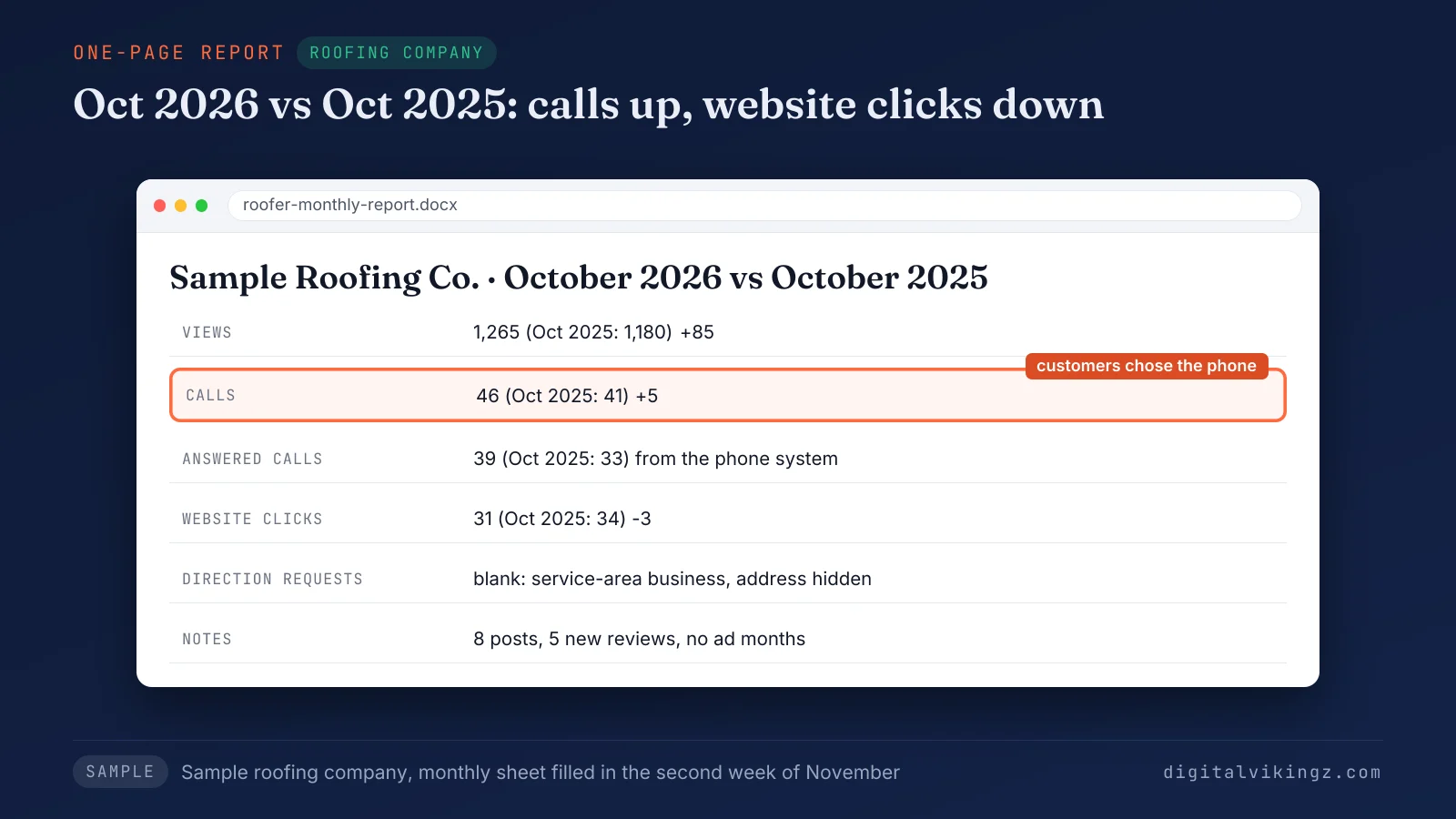
Calls rose from 41 to 46 against the same month last year, while website clicks fell from 34 to 31. The sample roofer's customers chose the phone.
A business that wants a steady post rhythm to read in the notes row can use Daily Google Posts from our AI agent.
Questions about the Google Business Profile Performance report
Six short answers cover the Performance report questions owners ask after reading the numbers.
Can you see who viewed a Google Business Profile?
No, the Performance report shows counts of views and actions, never the names or accounts of the people behind them. Google counts unique viewers without naming them, so the views line works as a count, never as a contact list.
Why do Performance numbers differ from Search Console?
The numbers differ because Search Console counts website clicks from Google Search results, and the Performance report counts actions on the profile. A customer can call or ask for directions from the profile without ever visiting the website.
Is a rank tracker the same as the Performance report?
No, a rank tracker records positions for chosen searches, while the Performance report records views and actions on the profile. A profile can hold the same position while interactions change, so the two are read together.
Does the Performance report show how Google posts perform?
No, post views and photo views no longer appear in the Performance report. Digifeel dates the end of photo and post metrics to 20 February 2023, citing Google's developer documentation, so posts go in the notes row.
Is the Performance report accurate?
Yes, the Performance report is accurate to its own counting rules, which differ from phone logs and Google Analytics. Gaps between tools come from what each one counts, such as call taps against answered calls.
How often should you check the Performance report?
A monthly check suits most local service businesses, made once the searches figure for the past month has arrived. Weekly reads mix normal day-to-day swings into the result.
What should you do with the Performance report next?
The next step is one complete month read in order and saved to a one-page sheet beside the same month last year. The order stays views, interactions, the action mix, then the same month last year. The "Read first" column for the business type comes before the total.
Digital Vikingz reads the Google Business Profile Performance report in that order for local service businesses before any profile change. Profile reporting is one part of how semantic SEO grows a local service business.
