 Digital Vikingz

Google Business Profile post examples show finished Update, Offer and Event posts with the text, photo, button and dates filled in.
The 12 examples below cover plumbers, HVAC companies, dental practices and med spas, with three posts for each industry. An Update post shares news or a finished job, an Offer post promotes a dated deal, and an Event post announces a dated event.
Plumbers post emergency availability, finished installs and freeze checks before winter. HVAC companies post furnace fixes, tune-up offers and heating safety classes. Dental practices post new appointment times, new-patient offers and family events.
Med spas post new treatments, gift card offers and consultation evenings, with prescription products left out. The best posts name one job and one town early, show one photo of the work and end with one button.
Google marks a post Not approved when the post breaks the posts content policy and may remove a post with an unverified phone number. Each example adapts to another business by swapping the job, town, date, price and photo.
Which Google Business Profile post type fits each job?
Google Business Profile offers three post types: Update for news and finished jobs, Offer for a dated promotion and Event for a dated event.
Owners often call the three types updates, specials and events. A GBP post can carry text, a photo or video, and one button, also called a CTA.
Customers see posts in the Updates or Overview tab on mobile, on Search and Maps. Desktop searchers see the same posts in the From the owner section.
The table below shows which job each post type fits and which fields Google requires:
| Post type | Job the type fits | Fields Google requires | Button | How long the post shows |
|---|---|---|---|---|
| Update | News, a finished job, a seasonal reminder, new hours | None beyond text, photo or video | Optional: Book, Learn more, Sign up or Call now | Archived after six months |
| Offer | A dated deal with a price or a code | Title, start and end dates and times | "View offer", added by Google | Until the end date |
| Event | A class, an open house, a community day | Title, start and end dates and times | Optional: Sign up, Book or Learn more | Until the end date |
Every example below names its post type, so the job decides the type and the type decides the fields. Business names, towns, prices and dates in the examples are samples to replace with your own.
Our guide to Google Business Profile posts covers what posts do for a profile and how often to post. Read the guide to Google Business Profile posts before planning a posting schedule.
What should a plumber post on Google Business Profile?
A plumber posts on Google Business Profile to show emergency availability, finished jobs and seasonal checks to homeowners deciding whom to call.
Plumber posts lead with the job and the town, because a homeowner with a leak scans the first line and the photo.
Posts are one part of local SEO for plumbers, beside service area pages, reviews and emergency service pages. The whole plan is in our guide to local SEO for plumbers.
Update post example: same-day burst pipe repair
The burst pipe Update post tells a Riverton homeowner what to do first and how to reach a plumber the same day.
The sample Update post for Sample Plumbing Co. has four fields:
- Post type: Update
- Text: "Same-day burst pipe repair across Riverton and Oak Hill. Shut off the main water valve first, then tap Call now. A licensed plumber arrives with pipe, fittings and a drying fan, and we give a price before any work starts." (221 characters)
- Photo: a plumber cutting out a split copper pipe in a basement, no text on the image.
- Button: Call now
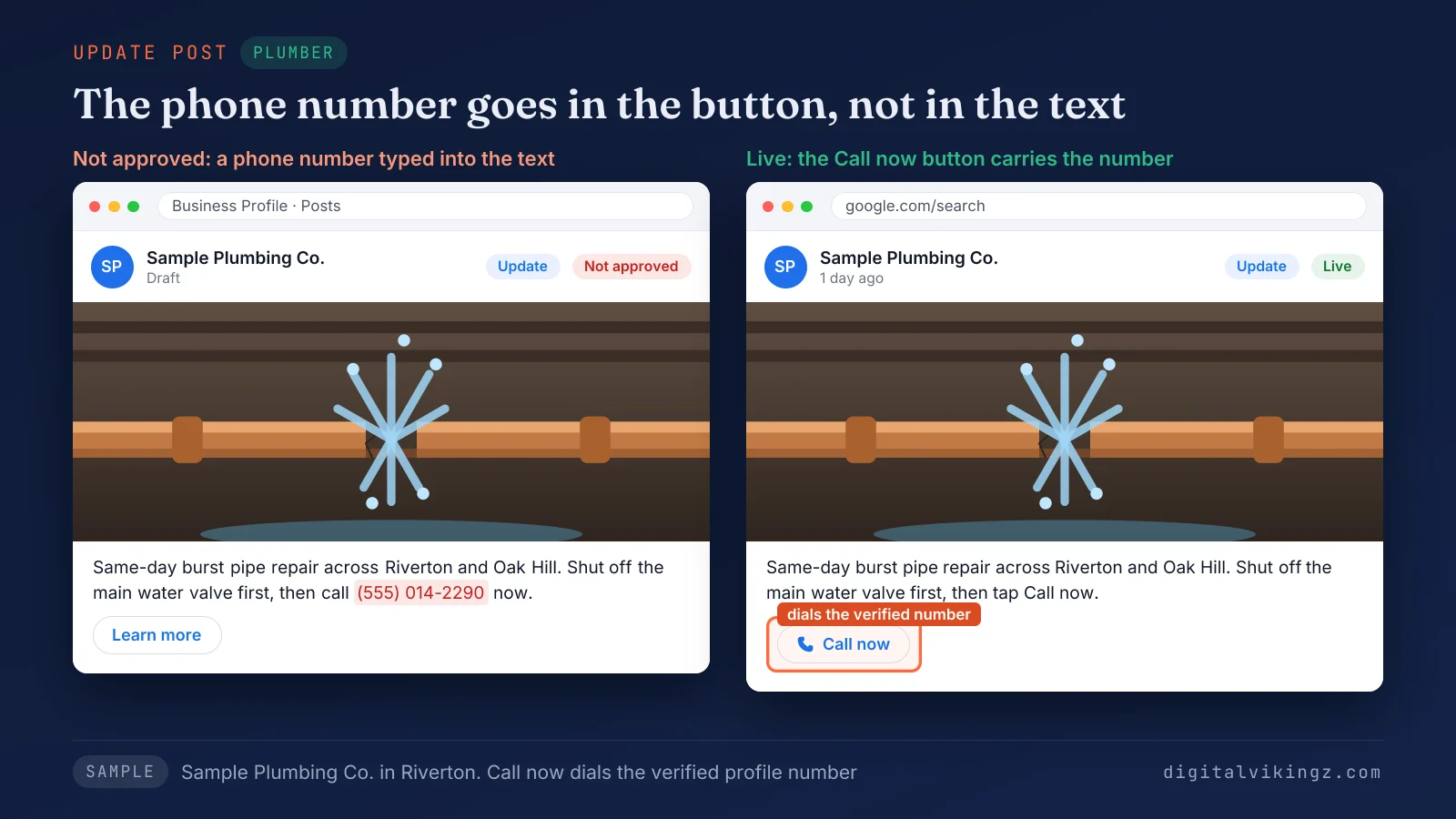
Figure 1 shows the post card with the Call now button and no phone number in the text. The Call now button dials the verified profile number, so the text never needs a phone number.
Update post example: finished water heater install
The finished-job Update post proves recent work on a named street, which a homeowner comparing plumbers can check in seconds.
The sample job-done post has four fields:
- Post type: Update
- Text: "New 50-gallon gas water heater installed today on Maple Street in Riverton. The old tank was 14 years old and leaking at the base. We hauled the old unit away, fitted an expansion tank and tested every hot water tap. Book a water heater quote below." (249 characters)
- Photo: the new water heater in place, taken on the job, no text on the image.
- Button: Book
The size, the street and the age of the old tank are facts that only the plumber who did the job knows. A job photo with three facts beats a stock image with a slogan.
Offer post example: winter pipe freeze check
The freeze check Offer post sells a dated, priced visit before the first hard freeze, with a code and terms.
The sample Offer post has seven fields:
- Post type: Offer
- Title: "Winter pipe freeze check: $79"
- Dates: 20 November 2026 to 31 December 2026
- Text: "A plumber checks exposed pipes, outdoor spigots and the main shutoff valve before the first hard freeze. The visit includes foam insulation on up to 10 feet of exposed pipe. Riverton and Oak Hill homes only." (207 characters)
- Coupon code: FREEZE79
- Terms: "One check per home. Book by 31 December 2026. Not valid with other offers."
- Button: View offer (added by Google), linked to the freeze check booking page
The title carries the price, and the dates and terms answer the questions a homeowner asks before booking.
What should an HVAC company post on Google Business Profile?
An HVAC company posts on Google Business Profile to answer seasonal heating and cooling problems and to sell tune-ups before demand peaks.
Heating posts belong in October and November, and cooling posts in April and May, before the first cold or hot week. HVAC SEO covers the same seasonal and emergency searches across the website and the profile.
HVAC posts repeat the services, towns and hours the website states, the facts behind a semantic SEO plan for local service businesses. Our semantic SEO plan for local service businesses sets out service-location pages and problem guides for each service and town.
Update post example: furnace blowing cold air
The cold air Update post answers a homeowner's first furnace question and books the repair visit when the three checks fail.
The sample problem-answer post has four fields:
- Post type: Update
- Text: "Three checks come first when a furnace blows cold air: thermostat set to Heat, a clean filter and the power switch on. Cold air after all three means a technician visit. Same-day furnace repair in Northfield." (208 characters)
- Photo: a technician opening a furnace panel in a basement, no text on the image.
- Button: Book
The post gives the homeowner three checks to try before calling, then names the service and the town.
Offer post example: furnace tune-up before winter
The tune-up Offer post puts a price and a deadline on furnace maintenance, so the booking happens before the first cold week.
The sample tune-up offer has seven fields:
- Post type: Offer
- Title: "Furnace tune-up before winter: $89"
- Dates: 18 November 2026 to 15 December 2026
- Text: "A 21-point furnace tune-up from a licensed HVAC technician: burner cleaning, flame sensor check, carbon monoxide test and a new standard filter. Northfield and nearby towns. Book before 15 December to keep the price." (216 characters)
- Coupon code: TUNEUP89
- Terms: "Gas furnaces only. One furnace per home. Price excludes parts."
- Button: View offer (added by Google)
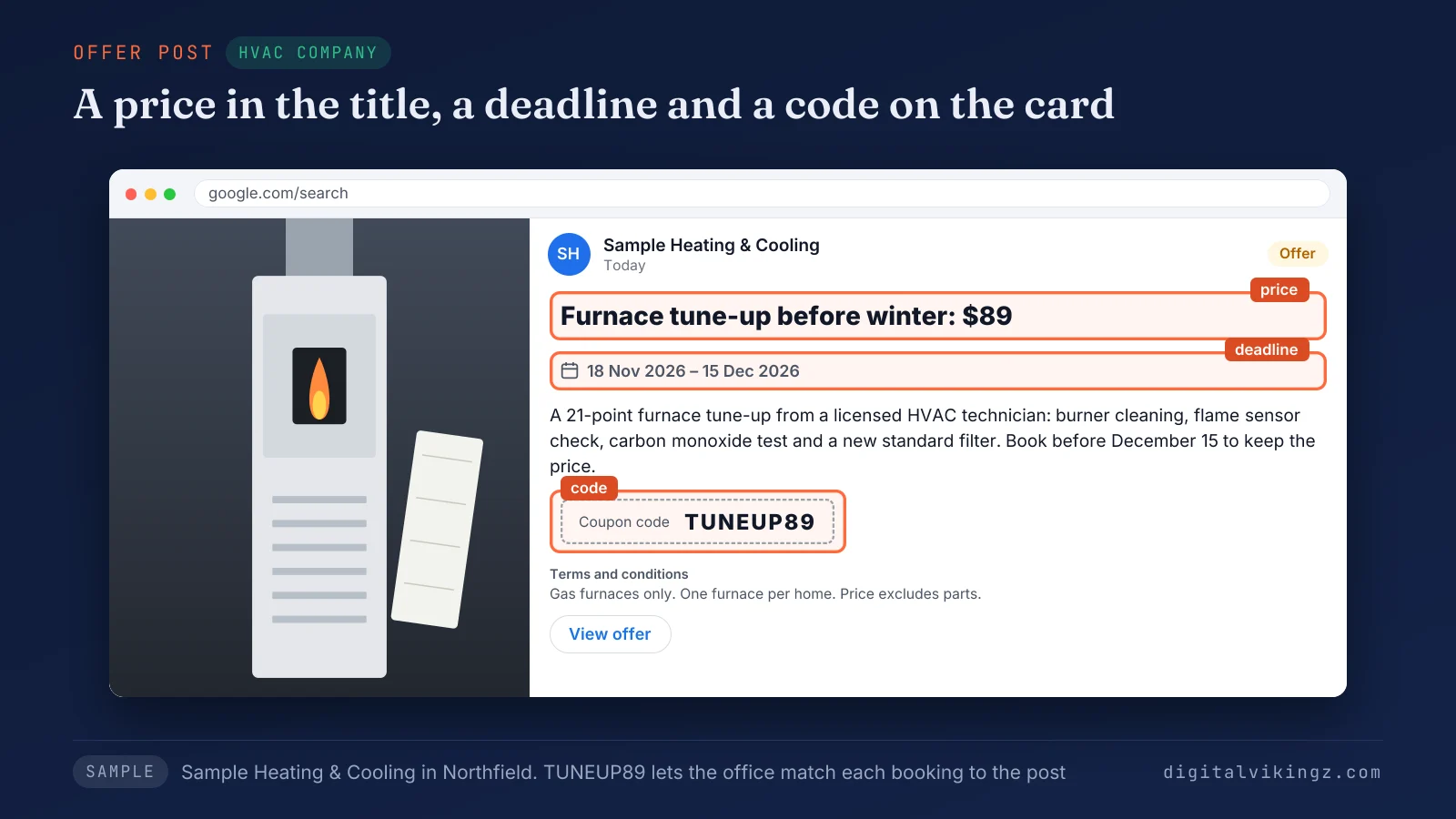
Figure 2 shows the $89 price in the title, the 15 December end date and the TUNEUP89 code on the card. The price in the title and the end date create the deadline, and the code lets the office match the booking to the post.
Event post example: home heating safety class
The heating safety Event post invites Northfield households to a free class, with the date and times Google needs to show the event.
The sample Event post has six fields:
- Post type: Event
- Title: "Home heating safety class"
- Start and end: Saturday 5 December 2026, 10:00 AM to 11:30 AM
- Text: "A free 90-minute class at our Northfield shop on carbon monoxide alarms, furnace filters and space heater safety. Coffee and a free furnace filter for every household. Seats are limited to 20." (192 characters)
- Photo: a technician showing a furnace filter to a small group in a shop, no text on the image.
- Button: Sign up
Exact start and end times stop the event showing as an all-day event. Google's help community guide advises posting an event 1 to 2 weeks ahead, to give Google time to index the post.
What should a dental practice post on Google Business Profile?
A dental practice posts on Google Business Profile to announce hours, welcome new patients and invite families, without naming regulated products.
Google lists health and medical devices and pharmaceutical products as regulated, so dental posts describe visits and services, never device or drug brands. Dental SEO covers the same services across the practice website and the profile.
Clinics that want posts, pages and listings planned together can read about semantic SEO for healthcare practices. Our semantic SEO for healthcare practices plans treatment pages, provider profiles and service-location pages for each clinic.
Update post example: new Saturday appointments
The Saturday hours Update post tells working parents the practice now opens on weekends and sends them to online booking.
The sample hours post has four fields:
- Post type: Update
- Text: "Sample Family Dental now sees patients on Saturdays from 8:00 AM to 1:00 PM in Lakeside. Saturday appointments cover cleanings, exams and fillings for children and adults. Book a Saturday visit online." (201 characters)
- Photo: the reception desk with the morning light on, no people's faces, no text on the image.
- Button: Book
The post names the day, the hours and the visits covered, so a parent knows the slot fits before booking. Update the profile's regular hours on the same day, so the post and the hours match.
Offer post example: new-patient exam and cleaning
The new-patient Offer post prices a first visit for patients without dental insurance and states who qualifies in the terms.
The sample new-patient offer has six fields:
- Post type: Offer
- Title: "New-patient exam and cleaning: $99"
- Dates: 18 November 2026 to 31 January 2027
- Text: "A first visit for new patients without dental insurance: a full exam and a routine cleaning with a hygienist. Appointments in Lakeside on weekdays and Saturdays." (161 characters)
- Terms: "New patients only. For patients without dental insurance. Excludes deep cleaning."
- Button: View offer (added by Google), linked to the new-patient booking page
The terms carry the conditions, and the post sells a visit, so no regulated product appears. A coupon code is optional on an Offer post, and the dental sample leaves the field empty.
Event post example: kids' dental open house
The open house Event post invites children and parents to meet the dental team before a first visit, with a fixed date and time.
The sample open house post has six fields:
- Post type: Event
- Title: "Kids' dental open house"
- Start and end: Saturday 12 December 2026, 9:00 AM to 12:00 PM
- Text: "Children aged 3 to 12 meet the team, tour a treatment room and practice brushing with a hygienist. Every child takes home a free toothbrush kit. Parents can ask about first visits." (180 characters)
- Photo: an empty, bright treatment room set up for children, no text and no medical labels on the image.
- Button: Sign up
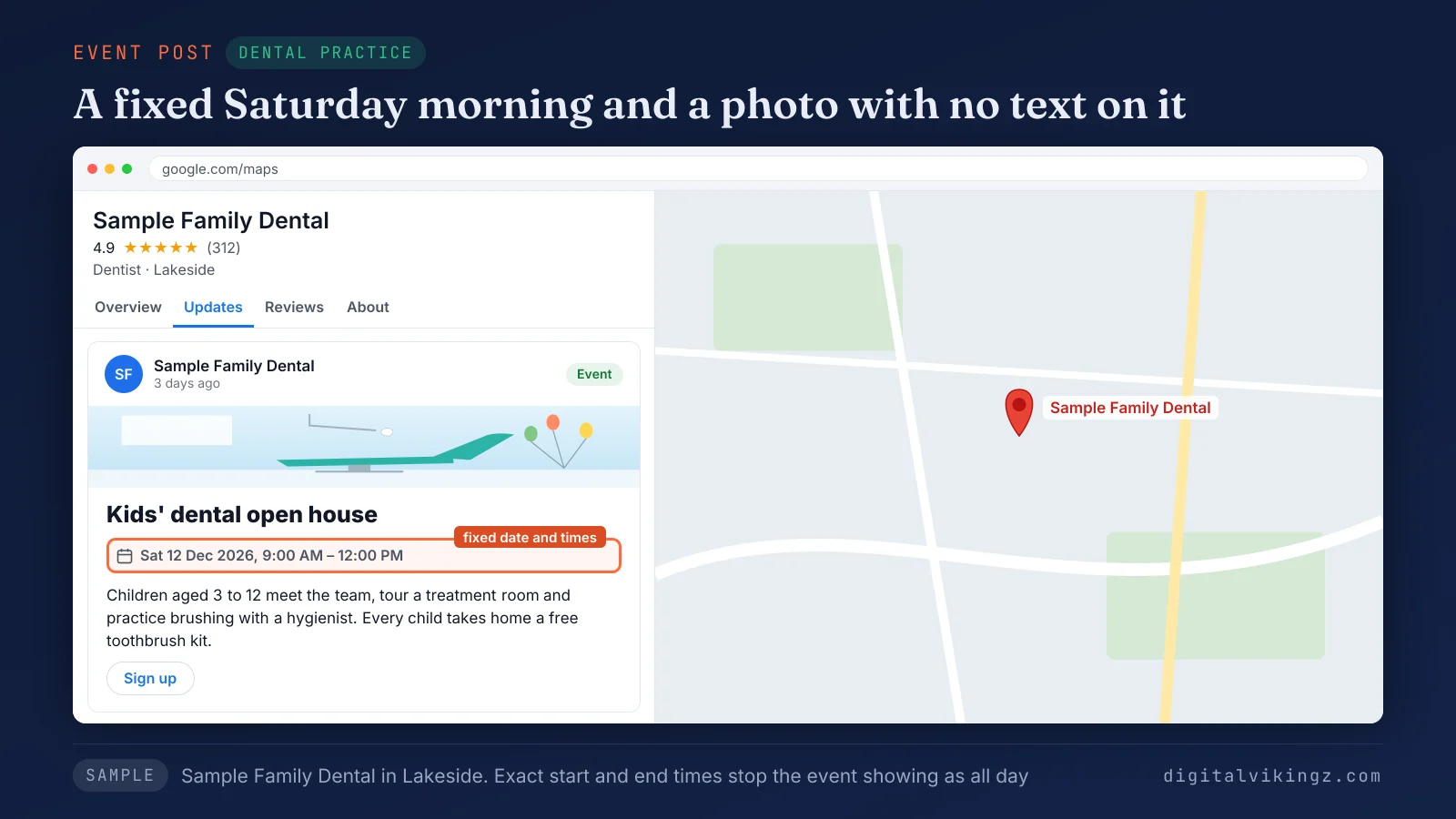
Figure 3 shows the open house card with the Saturday 12 December date, the 9:00 AM to 12:00 PM times and the Sign up button. The photo carries no text or medical labels, which keeps the post clear of the image problems health practices report.
What should a med spa post on Google Business Profile?
A med spa posts on Google Business Profile to promote treatments, gift cards and consultation events while keeping prescription products out of the post.
Med spa posts name the treatment by its general description, such as a facial or a peel, and never by a drug or device brand. Spa brands compete on treatment and gift searches.
Our day spa SEO case study shows one spa brand's non-branded Google clicks rising 42 percent in six months. The day spa SEO case study covers a full semantic SEO program, not posts alone.
Update post example: new facial on the menu
The new treatment Update post announces a service by what happens in the room and who performs the treatment, without a product brand.
The sample new treatment post has four fields:
- Post type: Update
- Text: "Sample Med Spa in Westbrook now offers a 60-minute hydrating facial by a licensed aesthetician. The facial includes cleansing, gentle exfoliation, extractions and a cooling mask. Book a facial online." (200 characters)
- Photo: a treatment room with a facial bed and soft light, no client face, no text on the image.
- Button: Book
The length, the steps and the licensed aesthetician answer what a first-time client wants to know. The post describes the treatment and makes no promise about results.
Offer post example: holiday gift card
The gift card Offer post turns holiday shopping into a booked visit, with a bonus card and dates that close on 24 December.
The sample gift card offer has six fields:
- Post type: Offer
- Title: "Holiday gift card: $25 bonus on $100"
- Dates: 27 November 2026 to 24 December 2026
- Text: "Buy a $100 gift card at Sample Med Spa and get a $25 bonus card for yourself. Gift cards cover facials, peels and skin consultations. Buy at the front desk or online." (166 characters)
- Terms: "Bonus card valid 2 January 2027 to 31 March 2027, on facials and peels only."
- Button: View offer (added by Google), linked to the gift card page
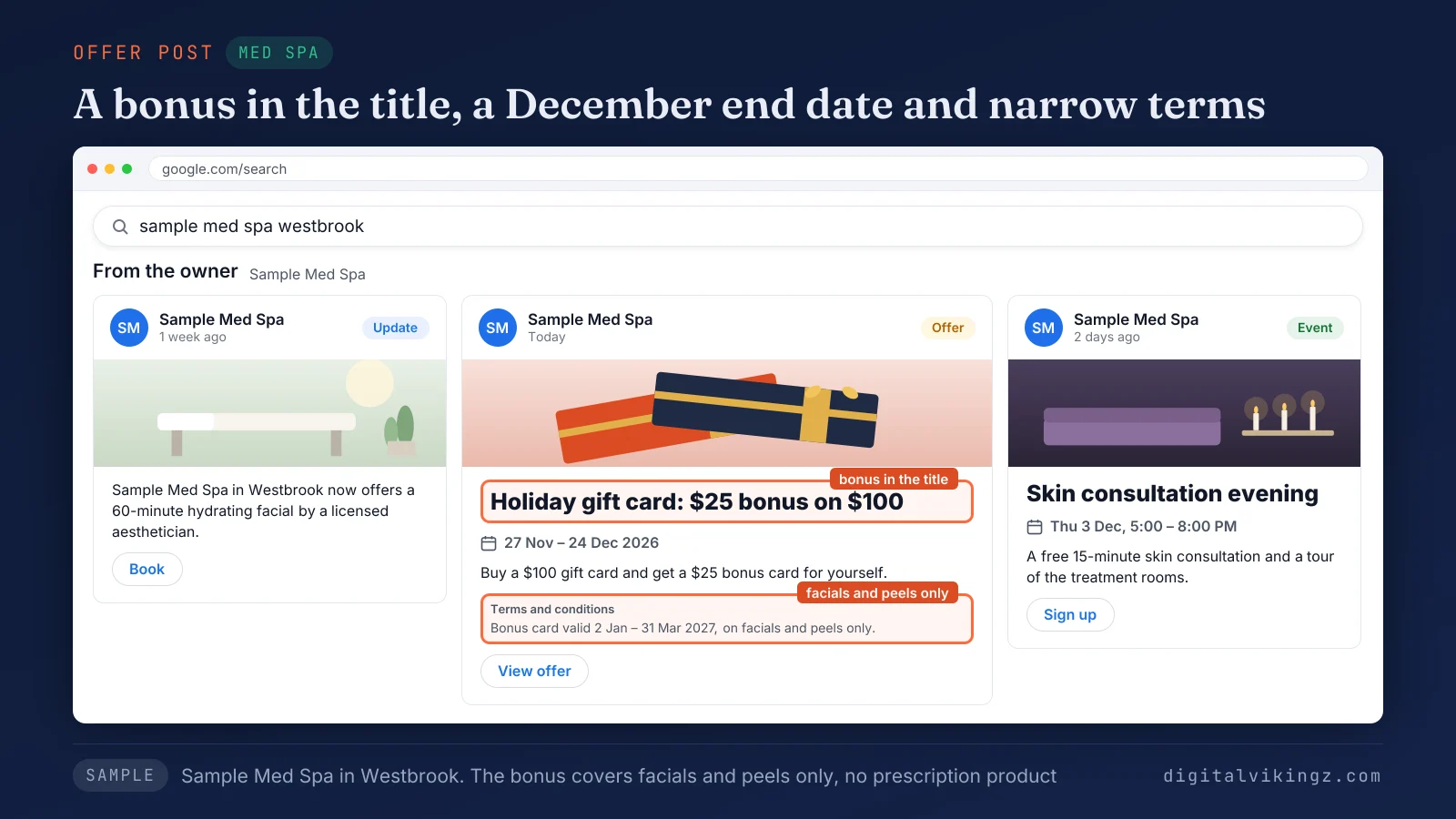
Figure 4 shows the $25 bonus in the title and the 24 December end date on the gift card offer. The terms limit the bonus to facials and peels, so the offer never touches a prescription treatment.
Event post example: skin consultation evening
The consultation Event post invites new clients to a free evening with set times, which lowers the step from browsing to a first visit.
The sample consultation evening post has six fields:
- Post type: Event
- Title: "Skin consultation evening"
- Start and end: Thursday 3 December 2026, 5:00 PM to 8:00 PM
- Text: "Meet our licensed aesthetician for a free 15-minute skin consultation and a tour of the treatment rooms in Westbrook. Light refreshments served. Spaces are limited, so sign up for a time slot." (192 characters)
- Photo: the spa lounge set for an evening event, no text on the image.
- Button: Sign up
A free 15-minute slot is a small first step, and the Sign up button turns interest into a named time. The same few parts repeat across all 12 examples.
What do the best Google Business Profile posts have in common?
The best Google Business Profile posts name one job and one town early, show one photo of the work and end with one button.
The six parts every example above shares are listed below:
- Job and town first: the opening 100 to 150 characters of the post name the service and the area, as Google's help community guide advises.
- One photo of the work: the post photo shows the job, the place or the team, in focus and well lit.
- One button: the post ends with Book, Call now, Sign up or Learn more, linked to the page that finishes the action.
- Dates and terms on deals: every Offer post and Event post states its start, its end and its conditions.
- Phone number in the button: the post keeps contact details in the Call now button, never in the text.
- One listed service: the post names a service the profile already lists, in the words customers search.
A Google post with these six parts reads as a finished answer, not as an advert.
The services a profile lists start from its categories, which our guide on how to choose a Google Business Profile primary category explains. Read how to choose a Google Business Profile primary category before writing the first post.
What size should a Google Business Profile post photo and text be?
A Google Business Profile post can carry up to 1,500 characters of text and one JPG or PNG photo between 10 KB and 5 MB.
The 1,500-character limit comes from practitioner guides such as BrightLocal, because Google's help pages state no number. Google recommends photos of 720 x 720 pixels, and the BrightLocal author uses 1,200 x 900 pixels for posts.
Videos run up to 30 seconds and 75 MB at 720p or higher, according to Google's photo and video guidelines. The 12 examples above use 161 to 249 characters of text, under the limit.
What gets a Google Business Profile post rejected?
Google marks a Google Business Profile post Not approved when the post breaks the posts content policy. A question mark beside the Not approved status names the broken rule.
Google's tips also ask for professional, respectful, family-friendly posts with complete titles, times and offer details, and links only to trusted sites.
A health practice reported a post removal tied to image text on the Local Search Forum in May 2025. The dental and med spa photos above carry no text for that reason.
The table below pairs one risky draft line per industry with a rewrite that follows Google's rules:
| Industry | Risky draft line | Rewrite | Google rule |
|---|---|---|---|
| Plumber | "24/7 emergency plumber, call [phone number] now!" | "Same-day burst pipe repair across Riverton. Tap Call now to reach a plumber." | Unverified contact details |
| HVAC company | "Text TUNEUP to [phone number] or email [address] for the $89 tune-up." | "Furnace tune-up before winter: $89. Use code TUNEUP89 under View offer." | Unverified contact details |
| Dental practice | "[Clear aligner brand] treatment, 20 percent off this month." | "Book a smile consultation with our Lakeside dentist." | Regulated products: health and medical devices |
| Med spa | "[Injectable brand] at $10 a unit this week." | "Holiday gift card: $25 bonus on $100, valid on facials and peels." | Regulated products: pharmaceutical products |
Phone numbers and regulated products cause the questions owners ask most.
Can a Google Business Profile post include a phone number?
A Google Business Profile post can include a phone number, but Google may remove the post when the number is not verified.
Email addresses and social media handles fall under the same rule. The Call now button uses the verified profile number, so every example above leaves numbers out of the text.
Add any extra number to the profile itself before quoting that number in a post.
Can a dental or med spa post name a prescription treatment?
A dental or med spa post should not name a prescription treatment, because Google bars content about regulated products in posts.
Google's list includes pharmaceutical products and health and medical devices. The post can still promote the visit, the consultation, the hours or a gift card, as the dental and med spa examples show.
Treatment claims belong on the practice website, written to the rules of the practice's own profession.
How do you adapt these examples to your own business?
Each example adapts in five steps: pick the closest job, swap in your facts, take one photo, choose the button and check the rules.
The steps to adapt a Google Business Profile post example are listed below:
- Pick the example from your industry that matches the job customers need this week.
- Swap the town, the job details, the price and the dates for your own, and keep the order of the sentences.
- Take one photo of the job, the place or the team on the day you post.
- Choose the button that finishes the action and link the page where customers book, buy or sign up.
- Check the post against the phone number and regulated product rules before selecting Post.
An adapted Offer post or Event post needs new dates each time, because Google shows the post only until its end date. Google Business Profile lets a post be scheduled, so a week of posts can be written in one sitting.
AI tools can draft posts, and each draft still needs the business's own facts and a person's check before publishing. A drafted post that names a job the business never did misstates the service.
Home-service owners who want the five steps done every day can use our daily Google posts for home-service businesses. Our daily Google posts for home-service businesses come from an AI agent that writes from each business's own website. Each post gets a picture and a button, and the week's posts can come to the owner for approval first.
One example can also fill a whole week.
How do you turn one example into a week of posts?
One example becomes a week of posts when each post shows a different angle of the same service. The five angles are the job, the question, the offer, the event and the result.
The furnace tune-up from the HVAC examples shows the method. A week of HVAC posts built from one tune-up example is listed below:
- Monday, Update post: a photo of a tune-up finished that morning, with the town and the furnace age.
- Tuesday, Update post: the three cold air checks from the problem-answer example.
- Wednesday, Offer post: the $89 tune-up with its code and its 15 December end date.
- Thursday, Event post: the Saturday heating safety class with its times.
- Friday, Update post: a tune-up finding, such as a worn flame sensor, with a photo of the part.
Five posts on one service read as five answers, not as one advert repeated. Each angle keeps the same town and the same button, so the week reads as one business.
Repeating the same text every day reads as automated content, which Google's tips ask posts to avoid. The next week repeats the method with another service, such as a water heater or a drain.
Each of the five posts still needs its own photo.
Should a post use a job photo or a designed graphic?
A clear photo of the actual job or place is the safer default for a post, and text on the image is optional.
Google's photo guidelines ask for images that are in focus, well lit and free of heavy filters or alterations.
An analysis of 1,000 posts by local SEO practitioner Joy Hawkins, reported by BrightLocal, found that images with text performed better in her sample. The same BrightLocal guide avoids text on images, because devices crop post images differently.
The May 2025 Local Search Forum report ties one health practice's post removal to image text. Clinics and med spas should keep images free of text and medical labels. Generated images of jobs that never happened misstate the work, so each example above uses a photo from the job itself.
A before and after pair from one job also counts as a job photo, because both pictures come from the same job. A Google Business Profile post photo answers a searcher deciding whom to call, which differs from a designed graphic built for a social media feed.
A few questions about post examples remain.
Questions about Google Business Profile post examples
Do Google Business Profile posts expire?
Google Business Profile posts do not expire on a set day, but Google archives posts older than six months without a date range. Offer posts and Event posts show until their end date.
How often should a business post on Google Business Profile?
One post a week is the common recommendation for a local business, according to guides from BrightLocal and other local SEO practitioners. The parent guide to posts covers frequency in depth.
Do Google Business Profile posts help rankings?
Google has not confirmed posts as a local ranking factor, so posts are best judged by the calls, bookings and visits they bring. Posts reach people already looking at the profile.
Can you schedule Google Business Profile posts?
Google Business Profile can schedule a post for a later date and repeat a post weekly, monthly or on a custom schedule. The scheduling option sits in the post editor, under Schedule this post.
Can one post go to several Business Profiles?
One post can go to several Business Profiles at once, because Google lets a manager select more profiles before selecting Post. Each location still needs its own town name in the text.
Is Google My Business the same as Google Business Profile?
Google My Business is the old name of Google Business Profile, which Google renamed in November 2021. Google announced the rename on The Keyword blog, so Google My Business post examples describe the same posts.
Which Google Business Profile post example should you publish first?
The first post to publish is the example that matches the job your customers need most this week.
Plumbers and HVAC companies start with the Update post for the most urgent job. Dental practices and med spas start with the Offer post or Event post already on the calendar.
Write the post, add one photo and one button, and check the two rules before selecting Post. Digital Vikingz plans posts and pages so Google and AI answer engines recognize the business for every service on offer.
Clinics and med spas get weekly posts as part of Google Business Profile optimization for clinics and med spas. Our Google Business Profile optimization for clinics and med spas includes weekly posts, reviews and location pages.
