 Digital Vikingz
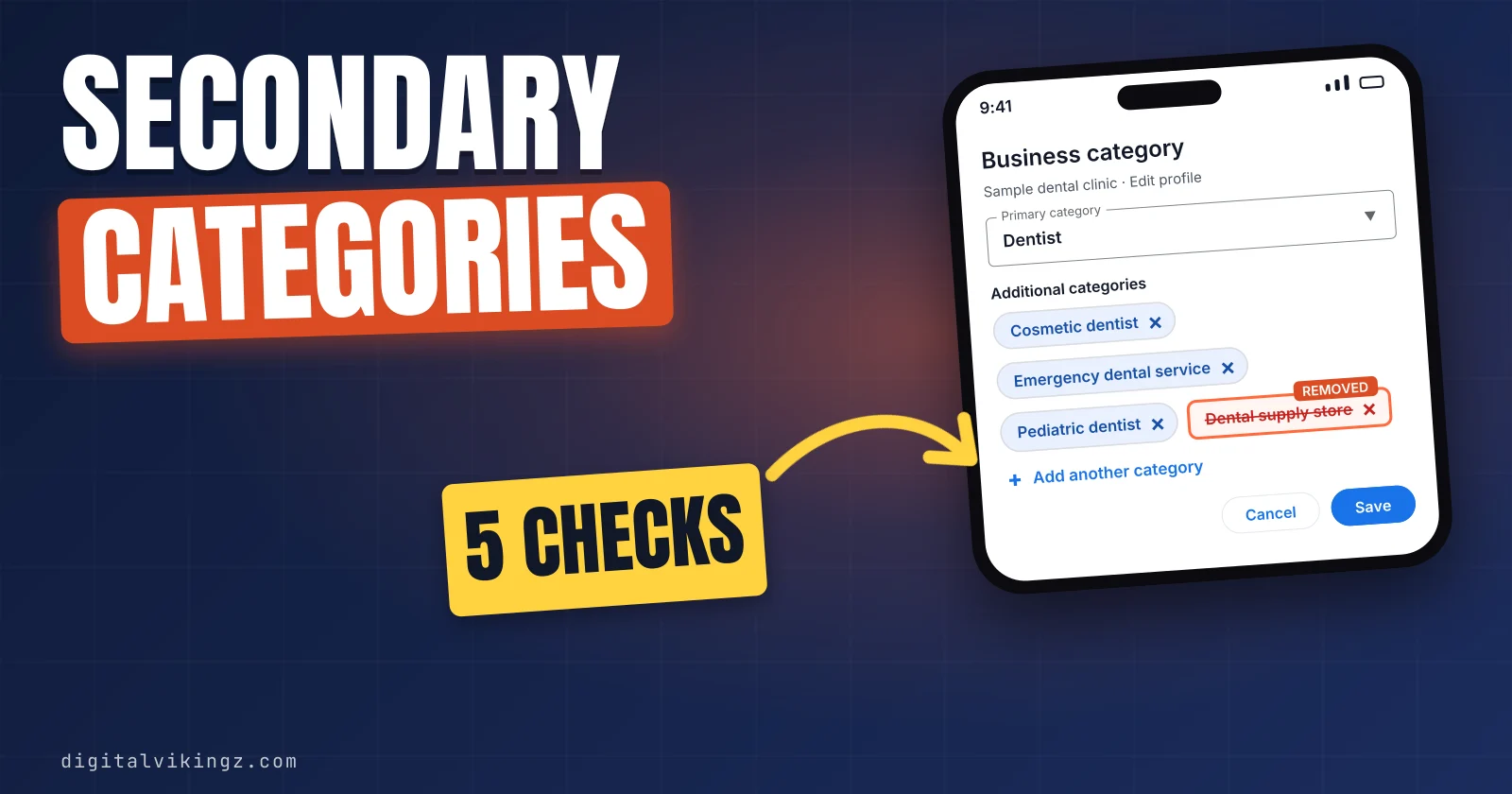
Google Business Profile secondary categories, often called GBP secondary categories, name a department or major service line beside the Google Business Profile primary category. Google allows up to 9 secondary categories, 10 in total, and each candidate must pass five checks.
Competitor lookup, editor steps and rank grid checks show what to add, how to edit and how to measure. Relevant categories can help a profile rank higher on Google Maps, but keyword categories can get a Google Business Profile suspended. Daily Google Posts carry seasonal work, and Local SEO and Google Business Profile Optimization sets categories and pages together.
What are Google Business Profile secondary categories?
Google Business Profile secondary categories are additional categories from Google's list that name a department or major service line beside the one primary category.
Owners often say extra categories, while Google's editor labels the Business Profile field additional categories, added through the Add another category button.
Google's help page says: "To inform your customers about special departments or services, select additional categories." Google's own example is a grocery store that adds Bakery and Deli beside the primary category Grocery store. The same passage sets a limit: "Do not select a category for every product or service."
Secondary categories classify the business further, so single services stay out of the category field. The primary category states the one main type of the business. The method for that choice is how a business chooses its Google Business Profile primary category.
Google also caps how many secondary categories one profile can hold.
How many secondary categories can a Google Business Profile have?
A Google Business Profile can have up to 9 secondary categories beside the one primary category, for 10 categories in total.
Google's help page states: "You can select up to 9 more categories." Agency and software guides read on 19 November 2026, including Sterling Sky, Uberall and BizIQ, give the same limit of 10 categories. No source we read gives a higher or lower ceiling.
Owners often call the 9 openings slots, and the method term for the ceiling is the category limit. Every name in those slots comes from Google's list, which the third check below tests. A full set of 9 is allowed, and the number a business should use is a separate question.
Recommendations on how many to add differ widely between sources.
How many secondary categories should you add?
A business should add only the secondary categories that pass the five checks, and the sources we read recommend between 2 and all 9.
The table lists what six sources recommend for the number of categories, read on 19 November 2026:
| Source | Recommendation | Basis |
|---|---|---|
| Google's guidelines | The fewest categories that describe the core business | Google's rule |
| BizIQ | Two or three closely related secondary categories | Agency guide |
| Local Brain | Start with 3 to 4 secondary categories | Software vendor guide |
| KD Interactive | Five or fewer categories in total, primary included | Agency guide |
| Heights Digital Media and Flento | Three to six secondary categories | Agency and vendor guides |
| Sterling Sky | All 10 category slots | Agency case study, 12 August 2025 |
Three to six secondary categories is the band named most often, and no source ties the number to a ranking result. Google's guidelines ask owners to "Choose the fewest number of categories it takes to describe your overall core business."
The five checks in the next section decide how many secondary categories each business adds.
How do you choose Google Business Profile secondary categories?
A candidate secondary category goes on the profile only when the category passes five checks, starting with Google's "This business IS a" test.
The five checks for a candidate secondary category are listed below:
- Pass the IS-a sentence: The candidate completes Google's statement "This business IS a" rather than "this business HAS a." A roofer IS a Siding contractor only when the company installs siding as a line of work.
- Confirm a department or major service line: The business runs the category's work with its own staff, equipment or revenue line at the profile's location. A one-off job or a single service fails the check and goes in the services list.
- Find the exact name in Google's list: The category field accepts only names from Google's list, and no custom category exists. A missing category is replaced by the closest more general category.
- Check local demand: A search for the category's work in the service area returns a map pack. A category with no map pack for its search adds little for the profile.
- Back the category with a page: The website carries a page about the category's work, because Google reads category information from websites. A category without a page waits until the page is live.
Google's guidelines state: "Google can also detect category information from your website and from mentions about your business throughout the web."
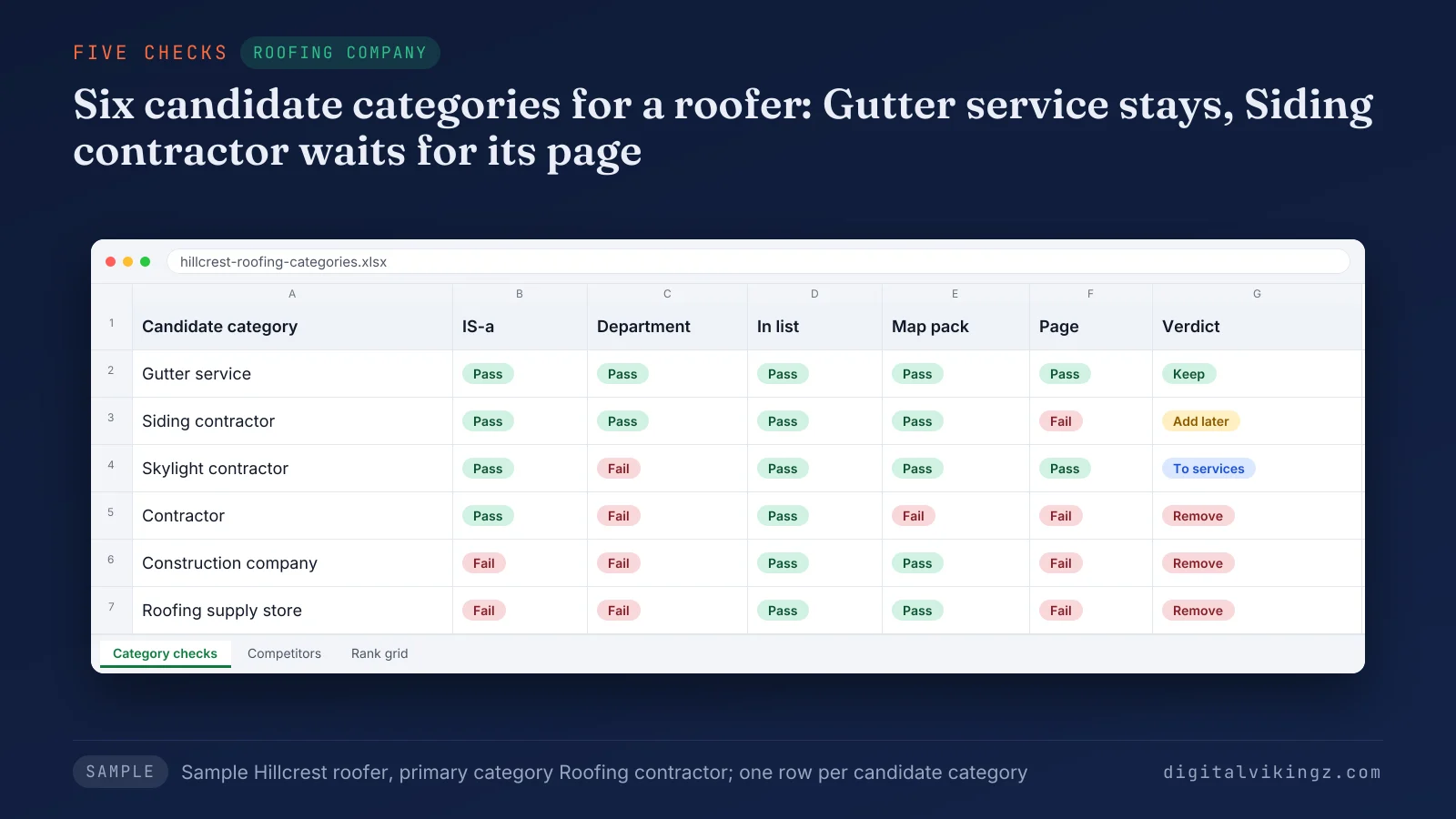
Figure 1 scores six candidates for a sample roofer whose primary category is Roofing contractor. The sample keeps Gutter service and holds Siding contractor until the siding page goes live. Skylight contractor moves to the services list, while Contractor, Construction company and Roofing supply store come off the profile.
Some candidates fail the checks because Google already covers general parent categories.
Which categories does Google add automatically?
Google adds the general parent categories of a specific category automatically, so a general parent needs no secondary slot.
Google's guidelines explain that for "a specific category like 'Golf Resort', Google implicitly includes more general categories like 'Resort Hotel', 'Hotel', and 'Golf Course.'" The same page adds: "You can skip adding any category that seems redundant with a more specific category you selected."
Our reading of the rule suggests that a Roofing contractor profile gains little from adding the general Contractor category. The secondary category slot is better spent on a department such as Gutter service, which Google's parent rule does not cover.
A department run by another company fails for a different reason.
Should a separately owned department get its own Business Profile?
A separately owned and operated department gets its own Business Profile instead of a secondary category on the host business profile.
Google's help page says separately owned and operated departments "should have their own Business Profiles." A health club with an independently operated cafe leaves Cafe off the profile, and the cafe gets its own profile.
Google lists four co-located cases that always take two profiles, starting with a restaurant, cafe or bar inside a hotel. The other three are a pharmacy inside a supermarket, a gas station next to a supermarket and some airport car rentals. A department the same business owns and runs stays a secondary category on one profile.
Competitors' profiles show which departments the local market already lists.
How do you see the secondary categories competitors use?
Competitors' secondary categories show in the page source of their profile or in a browser extension, since Maps shows only the primary category.
Owners often call the job spying on competitors, and the method term is a competitor category lookup.
The steps to read and judge competitors' secondary categories are listed below:
- Search the main service in the service area and note the three to five businesses in the map pack.
- Open each listing and read the additional categories with a category extension such as GMB Everywhere's Category Finder.
- View the page source of the listing when no extension is installed, and search for the primary category name. The additional categories sit next to the primary category in the data.
- Count which categories recur across listings, then run each recurring category through the five checks.
A category that appears on several winning listings is a candidate, never an automatic addition. A competitor may list a category the competitor does not run, so copying categories copies mistakes.
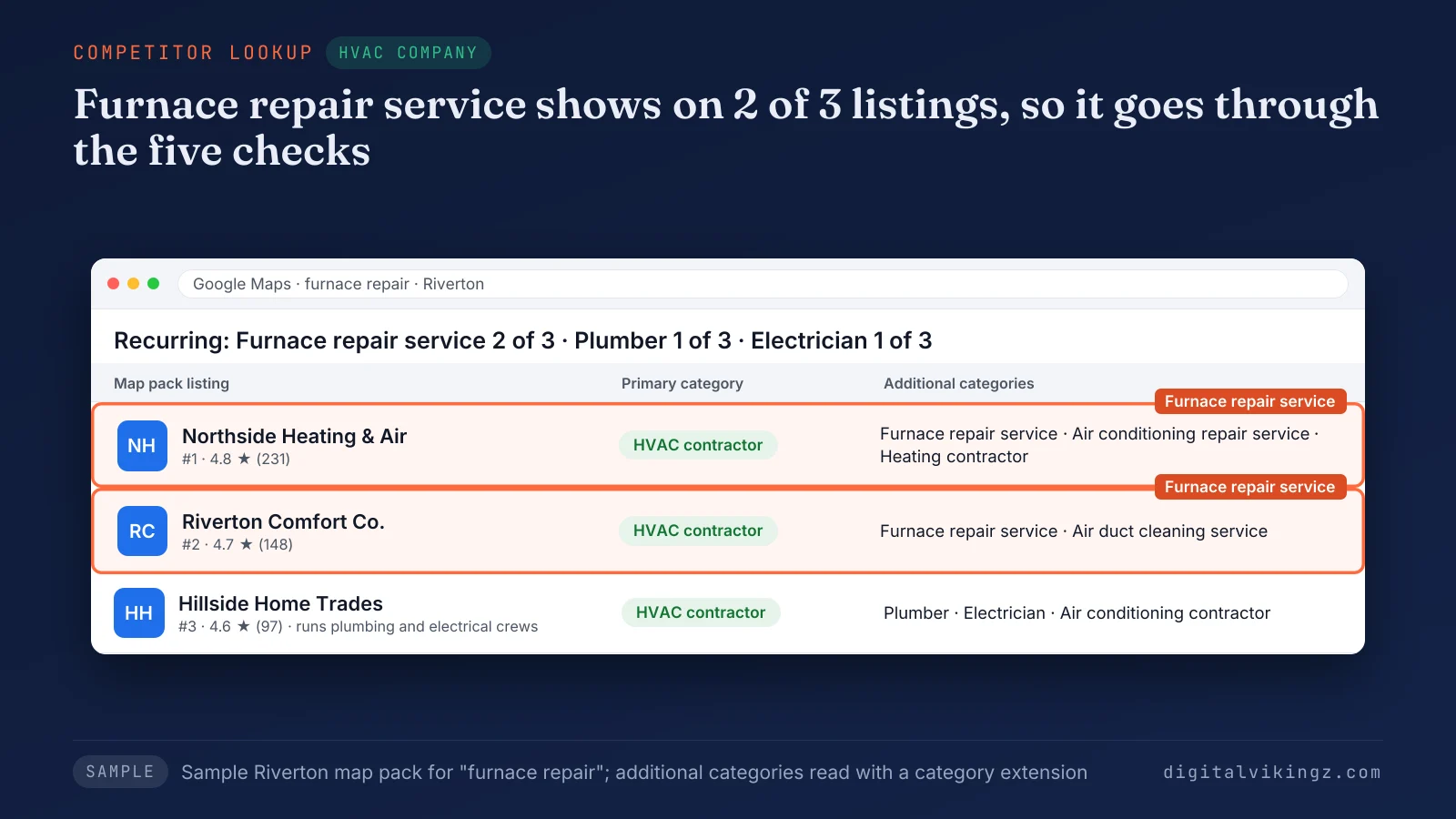
Figure 2 compares three sample listings for furnace repair. Furnace repair service appears on two of the three sample listings, so the category goes through the five checks. Plumber and Electrician appear once, on a company that runs those trades, and stay off an HVAC profile without those departments.
Recurring categories differ by trade.
Which secondary categories fit plumbers, HVAC companies, roofers, dentists and med spas?
Secondary categories that fit a trade name its departments, such as Air duct cleaning service for an HVAC contractor.
The table pairs five primary categories with secondary categories that pass the five checks when the business runs the department:
| Trade and primary category | Secondary categories that can pass | Work that stays in the services list | Category to leave off |
|---|---|---|---|
| Plumber (Plumber) | Septic system service; Water damage restoration service | Drain cleaning; water heater installation | Heating contractor without a heating team |
| HVAC company (HVAC contractor) | Air conditioning repair service; Furnace repair service; Air duct cleaning service | Thermostat installation; heat pump tune-ups | Plumber without a plumbing department |
| Roofer (Roofing contractor) | Gutter service; Siding contractor; Skylight contractor | Roof inspections; storm damage repair | Contractor, a general parent Google adds |
| Dental clinic (Dentist) | Cosmetic dentist; Emergency dental service; Pediatric dentist | Teeth whitening; dental implants | Orthodontist without an orthodontist on staff |
| Med spa (Medical spa) | Laser hair removal service; Skin care clinic; Facial spa | Injectables; chemical peels | A physician category the business is not |
Each pairing holds only when the business runs the department, so the table is a starting list, not a set to copy.
Google's list changes, so each name should be confirmed in the Business category field before saving. Category lists from AI chatbots need the same field check, since a chatbot can suggest a trade the business does not run.
Each chosen category goes on the profile through the same editor steps.
How do you add, edit or remove a secondary category?
A secondary category is added, edited or removed in the Business category section of Edit profile, through the Add another category and Remove buttons.
The steps to add or remove a secondary category are listed below:
- Go to the Business Profile while signed in as an owner or manager.
- Select Edit profile.
- Select Edit next to Business category.
- Select Add another category, type the category and pick the name from the list that shows up.
- Select Remove next to any additional category to delete.
- Select Save.
All category edits should go in one session, so the profile goes through one review instead of several. A screenshot of the categories before the edit records the starting point for the before-and-after rank grid check.
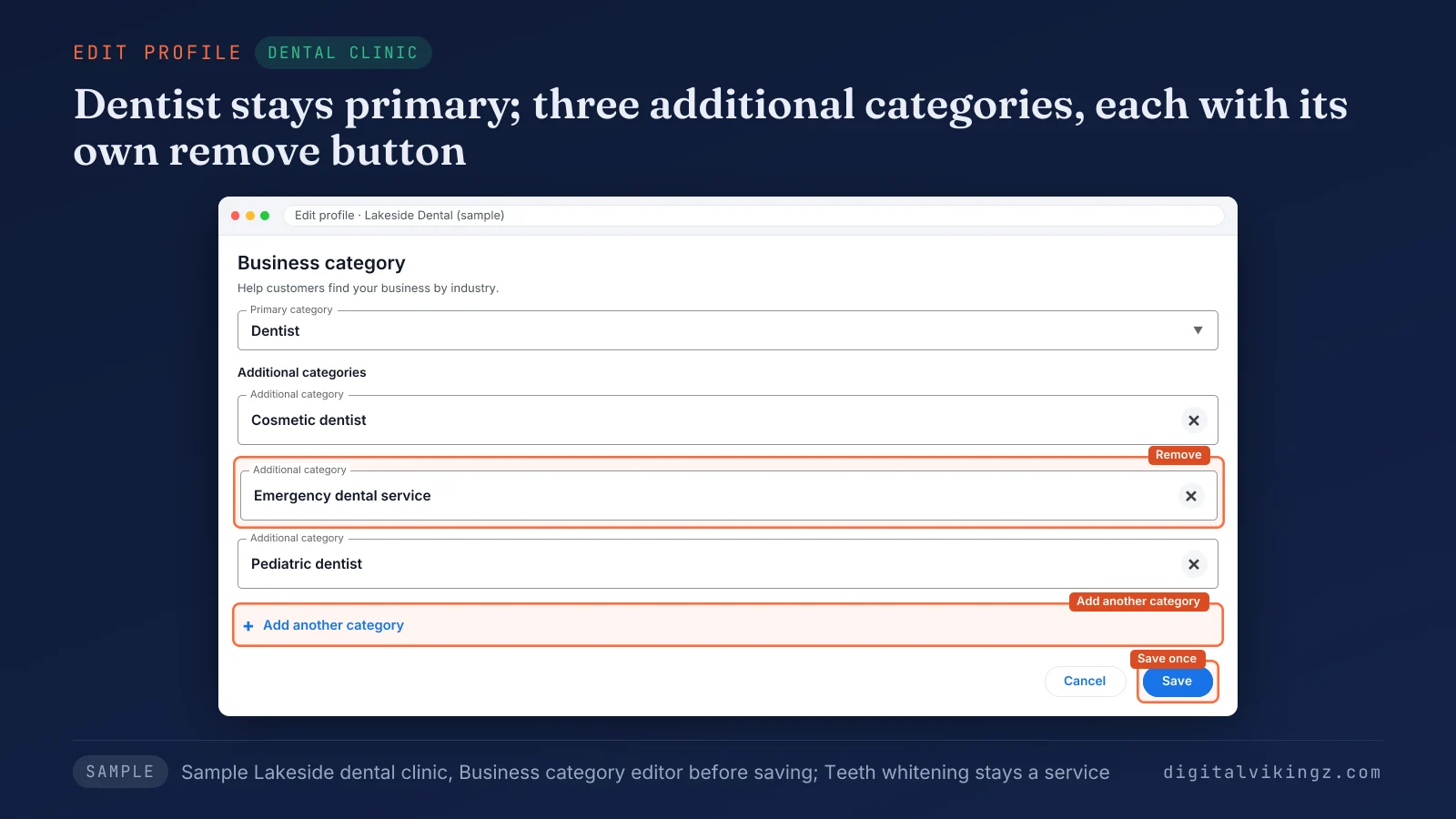
Figure 3 shows where each button sits in the editor. The sample dental clinic keeps Dentist as the primary category and lists Cosmetic dentist, Emergency dental service and Pediatric dentist as additional categories. Teeth whitening stays in the services list, because whitening is a single service.
Any category edit can bring one more step from Google.
Can adding a secondary category trigger re-verification?
Adding a secondary category can trigger re-verification, because Google warns that after a category edit "you might be asked to verify your business again."
A Local Search Forum thread in October 2025 reported a profile pulled into verification after categories were added with no other edit. Owners describe the result as being knocked out of verification, which is a re-verification request.
Owners should keep business documents and storefront or vehicle photos ready before a category edit. The steps to verify a Google Business Profile by video, phone or postcard depend on the options Google offers that profile.
The edit is worth the step only when the category can change rankings.
Do secondary categories help Google Business Profile rankings?
Secondary categories can help a Business Profile rank for the searches each added category matches, with less weight than the primary category.
Google's help page states: "The categories you select affect your local ranking on Google." Sterling Sky reported in August 2025 that a landscaper ranked higher for "landscape designer" and "landscape architect" after adding those categories.
A Sterling Sky guide updated in January 2026 reports that a law firm's employment-related rankings "improved significantly" after adding a relevant secondary category. Both cases are single businesses, so neither sets an expected gain for other profiles.
Practitioner guides from Heights Digital Media and Flento agree that the primary category carries more ranking weight than any single secondary category. Categories are one relevance lever, and distance and prominence decide the rest. Our guide sets out the levers to rank higher on Google Maps.
The common fear is the opposite effect: dilution.
Do too many secondary categories dilute a profile?
Relevant secondary categories do not dilute a profile in the case reports we read, and poor-fit categories are the risk practitioners agree on.
Uberall, BizIQ and Heights Digital Media warn that loosely related or irrelevant categories dilute relevance. Uberall puts the warning as "piling on loosely related categories dilutes your local relevance." Sterling Sky argues the opposite for relevant categories and tells owners to use all 10 slots.
A Local Search Forum thread in February 2026 reported uneven gains from added categories and lower rankings after removals until the categories returned. Owners ask whether extra categories hurt ranking, and the deciding factor in every source is category fit.
We read the two sides as agreeing on fit: a category that passes the five checks stays, and a category that fails comes off.
Only a before-and-after check shows what one category did for one profile.
How do you check whether a secondary category worked?
A new secondary category is measured on one rank grid for the category's search term, before the edit and 2 to 4 weeks after.
Owners usually watch one map pack position, while a rank grid reads the ranking at many points.
The steps to measure one secondary category are listed below:
- Pick the search term the new category matches, such as laser hair removal.
- Scan and save a rank grid for that term before the edit.
- Add the category with no other profile edit, then wait 2 to 4 weeks.
- Scan the same grid and term again, then count the points in the top 3.
Heights Digital Media advises two to four weeks, and Local Brain advises four weeks of monitoring. Owners should change one category at a time, because frequent edits blur the cause of a change.
A 7 by 7 grid checks 49 points, so the change reads as a count of points, not one position.
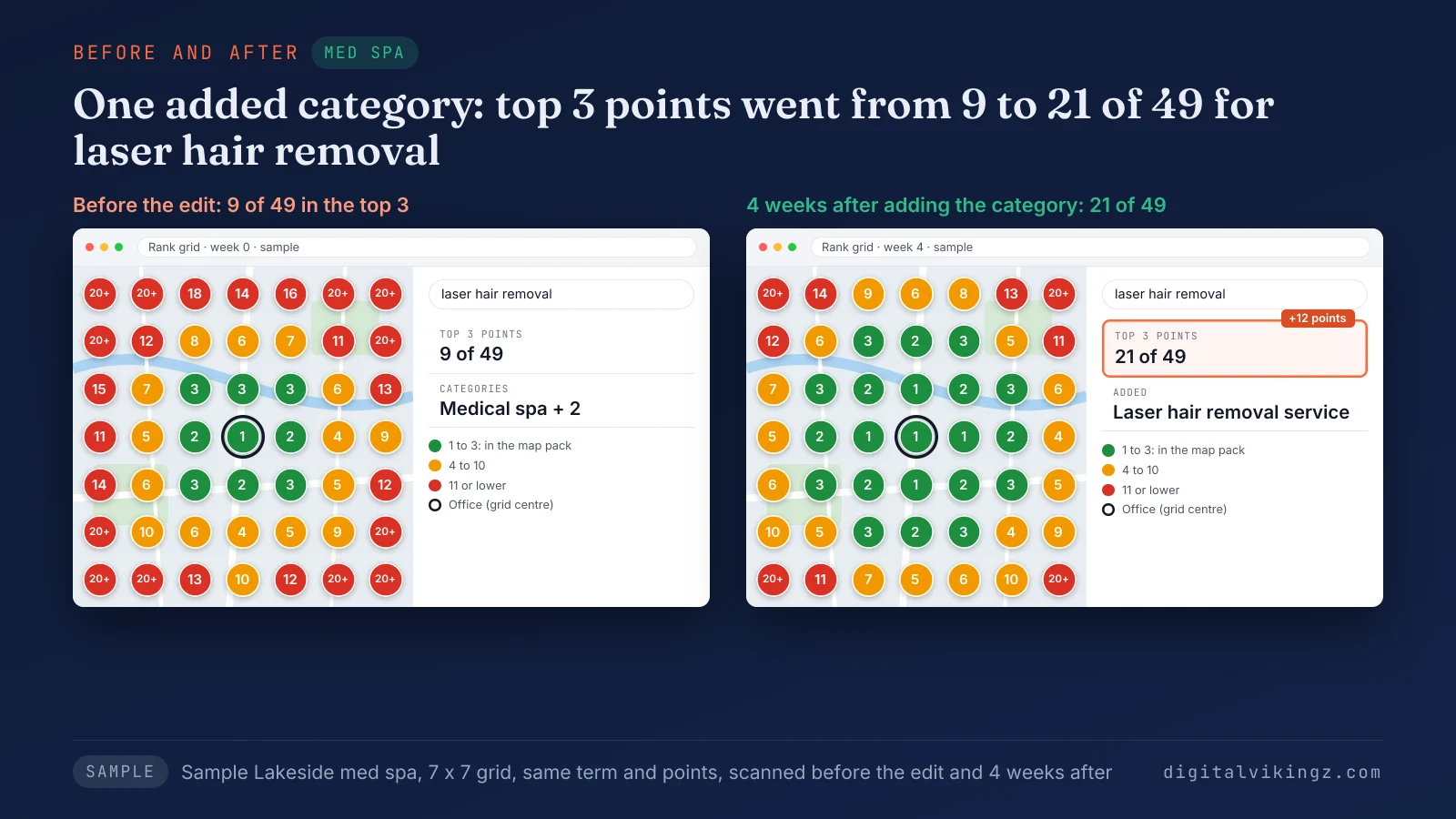
Figure 4 shows a sample med spa moving from 9 to 21 of 49 points in the top 3 for laser hair removal.
Ranking on a grid also depends on the rest of the profile and the site.
What else on a Business Profile supports a secondary category?
A secondary category gains support from the services list, a matching website page and Business Profile posts about the department.
The three supports for a secondary category are listed below:
- Services list: the category names the department and the list names the single services under the department, as the second check requires.
- Website page: a page about the department lets Google confirm the category from the site, as the fifth check requires.
- Posts: posts that name the department show current activity in that line of work on the profile, between category edits. Each post can carry a picture and a button to the matching department page.
Filling in Google Business Profile services and products adds the single services that never earn their own category. A furnace repair post in January ties the Furnace repair service category to dated activity on the profile. The three supports work together, because each repeats the department name the category uses, and a category with none of the three adds little.
Owners who want categories, services and pages set together can use our Local SEO and Google Business Profile Optimization for multi-service businesses. Our AI agent does the repetitive steps, and a person checks each change before the profile updates. The service starts with a strategy call, and the price is a written quote after that call.
Posts also carry services that last one season.
Should seasonal services become secondary categories?
A seasonal service becomes a secondary category only when the business runs the service as a department all year.
BrightLocal advises switching the primary category with the season, while Wiremo keeps one primary category all year and moves seasonal services into secondary categories. Both guides were read on 13 November 2026. We keep one primary category all year, because each switch can bring a new verification request.
An HVAC company that repairs furnaces every month keeps Furnace repair service all year, while a two-month promotion goes in posts. Owners in an October 2025 Local Search Forum thread on HVAC asked whether seasonal category switches trigger verification. Owners call such a slot a seasonal category, and the method term is a seasonal secondary category.
A season can be carried by daily posts instead of category edits. Our AI agent writes Daily Google Posts that carry seasonal services from the business's own website, starting with a free sample post.
We apply the same checks to our own profile.
What did we decide about the categories on our own Business Profile?
Our Business Profile carries four secondary categories, and Video production service fails the fifth check, because no page on our site supports the category.
Our profile listed Internet marketing service as the primary category on 16 November 2026. The additional categories were Website designer, Copywriting service, Marketing consultant and Video production service.
Website designer and Marketing consultant pass the checks, because website builds and strategy calls are sold services with pages. Neither category needed an edit. We held the removal while other profile edits were under review, because Google warns that a category edit can bring a new verification request.
The removal goes in one batch with the next profile edit, followed by the grid check described above.
A category that fails the checks on purpose carries a larger risk.
Can a wrong secondary category get a Business Profile suspended?
A secondary category picked as a keyword can lead to a Google Business Profile suspension, because the category breaks a Google guideline.
Google's guidelines state: "Do not use categories solely as keywords or to describe attributes of your business." A med spa that adds a physician category without a physician on staff describes a business the profile is not.
Keyword categories are one of six common suspension causes. The causes and the appeal for a Google Business Profile suspended for a guideline break sit in our suspension guide.
Owners also ask five shorter questions about categories.
Questions about Google Business Profile secondary categories
Can two locations of one business use different secondary categories?
Two locations that offer the same services use the same secondary categories, because Google's guidelines require one category set for the same service. Google's guidelines state: "All locations must also have the same category if they provide the same service."
Can Google change a secondary category without the owner?
Google can change a secondary category from user suggestions or its own data, according to Heights Digital Media and Uberall. Local Brain advises a category review at least twice a year, so a changed category is caught within months.
How many categories are in Google's list?
Google's category list held about 4,000 categories in November 2026. Dalton Luka counted 4,044 on 1 November 2026, and BizIQ lists 4,045 possible names for a secondary category.
Can a secondary category be another business's primary category?
A secondary category can be another business's primary category, as Google's grocery store example shows with Bakery. Bakery is the primary category of a bakery and a secondary category of a grocery store with a bakery department.
Should a secondary category come off when the service stops?
A secondary category should come off when the business stops running that department. Local Brain puts the rule as: "Your categories should reflect what you do today, not what you did two years ago."
How do you keep Google Business Profile secondary categories right?
Google Business Profile secondary categories stay right when every candidate passes the five checks and each edit is measured before the next.
The four habits that keep secondary categories right are listed below:
- Run every candidate through the five checks before adding the category.
- Compare the map pack listings for the main service twice a year.
- Edit categories in one session and keep verification documents ready.
- Scan the category's search term on the same grid 2 to 4 weeks after each edit.
Categories are one of the 13 steps to optimize a Google Business Profile, from setup to upkeep. Some owners hand the category choice and the checks to an agency. Digital Vikingz offers Local SEO and Google Business Profile Optimization for categories, services and posts through a strategy call.
