 Digital Vikingz
Google Business Profile services list the work a business does, and products show the physical goods it sells, each with optional prices. A matching service may be highlighted when a customer searches for that work, yet Google names no ranking boost for services or products.
Businesses in service categories can usually add services, while the product editor suits local stores that sell physical goods. Owners add services through Edit services, choosing suggested services or writing a custom service, and add products through Edit products.
Most rejections come from prices, phone numbers or keywords in names. The services list holds work the business performs, and product entries hold goods the business sells.
What are Google Business Profile services and products?
Google Business Profile services list the work a business does, and products show the physical goods it sells, each with optional prices. Both sections sit on the free listing that a business holds on Google Search and Google Maps.
Google's help page on services states: "When local customers search Google for an offering you provide, that service may be highlighted on your profile." The same page adds: "On the Google Maps app, customers can view your full menu under "Services."" Google says product entries appear in Business Profiles on Google Search, each with a photo of the item.
Readers call the area the services section or services tab, and Google calls the tool the services editor. The product editor is the matching Google tool for product entries.
Services and products are one step in the 13 steps of how to optimize a Google Business Profile. The step comes after categories and before attributes. Many owners first ask if a fuller services list moves the profile up.
Do services and products help a Google Business Profile rank?
Google Business Profile services help a profile show a matching service to searchers, but Google names no ranking boost for services or products. Google's help page on services stops at the word "highlighted" and makes no ranking statement.
Google's local ranking tips state: "Businesses with complete and accurate info are more likely to show up in local search results." Practitioners disagree on any further effect. PCG Digital, an agency, calls services an unconfirmed factor, while other guides advise keywords in service names.
Service names should match the words customers use for the job, because a matching search is the case Google describes. The full order of local ranking levers is set out in the guide to what ranks a business higher on Google Maps.
The services list is only open to some businesses, so eligibility comes before the first entry.
Which businesses can add services and products?
Businesses in service categories can usually add services, while the product editor suits local stores that sell physical goods. Google's help page on services states: "Businesses in certain categories, like service businesses, might have the option to showcase their offerings directly on their Business Profile."
Google's developer documentation states: "Predefined services listed might differ based on the category and country." The same documentation adds that services can be performed inside a store or at customer locations.
Google's service business guide covers service-area businesses, such as a plumber, and hybrid businesses, such as an auto shop with roadside assistance. Google's guide also lists services offered among the details a Google Business Profile for a service business can include.
Google's help page on the product editor states: "If you have a local store which sells physical goods, the product editor is suitable for you."
The four Google editors for offerings, and the businesses each one serves, are listed in the table below:
| Editor | Built for | What one entry holds |
|---|---|---|
| Services editor | Businesses in service categories | A service name, with an optional description and price |
| Product editor | Local stores selling physical goods without barcodes | A product photo, name, price and description |
| Menu editor | Food and drink businesses only | Menu items with prices |
| Local Inventory app | Retail stores with a point-of-sale system | In-store products with barcodes |
Retail businesses in the US, Canada, the UK and Ireland can show in-store products by connecting a point-of-sale system to the Local Inventory app. Menus, ticketed experiences and barcode inventory rarely apply to a service business, which works in the services editor and the product editor.
Services come first, because the services editor is the one most service businesses can open.
How do you add services to a Google Business Profile?
Owners add services to a Google Business Profile by opening the profile, selecting Edit services, choosing the services offered and selecting Save.
The four steps to add services, from Google's help page on services, are listed below:
- Go to your Business Profile.
- Select Edit services.
- Select the services you want to add.
- Select Save.
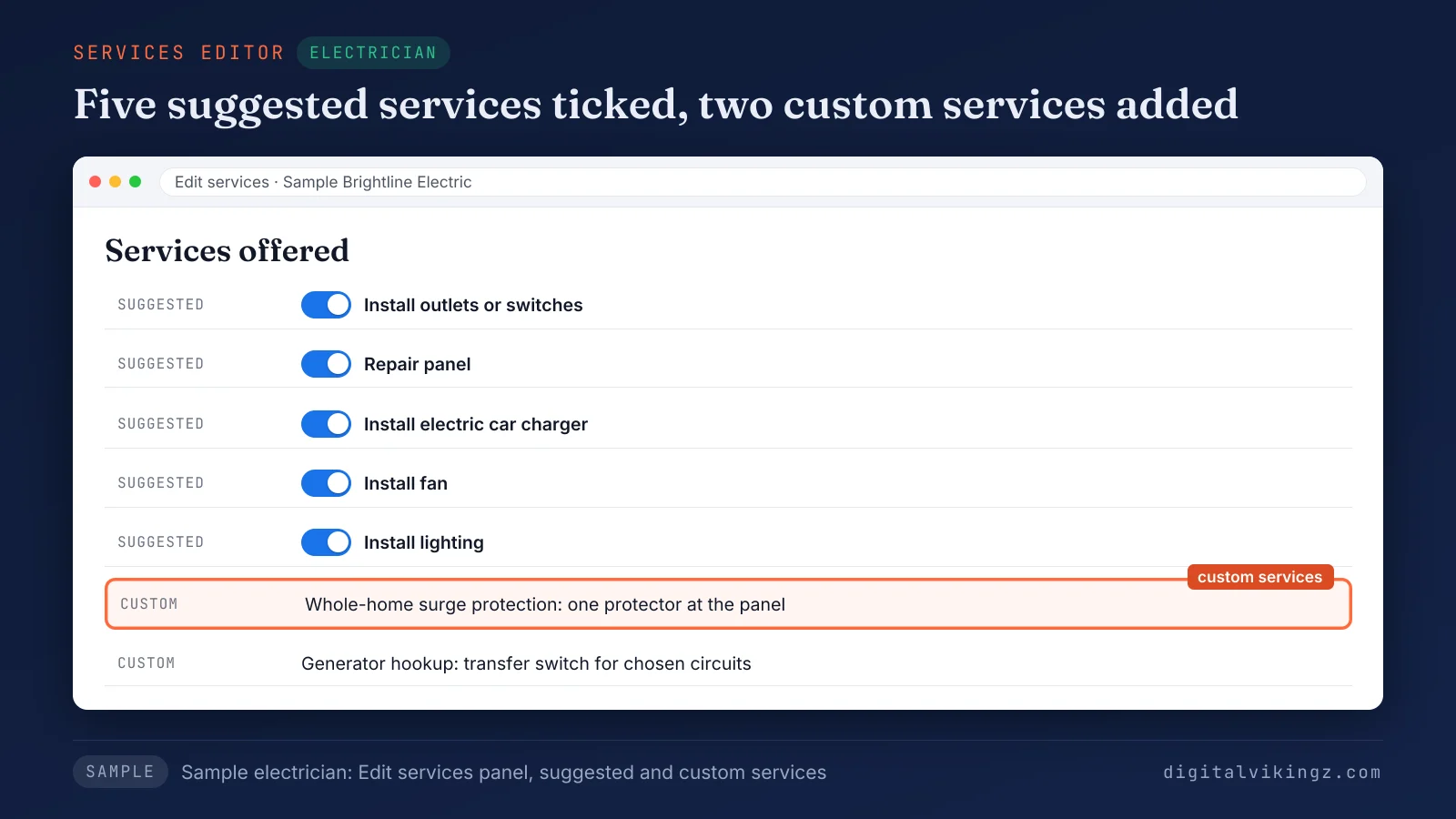
Figure 1 shows a sample electrician's services editor with five suggested services ticked and two custom services added.
The profile opens from Google Search or the Google Maps app. The owner signs in first with the Google Account that manages the profile.
Editing an existing service follows the same path: select the service, add a price and a description, then save. Google's help page on services adds: "To remove the service, select Delete service." The ticked entries in Figure 1 come from two sources, Google's suggestions and the owner's own names.
What is the difference between suggested and custom services?
Suggested services are ready-made names Google offers for the business category, and custom services are names the owner writes for unlisted work. Google's help page on services gives an example: "For example, a plumbing business might get options such as "Install faucet" or "Repair toilet.""
Google's developer documentation calls the same entries predefined services. The documentation's US electrician list includes Install fan and Repair panel. Google's developers add that predefined lists "are dynamic and can change at any time."
Owners who want to see the clickable services for a category find the suggested list inside the services editor itself.
Custom services fill the gaps that the suggested list leaves on a Google Business Profile. Google's help page states: "If your service isn't listed and you want to create your own service, select Add custom service." Google warns: "Custom services that violate policy will be automatically rejected."
Google asks owners to keep profanity, gibberish, personal information, prices and phone numbers out of custom service names. We tick every suggested service the business performs first, then add custom services only for work the business does that Google does not list.
Businesses that offer more than one kind of work can also group services under extra business categories.
How do you group services into categories?
Owners group services by adding a business category inside the services editor, then choosing the services offered under that category.
The steps to add a service category, from Google's help page on services, are listed below:
- Go to your Business Profile.
- Select Edit services Add a new business category.
- Enter the business category and select from the available options.
- Select Save.
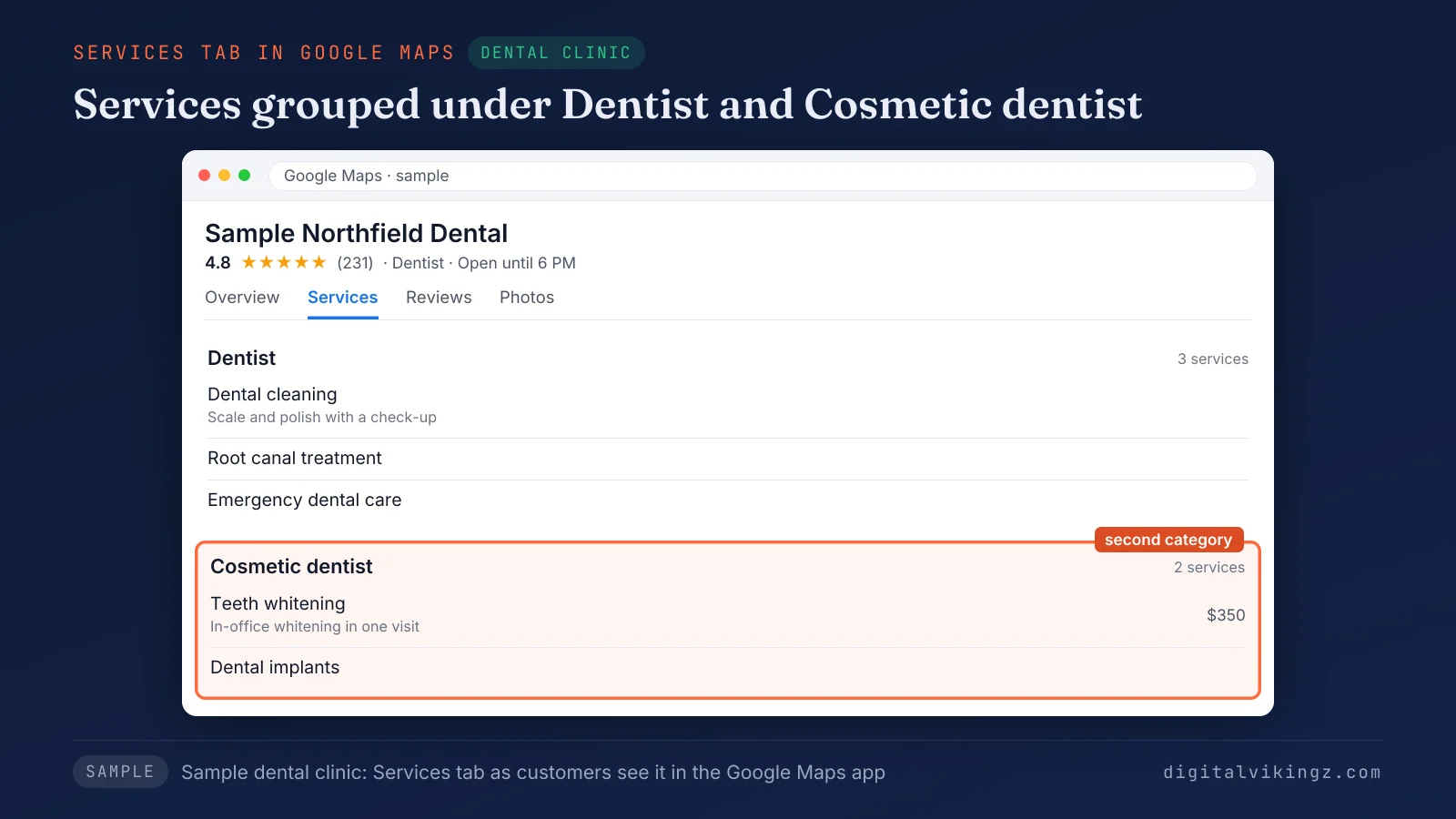
Figure 2 shows a sample dental clinic's services in the Google Maps app, grouped under the Dentist and Cosmetic dentist categories. A category added in the services editor is a business category on the profile, so the category must describe what the business is.
Secondary categories on a Google Business Profile follow the primary category rule: each one names a kind of business, never a single service. Each service in a group can then carry a description and a price.
What should a service description and price say?
A service description should state what the job includes and who it suits, and a price should appear only when the business charges it. Google's help page on services states: "You can add info such as price and description."
We keep each service description to one or two sentences. Google's help page on services gives no character limit for a service description.
A service description works when it answers three questions, listed below:
- Scope: what the job includes, such as parts, inspection or cleanup.
- Fit: the customer or problem the service is for, such as tank or tankless water heaters.
- Condition: how the service is booked, such as by appointment or after a free estimate, stated only when true.
A sample plumbing description on a Google Business Profile follows the pattern. The sample reads: "Water heater repair: diagnosis and repair of gas and electric tank water heaters, including a safety check of the venting."
Prices belong in the price field, because Google rejects custom service names that carry prices. We leave the price field empty when the price depends on an inspection, since a placeholder price misleads the customer. Google's help page on profile edits asks owners to keep each service and its price accurate.
The same description pattern applies across trades, with service names that change by trade.
What services should each trade list?
Each trade should list every job it performs as a separate service, named the way customers ask for it.
Sample services lists for six trades, with suggested services where Google documents them and custom services in customer words, are given in the table below:
| Trade | Suggested services (where Google documents them) | Custom services in customer words | Sample description |
|---|---|---|---|
| Plumber | Install faucet; Repair toilet | Drain cleaning; Water heater repair; Leak detection | Leak detection: locating hidden pipe leaks behind walls and under slabs before repair. |
| HVAC company | None documented; tick the matches the editor offers | AC repair; Furnace installation; Heat pump service; Duct cleaning | Heat pump service: seasonal inspection, filter change and refrigerant check for ducted heat pumps. |
| Electrician | Install outlets or switches; Repair panel; Install electric car charger | Whole-home surge protection; Generator hookup | Generator hookup: wiring a transfer switch so a portable generator powers chosen circuits. |
| Roofer | None documented | Roof repair; Roof replacement; Storm damage inspection; Gutter installation | Storm damage inspection: a roof check after hail or wind, with photos for the insurance claim. |
| Dental clinic | None documented | Dental cleaning; Teeth whitening; Dental implants; Root canal treatment; Emergency dental care | Teeth whitening: in-office whitening in one visit for adults with natural teeth. |
| Med spa | None documented | Laser hair removal; Chemical peel; Microneedling; Dermal fillers | Chemical peel: a light or medium peel for uneven tone, after a skin consultation. |
Every row is a labelled sample, so each business keeps only the services it performs. Suggested lists change by category and country. The services editor, not a published list, shows which suggestions a Google Business Profile can tick.
Homeowners in forum threads say AC, furnace and heat pump more often than HVAC, so the HVAC row uses those words.
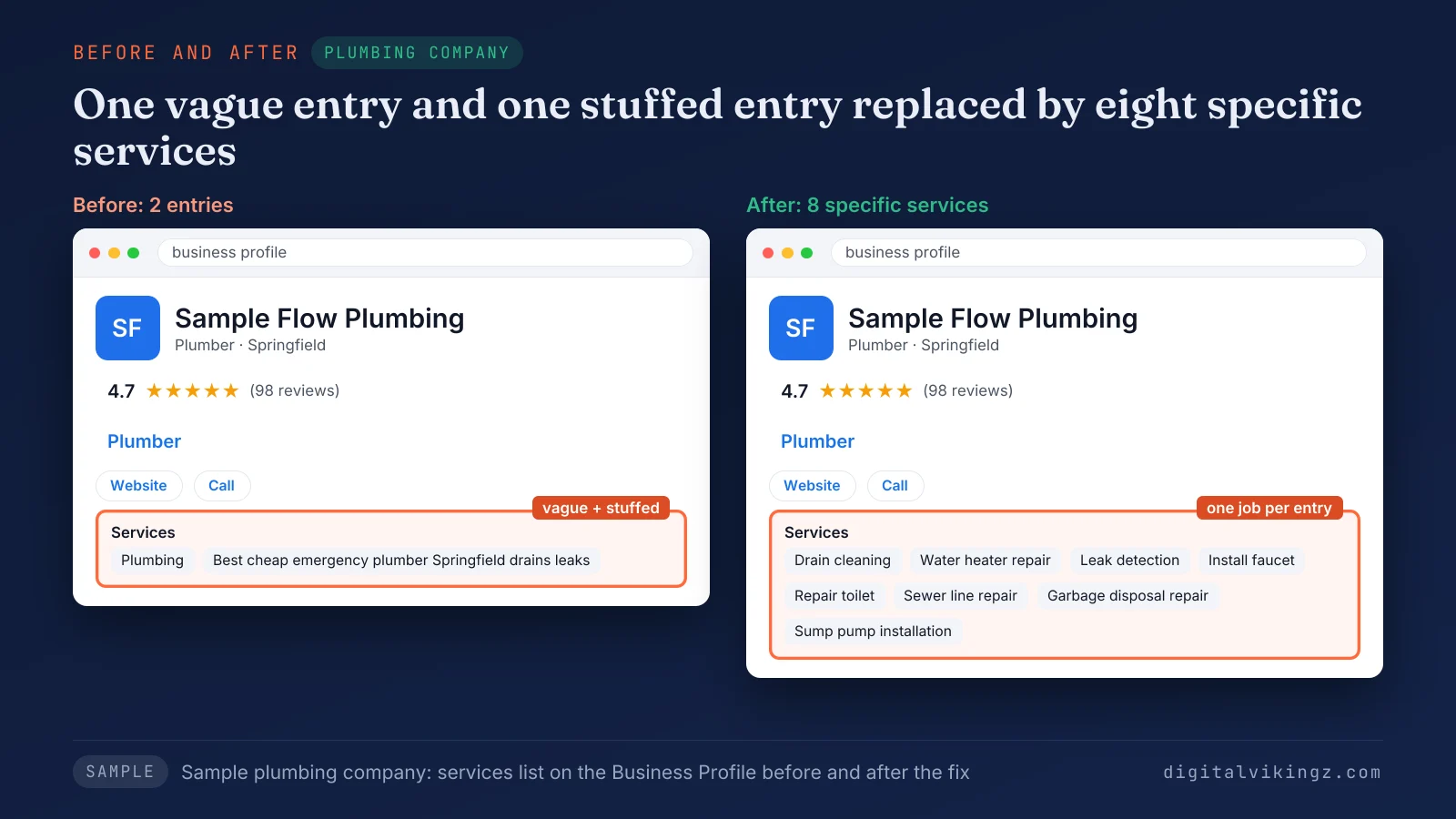
Figure 3 shows a sample plumbing company's services list before and after: two vague or stuffed entries on the left, eight specific services on the right. The rest of a plumber's profile and website work is covered in local SEO for plumbers and their service areas.
Goods sold beside the services in the table, such as a med spa's skincare, go in a different editor.
How do you add products to a Google Business Profile?
Owners add products to a Google Business Profile by signing in, selecting Edit products, filling in the product form and clicking Publish.
The five steps to add a product, from Google's help page on the product editor, are listed below:
- Sign in to the Google Account you use to manage your Business Profile.
- Go to your Business Profile.
- Click Edit products.
- Fill out the fields in the form.
- To submit a product, click Publish.
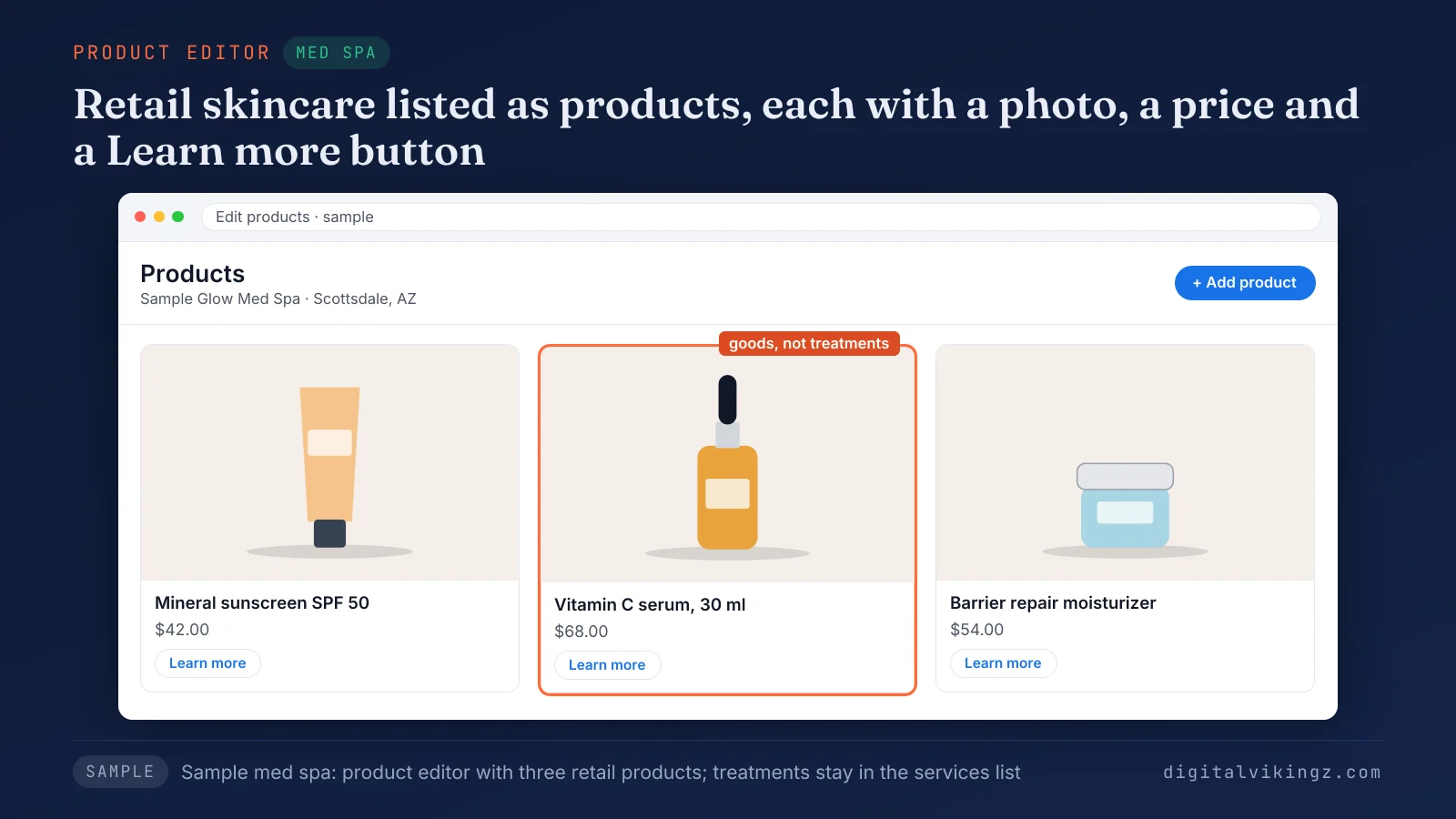
Figure 4 shows a sample med spa's product editor with three skincare products, each with a photo, a price and a Learn more button.
Google's help page on the product editor states: "Products submitted through product editor must adhere to the shopping ads policy." The page warns: "If you submit products that violate Google's policy, it can result in the removal of all of the products you uploaded." A profile already linked to Merchant Center sends the owner from Edit products to Merchant Center instead.
BrightLocal and GMBapi, two local SEO publishers, give a 58-character name, a 1,000-character description and a photo of about 1,200 x 900 pixels. The same sources list an optional fixed price or price range and a button such as Learn more or Buy. Google's Product Studio, a generative AI tool, can replace a product photo background for merchants in the US.
Product entries are added through the product editor, outside the three post types. Google's documentation also states that product posts are not available through the posting API. Offers and event dates belong in the three Google Business Profile post types instead of product entries.
Figure 4 shows goods, not treatments, and the reason is Google's scope for the product editor.
Can a service business add products?
A service business can add products only for physical goods it sells, because Google points services to the services editor. Google's help page on the product editor states: "If you sell services, you can add the services you offer with the services editor."
The same Google page describes physical goods, products without barcodes and stores without an online checkout. Practitioners on the Local Search Forum report roofers, plumbers and HVAC companies listing services as products. The same practitioners disagree about what Google allows.
The safe pattern keeps every service in the services list and every product entry for an item the customer takes home. Services entered as products risk the policy removal Google describes, and that removal can take every uploaded product.
Two sample businesses show the fit on a Google Business Profile. A med spa can list retail sunscreen and serums, and an HVAC company can list air filters sold over the counter. The difference between the two editors is clearest beside categories, descriptions and posts.
How do services, products and categories differ?
Categories state what the business is, services list what the business does, and attributes describe facts about the place or the offer. Products show the goods a business sells, the description summarizes the business, and posts carry offers, events and updates with a date.
Five fields of a Google Business Profile, and what each one states, are compared in the table below:
| Field | What the field states | Example for a sample dental clinic | Changes how often |
|---|---|---|---|
| Primary and secondary categories | What the business is | Dentist; Cosmetic dentist | Rarely |
| Services | Each job the business performs | Teeth whitening | When a service is added or dropped |
| Products | Each physical item sold | Whitening toothpaste | When stock changes |
| Description | A summary of the business in prose | One paragraph on the practice | Once or twice a year |
| Posts | An offer, event or update with a date | A holiday opening notice | Weekly |
One fact belongs in one field, so a service named in the services list needs no category of its own. The Google Business Profile description field summarizes the business in prose and repeats no entry from the services list.
The method for the category row is set out in how a Google Business Profile primary category is chosen. Most rejected or removed entries come from a fact placed in the wrong field.
Which mistakes get services or products rejected or removed?
Google Business Profile services and products get rejected or removed for prices, phone numbers or keywords in names, or for false entries.
The six mistakes that most often break Google's rules for services and products are listed below:
- Prices or phone numbers in custom service names (automatic rejection, Google's help page on services).
- Keywords or place names added to service names (names must match the job, and areas belong in the service area setting).
- Services the business does not perform (the services editor keeps services accurate).
- Services entered as products (shopping ads policy, with removal of all products).
- A new category for every service (Google: "Do not select a category for every product or service").
- Placeholder or outdated prices (the services editor keeps prices accurate).
The same stuffing rule applies to keywords in the business name on Google, which can lead to a suspension. Digital Vikingz checks every service and product entry against these rules as part of Local SEO and Google Business Profile optimization for trades and clinics.
Some entries never appear even without a mistake, and the cause is usually the editor or the review.
Why are Google Business Profile services or products not showing?
Google Business Profile services or products usually fail to show because the category lacks the editor, an edit awaits review, or Google removed the entry. Google's help page on profile edits states: "We review your changes before we update them live on your profile."
Eight symptoms owners report, with the likely cause and the check for each, are given in the table below:
| Symptom | Likely cause | Check or fix |
|---|---|---|
| No Edit services option | The category has no services editor (Google) | Confirm the primary category is accurate, and read the next section before changing the category |
| A custom service vanished after saving | Automatic rejection of the name (Google) | Rename the service without prices, phone numbers or personal information |
| An edit saved but not public | Google reviews each edit (Google) | Wait for the review and check the profile again later |
| Services show in the Maps app but not on a computer | The full list shows under Services in the Maps app (Google); little desktop display (practitioner report) | Check the services on the Google Maps app |
| Services appeared that the owner never added | Google suggestions added to the list (practitioner report) | Delete every service the business does not perform |
| Edit products opens Merchant Center | A linked Merchant Center account (Google) | Manage products there or request access |
| All products disappeared | Policy removal under the shopping ads policy (Google) | Remove services entered as products and re-add only goods |
| The whole profile is limited or suspended | A guideline breach elsewhere on the profile | Follow the reinstatement steps |
A limited or suspended profile needs the steps in how a suspended Google Business Profile gets reinstated. The first symptom tempts many owners to switch the primary category.
Should you change the primary category to unlock services?
No, a primary category should name what the business is, not unlock the services editor. A Local Search Forum administrator warned in March 2024 that switching the primary category to unlock a field would cost ranking benefit.
A Google Business Profile Community reply in February 2024 suggested adding a relevant secondary category instead. The reply is a volunteer tip, not a Google rule.
A business without a services editor can still name its services in the description and in posts. Customers are not the only readers of a services list on a Google Business Profile.
Do AI assistants read Google Business Profile services?
AI assistants can repeat the services a Google Business Profile lists, because business profiles are one of the four source types they read. AI assistants read four kinds of sources for a local business: business profiles, directory and review sites, the business website and third-party mentions.
Ignite Visibility, a digital marketing agency, advised in November 2026 that businesses maintain accurate services for Google's AI answers in Maps. A service named the same way on the profile and on the website gives an assistant one consistent fact to repeat.
The stages behind a recommendation are laid out in how AI assistants choose a local business from its listings. Consistency only lasts when someone checks the list on a schedule.
How often should services and products be checked?
Services and products should be checked after every change to what the business sells, after any profile edit and once a month. Google's suggested lists for a Google Business Profile change over time. A monthly check can surface new suggestions that match the business.
Practitioners also report Google adding services the owner never chose, which a monthly check removes.
A monthly check of the two lists covers four points, listed below:
- Delete services the business no longer performs.
- Tick new suggested services that match work the business performs.
- Update prices that changed.
- Remove product entries for goods no longer sold.
Owners who want each listed service to appear in fresh posts can use Daily Google posts for a local service business. Our AI agent drafts one post a day from the business's own website. The page also shows a free preview of today's post.
A current services list and current product entries give each post accurate facts to draw on.
Google Business Profile services and products questions
How many services can a Google Business Profile list?
Google's help page on services sets no maximum number of services. Rallio, a social media vendor, states that a profile can list as many services as the business offers.
How long can a service or product description be?
Google states no limit for service descriptions, and BrightLocal and GMBapi give 1,000 characters for a product description. Google's help page on the product editor does not state the product limit itself.
What size should a product photo be?
A product photo of about 1,200 x 900 pixels is the size BrightLocal, GMBapi and Rallio recommend. Google's help page on the product editor names no pixel size.
How do you remove a product from a Google Business Profile?
Owners remove a product by selecting Edit products, opening the product and choosing Delete from the menu. Google lists the path as Click Menu Delete on the product editor help page.
Can the same offer be listed as a service and a product?
An offer should sit in one section only: services for work performed, products for goods sold. Forum answers disagree on duplicates, and Google's pages describe no case that needs both.
Can products be sold on Google through a Business Profile for free?
Product entries cost nothing on the free Business Profile, but the sale happens in the store or on the business website. Google's product editor targets stores without an online checkout, so a button sends the customer onward.
Are Google My Business services the same as Google Business Profile services?
Google My Business services are the same feature under the product's former name, Google My Business. Guides that still use the old name describe the same services editor.
Can a restaurant use the services editor instead of a menu?
Restaurants use the menu editor, which Google reserves for food and drink businesses. Google's product editor page also directs dining establishments to upload photos of dishes with the menu editor.
Services and products on a Google Business Profile: next step
A complete Google Business Profile lists every service the business performs and only the physical goods it sells. Services go in through Edit services, products go in through Edit products, and each fact sits in one field. Digital Vikingz builds the services list, the website and the listings around the same facts in semantic SEO for local service businesses and clinics.
