 Digital Vikingz
A suspended Google Business Profile can be reinstated by reading the stated reason, fixing the cause, and filing one appeal with matching evidence. A suspension is a profile status Google sets for a guideline issue, and the appeals tool names the reason and the violated policy.
Suspended and disabled profiles share one appeal, while a restricted Google Account needs the account appeal on the My accounts page first. Most suspensions trace to six causes, according to Google's guidelines and practitioner reports. The causes are extra words in the name, an ineligible address, a shown home address, a keyword category, a duplicate profile and a big edit.
The appeal goes in once, with documents matching the profile. Google states that reviews and decisions can take up to 5 business days. A Not Approved decision can go to an additional review, and a fixed root cause lowers the chance of a repeat suspension.
What does it mean when a Google Business Profile is suspended?
A suspended Google Business Profile is a profile status Google sets when a profile breaks Google's guidelines, until an approved appeal reinstates the profile. Google's suspension help page states: "We may suspend or disable Business Profiles that don’t follow our guidelines."
Google adds that a suspended business gets "a notification in the Google Account you use to manage your profile." Each suspension is a recorded decision. The appeals tool shows the date, the reason, a link to the violated policy and the appeal status.
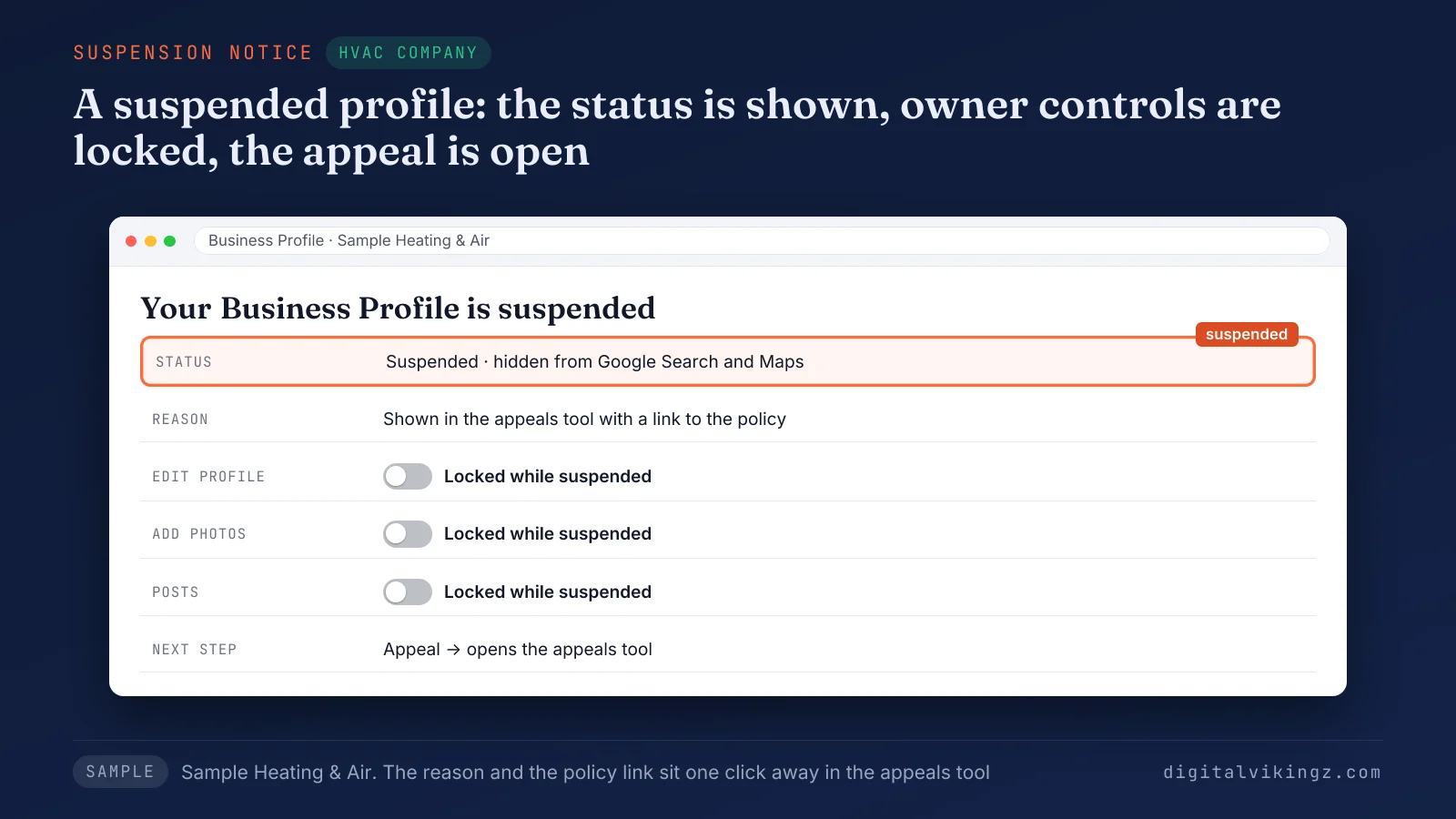
The sample HVAC profile shows the suspension banner and an Appeal button. The reason sits one click away in the appeals tool.
Older guides call the same status a Google My Business suspension, after the former name of Google Business Profile. The next step is telling a suspended profile apart from a disabled profile and a restricted Google Account.
How do you tell if a Google Business Profile is suspended, disabled or restricted?
Suspended, disabled and restricted Google Business Profiles show in different places: the profile notice, the appeals tool, and the My accounts page. A restricted Google Account shows on the My accounts page, because it is an account status set one level above every profile the account manages.
A signed-out Google Maps search for the business name shows what customers see, apart from the owner view.
The table below matches what an owner sees to the likely Google Business Profile status and the first action:
| What the owner sees | Where the status shows | Likely status | First action |
|---|---|---|---|
| A notice that the profile is suspended or disabled; no result in a signed-out Maps search | Google Account notification, profile dashboard, signed-out Google Maps | Profile suspended or disabled | Read the decision in the appeals tool |
| Profile still public, but owner edits and photos are locked | Profile dashboard, signed-out Google Maps | Profile restriction (owner features locked) | Read the decision in the appeals tool, then fix before any appeal |
| Every profile on the account suspended at once; no way to create or claim profiles | My accounts page of the Google Account | Google Account restricted | Appeal the account on the My accounts page first |
| Decision shows Not Approved or Can't be appealed | Appeals tool | Appeal denied | Additional review with new evidence |
Account restrictions come first, because Google suspends every Google Business Profile that a restricted account manages.
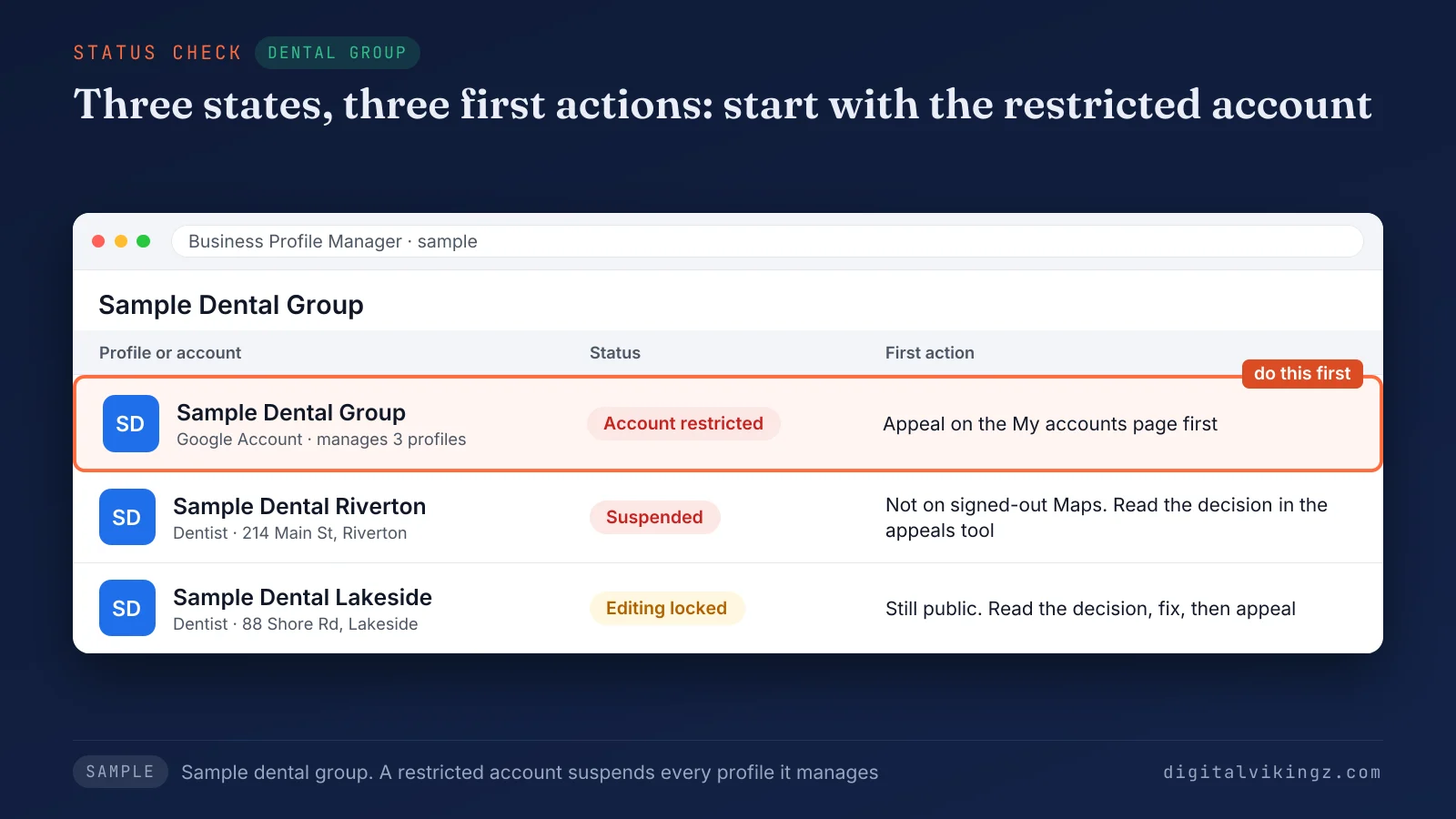
The sample dental group shows three locations in three states, and each state starts with a different first action. Suspended and disabled profiles then share one appeal path, which settles the most common status question.
Is a disabled Google Business Profile different from a suspended one?
A disabled Google Business Profile is not different from a suspended one in the fix: Google sends both statuses to the same appeal. Google's help page for both is titled "Fix suspended or disabled profiles."
The appeal page lists "Suspended or disabled profile" as one appeal type.
Practitioners use two informal terms instead of Google's pair: soft suspension and hard suspension. A soft suspension leaves the Google Business Profile public with owner controls locked, according to those practitioners. A hard suspension removes the profile from Google Search and Google Maps.
Google does not use either term on the help pages. A third status sits above the profile, at the level of the Google Account that manages the profile.
What happens to the profiles when the Google Account is restricted?
A restricted Google Account suspends every Google Business Profile the account manages, and the account appeal comes before any profile appeal. Google's help page states that, after an account restriction, "the Business Profiles you manage are suspended."
The same page adds that a restricted account loses the option to create or claim other profiles. The account appeal goes through the My accounts page, where the appeal status is also tracked. Each Google Business Profile appeal follows once Google lifts the account restriction.
Google describes what a removal does to each account role below:
- Owner account: Google removes all the locations owned by that user, and reinstating the account reinstates those locations.
- Manager account: Google suspends the manager on the accounts the manager handles, and the locations stay unaffected.
Practitioners advise checking the profile users for a former agency or an unknown manager before any appeal. The reason Google gave then points to the cause, once the status and the account are clear.
Why was my Google Business Profile suspended?
Your Google Business Profile was suspended for the guideline named in the appeals tool, and six causes explain most suspensions of local service businesses. A suspension that feels like one "for no reason" still carries a stated reason and a policy link in the appeals tool.
Owner reports show notices that name a broad policy, such as deceptive content, rather than the field that broke the rule. Practitioners also report closer checks on spam-prone trades, such as locksmiths, plumbers and garage door repair.
The six causes come from Google's written guidelines and from practitioner reports, not from a Google count. The six causes of a Google Business Profile suspension are listed below:
- Extra words in the business name
- An address Google does not accept
- A home address shown by a service-area business
- A category used as a keyword
- A second profile for the same business
- A big edit, a move or a rebrand in one change
Review policy problems belong to a separate subject: how to get more Google reviews without breaking Google's rules. The name comes first, because extra words in the name are the cause Google names outright.
1. Extra words in the business name
Extra words in the business name, such as a service or a city, can get a Google Business Profile suspended under Google's name rule. Google's guidelines state: "Including unnecessary information in your business name isn't permitted, and could result in the suspension of your Business Profile."
The name should reflect the "real-world name" used on the storefront, website and stationery, according to the same guidelines. A sample name such as "Northside Heating and Air Best AC Repair Tulsa" breaks the rule. The plain "Northside Heating and Air" follows the rule.
The fix is the name on the business documents, with services moved to the services list and the posts. Special characters and legal terms in the name need proof, such as signage, business cards or invoices, under Google's name rule. The address rules in the guidelines come next, because an ineligible address breaks eligibility itself.
2. An address Google does not accept
An address Google does not accept, such as a P.O. box or a virtual office, makes a Google Business Profile ineligible and open to suspension. Google's guidelines state: "P.O. boxes or mailboxes located at remote locations aren't acceptable."
Google adds that a virtual office "isn't eligible for a Business Profile."
A co-working office qualifies only with clear signage, customers received on site, and the business's own staff there during business hours. The fix is a staffed address with signage, or a switch to a service-area profile with the address hidden. A service-area business faces the opposite rule: the address must stay hidden.
3. A home address shown by a service-area business
A service-area business that shows a home address breaks Google's address rule, because Google tells service-area businesses to hide the address. Google's guidelines state: "If you’re a service-area business, you should hide your business address from customers."
The same guidelines use a plumber as the example and say to "clear the address from your Business Profile." Google's guidelines keep the service area within about 2 hours of driving time from the base. Larger areas are allowed for some businesses, the same guidelines add.
An HVAC contractor with a home office keeps the Google Business Profile address hidden and lists the towns as the service area. The towns then belong on the website, in service area pages built without becoming doorway pages. Categories carry a similar suspension risk when an owner picks one for the keyword alone.
4. A category used as a keyword
A category picked as a keyword breaks a Google guideline, and the broken guideline can lead to a Google Business Profile suspension. Google's guidelines state: "Do not use categories solely as keywords or to describe attributes of your business."
A sample plumbing company that adds "Water heater supplier" without selling water heaters uses a category as a keyword. The primary category for a Google Business Profile should name the core business, and services belong in the services list.
A separate guide explains how to choose the primary category for a Google Business Profile. A second profile for the same business breaks a different rule, the one-profile rule.
5. A second profile for the same business
A second Google Business Profile for the same business breaks Google's one-profile rule and can lead to a suspension. Google's guidelines set one profile per business, because a second profile "can cause problems with how your information displays on Google Maps and Search."
Duplicates often come from a past owner, a former agency, or a new profile made during an earlier suspension, according to practitioners. A Google Maps search for the business phone number and the street address finds a second listing.
The duplicate should be reported for removal before the appeal, and no new profile should be created. Large edits can also start a review, even on a profile with a single listing.
6. A big edit, a move or a rebrand in one change
A big edit, a move or a rebrand made in one change can trigger a Google Business Profile suspension, according to owner and practitioner reports. Owners in the Google Business Profile Help Community report suspensions within days of an address change.
Google's guidelines allow a rebrand on the same profile only for a minor name change that keeps the proper nouns, services and category. A bigger name change counts as a new business, and Google says to mark the old profile as closed.
Practitioners advise one change at a time, with the documents updated to the new name or address first. The appeal can start once the cause is fixed and matched to the documents.
How do you get a suspended Google Business Profile reinstated?
A suspended Google Business Profile can be reinstated through one appeal in the appeals tool, filed after the cause is fixed. Google's help page sets one condition before any appeal: "Make sure your profile follows all the guidelines."
The six steps to appeal a Google Business Profile suspension are listed below:
- Read the decision. Open the appeals tool and note the reason and the linked policy.
- Fix the cause. Correct the name, address, category or duplicate that the policy points to, one field at a time.
- Keep the profile. Do not create a new Business Profile for the same business while the suspension stands.
- Prepare the evidence. Gather documents that show the same business name and address as the profile.
- Submit one appeal. Select the profile and the decision, attach the files, explain the fix and submit once.
- Watch the email. Track the status in the appeals tool and wait for the decision email from Google.
Google's help page notes: "Appeals can only be submitted once."
Google also recommends that owners "prepare the documents before submitting an appeal." An owner with a restricted Google Account files the account appeal on the My accounts page before step 5.
The Google Business Profile appeals tool shows the decision, a file upload and a text box for the explanation. The explanation should name the cause, the fix and the date of the fix in a few short sentences.
A new profile made during the suspension counts as a duplicate, according to practitioners, and starts with no review history.
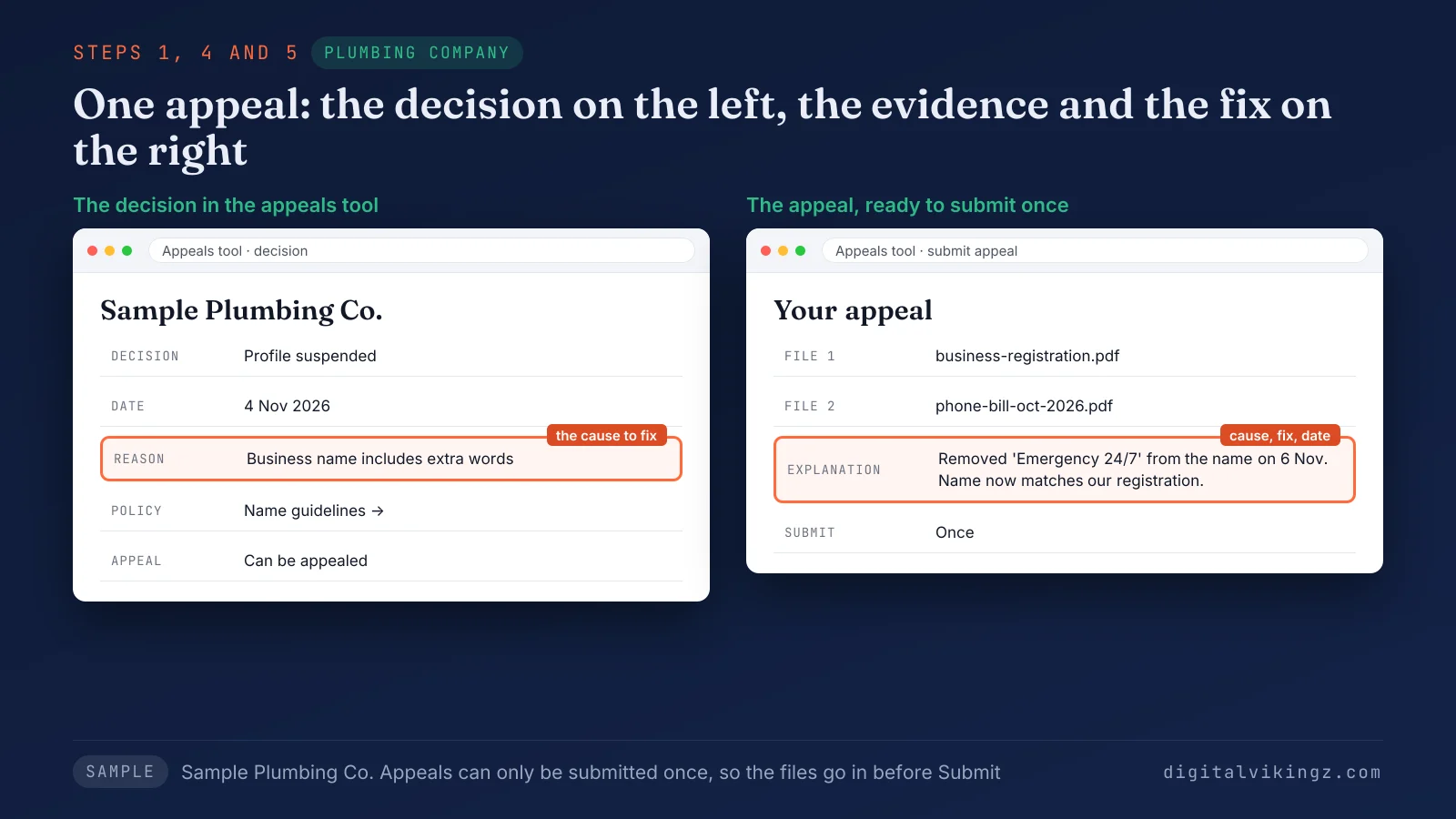
The sample plumbing appeal shows the reason, the policy link and two attached documents before the owner submits once. Step 4 needs a separate check, because the documents carry the proof of the fix.
What evidence helps a Google Business Profile appeal?
Evidence that helps a Google Business Profile appeal shows the same business name and address as the profile, on official documents. Google calls the evidence optional, yet owners report first appeals denied when no documents were attached.
The evidence types Google lists for an appeal are given below:
- Official business registration
- A business license
- Tax certificates
- Utility bills for the business, such as electricity, phone, water or internet
Google's tip asks owners to "check that the business name and address match the profile."
The table below pairs each sample trade with documents from Google's list and the extra proof practitioners suggest:
| Sample trade | Documents from Google's list | Extra proof practitioners suggest | Check before upload |
|---|---|---|---|
| HVAC contractor (service-area) | State contractor license, utility bill for the business | Photo of a branded service van | License name matches the profile name |
| Plumber (service-area) | Business registration, phone bill for the business line | Photo of signed vehicle and equipment | Address on the bill matches the hidden address |
| Roofer after a rebrand | Updated business registration, tax certificate | Photo of new signage or truck lettering | Every document shows the new name |
| Dental clinic or med spa (storefront) | Business license, electricity bill for the suite | Photo of exterior signage with the suite number | Suite number matches the profile address |
Photos sit outside Google's written evidence list, so photos support the documents for a suspended profile and never replace them.
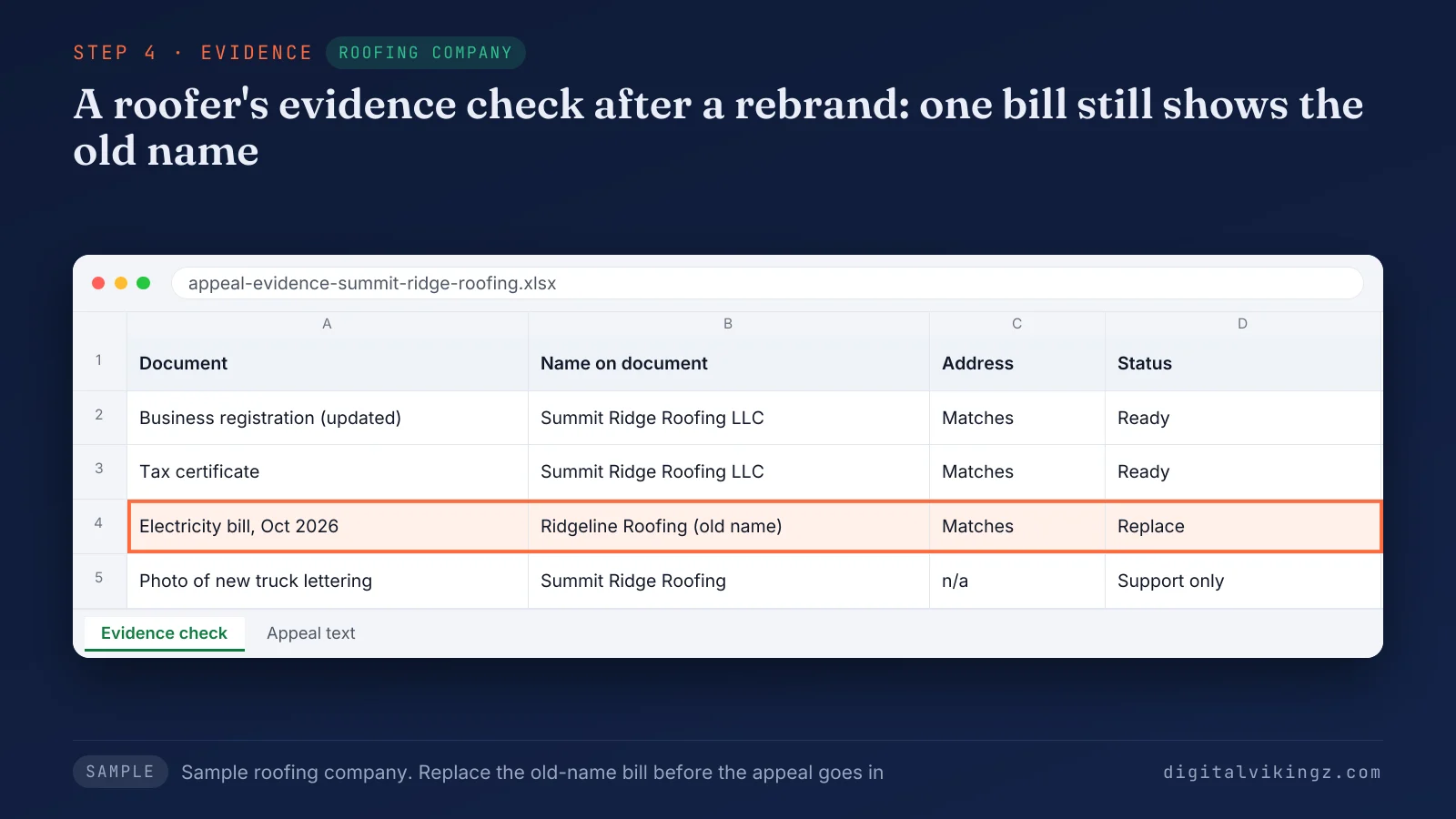
The sample roofing checklist marks each document against the new business name before the appeal goes in. The wait begins once the evidence is attached and the appeal submitted.
How long does a Google Business Profile appeal take?
A Google Business Profile appeal can take up to 5 business days for review and a decision, according to Google's appeal help page. Google's appeal help page states: "Appeal reviews and decisions can take up to 5 business days."
Owners and practitioners report longer waits during busy periods, so the 5-day figure is a Google statement, not a guarantee. Google sends the decision by email, and the appeals tool shows the current status meanwhile.
Practitioners advise against new profile edits while the appeal is open, because each edit can start another review. The appeals tool status shows how far the appeal for a suspended profile has moved.
How do you check the status of a Google Business Profile appeal?
The status of a Google Business Profile appeal shows in the appeals tool, on the right after the profile is selected.
The five appeal statuses Google lists, with a reading of each status and the next step, are given below:
| Status (Google's label) | Reading | Next step |
|---|---|---|
| Submitted | The appeal is under review | Wait for the decision email |
| Approved | The profile is reinstated | Check the profile in a signed-out search |
| Not Approved | The appeal was denied | Request an additional review with new evidence |
| Can't be appealed | The tool offers no appeal for the decision | Read the linked policy and fix the profile |
| Eligible for appeal | The decision is open to one appeal | Fix the cause, then submit one appeal |
Google changes the status of a bulk appeal only for the Google Business Profile selected in the tool. A restricted Google Account shows the account appeal status on the My accounts page instead. A Not Approved status still leaves one more route for a suspended profile.
What can you do when Google does not approve the appeal?
A Google Business Profile appeal marked Not Approved can go to an additional review, with new evidence that the first appeal did not include. Google's help page states: "Only if your reinstatement request is denied, we may be able to do an additional review to prove your eligibility."
Google adds that the owner can provide "additional evidence that wasn’t added with your original appeal." A decision marked "Can't be appealed" offers no route in the appeals tool, so the profile has to meet the linked policy first.
Owners then turn to the Google Business Profile Help Community, where Product Experts can escalate some cases, according to owner reports. Product Experts are volunteers, not Google staff.
A fixed root cause and fresh documents carry more weight in a review than repeated requests, according to practitioners. A new profile for the same suspended business stays off the table at every stage, as Google instructs. Reinstated or not, the profile needs habits that keep the same suspension from returning.
How do you keep a Google Business Profile from being suspended again?
A Google Business Profile is less likely to be suspended again when the root cause stays fixed and later edits match the business documents. Repeat suspensions usually follow an unfixed cause, a new duplicate, or a large edit soon after reinstatement, according to practitioners.
The habits that keep a reinstated Google Business Profile in line with the guidelines are listed below:
- Match the name. Keep the profile name identical to the signage, the website and the documents.
- Edit one field. Change one field at a time and wait for each review to finish.
- Check the users. Review the profile users on a set schedule for old agencies or unknown managers.
- Search for duplicates. Search Google Maps for the business phone number to catch a new duplicate early.
- Update documents first. Change the registration and bills before the profile when the business moves or rebrands.
- Keep the address rule. Keep the home address hidden for a service-area business and the storefront staffed during hours.
Practitioners also advise a dated record of every edit, so a later appeal can name the exact change. The same habits sit inside Local SEO and Google Business Profile work for service businesses. Our Local SEO and Google Business Profile optimization for service businesses keeps profile setup, NAP details and weekly posts in line with each habit.
A reinstated profile also raises three practical questions: reviews, Maps visibility and AI answers.
Do reviews, rankings and calls come back after reinstatement?
Reviews, rankings and calls can come back after a Google Business Profile is reinstated, though Google publishes no promise on rankings or calls. Google's help page says a reinstatement restores "both the profile and its owner and managers."
Owners report reviews restored along with a formerly suspended profile, while rankings can take longer to settle, according to practitioners. Google sends owners with problems on a reinstated profile to Google Business Profile Help.
The Performance report in Business Profile Manager shows whether calls and direction requests return after reinstatement. A full month of data gives a fairer comparison than the first week back. Owners who keep a monthly call log can compare the months before and after the suspension.
A profile that returns lower in the map pack needs the work to rank higher on Google Maps. A reinstated profile that still gets fewer calls needs the separate check for Google Business Profile calls dropped. Calls also depend on whether customers can see the profile again on Google Maps.
Is a suspended Google Business Profile still visible on Google Maps?
A suspended Google Business Profile is usually not visible to other users on Google Maps, though owners report some staying public with editing locked. Google's help page states that a profile breaking the guidelines "won’t show to other users on Google until you resolve the issue."
A signed-out Google Maps search for the business name shows which case applies. A private browser window gives the signed-out view without leaving the Google Account. The owner view can still show the full profile while customers see nothing.
Calls and direction requests from Google Maps stop reaching a profile hidden from customers.
Owners also report a short gap after reinstatement, when the public profile returns before the dashboard status changes. A profile that stays hidden after reinstatement needs the separate diagnosis for a business not showing on Google Maps. Google Maps is not the only place where a suspension removes the business.
Do AI assistants still recommend a suspended business?
AI assistants can stop recommending a suspended business, because a hidden Google Business Profile removes one source the assistants read. AI assistants pick a local business from profiles, directories, reviews and websites, then name the few whose facts agree.
Directories and the website keep describing the business during a suspension, so consistent facts there still matter. Assistants with live search can still read the website, directories and reviews while the profile is hidden.
Directory listings should keep the same name, address and phone number as the suspended profile during the gap. The remaining sources then decide which local business AI assistants choose to recommend while the profile is out.
A reinstated Google Business Profile returns that source to the set an assistant reads.
Google Business Profile suspension questions
Google Business Profile suspensions also raise questions about phone contact, the old reinstatement form, competitors, content appeals, bulk appeals and the dashboard.
Is there a phone number for a Google Business Profile suspension?
Google's suspension help page names no phone route, because the appeal runs in the appeals tool and the decision arrives by email. Google adds that rejected edits and other content outside the UK and EEA go through the contact us form.
Where is the Google Business Profile reinstatement request form?
The reinstatement request form in older guides is now the Google Business Profile appeals tool, the route Google's current help pages give. Guides that still describe the old form predate the appeals tool.
Can a competitor get a Google Business Profile suspended?
A competitor can trigger a review with suggested edits or user reports, according to practitioners, and Google decides the outcome against the guidelines. A profile whose name, address and category match the documents gives such a review little to act on.
Can a content appeal be filed while the profile is suspended?
A content appeal waits until the Google Business Profile is reinstated, because Google says a suspended or disabled profile "must be reinstated" first.
How do you appeal more than 10 suspended Google Business Profiles?
More than 10 suspended Google Business Profiles go through one bulk appeal with a spreadsheet of Business Profile IDs and supporting documents, according to Google. The appeals tool asks: "Are you requesting bulk reinstatement for 10 or more suspended locations?"
Why does the dashboard still show Suspended after reinstatement?
A dashboard that still shows Suspended after an approved appeal is a case for Google Business Profile Help, the contact Google names for reinstated profiles.
The first step after a Google Business Profile suspension
The first step after a Google Business Profile suspension is reading the reason in the appeals tool, because the reason decides each fix that follows. Status, cause, evidence and one appeal come in that order, with a restricted account before the profile.
Digital Vikingz checks client Google Business Profiles in the same order before any appeal is filed. A reinstated profile stays active with regular Google posts. A free sample shows what daily Google posts for a home-service business look like.
