 Digital Vikingz
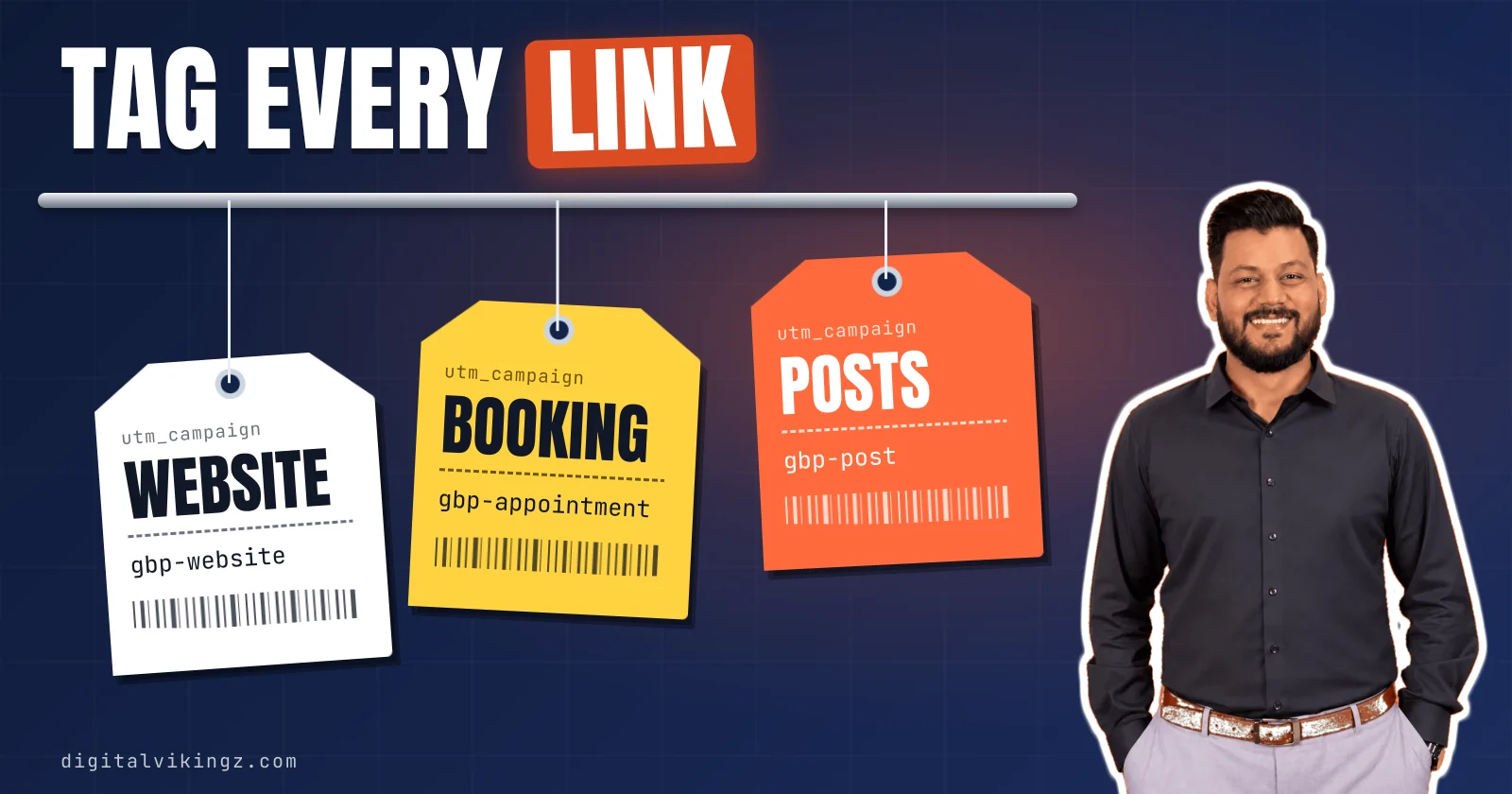
Google Business Profile UTM tracking is the practice of adding utm_source, utm_medium and utm_campaign tags to profile links, so GA4 separates those visits from other Google traffic. Untagged profile visits can land in Organic Search or Direct, mixed with every other visit from Google. Tag the website link first, then the appointment, order, reservation and menu links and every post button.
Use utm_source=gbp with utm_medium=organic, and GA4 keeps the visits in Organic Search on their own gbp / organic row. GA4's Traffic acquisition report then shows sessions and key events for each tagged link. Calls, direction requests and messages never open the website, so they stay in the Performance report.
What is UTM tracking for a Google Business Profile?
Google Business Profile UTM tracking is the practice of adding utm_source, utm_medium and utm_campaign tags to profile links, so GA4 separates those visits from other Google traffic. The tags go on the profile's website, booking and post links.
Owners also call the tags UTM codes, and a link that carries them a tracking link. Google's Analytics help states that a URL with UTM parameters "should always use utm_source, utm_medium, and utm_campaign". The optional utm_content tag separates one link, post or location from the next.
Older guides call the same setup GMB UTM tracking, after the Google My Business name. Profile visits without the tags blend into other GA4 channels.
Where do untagged Google Business Profile visits show up in GA4?
Untagged Google Business Profile visits can show up in GA4 as Organic Search or Direct, mixed with every other visit from Google. GA4 files every visit in one default channel group, chosen by the visit's source and medium.
A profile website click on Google Search usually arrives with source google and medium organic, the same pair a search result click carries. Clicks from the Google Maps app or an in-app browser can lose the referrer and arrive as (direct) / (none), which GA4 files as Direct.
The Performance report counts Website clicks as "the number of times people clicked on the website link on your Business Profile." The Performance report stops at the click, before the landing page or the form fill.
The Google Business Profile performance report lists calls, direction requests and website clicks for the profile itself. Tags fix the blend one profile link at a time.
Which Google Business Profile links can carry a UTM tag?
Every Google Business Profile link that opens the business's own website can carry a UTM tag, from the website link to each post button. Google asks owners to "Enter the full URL, which includes http:// or https://" in the website field.
Google adds that "Some business categories might be able to add more links to their website, like online orders, reservations, or appointments."
The Google Business Profile links worth tagging, in the order to tag them, are listed below:
- Website link: the main link on the profile and the first one to tag (
gbp-website). - Appointment link: the booking link that dental clinics, med spas and other booked businesses add (
gbp-appointment). - Order and reservation links: the links some categories add for online orders and table bookings (
gbp-order,gbp-reservation). - Menu link: the menu or service menu link that restaurants and med spas use (
gbp-menu). - Product link: the link on a product listed on the profile, where the product points to the site (
gbp-product). - Post button link: the button on each update, offer and event post (
gbp-post).
Social media links open Facebook, Instagram or another platform, so a tag on them never reaches your GA4 property. Tagging the contact links is one step in how to optimize a Google Business Profile in 13 steps. Post buttons need one more value than the other links.
How do you tag Google Business Profile post buttons?
Google Business Profile post buttons take the same three tags as the website link, plus a utm_content value that names the post. A sample furnace tune-up post for an HVAC company links to https://www.sampleheatingair.example/furnace-tune-up/?utm_source=gbp&utm_medium=organic&utm_campaign=gbp-post&utm_content=2026-12-furnace-tune-up.
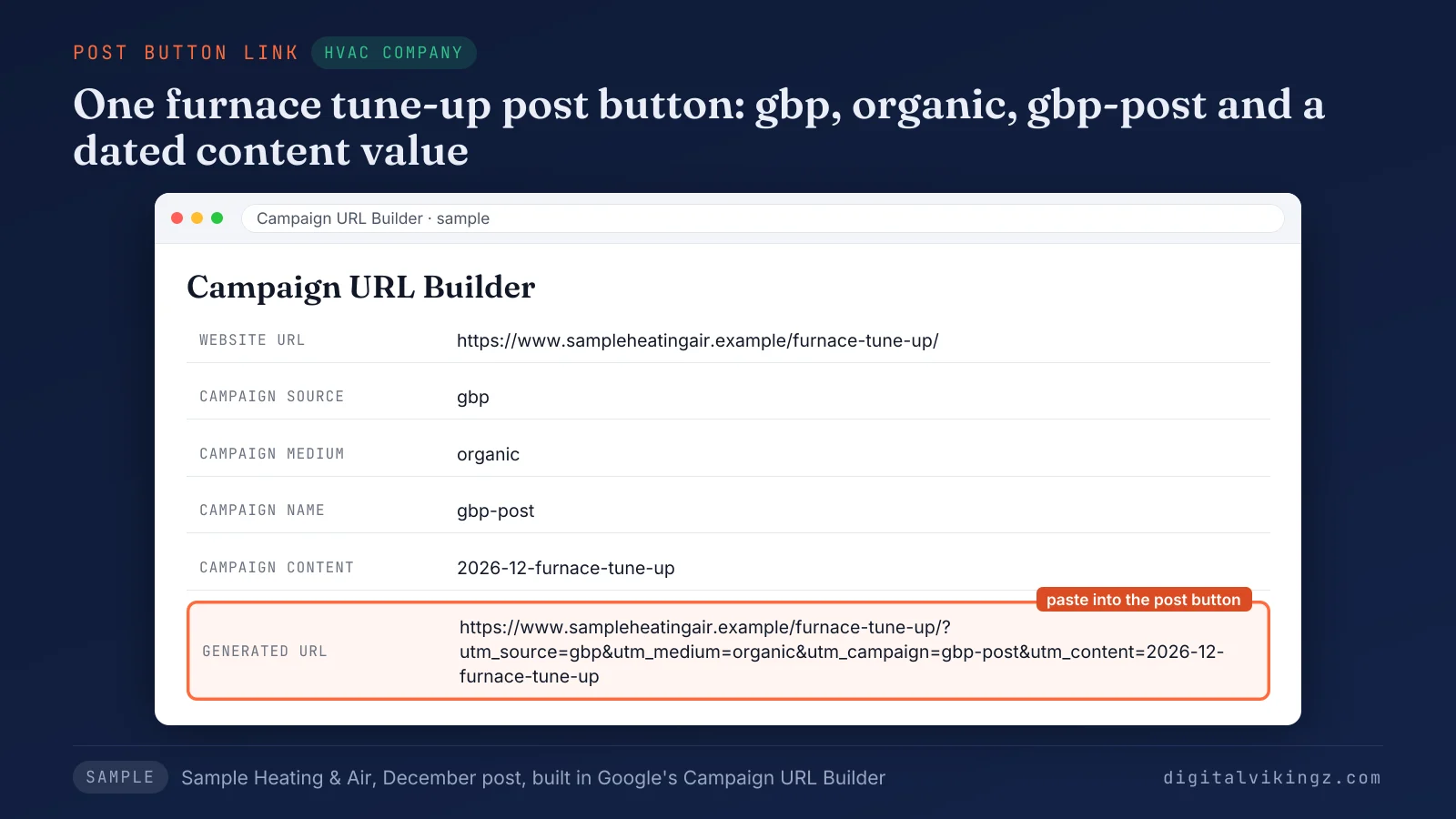
The sample Campaign URL Builder for Sample Heating & Air turns the furnace tune-up page into one tagged button link for the December post. The business names, domains and numbers in our figures are samples, not client data.
A date and topic in utm_content keep each post on its own row while the campaign value stays gbp-post.
Owners still decide what to put in Google Business Profile posts before the tag goes on. Our guide on what to put in Google Business Profile posts covers the post text, the button choice and the posting cadence. Every tag value then follows one naming rule.
Which UTM values should Google Business Profile links use?
Google Business Profile links should use utm_source=gbp and utm_medium=organic, because GA4 then keeps the visits in Organic Search and lists them on their own row. Ranking guides split between utm_source=google and utm_source=gbp, and both stay in Organic Search while the medium is organic.
The google source merges profile visits with search result visits in the Session source / medium report, so only the campaign value separates them. The gbp source gives the profile its own gbp / organic row without leaving the Organic Search channel.
Google's help warns that "Parameter values are case sensitive", so GBP and gbp appear as two separate sources.
The naming convention below gives each Google Business Profile link one fixed set of tag values:
| Profile link | utm_source | utm_medium | utm_campaign | utm_content |
|---|---|---|---|---|
| Website link | gbp | organic | gbp-website | location (several locations only) |
| Appointment link | gbp | organic | gbp-appointment | location |
| Order link | gbp | organic | gbp-order | location |
| Reservation link | gbp | organic | gbp-reservation | location |
| Menu link | gbp | organic | gbp-menu | location |
| Product link | gbp | organic | gbp-product | product name |
| Post button | gbp | organic | gbp-post | post date and topic |
Lowercase values with hyphens keep the convention readable and stop case splits. Each source and medium pair lands in one GA4 channel.
Which GA4 channel does each source and medium pair land in?
GA4 puts a Google Business Profile visit in Organic Search when utm_medium is organic or utm_source is a search site, and in Unassigned when no rule matches. GA4's Organic Search rule reads "Medium exactly matches organic" or a source that "matches a list of search sites".
The GA4 default channel for each source and medium pair is shown below:
| utm_source | utm_medium | GA4 default channel | GA4 rule that decides |
|---|---|---|---|
| organic | Organic Search | Medium exactly matches organic | |
| gbp | organic | Organic Search | Medium exactly matches organic |
| gbp | Organic Search | google is on the search-site list | |
| gbp | referral | Referral | Medium is referral, app or link |
| gbp | post | Unassigned | No channel rule matches |
Only the gbp and organic pair gives the profile its own row inside Organic Search. Google states that "Default channel groups can't be edited in Google Analytics" and that the definitions "may evolve as the market changes."
A custom medium is the case where the source decides the channel.
Does a custom utm_medium send Google Business Profile visits to Unassigned?
A custom utm_medium sends Google Business Profile visits to Unassigned only when utm_source is not on GA4's list of search sites. A visit tagged gbp / post lands in Unassigned, while a visit tagged google / post stays in Organic Search.
GA4 uses Unassigned "when there are no other channel rules that match the event data." Guides that say any custom medium means Unassigned leave out the source half of the rule.
The tagged URL goes into the profile once the values are set.
How do you add a tagged link to a Google Business Profile?
A tagged link is added to a Google Business Profile under Edit profile, after the URL is built in Google's Campaign URL Builder. Google's own UTM builder is the Campaign URL Builder.
The steps to add a tagged link to a Google Business Profile are listed below:
- Open Google's Campaign URL Builder and enter the page address the link should open.
- Enter gbp as the source, organic as the medium and the campaign value for the link, such as gbp-website.
- Copy the tagged URL and check that the page address holds only one question mark.
- Open the profile on Google Search or Maps and select Edit profile.
- Paste the tagged URL, starting with https://, into the website field or the appointment, order or menu field.
- Save, open the public profile and click the link to see the tag in the address bar.
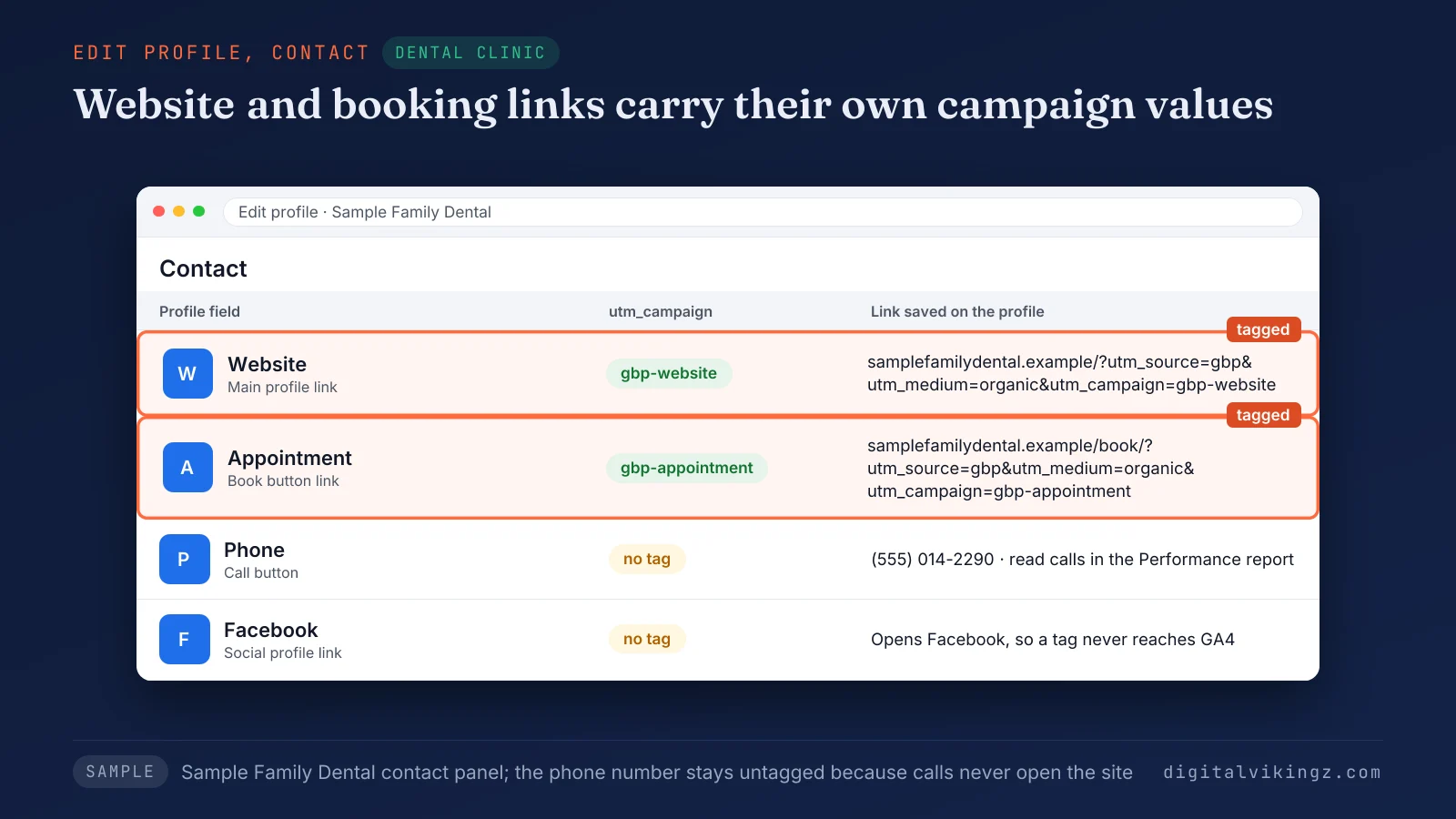
The sample contact panel for Sample Family Dental carries gbp-website on the website link and gbp-appointment on the booking link. A page address that already holds a question mark takes the tags after an ampersand instead.
A tag that saves can still fall off the live link.
Why does a UTM tag fall off the live profile link?
A UTM tag falls off the live Google Business Profile link when the page redirects, a listing tool overwrites the field, or the URL is built wrong. Practitioners on Local Search Forum reported tags stripped from the website button in January and June 2025.
The causes of a lost tag, each with its fix, are listed below:
- Redirect: the tagged address redirects to another version of the page, such as http to https. BrightLocal notes that a redirect "might strip the UTM tagging". Tag the final address.
- Listing tool overwrite: a listings management platform pushes its own URL back to the profile. BrightLocal notes that the tag lasts only until the next push. Add the tag inside the tool.
- Broken query string: a second question mark, or tags that start with an ampersand, break the tag. Use one question mark, then ampersands.
- Edit screen check: the edit screen can show a tag the public profile does not show yet. Check the public profile.
GA4's Realtime report confirms the fix when a test click appears with source gbp. A tagged link also raises an owner question about ranking.
Do UTM tags hurt Google Business Profile ranking?
UTM tags on profile links have no documented effect on Google Business Profile ranking, which Google bases on relevance, distance and prominence. Google lists "To simplify tracking metrics for a piece of content" among the reasons to set a canonical URL.
A self-referencing canonical tag on the landing page points search engines to the clean URL, so the tagged address does not compete as a duplicate. The tag changes the label on the visit, not the page the profile links to.
The tagged visits are then read in GA4.
How do you see Google Business Profile visits and key events in GA4?
Google Business Profile visits appear in GA4 under Reports, Acquisition, Traffic acquisition, on the gbp / organic row once the table shows Session source / medium. The report opens on "Session default channel grouping", which Google calls the default dimension.
Switching the table to Session campaign splits the visits into gbp-website, gbp-appointment and gbp-post rows.
The Key events column counts form fills, bookings and other website actions that GA4 records as key events. An event becomes a key event under Admin, Events, where Google says to mark the event "by clicking the star icon next to it."
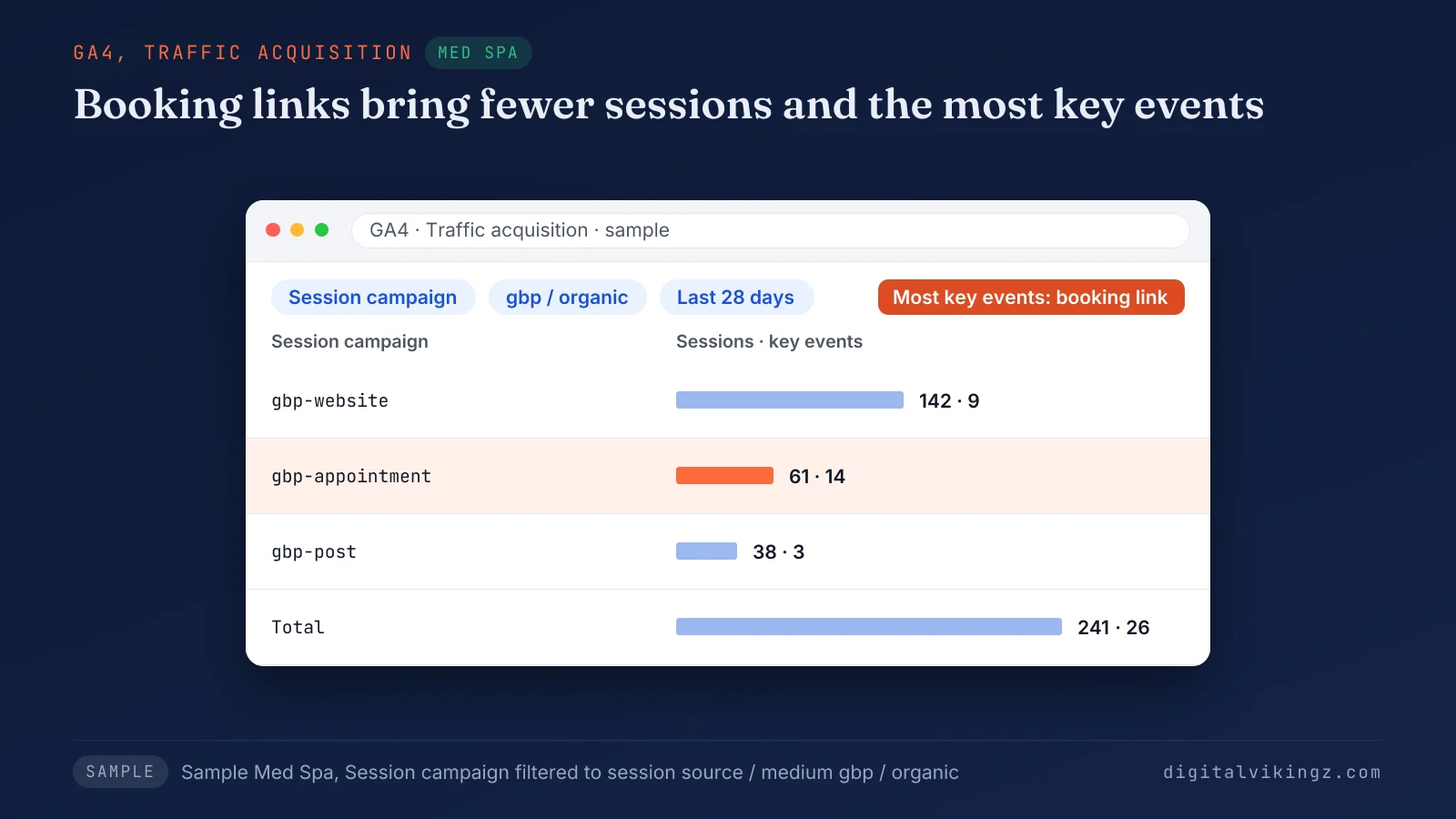
The sample report for Sample Med Spa shows 142 sessions and 9 key events from gbp-website. The same sample shows 61 sessions and 14 key events from gbp-appointment, and 38 sessions and 3 key events from gbp-post.
A custom channel group, built under Admin, Data display, Channel groups, can give the profile its own channel. The build steps match the ones we use to track ChatGPT traffic in GA4 with a custom channel group. GA4 also offers a direct link to the profile itself.
How is the GA4 Business Profile link different from UTM tags?
The GA4 Business Profile link imports the profile's own performance data, while UTM tags record the website sessions and key events that follow a click. Google says the link shares "performance data from your Business Profile, such as interactions, website clicks, calls, directions", plus messages, bookings and menu clicks.
The link is set up in GA4 Admin under Product links, Google Business Profile links. The person linking needs the Administrator or Editor role in GA4 and the Owner or Manager role on the profile. One GA4 property can link several Google Business Profiles.
UTM tags still supply the landing page, the session and the key event, so the two methods work together. Some profile actions never reach the website at all.
What can UTM tags not track on a Google Business Profile?
UTM tags do not track calls, direction requests or messages from a Google Business Profile, because none of the three opens the website. Google counts Calls as "the number of times a customer clicked on the call button" and Messages as "the number of different conversations through messages."
The three actions are read in the Performance report or through the GA4 Business Profile link. Google added a Message button beside Call in Google Maps on 5 November 2026, so some contacts now go to messages instead of website clicks.
A call tracking number on the profile should follow Google's rule that the phone number stays under the direct control of the business. A drop in calls is checked with the Google Business Profile calls dropped checklist, not with GA4.
The Google Business Profile calls dropped checklist covers the call log and the call tracking rule in full. Every extra location multiplies the links to tag.
How do you tag Google Business Profile links for several locations?
Businesses with several locations tag Google Business Profile links with the same source, medium and campaign values, plus a utm_content value that names the location. Google describes utm_content as the tag to "Use to differentiate creatives."
A city or store code in utm_content, such as hillcrest or store-014, splits sessions and key events by location in GA4. Multi-location guides from BrightLocal, FoundHint and Trojan Digital Marketing also carry the location in utm_content. A separate campaign value per location would scatter one link type across many campaign names.
One sheet lists each location, its landing page and its tagged website and booking links. A new location gets its row in the sheet before its profile edit goes live.
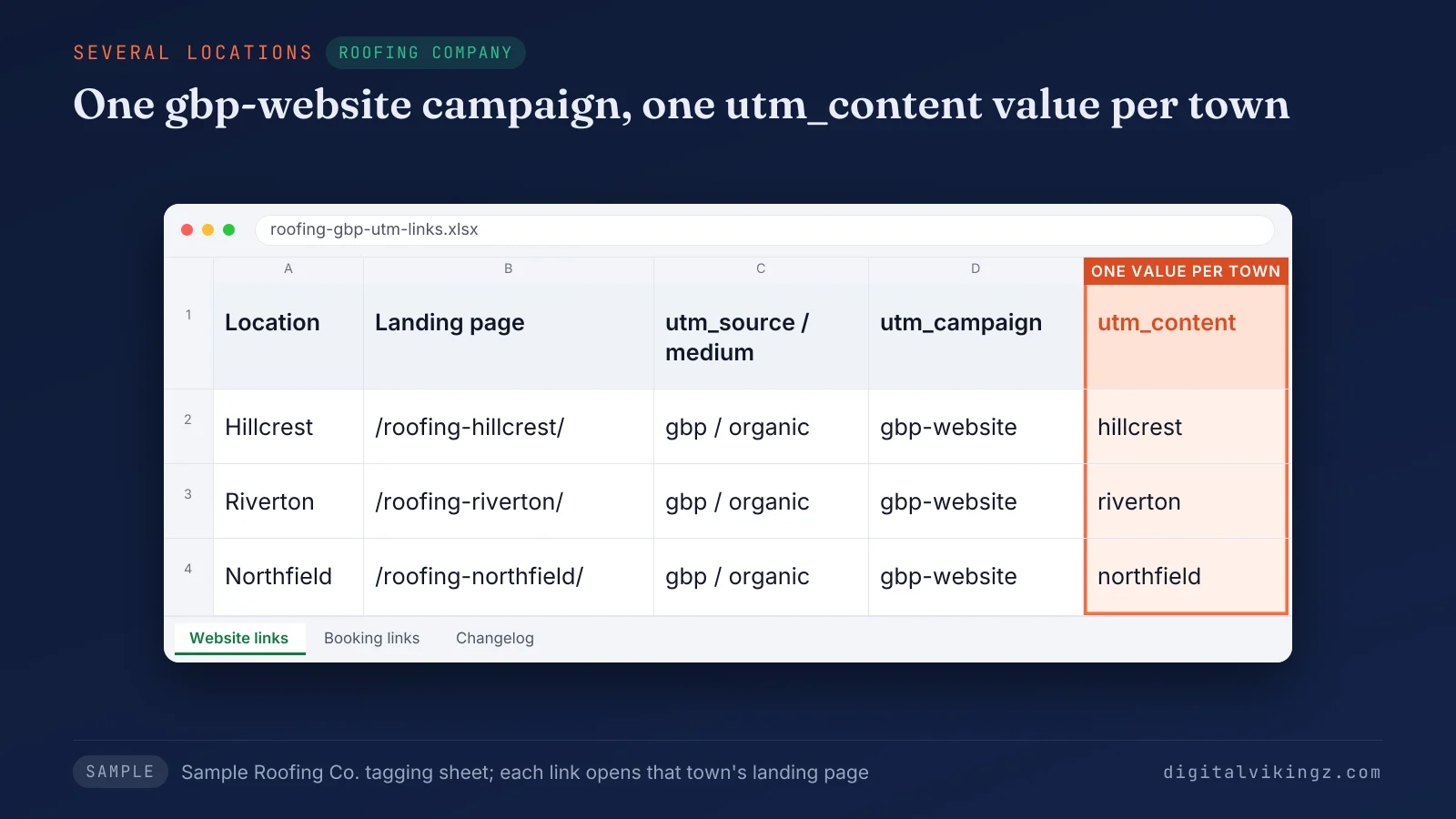
The sample sheet for Sample Roofing Co. gives Hillcrest, Riverton and Northfield the same gbp-website campaign and a different utm_content value each. Each tag points at the landing page for that town, not the homepage, so GA4 shows which location page earns the visit.
Location values stay lowercase and match the town name on the landing page. Service-area businesses without a storefront follow the same rule, with the service area name as the location value. Accounts with several brands keep one convention across every brand, so one gbp / organic filter in GA4 covers all profiles.
Our Local SEO and Google Business Profile service gives each location its own profile, page and post plan, and the monthly report splits calls and clicks by location. Tagged profile links give each location's calls and clicks a matching row of GA4 sessions and key events.
Owners with several locations can book a 30-minute strategy call for a written scope of Local SEO and Google Business Profile Optimization for multi-location businesses. Agencies report the same rows to each client.
How do agencies report tagged profile visits to clients?
Agencies report tagged Google Business Profile visits by placing GA4 sessions and key events beside the Performance report's calls, direction requests and website clicks each month. GA4 sessions can run lower than Performance report website clicks, because GA4 counts only visits that load the page and run the tag.
Google states that Performance report data "includes views, searches, and actions from both organic search results and Google Ads." The two counts therefore measure different events, so each report column should name its source.
One monthly row per location holds sessions, key events, calls, direction requests and website clicks, read together. Last year's same month beside each new month keeps seasonal dips visible.
A month with many Performance report clicks and few GA4 sessions can point to a stripped tag or a redirect on the profile link. A Realtime test click after every profile edit confirms the tag before the next monthly report goes out. Agencies that manage many client profiles keep one convention for every client, so each report reads the same way.
Key events show leads, not revenue, so the report stops at the form fill or booking. Revenue from those leads needs the method to attribute SEO to pipeline and revenue.
Larger accounts follow our method to attribute SEO to pipeline and revenue in a monthly report. Every row in the report depends on each Google Business Profile link keeping its tag.
Frequently asked questions about Google Business Profile UTM tracking
Should utm_term be used on Google Business Profile links?
utm_term is not needed on Google Business Profile links, because Google defines utm_term as the "Paid keyword" field and profile visits are unpaid. The three required tags and an optional utm_content cover every profile link.
Is utm_id required on Google Business Profile links?
utm_id is optional on Google Business Profile links, since Google names utm_source, utm_medium and utm_campaign as the tags to always use. Teams that already number campaigns can add utm_id as a fixed campaign code.
Can UTM tags separate Google Maps visits from Google Search visits?
UTM tags do not separate Google Maps visits from Google Search visits, because one website field serves the profile on both surfaces. The gbp / organic row therefore covers both Maps and Search clicks.
Do UTM tags break NAP consistency on a Google Business Profile?
UTM tags do not break NAP consistency, because citations compare the business name, address and phone number, not the query string on the website link. Keep the page address before the question mark identical to the site's live version.
Can GA4 show the search terms behind a Google Business Profile visit?
GA4 does not show the search terms behind a tagged Google Business Profile visit. The Performance report lists the searches that showed the profile.
Should Bing Places links use the same UTM convention?
Bing Places links should use the same convention with their own source value, such as bingplaces, so Bing Places and Google Business Profile visits stay on separate rows. A medium of organic keeps Bing Places visits in Organic Search as well.
Where should you start with Google Business Profile UTM tracking?
Start Google Business Profile UTM tracking by tagging the website link with gbp, organic and gbp-website, then the booking link and every post button. Check the live link after each profile edit and each listing tool sync.
Digital Vikingz runs Daily Google Posts, where our AI agent puts a button to your website on every post and logs its date, text and link. See what the agent writes with a free Daily Google Posts preview of today's post.
