 Digital Vikingz
A semantic content brief for SEO turns one node of the topical map into one page and decides every heading before writing starts. Digital Vikingz writes each semantic content brief in seven steps that run from one topical map row to a check of the finished brief. The map row is where the guide on how to build a topical map ends. A semantic content brief holds four tabs, Brief, Questions, Queries and N-Grams, and each tab stores part of what a content brief decides.
The brief splits the headings into macro and micro context and places the information gain under named headings. Content Briefs within Semantic Content Writing supplies the briefs alone. AI agents can draft the briefs through SEO Automation with human review. Each finished brief adds one page to how topical authority is built.
How do you write a semantic content brief for SEO?
A semantic content brief for SEO is written in seven steps, from one topical map row to a check before the writer starts.
The seven steps that write a semantic content brief are listed below:
- Start from one topical map row, which fixes the entity, query, page decision and planned links.
- Read the search results for the row's query and record the agreement area and gaps.
- Collect the queries and questions around the node, then group them into one canonical question per need.
- Order the headings into a contextual vector and draw the border between macro and micro context.
- Write the methodology under each heading: starting sentence, answer format, entities, terms and word range.
- Plan the internal links, with one anchor text per target from the anchor register.
- Check the finished brief against the map row and the research before any writer sees the brief.
We read the eight readable guides that held page one of Google for "how to write a content brief for SEO" on 13 November 2026. All eight list keywords as a brief field, and none starts the brief from a topical map row. A semantic content brief keeps those fields, including keyword research, secondary keywords, audience and tone. Creating a semantic content brief adds what those guides leave to writers: each heading's question, answer format, order and contextual border.
A content brief is the document that turns one node of the topical map into one page.
Every semantic content brief therefore starts from one topical map row.
1. Start from one row of the topical map
Starting from one topical map row fixes the entity, the representative query, the page decision and the planned links of the page.
The "target keyword" a reader expects is the row's representative query. The row also lists every phrasing the page absorbs. The row gives the title, URL slug, meta description, page type, absorbed variants, bridge to a service page and planned links. A query without a row marked "page" gets no content brief of its own and becomes a heading or sentence in another brief. The content brief states the page goal in one line: the query network answered and the next reader action.
Our sample row for a B2B SaaS company names the entity "employee onboarding software" and the query "how to automate employee onboarding". The same row plans one link to the onboarding feature page. Step 1 outputs the frame of the content brief: entity, predicate, goal, title, slug, meta description and planned links.
A team without a map runs the seven steps of how to build a topical map first. Each row is the output of the page decisions described in how to build a topical map. The row's query then goes to the search results.
2. Read the search results for the row's query
Reading the search results shows which source types rank, which answer shape Google prefers, and what the ranking pages leave out.
The reader's word for the step is "competitor analysis". A semantic content brief records the step as six readings.
The six readings a brief records from the search results are listed below:
- Source types: The source types count how many vendors, agencies, publishers and forums hold the first ten results.
- Answer shape: The answer shape records the form of the AI Overview and the top result: steps, a list or a definition.
- People Also Ask: People Also Ask questions, expanded twice, become candidates for the Questions tab.
- Top page headings: The heading lists of the top five pages show the orders the new page competes with.
- Agreement area: The agreement area holds the facts and definitions that ranking pages state the same way.
- Gaps: The gaps list what the ranking pages leave out, such as a step, a unit, a question type or an example.
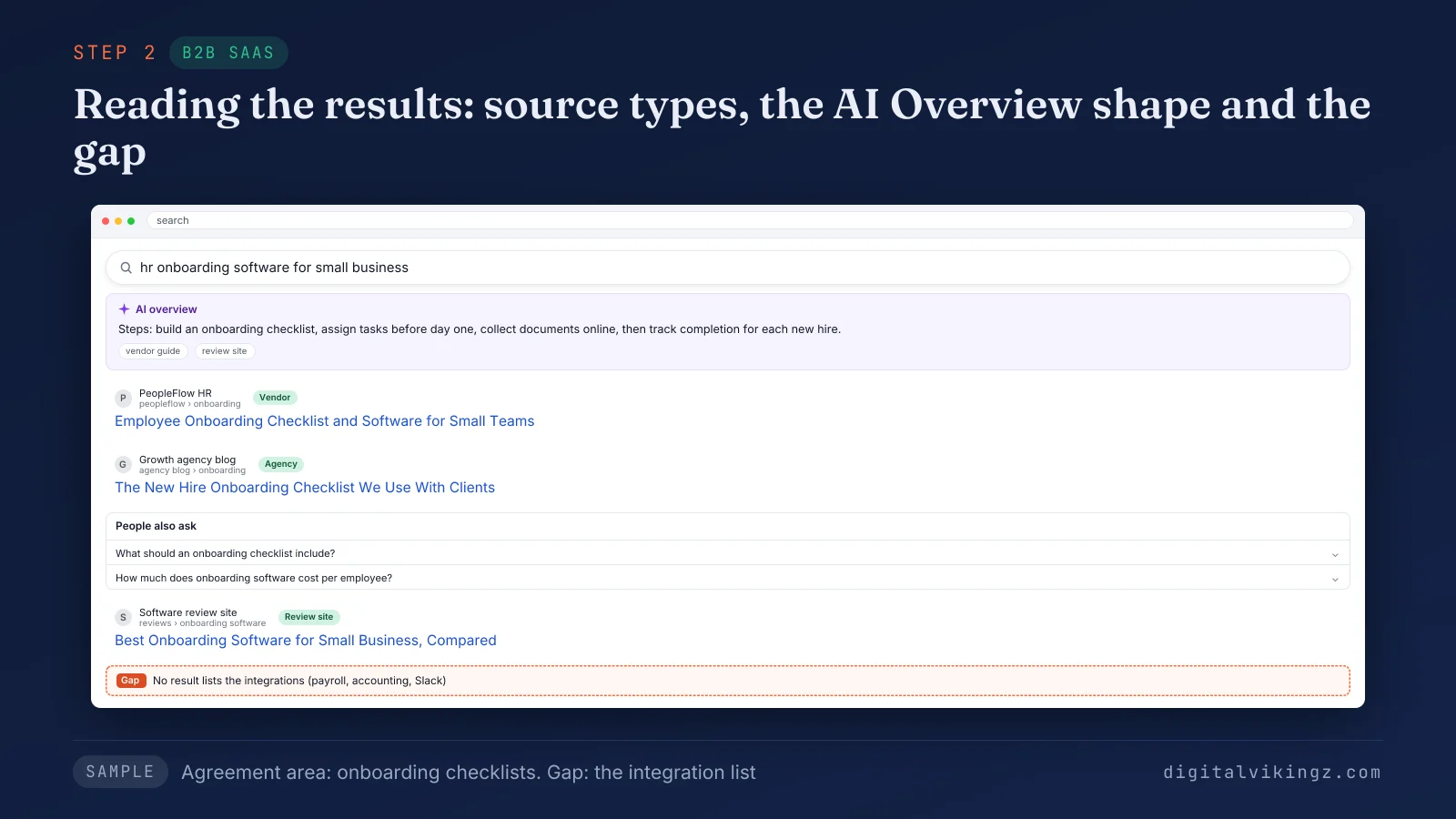
The sample shows vendors and agencies sharing the first results, a step-list AI Overview and an agreement area on onboarding checklists. The gap is the missing integration list.
A figure that appears on only one ranking page stays out of the content brief. A query with no ranking page of the site's own source type returns to the map, not to a content brief. Step 2 outputs the agreement area and the gap list. The read also feeds the questions of step 3.
3. Collect the queries and questions, then group them
Collecting the queries and questions gathers every phrasing of the node's need, and grouping them leaves one canonical question per need.
Questions come from Google Search Console, the sales team, forums, competitor headings, People Also Ask, autocomplete and related searches. Questions sharing one need, heaviest term and answer shape form one group. A group's canonical question is the shortest grammatical form of the group's broadest question.
The six question types a brief assigns to each canonical question are given below:
- Definitional: A definitional question asks what an entity is, and the answer opens with the entity and its class.
- Grouping: A grouping question asks for the types, parts or steps of an entity, and the answer is a list.
- Comparative: A comparative question sets two entities side by side, and the answer states the difference first.
- Boolean: A Boolean question takes a yes or no answer and closes its heading group.
- Process: A process question asks how to do something, and the answer is an ordered list of actions.
- Quantity: A quantity question asks how much, how many or how long, and the answer gives a number with its unit.
Each canonical question gets one Questions tab decision: heading, FAQ, sentence in another heading, or excluded with the owner page named.
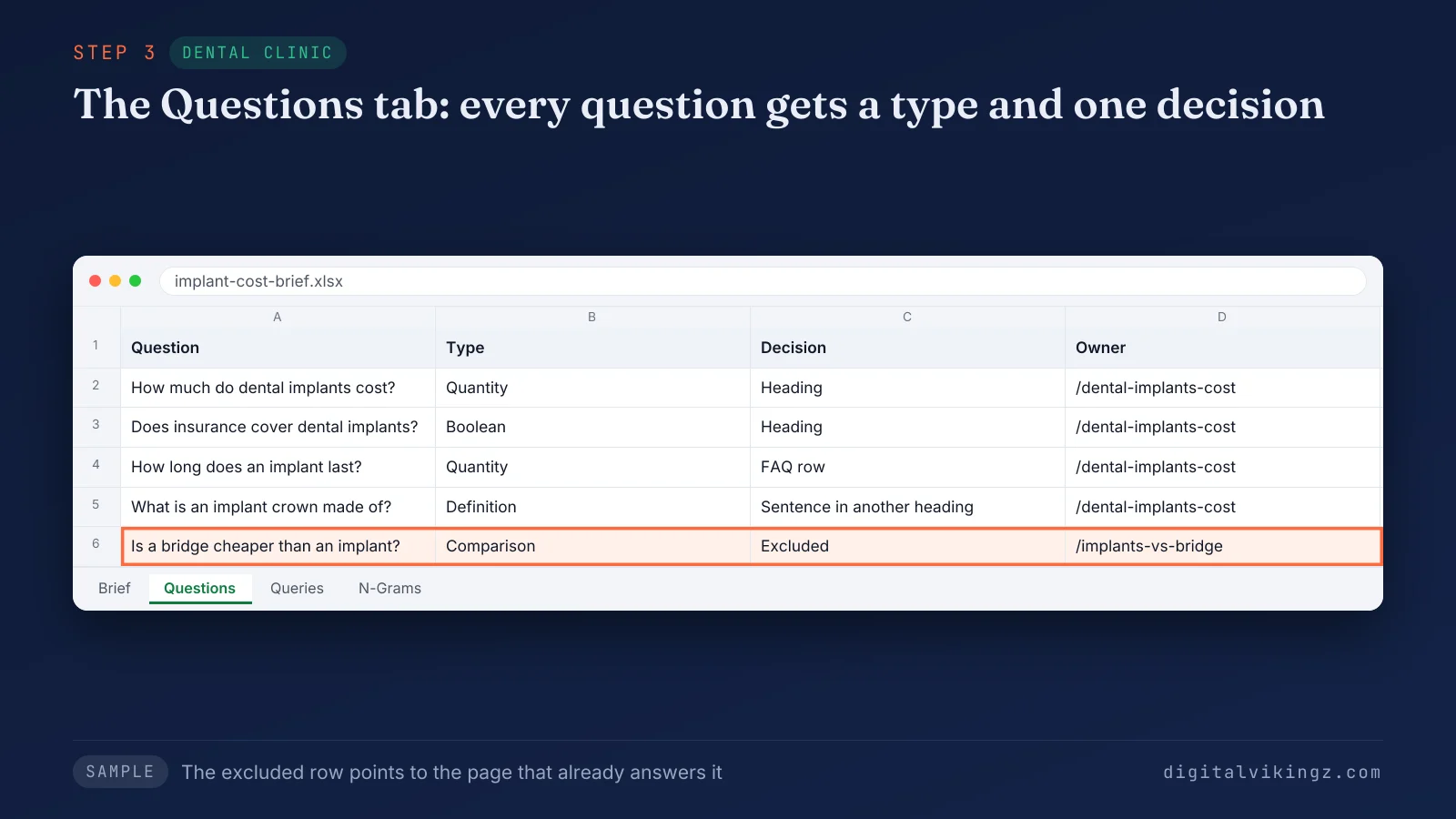
The excluded row points to the clinic's comparison page, so the implant cost page answers each question once. The Queries tab pairs each query from the ranking pages and the row's absorbed variants with the content brief row covering the query. The canonical questions then need a heading order.
4. Order the headings and draw the contextual border
Ordering the headings turns the canonical questions into a contextual vector, the sequence that carries the reader from the H1 to the last heading.
The contextual vector replaces the "outline", the reader's word for a heading list, because the place of each heading is decided, not listed. The representative question becomes the first H2, and each broad H2 sits above the specific H3 that narrows the H2. Boolean questions close their group as an H3 or H4, and numbered steps share one heading level. Each heading in the content brief makes the planned link the natural next click.
The contextual border is the first H2 of the micro context, where macro and micro context meet. We keep about 70 to 80 percent of the body words above the border and the rest below. Main and supporting content are defined in detail in the entry on macro and micro context.
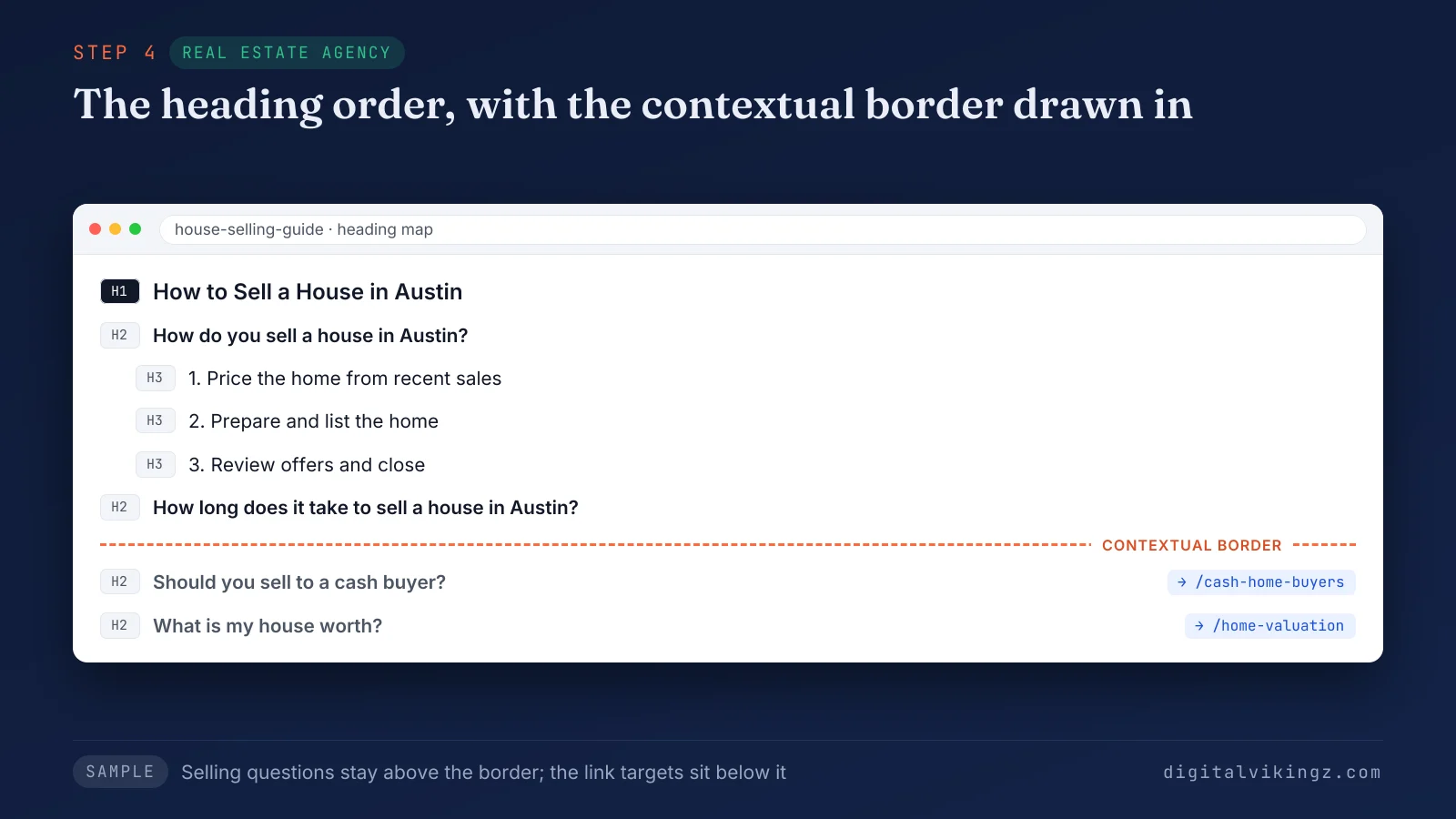
Selling questions sit above the dashed border, while the cash buyer and valuation questions sit below the border with the links. Each heading in the vector then needs a methodology.
5. Write the methodology under each heading
Writing the methodology tells the writer how to answer each heading: starting sentence, answer format, entities, terms and word range.
The lines a methodology cell holds for each heading are listed below:
- Starting sentence: The starting sentence is the bold one-sentence answer that opens the section, given in full or as a pattern.
- Answer format: The answer format names a paragraph, a list with its row count, or a table with its columns.
- Entities and units: The entities and units name what the section mentions, with every unit the queries use.
- Figures: Each figure carries its unit, two authoritative sources and the range inside which the sources agree.
- N-Grams: The N-Grams line lists the phrases from ranking pages that the section uses in a fixed wording.
- Word range: The word range gives a minimum and a maximum, set by the questions the section answers.
The N-Grams tab classifies each phrase as an entity term, a context term, an answer term, an allowed synonym or a banned term. A content tool's term list therefore never enters the content brief unfiltered.
Our sample methodology for the onboarding software heading asks for a starting sentence naming the software, a six-row instruction list and one link. Each gap from step 2 becomes information gain inside one named heading, with its evidence in the same section. The scoring idea behind what a page adds is covered in the knowledge entry on information gain. The methodology cells leave one decision open: the links.
6. Plan the internal links and anchor texts
Planning the internal links decides each target page, its anchor text and the sentence after which the link sits, before the writer starts.
Each target page has one anchor text in the anchor register; the anchor names the target page. We cap each anchor string at three uses site-wide. The link follows the definition of the linked term, never inside the opening answer of a section and never on a first word. Links grow denser toward the bottom of the page. The key link to the service page sits under the border heading. A target page that is not live yet keeps the anchor phrase as unlinked text, and the link follows at publication.
Our sample brief for a real estate agency places the link to the home valuation page under the border heading of the selling guide. Step 6 fills the connection column of the content brief. The full link plan then goes to a final check.
7. Check the brief before the writer starts
Checking the brief before the writer starts confirms that every heading, answer format, figure and link traces to the map row or the research.
The checks a brief passes before the writer starts are listed below:
- Match the title, slug, meta description and planned links to the map row.
- Trace every heading to a canonical question in the Questions tab.
- Confirm that no heading answers a question another page of the site owns.
- Confirm that every figure traces to the sources named in its methodology cell.
- Confirm that the first micro heading is an H2 that carries the key link.
- Mark the brief ready only when every row has its methodology and link plan.
The check compares the content brief with the map row and the research, never with the reviewer's own preference. Abad Aslam, our content marketing lead, runs the check on every brief before a writer sees the brief. A content brief that fails a check goes back to the step that produced the failing row. A checked content brief then holds its decisions in four tabs.
What does each tab of a semantic content brief hold?
A semantic content brief holds four tabs, Brief, Questions, Queries and N-Grams, and each tab records one kind of decision for the writer.
The table below lists what each tab records, the step that fills the tab, and what the writer does with the tab.
| Tab | What the tab records | Filled in step | What the writer does with the tab |
|---|---|---|---|
| Brief | One row per heading: the heading, its level, its methodology and its link | Steps 4, 5 and 6 | Drafts the page from the rows in order |
| Questions | Every question found, its type, its canonical group and its decision | Step 3 | Answers each question at the heading or FAQ row named |
| Queries | Every query, the row that covers the query, and its place before or after the target query | Steps 2 and 3 | Absorbs each phrasing in the row named |
| N-Grams | The phrases ranking pages share, each with a class and a placement | Steps 2 and 5 | Uses each phrase where placed, in its fixed wording |
The Brief tab is the one the writer drafts from, and the other three tabs hold the evidence behind each row. The reviewer reads all four tabs, because a draft is checked against the evidence as well as the headings.
Together the four tabs record what a content brief decides. The three groups of decisions, meaning, structure and links, appear in the guide to what a content brief decides. One decision appears in every Brief tab row: the word range.
Does a semantic content brief set a word count?
A semantic content brief sets a word range for each heading, not one fixed word count for the whole page.
The range comes from the questions the heading answers and the depth of same-type pages that rank. The average length of the top ten results is a reference, never a target. Published guides split on the point: some ask for a word count range, and others leave fixed word counts out of the brief. The page total is the sum of the heading ranges, so a short answer stays short. A finished brief carries a range on every row.
What happens after a semantic content brief is finished?
A finished semantic content brief goes to the writer, and a separate reviewer later checks the draft against the same rows.
The writer drafts the page from the Brief tab in row order and keeps every heading exactly as the brief words the heading. The reviewer is never the writer. A draft that fails a row goes back with the row named. The page then goes live in map order. Older pages gain their links to the new page at publication.
Teams with in-house writers can order Content Briefs within Semantic Content Writing, as four-tab briefs without the writing. Briefs, drafts and map-order publishing sit together on the service page for Content Briefs within Semantic Content Writing. The number of content briefs the map needs should be agreed on a strategy call before the first order. The document a semantic content brief replaces is the keyword brief.
How does a semantic content brief differ from a keyword brief?
A semantic content brief decides the question and answer format under every heading, while a keyword brief stops at a list of fields.
A keyword brief, sometimes called a traditional SEO brief, gives a keyword, a word count, a tone and a deadline.
The table below compares a keyword brief and a semantic content brief on six decisions.
| Decision | Keyword brief | Semantic content brief |
|---|---|---|
| Starting point | One keyword | One topical map row |
| Headings | Chosen by the writer or copied from ranking pages | Canonical questions in a fixed order and level |
| Answer under each heading | Key points | A starting sentence and an answer format |
| Terms | A term list from a content tool | Filtered N-grams with a placement |
| Links | A list of URLs | An anchor, a position and a target per heading |
| Review | A read by an editor | A row-by-row check against the brief |
Two writers given one keyword brief produce two different pages. One semantic content brief narrows every writer to the same headings and answers.
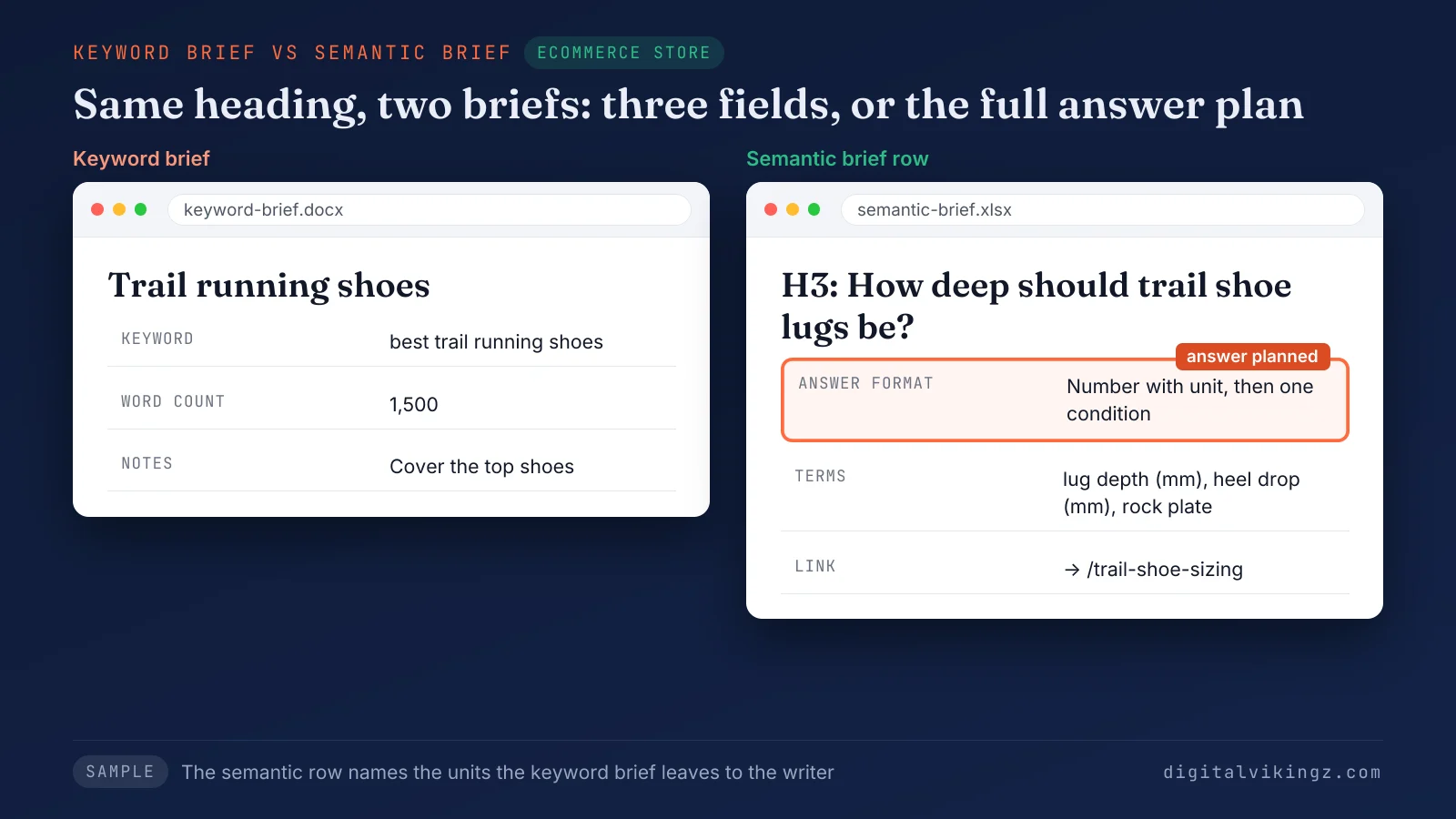
The semantic row names the lug depth and the heel drop in millimetres, which the keyword brief leaves to the writer. Several keyword brief habits return as mistakes inside semantic content briefs.
Which mistakes weaken a semantic content brief?
Five mistakes weaken a semantic content brief, and each mistake hands a decision back to the writer.
The five mistakes that weaken a semantic content brief are listed below:
- Brief built from a keyword: A brief built from one keyword has no map row, so two pages can end up answering one query. The fix is step 1.
- Headings copied from People Also Ask: A brief that copies the People Also Ask box follows the box's order, not the order a reader needs. The fix is step 4.
- Tool term list pasted into the brief: A brief that pastes a content tool's term list repeats phrases instead of answering questions. The fix is step 5.
- Fields without answer formats: A brief that names fields but no starting sentence leaves every answer to the writer. The fix is step 5.
- Links chosen after the draft: A brief that leaves links until after writing gets links in opening answers or on terms the page never defines. The fix is step 6.
An AI draft of a content brief carries the same risks unless a person reviews every row.
Can AI write a semantic content brief?
AI can write the first draft of a semantic content brief; a person then decides the headings, the border and the links.
AI agents gather brief row inputs, group questions and fill the Queries and N-Grams tabs. Relevance calls rest on the map and the source context, which the business owner or strategist holds. Our AI agents draft brief rows from search data, and a person approves every row before a writer starts. The same agents can run in a team's accounts as SEO Automation with human review. Brief drafting is one workflow set up in SEO Automation with human review. A reviewed content brief is ready for the writer.
Questions about writing a content brief
Teams writing a content brief raise six questions: experienced writers, templates, keywords, meta tags, competitor URLs and local service pages.
Do experienced writers need a content brief?
Experienced writers still need a content brief, because the brief holds decisions made outside the draft: the map row, the links and the border. The content brief is also the list against which the finished draft is checked.
Is a content brief template enough to write a semantic content brief?
A content brief template is never enough by itself, because a template holds empty columns, while the research of each step supplies the decisions. The template saves layout time, while step-by-step research fills every row of the brief.
Can one content brief cover two keywords?
One content brief covers every phrasing of one query, and a second query with a different intent gets its own map row and brief. The Queries tab lists each absorbed phrasing with the row of the content brief that answers the phrasing.
Should a content brief include the meta title and description?
A content brief includes the meta title and the meta description, copied from the map row so the writer never changes them. The writer drafts the page to fit the title in the content brief, never the reverse.
Does a content brief need competitor URLs?
A content brief lists the competitor URLs that rank for the query, chosen from the site's own source type plus one authority source. The URLs show the agreement area the page matches and the gaps the page fills.
Does a semantic content brief work for local service pages?
A semantic content brief works the same way for a local service page, with the service area added as a qualifier of the entity. The Questions tab then holds the questions local buyers ask, such as price and response time.
What does a semantic content brief give a website?
A semantic content brief gives a website pages whose headings, answers and links were decided once, from the map, before any writing.
Briefed pages aim to be read by Google and AI answer engines as one answer per map node, after publication and linking. Briefs show, page by page, how topical authority is built in semantic SEO. The factors behind topical authority are listed in the entry on how topical authority is built. Digital Vikingz writes semantic content briefs for B2B SaaS companies and local service businesses, and a strategy call scopes the first set.