 Digital Vikingz
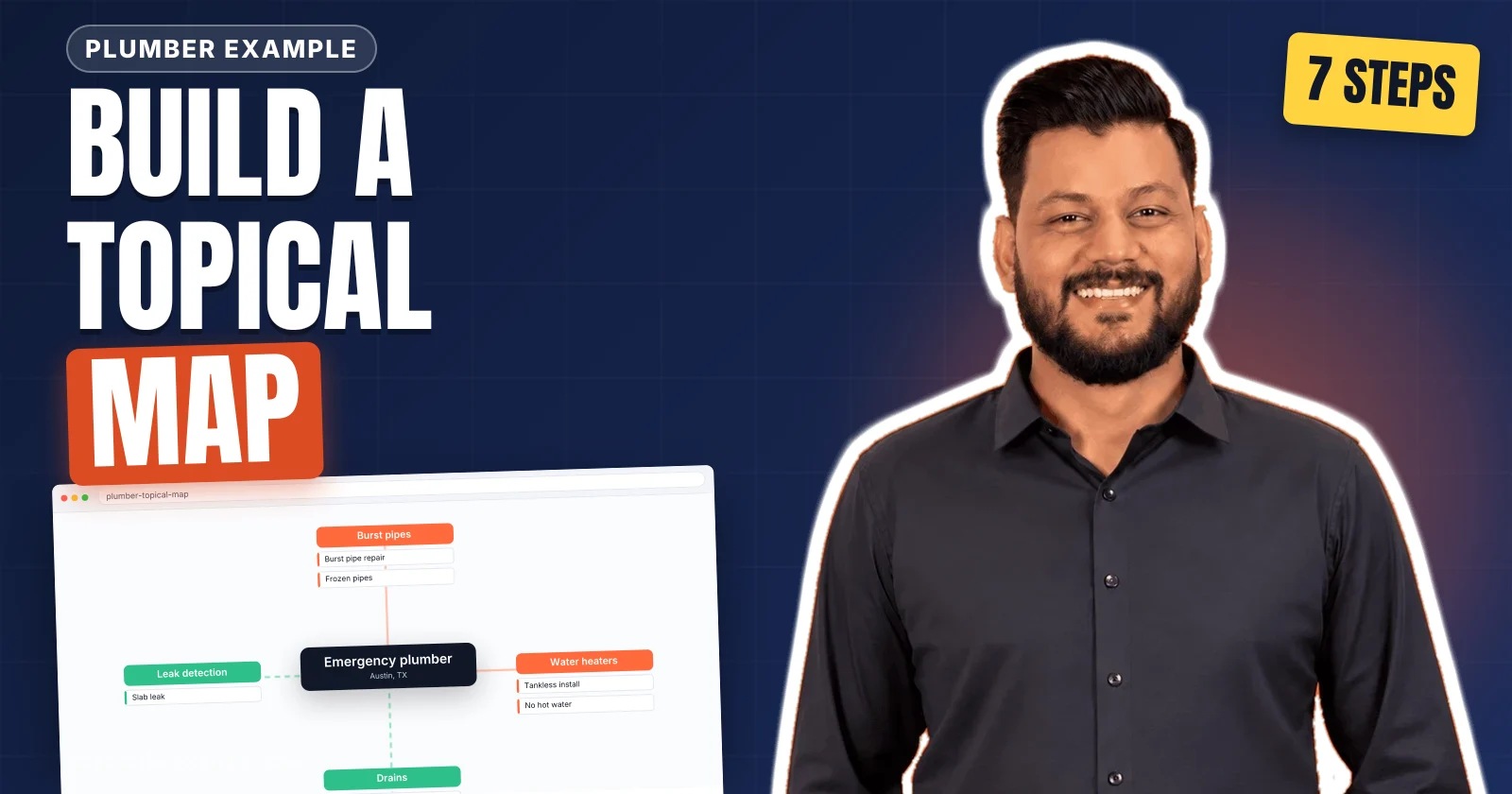
A topical map for SEO is the plan of every entity, attribute and query a website covers, decided from the source context of the business. Digital Vikingz builds a topical map in seven steps. The seven steps are source context, central entity, query network, attribute filter, core and outer sections, page decisions and publishing order.
Each step of a topical map build produces one document that the next step reads, from the source context statement to the publishing order. A finished topical map hands the content team four documents: the map sheet, the publishing order, the anchor register and the content briefs.
How do you build a topical map for SEO?
A topical map for SEO is built in seven steps, from the source context of the business to the publishing order of the pages.
The seven steps that build a topical map are listed below:
- Define the source context: what the business sells, to whom, and how revenue arrives.
- Choose the central entity and the central search intent as two predicates.
- Collect the query network around the central entity into a raw map.
- Filter the attributes by prominence, popularity and relevance into a filtered attribute list.
- Split the map into core and outer sections and draw the topical border.
- Decide which queries deserve a page, a heading or a sentence in the processed map.
- Set the publishing order and the internal links in the anchor register.
Create, make and build name one process. Step guides on Google's first results page for "how to build a topical map" list between five and eight steps, in a check we ran on 13 November 2026. Most guides to topical mapping start from keyword research and pillar pages. An entity-first build places the source context and the central entity before any keyword is collected.
Each step rests on what a topical map is. A topical map is the plan of every entity, attribute and query a site covers. The parts of the map and the core and outer sections are explained on the page about what a topical map is. Every topical map build starts from the source context.
1. Define the source context of the business
Defining the source context fixes what the business sells, to whom, in which markets, and through which action revenue arrives.
Teams often describe a source context as "who we are and how we earn", and a topical map records that answer in writing. The inputs to step 1 are the business model, the monetising pages and the action each page asks for: book, buy or call. The service area, the buyers and the topics the business refuses to cover complete the inputs of the source context.
Every later attribute in the topical map is judged relevant or irrelevant against the source context, never against the entity alone. The output of step 1 is a source context statement of one paragraph and a first list of excluded topics. The excluded topics become the topical border in step 5.
Our source context statement names B2B SaaS companies and local service businesses as the buyers, and fixed-fee projects and monthly retainers as the revenue. The source context then decides which entity sits at the centre of the topical map: the central entity.
2. Choose the central entity and the central search intent
Choosing the central entity fixes the one entity that every page of the site connects back to.
What many guides call the "main topic" or niche becomes one entity that the source context monetises. The central entity comes from the monetised offer of the source context, not from the keyword with the most searches. The central search intent states two predicates: what users want to know and what users want to do about the central entity. A separate guide sets out the identification test for a central entity and the first attribute set.
Our central entity is semantic SEO. The know predicate is "understand", and the go predicate is "hire".
The output of step 2 is an entity definition and a central search intent written as two predicates. Every node of the topical map later links back to the central entity, so a wrong choice spreads to every page. The central entity then becomes the seed of the query network that step 3 collects.
3. Collect the query network around the central entity
Collecting the query network gathers every query and question that joins the central entity to an attribute, before any page is planned.
The sources that feed the query network of a topical map are listed below:
- Google Search Console queries: Google Search Console lists the searches that already show the site's pages.
- People Also Ask: People Also Ask adds the questions Google pairs with the query, expanded twice.
- Related searches and autocomplete: Related searches and autocomplete supply the phrasings Google suggests around the query.
- Competitor and AI Overview headings: The headings show the subtopics that ranking pages and AI Overviews already answer.
- Forum threads: Forum threads on Reddit and Quora record the user's own wording.
- Sales and support questions: The questions record what buyers ask the business directly.
- AI assistant rewrites: The rewrites add the query variants that AI assistants produce for one question.
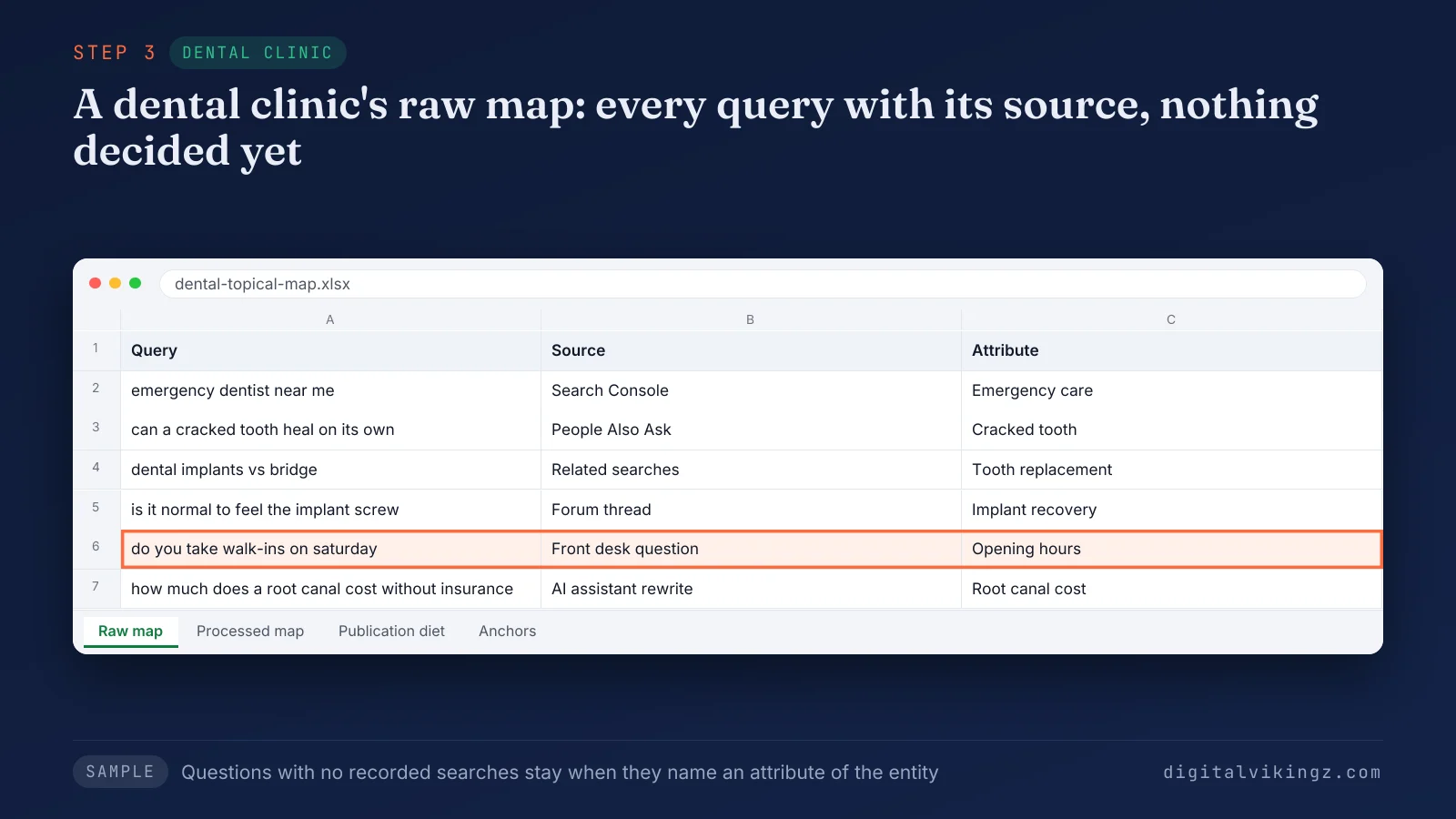
In the dental clinic sample, the highlighted front desk question has no recorded searches and stays because opening hours are an attribute of the clinic.
A question with no recorded searches stays in the query network when the question names an attribute of the central entity. Queries outside the SEO sense, such as topographic map searches, leave the network at step 3.
The output of step 3 is the raw map: every query with its source and nothing decided yet. The raw map holds more attributes than the topical map can cover, so step 4 filters the attributes.
4. Filter the attributes by prominence, popularity and relevance
Filtering the attributes keeps only the attributes that pass three tests in a fixed order: prominence, popularity and relevance to the source context.
The three tests that filter the attributes of a topical map are given below:
- Prominence: An attribute is prominent when removing the attribute changes what the entity is.
- Popularity: An attribute is popular when Google Search Console or a keyword tool records searches for the attribute.
- Relevance: An attribute is relevant when the attribute fits the source context of the business.
Attributes that pass are classed as root, rare or unique. A root attribute is shared by many entities and builds coverage. A rare attribute is covered by few sources. A unique attribute is an attribute that only the source context of the business has reason to cover.
Paid ads management passes popularity and fails relevance for a semantic SEO agency, so the attribute leaves the map. Many published guides call the third test business value or brand relevance.
The output of step 4 is a filtered attribute list with one class per attribute. The filtered attributes then divide into core and outer sections.
5. Split the map into core and outer sections
Splitting the map places the attributes closest to revenue in the core section and the informational attributes that link inward in the outer section.
Each section of the topical map gets a root document, the page the market calls a pillar page. The outer section links to the core section, never the reverse as the main flow. The topical border lists the topics the map will not cover, each with a reason, starting from the exclusions of step 1.
Our own topical map places topical maps and content briefs in the core section. Concept definitions such as cost of retrieval sit in the outer section. Paid ads sit beyond the topical border.
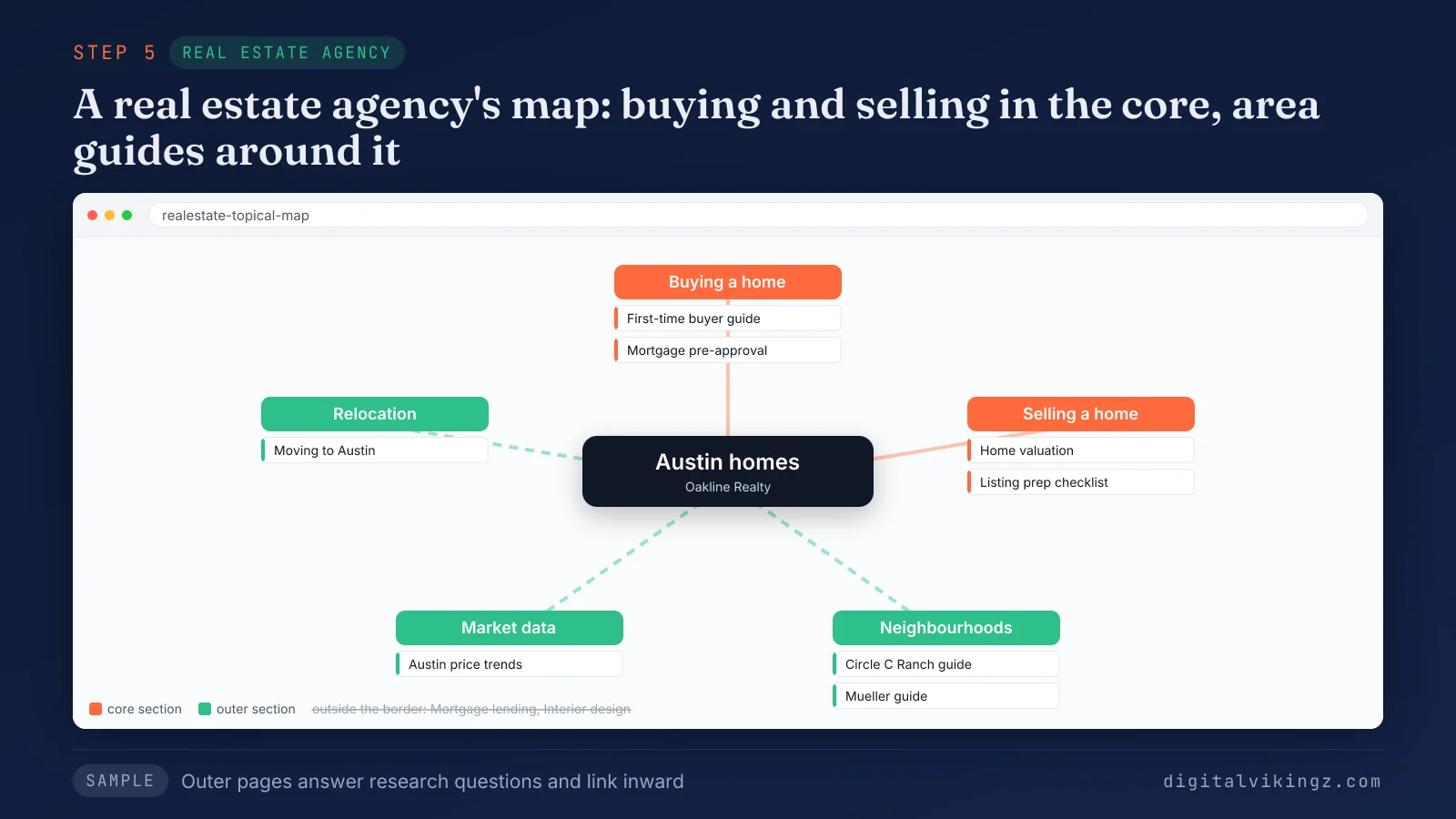
In the real estate sample, the neighbourhood guides answer research questions and link inward to the buying and selling pages, while mortgage lending sits outside the topical border.
The output of step 5 is a section plan and a border list. Every query inside the border then needs one owner, which step 6 decides by asking which queries deserve a page.
6. Decide which queries deserve a page
Deciding which queries deserve a page gives every query one owner: its own page, a heading on another page, or a sentence.
The five checks of Query Deserves a Page are demand, a different entity, low similarity, different predicates and a repeatable pattern. The scoring behind each verdict is set out on the page about the five checks of Query Deserves a Page. A query that fails the checks becomes a heading on the page that owns the closest query, or one sentence inside that heading.
Queries that share most top-ranking results share one page of the topical map. One search intent per page prevents keyword cannibalization, where two pages compete for the same query. Every existing URL receives the same decision: keep, merge or redirect.
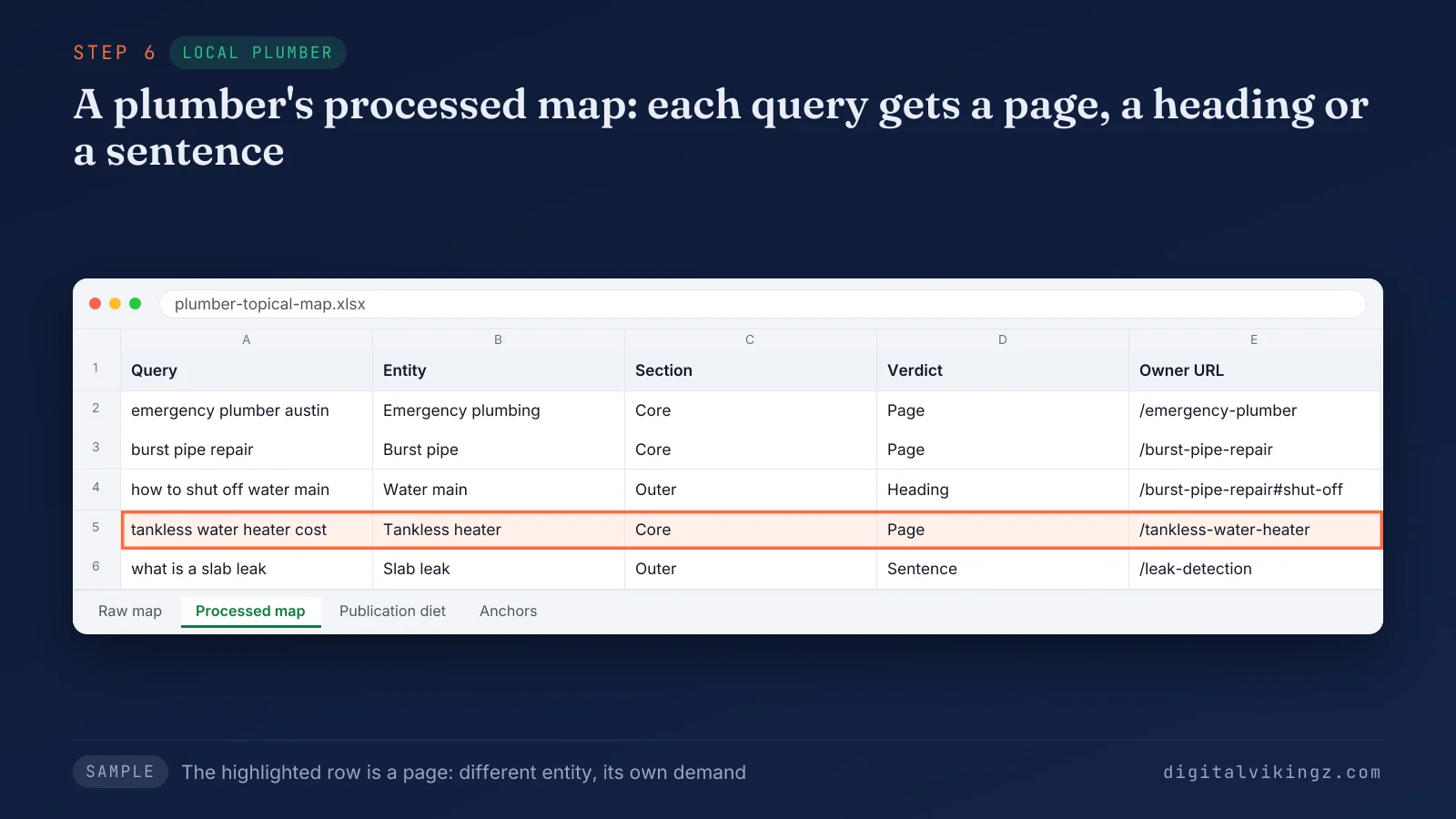
In the plumber sample, the tankless water heater cost query becomes its own page, while the water main shut-off question becomes a heading on the burst pipe page.
Keyword research ends where step 6 begins: a keyword list holds queries, and the processed map holds decisions. Each page node of the topical map then gets a title, a URL slug and a page type. The output of step 6 is the processed map, with node IDs, titles, slugs and page types. The processed map still has no dates, so step 7 sets the publishing order.
7. Set the publishing order and the internal links
Setting the publishing order decides which pages of the topical map go live first and which pages link to each other.
Our practice sets the order by ranking history. A site with ranking history in the topic publishes the hardest core pages first. A new site first publishes the pages that bridge to the hardest core pages, and the core pages follow. The first batch is sized to the existing page count of the site, and later pages follow at an irregular rhythm.
Internal links follow the section plan of step 5, from the outer section to the core section. The anchor register gives each target page one canonical anchor text. No anchor string is used more than three times across the site. Our map sheet records the planned date of every page, the links each new page needs and the date of each 90-day review.
The output of step 7 is the publishing order and the anchor register. Each page node then receives a content brief. Read together, the seven steps form a chain in which each step produces the input of the next.
What does each step of a topical map build produce?
Each step of a topical map build produces one document that the next step reads, from the source context statement to the publishing order.
The table below lists the input, the decision and the output of each step in a topical map build.
| Step | Input | Decision | Output |
|---|---|---|---|
| 1. Source context | Business model, converting pages, service area, buyers, refused topics | What the business sells and never covers | Source context statement |
| 2. Central entity | Source context statement, Google Search Console queries, brand searches | One central entity, one know predicate, one go predicate | Entity definition and central search intent |
| 3. Query network | Central entity, Google Search Console, People Also Ask, related searches, autocomplete, competitor headings, forums | Which queries belong to the SEO sense of the entity | Raw map |
| 4. Attribute filter | Raw map | Prominence, popularity and relevance pass or fail; root, rare or unique class | Filtered attribute list |
| 5. Core and outer sections | Filtered attributes, source context | Core or outer per attribute; topical border | Section plan and border list |
| 6. Page decisions | Section plan, live results per query, existing URLs | Page, heading or sentence per query | Processed map with titles, slugs and page types |
| 7. Order and links | Processed map | Which pages go live first; which anchor points to which page | Publishing order and anchor register |
The seven outputs together form the map sheet, and every content brief is written from one row of the map sheet. The map sheet is a spreadsheet that the team revises after each page is published. The chain of outputs also explains why the order of the topical map steps matters.
Can the build steps run in a different order?
Topical map build steps run in a different order only after step 2, because steps 1 and 2 set every later test.
The source context and the central entity never move, so a change to either restarts the build. Steps 3 and 4 repeat as a loop when new queries appear in Google Search Console. A query that falls outside the topical border at step 6 reopens step 5. An existing site adds the current URLs at step 3 and decides each URL at step 6. The loop ends when the finished topical map passes to the content team.
What does a finished topical map hand to the content team?
A finished topical map hands the content team four documents: the map sheet, the publishing order, the anchor register and the content briefs.
The topical map hands over one content brief per page node. The pages then follow the second half of our process: brief, draft, audit by a separate reviewer, and publication in map order. Pages published in map order turn the topical map into a semantic content network.
Semantic SEO Strategy delivers the source context and the entity model together with the topical map and 12-month roadmap as one fixed-fee project. Teams that write in-house buy the Topical Map alone. Teams that want an agency to run the build get the topical map and 12-month roadmap inside Semantic SEO Strategy. A strategy call should come first, because the call scopes the build against the source context.
The topical map keeps changing after handover, at each 90-day review.
What does the 90-day review change in a topical map?
The 90-day review changes a topical map: passed pages gain their next attribute, and failed pages are retested, merged into the parent or rewritten.
Every decision at the review rests on Google Search Console evidence for each published page. The topical map changes at the review, not between reviews, and every change enters the change log of the map. The map is a working sheet, not a one-off file.
The first review closes the first 90 days of a semantic SEO engagement. The work around the first review is laid out month by month in the first 90 days of a semantic SEO engagement. Pages that fail the review point back to the build steps where topical map mistakes were made.
Which mistakes break a topical map build?
Five mistakes break a topical map build, and each mistake skips one of the seven steps.
The five mistakes that break a topical map build are listed below:
- Keyword list as the topical map: A keyword list records searches for the topical map but no page decision for any search. The mistake skips step 6.
- Mind map instead of a decision sheet: A mind map draws related topics, while a topical map records an owner for every query. The mistake skips steps 4 and 6.
- Niche chosen before the source context: A "main topic" or niche picked first leaves the topical map with no relevance test. The mistake skips step 1.
- Outer pages before core pages: Outer pages of a topical map that go live first link to core pages that do not exist yet. The mistake skips step 7.
- One page per keyword variant: Separate pages for variants of one query split one topical map node across URLs and cause keyword cannibalization. The mistake skips step 6.
A topical map from an AI tool repeats the first two mistakes when no person reviews the decisions.
Can an AI tool build a topical map?
An AI tool builds the inputs of a topical map, not the topical map itself.
Topical map generators and chat assistants list subtopics and group keywords. The relevance test, the page decision, the publishing order and the anchor plan depend on the source context. A person who knows the business sets the source context. We use AI agents to collect queries and draft rows, and a person reviews every decision before the map is approved.
Questions about building a topical map
Teams building a topical map ask six further questions, about finishing the map first, website size, mind maps, new websites, existing pages and templates.
Does a topical map have to be finished before the first page is written?
A topical map is finished before the first page of a new cluster is written, because every page decision and anchor depends on the whole map. Pages written before the map exists risk answering queries that the map later assigns to another page.
Is a topical map only for large websites?
A topical map is not only for large websites: a small website runs the same seven steps and ends with fewer pages. The steps stay the same, and the number of page nodes follows the query network of the business.
Is a topical map the same as a mind map?
A topical map is not a mind map, because a mind map draws related topics and a topical map records a decision per query. A mind map records no owner page, publishing order or anchor for any query.
Can you build a topical map for a new website?
A new website builds its topical map from live search results, People Also Ask and competitor headings, then adds Google Search Console queries later. Google Search Console queries enter the topical map once the first pages earn impressions.
Should a topical map include pages that already exist?
A topical map includes every page that already exists, and each existing URL receives a decision: keep, merge or redirect. Each existing URL passes the same query deserves a page test as a new page.
Is a topical map template enough to build a topical map?
A topical map template is not enough on its own: the template gives the columns, and the seven steps fill the decisions. A blank template carries no source context, and every relevance decision depends on the source context.
What does a finished topical map give a website?
A finished topical map gives a website one plan in which every query has one owner page, heading or sentence.
Google and AI answer engines then read the site as a source on one central entity. The plan is how semantic SEO builds topical authority across a website. The way coverage turns into topical authority is explained in the guide to that term. Digital Vikingz builds topical maps for B2B SaaS companies and local service businesses; a strategy call starts the build.