 Digital Vikingz
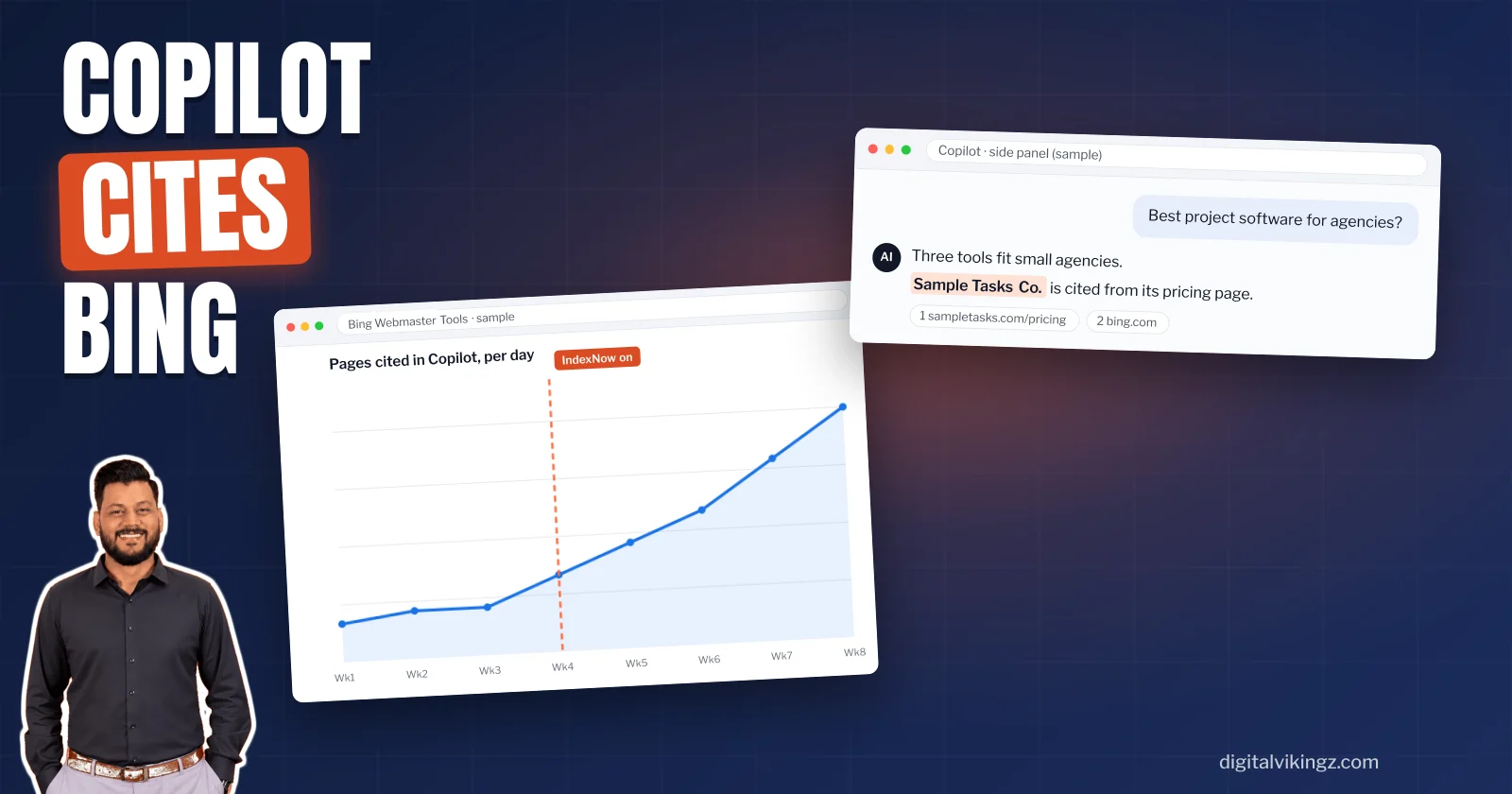
Sample case: a software company ranks well on Google, and a buyer asks Copilot to compare tools. The company is not named.
Microsoft Copilot SEO starts with Bing, because the guides we read agree that Copilot answers draw on the Bing index. A page Bing does not hold gets no citation.
Set up Bing Webmaster Tools, send changes through IndexNow and write answers Bing can lift. Then read the AI Performance report each month.
What is Microsoft Copilot SEO?
Microsoft Copilot SEO is the work of getting your pages cited in Microsoft Copilot answers through the Bing index. The guides we read agree that Copilot has no web index of its own, so Bing indexing comes first.
Readers search for how to rank in Microsoft Copilot, yet Microsoft's AI Performance report counts citations and shows no ranking, so we say cited.
We found no ranking formula for Copilot citations in Microsoft documents, and nobody outside Microsoft knows the weights. Using Copilot as a writing tool for SEO work is a different topic, and we leave that out.
Start with Bing.
AI SEO covers every engine, and Copilot is one of them. Our guide on how AI SEO works and how to get cited by AI covers what holds for every engine.
How does Microsoft Copilot find web sources?
Microsoft Copilot finds web sources by searching the Bing index and citing the pages that answer the question. Copilot runs short searches behind the scenes, and Microsoft calls these grounding queries.
Take a sample. A buyer types best invoicing software for agencies, and Copilot searches Bing for phrases taken from that question.
Bing does not return pages that are missing from its index, so Copilot has nothing to cite from them. We found no Microsoft page that lists how Copilot ranks the pages Bing returns.
Index first. Citations second.
What is a grounding query?
A grounding query is a key phrase Copilot used to find the content the answer cited. In everyday words, it is the search Copilot runs behind the scenes.
A grounding query may differ from the exact words the buyer typed. Microsoft's report shows a sample of these phrases, not the full list.
The phrases matter only once Bing holds your pages, so we check that next.
Is Bing indexing your site at all?
Bing indexes your site when pages from your domain appear in a site: search on Bing. Type site: followed by your domain into the Bing search box. You should run the search for your domain, then for your newest page.
Here is a sample. A software company with strong Google traffic searches Bing for its domain and finds almost nothing.
A site: search is a rough check, and Bing Webmaster Tools gives the exact answer. Two Microsoft Q&A threads we read on 22 November describe sites missing from Bing search, even after the owners followed Bing's guidelines.
Those threads are community reports that Microsoft did not write, and the tool gives the exact answer, so we set it up next.
How do you set up Bing Webmaster Tools?
Set up Bing Webmaster Tools in five moves: add the site, verify ownership, submit the sitemap, read the indexed pages and fix the blocks. The steps to set up Bing Webmaster Tools are listed below:
- Add your site to Bing Webmaster Tools.
- Verify that you own the site.
- Submit your XML sitemap.
- Open the indexed pages report and note which key pages are missing.
- Fix the blocks you find, such as noindex tags, robots.txt rules and broken sitemap URLs.
These steps are our advice, and Bing's own help pages show each screen. In one sample, a marketing lead at a software company verifies the domain and submits the sitemap in the same sitting.
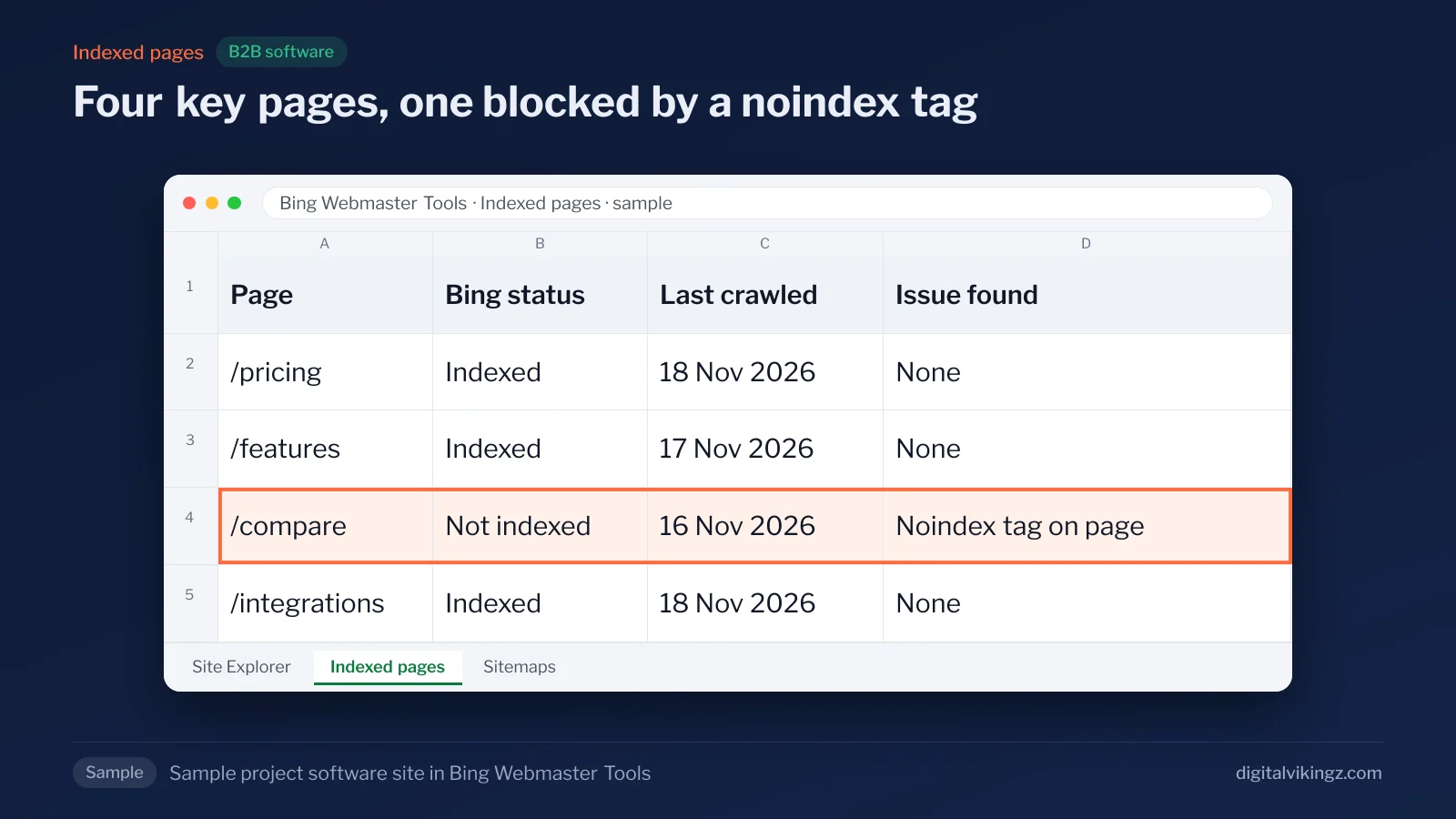
A sample indexed pages panel shows which key pages Bing holds and which carry a block.
In the sample panel, the /compare page is flagged as not indexed because of a noindex tag. Verification only proves ownership.
Does a verified site mean Bing has indexed it?
A verified site does not mean Bing has indexed your pages. Verification proves you own the site, and indexing is a separate decision Bing makes page by page.
Owners in the threads we read saw pages marked indexed in the tool and found no results in Bing search. The owners in those threads report no reply from support, and nobody outside Microsoft can confirm a quality filter.
The first checks for a verified site that Bing does not show are listed below:
- A noindex tag on the page or in the header.
- A robots.txt rule that blocks Bingbot.
- A sitemap that is missing or lists redirected URLs.
- A page that repeats another page or adds little.
These four are standard blocks, and the list is our advice. Fix what you control first.
IndexNow: tell Bing when a page changes
IndexNow tells participating search engines when a URL is added, updated or deleted. Microsoft's February 2026 post says IndexNow helps AI systems reference current versions of a page.
You host a key file at your site root to prove you control the host, then send the changed URLs. The IndexNow page does not list which engines take part, so we name none here.
Our own site pings IndexNow each time we publish a post. Sample case: a software company changes its pricing page on Tuesday and sends the changed URL the same day.
The ping exists so AI systems can reference the current version of a page, and a pricing page is where that matters most.
Does IndexNow promise that Bing indexes a page?
IndexNow does not promise indexing, because a 200 response only confirms that the search engine received your URL. The IndexNow documents add that some URLs may not be considered for indexing.
No source we found measured the effect of IndexNow pings on Copilot citations. We treat the ping as a freshness notice to Bing, and nothing more.
Send the ping on every publish and every meaningful edit.
Page changes that help Copilot cite your content
Microsoft's guidance for AI search answers asks for clear headings, short direct answers and consistent page signals. Microsoft Advertising set out most of these on 8 October 2025, and the Bing blog adds freshness and consistent entities.
The page changes Microsoft names for AI search answers are listed below:
- Title, H1 and description: keep the three consistent, in natural language.
- Headings: write specific H2 and H3 labels.
- Answers: give one to two sentences under each question.
- Tables and lists: use them for steps, features and comparisons.
- Visible HTML: keep key answers out of tabs, expandable menus, PDFs and images alone.
- Structured data: add JSON-LD for products, reviews, FAQs or events.
- Freshness: update pages regularly and keep entities consistent across text, images and video.
Each change also helps a human reader, which is why we make them first. In a sample, a software company hides plan limits in an expandable tab, so the limits move into a table on the page.
Freshness matters most on pages that change, such as pricing and comparisons. Our guide on refresh, prune or consolidate old content shows which pages to update first.
Vendor guides list authorship as a factor, but we found no Microsoft source for it, so we keep it off the list.
Pick your three best pages first.
Does structured data make Copilot cite a page?
Structured data does not secure a Copilot citation, and Microsoft recommends JSON-LD to label content. No source we found measured a citation lift from schema.
One vendor guide quotes a percentage lift with no named study, so we leave the number out. Add schema that matches the visible content, such as FAQPage on a page that shows the questions.
In our view, schema labels what a page already says, so thin answers gain little from markup alone.
Match the markup to the page.
The AI Performance report in Bing Webmaster Tools
The AI Performance report in Bing Webmaster Tools shows how often AI answers cite your pages. Microsoft released the report as a public preview on 10 February 2026. The report covers Microsoft Copilot, AI-generated summaries in Bing and select partner integrations.
The report shows five measures, listed below:
- Total Citations: the times your content shows as a source in AI answers over the chosen period.
- Average Cited Pages: the daily average of unique pages cited.
- Grounding queries: a sample of the key phrases used to retrieve cited content.
- Page-level citation activity: citation counts per URL.
- Visibility trends: a timeline of citation activity.
Microsoft says the numbers show citation frequency, not ranking, authority or placement in an answer. The report is in preview and the grounding queries are a sample, so treat every figure as partial.
Imagine a sample case: a software company opens the report on Monday and sees its pricing page cited for a comparison phrase.
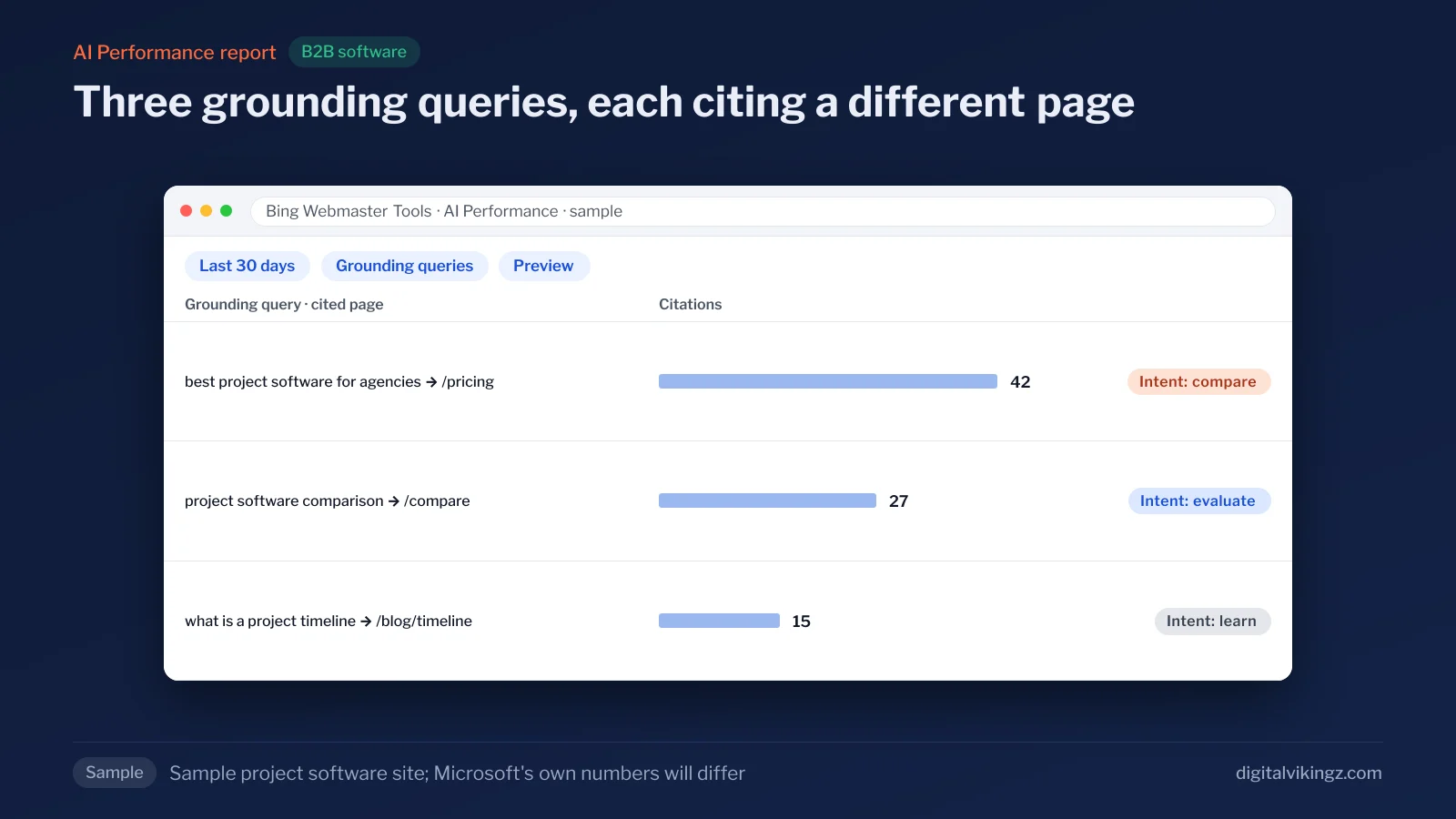
A sample report layout pairs each grounding query with its intent and the page cited.
In the sample, best project software for agencies cites the /pricing page, and project software comparison cites /compare. The third phrase, what is a project timeline, cites a blog post. These values are a sample, and Microsoft's own numbers will differ.
How do you read grounding queries and cited pages?
Read grounding queries and cited pages in three passes: match each query to a page, group the queries, then compare periods. Microsoft began rolling out Intents, Topics, Citation Share and Compare in preview on 16 June 2026.
Citation Share is the percentage of citations for a grounding query that go to your site. Microsoft calls Citation Share an observational metric, not a ranking.
The steps to read the AI Performance report are listed below:
- Open the grounding queries and note which page Bing cites for each.
- Group the queries by Intent and Topic, using the June 2026 views.
- Check Citation Share for the queries that matter to revenue.
- Turn on Compare and set the previous period beside the current one.
Suppose a commercial grounding query cites a competitor's comparison page, and the software company's own page does not appear.
That gap shows you which page to rewrite first, and the grounding query tells you which question the new answer must open with.
Why is the AI Performance report empty?
An empty AI Performance report means Bing has not cited your pages yet, so check your indexed pages first. Consider a sample: a new software blog opens the report and finds the report empty, while its pages show in Bing search.
The checks for an empty report are listed below, in order:
- Confirm the site is verified in Bing Webmaster Tools.
- Confirm the key pages appear in the indexed pages report.
- Remove noindex tags and robots.txt blocks on those pages.
- Give a new or small site time, because citations may be few at first.
Nobody outside Microsoft can say how long a new page waits for a first citation. One vendor guide gives a range in weeks, and we found no Microsoft source for that range.
The free AI Visibility Checker to test whether AI answers name your site adds a view from outside Bing's report.
What else shapes what Copilot cites?
Copilot answers also draw on signals outside your pages, such as business listings. Each outside signal returns to one goal, a page Bing can read and cite.
Here is another sample. A software company lists one address on its site and another in a directory, and a buyer sees both.
Three items follow: Bing Places, the other engines and the claims vendors repeat. Our AI Search Visibility service for Copilot citation checks tracks these outside signals each month.
Bing Places and local business answers
Bing Places keeps your address, hours and contact details current for AI answers, according to Microsoft. Register your business in Bing Places if customers search by location.
Treat Bing Places as its own listing, and check each field against your Google Business Profile. In a sample, a plumbing company shows different hours in Bing Places and on its website.
Our guide on how AI assistants check a local business listing shows the sources they read.
Copilot, Google AI Mode and ChatGPT side by side
Copilot differs from Google AI Mode and ChatGPT in the index each engine reads and the report you get. Our guide on how AI search engines pick sources to cite covers the shared mechanisms.
Google AI Mode is Google's AI search experience that answers questions in a conversation. Google AI Overviews are the AI-written summaries that Google shows above some search results.
The differences between the three engines are listed in the table below:
| Engine | Index it draws on | Report for site owners |
|---|---|---|
| Microsoft Copilot | Bing index | AI Performance report in Bing Webmaster Tools |
| Google AI Mode | Google Search index, according to Google's AI features page | AI feature traffic counts in the Web search type of the Search Console Performance report |
| ChatGPT | Not confirmed on 22 November 2026. | Not confirmed on 22 November 2026. |
Among the three, we confirmed a citation report for site owners only for Copilot. Google's AI features page, opened on 22 November 2026, places AI feature traffic inside the standard Performance report and names no separate citation view.
Take a sample. A buyer asks all three engines for the best software for agencies, and each may cite a different page.
Perplexity follows its own rules, covered in how Perplexity chooses its sources.
Copilot SEO claims Microsoft has not backed
Several Copilot SEO claims in vendor guides have no Microsoft source, and we leave them out. The claims we leave out are listed in the table below:
| Claim in vendor guides | What we found | How we treat the claim |
|---|---|---|
| Social signals as a ranking factor | One guide lists them, and the Microsoft posts we read do not | Left out |
| A percentage lift from schema | No named study | Left out |
| How many citations go to the top pages | The study is unnamed | Left out |
| Paid Copilot seat counts | Three guides give three figures | Left out unless Microsoft states one |
| Weeks to a first citation | No Microsoft source | Left out |
Lilach Bullock's single-site study covers one site and one window, and its author says the result is not a rule. Guides written before 16 June 2026 may miss the Intents, Topics, Citation Share and Compare views.
The split between what Microsoft states and what vendors repeat tells you where to spend your time. Spend it on what Microsoft states.
Your first week of Copilot SEO
The first week of Copilot SEO is about getting indexed in Bing, then making your best pages easy to cite. The steps for your first week of Copilot SEO are listed below:
- Verify the site in Bing Webmaster Tools (marketing or SEO lead).
- Submit the sitemap and read the indexed pages report (SEO lead).
- Remove noindex tags and robots.txt blocks on key pages (developer).
- Switch on IndexNow for new and changed URLs (developer).
- Rewrite the opening answer on your three best pages (writer).
- Check your Bing Places listing if customers search by location (owner).
- Open the AI Performance report and write down what the report shows today (SEO lead).
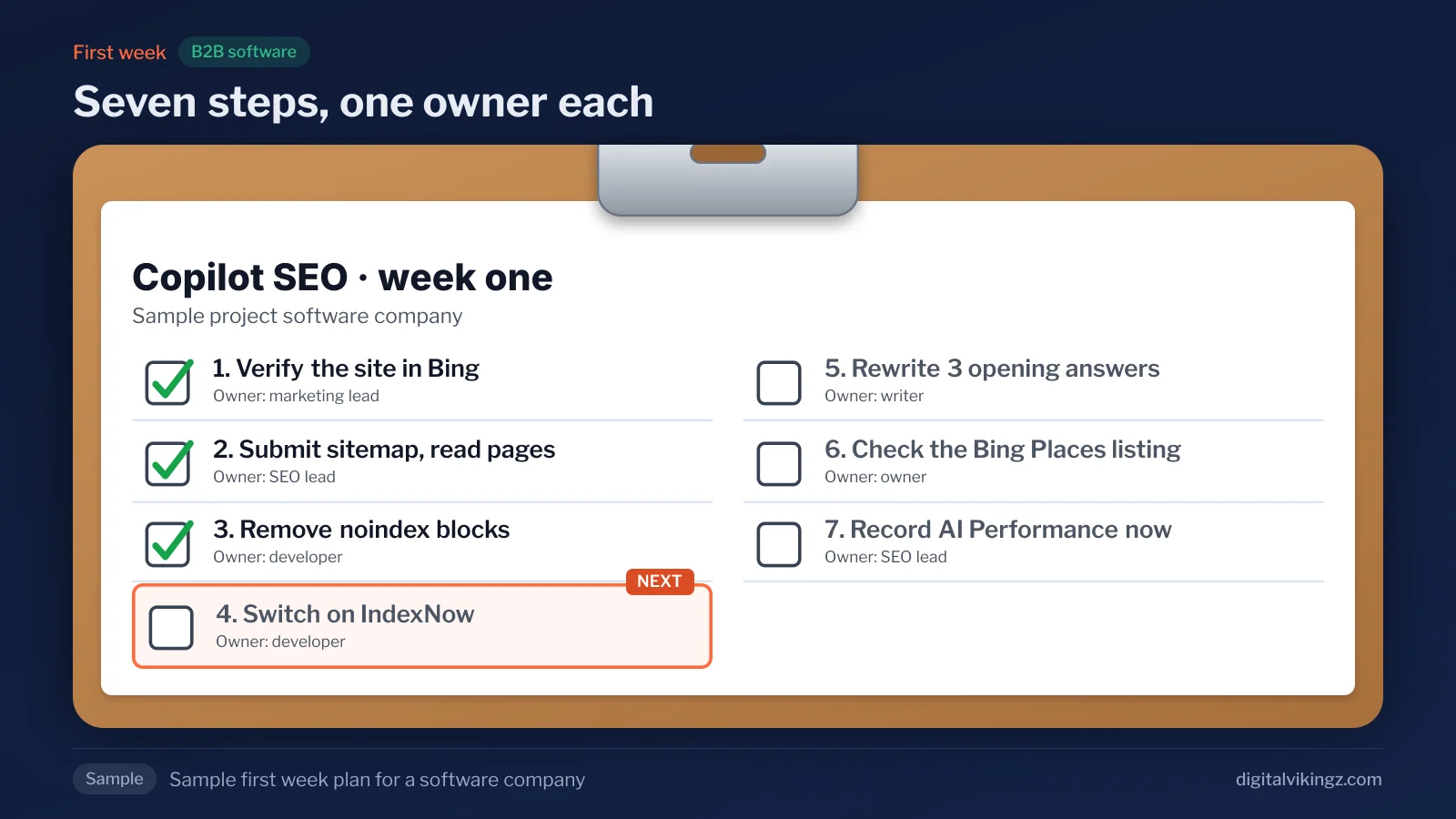
A first week of Copilot SEO has seven steps, and each step has one owner.
The sample checklist gives each of the seven steps one owner.
Most of the week goes to steps two to four, because a page Bing cannot reach never reaches a Copilot answer. Here is a sample. A software company with a small team gives steps three and four to its developer and step five to its writer.
Then set a date for the monthly check.
A monthly Copilot check
A monthly Copilot check has four parts: indexed pages, citations, grounding queries and Citation Share. The steps of the monthly Copilot check are listed below:
- Compare indexed pages with last month and list new gaps.
- Open Compare and read total citations against the previous period.
- Read new grounding queries by Intent and Topic.
- Check Citation Share on the queries tied to revenue, then pick three pages to refresh.
The report counts citations, not visits, so pair the report with your analytics. The output is one page note with an owner and a date.
Sample case: a software company logs one new grounding query each month and rewrites the page that query points to.
A fixed routine matters more than a clever one, because only the same four checks each month show whether anything improved.
Readers ask six more questions after the routine, and we answer them next.
Questions about Microsoft Copilot SEO
Do you need to rank at the top of Google to be cited by Copilot?
No source we found ties Copilot citations to your Google position, and Copilot reads pages from the Bing index.
Can you force Copilot to cite a specific page?
No setting for that appeared in the Microsoft documents we read, so the steps above are the only levers we found.
How long does Copilot take to cite a new page?
Nobody outside Microsoft knows, and we found no Microsoft figure for the wait. Log the date you publish and the first date a grounding query points to the page.
How do you track Copilot visits to your site?
Check the referral sources in your analytics tool, and use the AI Performance report for citation counts.
Why does Copilot name competitors and not your brand?
Start with Bing indexing and Citation Share, because a competitor with indexed answer pages is easier to cite. Then compare their answer pages with yours, heading by heading.
Does Copilot SEO help your Google rankings?
Microsoft's guidance on clear headings and direct answers matches good page practice, and we found no study that measured Google gains.
Microsoft Copilot SEO and the next step
Microsoft Copilot SEO starts with a page Bing holds and ends with a monthly look at what Copilot cites.
We run the monthly Copilot check inside our monthly AI Search Visibility checks for Copilot, booked through a strategy call.