 Digital Vikingz
A SaaS comparison page is a page on a vendor's own site that compares the product with named competitors for one query template. SaaS comparison pages are structured as three page types: the vs page, the alternatives page and the category page, each answering its own query template. A competitor earns its own vs page or alternatives page only when the query passes the Query Deserves a Page test. Other competitors become rows on a shared page. Every vs page compares the same attributes in the same order, and every competitor fact carries a source and a checked date. The pages of the set link through two URL folders. Comparison pages belong to the core section of a SaaS topical map.
What is a SaaS comparison page?
A SaaS comparison page is a page on a vendor's own site that compares the product with named competitors for one query template. Buyers who reach a SaaS comparison page are close to a decision.
The three types of SaaS comparison page are listed below:
- Vs page: A vs page, which marketers often call a competitor page, compares the product with one named competitor for the query "[product] vs [competitor]".
- Alternatives page: An alternatives page, often titled an "Alternative to" page, ranks several replacements for one named competitor for the query "[competitor] alternatives".
- Category page: A category page, the "best [category] tools" round-up, ranks the main products of one software category for the query "best [category] software".
Review platforms such as G2 and Capterra also publish comparison pages, but those pages belong to a third party, not to the vendor. The guide below covers the three SaaS comparison page types that live on the vendor's own site. Each of the three page types answers a different query template.
Which query template does each comparison page answer?
Each SaaS comparison page answers one query template, and the variable slot of that template decides the page's buyer, main component and URL. A query template is a recurring search pattern with fixed wording and one variable slot, such as "[competitor] alternatives". The parts of a query template and the way a template groups demand are defined in the knowledge hub.
The table below matches each SaaS comparison page type to its query template, buyer, main component and URL pattern.
| Page type | Query template | Buyer | Main component | URL pattern |
|---|---|---|---|---|
| Vs page | "[product] vs [competitor]" | Choosing between two shortlisted tools | Comparison table, typed values, pros and cons per entity | /compare/[product]-vs-[competitor]/ |
| Alternatives page | "[competitor] alternatives" | Leaving or ruling out one tool | Ranked list with the deciding attribute beside each item | /alternatives/[competitor]/ |
| Category page | "best [category] software" | Building a shortlist in one category | Ranked feature table with typed values | /[category]-software/ |
Query variants of one template share the template's comparison page. The phrasings "[product] versus [competitor]", "[product] or [competitor]" and "is [product] better than [competitor]" all belong to the vs page. A keyword tool splits the demand of one template across those variants, so template demand is the sum of the variants.
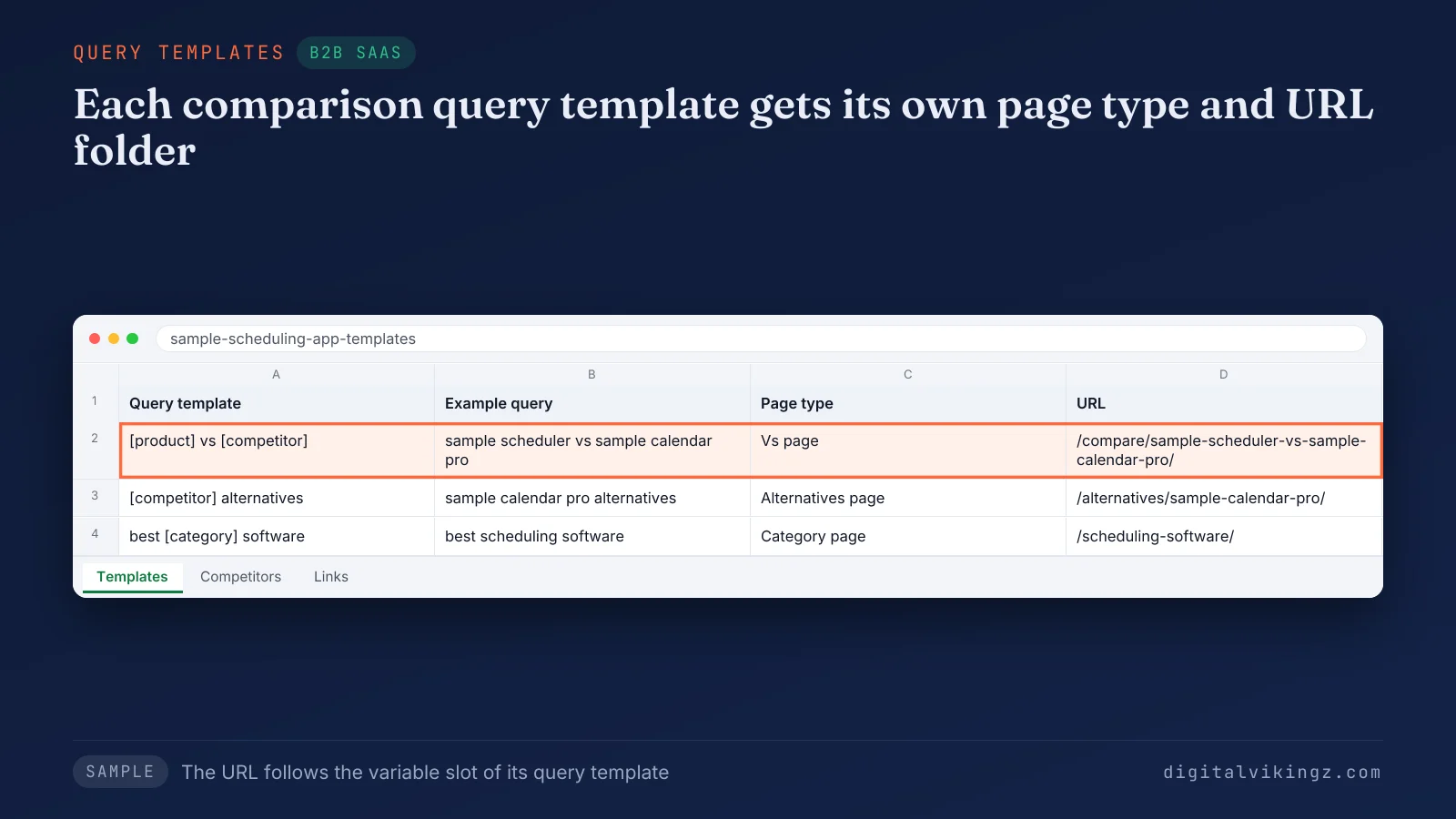
The sample sheet shows each URL following the variable slot of its query template. The competitor name therefore sits in the slug of the vs page and the alternatives page. The vs page and the alternatives page both carry a competitor name, so the difference between the two comparison page types comes next.
How is a vs page different from an alternatives page?
A vs page compares the product with one competitor the buyer has shortlisted, while an alternatives page lists several replacements for one competitor. A vs page holds two entities, while an alternatives page holds one competitor and several options. The vs page buyer is choosing, and the alternatives page buyer is leaving or ruling out one tool. A vs page uses the predicate "compare", and an alternatives page uses "replace" and "switch from". Both comparison page types name the competitor in the title, the H1 and the URL. A buyer who searches one competitor name with "alternatives" needs a shortlist, and a buyer who searches two names needs a verdict. A vs page is structured around that verdict.
How is a vs page structured?
A vs page is structured as a verdict, a comparison table, the case for each product and a switching path, in that order.
The sections of a vs page are listed below in reading order:
- Verdict: The verdict states which buyer each product fits, in two or three sentences above the table.
- Comparison table: The comparison table lists the same attributes in the same order, with typed values for both products.
- Pricing: The pricing section gives both prices as text, with the billing period and the date checked.
- Where [product] fits better: The product section names the buyers and use cases that the product serves better.
- Where [competitor] fits better: The concession names the buyers and use cases that the competitor serves better.
- Migration: The migration section states what data moves, how long the move takes and who runs the move.
- FAQ and call to action: The closing block answers switching questions and offers the next step, such as a free trial or a demo.
A vs page that never states the competitor's price or a differentiating attribute fails the buyer's test. The comparison table confirms the verdict and does not replace the verdict, because a feature table with green checkmarks alone reads as one-sided. The concession is the comparison page section buyers trust most, because the vendor names a case where the competitor wins. An alternatives page keeps one competitor at the centre with a different section order.
How is an alternatives page structured?
An alternatives page is structured as the reasons buyers leave one competitor, a stated sort rule and a ranked list of replacements.
The sections of an alternatives page are listed below in reading order:
- Switching reasons: The switching reasons name what buyers of the competitor want and do not get, such as a price change or a missing integration.
- Sort rule: The sort rule states in text how the list is ordered, such as fit for teams under fifty seats.
- Ranked list: The ranked list gives each replacement the deciding attribute, the buyer the replacement fits and a dated price.
- Comparison table: The comparison table sets every listed option against the same attributes.
- Migration and call to action: The closing block explains the move from the competitor and offers the next step.
The trust element of an alternatives page is the sort rule stated in text. An alternatives page should list several named replacements, because a page that lists only the vendor is a landing page with a misleading title. The vendor's product takes the position the sort rule gives the product, and the sort rule says why. Each option on the alternatives page links to its own vs page where one exists. The category page widens the comparison page set from one competitor to a whole software category.
How is a category page structured?
A category page is structured around a ranked feature table with typed values for the main products in one software category. The category page answers "[category] software" and "best [category] software" on one URL, because the two phrasings share one template. The buyer of a category page is building a shortlist and has not named a competitor yet. The ranking criteria sit above the table in text. Competitors without search demand of their own get a row in the comparison table on the category page. Each row links to the vs page of that competitor where one exists. Review platforms and directories hold many "best [category] software" results, so a vendor category page can rank more slowly than its vs pages. A competitor leaves the table for its own comparison page only when the competitor's query passes the page test.
Which competitors deserve their own comparison page?
A competitor deserves its own comparison page when its vs or alternatives query passes the Query Deserves a Page test. Every other competitor becomes a row on a shared page.
The steps that decide which competitors get their own page are listed below:
- List the direct competitors that buyers name in lost deals, sales calls and onboarding interviews.
- Read Google Search Console for queries that already contain a competitor's name next to the product.
- Sum the demand of each competitor on the vs template and on the alternatives template.
- Score each competitor query with the five checks of the page test and record the verdict.
Query Deserves a Page scoring counts five checks: demand, entity, similarity, predicate and pattern. Four or five passes make a page. The pass and fail rules behind each verdict are set out on the page about Query Deserves a Page scoring. Building a comparison page for every competitor listed on a review platform, "the G2 dump", produces near-identical pages that compete with each other. The number of comparison pages equals the number of competitor queries that pass the page test, not the number of competitors in the category.
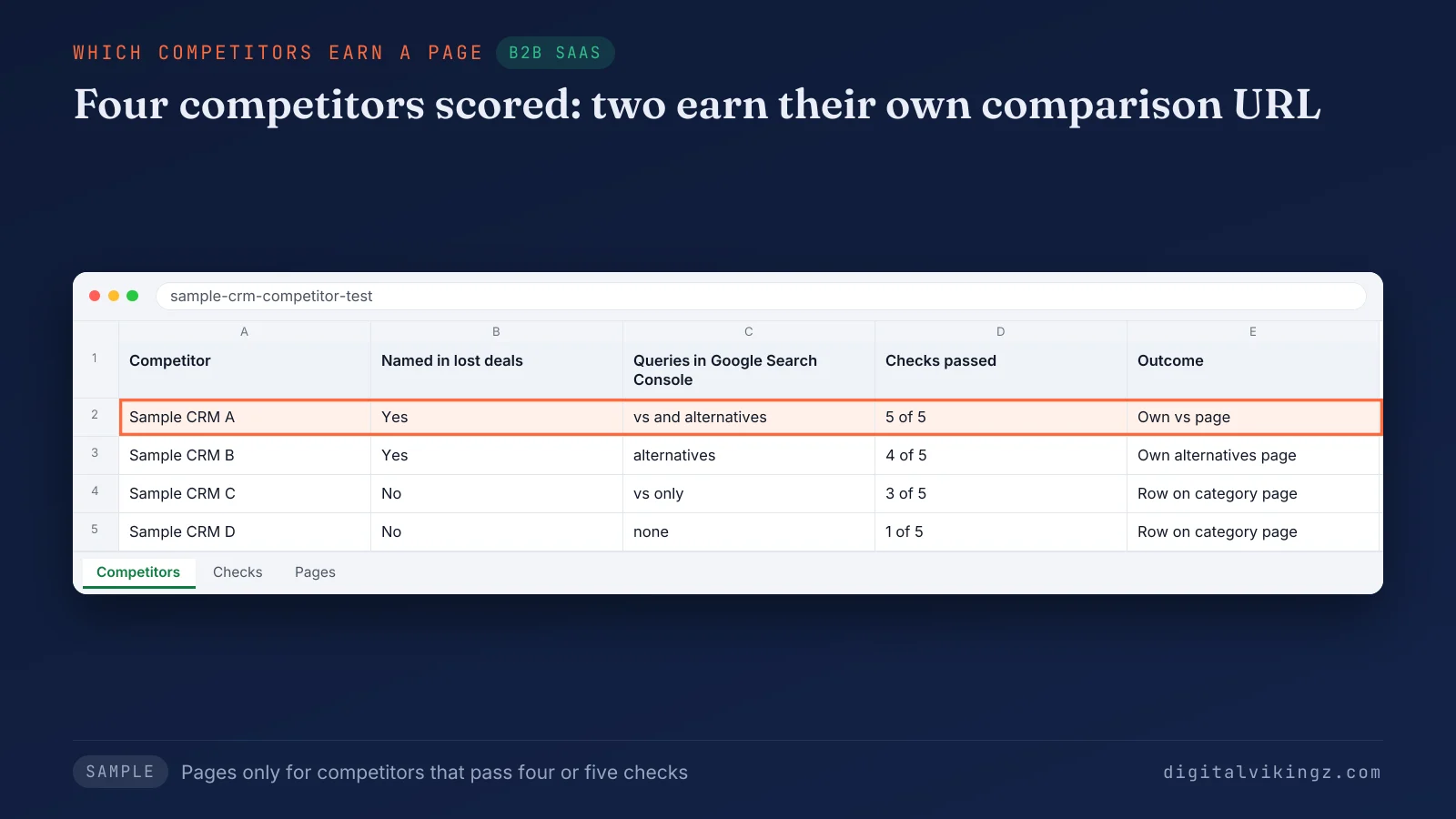
The sample sheet gives the first two competitors their own comparison page, because each competitor passes four or five checks. The third competitor has three passes, none of them entity or predicate, so the third competitor becomes a row on the category page. The same page test settles the reversed order of a vs query.
Does a reversed vs query need its own page?
A reversed vs query does not need its own page, because "[product] vs [competitor]" and "[competitor] vs [product]" share one intent. One intent gets one URL, and the other order appears in that comparison page's body text. Two phrasings that share six or more of their top-ten results belong on one page. The vs page title carries the order Google Search Console shows more often. A three-way query, "[product] vs [competitor] vs [competitor]", stays on the alternatives page or the category page unless the query passes the page test alone. The owning vs page then needs fixed attributes.
Which attributes should every vs page compare?
Every vs page compares the same six attributes in the same order: price, plan limits, integrations, support, security and migration. We keep one attribute order across every vs page, so buyers read each comparison page the same way. One answer pattern per query template, with every slot filled, keeps the vs pages consistent.
The table below lists the six attributes every vs page compares, with the value each row records and the source behind it.
| Attribute | Value recorded | Source | Review trigger |
|---|---|---|---|
| Price | Price per seat or per plan, billing period, currency | Each vendor's pricing page, with the date checked | A pricing change by either vendor |
| Plan limits | Seats, records, usage caps per plan | Pricing page or documentation | A plan change |
| Integrations | Named apps, native or through a connector | Each vendor's integration directory | A new or retired integration |
| Support | Channels, hours, onboarding included | Each vendor's support pages | A support plan change |
| Security | Certifications named as text | Each vendor's trust or security page | A new certificate or report |
| Migration | Data that moves, import method, time to move | Documentation and the vendor's own migration process | A new import tool |
An attribute the competitor does not publish is marked "not published" with the date checked, never guessed. Typed values replace checkmarks, so a cell reads "1,000 records" instead of a tick. The fixed order raises one question about templates.
Can one template build every comparison page?
One template builds the structure of every comparison page, and each page still needs values specific to its competitor pair. Google's spam policies name scaled content abuse: many pages generated mainly to manipulate rankings rather than to serve users. A comparison page set in which only the competitor name changes adds no information on any page after the first. Pair-specific values are the verdict, the concession, the prices with dates and the migration path. The template fixes the section order and the attribute order, and the values change per pair. The finished pages then need URLs and internal links that join the set.
How should comparison page URLs and internal links be organised?
Vs pages sit in a /compare/ folder and alternatives pages in an /alternatives/ folder, linked to each other and to the pricing page. Each comparison page slug carries the entity names only, product first on vs pages, with no year, so the URL survives every update.
The internal links that join a comparison page set are listed below:
- Comparison index: A comparison index at /compare/ lists every vs page by competitor name.
- Alternatives to vs: Each alternatives page links to the vs page of every listed option that has one.
- Vs to alternatives: Each vs page links to the alternatives page of the same competitor.
- Category to vs: The category page links to the vs page of every competitor in its table.
- Pricing and product to comparison: The pricing page and the product pages link to the vs pages of the competitors named there.
No comparison URL is orphaned, so every page in the set is reachable within two clicks of the comparison index. The vs pages link to the pricing page, because the pricing page is the next step of a buyer who has chosen.
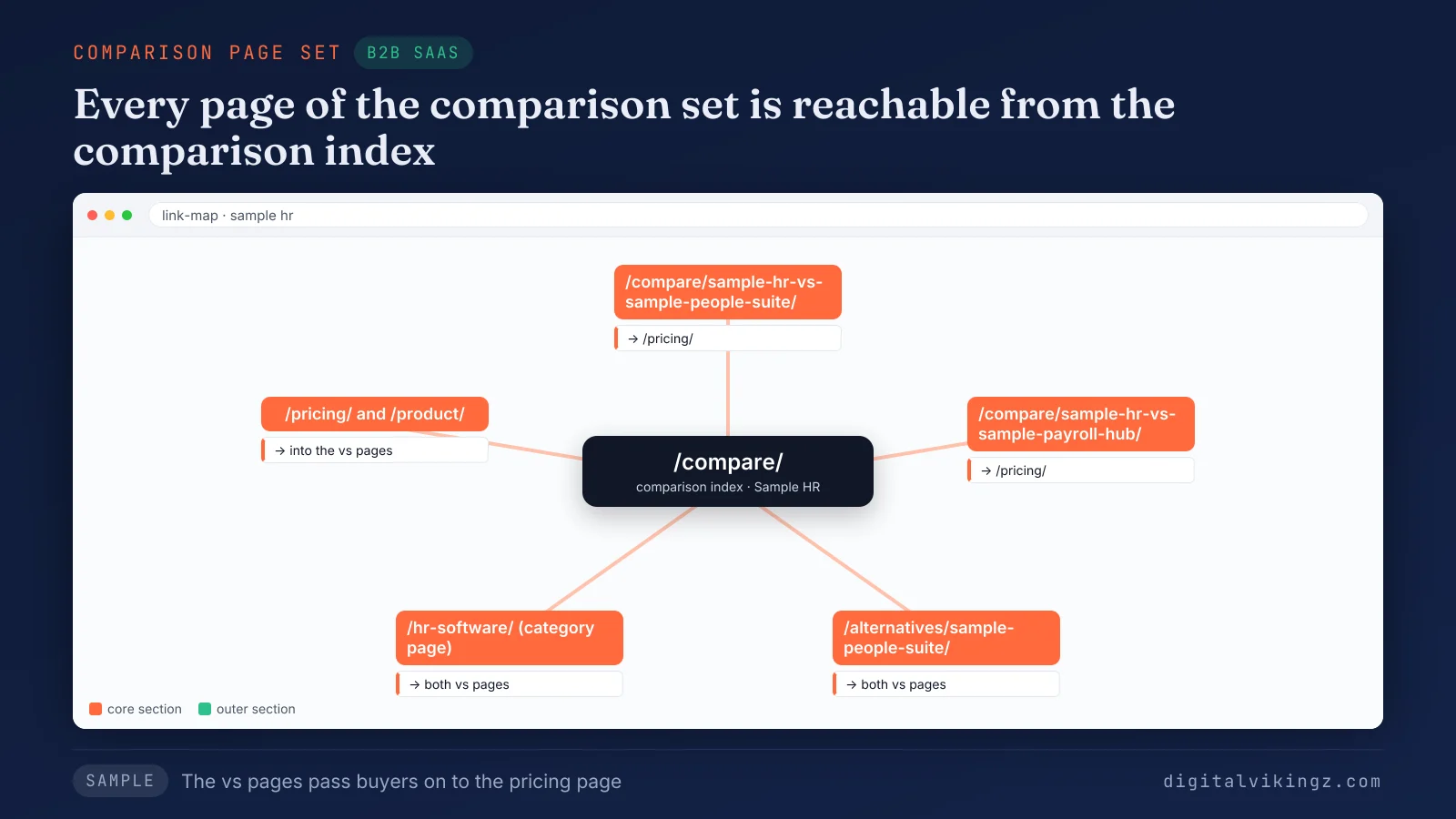
The sample link map shows every page of the comparison page set reachable from the comparison index. The vs pages pass buyers on to the pricing page. A linked set keeps its value only while every claim on every page stays accurate.
How do comparison page claims stay accurate?
Comparison page claims stay accurate when every competitor fact carries a source, a checked date and a named owner who reviews the fact. Each price sits beside its billing period and the date checked, and each competitor claim links to the competitor's own pricing or documentation page. Review triggers are a competitor price change, a plan change, an acquisition and a product release on either side. The 90-day review checks each comparison page against both products. The product owner signs off every competitor claim before a comparison page is published. The concession is reviewed with the same care as the claims in the product's favour. A claim without a source or a checked date is removed until the product owner confirms the claim. A comparison page that lags a competitor change should be corrected within the same week. Accurate comparison pages then take their place in the wider SaaS topical map.
Where do comparison pages sit in a SaaS topical map?
Comparison pages belong to the core section of a SaaS topical map, beside the category, feature and pricing pages. Core pages are the pages buyers use to decide, and the outer section explains the problem and links inward. Problem guides and use case guides in the outer section link to the vs pages and alternatives pages of the competitors those guides name. The comparison set is one query template network inside the topical map, decided page by page with the same test. The topical map records each comparison page as one node with its query template, its page type and its planned links. The other page types of semantic SEO for SaaS websites follow the same template logic, from feature pages to help articles. The full page table for a SaaS site, with a verdict per query pattern, sits on the page about semantic SEO for SaaS websites. The comparison set still needs an order that says which comparison pages to publish first.
Which comparison pages should a SaaS site publish first?
A SaaS site publishes first the comparison pages for competitors that already appear in its Google Search Console queries and lost deals. A challenger with competitor demand starts with the vs page against the category leader. A category leader can start with the pricing page and with alternatives pages for rivals its buyers consider. Few buyers search the leader against smaller tools. A product that creates a new category and has no competitor queries starts with a "[product] vs spreadsheet" or "[product] vs [manual method]" comparison page. A competitor price rise or acquisition moves that competitor's alternatives page to the top of the order. The order of the comparison pages is set at step 7 of a seven-step topical map build. The rules for sizing the first batch and spacing the rest are part of the seven-step topical map build. Publishing comparison pages that name competitors raises one common worry among SaaS teams: sending buyers to those competitors.
Do comparison pages send buyers to competitors?
Comparison pages rarely send new buyers to competitors, because a buyer who searches a competitor's name already knows the competitor. Buyers evaluate with several tabs open: the vendor page, the competitor's page and a review platform. A check we ran on 13 November 2026 found that Bing's AI answer for "SaaS comparison pages" listed review platforms, not vendor pages.
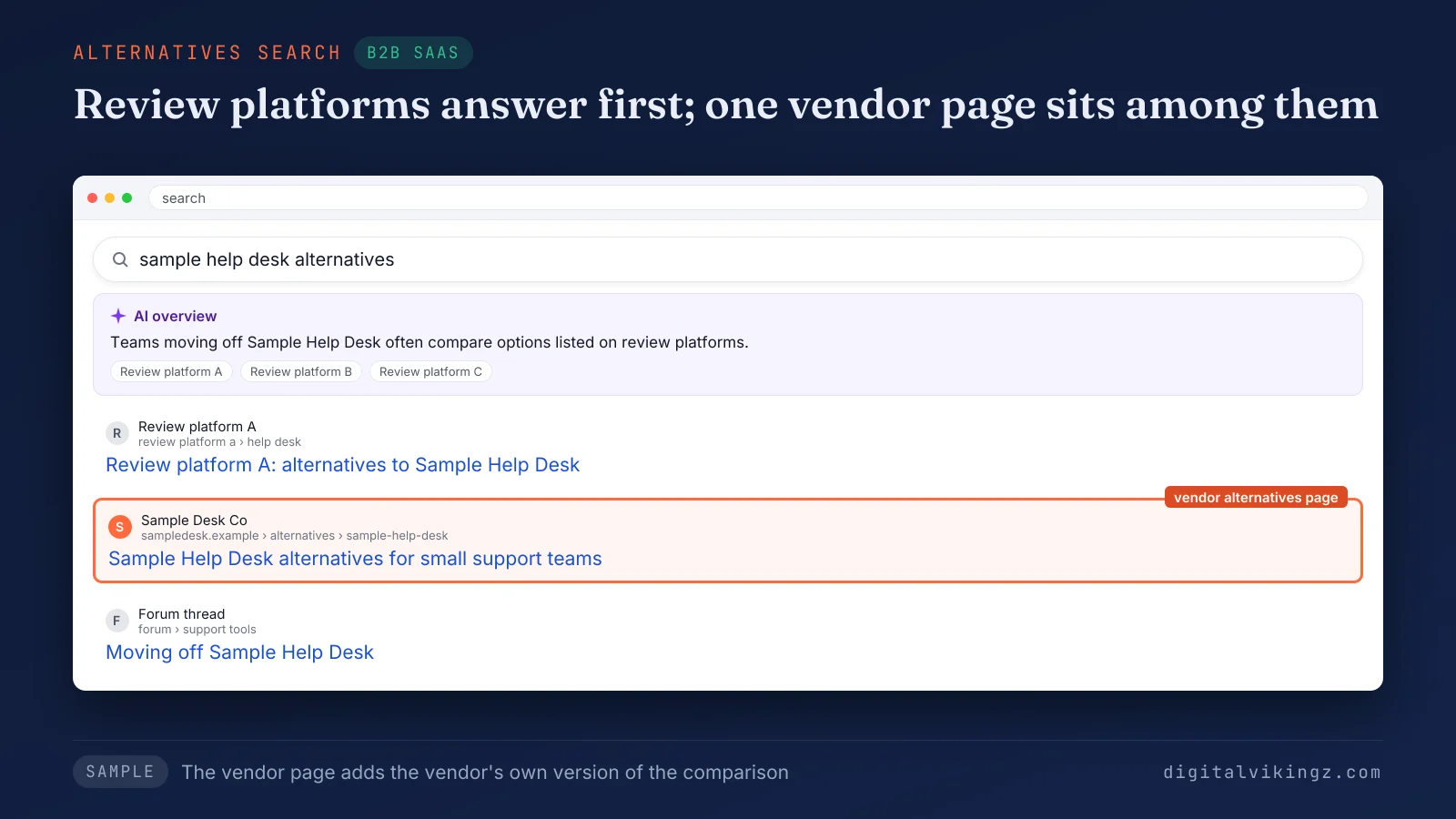
The sample results page shows the competitor's name and three other sources before the vendor's alternatives page. The vendor page adds the vendor's own version of the comparison. The vendor's comparison page decides whose version of the comparison the buyer reads. A vendor without the page leaves that version to a third party. A concession that sends the wrong-fit buyer to the competitor can reduce churn from customers who would have left. Naming competitors raises a legal question too.
Is it legal to name competitors on a comparison page?
Naming competitors on a comparison page is legal under US Federal Trade Commission policy when every comparison is truthful and not misleading. The Federal Trade Commission's policy statement on comparative advertising encourages comparisons that name competitors, provided the comparison is clear and not deceptive. The statement sits in the US Code of Federal Regulations at 16 CFR 14.15. Every claim on the comparison page should be truthful, sourced and dated. Trademarks, competitor logos and product screenshots are separate questions, so the page names the competitor in text and uses no competitor logo without permission. Rules outside the United States differ. Legal review of each comparison page remains the owner's decision, and the guide gives no legal advice.
Questions about SaaS comparison pages
SaaS comparison pages raise further questions about listicles, switch-from pages, spreadsheets, review platforms, measurement and calls to action.
Is an alternatives page the same as a listicle?
An alternatives page is not a listicle, because an alternatives page starts from one named competitor and ranks replacements for buyers leaving that competitor. A listicle ranks a category with no anchor competitor, like the category page of a comparison page set.
Does a SaaS site need separate switch-from pages?
A SaaS site needs a separate switch-from page only when "switch from [competitor]" passes the Query Deserves a Page test on its own. Migration otherwise stays a section of the comparison pages for that competitor, the vs page and the alternatives page.
Does a vs spreadsheet page count as a comparison page?
A "[product] vs spreadsheet" page counts as a vs page, with a manual method in the place of the named competitor. The page follows the vs page sections, and the concession names the teams for whom the spreadsheet is enough.
Can a vendor comparison page rank above review platforms?
A vendor comparison page can rank above review platforms on vs queries, when the page carries more sourced and dated detail than the platform page. Review platforms tend to hold "best [category] software" results for longer than a single vendor comparison page.
How is a comparison page measured?
A comparison page is measured by clicks and impressions per template, leads and opportunities per cluster, and citations in AI answers. Leads come from the CRM source field, and query count growth per template is the leading indicator for a comparison page.
Which call to action fits a comparison page?
The call to action on a comparison page is the next step a buyer at the decision stage takes, such as a free trial or a demo. The call to action appears after the verdict and again after the migration section of the comparison page.
What does a structured comparison page set give a SaaS site?
A structured comparison page set gives a SaaS site one owner page for each comparison query its buyers run. The set answers buyers at the decision stage, where the core section of the topical map earns revenue. Pages that answer every variation of a query template in one shape are how semantic SEO builds topical authority across a buyer's comparison queries. Digital Vikingz plans comparison page sets inside the topical map and 12-month roadmap of Semantic SEO Strategy. The scope of the topical map and 12-month roadmap is set out on the Semantic SEO Strategy page. A strategy call starts the plan for a SaaS site and its comparison pages.