 Digital Vikingz
A Shopify SEO checklist is a list of technical and page checks for the URLs, collections and products that Shopify generates for a store.
A Shopify SEO checklist includes twelve checks across Google Search Console, product and collection URLs, robots.txt and the collection and product pages.
Shopify creates duplicate URLs in eight places, from collection product paths to filter, sort, pagination and variant parameters. Shopify product URLs include /collections/ when the theme builds product links with the Liquid filter "within: collection", which places the product inside the collection's URL.
Shopify filter and tag URLs should be indexed only when the filtered set matches a search with its own demand, as a built collection.
Search Console shows duplicate URLs in the Page indexing report, where three duplicate statuses separate URLs that need no action from URLs that do. A keyword cannibalization check in Search Console finds the duplicates no status shows, such as a filter URL ranking next to its collection.
Robots.txt stops crawling, noindex stops indexing and a canonical tag names the preferred URL, so each method fits a different Shopify duplicate.
Shopify collection pages rank as category pages when each collection owns one buying intent and opens with a paragraph that defines the category. Category pages rewritten to answer one buying intent are part of the fashion boutique SEO case study.
Shopify product pages rank when each product has one URL, a title and description written from product attributes, and one Product markup. Mattress model pages rewritten from product attributes are part of the mattress retailer SEO case study.
Five Shopify changes should trigger an SEO recheck: a theme update, a new SEO app, new filters, a new market and a move to Shopify. Template fixes and a monthly recheck of collections and product URLs are the work of Shopify and WooCommerce SEO for Google.
Indexed pages jump after a move to Shopify because Shopify adds collection product paths, tag pages and filter URLs the old platform did not have. A store moving to Shopify redirects each ranking URL permanently to one new URL, which is how to migrate a website without losing rankings.
The Shopify SEO checklist stays the same for ChatGPT shopping: the product page checks serve both Google and ChatGPT, and the URL checks serve Google. Product data that ChatGPT compares store by store decides how Shopify products get recommended in ChatGPT.
A Shopify store should start the SEO checklist in Search Console, then fix product links to collection paths, then decide filter URLs. Theme templates that need a rebuild rather than a fix are the scope of Shopify Store Design built for semantic SEO.
What is a Shopify SEO checklist?
A Shopify SEO checklist is a list of technical and page checks for the URLs, collections and products that Shopify generates for a store. Shopify adds canonical tags and generates the sitemap.xml and robots.txt files for every store automatically.
The checklist covers the gaps those defaults leave: product links inside collections, filter and tag URLs, pagination, variants and collection copy.
Each check names the place to look, the Search Console status that confirms a problem and the change that fixes the problem. How much of the checklist a store needs depends on how many duplicate URLs Shopify's default canonical tags already consolidate.
Is Shopify good for SEO?
Shopify is good for SEO, since the platform generates canonical tags, a sitemap.xml file and a robots.txt file for every store. Shopify's weak point is URL duplication, with the same product and collection open at several URLs.
Google consolidates most duplicate URLs through the canonical tag, so the work lies in finding where the defaults fail.
Twelve checks find those failures and cover the page work Shopify leaves to each store.
What should a Shopify SEO checklist include?
A Shopify SEO checklist includes twelve checks across Google Search Console, product and collection URLs, robots.txt and the collection and product pages.
The twelve checks of a Shopify SEO checklist are listed below:
- Connect Search Console and submit the store's sitemap.xml.
- Confirm the storefront password is off and the custom domain is the primary domain.
- Read the Page indexing report for the three duplicate statuses.
- Point product links in the theme to /products/ URLs, not collection paths.
- Decide which filter and tag URLs deserve a page of their own.
- Leave paginated collection pages crawlable, each with its own canonical.
- Check that variant URLs carry the product URL as their canonical.
- Compare the live /robots.txt with Shopify's default rules before any edit.
- Open each collection with a paragraph that defines the category.
- Write product titles and descriptions from each product's attributes.
- Keep one Product markup on each product page.
- Add a 301 redirect whenever a product or collection handle changes.
Page speed, keyword research and links follow the same rules on any platform, so the checks above cover Shopify-specific work.
Checks 4 to 8 all trace back to the duplicate URLs Shopify creates.
Where does Shopify create duplicate URLs?
Shopify creates duplicate URLs in eight places, from collection product paths to filter, sort, pagination and variant parameters.
The table below lists the eight URL types Shopify creates, an example path for each, the Shopify default and the action a store takes.
| URL type | Example path | Shopify default | Action |
|---|---|---|---|
| Collection product path | /collections/tents/products/dome-tent | Canonical tag points to /products/dome-tent | Fix internal links |
| Tag page | /collections/tents/green | Single tags crawlable; tag combinations joined with "+" blocked | Decide |
| Filter parameter | /collections/tents?filter.v.option.color=green | Single filters crawlable on the default file checked | Decide |
| Sort parameter | /collections/tents?sort_by=price-ascending | Blocked by the default robots.txt | Leave |
| Pagination | /collections/tents?page=2 | Crawlable | Leave crawlable |
| Variant parameter | /products/dome-tent?variant=4501 | One URL per variant option | Check the canonical |
| Vendor and type pages | /collections/vendors?q=Brand and /collections/types?q=Tents | Generated by theme links | Link a built collection instead when the brand or type has search demand |
| All collection | /collections/all | Lists every product | Leave; remove any second all-products collection |
Rows marked Leave need no change, and rows marked Fix or Decide carry the work of the next four sections. None of the eight URL types appears in the Shopify admin, so no admin action deletes those URLs. Vendor and type pages reach Google through the vendor or type links a theme prints.
Collection product paths are the most common of the eight.
Why do Shopify product URLs include /collections/?
Shopify product URLs include /collections/ when the theme builds product links with the Liquid filter "within: collection", which places the product inside the collection's URL. Shopify's developer documentation warns that a product page inside a collection and the standard product page show the same content on separate URLs.
The canonical tag of each collection product path should point to the /products/ URL. The page source confirms the tag in seconds.
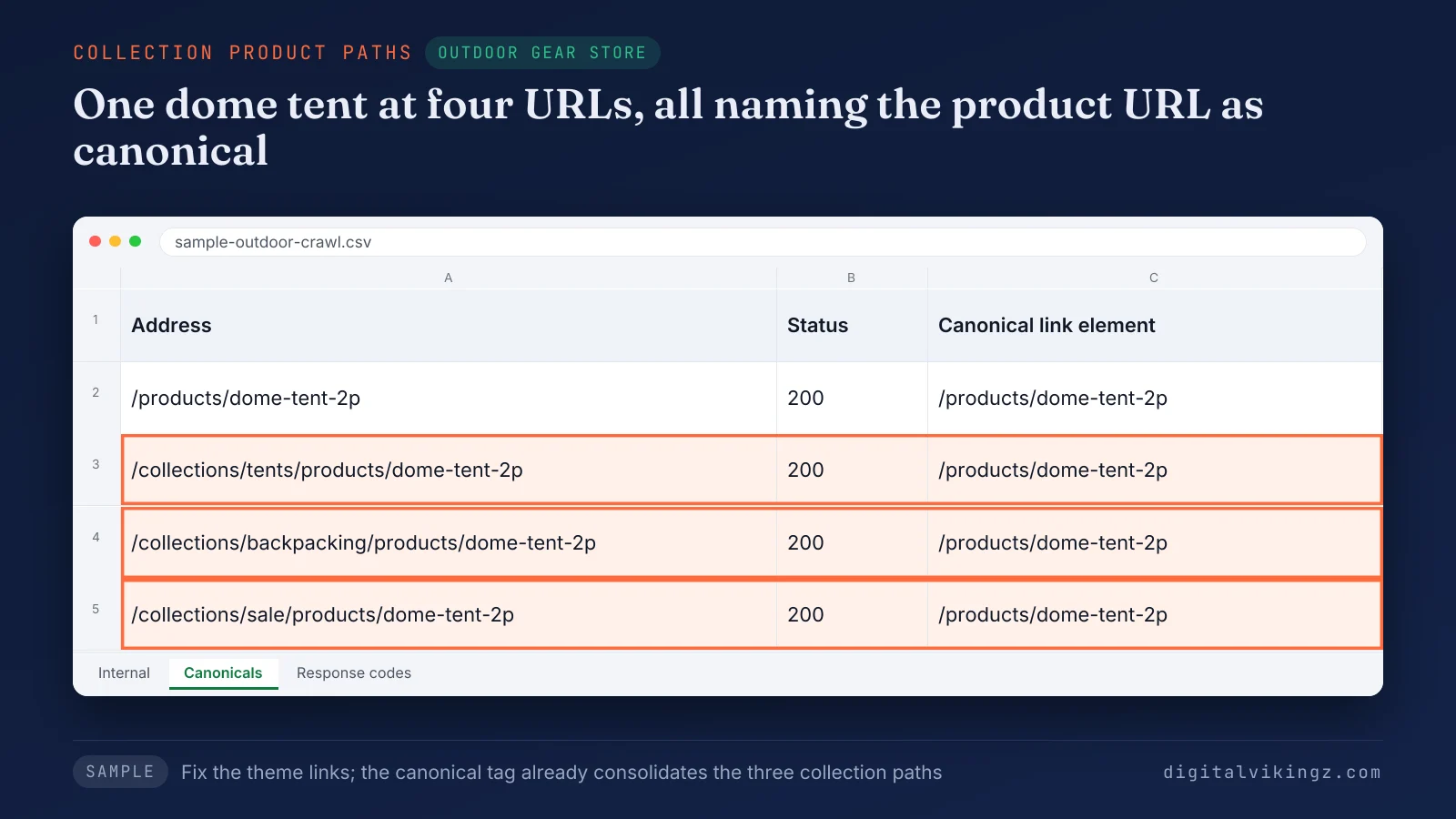
The sample crawl shows one 2-person dome tent at four URLs, including three collection paths that carry the /products/ canonical.
Search the theme's product card snippets for "within: collection" and remove the filter. Internal links then point to /products/ URLs. Collection product paths need no noindex tag and no redirect, since the canonical tag already consolidates those URLs.
Product recommendations, apps and links typed into blog posts can still output collection paths. A theme update can restore the filter, so recheck the snippets after each update. Filter and tag URLs need a decision rather than a fix.
Which Shopify filter and tag URLs should be indexed?
Shopify filter and tag URLs should be indexed only when the filtered set matches a search with its own demand, as a built collection. Filters and tags form a collection's faceted navigation, the controls that narrow products by attributes such as colour, size or price.
Google's faceted navigation documentation recommends robots.txt rules for filter URLs that never need to appear in search. Google calls a canonical tag on filter URLs less effective over the long term than a robots.txt rule.
Shopify's default robots.txt blocks sorted collection URLs and tag combinations joined with "+". Tilley's default file at tilley.com/robots.txt, read on 18 November 2026, also blocked URLs with two or more filters, so check the store's own /robots.txt.
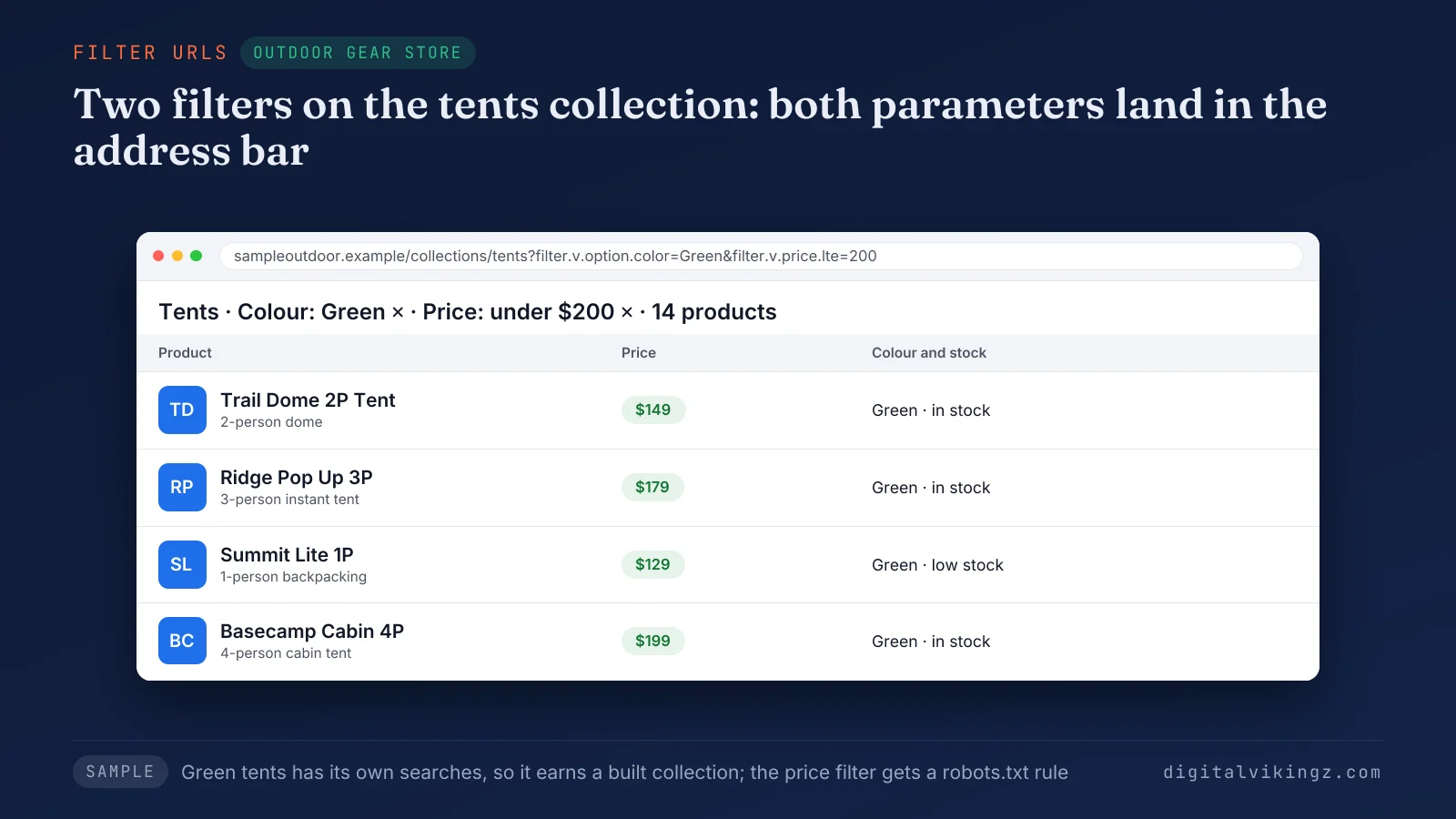
The sample tents collection shows a colour filter and a price filter in the address bar, with 14 products left.
A filter with demand, such as green tents, becomes a collection with an intro, and a price filter gets a robots.txt rule. Filter URLs already in Google's index stay crawlable until the canonical or noindex removes the filter URLs from the index. The robots.txt rule comes after.
Paginated collection URLs need no such decision, since paginated URLs stay open to crawling.
Is collection pagination duplicate content?
Collection pagination is not duplicate content, because Google treats each paginated page as a separate page with its own URL. Google's pagination guidance asks for a unique URL per page, such as ?page=2, with a canonical tag that points to the page itself.
Page 1 is not the canonical for page 2. A Shopify theme that canonicalises every page to page 1 needs a fix. Blocking ?page= URLs in robots.txt hides products beyond the first page from crawling.
Variant URLs raise the same question for product pages.
Do variant URLs create duplicate content?
Variant URLs do not create duplicate content when each variant URL carries a canonical tag that points to the product URL. Shopify builds variant URLs as /products/[handle]?variant=[variant-id], one for each size, colour or firmness option.
A sample queen medium-firm mattress at /products/hybrid-mattress?variant=4501 should show /products/hybrid-mattress as its canonical. View the source of one variant URL per product template and confirm the canonical carries no variant parameter.
Search Console shows whether Google accepted each of these canonicals.
How do you check duplicate URLs in Search Console?
Search Console shows duplicate URLs in the Page indexing report, where three duplicate statuses separate URLs that need no action from URLs that do.
The table below lists the three duplicate statuses in the Page indexing report, what Google says about each and the action on a Shopify store.
| Status | What Google says | Action on a Shopify store |
|---|---|---|
| Alternate page with proper canonical tag | The page points to an indexed canonical, so there is nothing to do | Leave; collection product paths and variant URLs land here |
| Duplicate without user-selected canonical | The page names no preferred canonical, and Google chose another URL | Check that the theme outputs a canonical tag on that URL type |
| Duplicate, Google chose different canonical than user | Google indexed a different URL than the canonical the page names | Fix: align internal links, the sitemap and the canonical on one URL |
The URL Inspection tool shows the canonical Google selected for any one URL in each status. Google states that validation of a fix typically takes up to about two weeks.
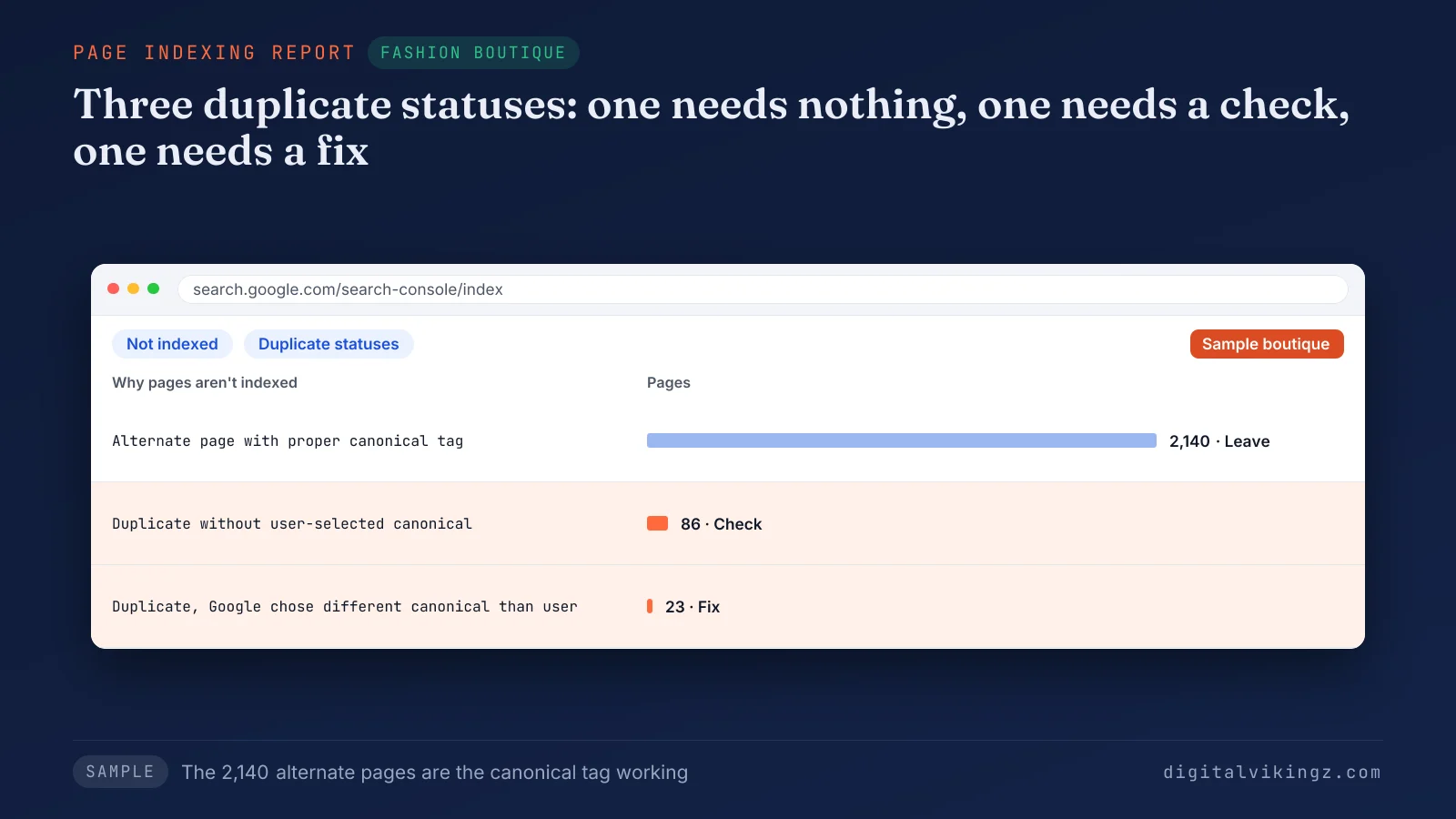
The sample boutique report lists 2,140 alternate pages, 86 duplicates without a canonical and 23 where Google chose a different canonical. The 86 pages in the second status need a canonical check, and the 23 pages in the third status need a fix. The 2,140 alternate pages are the canonical tag working.
A keyword cannibalization check in Search Console finds the duplicates no status shows, such as a filter URL ranking next to its collection. Our guide gives the steps for a keyword cannibalization check in Search Console, starting from one query and its ranking URLs.
How do robots.txt, noindex and canonical tags differ?
Robots.txt stops crawling, noindex stops indexing and a canonical tag names the preferred URL, so each method fits a different Shopify duplicate.
The table below compares the three methods by what each controls, where each fits on Shopify and where each is set.
| Method | What the method controls | Fits on Shopify | Where the method is set |
|---|---|---|---|
| Robots.txt rule | Crawling | URL patterns that never need search and are not yet indexed, such as price filters | The robots.txt.liquid theme template |
| Noindex tag | Indexing | Crawlable pages already indexed that should drop | A meta robots tag in the theme, set for the template of the affected page type |
| Canonical tag | Which URL Google shows from a duplicate set | Collection product paths and variant URLs | The theme's canonical_url output, on by default |
Google never sees a noindex tag on a URL robots.txt blocks, so the URL can stay in search results. A 301 redirect is the strongest canonical signal. Google reserves redirects for duplicates a store retires for good.
Robots.txt is the one method that needs a theme template edit.
How do you edit robots.txt on Shopify?
Shopify robots.txt is edited through a robots.txt.liquid template in the theme, which replaces the robots.txt file Shopify generates. Shopify calls the template "an unsupported customization" and warns that incorrect use "can result in loss of all traffic".
The steps to edit robots.txt on Shopify are listed below:
- Save a copy of the live /robots.txt output before any change.
- Create robots.txt.liquid in the theme's Templates folder through the code editor.
- Keep the loop over robots.default_groups, so every default robots.txt rule stays.
- Add each new robots.txt rule inside the loop for the user agent the rule targets.
- Compare the published /robots.txt with the saved copy line by line.
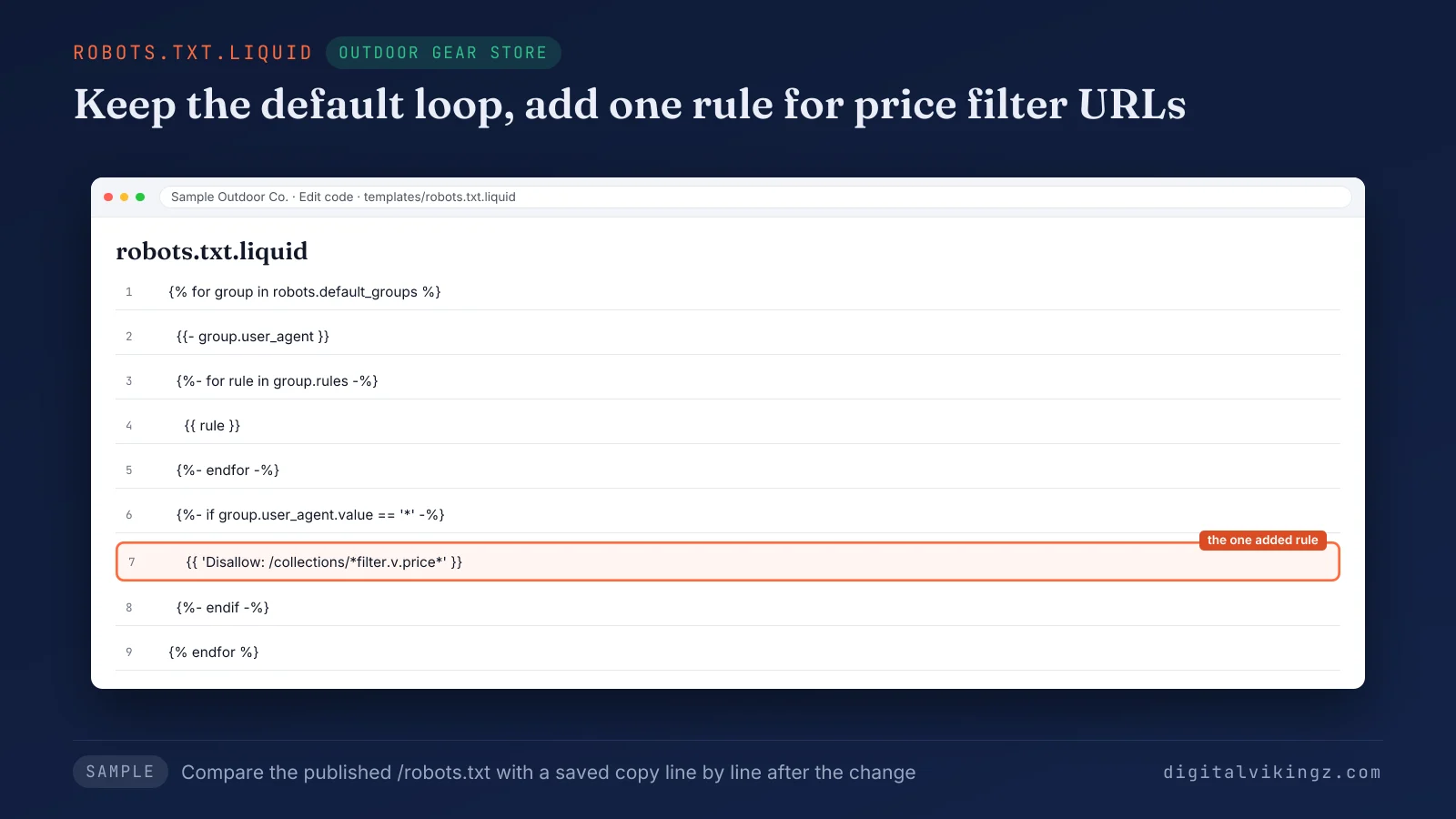
The sample template keeps Shopify's default rules and adds one robots.txt line that blocks price filter URLs.
An older robots.txt.liquid template can keep rules the default dropped, such as Disallow: /search. Deleting the template restores the current default.
Crawl rules protect collection pages, and page copy decides how those pages rank.
How do you optimize Shopify collection pages?
Shopify collection pages rank as category pages when each collection owns one buying intent and opens with a paragraph that defines the category.
The checks for a Shopify collection page are listed below:
- Give each collection one buying intent, so no two collections target the same search.
- Open the collection with one paragraph that defines the category above the product grid.
- Write a unique title tag and meta description in the collection's search engine listing.
- Offer collection filters on at least two attributes shoppers compare, such as size and material.
- Link each collection from the main menu or a parent collection and from related buying guides.
No Google source sets a word count for collection copy. The intro stays as long as the category definition needs.
Category pages rewritten to answer one buying intent are part of the fashion boutique SEO case study. One boho tops category page rose from 3 to 36 Google clicks, as the fashion boutique SEO case study reports.
What should happen to seasonal collections after the holidays?
Seasonal Shopify collections should stay live after the holidays, with the same URL updated and reused each year. A deleted seasonal collection returns a 404 error and loses the links and history the URL earned.
The off-season collection intro names the next season, such as Black Friday, and links the closest year-round collection. A seasonal collection retired for good should redirect with a 301 to the closest year-round collection.
Product pages follow the same keep-or-redirect logic.
How do you optimize Shopify product pages?
Shopify product pages rank when each product has one URL, a title and description written from product attributes, and one Product markup.
The checks for a Shopify product page are listed below:
- Name the product type and the main attribute in each product title.
- Write the product description from attributes such as material, size and use, not from supplier copy.
- Keep one Product markup per product page, since themes and SEO apps can each add one.
- Keep an out-of-stock product live with the stock status as text.
- Redirect a discontinued product with a 301 to the successor or, without one, to the product's collection.
A changed product handle needs a 301 redirect in Shopify's URL redirects, from the old URL to the new one.
Mattress model pages rewritten from product attributes are part of the mattress retailer SEO case study. A second mattress model page rose from 8 to 46 Google clicks, as the mattress retailer SEO case study reports.
Which Shopify changes should trigger an SEO recheck?
Five Shopify changes should trigger an SEO recheck: a theme update, a new SEO app, new filters, a new market and a move to Shopify. Each change adds new URLs or new theme code, so the duplicate URL checks run again.
The five Shopify changes that reopen the duplicate URL checks are listed below:
- Theme update: a new theme version can restore "within: collection" links to collection product paths.
- New SEO app: an app can add a second canonical tag or a second Product markup to every page.
- New filters or seasonal collections: each filter adds URL parameters that need the indexing decision.
- New market: a market subfolder or domain repeats products for a region and language.
- Move to Shopify: old URLs without redirects and new collection paths both add duplicate URLs.
Template fixes and a monthly recheck of collections and product URLs are the work of Shopify and WooCommerce SEO for Google. Our Shopify and WooCommerce SEO for Google service fixes collection and product templates and checks markup and prices every month.
Why do indexed pages jump after moving to Shopify?
Indexed pages jump after a move to Shopify because Shopify adds collection product paths, tag pages and filter URLs the old platform did not have. Old URLs without a 301 redirect to the new Shopify address add 404 errors and more duplicates.
The indexed count settles as Google recrawls the new URLs and reads their canonical tags. The Search Console and duplicate URL checks above apply to the new Shopify store from day one.
A store moving to Shopify redirects each ranking URL permanently to one new URL, which is how to migrate a website without losing rankings. The guide on how to migrate a website without losing rankings gives the full sequence for a platform move.
Is WooCommerce SEO different from Shopify SEO?
WooCommerce SEO differs from Shopify SEO in URL control: WooCommerce runs on WordPress templates and plugins, while Shopify uses theme sections and fixed URL paths. WooCommerce sets product and category URL bases in WordPress permalink settings, a choice Shopify does not offer.
WooCommerce documentation places those settings under Settings > Permalinks in the WordPress dashboard. The checks on canonical tags, filter URLs and page copy apply to both platforms in the same order.
Large WooCommerce catalogs, with filter plugins and category archives, need a separate WooCommerce SEO checklist. Shopify Markets adds a second URL set inside one Shopify store.
Are Shopify Markets URLs duplicate content?
Shopify Markets URLs are not duplicate content when each market version carries hreflang tags that name the other language and region versions. Market subfolders such as /en-us/ repeat products for one region and language, so Search Console can list those URLs as alternates.
Hreflang tags tell Google which market version suits each region and language. View the source of one product URL per market and confirm one hreflang link for each market version. Each market version keeps its own URL, so the duplicate URL checks run once per market.
Shopify's changelog of 25 March 2025 added robots.txt rules per domain, set through request.host in robots.txt.liquid. ChatGPT shopping reads Shopify products through a different route than Google.
Does the Shopify SEO checklist change for ChatGPT shopping?
The Shopify SEO checklist stays the same for ChatGPT shopping: the product page checks serve both Google and ChatGPT, and the URL checks serve Google. OpenAI states that Shopify merchants' product data reaches ChatGPT through Shopify Catalog, with no additional work required.
Duplicate URL checks stay a Google task, because Google crawls collection, filter and variant URLs. Complete product titles, attributes, prices and return policies are the product data both search surfaces read.
The product page checks above cover part of that data: attribute-led titles, one Product markup and stock shown as text.
Product data that ChatGPT compares store by store decides how Shopify products get recommended in ChatGPT. Our guide on how Shopify products get recommended in ChatGPT maps each product field ChatGPT reads. A store can track ChatGPT traffic in GA4 to see which product pages those recommendations send visits to.
Shopify SEO checklist questions
Shopify store owners ask six more questions about the checklist, on SEO apps, tags, penalties, timing, URL prefixes and blog tags.
Do you need an SEO app for Shopify?
A Shopify store does not need an SEO app to complete the checklist, since every check runs in the theme, the admin and Search Console. Apps suit bulk edits across hundreds of products, such as writing image alt text at scale.
What is the difference between tags and collections in Shopify?
A Shopify collection is a page with its own URL, title and description, while a tag is a product label that can filter a collection. Collections suit buying intents with search demand, and tags suit internal sorting and filters.
Does duplicate content cause a Google penalty?
Duplicate content does not cause a Google penalty on a Shopify store, since Google states that no penalty exists for a site's own duplicate URLs. The cost is split signals, since Google must pick one URL to show from each duplicate set.
How long does Google take to drop duplicate URLs?
Google drops a duplicate Shopify URL only after recrawling the URL, so the drop follows Google's crawl rather than the date of the fix. The Page indexing report shows the drop as the duplicate status counts fall over the following weeks.
Can you change the /products/ and /collections/ parts of Shopify URLs?
Shopify does not allow changes to the /products/ and /collections/ parts of its URLs, and only the handle after those prefixes can change. Short handles that name the product type, such as /products/linen-wrap-dress, read clearly in search results.
Do Shopify blog tag pages need the same checks?
Shopify blog tag pages need the same check as collection tags, because the default robots.txt blocks only combined blog tags joined with "+". A blog tag with no search demand should stay out of the main navigation.
Where should a Shopify store start the SEO checklist?
A Shopify store should start the SEO checklist in Search Console, then fix product links to collection paths, then decide filter URLs. The third Page indexing status shows where Google disagrees with the store, so those URLs come first.
Digital Vikingz treats each check as part of how semantic SEO builds topical authority that Google and AI answer engines recognise, collection by collection.
Theme templates that need a rebuild rather than a fix are the scope of Shopify Store Design built for semantic SEO. Stores whose theme needs a rebuild start with Shopify Store Design built for semantic SEO.
