 Digital Vikingz
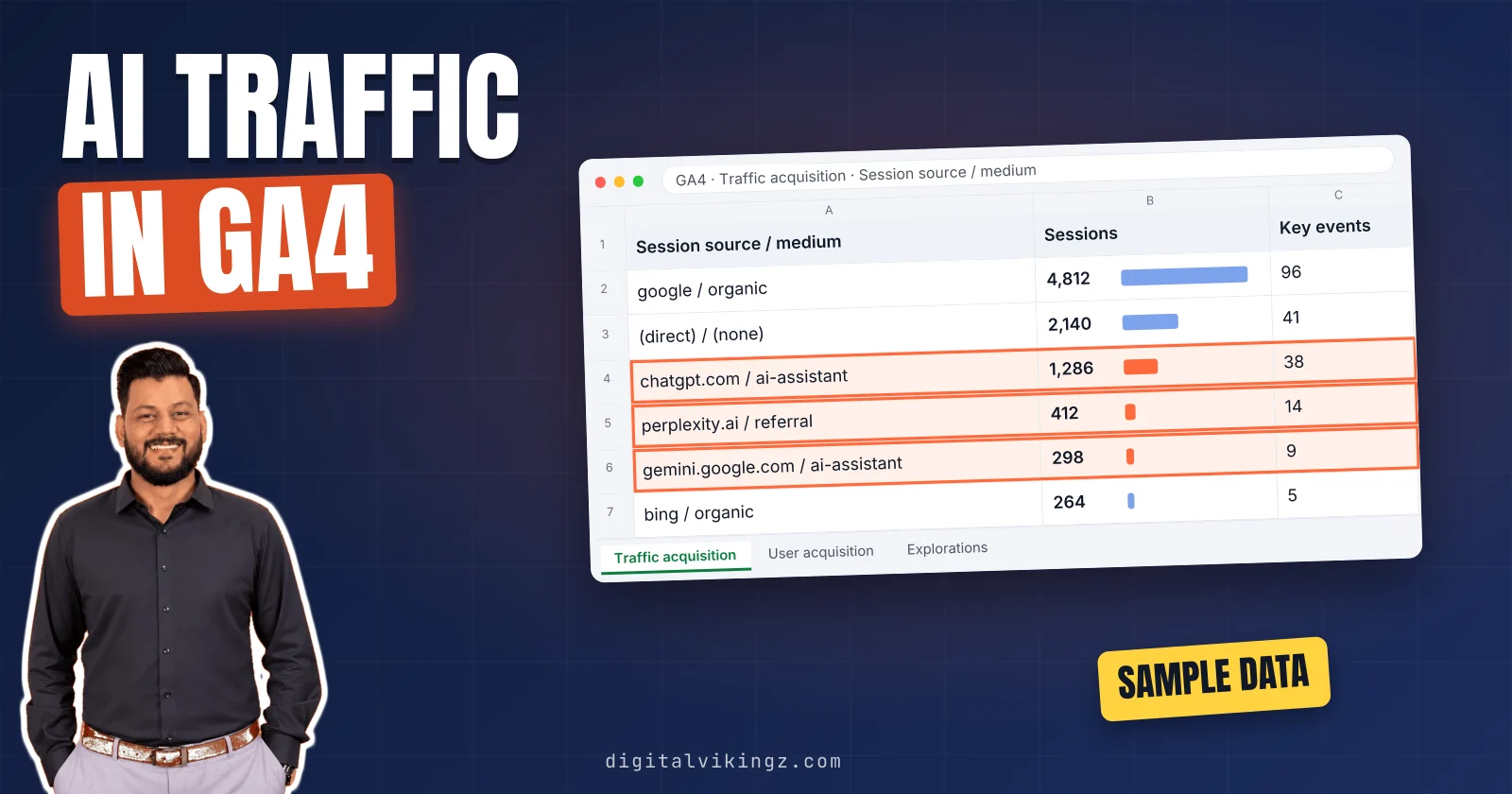
The fastest way to track ChatGPT traffic in GA4 is the AI Assistant row of the Traffic acquisition report. GA4 has placed visits with a recognized AI assistant referrer in the AI Assistant channel since 13 May 2026, according to Google.
A custom channel group with one regex adds Perplexity and the assistants Google does not name. An exploration shows the landing pages that receive AI visits. Key events show which AI visits became leads or sales.
Visits with no referrer and no tag land in Direct, so the AI number is a floor. SEO reporting reads the AI row beside Google Search Console AI impressions and a check of AI answers. Clicks from AI Overviews and AI Mode stay in Organic Search.
How does GA4 record ChatGPT traffic?
GA4 records a ChatGPT visit in the AI Assistant channel when the visit arrives with a referrer that Google recognizes as an AI assistant. The medium of that visit is "ai-assistant", and the campaign is "(ai-assistant)".
The session source keeps the assistant's domain, such as chatgpt.com or gemini.google.com. A channel group is the GA4 rule set that sorts every session into one channel, such as Organic Search, Referral or Direct.
Google added the AI Assistant channel to the default channel group of Google Analytics 4 (GA4) on 13 May 2026. The channel excludes Google AI Overviews and AI Mode, whose clicks stay in Organic Search. Which assistants count depends on the list Google recognizes.
Which AI assistants does the AI Assistant channel recognize?
Google's help pages name ChatGPT, Gemini, Claude, DeepSeek, Copilot and Grok as sources of the AI Assistant channel. Neither page names Perplexity, as of 18 November 2026.
Google's downloadable list of channel sources holds 802 sources in four categories and no AI category. The four categories are search, social, shopping and video. The full list of recognized AI assistants is not public.
Perplexity visits can sit in Referral as a result, and a custom channel group catches those visits. The utm_source tag on ChatGPT links is a second signal GA4 can read.
Does ChatGPT add a utm_source tag to its links?
ChatGPT adds utm_source=chatgpt.com to links in its answers, according to OpenAI's publisher FAQ. GA4 reads the utm_source value as the session source. A tagged ChatGPT visit therefore shows chatgpt.com even with no referrer.
Search Engine Roundtable reported on 14 October 2026 that ChatGPT links were arriving without the tag. A Marketing4eCommerce report put the gap at about 8 to 15 October 2026. Many of those untagged visits landed in Direct, as the reports describe.
The tag is a helpful extra signal, and the setup below does not depend on the tag. The first place to see both signals is the Traffic acquisition report.
Where do you find ChatGPT traffic in GA4 reports?
ChatGPT traffic appears in GA4 under Reports, Acquisition, Traffic acquisition, as the AI Assistant row of the session default channel group. Set a date range that starts after 13 May 2026, so the row has data on every day.
Add "Session source / medium" as a secondary dimension to split the row by assistant. Typical AI values read chatgpt.com / ai-assistant and gemini.google.com / ai-assistant. Perplexity shows as perplexity.ai / referral instead.
Search the Referral row for perplexity.ai, because Google does not name Perplexity. Each source row carries its own sessions, engaged sessions and key events.
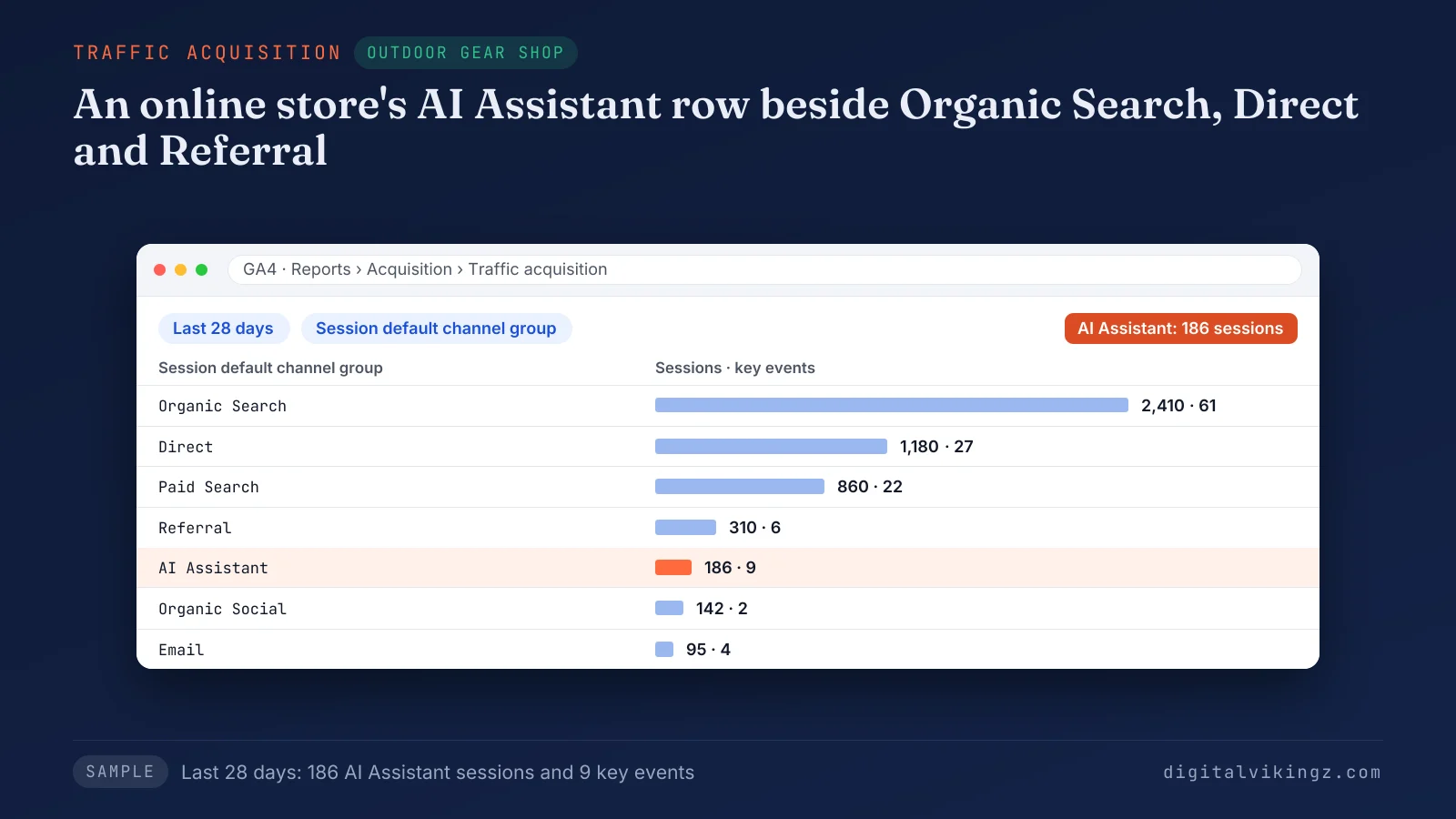
The sample store's AI Assistant row shows 186 sessions and 9 key events over 28 days. A custom channel group puts every assistant, Perplexity included, into one row. Shopify stores earn part of that row through ChatGPT Shopping product recommendations.
How do you build a custom channel group for AI assistant traffic?
A custom channel group for AI assistant traffic takes seven steps under Admin, Data display, Channel groups. The new group gives every assistant one row in GA4 reports.
The seven steps to build the AI assistants channel are listed below:
- Open Admin, then Data display, then Channel groups.
- Click Create new channel group, which starts as a copy of the default channel group.
- Name the group, for example Channels with AI assistants.
- Click Add new channel and name the channel AI assistants.
- Add a condition on Source, choose matches regex and paste the pattern from the next section.
- Click Reorder and drag AI assistants above Referral, and above the AI Assistant channel when the copy lists one.
- Save the group, then choose the group as the primary dimension in Traffic acquisition.
Google applies custom channel groups to reports retroactively, so the AI assistants row also covers past dates. The condition reads the session source. The row therefore catches visits whether the source came from the referrer or the tag.
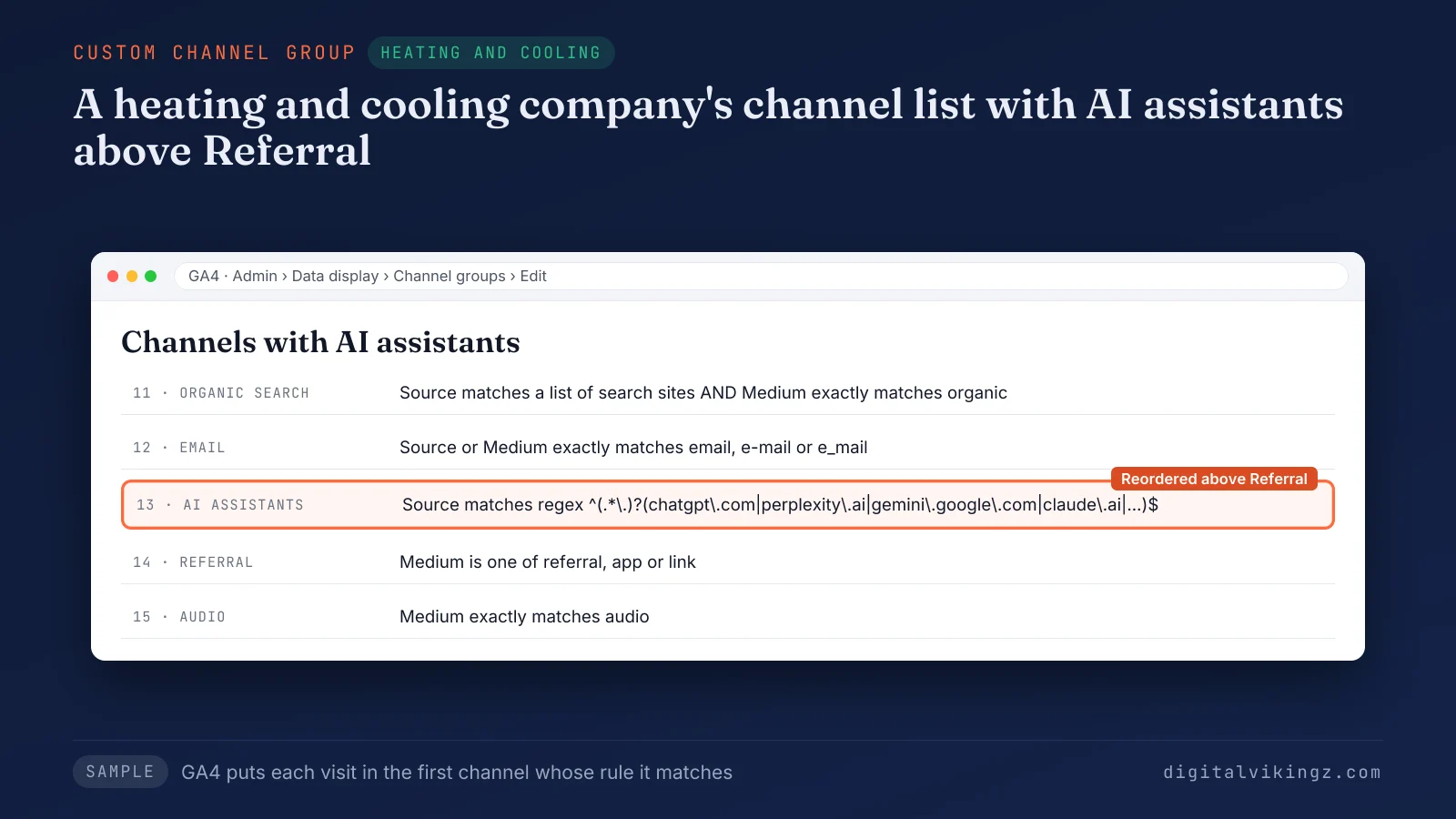
The sample heating and cooling company places AI assistants above Referral, so assistant visits never fall into Referral. The channel works only as well as its regex.
What regex matches AI assistant sources in GA4?
One regex matches the source domains of ChatGPT, Perplexity, Gemini, Copilot, Claude, DeepSeek, Grok, Meta AI and Mistral in a GA4 channel condition.
^(.*\.)?(chatgpt\.com|openai\.com|perplexity\.ai|gemini\.google\.com|copilot\.microsoft\.com|claude\.ai|deepseek\.com|grok\.com|meta\.ai|mistral\.ai)$
The ^ and $ anchors match the whole session source value, under matches regex or partially matches regex. The optional (.*.) group accepts subdomains such as chat.openai.com and www.perplexity.ai. Escaped dots and the $ anchor reject lookalikes such as chatgpt.com.example.net.
Our 18 November 2026 test matched all 12 assistant sources and none of 13 others. Google's example pattern also matched non-assistant sources ending in "ai" or containing "gpt".
Test the pattern in an exploration filter before saving the channel. Google's help advises updating the pattern as domains change. Channel position decides which visits the pattern sees.
Does channel order change which visits count as AI traffic?
Channel order changes the count, because GA4 puts each visit in the first channel whose rule the visit matches. A visit from perplexity.ai matches the Referral rule too.
A custom channel group that lists AI assistants below Referral therefore never receives the visit. Google's help places the AI channel above Referral in its example. Google adds that the AI channel can also sit above Organic Search.
The next question, with the channel in place, is which pages receive those visits.
Which pages do AI assistants send visitors to?
A free-form exploration in GA4 shows which landing pages receive AI assistant visits, split by assistant.
The steps to build the landing page exploration are listed below:
- Open Explore and start a Free form exploration.
- Import the dimensions Landing page + query string and Session source.
- Import the metrics Sessions, Engaged sessions and Key events.
- Drag Landing page + query string to Rows and Session source to Columns.
- Add a filter on Session source that matches the regex from the channel step.
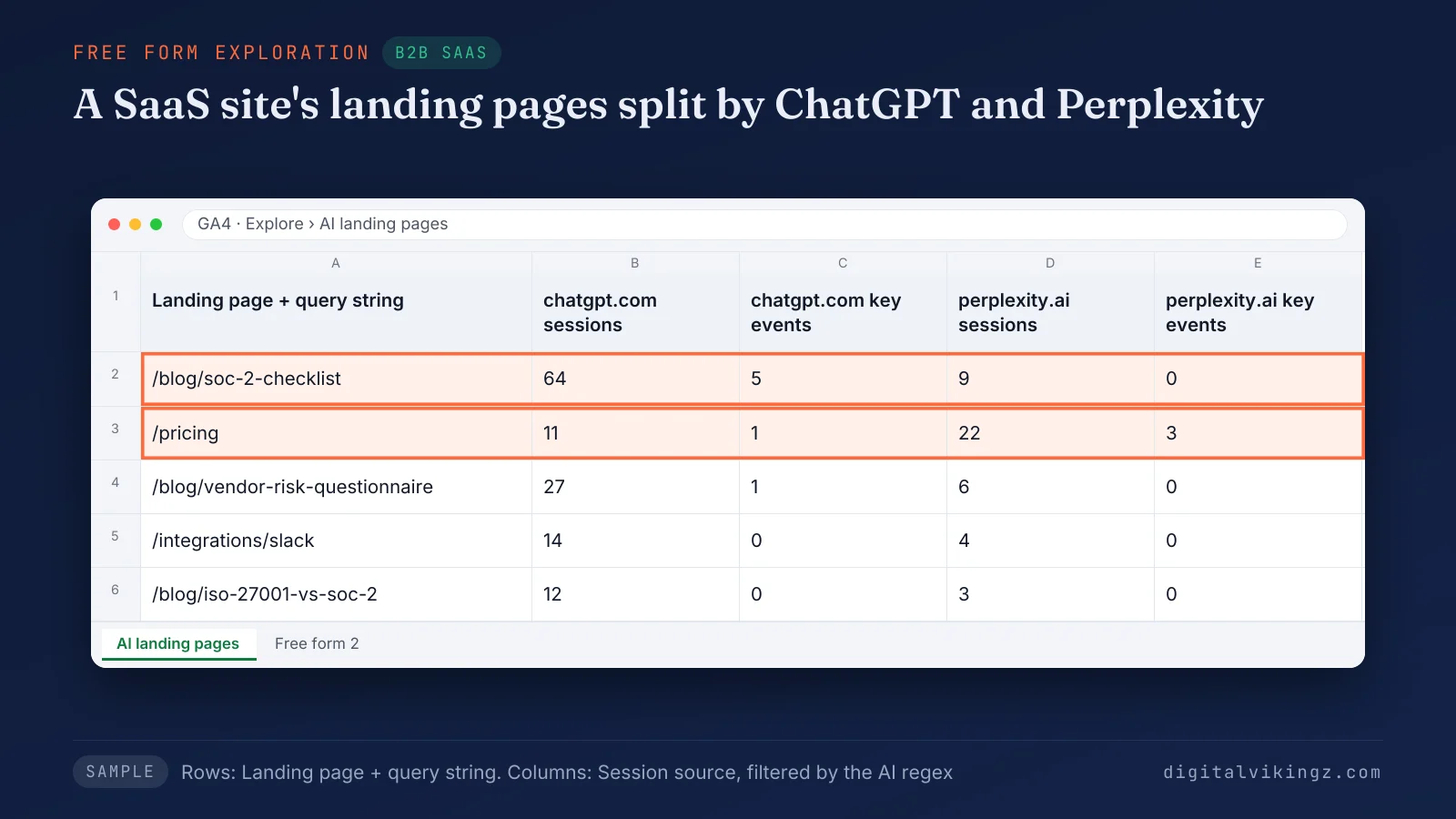
The sample SaaS exploration shows 64 sessions and 5 key events from chatgpt.com on /blog/soc-2-checklist, and 22 sessions and 3 key events from perplexity.ai on /pricing.
The landing pages show which content the assistants link to most. Engaged sessions show whether AI visitors read the page or leave at once. A page with AI visits and no key events shows where the next step is weak.
Name the exploration so the same view opens every week from the Explore list. Sessions show reach, and key events show which visits became leads and sales.
How do you tie AI assistant visits to leads and sales?
AI assistant visits tie to leads and sales when the actions that matter are marked as key events in GA4. A key event is a GA4 event marked as important to the business, such as a purchase or a form submission.
The key events to mark for each business type are listed below:
- Ecommerce store: purchase and add_to_cart, so the AI row shows orders and carts from assistant visits.
- B2B SaaS: sign_up and the demo request form, so the AI row shows trials and demos from assistant visits.
- Local service business: the contact form and a click on the phone number, so the AI row shows calls and quote requests.
Add the Key events column to Traffic acquisition and read the AI assistants row beside Organic Search. A phone number click needs its own event before the click can count as a key event.
The weekly SEO and AEO report carries the AI assistants row and its key events. Digital Vikingz adds that row to the automated weekly SEO and AEO report every Monday.
Does AI assistant traffic convert better than organic search traffic?
AI assistant traffic converts better than organic search traffic on some sites and worse on others, so each property's own key event rate decides.
The key event rate is key events divided by sessions for the same channel and date range. We compare the AI assistants rate with Organic Search once the AI row passes 100 sessions in the range.
Smaller rows swing too much from one sale or one lead. The AI row also misses visits that GA4 files under Direct.
Why does some ChatGPT traffic show as Direct in GA4?
Some ChatGPT traffic shows as Direct in GA4 because the visit arrives with no referrer and no utm_source tag. GA4 uses Direct for visits from a saved link or a typed address.
The ways a ChatGPT visit loses its source are listed below:
- Copied links: a link pasted into a new tab carries no referrer.
- App links: some apps open links without passing a referrer.
- Referrer policies: a page or browser setting can strip the referrer before the visit.
- Missing tags: links that arrive without utm_source=chatgpt.com have no tag to fall back on.
Unassigned is the value GA4 uses when no channel rule matches the visit. The AI assistants row is therefore a floor, not a full count.
A "how did you hear about us" option that names ChatGPT shows the visits the row misses. Two dates explain most sudden jumps in the row.
Which dates need a note in GA4 AI traffic reports?
Two dates need a note in GA4 AI traffic reports: 13 May 2026 and about 8 to 15 October 2026.
Google dates the AI Assistant channel to 13 May 2026, so a comparison across that date mixes two rule sets. A custom channel group reads both sides with one rule.
The October 2026 gap reported for ChatGPT tags can show as a dip in ChatGPT sessions and a rise in Direct. A note on each date stops a reader from taking a rule change for a traffic change.
GA4 records clicks, and AI search also works without clicks.
How do AI assistant numbers fit into SEO reporting?
AI assistant numbers fit into SEO reporting as one traffic row, read beside Google Search Console AI impressions and a check of AI answers. GA4 measures clicks, while the other two sources cover answers that send no click.
We read the three sources together, because each source misses what the others catch.
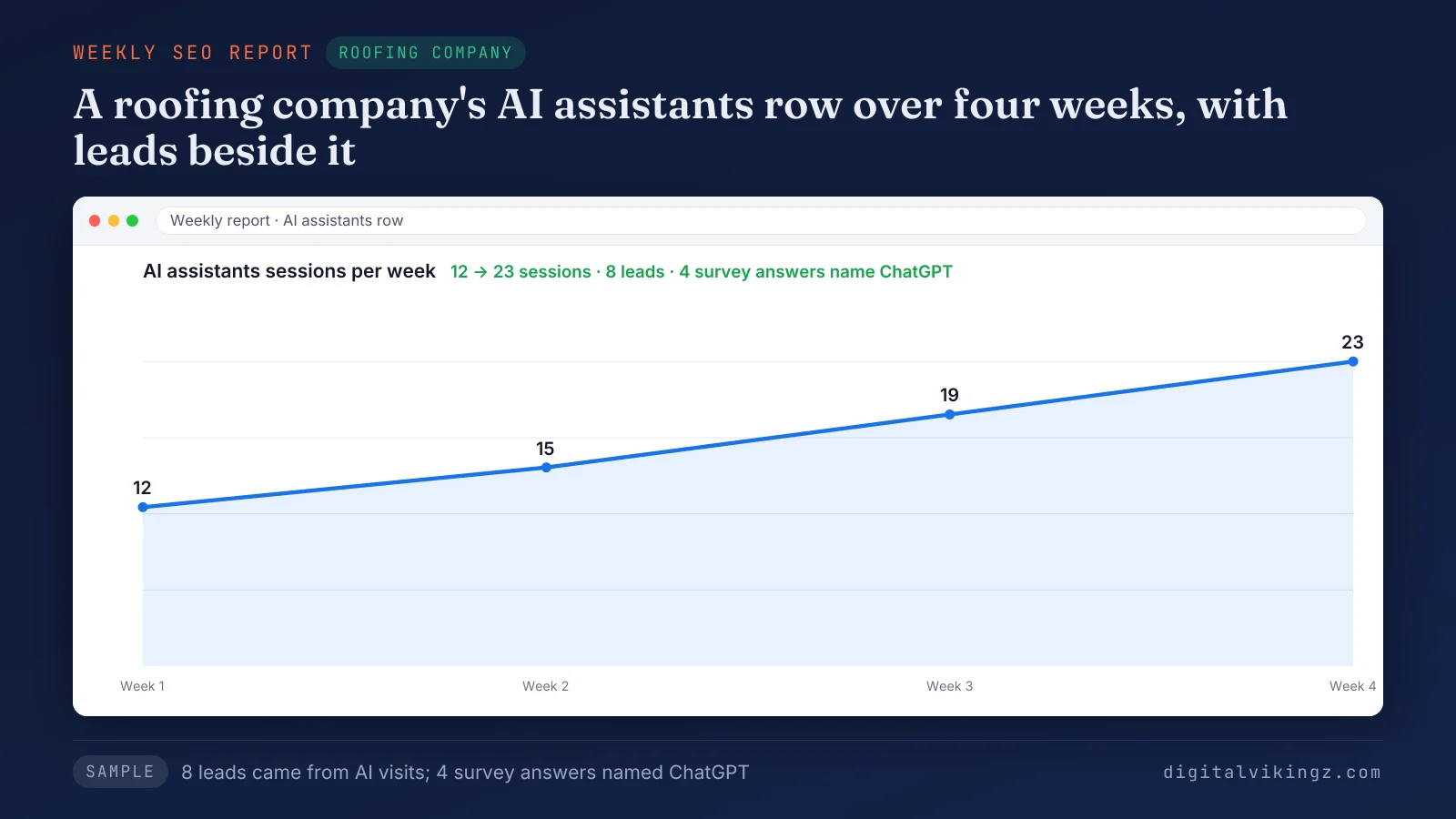
The sample roofing company's AI assistants row rises from 12 to 23 weekly sessions, with 8 leads and 4 survey answers naming ChatGPT. The survey answers confirm visits that the AI row loses to Direct.
A report that groups pages by topic cluster shows which topics earn AI visits and leads.
SEO Reporting and Attribution covers that weekly view for clients. Our SEO Reporting and Attribution service reports the AI assistants row per cluster beside leads every Monday.
Does GA4 show clicks from AI Overviews and AI Mode?
GA4 does not separate clicks from AI Overviews and AI Mode, because Google counts those clicks as Organic Search. No GA4 dimension marks a click as coming from an AI feature on Google.
The generative AI performance report in Google Search Console counts AI Overviews and AI Mode impressions, not clicks.
The Google Search Console generative AI report fills the Google side of the picture. The reading steps are in our guide to the Google Search Console generative AI report.
Can GA4 show whether ChatGPT mentions your business?
GA4 does not show whether ChatGPT mentions a business, because a mention without a click sends no visit. GA4 answers whether an assistant sends visits. A prompt check answers whether the assistant names the business.
A low AI row beside frequent mentions points to answers that name the business without a link.
A check of what ChatGPT and AI Overviews say about your business covers the mention side. Run a monthly check of what ChatGPT and AI Overviews say about your business beside the GA4 row.
Do AI crawlers show up in GA4?
AI crawlers such as GPTBot and OAI-SearchBot rarely show up in GA4, because crawlers fetch pages without running the GA4 tag. Server logs record crawler visits, and GA4 records people who click.
A sudden Direct spike with odd device or location patterns points to bots or spoofed hits, not to AI assistant visitors. Compare the same day in GA4, the store platform and the CDN before calling the spike AI traffic.
Clean click data is the input for attribution.
How do AI visits connect to pipeline and revenue?
AI visits connect to pipeline and revenue when each AI key event carries its session source into the lead or order record. A hidden form field in the CRM or the store's order record keeps the source with the lead or order.
Deals and revenue then join the AI row through the attribution model the business uses.
The steps to attribute SEO to pipeline and revenue apply to AI visits too. Follow the steps to attribute SEO to pipeline and revenue and add the AI assistants row as one source.
Questions about tracking ChatGPT traffic in GA4
How many custom channel groups can a GA4 property have?
A standard GA4 property can have 2 custom channel groups, and a GA4 360 property can have 5. Google's channel group help sets those limits beside the default channel group, with up to 50 channels in each group.
Do you need Google Tag Manager to track ChatGPT traffic in GA4?
Google Tag Manager is not needed to track ChatGPT traffic in GA4, because the channel group and the exploration live in GA4 itself. Google Tag Manager adds only the events the site does not send yet, such as phone number clicks.
Can GA4 show which ChatGPT prompt sent a visitor?
GA4 does not show the ChatGPT prompt behind a visit, because the link carries the assistant's domain and source tag only. The landing page is the closest clue to the question the visitor asked.
Can the default channel group include Perplexity?
The default channel group is not editable, but a custom channel group can become the property's primary channel group. Data in the primary channel group follows the new rules from the day of the switch.
Is a paid tool needed to track AI assistant traffic?
A paid tool is not needed to track AI assistant visits, because GA4 reports those clicks at no cost. Paid AI visibility tools mostly track mentions in AI answers, a different job.
What to set up first to track ChatGPT traffic in GA4
Start with the AI Assistant row in Traffic acquisition, then build the custom channel group and mark the key events. Save the landing page exploration and read the AI row every week.
Digital Vikingz checks pages that earn no AI visits for crawler access and answer readiness first. The AI Visibility Checker reads up to five public pages for free.
Run the AI Visibility Checker for pages with no AI visits on the page you most want assistants to cite.
