 Digital Vikingz
Optimizing a Google Business Profile means filling every field Google offers with accurate details, within Google's guidelines, and keeping those details current. Complete and accurate details make a profile more likely to show up in local search results on Google Maps, though no edit changes distance.
The setup runs in 13 steps, from verification and the business name to Google reviews and the Performance report. A weekly, monthly and seasonal routine of replies, posts, checks and hours updates keeps the profile optimized after setup. Six optimization mistakes, from extra words in the name to duplicate profiles, can get a profile suspended.
What does it mean to optimize a Google Business Profile?
Optimizing a Google Business Profile means filling every field Google offers with accurate details, within Google's guidelines, and keeping those details current.
A Google Business Profile is the free business listing that Google shows on Search and Maps, edited by the owner after verification. The work has two parts: a one-time setup in 13 steps and a weekly, monthly and seasonal upkeep routine.
The 13 steps to optimize a Google Business Profile are listed below:
- Claim and verify the profile so the business shows on Google Maps.
- Enter the business name exactly as shown on signage.
- Choose the primary category and up to 9 more categories.
- Set the address or the service area.
- Set regular hours, special hours and more hours.
- Add the phone number, website link and chat.
- Write the business description within 750 characters.
- Add services and products.
- Select the attributes that apply.
- Upload photos and videos.
- Publish Google Business Profile posts every week.
- Ask every customer for a Google review and reply to each one.
- Read the Performance report every month.
The order runs from identity to contact details, then content, then reviews and measurement. Each field is finished once in that order, and no later step undoes an earlier one.
Google Business Profile optimization is therefore a routine, not a one-time task. Digital Vikingz runs the same 13 steps for clients through the Google Business Profile optimization service. Profile completeness also raises the most common question about ranking on Google Maps.
Does an optimized Google Business Profile rank higher on Google Maps?
Yes, an optimized Google Business Profile can rank higher on Google Maps, because complete and accurate details raise relevance. Google states that "Businesses with complete and accurate info are more likely to show up in local search results."
Google also states that "Local results are mainly based on relevance, distance, and popularity." Distance is how far the business sits from the searcher, so no profile edit changes distance.
Google adds that "There's no way to request or pay for a better local ranking on Google." The levers that move a profile up, in order, are set out in the guide on how to rank higher on Google Maps.
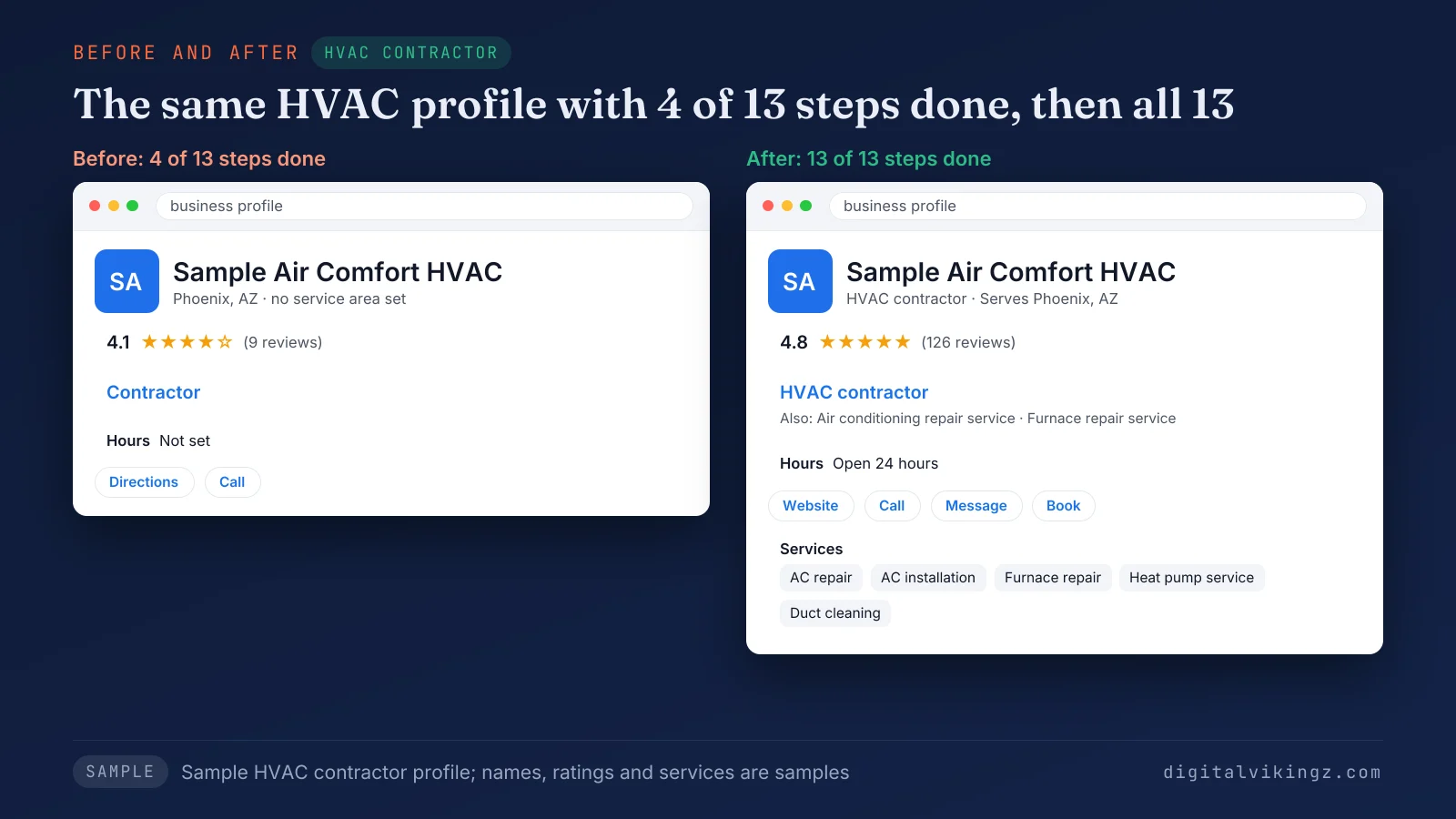
Figure 1 shows a sample HVAC profile with 4 of 13 steps done on the left and 13 of 13 on the right. Verification is the first of the 13 steps.
1. Claim and verify the profile so the business shows on Google Maps
Claiming and verifying a Google Business Profile comes first, because only verified businesses can show their details on Google Maps and Search. Google asks owners to "add or claim your business then verify your Business Profile." Claiming applies when Google already shows a profile for the business, and creating applies when no profile exists.
Search Google Maps for the business name before creating a profile. The owner then claims the existing listing instead of starting a duplicate.
Verification "tells Google that you're authorized to represent the business," according to Google. Some businesses must verify a Google Business Profile before Google accepts any edit to the fields in steps 2 to 13.
A verified profile that still does not appear points to one of the reasons a business is not showing on Google Maps. A verified profile then needs a business name that matches the signage.
2. Enter the business name exactly as shown on signage
The business name on a Google Business Profile must match the name on the business's signage, website and stationery, with no added words. Google states that "Including unnecessary information in your business name isn't permitted, and could result in the suspension of your Business Profile."
Google's name rules exclude six kinds of added text:
- Marketing taglines, such as a slogan after the name.
- Phone numbers and website addresses.
- Business hours, such as "Open 24 hours".
- Service or product words, such as "Drain Cleaning" after a plumber's name.
- Location words, such as a town or a highway exit.
- Legal terms such as LLC, unless the signage carries them.
Practitioners answering owners on Quora report keywords in a Google Business Profile name as a common reason for suspension. Legal terms such as LLC raise the narrowest name question.
Should a Google Business Profile name include LLC?
A Google Business Profile name should include LLC only when LLC appears in the name on the business's signage and documents. Google requires "real-world proof (e.g. signage, business cards, invoices)" before a legal term enters the name.
A company invoiced as Clearwater Plumbing LLC but signed as Clearwater Plumbing on vans and the shopfront uses Clearwater Plumbing. The category comes next, after the name.
3. Choose the primary category and up to 9 more categories
A Google Business Profile primary category is the one category from Google's list that states what a business is, chosen as specific as possible. Google allows up to 9 more categories after the primary category.
Google asks for categories that complete the statement "This business IS a" rather than "this business HAS a." Google also asks owners to "Choose the fewest number of categories it takes to describe your overall core business."
A plumber picks Plumber as the primary category and adds Drainage service only when drain work is a core line of the business. Google Business Profile secondary categories name other core lines of the business, never single services, which belong in step 8.
The five steps for choosing your Google Business Profile primary category begin with one sentence that names what the business is. Category choice depends partly on whether customers visit the business, the subject of step 4.
4. Set the address or the service area
A Google Business Profile shows a street address only when customers visit that address, and a service-area business sets the areas the business serves instead. Google does not accept P.O. boxes, remote mailboxes or virtual offices as a business address. A co-working desk qualifies only with signage, staff and customers received there during business hours.
Google's guidelines set service areas by cities, zip codes or other places, within about 2 hours of driving time from the business base. A hybrid business, such as an auto repair shop with roadside service, shows the storefront address and also sets a service area.
A service area business on Google keeps one profile for the central office, as Google's guidelines require.
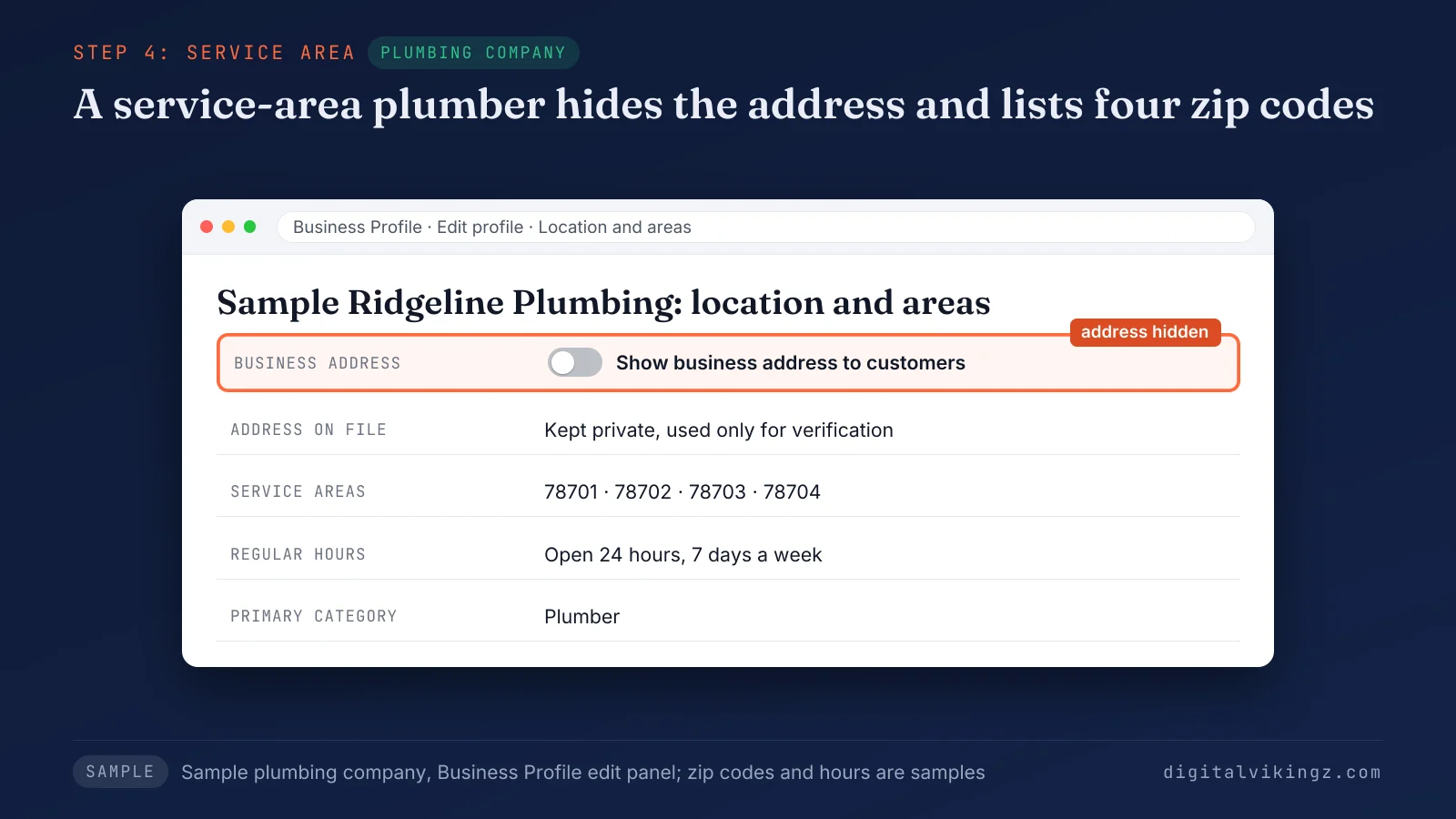
Figure 2 shows a sample plumber's profile with the address hidden, four service areas and 24-hour regular hours. Service areas on the profile pair with service area pages on the website for the places that earn their own page. Businesses that travel to customers face one more address question.
Should a service-area business hide the business address?
Yes, a service-area business should hide the business address on a Google Business Profile when customers are not served at that address. Google's own example says "if you're a plumber and run your business from your residential address, clear the address from your Business Profile."
The hidden address stays in the profile settings, and customers see the service areas instead. Hours are the next field customers check before calling.
5. Set regular hours, special hours and more hours
Owners set three kinds of hours on a Google Business Profile: regular hours, special hours for holidays and closures, and more hours for specific services. Google's help says "To change your hours for holidays or other temporary periods, set special hours."
The federal holiday calendar lists Thanksgiving Day on 26 November 2026, Christmas Day on 25 December 2026 and New Year's Day on 1 January 2027. The US Office of Personnel Management publishes that calendar. Special hours for each of the three holidays should be set before the date.
More hours show the times for one service, such as emergency call-outs, and sit inside the regular hours. A seasonal business sets the season's hours as regular hours and marks the profile temporarily closed in the off-season. Businesses that work only by appointment leave the hours blank, as Google's guidelines state.
Google Business Profile holiday hours are the most time-bound task of the year, with three holidays between 26 November and 1 January. Accurate hours matter most when the phone, website and chat lead straight to the business.
6. Add the phone number, website link and chat
Adding the phone number, website link and chat to a Google Business Profile gives customers three ways to reach the business directly. Google Help lists one primary phone number and up to 2 more numbers for each profile. Google advises owners to "Use a local phone number instead of a central call center helpline number whenever possible."
The website field takes the full URL, starting with https://, and some categories can add links for bookings or orders. We add a UTM tag to the website link, such as ?utm_source=gbp&utm_medium=profile&utm_campaign=website, to separate profile visits in Google Analytics 4.
GA4 lists those visits under Reports, Acquisition, Traffic acquisition as gbp / profile, apart from post links tagged utm_medium=post. UTM tracking for Google Business Profile links keeps profile visits apart from other Google organic visits.
Google states that "Businesses with a claimed and verified Business Profile can add a WhatsApp or text messaging option." Google added a Message button beside Call in Google Maps on 5 November 2026.
The Message button appears on profiles with chat set up, so chat now sits beside the phone as a main contact route. Google Help lists social media links, one per platform, as available in select regions. The description is the first field written in the owner's own words.
7. Write the business description within 750 characters
A Google Business Profile description states what the business offers and what sets the business apart in no more than 750 characters.
Google sets that limit and asks for what the business offers, what makes the business special and how long the business has operated. Google asks owners to focus on the business "instead of details about promotions, prices, or sales."
URLs and HTML code do not belong in the description. We write each description with services named in the words customers search for, inside full sentences rather than a keyword list.
A 24-hour plumber's description names the main services, the areas served and the year the business opened. A Google Business Profile description shows in the "From the business" section of the profile. Each service named in the description also belongs in the services list.
8. Add services and products
The services and products sections of a Google Business Profile list each service or item the business sells, with a price where one applies. The services editor keeps each service and price accurate, while the menu editor serves food and drink businesses only.
Google Help limits in-store products to retail businesses in the US, Canada, the UK and Ireland. The products reach the profile through a point-of-sale system connected to the Local Inventory app.
Each service is one item named as customers say it, such as Teeth whitening, not a broad label such as Cosmetic options.
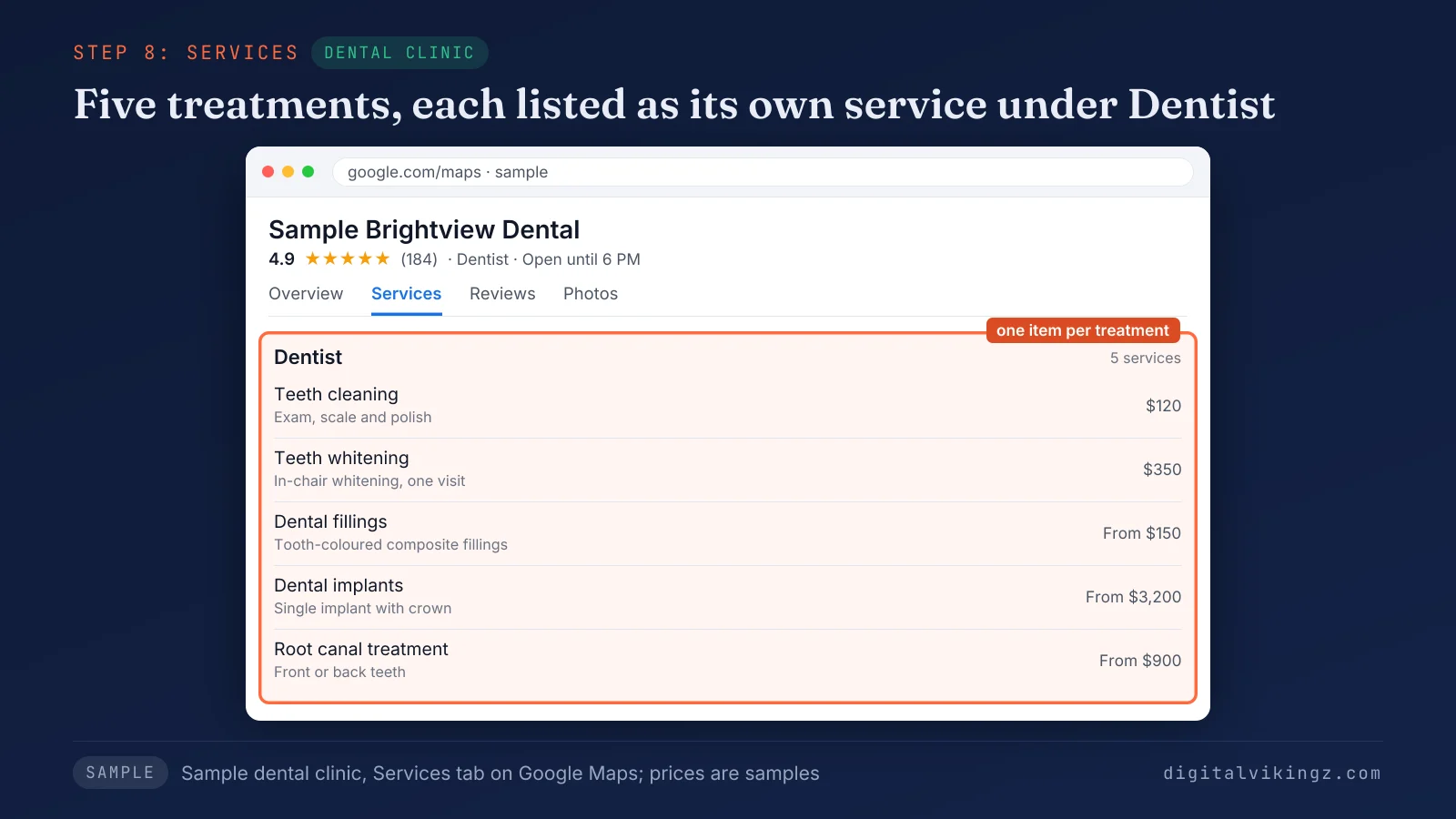
Figure 3 shows a sample dental clinic with five services listed under the Dentist category. Google Business Profile services and products also give each category from step 3 a concrete list behind it. Attributes add the facts that a services list does not state.
9. Select the attributes that apply
Attributes are the facts on a Google Business Profile that describe features of the business, such as Wi-Fi, parking or outdoor seating. Owners edit the factual attributes themselves. Google's help says "Subjective attributes, like whether your business is popular with locals, rely on the opinions of Google users who have visited your business."
The attribute list can differ by category, so each owner checks the list after every category change. Google Business Profile attributes answer small questions such as parking before a customer has to ask. Photos show what the attributes and services describe.
10. Upload photos and videos
Photos and videos on a Google Business Profile show customers the building, the team and the finished work before the first call. Google states that "When you add an exterior photo, it helps customers recognize your business when they visit." Google describes photos and videos as a way to show customers what the business offers.
We recommend a set that covers the exterior, the interior, the team, the vehicles and recent jobs, refreshed every month. Phone photos of recent jobs show customers the finished work.
New Google Business Profile photos of recent jobs are one of the monthly tasks in the upkeep routine. Posts put new photos in front of customers every week.
11. Publish Google Business Profile posts every week
Google Business Profile posts should be published at least once a week, the rate most practitioner guides recommend, because Google sets no posting frequency. Business Profile posts come in three types: Update, Offer and Event. Useful posts show a finished job, a dated offer, an event or an hours change.
Posts keep the profile current for customers, and Google names no ranking effect for posts. Post types, parts and topics are covered in the guide on what to post in Google Business Profile posts. Reviews are the second weekly task after posts.
12. Ask every customer for a Google review and reply to each one
A Google Business Profile gains reviews when the business asks every customer through the review link and replies to each review. The Get more reviews option gives each Business Profile a review link and a QR code. Google states that "When you reply to customer reviews, it shows that you value their feedback."
Google bans incentives for any review and review gating, which means asking only the customers expected to be happy. The Google review policy also bars conflict-of-interest reviews, such as reviews written by the owner or staff.
Owners who respond to Google reviews should answer a negative review with the facts and an offer to settle the issue offline. The seven steps to get more Google reviews cover the link, the timing, the wording and the replies. Reviews, posts and every other field show their effect in the Performance report.
13. Read the Performance report every month
The Performance report of a Google Business Profile shows the searches that found the profile and the calls, direction requests and website clicks that followed.
The Calls metric counts taps on the call button, not connected calls, according to Google Help. Google Help also states that the searches metric updates at the start of each month and can take up to 5 days to show.
A monthly reading ties each change, such as a new service or new photos, to the calls and clicks that followed. Seasonal trades compare each month with the same month a year earlier.
The Google Business Profile performance report is the place owners read every month. The monthly reading is one part of the routine that keeps a profile optimized after setup.
How do you keep a Google Business Profile optimized?
A Google Business Profile stays optimized through a weekly, monthly and seasonal routine of replies, posts, checks and hours updates. We run the routine below on the local service profiles we manage.
The table lists each upkeep task with the cadence and the setup step the task repeats:
| Cadence | Task | Setup step |
|---|---|---|
| Weekly | Reply to every new review | Step 12 |
| Weekly | Publish one post | Step 11 |
| Weekly | Answer chat messages | Step 6 |
| Monthly | Read the Performance report | Step 13 |
| Monthly | Add photos of recent work | Step 10 |
| Monthly | Check services, prices and attributes | Steps 8 and 9 |
| Monthly | Review Google updates and collected info | All steps |
| Seasonal | Set special hours before each holiday | Step 5 |
| Seasonal | Change seasonal services and offers | Steps 8 and 11 |
| After any change | Update the name, address, phone or hours the same day | Steps 2, 4, 5 and 6 |
Google may confirm business details through automated calls or texts and update the profile from the answers. The monthly check of collected info catches those changes before customers act on them.
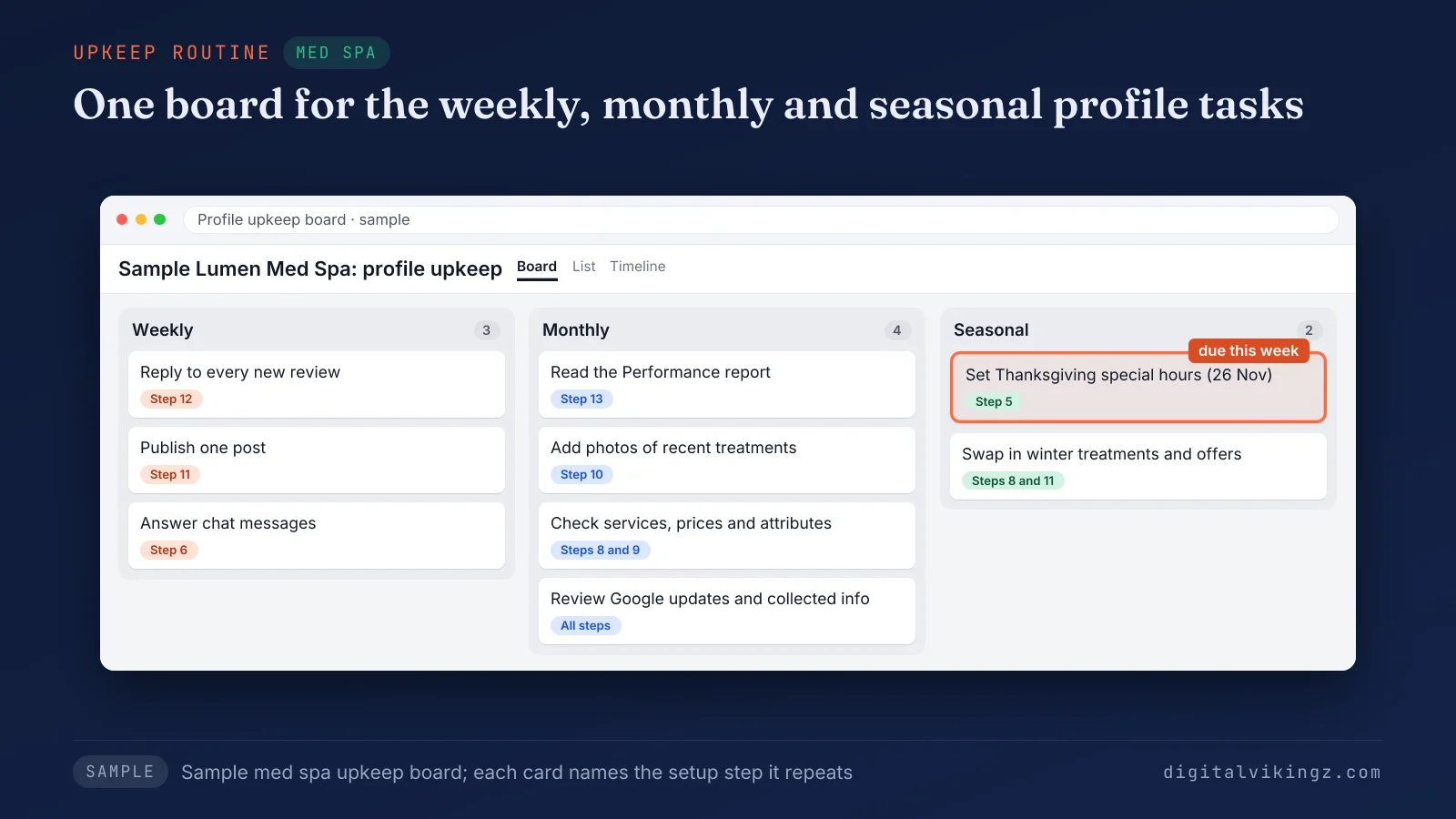
Figure 4 shows a sample med spa upkeep board with three weekly, four monthly and two seasonal tasks.
Owners who want the weekly post done for them can use Daily Google Posts for local service businesses. Our AI agent behind that service drafts one post a day from the business's own website. Part of the routine can run without a person at the keyboard.
Can an AI agent or post scheduler run Google Business Profile upkeep?
Yes, an AI agent or a post scheduler can run repeated Google Business Profile upkeep such as posts. A person still checks each automated post for facts, policy and the photo before the post goes live.
Review replies, hours changes and edits to the name or address stay with a person, because each one changes what Google shows as fact. The choice between a Google Business Profile post scheduler and AI agents comes down to who writes each post and who checks the post. Careless upkeep also creates the mistakes that can get a profile suspended.
What optimization mistakes can get a Google Business Profile suspended?
Six optimization mistakes can lead to a suspended or restricted Google Business Profile, and each one breaks a written Google rule. Google says its guidelines exist "To make sure your Business Profile won't be suspended."
The six mistakes that can get a Google Business Profile suspended or restricted are listed below:
- Extra words in the business name, such as a service or a town (step 2).
- An address Google does not accept, such as a P.O. box or a virtual office (step 4).
- Categories added as keywords instead of what the business is (step 3).
- Review incentives, review gating or bought reviews (step 12).
- A second profile for the same business, since Google allows one profile per business (step 1).
- A phone number or website link that redirects to another page or a call centre (step 6).
A duplicate Google Business Profile should be merged into the main profile or removed, never kept as a second listing. Edits inside these six rules break no guideline.
The causes, the appeal and the evidence for reinstatement are explained in why a Google Business Profile gets suspended. One outdated tactic, seeding questions in Q&A, still appears in several top-ranking guides.
Does the Q&A section still exist on Google Business Profiles?
No, the public Q&A section no longer exists on Google Business Profiles, because Google began removing the section in December 2025. Google Help still describes a pilot in which verified US merchants answer attribute questions with Yes, No or Skip.
Guides that tell owners to seed questions and answers describe a feature customers no longer see. Removed features also shift where customer contact comes from, which explains many profiles with views but few calls.
Why does an optimized Google Business Profile get views but few calls?
An optimized Google Business Profile gets views but few calls when ads, competitor profiles or a weak contact route take the tap. Ads sit above the map pack, and competitor profiles sit beside the profile. The contact route then decides whether a customer calls, messages or clicks.
Calls can move to the Message button, so calls and messages are read together in the Performance report. A complete profile raises the chance of a view, while the category match, hours, reviews and contact route decide the call.
The order of checks is laid out in what to check first when Google Business Profile calls dropped. Calls and clicks are no longer the only route from a profile to a customer.
Do AI assistants use Google Business Profile data to recommend a local business?
Yes, AI assistants use business profiles such as the Google Business Profile, along with directory sites, the business website and third-party mentions. Matching ties the website, the Google Business Profile and each directory listing to one business through a shared name, address, phone number and category.
Consistent facts across the profile and the website make that match easier for every assistant. The five stages an assistant runs are explained in how AI assistants decide which local business to recommend. The fields that matter most also change from one industry to the next.
Which Google Business Profile settings change by industry?
The Google Business Profile settings that change by industry are the address setting, service areas, hours, services list and practitioner profiles. Each setting follows a written Google rule, so the industry changes the values and never the rule.
The table matches each industry with the profile settings that change and the Google rule behind each setting:
| Industry | Settings that change | Google rule behind the setting |
|---|---|---|
| Plumber | Address hidden; service areas by cities or zip codes | Google's own plumber example: clear a residential address |
| HVAC company | Seasonal services such as furnace repair and AC installation; special hours in peak weeks | Services editor and special hours |
| Roofer | Service areas within about 2 hours of driving time; photos of finished roofs | Service area limit and exterior photos |
| Dental clinic | A practice profile plus a profile for each public-facing dentist | Google's individual practitioner rule |
| Med spa | Each treatment as a service with a price; special hours from Thanksgiving to New Year | Services editor and special hours |
Trade guides apply the same settings: local SEO for plumbers, HVAC SEO for seasonal and emergency searches and roofing SEO for the map pack. Dental SEO for practices starts from the same practitioner rule.
Every setting in the table is work an owner can do, which leaves the question of doing the work alone.
Should you optimize a Google Business Profile yourself or hire help?
Owners can optimize a Google Business Profile themselves, and outside help pays off when the weekly upkeep keeps slipping. Doing the work alone takes a few tasks each week: review replies, one post and chat messages, plus the monthly report.
Owners who work alone can follow the upkeep table row by row, with each row tied to one setup step. Help suits owners with several locations, a past suspension or no one free for the weekly tasks.
Google Business Profile management as a service covers the weekly and monthly rows of the upkeep table. Outside help also takes over the monthly checks, such as the Performance report and collected info. The 13 setup steps come first either way, and the routine keeps the result.
Questions about optimizing a Google Business Profile
Is a Google Business Profile free?
Yes, a Google Business Profile is free to create and manage, and Google sells no paid activation or ranking. Offers that promise a paid top position on Google Maps do not come from Google.
Is Google My Business the same as Google Business Profile?
Yes, Google Business Profile is the current name of the product formerly called Google My Business. Every feature, from posts to reviews, carried over under the new name.
Do Google Business Profile edits need approval?
Yes, Google reviews Google Business Profile edits before the changes appear live on the profile. An edit shown as pending is still under that review.
How long does Google Business Profile optimization take to show results?
Google publishes no timeline for results from Google Business Profile optimization, and each edit passes Google's review before the edit shows. Results depend on competition near the business and on how many steps were missing.
Can a Google Business Profile work without a website?
Yes, a Google Business Profile works without a website, because the website field is optional. A website with one page per service gives customers more detail than the profile holds.
Do geotagged photos help a Google Business Profile rank?
No, Google documents no ranking effect for geotagged photos on a Google Business Profile. Photos of recent jobs help customers judge the work, with or without location data.
Should each dentist in a practice have a Google Business Profile?
Each public-facing dentist can have a separate Google Business Profile when patients can reach that dentist at the verified location during stated hours. The practice keeps a separate profile for the location.
Can a business change the name on a verified Google Business Profile?
Yes, the name on a verified Google Business Profile can change, but Google may ask the business to verify again.
What happens to a Google Business Profile when the business moves?
A Google Business Profile must be verified again after the business moves to a new address.
Who should own a Google Business Profile when an agency manages the profile?
The business should keep ownership of the Google Business Profile and add the agency as a manager under People and access. Ownership then stays with the business if the agency changes.
Can Google change a Google Business Profile without the owner?
Yes, Google can update a Google Business Profile from details confirmed through automated calls, texts or other sources. Owners review those changes under Collected info and Google updates in the profile.
Does Google Business Profile optimization replace local SEO on the website?
No, Google Business Profile optimization covers the profile only, while local SEO also covers the website, listings and links. The local SEO checklist adds those website and listing tasks to the profile work.
Where should an owner start with a Google Business Profile?
An owner starts with verification and the business name, works through the 13 steps in order, then keeps the weekly, monthly and seasonal routine.
Each finished field keeps one consistent description of the business across Google Search, Google Maps and AI answers. Digital Vikingz builds the same profile work into semantic SEO for local service businesses, with the profile, website and listings stating the same facts.
