 Digital Vikingz
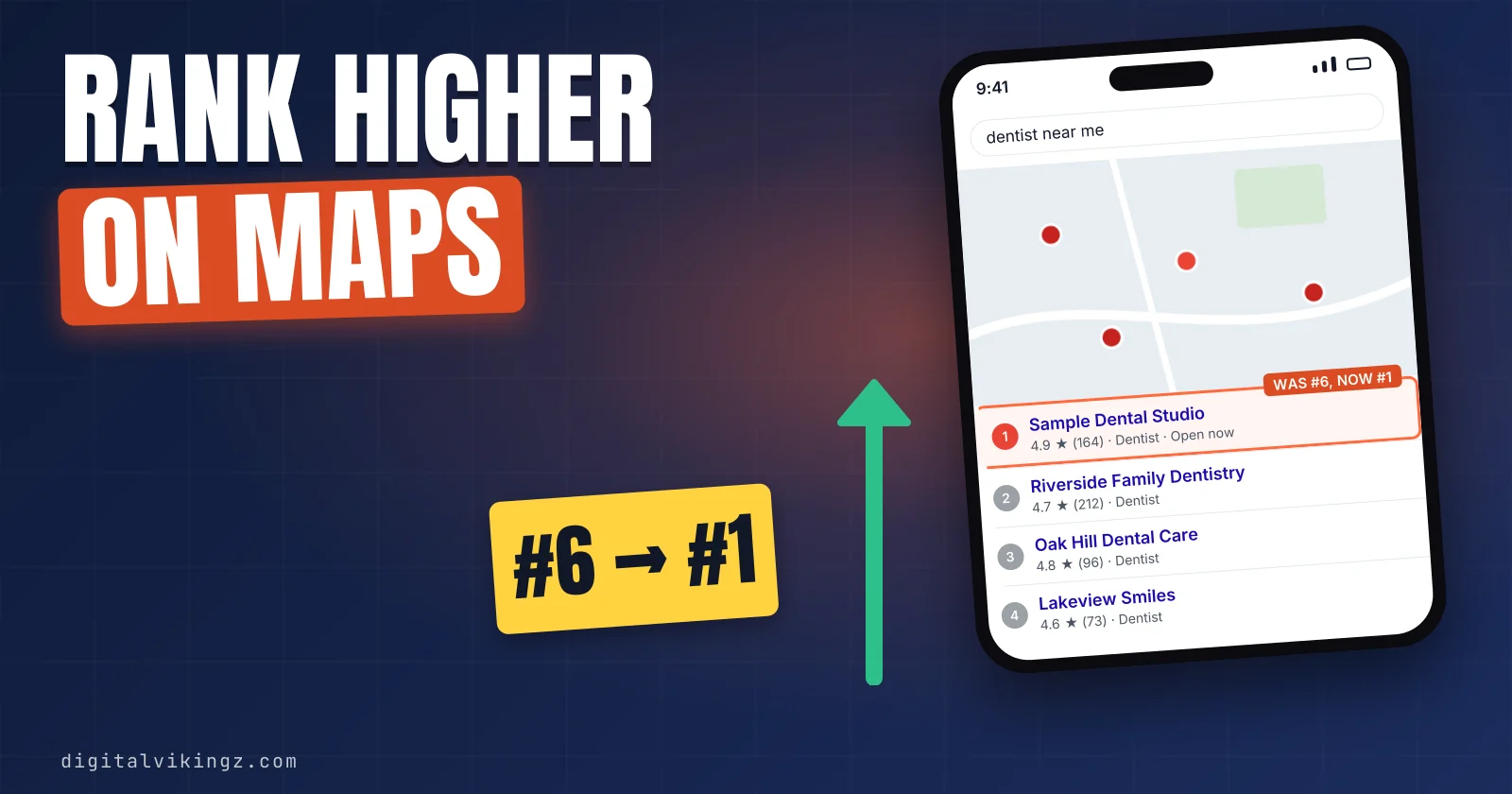
A business ranks higher on Google Maps by improving relevance and prominence, the two of Google's three local ranking factors that an owner can change. Google ranks each Google Business Profile for one search at one searcher location, so a business has many Google Maps rankings, not one.
Google Maps ranking rests on relevance, distance and prominence. Relevance measures the match to the search, prominence measures how well known the business is, and distance is fixed by where the business is based.
Seven steps move a profile up, starting with categories, profile fields and the service area, then reviews, website pages, consistent details and local links. Keyword-stuffed names, second profiles and incentivised reviews break Google's guidelines and put the profile at risk of suspension.
A rank grid checks the same search from many points across the service area, because a search from the office shows one point only. Digital Vikingz works the seven steps in the same order for local service businesses as part of Local SEO and Google Business Profile optimization.
How does Google Maps ranking work?
Google Maps ranking is the order Google gives local results for one search at one searcher location, set mainly by relevance, distance and prominence.
Google's help page on local ranking states: "Local results are mainly based on relevance, distance, and popularity." The same Google page still heads the third factor "Prominence", so popularity and prominence name one factor. Google keeps the weights private: "We do our best to keep the search algorithm details confidential."
A Google Business Profile can sit first for a customer two streets away and lower for a customer at the edge of the service area. We therefore read a ranking on Google Maps as many positions, one for each search and each searcher location.
The positions show up in two places: the map pack in Google Search and the full list in Google Maps.
How does the map pack differ from the Google Maps list?
The map pack is the block of three Google Business Profiles shown with a map in Google Search, and Google Maps shows a longer list.
Google states that customers searching nearby "find local results on Google Maps and Search." Owners who ask how to reach the "top 3" mean a place in the map pack. Practitioners call the longer list opened from the map pack the local finder.
Both surfaces draw on the same Google Business Profile and the same three factors.
What are the 3 Google Maps ranking factors?
The 3 Google Maps ranking factors are relevance, distance and prominence, and Google names all three on the Google help page about local ranking.
The 3 Google Maps ranking factors are listed below:
- Relevance: how well a profile matches the search
- Distance: how far the business is from the searcher
- Prominence: how well known the business is
The table below sets each factor against what a Google Business Profile owner can change:
| Factor | What Google measures | What the owner controls | Words owners use |
|---|---|---|---|
| Relevance | How well the profile matches the search | Categories, profile fields, website service pages | "keywords" |
| Distance | How far the business is from the searcher | Only the address or service area, within Google's rules | "proximity" |
| Prominence | How well known the business is, including links and reviews | Reviews, replies, consistent details, local links | "authority" |
Relevance comes first, because the owner controls every input behind relevance.
1. Relevance: how well a profile matches the search
Relevance is how well a Google Business Profile matches what someone searches, and complete, detailed business info raises the match.
Google advises owners to "provide complete and detailed business info" so the profile matches relevant searches. The primary category tells Google what kind of business the profile represents. Local SEO practitioners rank the primary category among the strongest relevance inputs, although Google publishes no weight for the category.
Owners often call relevance "keywords", but the match comes from categories, services and website pages, not from repeated words. Relevance decides which searches a profile can rank for on Google Maps, and distance decides where the profile ranks.
2. Distance: how far the business is from the searcher
Distance is how far a business is from the customer who searches, and Google Maps ranking changes with every searcher location.
Google's help page adds: "If a customer doesn't share where they are, Google uses what it knows about their location." Local SEO practitioners call the same factor proximity.
No Google Business Profile setting moves a business closer to a customer. Practitioners agree that only a new staffed location changes distance.
Practitioners on the Local Search Forum reported more weight on proximity in November 2026, a change Google has not confirmed. Prominence is the factor that lets a business farther away still rank.
3. Prominence: how well known the business is
Prominence is how well known a business is, and Google bases prominence partly on links to the business and the number of reviews.
Google's help page says prominence draws on "how many websites link to your business and how many reviews you have." Google also states: "More reviews and positive ratings can help your business's local ranking."
Practitioners add a steady flow of reviews and the same business details across directories to the prominence inputs of a Google Business Profile. Owners call prominence "authority", and the word covers how well represented the business is across the web.
The three factors together explain why a closer business with fewer reviews can still rank first on Google Maps.
Can a business outrank a closer competitor on Google Maps?
Yes, a business can outrank a closer competitor on Google Maps when relevance and prominence for that search are clearly stronger.
Owners more often see the reverse: a closer Google Business Profile with fewer reviews sits first. Practitioners report that distance and category match outweigh review count in many map packs. More reviews alone therefore do not lift a profile above a closer, well-matched competitor.
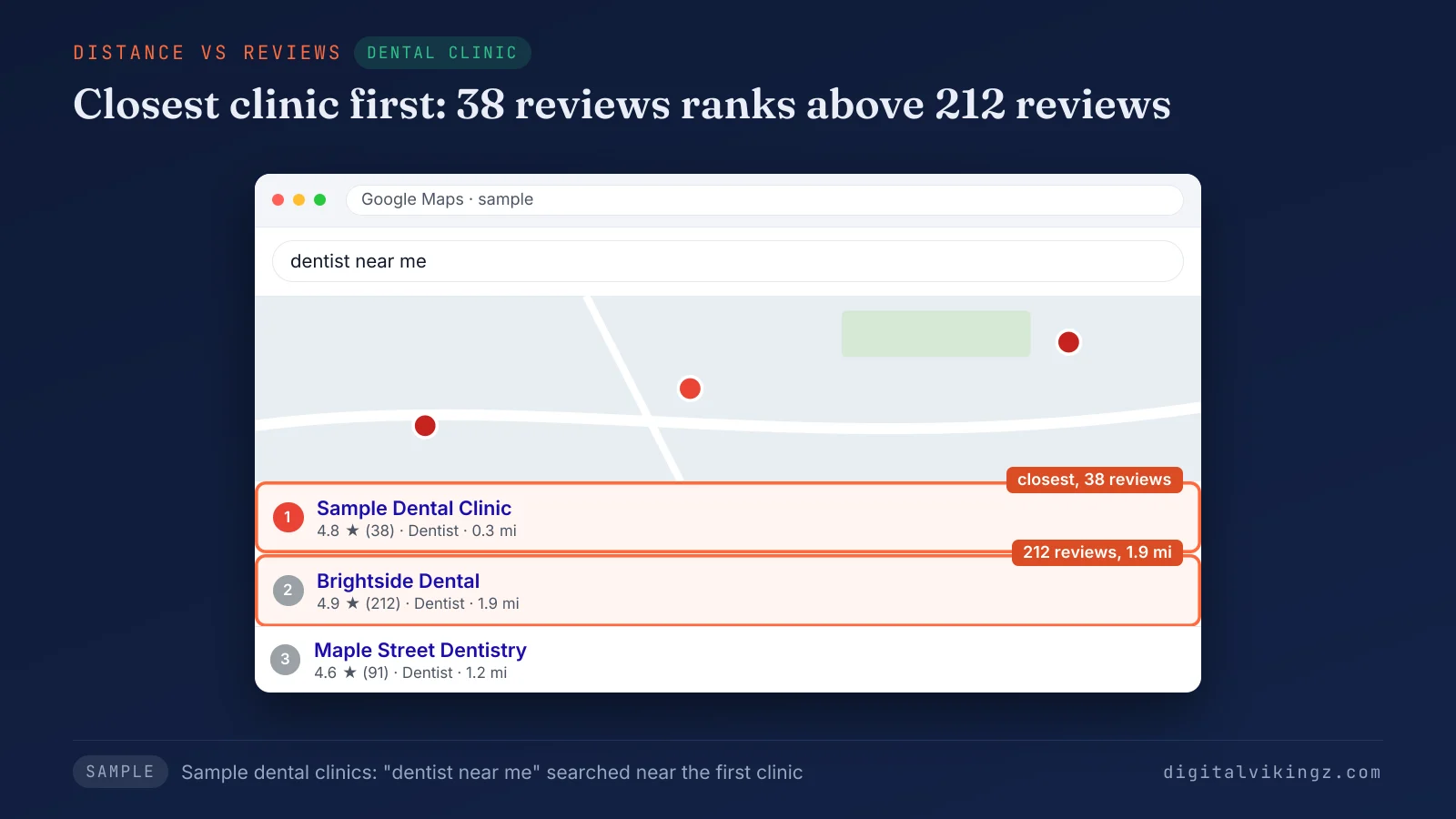
The sample dental clinic map pack shows the closest clinic first with 38 reviews, above a clinic 1.9 miles away with 212 reviews. Seven steps raise relevance and prominence in the order an owner controls each input.
What are the 7 steps to rank higher on Google Maps?
Seven steps rank a Google Business Profile higher on Google Maps, starting with relevance, the factor the owner fully controls.
The steps assume a verified profile that already appears on Google Maps for the business name. A profile missing even for the business name has a visibility problem, explained in why a business is not showing on Google Maps.
The 7 steps to rank higher on Google Maps are listed below:
- Set the most specific primary category and the secondary categories
- Complete every profile field that describes the services offered
- Set the address or service area within Google's rules
- Earn reviews steadily and reply to every review
- Publish a website page for each main service
- Keep the name, address and phone number identical everywhere
- Earn links and mentions from local organisations and press
We work the steps in that order. Category and service area settings decide which searches a profile enters, before reviews add weight.
The table below tags each step with the ranking factor that the step moves:
| Step | Factor the step moves | Where the change is made |
|---|---|---|
| 1. Categories | Relevance | Business Profile categories |
| 2. Profile fields | Relevance | Business Profile fields |
| 3. Address or service area | Distance (setting only) | Business Profile address and service area |
| 4. Reviews and replies | Prominence | Google reviews and replies |
| 5. Service pages | Relevance and prominence | Website service pages |
| 6. Name, address and phone number | Prominence | Website and directories |
| 7. Local links | Prominence | Other websites |
Categories come first, because every later step builds on the match the categories set.
1. Set the most specific primary category and the secondary categories
The primary category should be the most specific Google category for the main service, and secondary categories should cover the other main services.
Google's guidelines tell owners to focus "on adding the most specific categories for your business." The same guidelines state: "Do not use categories solely as keywords or to describe attributes of your business."
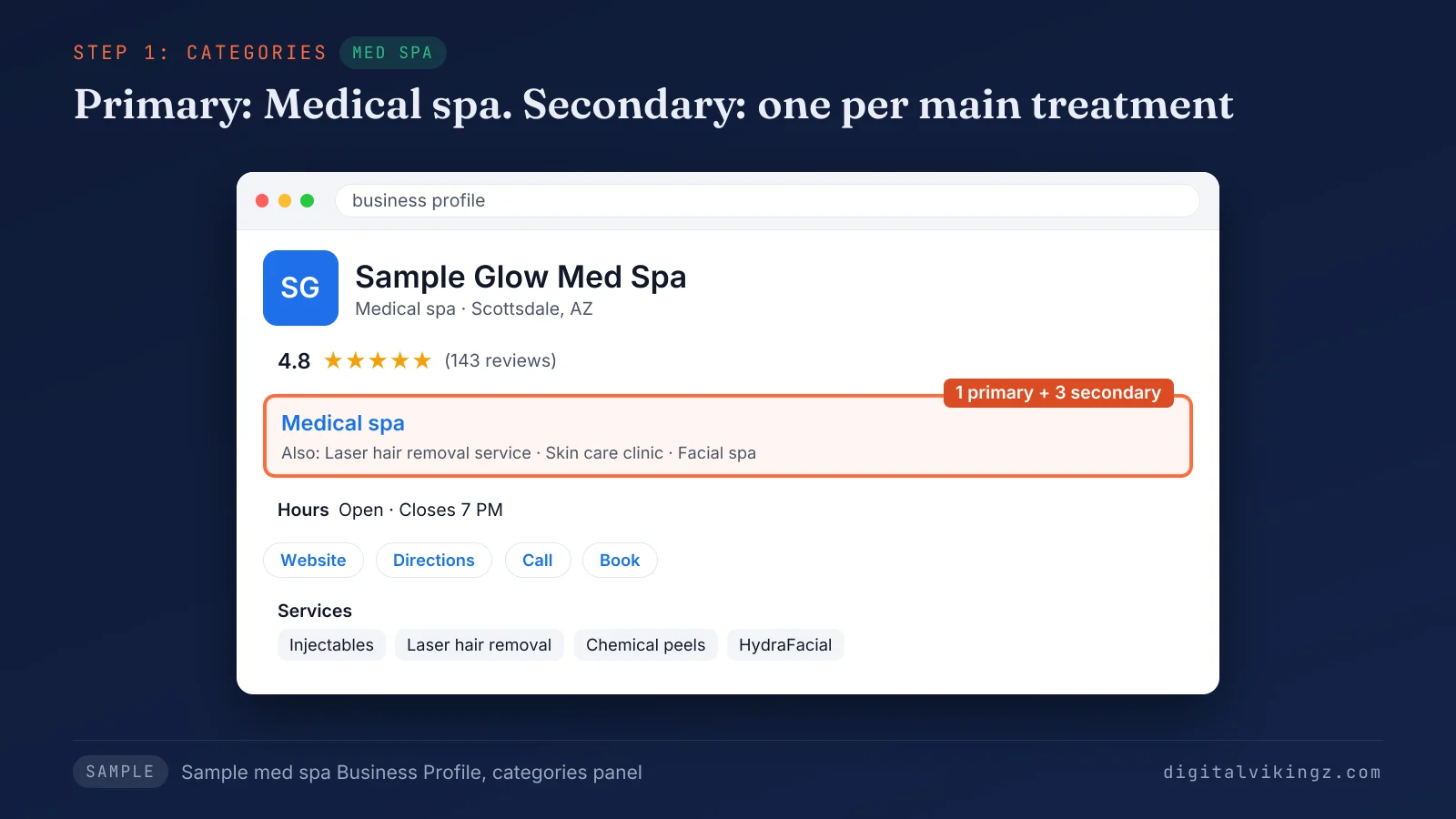
The sample med spa Google Business Profile lists "Medical spa" as the primary category and three secondary categories, one for each main treatment. Choosing the category itself follows the five-step method for a Google Business Profile primary category. Categories set the match on Google Maps, and the profile fields fill in the services behind each category.
2. Complete every profile field that describes the services offered
A complete Google Business Profile lists the services, hours, attributes and description, so Google can match the profile to more searches.
Google states: "Businesses with complete and accurate info are more likely to show up in local search results." Google lists the fields to fill: the full address where customers visit, business hours, the kind of business and details such as parking. Google adds that verification makes a business "more likely to show up in search results."
Each service should be listed under the exact name customers type into Google Maps, such as "drain cleaning" rather than "drainage solutions". The address field leads to the third step, which follows Google's location rules.
3. Set the address or service area within Google's rules
A storefront business shows the staffed address, and a service-area business hides the address and lists the area the business serves.
Google's guidelines state: "If you're a service-area business, you should hide your business address from customers." Google adds that a service area "shouldn't extend farther than about 2 hours of driving time from where your business is based."
Some practitioners advise showing the address on the Google Business Profile to gain distance on Google Maps. Google's guidelines expect a shown location to be staffed and able to receive customers during stated hours. The service area tells customers where the business travels, and distance is still measured from where the business is based.
Distance settings end with step 3, so steps 4 to 7 build prominence, with website pages adding relevance as well.
4. Earn reviews steadily and reply to every review
Steady reviews from customers raise prominence, and replies show future customers that the business reads every review.
Google's help page notes that "Positive reviews and helpful replies can help your business stand out." Practitioners report that a steady flow of reviews counts alongside the total, though Google publishes no figure for either.
The Google Maps user contributed content policy allows businesses to "solicit or encourage the posting of content" from genuine customers, without incentives. Ways to ask for reviews within those rules are set out in how to get more Google reviews. Reviews build prominence on the Google Business Profile, and website pages build relevance and prominence away from the profile.
5. Publish a website page for each main service
A website page for each main service gives Google a second source for the services the Google Business Profile lists.
Local SEO practitioners treat service pages as both a relevance input and a place where links to the business arrive. The website link on the Google Maps listing should open the main service page, not only the home page.
Pages should name the service, the area served and the same business details as the profile. Pages for the places a service-area business covers follow the method for service area pages that stay clear of doorway pages. Website pages also carry the name, address and phone number that step 6 keeps identical.
6. Keep the name, address and phone number identical everywhere
The business name, address and phone number should match exactly across the Google Business Profile, the website and every directory.
Google's guidelines require a name that reflects "your business's real-world name, as used consistently on your storefront, website, stationery, and as known to customers." Practitioners call listings of those details on directories such as Yelp and Bing Places citations. Local SEO practitioners treat matching citations as a prominence input.
An old phone number on one directory should be corrected, not left beside the number on Google Maps. Directories mention the business, and local links go one step further.
7. Earn links and mentions from local organisations and press
Local links come from organisations that already know the business, such as suppliers, trade associations, sponsored teams and local press.
Each link raises the count of websites that link to the business, a prominence input Google names for every Google Business Profile. Practitioners disagree on how much links move a Google Maps position, so links are one prominence input, not the whole answer.
Every link should come from an actual relationship, never from a paid link scheme. Some tactics promise faster gains than the seven steps and break Google's guidelines instead.
Which Google Maps ranking tactics break Google's guidelines?
Five Google Maps ranking tactics break Google's guidelines: keywords in the business name, virtual offices, second profiles, incentivised reviews and selective review requests.
The table below pairs each tactic with the Google rule that the tactic breaks:
| Tactic | Google rule | Google source |
|---|---|---|
| Keywords added to the business name | "Including unnecessary information in your business name isn't permitted" | Business Profile guidelines |
| A virtual office or remote mailbox as the address | A virtual office "isn't eligible for a Business Profile"; remote mailboxes "aren't acceptable" | Business Profile guidelines |
| A second profile for the same business | "There should only be one profile per business" | Business Profile guidelines |
| Discounts or gifts in exchange for reviews | No incentives "in exchange for posting any review" | Google Maps user contributed content policy |
| Asking only happy customers for reviews | Businesses must not "selectively solicit positive reviews from customers" | Google Maps user contributed content policy |
Google warns that unnecessary words in the name "could result in the suspension of your Business Profile." A competitor that gains rank through the five tactics carries the same suspension risk. Copying a tactic trades a short gain for the whole listing.
A listing removed for any of the five breaches needs the appeal path for a suspended Google Business Profile. Two popular tactics break no rule, yet Google names neither one as a ranking factor.
Do Google Business Profile posts help Google Maps ranking?
Google does not name Google Business Profile posts as a local ranking factor, and posts mainly show customers that the business is active.
Owners on the Local Search Forum report posting updates for a week with "zero effect" on their Google Maps position. The customer side is covered in what Google Business Profile posts do for a listing.
Engagement such as clicks and calls raises the same question.
Do clicks and calls raise a Google Maps ranking?
Google names no clicks, calls or direction requests as local ranking factors, although some practitioners list engagement as a ranking input.
Practitioner lists of engagement signals rest on observation, not on a Google statement, so the seven steps leave engagement out. Calls and direction requests still measure what a higher position on Google Maps earns for the business.
The effect of any step shows only when the Google Business Profile is checked from customer locations.
How do you check Google Maps ranking across a service area?
A rank grid checks Google Maps ranking by repeating one search from many points across the service area and recording the position at each point.
The steps of a rank grid check are listed below:
- Choose the search customers type most, such as the main service plus "near me".
- Set a grid of points that covers the whole service area, not only the office.
- Run the search from every grid point on the same day and record each position.
- Count the grid points where the Google Business Profile holds a map pack position.
- Repeat the grid every month with the same search and the same points.
A search from the office or an incognito window shows the ranking at one point only. Distance changes the order for each searcher. Owners often call the grid result a heat map, and each marker on the grid is a grid point.
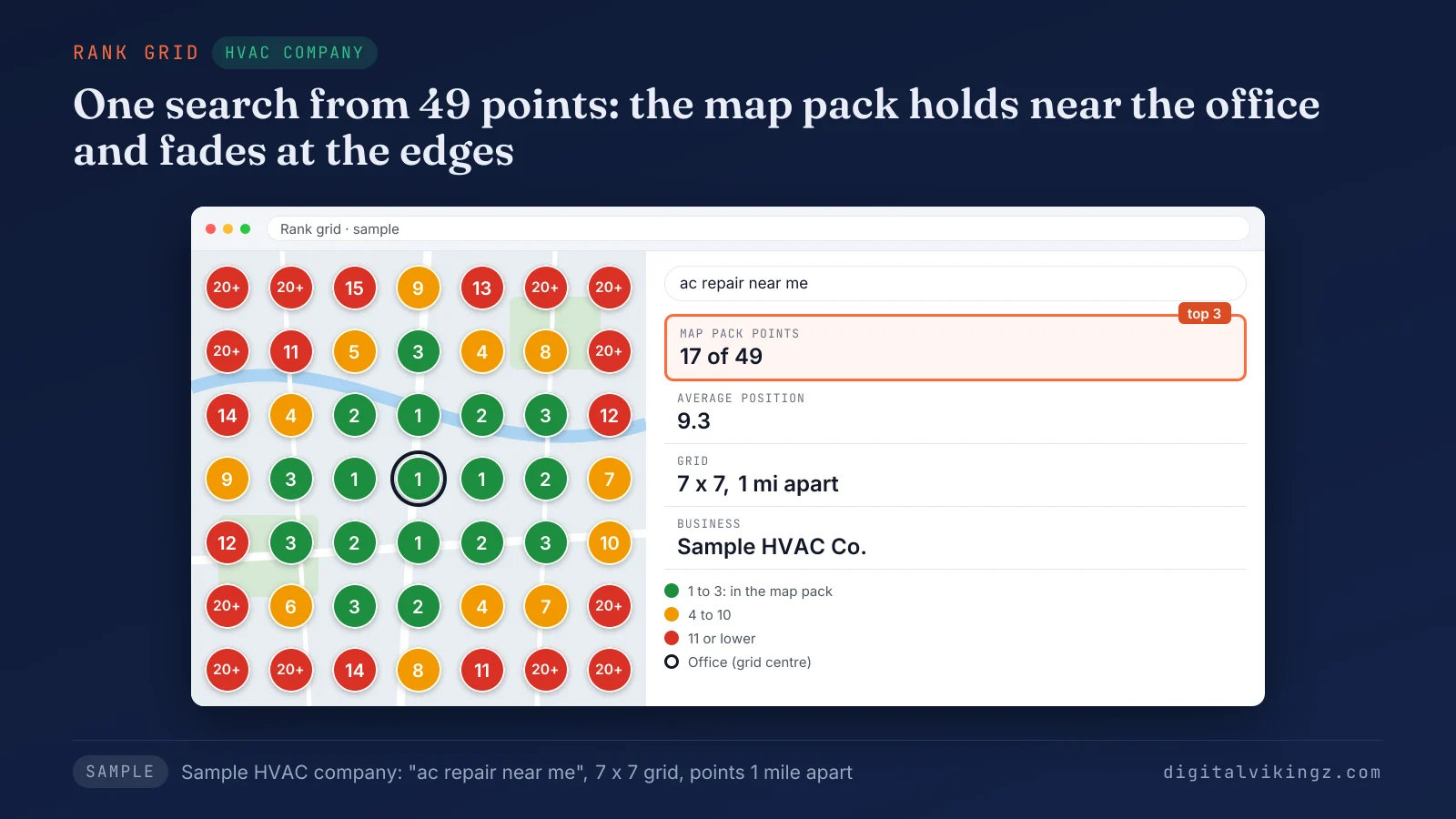
The sample HVAC company holds a map pack position at 17 of 49 grid points, all within a few miles of the office. The method works with any grid tool or with manual searches from customer addresses. Our Local SEO and Google Business Profile optimization for service businesses runs the grid every month and works the seven steps against the grid.
A monthly grid also shows how long each change takes to move the ranking.
How long does it take to rank higher on Google Maps?
No fixed time applies to ranking higher on Google Maps, and Google states only how long edits and new businesses take to appear.
Google states that Google Business Profile edits "can take up to 3 days to appear." Google adds: "Rankings for new businesses can take up to a month to appear in search results."
Practitioner timelines such as "2-3 months" have no Google source, so no ranking date should be promised to an owner. A ranking that falls across the whole grid is a different event from slow progress.
Why can a Google Maps ranking drop across the whole service area?
A Google Maps ranking can drop across a whole service area after a Google update, a profile change in review, or a stronger nearby competitor.
Google began the November 2026 core update on 10 November 2026, according to the Google Search Status Dashboard. A drop that competitors share in the same weeks points to a Google change, not a penalty against one Google Business Profile.
A suspension is a separate state, and Google sends a notice to the managing account when one happens. Fewer calls after a drop need the separate check of calls dropped on a Google Business Profile. Trade guides apply the same factors to one industry at a time.
How do plumbers and roofers apply the Google Maps ranking steps?
Plumbers and roofers apply the same seven steps, with categories and website pages set for repair, replacement and emergency searches.
Plumbing companies follow the guide to local SEO for plumbers and emergency searches. Each trade guide sets the categories, service pages and service area for that trade on Google Maps. Roofing companies follow the roofing SEO guide for the map pack and organic results.
AI assistants read many of the same Google Business Profile signals when they name a local business.
Does Google Maps ranking decide which business AI assistants recommend?
Google Maps ranking does not decide alone which business AI assistants recommend, because assistants also read directories, reviews and websites.
The Google Business Profile is one of those sources, so the seven steps also feed AI answers. The sources behind those answers are set out in how AI assistants pick a local business to recommend.
Six owner questions remain about ads, review counts, hidden addresses, new businesses, websites and photos.
Questions about Google Maps ranking
Owners ask six more questions about ranking on Google Maps, from paid ads to photos on the Google Business Profile.
Do Google Ads or Local Services Ads raise a Google Maps ranking?
No, Google Ads and Local Services Ads do not raise a Google Maps ranking, because Google sells no local ranking. Google states: "There's no way to request or pay for a better local ranking on Google."
How many Google reviews does a business need to rank on Google Maps?
Google sets no number of reviews that a business needs to rank on Google Maps. Forum claims of a jump at 10 reviews have no Google source.
Can a service-area business rank on Google Maps with a hidden address?
Yes, a service-area business can rank on Google Maps with a hidden address, and Google's guidelines tell service-area businesses to hide the address. Practitioners report that the hidden address still sets the point that distance is measured from.
Can a new business rank on Google Maps without many reviews?
Yes, a new business can rank on Google Maps for nearby searches when relevance and distance favour the Google Business Profile. Prominence then grows as the first customers leave reviews.
Does the website affect Google Maps ranking?
Yes, the website can affect Google Maps ranking, because Google reads category information from websites and counts links to the business. Google's guidelines state: "Google can also detect category information from your website and from mentions about your business throughout the web."
Do photos help Google Maps ranking?
Google lists photos and videos among the tips on the Google local ranking help page, without naming them as a ranking factor. Geotagged photos have no documented effect on a Google Maps position.
What should a business fix first to rank higher on Google Maps?
A business should fix the primary category first, then the profile fields and the service area, before spending effort on reviews and links.
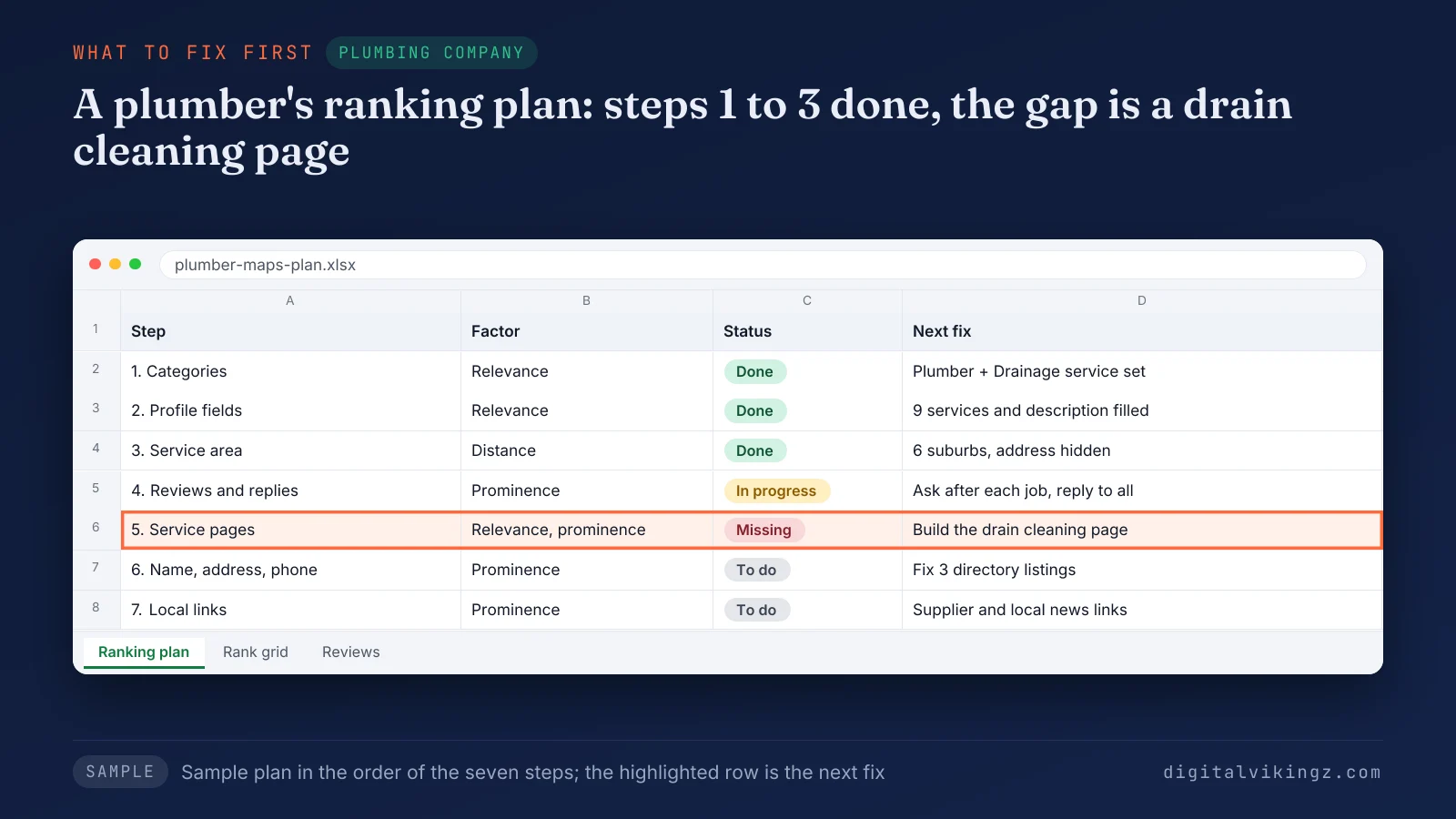
The sample plumbing plan marks steps 1 to 3 done, step 4 in progress and a missing drain cleaning page at step 5. Digital Vikingz builds the same plan for each Google Business Profile the agency manages, against relevance, distance and prominence.
The wider local SEO checklist for service businesses covers the website and tracking work beyond Google Maps. A ranked profile also needs steady activity that customers see, which Daily Google Posts for service businesses supplies.
A Google Maps ranking moves when each step is done in order and checked on the grid every month.
