 Digital Vikingz
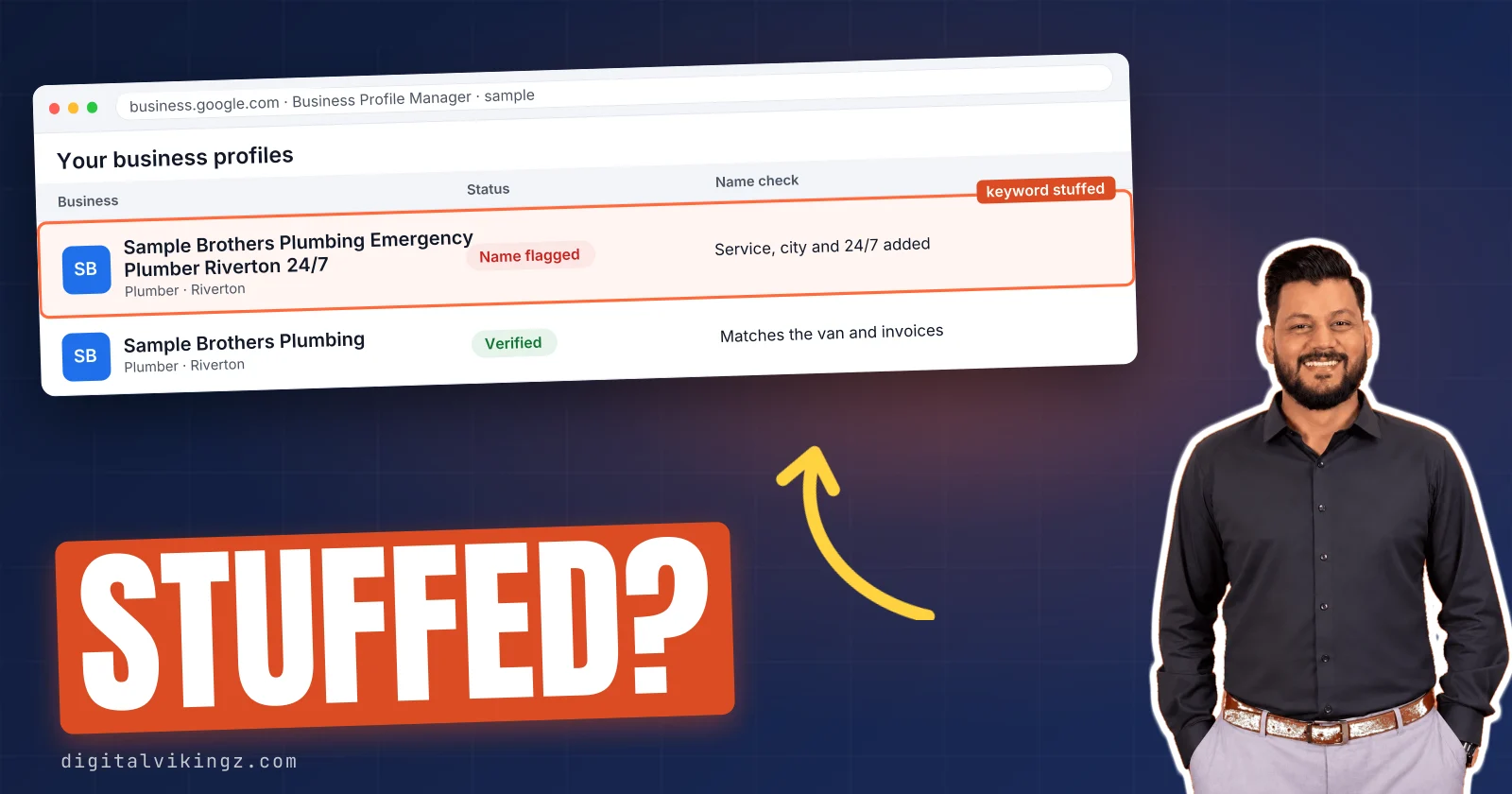
A Google Business Profile name may not include added keywords, unless the words are part of the everyday name the business uses on its signage, website and stationery.
Keyword stuffing is the practice of adding service, city or promotional words that are not part of that name. Stuffed names can rank for a while, and the risk ranges from an edited name to a suspended profile.
Branded location words, practitioner titles and a DBA used everywhere are the cases Google accepts. The fix is to edit the name back and move the keywords into categories, services, the description and posts. A competitor's stuffed name is reported through Suggest an edit, and copying the name carries the same risk.
Can you add keywords to your Google Business Profile name?
A Google Business Profile name may not include added keywords, unless the words are part of the everyday name the business uses on its signage, website and stationery.
Google's guidelines state: "Your name should reflect your business's real-world name, as used consistently on your storefront, website, stationery, and as known to customers." The same guidelines warn: "Including unnecessary information in your business name isn't permitted, and could result in the suspension of your Business Profile."
Google labels the field Business name, and owners also call the field the business title or listing name. The name is one field in our 13-step guide to optimizing a Google Business Profile.
The three kinds of added keywords Google's name rule covers are listed below:
- Service keywords: words such as emergency plumber, roof repair or teeth whitening added after the business name.
- Location keywords: a city, a neighbourhood or near me added to the business name.
- Promotional keywords: taglines such as best, 24/7 or top rated added to the business name.
Business names in the figures below are samples, not client data or live businesses. Google's guidelines list each kind of extra word in the business name, with examples of what passes.
What do Google's business name guidelines allow?
Google's business name guidelines allow the everyday name and a few branded forms, and exclude 11 kinds of extra information, from taglines to service and location words.
Each kind of word falls into one of three groups: part of the everyday name, an allowed form Google lists, or not allowed.
The table below shows what Google's guidelines say about seven common additions to a business name, with Google's own examples:
| Addition | Google's rule | Allowed when | Google's examples |
|---|---|---|---|
| Service or product words | Not allowed | The words are part of the brand customers know | Best Buy Mobile allowed; Midas Auto Service Experts not allowed |
| Location words | Not allowed | The location is part of the branded name | Holiday Inn Salem and Equinox SOHO allowed; Equinox near SOHO not allowed |
| Marketing taglines | Not allowed | Never | TD Bank allowed; a slogan after the name not allowed |
| Business hours | Not allowed | Never | Regal Pizzeria allowed; Regal Pizzeria Open 24 hours not allowed |
| Phone numbers and website URLs | Not allowed | The number or URL is the brand itself | 1-800-Got-Junk allowed |
| Special characters and legal terms | Not allowed | Signage, business cards and invoices show them | Re/Max, H&M and T.J.Maxx allowed with proof |
| Fully capitalized words | Not allowed | The brand is an abbreviation | IHOP allowed; SUBWAY not allowed |
Google's list also excludes store codes, trademark signs, containment details such as inside a mall, and the same name repeated in two languages. Google sends the other details elsewhere: "Add additional details like address, service area, business hours, and category in the other sections of your business information."
Every row of the table depends on one test: which name the business uses every day.
Which name does Google treat as your business name?
Google treats the everyday business name as the business name: the name used consistently on signage, vehicles, website, stationery and invoices, and the name customers know.
Google's edit help says to enter the name "exactly as it appears on your real world business signage, stationery, and other branding." The everyday name can differ from the legal name on state filings, as long as the business uses the everyday name consistently. Service businesses without a storefront show the everyday name on vans, uniforms, quotes and the website.
The proof that shows an everyday business name is listed below:
- Signage: the storefront sign or the vehicle wrap.
- Website: the logo and header of the business website.
- Stationery: business cards, letterheads and email signatures.
- Invoices: quotes, receipts and invoices sent to customers.
City words are the most common addition that fails the everyday name test.
Can you add your city to your Google Business Profile name?
A city may not be added to a Google Business Profile name unless the city is part of the everyday name on the signage, website and stationery.
Google's guidelines accept Holiday Inn Salem and Equinox SOHO. The place name in each example belongs to the branded name of that location.
Google rejects Equinox near SOHO. The location words in that example describe the place instead of naming the business.
A plumber called Sample Brothers Plumbing on the van keeps that name, without Riverton added after the name. Google sends location details to the address and service area sections of the profile.
Legal terms such as LLC follow a different test: proof.
Should you put LLC in your Google Business Profile name?
LLC, Inc. or Ltd. should stay out of a Google Business Profile name unless signage, business cards and invoices show the legal term as part of the name.
Google's guidelines set a proof rule for legal terms and special characters in the name. The business must show "real-world proof (e.g. signage, business cards, invoices) that consistently displays those elements as part of your business name."
Most service businesses leave the legal term on contracts and leave the term off the van and the sign. The same proof rule covers special characters such as an ampersand or a slash.
Additions that fail these tests turn a business name into a keyword-stuffed name.
What is keyword stuffing in a Google Business Profile name?
Keyword stuffing in a Google Business Profile name is a guideline violation: adding service, city or promotional words that are not part of the everyday business name.
Owners call the result a stuffed name or name spam, and local SEO forums use the same terms. Stuffed names spread in a market when one competitor adds keywords and seems to climb the map pack.
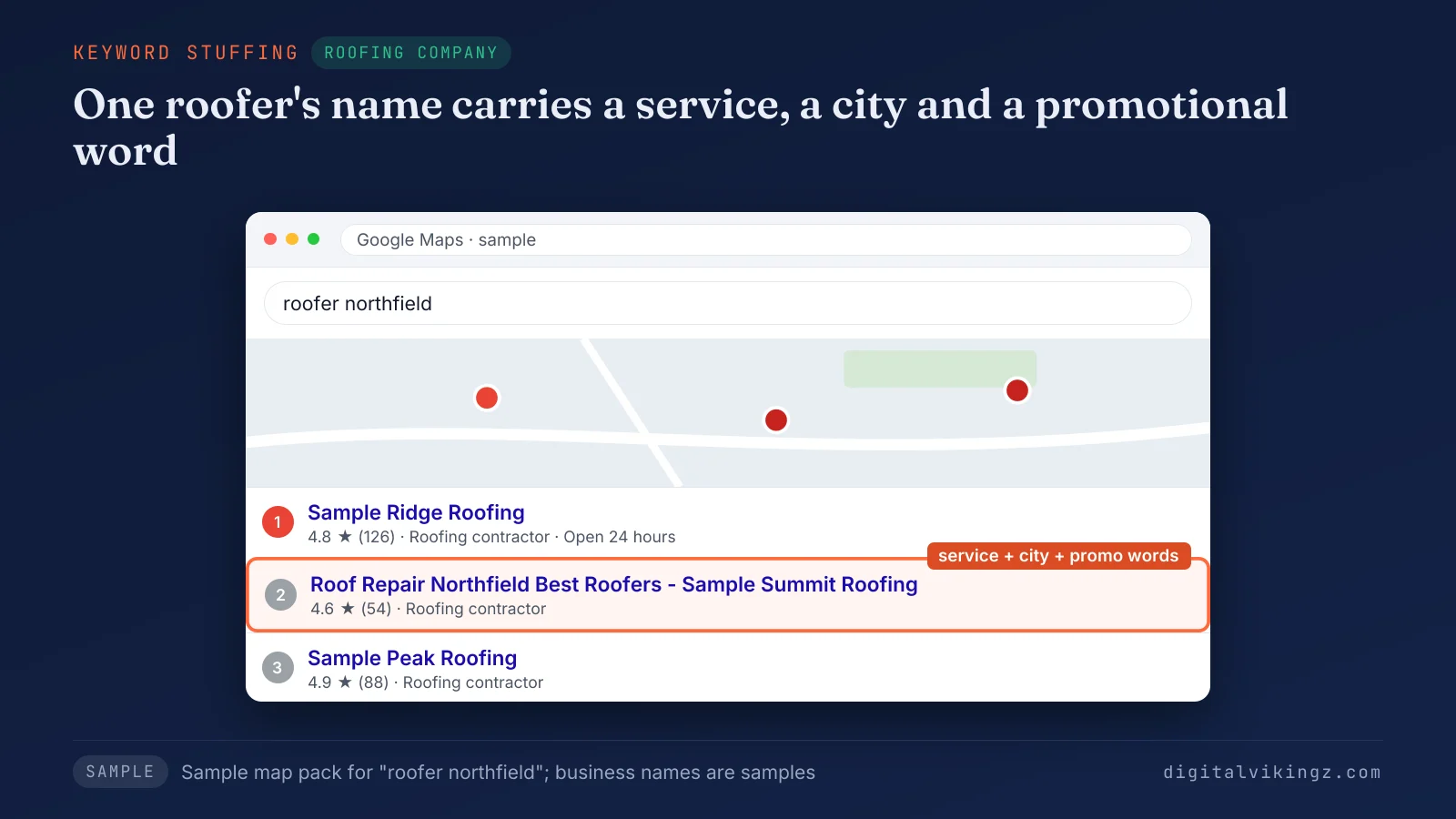
Figure 1 shows a sample map pack for a roofing search in Northfield. One listing reads Roof Repair Northfield Best Roofers - Sample Summit Roofing. Sample Ridge Roofing and Sample Peak Roofing use their everyday names.
The stuffed listing carries all three kinds of keywords: a service, a city and a promotional word. The reason stuffed names keep appearing is the ranking effect of keywords in the business name.
Do keywords in a business name help Google Maps ranking?
Keywords in a business name can raise Google Maps ranking for the matching searches, according to practitioner tests, and the gain lasts only while the words stay.
Sterling Sky added a service keyword to the name of a restaurant listing that had no website. Rankings for the matching search rose in Sterling Sky's test.
Rankings fell when Sterling Sky removed the words a few days later. Rankings rose again when the words returned a week after that.
Whitespark's 2020 Local Search Ranking Factors survey moved keywords in the business name up the list of local pack factors. The factor rose from fourth to second place in Whitespark's 2020 survey.
Google's own page on local ranking names relevance, distance and prominence. Google's page does not mention the business name as a ranking factor.
The tests measure rankings while a stuffed name stays live. The same tests say nothing about what happens after a report. A report or a Google review changes the stuffed business name, and the outcome varies.
What happens to a keyword-stuffed Google Business Profile name?
A keyword-stuffed Google Business Profile name can be edited back, trigger a warning or a new verification, or lead to a suspended profile.
Google's guidelines say extra words in the name "could result in the suspension of your Business Profile."
The outcomes owners report for a keyword-stuffed business name are listed below:
- Name edit: a suggested edit or a Google review returns the business name to the everyday name.
- Warning: Google emails the owner to stop adding keywords to the business name.
- New verification: a changed business name can send the profile through verification again.
- Suspension: the profile loses its owner's control, or the listing leaves Google Maps.
Sterling Sky reviewed 50 reported cases of keyword-stuffed names in 2020. Sterling Sky's review found a warning in 60 percent of cases, a soft suspension in 20 percent and a hard suspension in 20 percent. Google publishes no enforcement rates, so the 2020 figures show a pattern, not a current rule.
A suspended profile follows its own appeal process with documents. Our guide to a Google Business Profile suspended over its name covers the causes and the reinstatement steps.
When can a keyword stay in a Google Business Profile name?
A keyword can stay in a Google Business Profile name when the word belongs to a branded name Google's guidelines accept for chains, franchisees, practitioners or departments.
The five cases where Google's guidelines accept a keyword in the business name are listed below:
- Branded location names: a chain location whose signage carries the place, such as Google's example Holiday Inn Salem.
- Sub-brands: a distinct name used at every location of that business, such as Google's example Nordstrom Rack.
- Franchisees: an authorized, fully dedicated seller, which "may use the underlying brand name."
- Practitioners: a dentist or a lawyer, whose profile "may include title or degree certification (for example Dr., MD, JD, Esq., CFA)."
- Departments: a public-facing department with its own entrance, whose name must differ from the main business name.
A dentist who shares an office with other dentists keeps a practitioner profile with only the practitioner's name. The practice keeps its own profile.
Small businesses ask most about one more case: a DBA that contains a keyword.
Does a DBA let you add keywords to your Google Business Profile name?
A DBA adds keywords to a Google Business Profile name only when the business uses the DBA as its everyday name on signage, website, stationery and invoices.
A DBA, also called an assumed or fictitious name, is a trade name a business registers with its state or county. Google's name rule tests use in the world, so a filing alone does not make a keyword DBA the everyday name.
A commenter on Sterling Sky's study described attorneys who registered keyword DBAs. The office signage of those attorneys showed a different name.
We advise against filing a DBA for Google Maps alone. A keyword DBA also requires new signage and a new website to pass Google's name test.
A full rename to a keyword name raises a second Google rule, on rebranding.
Can you rename your business to include keywords?
A business can rename itself to include keywords, but Google treats a name with new service words as a new business, not an edit to the profile.
Google allows a rename on the same profile only for "a minor name change." Google defines the minor change as one "in which the proper nouns and services described in the business name remain unchanged and the business category remains unchanged."
Google adds: "You must mark the existing Business Profile as closed and then create a new Business Profile with your new business name."
A rename for Google Maps alone should be avoided, because the new profile starts again with verification. A business that truly renames changes the signage, the website and the invoices first.
Most owners with a stuffed name need the opposite move: removing the keywords.
How do you remove keywords from your Google Business Profile name?
Keywords come out of a Google Business Profile name through one edit: change the Business name field back to the everyday name and keep the proof ready.
The steps to remove keywords from a Google Business Profile name are listed below:
- Check the everyday name on your signage, vehicles, website and invoices.
- Open your Business Profile and edit the Business name field to that name only.
- Move the removed service and city words into categories, services and the description.
- Keep photos of the signage, a vehicle and an invoice ready for a verification request.
- Leave the profile unchanged while the edit is in review, and create no second profile.
Google's edit help states: "We review your changes before we update them live on your profile." The same page warns: "If you change your business name after it's verified, you might need to verify your business again."
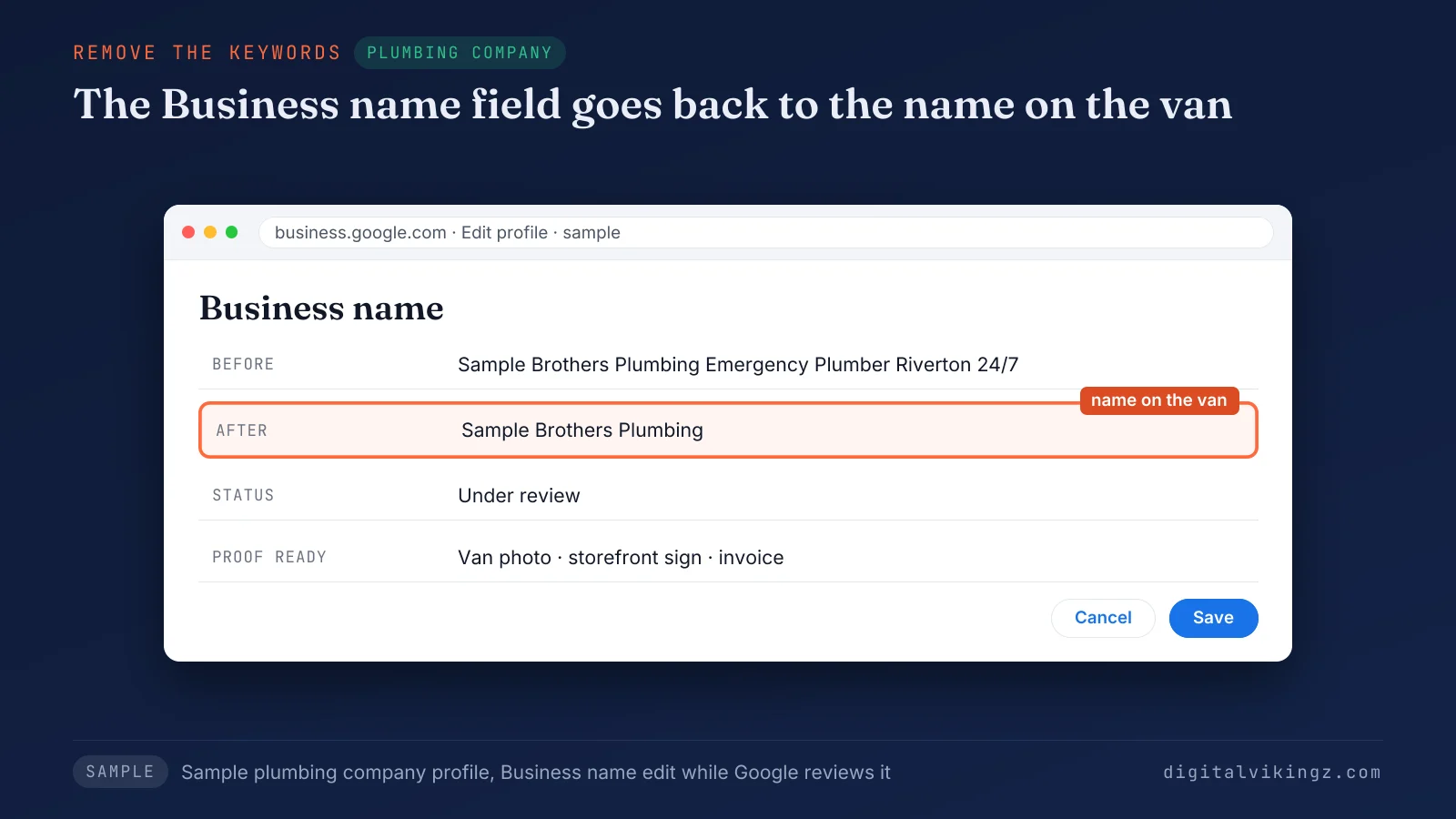
Figure 2 shows the Business name field for a sample plumber. The name changes from Sample Brothers Plumbing Emergency Plumber Riverton 24/7 to Sample Brothers Plumbing. The edit shows the status Under review.
A second profile opened during review counts as a duplicate Google Business Profile, a separate guideline problem. Owners who fix a stuffed name often fear the effect on rankings.
Will removing keywords from the name lower your ranking?
Removing keywords from a business name can lower ranking for the matching searches for a while, because the name stops matching those searches.
Rankings dropped in Sterling Sky's test each time the keyword left the business name. A compliant business name carries no risk of a forced edit, a warning or a suspension.
The categories, services, description and reviews should carry the service words from the day the name changes. Each profile field has its own place for the service and city keywords.
Where should service and city keywords go instead?
Service and city keywords should go in the profile fields built for them, the categories, services, description, posts and service area, and on the website.
A Business Profile has no separate keyword field, so the service words sit in fields customers can read.
The six places that carry service and city keywords instead of the business name are listed below:
- Primary category: the one category that names the core service.
- Secondary categories: other categories the business truly offers.
- Services: each Google Business Profile service listed by its customer-facing name.
- Description: a short Google Business Profile description naming the main services and the area served.
- Posts: updates that name a service and a town.
- Website pages: one page per core service and per town served.
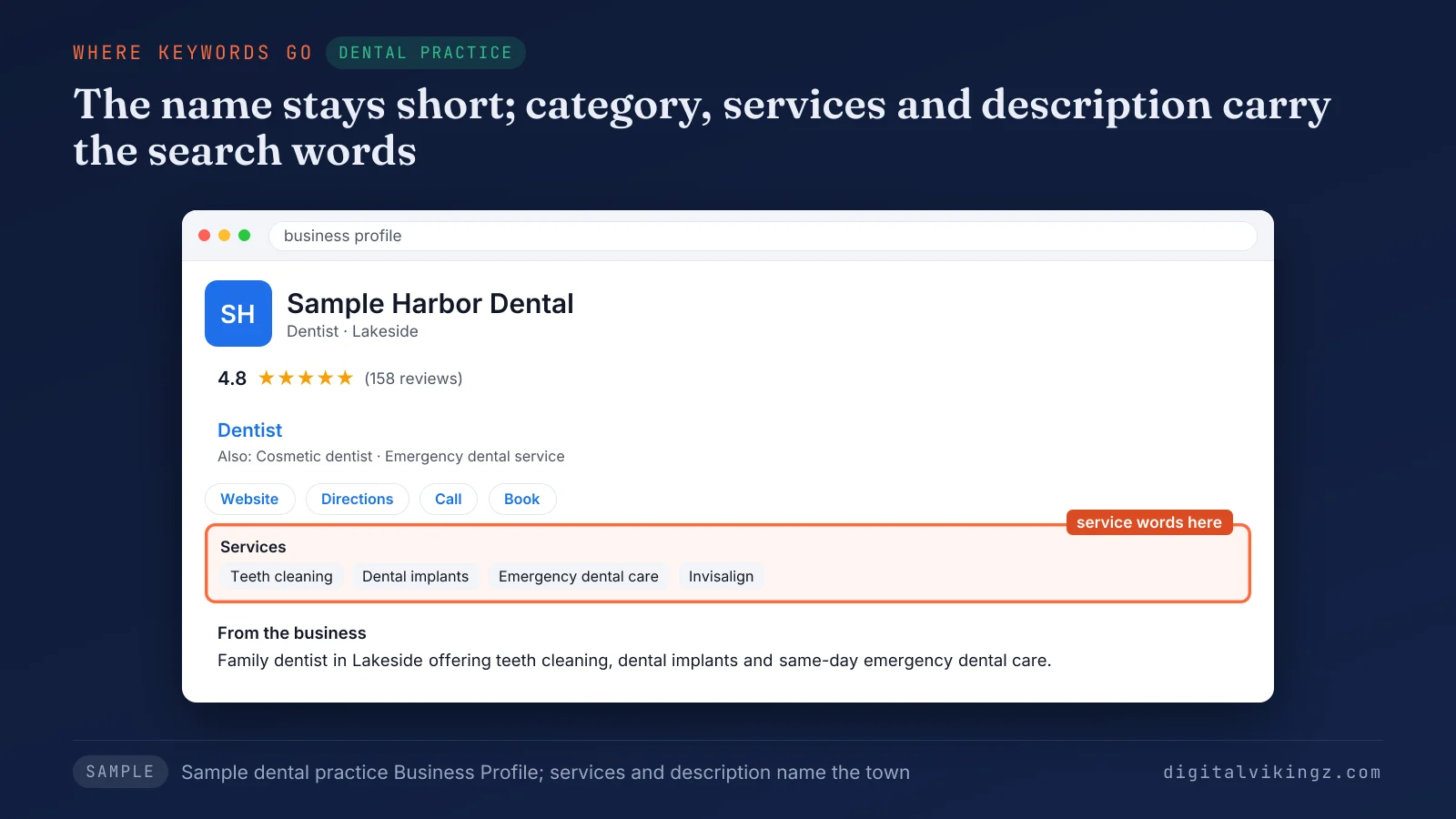
Figure 3 shows Sample Harbor Dental with the business name unchanged. The primary category reads Dentist, the services list names teeth cleaning, dental implants and emergency dental care, and the description names Lakeside.
Setting up those fields while the business name stays clean is part of the profile work we run for service businesses. The service is Local SEO and Google Business Profile Optimization with categories and services set up from the searches your customers run.
Is the primary category a better place for the service keyword?
The primary category is a better place for the service keyword than the business name, because Google allows the category and permits no extra words in the name.
The primary category decides which searches a Google Business Profile can match and shows as the label under the business name. A category keyword stays as long as the business offers the service, while a name keyword lasts until the first report.
Picking the category that names the core service follows a five-step check of the map pack. Our guide on how a Google Business Profile primary category is chosen walks through the five steps.
Where do city keywords belong on a Google Business Profile?
City keywords belong in the address or the service area setting, in the services and description text, and on a website page for each town served.
Google's guidelines place the address and the service area in their own sections of the business information. A service-area business without a storefront sets its towns in the service area setting and hides the street address.
Each town in the service area can also earn its own page on the website. Our guide to service area pages for each town you serve explains when a town earns a page.
How do you report a competitor's keyword-stuffed business name?
A competitor's keyword-stuffed business name is reported through Suggest an edit on Google Maps, and through Google's Business Redressal Complaint Form when the name looks fraudulent.
The steps to report a keyword-stuffed business name are listed below:
- Save proof of the competitor's everyday name: the website header, signage photos and vehicle photos.
- Open the competitor's profile in Google Maps and select Suggest an edit.
- Change the business name to the name on the signage and website, then submit.
- Check the edit status in your Google Maps contributions.
- Use the Business Redressal Complaint Form only when the name is misleading enough to suggest fraud.
Google's form covers "misleading information or fraudulent activity on Google Maps related to the name, phone number, or URL of a business." The form also says: "If you simply need to correct an incorrect business name, phone number, or URL, do not use this form."
Google adds: "We cannot guarantee that any action will be taken on your complaint after you complete and submit this form."
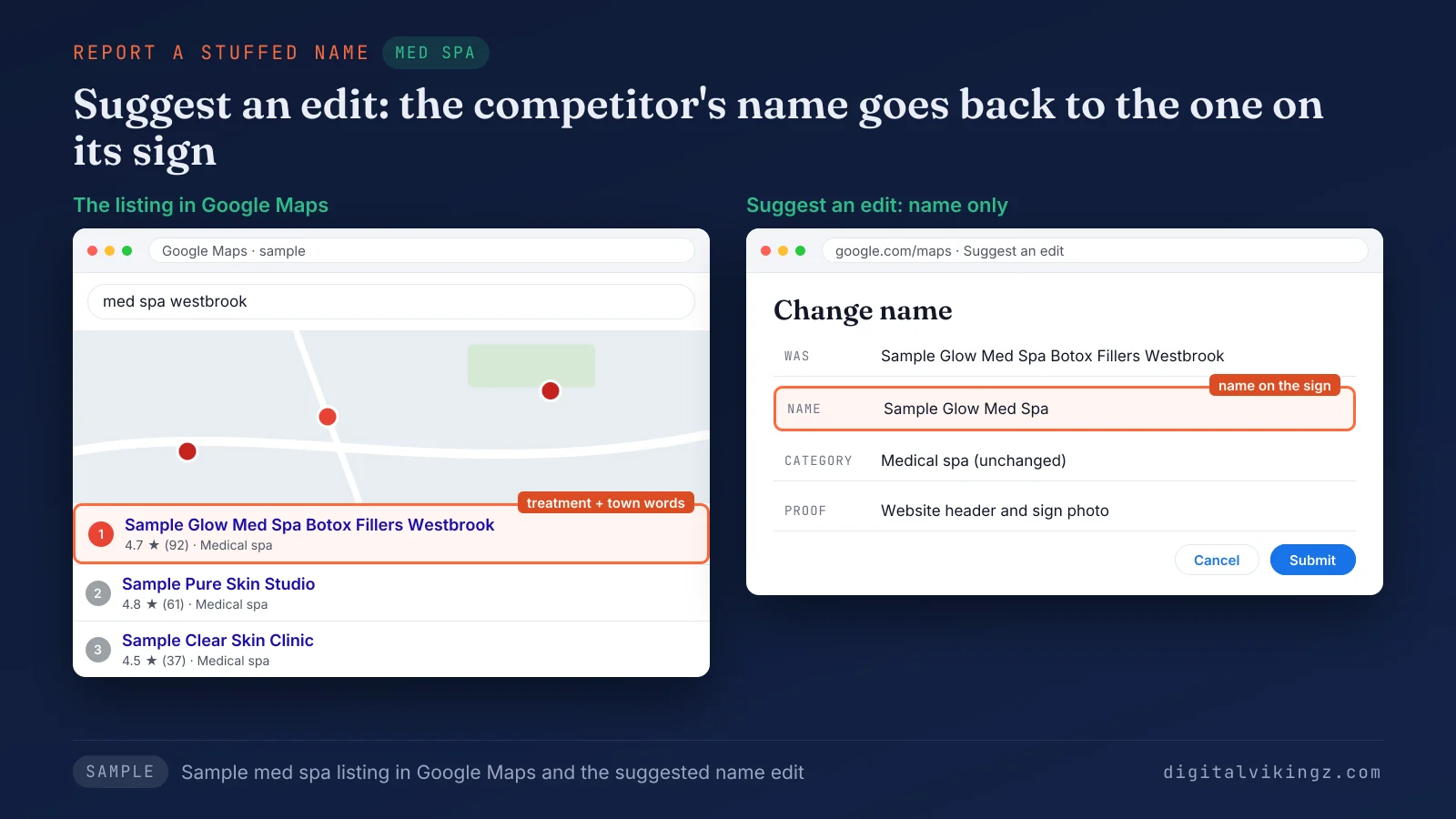
Figure 4 shows a suggested edit on a sample med spa listing. The name Sample Glow Med Spa Botox Fillers Westbrook is corrected to Sample Glow Med Spa.
Owners on both sides report that a corrected business name often returns.
Why do keyword-stuffed competitor names come back?
Keyword-stuffed competitor names come back because the verified owner can edit the business name again after a suggested edit corrects the name.
Sterling Sky's 2020 review found that suggested edits never stopped keywords returning on verified listings. One business in the same review re-added keywords as many as 8 times. Owners on the Local Search Forum report flagrant cases taking 3+ weeks and follow-ups with case IDs.
One report per violation, with evidence, works better than repeated reports from several accounts. A listing that seems to have no business behind the name takes a different report path. The path runs through Suggest an edit, Place is closed or not here, then Offensive, harmful, or misleading.
Two listings in one category at one address often see one listing filtered from results. Our guide on why a filtered business is not showing on Google Maps explains the filter.
Should you copy a competitor's keyword-stuffed name?
A business should not copy a competitor's keyword-stuffed name, because the ranking gain lasts only until one report edits the name back, warns or suspends.
A compliant business name gives a competitor nothing to report, while a stuffed name stays one report away from an edit. We keep client business names exactly as customers know them and put the service words in the fields Google allows.
Relevance, distance and prominence remain the three local ranking factors Google names. Categories, reviews and website pages raise relevance and prominence without touching the business name. Our guide on how to rank higher on Google Maps within Google's guidelines covers each factor in order.
Google Business Profile name questions
Can you add 24/7 to a Google Business Profile name?
A Google Business Profile name may not carry 24/7 or opening hours, because Google's guidelines exclude business hours information from the name. Google's example rejects Regal Pizzeria Open 24 hours, and the hours belong in the hours section.
Can you put a phone number in a Google Business Profile name?
A phone number or a website address may not go in a Google Business Profile name, unless the number or address is the brand itself. Google accepts 1-800-Got-Junk as a business name because the number is the brand customers know.
Can you add one service word after the name with a dash?
One service word after a dash still counts as service information, which Google's guidelines exclude from the business name. Google's example rejects Midas Auto Service Experts and accepts Midas, the "real-world name" on the sign.
Does Google find keyword-stuffed names without a report?
Google does not publish how keyword-stuffed business names are detected, and Sterling Sky's 2020 review found enforcement mostly followed competitor reports. Some practitioner guides claim automated detection, and none cites a Google source.
Can a competitor report your Google Business Profile name?
Any Google Maps user can suggest an edit to a business name, including a competitor, and Google reviews each suggested edit. A business name that matches the signage, website and invoices leaves a competitor nothing to correct.
Is the Google My Business name the same as the Business Profile name?
The Google My Business name and the Google Business Profile name are the same field, because Google renamed Google My Business in November 2021. Older guides that say GMB name or GMB title describe the same Business name rule.
Where should you start with your Google Business Profile name?
Start by comparing the Google Business Profile name with the signage, the website and an invoice, because every later fix rests on the everyday name. A clean business name and keyword-rich profile fields keep the relevance without the risk.
Digital Vikingz keeps service and town words flowing into the profile through a daily posting plan. Our AI agent writes Daily Google Posts from your own services and towns for plumbers, HVAC companies, roofers, electricians and cleaners.
Owners can test the posting agent first with a free preview of one Google post from your website.
