 Digital Vikingz
Google Business Profile calls drop for three reasons: fewer people see the profile, fewer viewers tap Call, or the count itself changes. The Calls number in the Performance report counts taps on the profile's Call button, not phone calls answered.
A profile can keep its map pack position while calls fall. The first check compares the Calls number with the phone system's call log. The second compares each month with the same month last year, because local demand is seasonal.
The live profile, its status and recent edits come next. Profile views set against calls then split visibility loss from response loss. Rank checks from several points across the service area close the diagnosis.
Google added a Message button beside Call in Google Maps on 5 November 2026. Google began the November 2026 core update on 10 November 2026.
A monthly log of calls, messages and phone records makes the next drop clear. The fix follows the cause: the phone setup first, then the profile, then rank and response.
Why do Google Business Profile calls drop?
Google Business Profile calls drop for three reasons: fewer people see the profile, fewer viewers tap Call, or the count itself changes. Each reason needs a different fix, so the cause comes before any profile edit.
The three groups also differ in where the evidence sits: search visibility, buyer choice or the phone records. Visibility loss and response loss change how many customers call, while a measurement change alters only the report.
The three cause groups behind a drop in Google Business Profile calls are listed below:
- Visibility loss: the profile appears in fewer searches, so fewer people reach the Call button.
- Response loss: the profile still appears, and fewer viewers choose to call.
- Measurement change: the Calls number falls while the phone system's call log stays level.
Reading the Calls number correctly comes first, because every later check depends on what the number counts.
What does the Calls number in the Performance report count?
The Calls number in the Google Business Profile Performance report counts taps on the profile's Call button, not phone calls answered. Google's Business Profile Help describes each call as a customer who "clicked on the call button on your Business Profile."
A customer who dials the number by hand adds nothing to the Calls number. Calls placed from the website, a saved contact or a printed flyer stay outside the count as well. A tap that never connects still counts, because the metric records the tap.
Google states that Performance data includes views, searches and actions from both organic search results and Google Ads. The Performance report sits in the Business Profile dashboard, and owners of older profiles know the report by its former name, Insights.
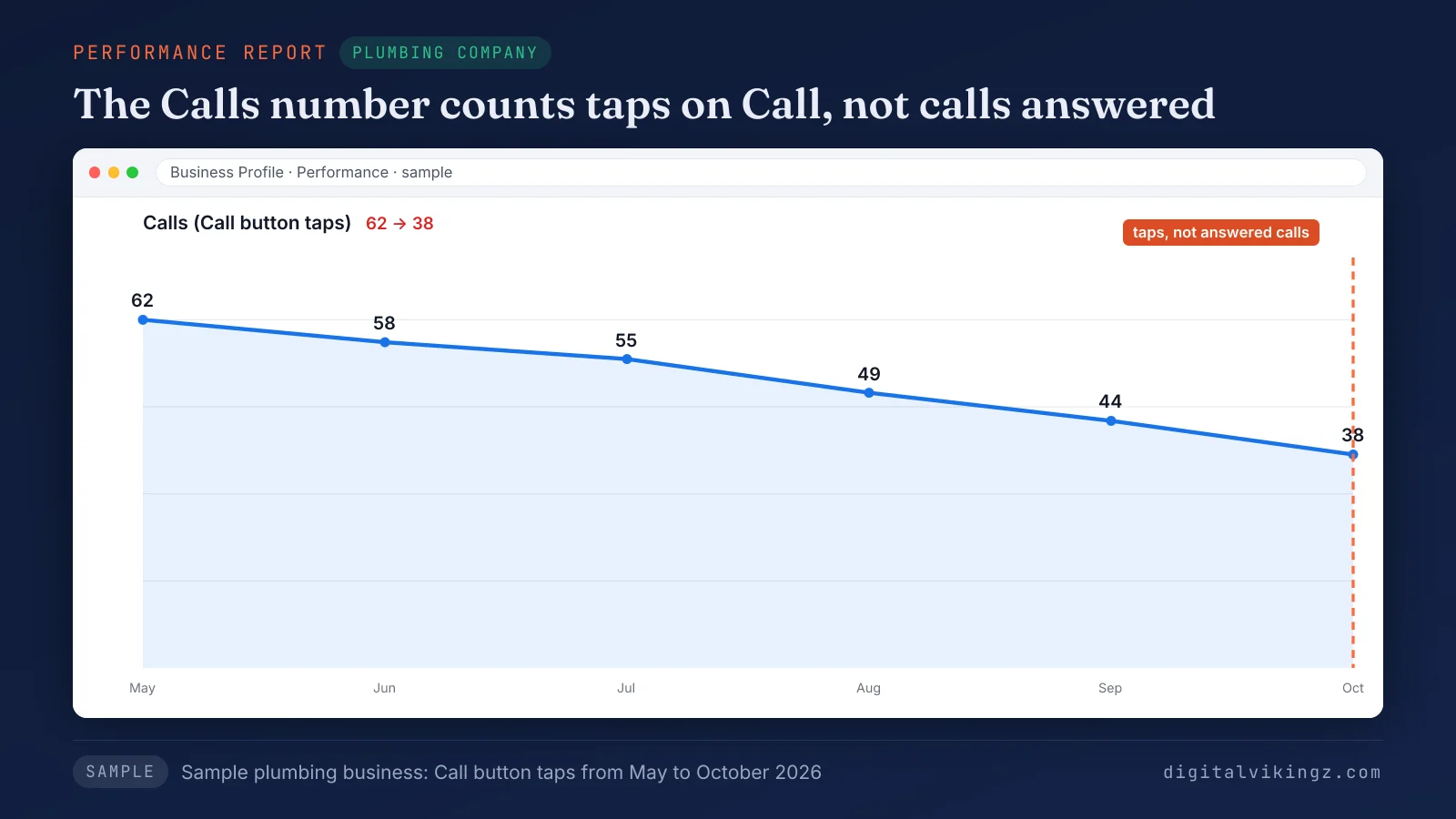
Figure 1 shows a sample plumbing business whose Calls number fell from 62 in May to 38 in October 2026. A falling Calls number therefore says less about map pack position than most owners expect.
Is a drop in calls the same as a drop in rankings?
No, a drop in Google Business Profile calls is not a drop in rankings. A profile can keep its map pack position while fewer viewers tap Call.
Owners in Google's Business Profile Help Community describe the same split: keywords hold their place on the map while calls fall.
Three things sit between a position and a tap. The three are ads above the map pack, competitor profiles in the pack and the buyer's route to the website or the Message button. A fixed order of checks separates the three causes faster than a ranking report alone.
What should you check first when Google Business Profile calls drop?
A drop in Google Business Profile calls is checked in six steps, starting with the phone log and ending with rank by location. We run the checks in the order below because the cheapest checks come first, and a measurement answer ends the search early.
The six checks for a drop in Google Business Profile calls are listed below, in order:
- Compare the Calls number with the phone system's call log for the same weeks.
- Compare each month with the same month last year.
- Open the live profile on a phone, check its status and tap Call.
- Review recent edits to hours, phone number and categories.
- Set profile views against calls to split visibility loss from response loss.
- Check rank from several points across the service area.
Each check below answers one question and points to the next one.
How do you confirm a drop in calls against phone records?
A drop in Google Business Profile calls is confirmed when the phone system's call log, call tracking or booking count falls in the same weeks. A steady call log beside a falling Calls number means customers reach the business by another route, such as the website or a saved number.
We read monthly totals, not weekly ones, for any profile with fewer than 30 calls a month. Small counts swing from week to week, so a weekly view exaggerates normal variation. Six calls falling to three reads as a 50 percent drop, yet the difference is three calls.
Note the first week of the decline, because the start date tests every later cause. A confirmed drop then needs a fair comparison with the same months a year earlier.
How do you tell a seasonal dip from a lasting drop in calls?
A seasonal dip repeats last year's pattern for the same months, while a lasting drop leaves calls below last year's level. Local demand moves with the calendar: heating and cooling repairs follow the weather, and many clinics see quieter holiday weeks.
Month-over-month comparisons mix the calendar into the result, so a fall from September to October can be normal. Year over year, the same month last year carries the same calendar, so the comparison isolates the profile. The Google Business Profile Performance report lets an owner pick the date range for each comparison.
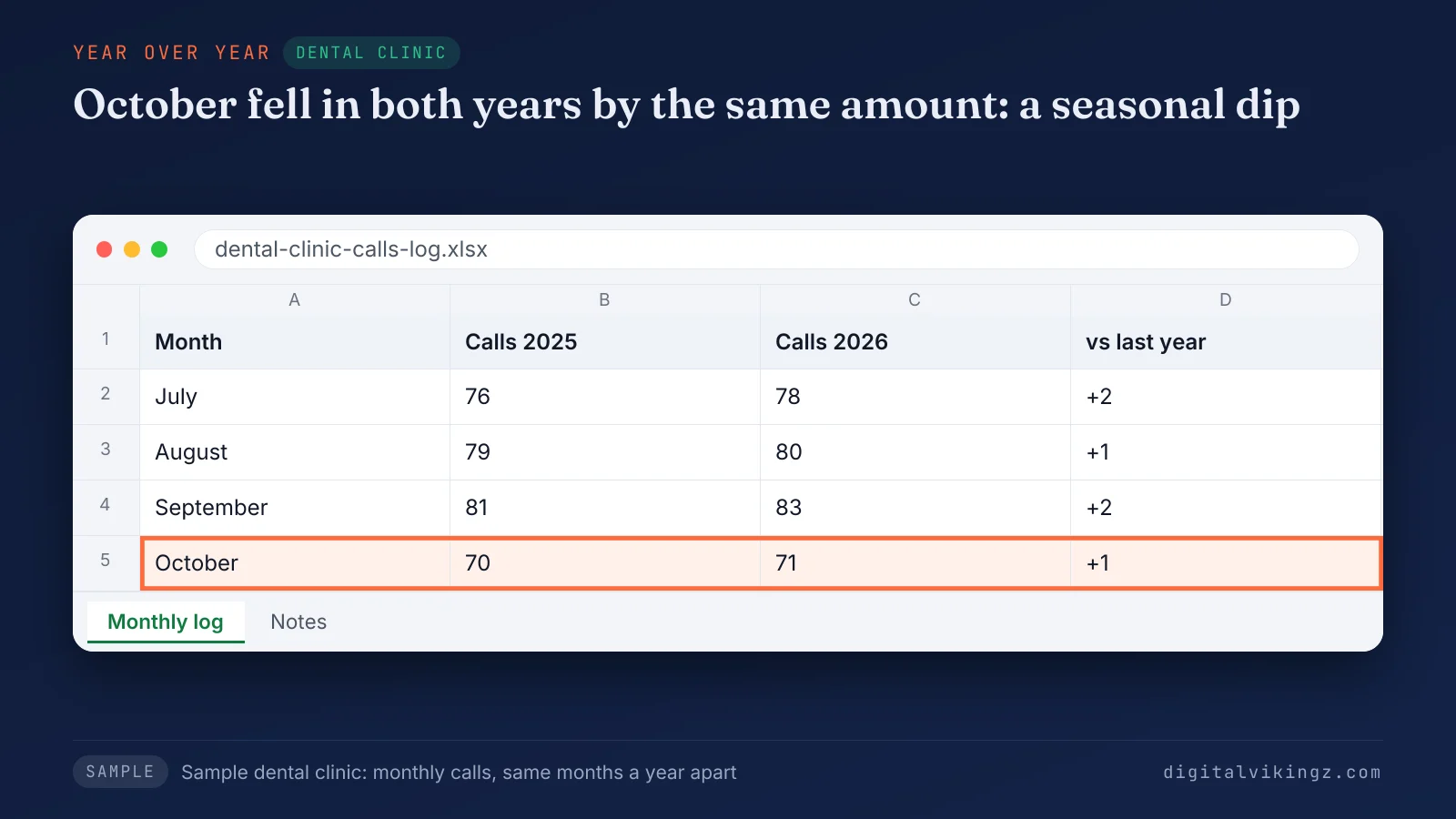
Figure 2 shows a sample dental clinic whose calls fell from 83 in September to 71 in October 2026. The same clinic fell from 81 to 70 over the same two months a year earlier. October 2026 sits one call above October 2025, so the clinic's October dip is seasonal.
A drop that survives the yearly comparison sends the check to the live profile.
How do you test the Call button on the live profile?
The Call button is tested by searching the business name on a phone, opening the profile and tapping Call as a customer would. The test confirms that the button shows, that the number rings the main line and that someone answers during the listed hours.
A full voicemail box or after-hours routing that rings nowhere makes answered calls fall while the report still counts each tap. A Google Business Profile with an empty phone number field has no Call button to tap.
A suspended Google Business Profile needs reinstatement before any other fix. Google's Business Profile Help directs owners of suspended profiles to an appeal for reinstatement.
A working Call button moves the check to what changed on the profile.
Which profile changes can lower calls?
Edited hours, a new phone number, a changed primary category and edits applied by Google can lower Google Business Profile calls.
The profile changes to check, with the date of each one, are listed below:
- Hours and special hours: wrong hours can remove the profile from searches for businesses open now.
- Phone number: a new or mistyped number sends every tap to the wrong line.
- Primary category: a new primary category changes the searches the profile appears in.
- Edits applied by Google: suggested changes can update hours or details without the owner's action.
A category change deserves the most care, because owners who choose a Google Business Profile primary category set the searches the profile fits. The five steps to choose a Google Business Profile primary category reduce the risk of a wrong switch.
Change one detail at a time and note the date, so the Calls number can be read against each edit. A profile with no harmful edit turns the question to how many people saw the listing.
How do you tell fewer viewers from fewer callers?
Fewer viewers show as falling profile views, while fewer callers show as steady views with fewer calls per 100 views. Calls per 100 views is the Calls number divided by Google Business Profile views, multiplied by 100.
A sample electrician made 5.2 calls per 100 views in October 2025: 96 calls from 1,840 views. October 2026 brought 3.9 calls per 100 views: 71 calls from 1,820 views, so viewers held and callers fell.
The table below reads five patterns in the Performance report and the next check for each:
| Pattern | What the pattern points to | Next check |
|---|---|---|
| Views and calls fall by a similar share | Visibility loss | Rank from several points in the service area |
| Views hold, calls fall | Response loss: competitors, reviews or ads above the pack | Compare the top three profiles for the main service |
| Calls fall, website clicks rise | Buyers move to the website, where calls are not counted | Phone clicks on the website in analytics |
| Calls fall, messages rise | Contacts move to the Message button | Read calls and messages together |
| Calls and views fall after an ad change | The Google Ads share leaves the numbers | Dates of changes in the Google Ads account |
Direction requests and website clicks read the same way as calls. Falling views send the check to rankings where customers search.
How do you check rankings from where customers search?
Rankings are checked from several points across the service area, because Google ranks local results by relevance, distance and prominence. Google's Business Profile Help states that local results are "mainly based on relevance, distance, and prominence."
Distance makes the order change with the searcher's location, so one search from the office shows one point only. A grid rank tracker repeats the main service search across the area and shows where the Google Business Profile holds a top-three position.
The map pack in Google Search and the list in Google Maps are checked separately. A phone search near the edges of the area shows what distant customers see.
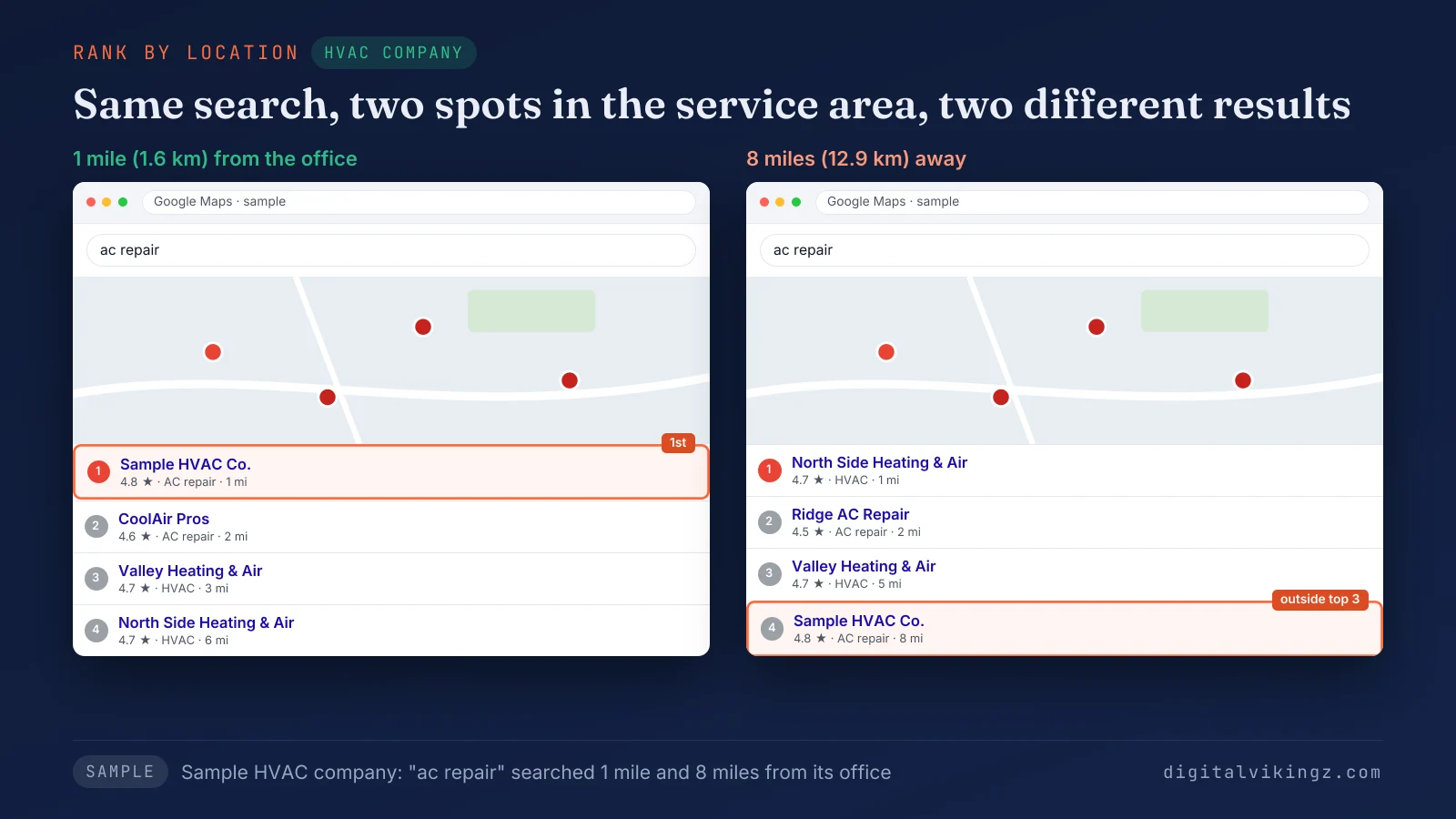
Figure 3 shows a sample HVAC company in first place 1 mile (1.6 km) from its office. The same company sits outside the top three at 8 miles (12.9 km).
A profile that does not appear even for its own business name has a different problem: the business is not showing on Google Maps. Raising the position across the area is separate Google Maps ranking work. Rankings that hold across the area while calls fall point to the Google changes of November 2026.
What changed on Google in November 2026 that can lower calls?
Three November 2026 events can lower Google Business Profile calls: the Maps Message button, the November 2026 core update and reported proximity shifts.
The table below dates each event and states how far Google has confirmed each one:
| Date | Event | What the event can do to calls | Status |
|---|---|---|---|
| 5 November 2026 | Message button placed beside Call in Google Maps on Android and iOS | Moves some contacts from calls to messages | Announced by Google |
| 10 November 2026 | November 2026 core update begins | No effect on Business Profile calls stated by Google | Start confirmed; still rolling out on 18 November 2026 |
| 1 to 14 November 2026 | Practitioners on the Local Search Forum report more weight on proximity | Shrinks the area where a profile holds the top three | Forum report, not confirmed by Google |
| 2026, no single date | Agencies report fewer one-tap Call buttons on organic map pack listings on mobile | Removes a one-tap route to call | Agency reports, not confirmed by Google |
The two reported events are tests for an owner's own phone.
Each event is read against the profile's Performance report, the first step of Local SEO and Google Business Profile Optimization. Our Local SEO and Google Business Profile Optimization service runs that reading before any profile edit. Owners can see the Message button on their own listing.
Can the Message button take calls away from the profile?
Yes, the Message button can take some calls away from a Google Business Profile, because Google Maps now shows Message beside Call. Google's Small Business Bulletin of 5 November 2026 describes "a prominent Message button right next to 'Call'" for customers on Android and iOS.
Messages reach the business through WhatsApp or SMS, according to the same announcement. Messages count as a separate interaction, so a customer who messages instead of calling lowers the Calls number.
Compare calls plus messages for November 2026 with calls alone for the months before. The comparison separates contacts that moved from contacts that were lost.
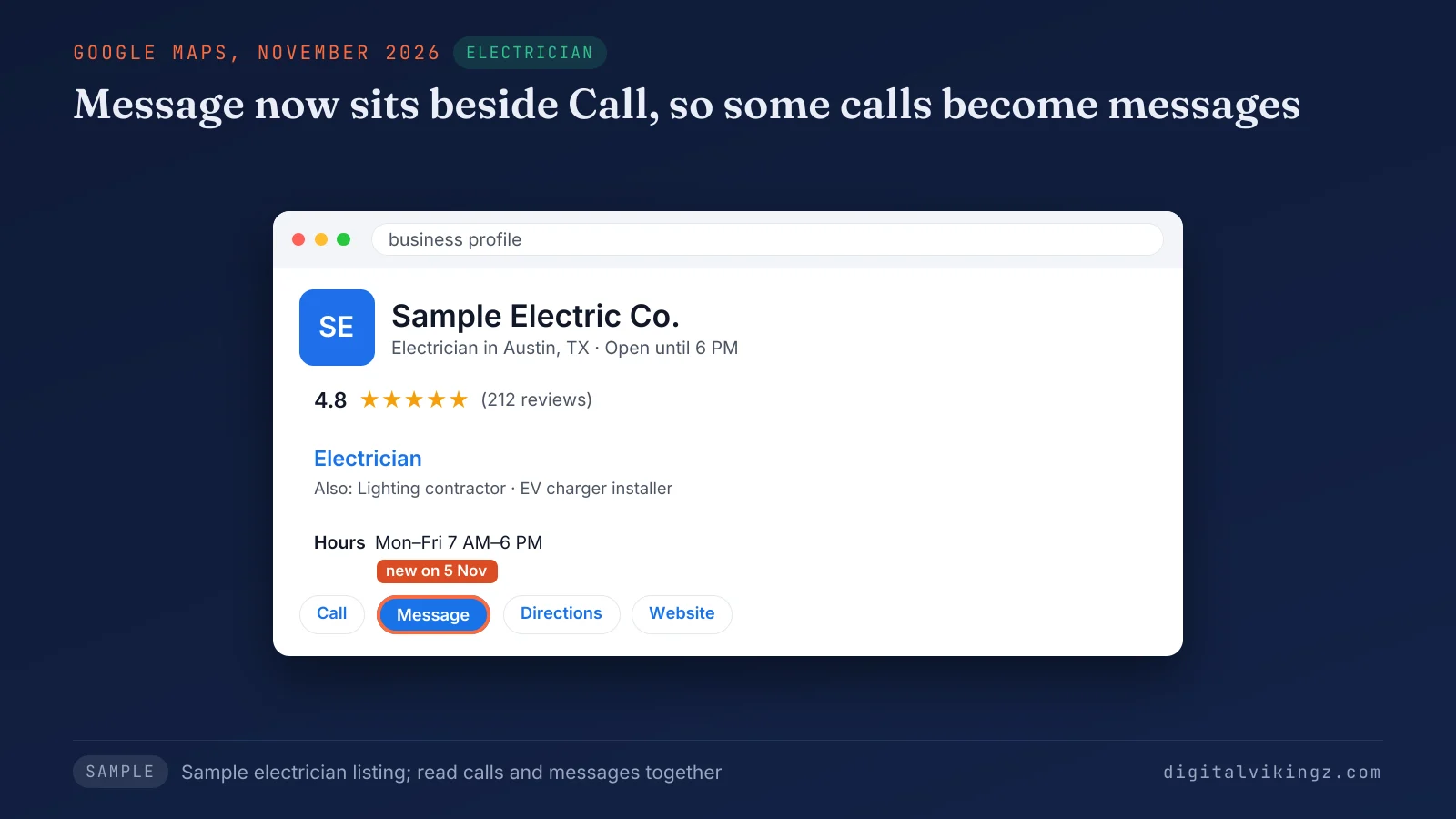
Figure 4 shows a sample electrician's profile in Google Maps with Message placed beside Call. The core update is the second November event owners ask about.
Did the November 2026 core update cause the drop in calls?
Google has not confirmed that the November 2026 core update causes fewer Google Business Profile calls. The Google Search Status Dashboard lists the November 2026 core update as starting on 10 November 2026 and still rolling out on 18 November 2026.
A decline that began before 10 November 2026 has another cause, found by the checks above. A decline that began after that date still needs the profile and rank checks, because timing alone proves nothing.
Website traffic that dropped after a core update is a separate question with its own causes. Our page on website traffic that dropped after a core update explains how the website side is read. A monthly call log makes the next update clearer.
How do you track Google Business Profile calls so the next drop is clear?
Google Business Profile calls are tracked by logging the Calls number, the Messages number and the phone system's call count in one sheet each month. The sheet keeps last year's same month beside each new month, so seasonal dips stay visible.
A call tracking number on the profile should follow Google's rule that the phone number stays under the direct control of the business. A UTM tag on the profile's website link separates Business Profile visits in analytics.
The same tagging logic lets a business attribute SEO to pipeline and revenue. Larger accounts can follow our method to attribute SEO to pipeline and revenue from first visit to closed deal. A clean monthly log turns the next drop into a choice of fix.
Questions about Google Business Profile calls
Five short answers below cover the numbers owners ask about most.
Can I still see who called my business from Google?
No, Google removed call history from Business Profile on 31 July 2024. The phone system or a call tracking service now holds the caller list.
Does Google count every direction request?
No, Google counts direction requests without multiple taps, cancelled requests and spam. Repeat taps by one person therefore add nothing to the total.
Does a profile view count the same person twice in one day?
No, Google counts a person once a day in Business Profile views. A buyer who checks the profile three times before calling adds one view.
Why does the searches number look low early in the month?
The searches number updates at the start of each month and can take up to 5 days to appear. A low reading in the first days of a month is missing data, not a drop.
Can a sales call about Google voice search turn off my calls?
No, a Business Profile is free and has no paid activation, so no seller can switch calls on or off. Check who holds access under the profile's People and access settings and remove anyone unknown.
What should you fix first when Google Business Profile calls drop?
The first fix for a drop in Google Business Profile calls follows the cause: the phone setup, then the profile, then rank and response. A measurement gap needs the phone log, Call button and tracking number fixed first.
A profile problem needs hours, phone number, category or account status corrected, one change at a time. A visibility loss needs rank work across the service area. A response loss needs a profile buyers choose: recent reviews, current photos and Google Business Profile posts that answer buyer questions.
Digital Vikingz runs the diagnosis for local service businesses that win customers from Google Maps. Daily Google posts from our AI agent keep a profile current with one post a day drawn from the business's own website. Owners can see a free sample of Daily Google posts for their own profile before choosing a package.
