 Digital Vikingz
Say a dental group opens its third clinic and the new profile comes back flagged as a duplicate. Most fixes start with how you add, group and name each location.
Google Business Profile for multiple locations means one profile for each physical location, all managed from one business group. Google's help page starts bulk verification at 10 locations of the same business.
We walk through adding, verifying, grouping and running each location, in that order.
What counts as a location on Google Business Profile?
A location on Google Business Profile is an address where your staff meet customers during business hours. Google's guidelines rule out P.O. boxes and virtual offices that no staff work from. A mailbox is not a branch.
A service-area business serves customers at their addresses instead of at its own. The table below sorts four common cases by whether each gets its own profile.
| Case | Own profile? | Google's rule |
|---|---|---|
| Storefront or branch with staff on site | Yes, one each | One profile for each physical location |
| Service-area business with no storefront | One profile for the whole business | Service area set, address hidden |
| Individual practitioner at a shared site | May have a page of their own | Google's practitioner guidelines |
| Department inside a larger site | May have a profile of its own | Distinct name, category and hours |
Sample: a plumbing company with one shop and three vans gets one profile for the shop and none for the vans. The rule source is Google's guidelines page for representing your business.
Can one profile cover several of those locations? Next question.
Can one profile cover several locations?
No, each location needs its own profile, and one business group can manage every profile. Google's guidelines tie a profile to one physical location.
So how does one team handle many profiles from one account? Through a business group. More on that below.
Do service-area businesses get a profile for each town?
No, Google gives a service-area business one profile, with its service area set on that profile. Google's help page lets a service-area business bulk verify only when its locations are also open to customers during regular hours.
Town pages for a service-area business belong on the website, as our guide to service area pages for towns without a storefront explains.
Sample Plumbing Co. serves Riverton, Hillcrest and Northfield from one shop. It keeps one profile and lists the three towns as its service area. The three town pages live on the website.
Name, category and phone rules for each location
Google's chain rules give every location in a country the same business name and, for the same service, the same primary category. A distinct name may apply to sub-brands, but only when you apply it consistently across all locations.
Use a local phone number that reaches the location, not a call-center line, whenever possible. Put only the business name in the name field, with no specialty, city or store code. That is Google's rule.
Sample Heating & Air keeps that name in all three towns and puts each town in the address field, never in the name.
Our guide to choosing the shared Google Business Profile primary category explains how to pick it.
Business name versus store code
The business name field holds the business name only, and the business code holds each location's identifier. Some owners call that identifier a store number or a branch ID.
A store code is one unique ID for each location that stays the same. Google's spreadsheet page caps a business code at 64 characters and a business name at 100.
The code never shows on Google, but the people who manage a location's profile can see it. Google's examples for codes include G1, G2 and G3.
Sample Family Dental uses SFD-LAKESIDE and SFD-NORTH as codes, while both profiles keep the name Sample Family Dental.
Adding locations one by one or by spreadsheet
You add locations one at a time, or you import a spreadsheet to add many at once. Google tells owners with fewer than 10 locations to add and verify them one by one.
Three points follow in order: one more location, the spreadsheet, and its four required columns. A 3-clinic dental group, for example, adds clinic three by hand. A 12-branch HVAC company imports one sheet instead.
The full Google Business Profile optimization guide covers every field you fill in after the profile exists.
How do you add one more location?
Google's help pages say you add one more location from Google Search by choosing More, then Add a new Business Profile. You then move the new profile into your business group with Actions, then Transfer businesses.
Sample: a dental group opens its third clinic, adds that profile by hand, and transfers it into the group.
The new location still needs verification, which a later section covers. Menu labels differ between guides, so we name the pages we checked on 22 November 2026.
How does the bulk upload spreadsheet work?
You choose Add profile, then Import profiles in Business Profile Manager, download the template, and fill one row per location. Google's bulk upload help page uses those menu names, and we checked it on 22 November 2026.
Third-party guides say Add business, then Import businesses. We follow Google's own labels, such as Add profile.
The template matches your business language, and Google also offers a sample spreadsheet and an attributes reference. Google's help page says to add all the businesses you manage before you upload.
Watch one trap. Google warns that a column heading with empty cells deletes the existing information in that column.
A Business Profile Community guide advises one big edit at a time, so one bad import does not hit every profile. That is community advice, not Google policy.
The four columns every row needs
Google's spreadsheet page marks four fields as required: business code, business name, primary category, and a phone number or website. Each new location also needs an address in the correct format for its country. Google caps a description at 750 characters, additional phones at 2 and additional categories at 9.
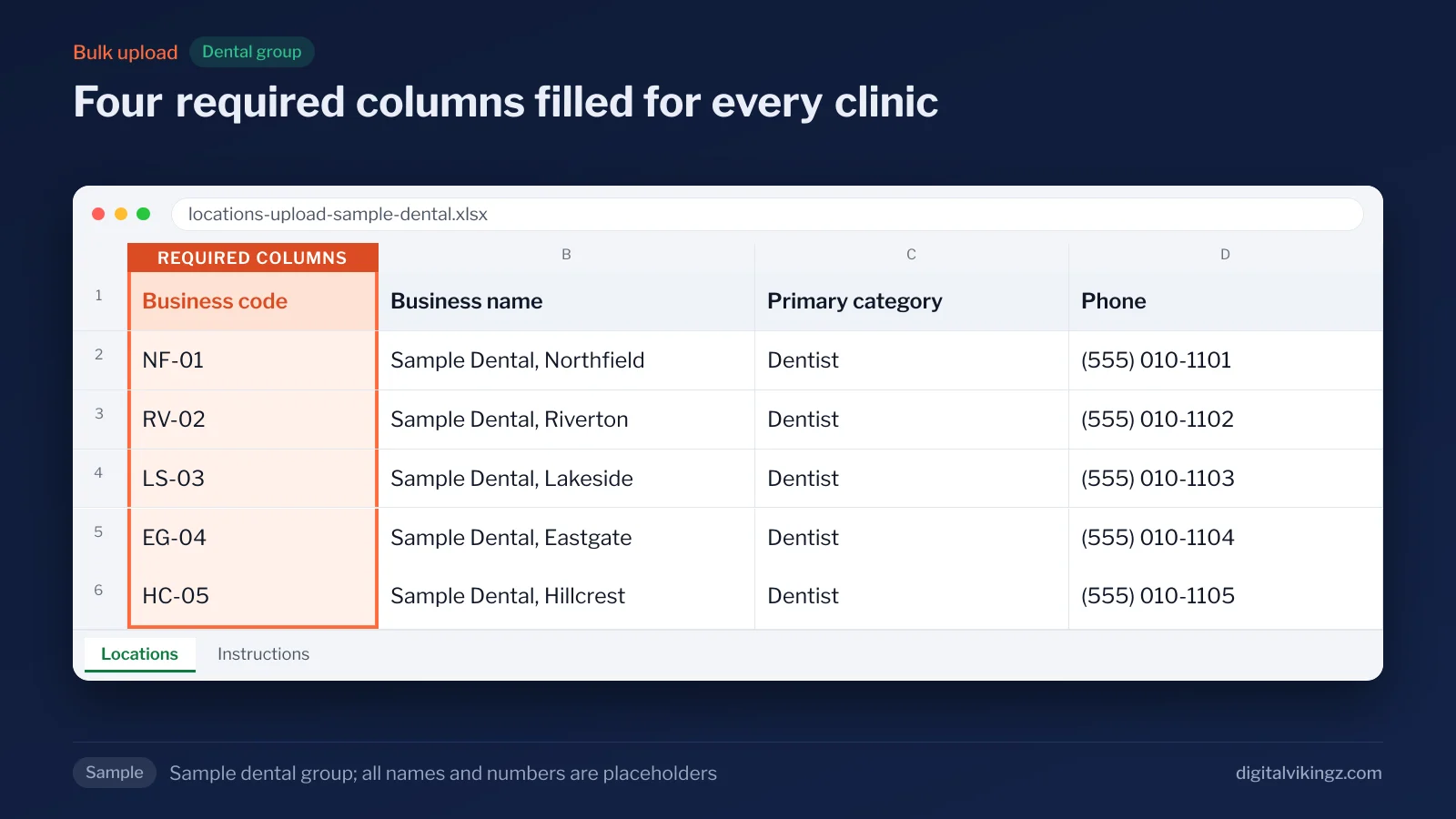
The figure shows a sample sheet for a dental group, with the four required columns highlighted. Every name, domain and number in our figures is a sample, not client data.
How do you verify each location?
You verify each location on its own, unless your account qualifies for bulk verification. Bulk verification is the exception, so the next three answers explain what it is, who qualifies and how to ask for it.
Sample Med Spa has four locations, finds no Verifications tab, and verifies each profile on its own.
What is bulk verification?
Bulk verification verifies every eligible profile in a business group once Google verifies the group's main owner. Google's help page describes it for accounts with 10 or more locations of the same business. It is a status Google reviews and grants. Uploading a sheet does not start it.
No, you cannot bulk verify fewer than 10 locations, because Google's help page asks for 10 or more profiles from the same business. Google's pages give no time for bulk verification, so we state none.
Google may also ask for video verification, with an authorized representative at the location. An email address on your company's own domain speeds verification, according to Google's help page.
Profiles that do not count toward the 10
Google's help page says duplicate, suspended and disabled profiles do not count toward the 10-profile minimum. Google's help page says agencies with more than one business in one account cannot bulk verify.
Service-area businesses qualify only when their locations are also open to customers during regular hours. The spreadsheet must list every profile you manage, because Google checks the size of your business.
Google says a missing Verifications tab can mean the account lacks enough eligible profiles.
Sample: a chain with 12 profiles, one suspended and one duplicate, has 10 that count, which is exactly the minimum.
How do you request bulk verification?
You request bulk verification in Business Profile Manager by choosing Verifications, then Chain, then Start, and filling out the form. Uploading the spreadsheet alone does not send that request, Google's help page says.
The steps to request bulk verification are given below:
- Sign in to Business Profile Manager on a computer.
- Select Verifications.
- Select Chain, then Start.
- Fill out the form.
- Select Submit.
Google emails a confirmation once bulk verification succeeds. Google may de-verify accounts that do not actively manage their profiles, so keep editing and fixing errors.
When Support is unsure, hand over four things. We suggest the business group ID, a company-domain email, the store codes and the website page for each location.
Business groups and who holds access
Business groups hold every location profile, and each person gets the role their task needs. The next three answers cover what a group is, when to use several, and who should own it.
Sample Plumbing Franchise keeps all locations in one group owned by a company email. For example, the owner seat sits on office@sampleplumbing.example.
What is a business group?
A business group is a set of profiles that people manage together, which Google's help page compares to a shared folder. Owners often call it the account or the login. Google adds that both owners and managers can create, edit and delete profiles inside a group.
Anyone added to a group reaches every current and future profile in it, Google's help page notes. Google calls a business group a more secure way to share access than one shared login.
One group or several for one brand
Google recommends one business group for each business or brand, and one spreadsheet cannot import across several groups. Google says a company with several brands or divisions that need different users can create several groups.
We suggest one group when one team runs every location, and one group for each brand when different teams do.
Sample: a plumbing franchise with a Riverton brand and a Hillcrest brand run by different offices makes two groups.
Who should be owner and who manager?
Only an owner can delete a business group, Google's help page says, so the owner seat belongs to the company. We suggest a shared company email on your own domain as the owner, never one employee's personal login.
Managers handle daily edits and review replies.
A Business Profile Community guide from July 2026 lists an employee who leaves while still controlling the profile as a handover failure. Our guide to owners and managers of a Google Business Profile covers the roles in full, including how to recover access.
The table below shows what each role can do, from Google's business group help page.
| Task | Owner | Manager |
|---|---|---|
| Edit profile details | Yes | Yes |
| Create or delete a profile | Yes | Yes |
| Delete the business group | Yes | No |
| Reach every current and future profile in the group | Yes | Yes |
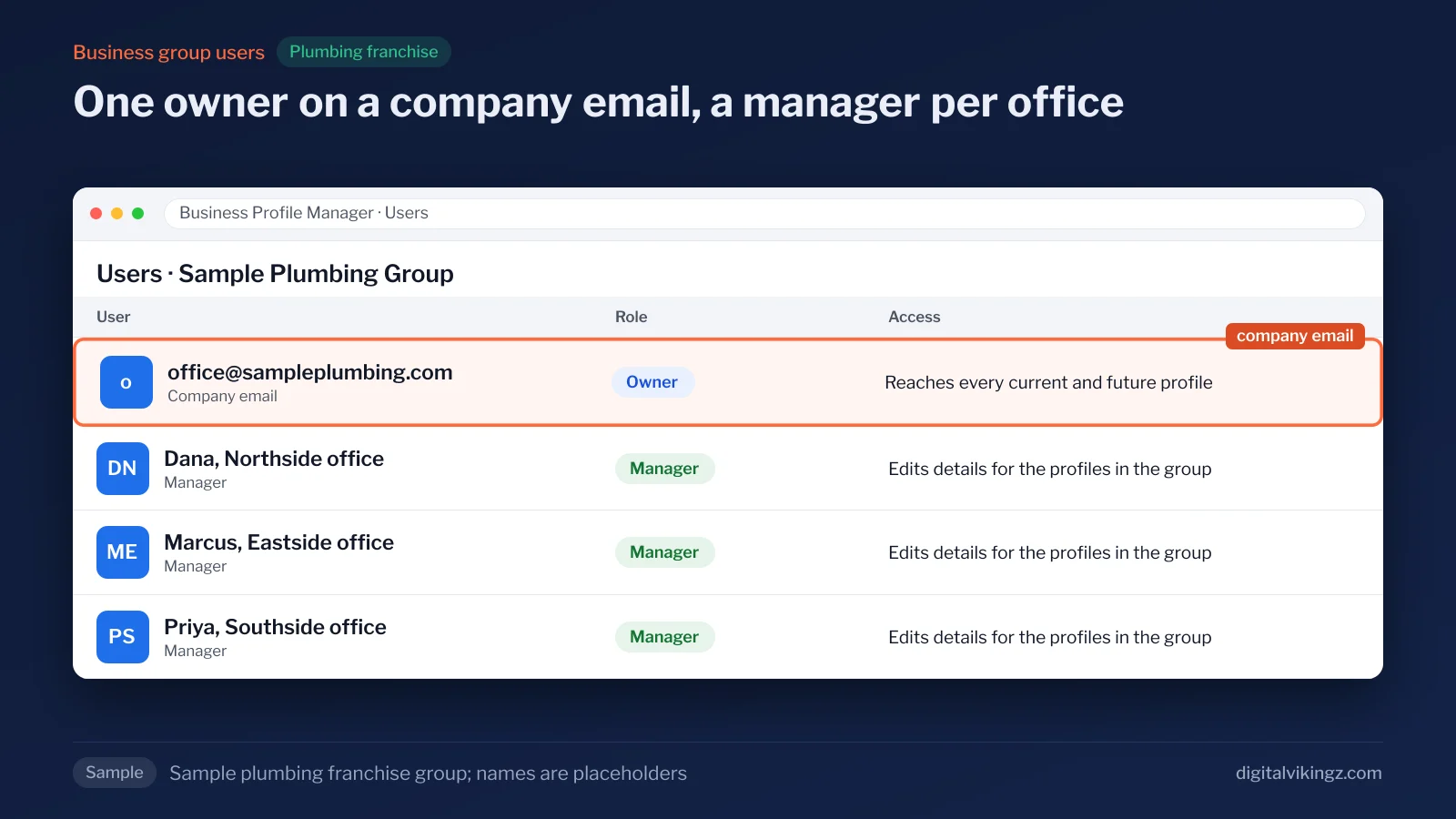
The figure shows one owner and three managers in a sample franchise group. We leave out who may add or remove users, because Google's agency table did not extract and a Community guide says otherwise.
What should differ between locations?
Each location should carry its own address, phone number, hours, services, photos and landing page. Google's guidelines tie the phone number and the website to the individual location.
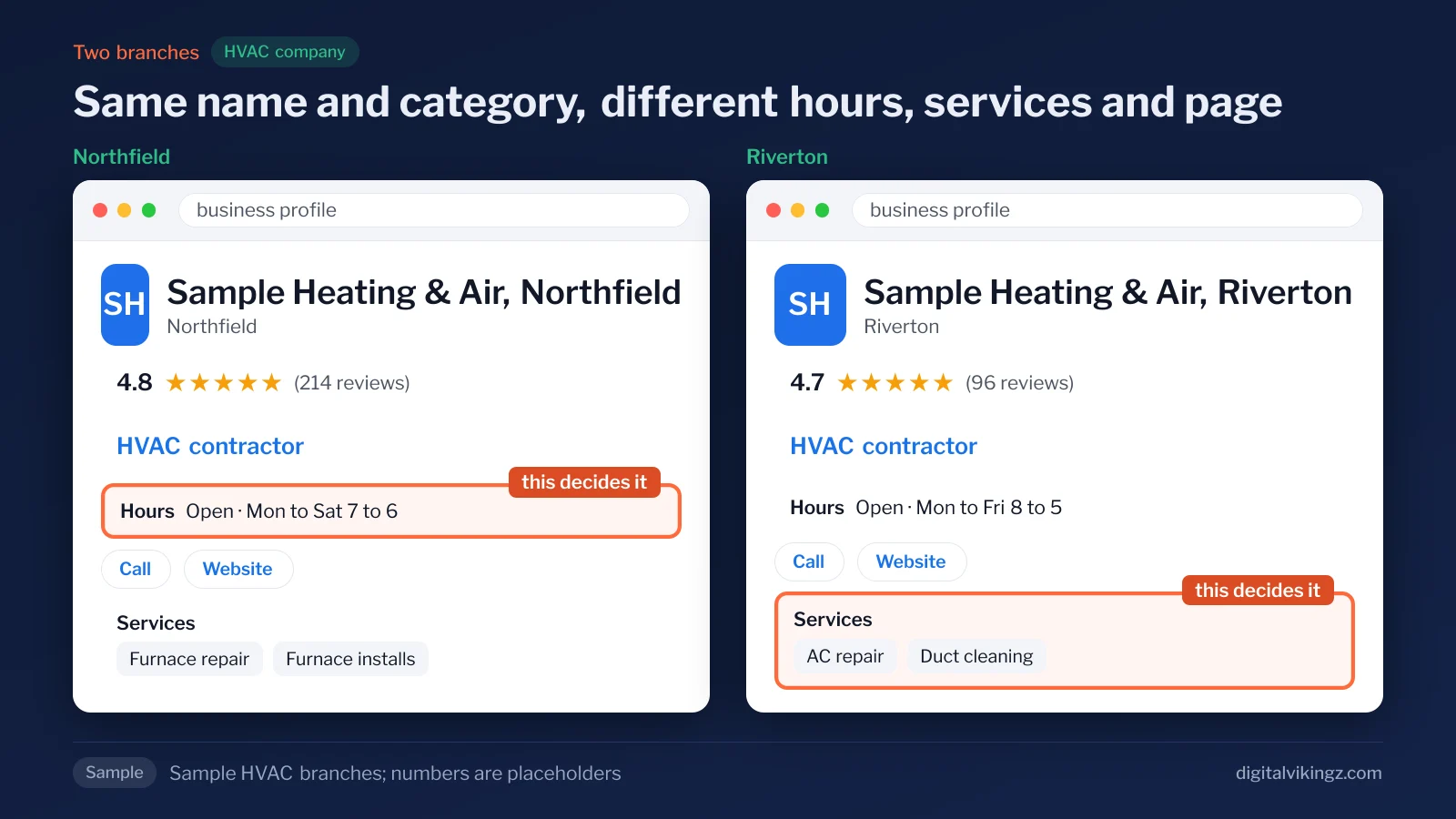
The table below shows two sample branches that share a name and a category but differ everywhere else.
| Field | Sample Heating & Air, Northfield | Sample Heating & Air, Riverton |
|---|---|---|
| Name | Sample Heating & Air | Sample Heating & Air |
| Primary category | Same | Same |
| Phone | Own placeholder number | Own placeholder number |
| Hours | Mon to Sat 7 to 6 | Mon to Fri 8 to 5 |
| Services | Furnace repair and installs | Air conditioning repair and duct cleaning |
| Landing page | /locations/northfield | /locations/riverton |
| Photos | Northfield shop front | Riverton service van and crew |
Special hours work the same way. Holiday hours are set for each location, such as a Friday close at one branch. Photos follow that rule too, and our guide to Google Business Profile photos covers what to upload for each one.
How those landing pages are built and linked belongs to our guide to site structure for a multi-location business.
Reviews, questions and posts at scale
Reviews, questions and posts run best as one routine that each location repeats on its own. Two points follow: who owns reviews and questions, then a posting cadence. For example, a 5-clinic dental group runs one weekly routine in every clinic.
Posting tools split into schedulers and done-for-you services, which our guide to done-for-you Google posts versus scheduling tools compares.
Who owns each location's reviews and questions?
One named person at each location should answer its reviews, with head office checking the whole list each week. Questions that arrive by call or message go to that same person.
Sample: at Sample Family Dental, each clinic's front-desk lead replies to its reviews, and the practice manager reads every clinic's replies on Monday.
A posting cadence for each location
Google publishes no posting frequency, so we suggest at least one post a week for each location. Most practitioner guides also recommend at least one post a week.
Google's Business Profile API release notes add recurring local posts on 7 April 2026. Each location's post should name its own town and service.
Daily Google Posts is free to try, then from $99 a month per listing, and we price 10 or more listings on a call.
See what our AI agent writes with a free Daily Google Posts preview for one location.
What does Google leave unsaid about multiple locations?
Google leaves out how long bulk verification takes and why some distinct second locations get duplicate flags. Each answer below names its source, or says that no source exists. Our sample is Google's own latitude example, further down.
What did Google change in 2026?
Google's help pages show no revision date, so we cannot say when the 10-location minimum last changed. Google's API release notes list 2026 changes to review replies, recurring posts and edit status, and none to bulk verification or business groups.
We checked the help pages cited here on 22 November 2026. They are help pages 4490296, 3370250, 6085339, 7655842, 3038177, 4669139 and 3217747. We do not claim that nothing changed.
Figures that differ between guides
Google asks for at least 6 digits after the decimal point in latitude and longitude, while one vendor guide says five. Google's own example is a latitude of 37.421998, which has six digits.
Two guides give bulk verification times, about one week and five business days, and Google's pages give none.
Two Google pages also pull apart. Google's spreadsheet page says to replace a business code when the business moves, while its duplicates page says to edit the existing profile.
We have not tested which route avoids a duplicate, so we follow the duplicates page and edit the existing profile.
What nobody outside Google knows
Nobody outside Google knows how long bulk verification takes. Google's pages give no time, and the two guides that do disagree, so plan each rollout without a promised date.
Fixing duplicates, moved and closed locations
Duplicates get an appeal or a removal, moved locations keep their profile with a new address, and closed locations get marked closed. Why does Google mark a profile as a duplicate? Google's help page gives three reasons for a duplicate flag: an existing verified profile, the same address, or different services.
Two answers follow: how to fix a flag on a second location, then what to do when a location moves or closes.
How do you fix a duplicate flag on a second location?
You fix a wrong duplicate flag by appealing through Google support, which Google's help page limits to distinct, eligible businesses. Google's help page says merging two profiles combines their reviews, but replies may be lost.
A Business Profile Community reply says Google support can clear the flag on a second location that exists. It advises against deleting or merging a location yourself, because reviews and history can go with it.
Keep each location's address, phone number and website distinct, and file the appeal with both profile links. That advice is ours. Owners may see the words "marked as duplicate record" in the profile.
Our guide to fixing a duplicate Google Business Profile walks through the appeal.
What do you do when a location moves or closes?
A moved location keeps its profile with the new address, and a closed location is marked closed, according to Google's help pages. Google says not to create a new profile when a business relocates.
A name change outside Google's rebranding rules counts as a new business, and the old profile is marked closed. A changed address can also trigger a review.
Sample: Sample Family Dental moves its Lakeside clinic across town and edits that clinic's address instead of adding a profile.
Per-location reporting with UTM tags
Per-location reporting starts with one tagged link per profile, using the same source and medium and a utm_content value for each location. A sample link for the Northfield branch reads https://www.sampleheatingair.example/?utm_source=gbp&utm_medium=organic&utm_campaign=gbp-website&utm_content=northfield.
Google's Performance report counts calls, direction requests and website clicks for each profile. Tagged visits add the website sessions that follow, which GA4 shows on its own gbp / organic row.
Our guide to tagging each location's Google Business Profile link lists the values and the GA4 steps.
Your first week with several locations
Start with one sheet that lists every location with its address, phone number, store code and verification status. Fix the names, categories and phone numbers on that sheet first, then group the profiles and assign an owner. Request bulk verification only when 10 or more eligible profiles sit in the group. Fewer than that, verify one by one.
Sample Heating & Air lists its eight branches on one sheet before it touches a single profile.
Owners who want the work handled can use our Local SEO and Google Business Profile Optimization across every location.