 Digital Vikingz
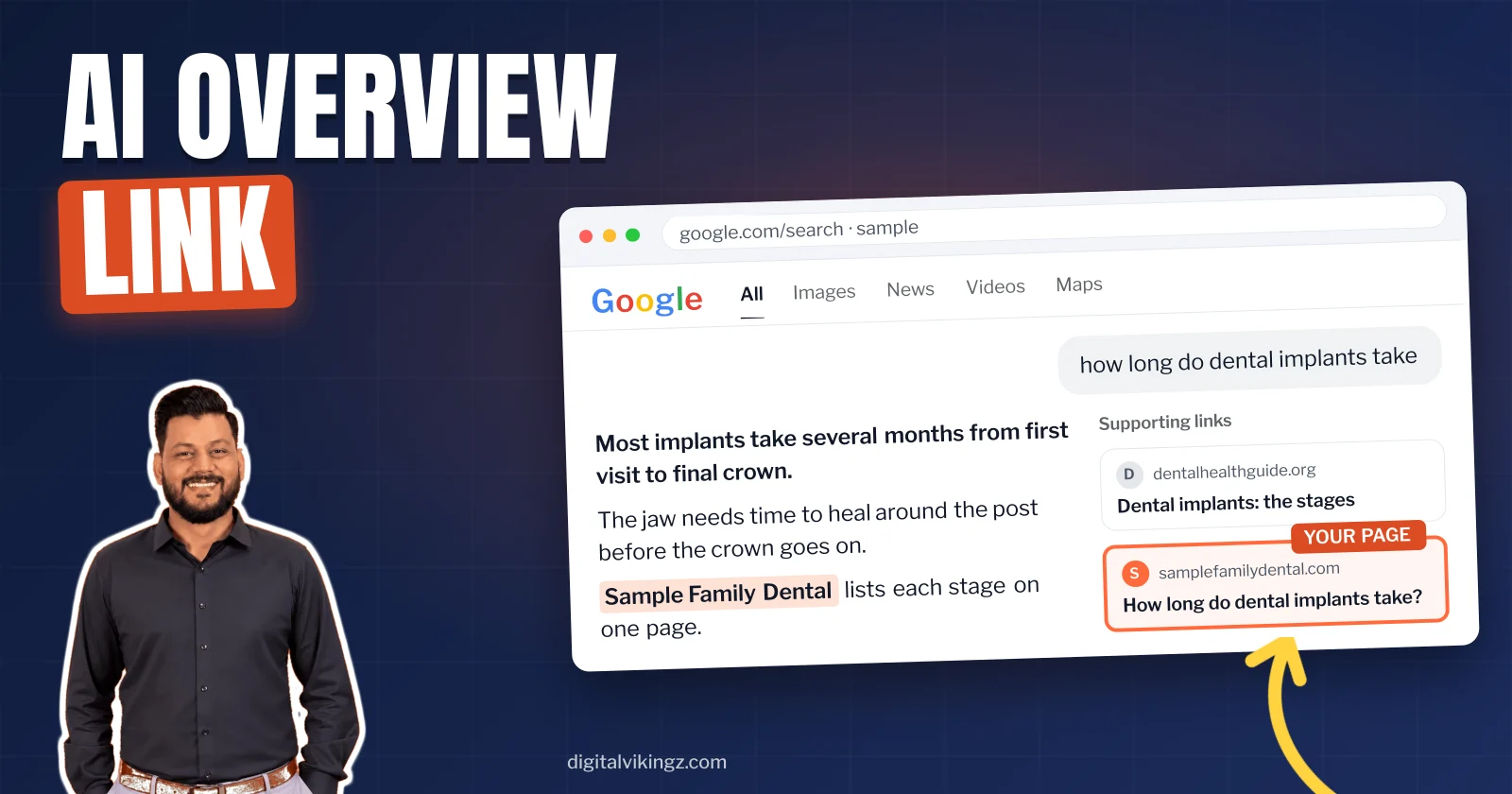
Your page ranks in Google, and the AI Overview above the results links to other sites. A page can appear in Google AI Overviews as a supporting link only when Google has indexed the page and can show a snippet. Google's July 2026 guide adds that the site must be included in Search generative AI features in Search Console.
Five steps follow in the order we would make them, then the citation data and the way to check the result. No one outside Google controls an AI Overview, and we cannot promise a placement. We cover Google AI Overviews only.
When does Google show an AI Overview?
Google shows an AI Overview only when its systems judge the summary additive to classic Search, so many searches get none. Google's AI features page says AI Overviews often do not trigger.
Google AI Overviews are one of several AI answer surfaces, and the AI SEO guide covers the rest. Google does not publish which searches get an Overview, so the check below is done by hand, one search at a time.
Here is a sample. A dental clinic owner searches "how long do dental implants take" and "dentist near me", then records which search shows an AI Overview. We state no outcome, because it moves by day and by searcher.
Check your own searches by hand
Search your ten most valuable queries in a signed-out browser and write down if an AI Overview appears. Do it in one sitting, on one device and from one location, because results may shift with any of the three.
For each query, log whether an Overview shows, whether your page is cited and which sites are. Figure 1 shows that log for a dental clinic.
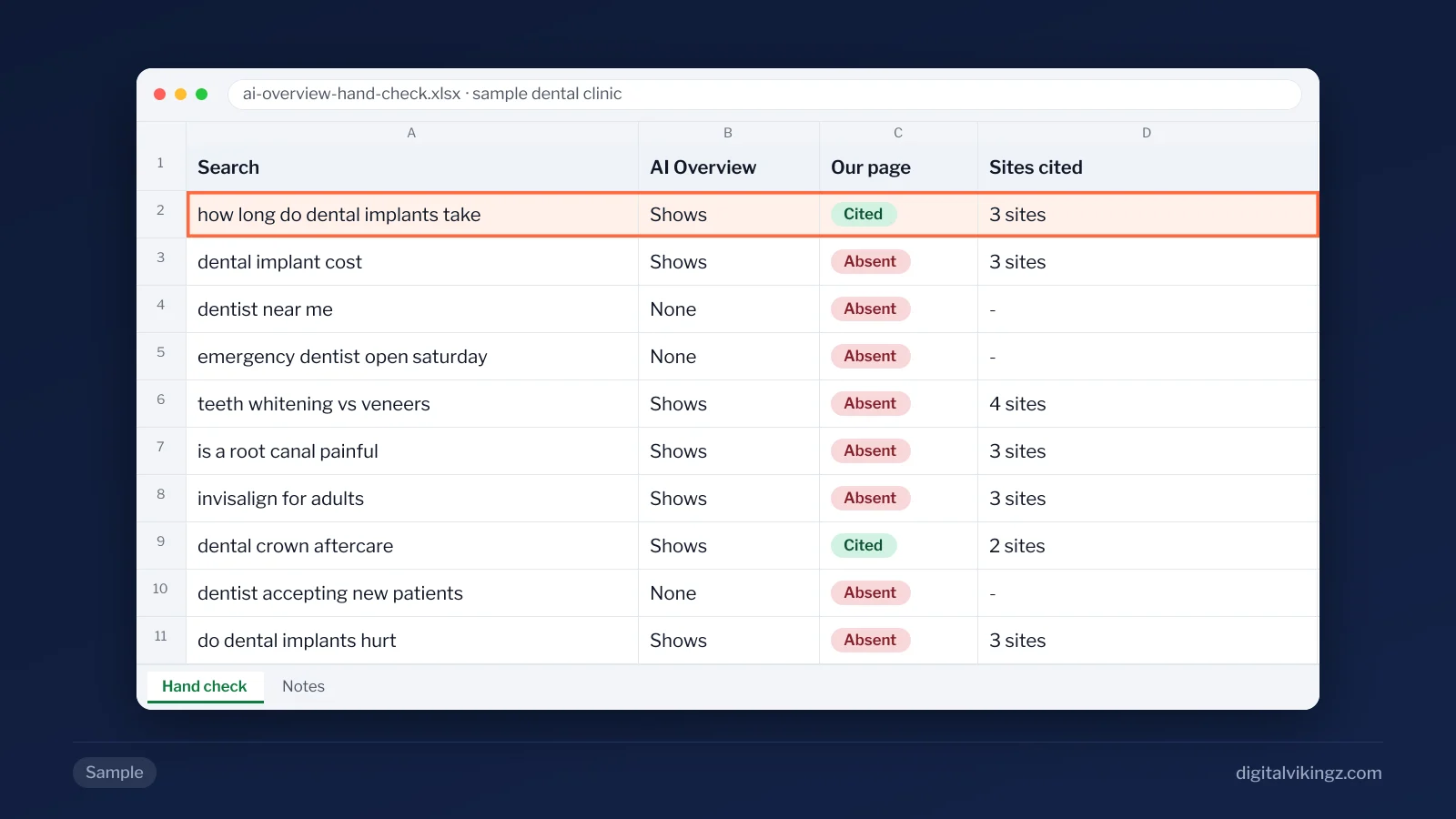
Figure 1. A sample hand check log for a dental clinic. It is a sample, not a measurement.
Read the first two columns. A query with no Overview needs no Overview step, and the page can still rank for it.
We have no tracked data on how often an AI Overview appears for a client's searches. The dental SEO guide for AI answers covers the Google Maps side of the same searches.
Step 1: Meet Google's Eligibility Rule
A page must be indexed and eligible to show in Google Search with a snippet to appear as a supporting link in AI Overviews. The rule has three conditions, given below:
- The page is indexed.
- The page is eligible to show in Google Search with a snippet.
- The site is included in Search generative AI features in Search Console.
Miss one, and nothing else matters. Owners say "show up" or "get featured". Google's word is a supporting link, the link shown beside the AI answer.
Google's guide, last updated 10 July 2026, adds that the site must be included in Search generative AI features in Search Console. The AI features page, updated 10 December 2025, lists no additional technical requirements. We re-read both pages on 22 November 2026.
The two pages differ on one point, so check the Search Console setting. We have not tested what that control shows in a client account.
Eligibility opens the gate. The post on how AI search engines pick sources explains what happens next. Below, we test the three conditions on one URL, then settle whether special markup is needed.
Check the three conditions on one URL
Inspect the URL in Search Console and confirm Google has indexed the page and received the full HTML. Check that robots.txt, the host and any CDN allow crawling, and that no nosnippet or noindex tag sits on the page.
The four checks run in this order:
- The URL is indexed.
- Crawling is allowed.
- Snippets are allowed.
- The site is included in Search generative AI features.
Stop at the first failing check and fix only that one. Take a SaaS feature page that shows as indexed, where a nosnippet tag from a theme setting still hides the snippet. In this sample case, the fix is one setting.
The free crawler access test in the AI Visibility Checker runs before any edit.
Step 2: Answer the Question in the First Sentence
Start each section with one sentence that answers the heading's question in the question's own words. Keep the sentence under 25 words and put the evidence in the next two.
Figure 2 shows the shape. A dental clinic answers "How long do dental implants take?" with one sentence that states the range and who measured it.
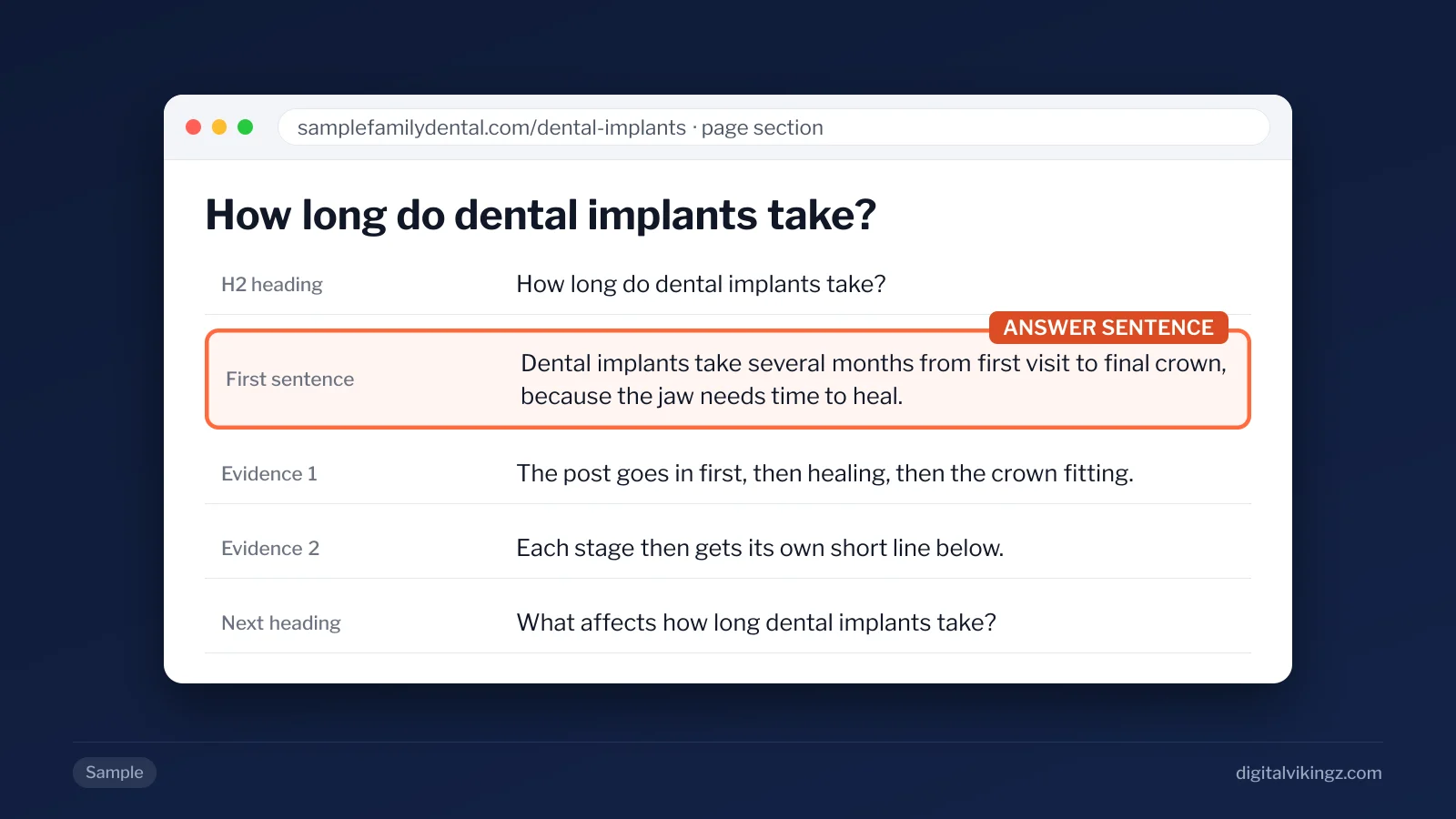
Figure 2. A sample page section for a dental clinic with the first sentence highlighted. The sample gives no figures.
Notice that the first sentence repeats the question's terms, so a reader who stops there still has the answer.
Does answer-first writing make a page more likely to be cited?
No study we have read shows answer-first writing raises the chance of a citation, and Google does not list the habit as a selection signal. Readers still reach the answer faster, so we keep the habit.
One commenter in an r/seogrowth thread calls the habit readability, not selection. We treat that as one opinion, because nobody outside Google knows what its systems weigh, not us and not the vendors.
Step 3: Cover the Sub-Questions on One Page
What is query fan-out?
AI Overviews may use query fan-out, a technique that issues several related searches across subtopics to build one response. Google's own example splits a lawn weed question into herbicides, chemical-free removal and prevention.
AI Mode may use the same technique, and the AI Overviews vs AI Mode comparison covers the rest. A page that answers only the main question may leave those related searches to other sites.
Answer the follow-up questions a buyer asks next on the same page, each under its own heading. Each sub-question becomes a heading of this page, not a new page.
First we find the sub-questions. Then we ask whether any of them needs its own page.
Find the sub-questions for one query
List the questions that come right after the main query, then keep only the ones a buyer needs answered. Read four sources, in this order:
- The buyer's own emails and calls.
- Autocomplete.
- Related searches.
- The AI Overview text, if one shows.
Keep a question only when it changes the buyer's decision. Take a plumber in Austin who lists follow-ups to "how to fix a leaking tap": parts, when to call, what a visit covers. The list is a sample, and it holds no price.
Google's lawn example works the same way, since each branch is a question a buyer asks next and a heading a page could carry.
Should every follow-up question get its own page?
No, Google says writing a separate page for every variation primarily to manipulate rankings violates its scaled content abuse policy. Pages that split one topic into thin variants can be merged into the strongest page. Our guide on how to merge or remove thin pages shows which.
A sub-question earns its own page only with a different intent and a different buyer.
Step 4: Show Who Stands Behind the Page
Name the author, source every figure and keep the business details on the page identical to your Google Business Profile. Google's guide asks for a unique point of view and first-hand experience over restated common knowledge. Show yours.
One r/seogrowth commenter says retrieval depends on authority, entity association and consistent claims across sources. That is one opinion, and we use it only as a reason to keep details consistent. Consistent details across the page and the listings are the entity layer most audits skip.
Local businesses should also keep Google Business Profile details and photos current.
We have no client AI Overview data on file, so we claim no result here. We check three things on a page: the author is named, the figures are sourced and the details match the profile.
Take a local service business that lists one phone number on its page and another on its profile. That mismatch is the first thing we would fix.
Do mentions on other sites help a page appear?
Yes, Google says AI features can show what blogs, videos and forums say about a business, and seeking inauthentic mentions helps little. Earn mentions by publishing the first-hand material from this step, then stop.
Step 5: Match Structured Data to the Visible Page
Make every structured data value match the text a visitor sees on the page. Keep important content in text form, and add images or video only where they help the reader.
Fix slow templates and layouts that hide the main content on phones.
Does a page need special markup or an AI file?
No, Google says you do not need an llms.txt file, an AI text file or special schema.org markup to appear in Google Search. Its ignore list also names chunking and rewriting just for AI. It names inauthentic mentions too.
Structured data stays useful for rich results, and the post on schema markup and AI citations covers the effect on citations.
What does the citation data say about ranking in the top 10?
A March 2026 Ahrefs study of 863,000 keyword SERPs found 38% of pages cited in AI Overviews also rank in the top 10. Treat that as one dated data point, not a rule. Ranking helps and does not decide, so the five steps above do not start with ranking.
Every overlap study reconciled sets the studies side by side. A page that ranks and is not cited usually has a fixable cause, and the post on seven causes of a page that ranks and is not cited lists them.
How do you check if a page appears in AI Overviews?
Use the Generative AI performance report in Search Console, then repeat a hand check of your key searches each month. Google's guide says AI Overview traffic also counts in the Performance report under the Web search type.
Without a Generative AI report in your account, the hand check still works. Google's guide advises caution with third-party tools that claim to show Google's internal metrics.
The guide to reading the Search Console generative AI report shows what each pattern means. Figure 3 shows sample rows for a SaaS site.
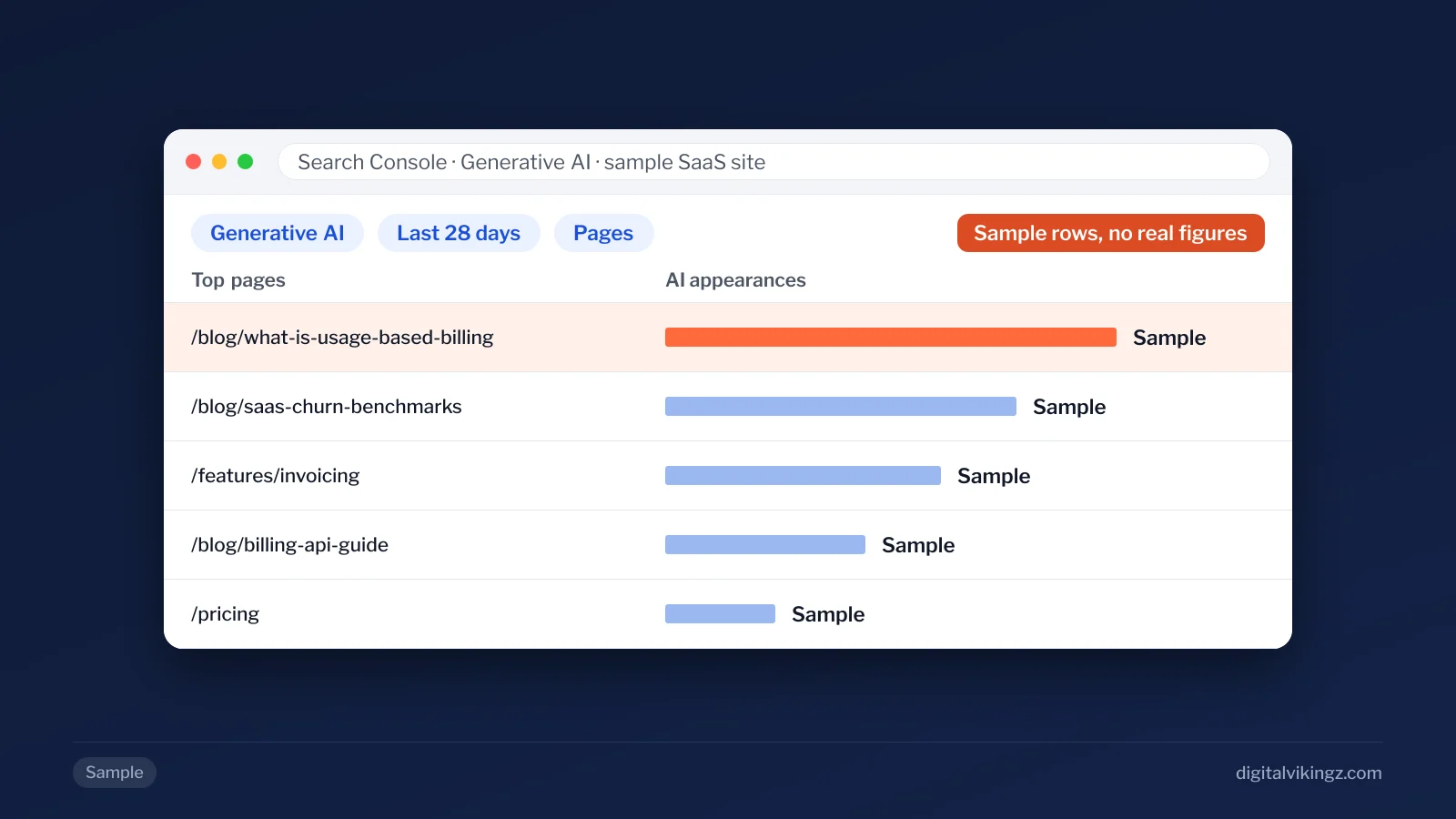
Figure 3. Sample rows in a Generative AI performance report for a SaaS site. The rows are a sample and hold no actual figures.
Your own account shows your own numbers, and the sample only shows where in the report to look first.
Run the hand check each month
Repeat the hand check above on the same ten queries, on the same day each month. Add one column for the month, so the log shows a pattern. One search is one sample, and results move between days. When your page is missing, go back to Step 1.
Other assistants, such as Perplexity, pick sources by their own rules, which how Perplexity chooses and cites sources explains.
Questions About Appearing in AI Overviews
How long does a change take to show?
Google says a recrawl can take several days to several months, depending on how often a page needs refreshing. Request a recrawl in Search Console after a major edit.
Can you opt out of AI Overviews?
Yes, you can limit what Google shows from a page with nosnippet, data-nosnippet, max-snippet or noindex controls. Google's documentation also lists a Search generative AI control in Search Console.
Can AI-written content appear in AI Overviews?
Yes, if the page meets Google's Search Essentials and spam policies, which apply to AI-assisted content too.
Do AI Overviews and AI Mode cite the same pages?
No, Google says the two features may use different models and techniques, so the links they show vary. The comparison post covers the differences between AI Overviews and AI Mode, and the tracker lists the overlap studies.
What to Change First
Fix eligibility first, then the first-sentence answers, then follow-up coverage, authorship and structured data. Stop at the first step that fails and fix only that step before moving on.
Run the AI Visibility Checker for one page to see crawler access and answer readiness. Our AI Search Visibility service for page-level fixes handles structural work across several pages after a strategy call.